

Microsoft has confirmed that Exchange Web Services in Exchange Online will begin global disablement in October 2026 and be fully disabled in April 2027. The practical answer for admins is clear: inventory EWS use now, assign an owner to every dependency, classify each workload by its replacement path, pilot the replacement, allow-list only documented exceptions, and review those exceptions monthly until they disappear.
WindowsForum’s own reporting has tracked this from several operational angles: the October 2026 allow-list deadline, the April 2027 shutdown, EWS migration planning, admin action plans, the June 2026 EWSAllowedAppIDs update, and the Exchange Online Admin API preview. The common thread is simple: this is not just a developer migration. It is a tenant-wide dependency cleanup that Exchange administrators, identity teams, app owners, vendors, security teams, and business owners need to manage together.
The key dates are now fixed enough to plan against. October 2026 is when Microsoft begins tenant-by-tenant Exchange Online EWS disablement. April 2027 is the final shutdown. Between those points, EWSAllowedAppIDs becomes the critical control for organizations that still have known, approved EWS dependencies that cannot be removed before enforcement begins.
The important operational update is EWSAllowedAppIDs. Microsoft is rolling out this mechanism so Exchange Online administrators can define which application IDs are allowed to continue using EWS during the final phase of retirement.
That changes the project from a broad “find and migrate EWS someday” exercise into an allow-list governance problem. If an application still needs EWS as October 2026 approaches, it should not be treated as ordinary background traffic. It needs to be identified, owned, justified, tracked, and reviewed.
EWSAllowedAppIDs should be understood as a temporary bridge for the final phase, not a permanent survival plan for EWS. It gives administrators a way to restrict remaining EWS access to specific known applications rather than leaving access broadly available. That is useful, but it also raises the standard for documentation. An application that deserves a place on the list should have a named business owner, a technical owner, a migration plan, a test status, and a review date.
WindowsForum’s report on EWSAllowedAppIDs framed the June 2026 change as the operational anchor for Exchange administrators: before phased disablement begins in October 2026, tenants need to know which applications are still using EWS and which, if any, will be explicitly allowed to continue during the transition.
That matters because many organizations handle Microsoft 365 deprecations as if the final shutdown date is the only real deadline. For EWS, that approach is risky. The enforcement period starts months before the April 2027 finish line, and the tenants that wait until the last moment will be sorting through unknown application traffic while controls are already tightening.
WindowsForum users have been circling the same concern in different ways: the allow-list deadline, the 2027 shutdown, migration planning, and the need for an admin action plan. The recurring lesson is that EWS retirement is less about reading one Microsoft announcement and more about finding every hidden dependency in a live tenant.
Old EWS use can hide in backup tools, archive connectors, room-booking systems, CRM integrations, helpdesk platforms, custom provisioning scripts, reporting jobs, and abandoned internal applications. Some of those apps may have obvious owners. Others may be tied to old service accounts or app registrations that nobody has reviewed in years. The problem is not only technical. It is organizational.
Use this six-step plan:
The exact Microsoft 365 admin center navigation path for EWS usage reporting should be confirmed in your tenant. Microsoft 365 admin center layouts and report locations can change, and the source material available here does not establish a stable click path that should be promised as universal. If your tenant exposes the report in a different location or under a changed label, rely on the current Microsoft 365 admin center experience and Microsoft’s current documentation for the precise UI path.
What matters operationally is the output. You need to know which application identities are generating EWS activity, which mailboxes or users are involved, what kind of operations appear to be in use, and whether the traffic maps to a known business process.
Do not treat this as a one-time export. EWS dependencies can be seasonal, tied to monthly reporting, triggered by quarterly finance processes, or hidden in rarely used workflows. A short observation window may miss a system that only runs occasionally but still matters.
A good inventory should capture:
If an application has no owner, that is not a reason to ignore it. It is a reason to escalate it. Ownerless EWS traffic is exactly the kind of dependency that becomes a production incident during phased disablement.
The Analyzer should be part of the engineering workstream, but it does not replace human review. It can help identify EWS patterns; it cannot decide whether a rewritten workflow has the right permissions, whether error handling is safe, whether paging and throttling are covered, or whether the new behavior matches the business process.
Microsoft’s migration guidance also includes AI-assisted refactoring as a possible aid. Treat that as an accelerator, not a guarantee. AI assistance may help locate patterns, propose replacements, or speed up repetitive code changes, but production Exchange workflows still need code review, security review, test coverage, and operational validation.
For internal code, the useful question is not merely “Where is EWS used?” It is “What Exchange capability is this code actually relying on?” The answer determines the destination.
This structure keeps the discussion practical. It also prevents one common mistake: assuming every EWS dependency has the same replacement.
Developers need to map EWS operations to supported Graph capabilities, review delegated versus application permissions, validate mailbox scope, test throttling behavior, and confirm that the data model matches the application’s expectations. A Graph migration that only works with overly broad permissions has solved one problem while introducing another.
The right framing is practical: if the workload is a mailbox or calendar application, evaluate Graph coverage early. If Graph covers the scenario, pilot it with real users and realistic data. If it does not cover the scenario cleanly, document the gap rather than pretending the migration is done.
This is also where permissions matter. Many older EWS deployments grew around broad mailbox access patterns. Moving to a modern API surface should be used as a chance to reduce privilege, not simply to recreate the same access model under a new protocol.
The important word is specific. Teams should not assume that every EWS-based administrative workflow belongs on the Admin API, and they should not assume that every Exchange management task should be moved there. Validate the exact scenario before committing.
For production planning, test against real workflows:
WindowsForum’s report on the Exchange Online Admin API public preview captured that distinction: it is a guided migration path for certain Exchange admin scenarios, not a universal answer for every Exchange management workflow.
The danger is that organizations will discover a long list of EWS callers, allow-list all of them, and call the project complete. That would defeat the purpose of the final-phase control. The allow list should shrink over time. If it grows as October 2026 approaches, the migration program is probably losing control.
A disciplined allow-list entry should include:
EWSAllowedAppIDs is useful because it forces specificity. It turns vague protocol risk into named application risk.
Do not ask vendors only whether they “support Microsoft 365” or “support Graph.” Those answers are too vague. Ask operational questions:
Contracts and renewals should also reflect the timeline. Any renewal that runs beyond October 2026 should include explicit language about EWS retirement readiness. Business owners do not need to understand every API detail, but they do need to know whether a product they fund will continue working when Exchange Online starts disabling EWS.
WindowsForum’s EWS planning coverage has repeatedly emphasized that vendor and owner discovery is one of the hardest parts. That matches real-world tenant experience: the protocol problem is technical, but the migration blocker is often ownership.
For administrators, that means the EWS inventory should not be treated only as an app compatibility exercise. It is also a security review of legacy mailbox access paths, service principals, app permissions, and poorly understood automation.
Security teams should be part of the migration board. They can help review application permissions, investigate unknown traffic, evaluate stale service principals, and decide whether some EWS activity should be removed rather than migrated.
The retirement creates an opportunity to reduce risk. Do not waste it by simply moving old broad-access patterns into new broad-access patterns. Every migration should ask whether the application still needs the access it has.
Start with low-risk users, test mailboxes, or controlled application groups. Restrict or reduce EWS access using supported controls, observe failures, compare the results with the inventory, and update the migration board. If something breaks that was not expected, the inventory is incomplete. If reports still show traffic after a migration, the application may not actually be off EWS.
For migrated applications, validation should include:
Confusing those dates leads to bad planning. If a team treats April 2027 as the only deadline, it may enter the enforcement period with unknown dependencies. If a team treats October 2026 as the final panic date, it may overuse the allow list instead of migrating.
The disciplined approach is to use the time before October 2026 to eliminate mystery traffic, use the enforcement period only for governed exceptions, and reach April 2027 with no business process still depending on EWS.
Each entry should answer:
The result should be a working board, not a memo.
WindowsForum’s own reporting has tracked this from several operational angles: the October 2026 allow-list deadline, the April 2027 shutdown, EWS migration planning, admin action plans, the June 2026 EWSAllowedAppIDs update, and the Exchange Online Admin API preview. The common thread is simple: this is not just a developer migration. It is a tenant-wide dependency cleanup that Exchange administrators, identity teams, app owners, vendors, security teams, and business owners need to manage together.
The key dates are now fixed enough to plan against. October 2026 is when Microsoft begins tenant-by-tenant Exchange Online EWS disablement. April 2027 is the final shutdown. Between those points, EWSAllowedAppIDs becomes the critical control for organizations that still have known, approved EWS dependencies that cannot be removed before enforcement begins.
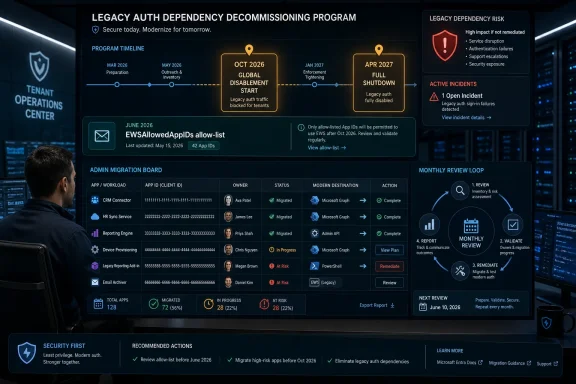 What Changed on June 19, 2026
The important operational update is EWSAllowedAppIDs. Microsoft is rolling out this mechanism so Exchange Online administrators can define which application IDs are allowed to continue using EWS during the final phase of retirement.That changes the project from a broad “find and migrate EWS someday” exercise into an allow-list governance problem. If an application still needs EWS as October 2026 approaches, it should not be treated as ordinary background traffic. It needs to be identified, owned, justified, tracked, and reviewed.
EWSAllowedAppIDs should be understood as a temporary bridge for the final phase, not a permanent survival plan for EWS. It gives administrators a way to restrict remaining EWS access to specific known applications rather than leaving access broadly available. That is useful, but it also raises the standard for documentation. An application that deserves a place on the list should have a named business owner, a technical owner, a migration plan, a test status, and a review date.
WindowsForum’s report on EWSAllowedAppIDs framed the June 2026 change as the operational anchor for Exchange administrators: before phased disablement begins in October 2026, tenants need to know which applications are still using EWS and which, if any, will be explicitly allowed to continue during the transition.
October 2026 Is the Start of Enforcement, Not the Day to Start Planning
The most dangerous misunderstanding is treating October 2026 as a reminder date. It is not. It is the start of global EWS disablement for Exchange Online tenants.That matters because many organizations handle Microsoft 365 deprecations as if the final shutdown date is the only real deadline. For EWS, that approach is risky. The enforcement period starts months before the April 2027 finish line, and the tenants that wait until the last moment will be sorting through unknown application traffic while controls are already tightening.
WindowsForum users have been circling the same concern in different ways: the allow-list deadline, the 2027 shutdown, migration planning, and the need for an admin action plan. The recurring lesson is that EWS retirement is less about reading one Microsoft announcement and more about finding every hidden dependency in a live tenant.
Old EWS use can hide in backup tools, archive connectors, room-booking systems, CRM integrations, helpdesk platforms, custom provisioning scripts, reporting jobs, and abandoned internal applications. Some of those apps may have obvious owners. Others may be tied to old service accounts or app registrations that nobody has reviewed in years. The problem is not only technical. It is organizational.
Use a Six-Step Operating Plan
Vague guidance such as “test the replacement before October 2026” is not enough. Administrators need a repeatable sequence that can be tracked.Use this six-step plan:
- Inventory observed EWS use. Use Microsoft’s EWS usage reporting and tenant telemetry to identify applications, service principals, accounts, and workloads still calling EWS.
- Assign an owner. Every dependency needs a technical owner, a business owner, and, where relevant, a vendor contact.
- Classify by destination. Decide whether the workload belongs on Microsoft Graph, the Exchange Online Admin API, Exchange Online PowerShell, a vendor replacement, retirement, or a temporary EWS allow-list entry.
- Pilot the replacement. Test the replacement with real workflows, realistic mailbox scope, permissions, error handling, and operational monitoring.
- Allow-list only exceptions. Use EWSAllowedAppIDs only for known applications that cannot be migrated before enforcement and that have documented business justification.
- Review monthly. Revisit every exception, owner, vendor dependency, and migration status until the allow list is empty.
The First Job Is a Live EWS Inventory
The first concrete task is to build a live inventory of observed EWS use. Microsoft’s EWS usage reporting is intended to help identify applications still calling EWS. Treat that reporting as the starting point, not the whole answer.The exact Microsoft 365 admin center navigation path for EWS usage reporting should be confirmed in your tenant. Microsoft 365 admin center layouts and report locations can change, and the source material available here does not establish a stable click path that should be promised as universal. If your tenant exposes the report in a different location or under a changed label, rely on the current Microsoft 365 admin center experience and Microsoft’s current documentation for the precise UI path.
What matters operationally is the output. You need to know which application identities are generating EWS activity, which mailboxes or users are involved, what kind of operations appear to be in use, and whether the traffic maps to a known business process.
Do not treat this as a one-time export. EWS dependencies can be seasonal, tied to monthly reporting, triggered by quarterly finance processes, or hidden in rarely used workflows. A short observation window may miss a system that only runs occasionally but still matters.
A good inventory should capture:
| Field | Why it matters |
|---|---|
| Application ID or identity | Needed for ownership, investigation, and possible EWSAllowedAppIDs decisions |
| Service account or app registration | Helps map technical authentication to business purpose |
| Mailbox or user scope | Shows blast radius and priority |
| Vendor or internal owner | Determines who must remediate |
| EWS operation pattern | Helps classify the replacement path |
| Business purpose | Separates critical workflows from stale traffic |
| Replacement candidate | Graph, Admin API, PowerShell, vendor upgrade, retirement, or temporary allow-list |
| Target migration date | Prevents “known issue” from becoming permanent |
| Exception review date | Keeps allow-list entries from drifting |
Use the EWS Analyzer for Code, but Do Not Stop There
Microsoft’s EWS Analyzer can help developers identify EWS usage in application code. That is important for internal apps, old automation, scheduled jobs, and repositories where EWS calls may not be obvious to current maintainers.The Analyzer should be part of the engineering workstream, but it does not replace human review. It can help identify EWS patterns; it cannot decide whether a rewritten workflow has the right permissions, whether error handling is safe, whether paging and throttling are covered, or whether the new behavior matches the business process.
Microsoft’s migration guidance also includes AI-assisted refactoring as a possible aid. Treat that as an accelerator, not a guarantee. AI assistance may help locate patterns, propose replacements, or speed up repetitive code changes, but production Exchange workflows still need code review, security review, test coverage, and operational validation.
For internal code, the useful question is not merely “Where is EWS used?” It is “What Exchange capability is this code actually relying on?” The answer determines the destination.
Classify Workloads by Destination
The migration board should be organized around workloads, not protocol labels. EWS is the protocol being retired, but the replacement path depends on what the application does.| Workstream | Find | Classify | Destination | Temporary allow-list? | Owner |
|---|---|---|---|---|---|
| Mail and calendar apps | App IDs, vendors, service accounts, mailbox scope | User-facing app, background sync, calendar, message, folder, or mailbox workflow | Microsoft Graph where scenario coverage fits | Only if migration cannot complete before enforcement | App owner plus Exchange admin |
| Administrative automation | Scripts, portals, middleware, service tools | Delegation, permissions, group, configuration, or other admin workflow | Exchange Online Admin API for supported scenarios; Exchange Online PowerShell where needed | Only for documented gaps | Exchange automation owner |
| Vendor products | Observed traffic matched to product and version | Supported, unsupported, roadmap pending, unknown | Vendor-supported non-EWS release or replacement | Only with vendor commitment and business approval | Business owner plus vendor manager |
| Internal code | Repositories, deployed scripts, scheduled jobs | Production app, utility, abandoned code, one-off automation | Graph, Admin API, PowerShell, or retirement | Avoid unless business-critical and actively migrating | Development lead |
| Unknown traffic | App registrations, sign-in logs, mailbox impact | Critical, low-risk, stale, suspicious | Remove, replace, or block after validation | Do not allow-list without an owner | Security plus Exchange admin |
Graph Is a Candidate for Mailbox and Calendar Scenarios, Not a Magic Drop-In Replacement
For mailbox, message, user, and calendar-centric applications, Microsoft Graph will often be the destination teams evaluate first. But EWS and Graph are not drop-in equivalents, and the migration still requires design work.Developers need to map EWS operations to supported Graph capabilities, review delegated versus application permissions, validate mailbox scope, test throttling behavior, and confirm that the data model matches the application’s expectations. A Graph migration that only works with overly broad permissions has solved one problem while introducing another.
The right framing is practical: if the workload is a mailbox or calendar application, evaluate Graph coverage early. If Graph covers the scenario, pilot it with real users and realistic data. If it does not cover the scenario cleanly, document the gap rather than pretending the migration is done.
This is also where permissions matter. Many older EWS deployments grew around broad mailbox access patterns. Moving to a modern API surface should be used as a chance to reduce privilege, not simply to recreate the same access model under a new protocol.
The Exchange Online Admin API Is for Specific Administrative Scenarios
The Exchange Online Admin API deserves careful attention because some administrative EWS dependencies may fit there. Microsoft has positioned it as a REST-based, cmdlet-style administrative surface for specific Exchange Online admin scenarios affected by EWS retirement.The important word is specific. Teams should not assume that every EWS-based administrative workflow belongs on the Admin API, and they should not assume that every Exchange management task should be moved there. Validate the exact scenario before committing.
For production planning, test against real workflows:
- Does the API support the operation you need?
- Are the required parameters available?
- Does the permission model fit your application?
- Does the response shape support your automation?
- Are paging, throttling, and partial failures handled?
- Does the workflow behave the same way as the current EWS or PowerShell process?
- Is the API available in your tenant and suitable for your production timeline?
WindowsForum’s report on the Exchange Online Admin API public preview captured that distinction: it is a guided migration path for certain Exchange admin scenarios, not a universal answer for every Exchange management workflow.
EWSAllowedAppIDs Is Exception Management
EWSAllowedAppIDs should be managed like an exception register. That means every allowed application should have documentation that answers five questions:- What is the application?
- Who owns it?
- Why does it still need EWS?
- What is the migration or retirement path?
- When will the exception be reviewed again?
The danger is that organizations will discover a long list of EWS callers, allow-list all of them, and call the project complete. That would defeat the purpose of the final-phase control. The allow list should shrink over time. If it grows as October 2026 approaches, the migration program is probably losing control.
A disciplined allow-list entry should include:
| Required item | Example of the decision it supports |
|---|---|
| Application ID | Confirms the exact app being allowed |
| Business owner | Identifies who accepts continuity risk |
| Technical owner | Identifies who can fix or migrate it |
| Vendor contact | Speeds escalation for third-party apps |
| Mailbox scope | Shows impact if EWS access fails |
| Replacement path | Prevents the exception from becoming permanent |
| Review date | Forces monthly governance |
| Removal criteria | Defines what “done” means |
Vendors Need Deadlines, Not Compatibility Promises
Every tenant inventory will produce vendor-owned applications that still use EWS. This is where many organizations lose time.Do not ask vendors only whether they “support Microsoft 365” or “support Graph.” Those answers are too vague. Ask operational questions:
- Is the application still using EWS in Exchange Online?
- Which versions remove EWS dependency?
- What replacement API or management surface does the product use?
- Are new permissions, admin consent, or app registrations required?
- What configuration changes are needed?
- What is the supported migration process?
- What is the vendor’s timeline before October 2026?
- What happens if the tenant restricts EWS with EWSAllowedAppIDs?
Contracts and renewals should also reflect the timeline. Any renewal that runs beyond October 2026 should include explicit language about EWS retirement readiness. Business owners do not need to understand every API detail, but they do need to know whether a product they fund will continue working when Exchange Online starts disabling EWS.
WindowsForum’s EWS planning coverage has repeatedly emphasized that vendor and owner discovery is one of the hardest parts. That matches real-world tenant experience: the protocol problem is technical, but the migration blocker is often ownership.
Midnight Blizzard Raised the Security Urgency
Microsoft’s EWS retirement materials connect the urgency of the work to the January 2024 Midnight Blizzard incident and indicate that the scope of the effort widened beyond third-party application cleanup. The safe operational takeaway is narrow but important: Microsoft has tied EWS retirement to security urgency, not just platform modernization.For administrators, that means the EWS inventory should not be treated only as an app compatibility exercise. It is also a security review of legacy mailbox access paths, service principals, app permissions, and poorly understood automation.
Security teams should be part of the migration board. They can help review application permissions, investigate unknown traffic, evaluate stale service principals, and decide whether some EWS activity should be removed rather than migrated.
The retirement creates an opportunity to reduce risk. Do not waste it by simply moving old broad-access patterns into new broad-access patterns. Every migration should ask whether the application still needs the access it has.
Testing Should Rehearse the Cutoff Before Microsoft Does
A plan that ends with “migrate before October 2026” is too weak. Administrators need rehearsals that prove the tenant can operate with EWS restricted.Start with low-risk users, test mailboxes, or controlled application groups. Restrict or reduce EWS access using supported controls, observe failures, compare the results with the inventory, and update the migration board. If something breaks that was not expected, the inventory is incomplete. If reports still show traffic after a migration, the application may not actually be off EWS.
For migrated applications, validation should include:
- Functional testing with real workflows
- Permission review
- Mailbox scope validation
- Monitoring and alerting
- Error handling
- Rollback criteria
- Helpdesk routing instructions
- Business-owner signoff
The Real Calendar Has Three Milestones
Keep the dates separate.| Milestone | Meaning | Admin action |
|---|---|---|
| Now | Inventory and migration window | Find EWS use, assign owners, classify workloads, begin pilots |
| October 2026 | Start of global Exchange Online EWS disablement | Operate only with known migrated workloads and documented allow-list exceptions |
| April 2027 | Full EWS disablement | No remaining Exchange Online EWS dependency should be expected to survive |
The disciplined approach is to use the time before October 2026 to eliminate mystery traffic, use the enforcement period only for governed exceptions, and reach April 2027 with no business process still depending on EWS.
Build the Migration Board Around Decisions
A useful EWS migration board should not be a static list of applications. It should drive decisions.Each entry should answer:
- What did we observe?
- Who owns it?
- What business process depends on it?
- What is the replacement path?
- What is the pilot status?
- What permissions are required?
- What vendor action is pending?
- Is an allow-list exception needed?
- When will the exception be reviewed?
- What is the removal date?
The result should be a working board, not a memo.
Practical Admin Checklist
Use this checklist to turn the timeline into action:- Start EWS usage reporting review now.
- Confirm the current Microsoft 365 admin center reporting path in your tenant.
- Export or record observed EWS application activity.
- Match app IDs and service accounts to known systems.
- Investigate unknown or ownerless traffic.
- Assign a business owner and technical owner to every dependency.
- Run EWS Analyzer against internal code repositories and deployed scripts.
- Classify each workload by destination.
- Evaluate Microsoft Graph for mailbox, mail, user, and calendar-centered app scenarios where coverage fits.
- Evaluate the Exchange Online Admin API for supported administrative scenarios.
- Keep Exchange Online PowerShell in scope for management automation where it remains the appropriate surface.
- Press vendors for specific non-EWS migration plans.
- Pilot replacements with real workflows.
- Review permissions before production rollout.
- Prepare helpdesk routing for EWS-related symptoms.
- Use EWSAllowedAppIDs only for known, justified exceptions.
- Review allow-list entries monthly.
- Remove exceptions as migrations complete.
- Treat April 2027 as the point by which no Exchange Online EWS dependency should remain.