

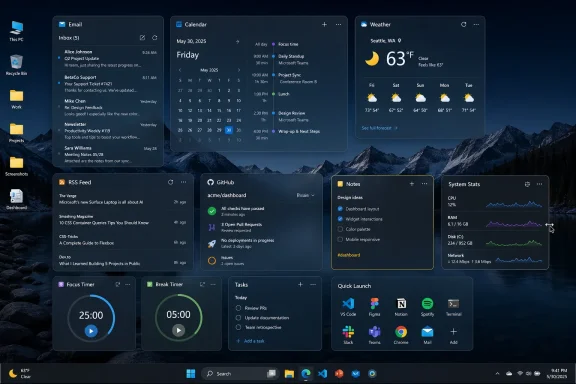
Themia, a new Windows 10 and Windows 11 desktop-widget app highlighted by XDA Developers in early July 2026, turns the traditionally idle Windows desktop into a configurable dashboard for email, calendars, folders, RSS, GitHub, notes, timers, weather, and system information. The app’s pitch is simple but pointed: after three decades of treating the desktop mostly as a wallpaper-backed dumping ground, Windows still lacks a native, serious answer for glanceable personal productivity. Themia is not just another skinning toy trying to make Windows look cyberpunk. It is a bet that the most ignored surface in the operating system can become useful again.
That matters because the Windows desktop has survived almost every Microsoft design era without being meaningfully reimagined. Windows 95 gave mainstream PC users the Start menu, taskbar, Explorer shell, and desktop shortcuts; Windows 11 has polished the glass, centered the icons, and modernized the chrome, but the basic desktop contract remains familiar. The user opens apps, minimizes apps, saves files, drops shortcuts, and occasionally stares at a pretty wallpaper. Themia’s argument is that this arrangement is not elegant restraint. It is wasted real estate.
The modern Windows desktop is one of the most successful interface ideas in personal computing, but success can harden into complacency. Microsoft launched Windows 95 on August 24, 1995, and with it popularized the Start menu, taskbar, and desktop shortcut model that still defines how many people think about PC navigation. That design was revolutionary because it gave ordinary users a stable mental map: your programs live behind Start, your running work lives on the taskbar, and your immediate stuff lives on the desktop.
Thirty years later, that map still works. It also shows its age. The desktop is persistent, highly visible, and spatially generous, yet on most PCs it is either cluttered with installer shortcuts and loose files or hidden behind windows all day. Microsoft has repeatedly tried to add glanceable information to Windows, but it has tended to put that information somewhere else: in the taskbar, in notifications, in the Windows 11 Widgets board, in Edge-adjacent feeds, or in Copilot surfaces.
That choice reveals a recurring tension in Windows design. Microsoft wants Windows to feel smarter and more connected, but it rarely trusts the desktop itself as the place where that intelligence should live. The company has treated the desktop as sacred legacy territory, not as a programmable, modern workspace.
The result is an odd split. Power users customize the desktop because it is theirs. Microsoft avoids reinventing it because it belongs to everyone.
But Rainmeter’s strength is also its barrier. It is powerful because it is flexible, and it is intimidating for the same reason. Users must find skins, install them, configure them, edit text files, troubleshoot dependencies, and often accept that the line between customization and maintenance is thin.
That is fine for the ricing crowd and for enthusiasts who enjoy the craft of building a desktop as much as using it. It is less fine for someone who simply wants a calendar, inbox, folder view, RSS reader, and timer visible without turning the evening into a configuration project.
Themia enters precisely at that gap. As XDA Developers framed it, the app may be described as a Rainmeter alternative, but the comparison is imperfect. Rainmeter is fundamentally a customization platform. Themia is closer to a dashboard builder.
That distinction matters. Rainmeter asks, “What do you want your desktop to look like?” Themia asks, “What do you need your desktop to tell you?”
Themia’s premise is different because its widgets sit directly on the desktop and are organized around work rather than novelty. According to Themia’s own site, the app supports widgets for email, calendar, files, weather, system stats, to-dos, RSS, GitHub, music, stocks, notes, and more. It also advertises multiple layouts, context switching, transparency controls, and support for Windows 10 and Windows 11.
That makes the desktop behave less like a static destination and more like an ambient operating surface. The email widget is not trying to replace Outlook. The folder widget is not trying to replace File Explorer. The calendar widget is not trying to replace a full scheduling client. The point is presence: the information exists where your eyes already land.
This is why Themia feels more consequential than its modest footprint suggests. A lightweight widget app will not change Windows overnight, but it points at a design failure Microsoft has never fully resolved. Windows has become richer, more connected, and more cloud-aware, while the desktop has remained strangely underemployed.
Themia’s bet is that users do not need another feed. They need their own information in their own space.
A desktop dashboard cuts against that trend. It gives lightweight status information a home outside the browser and outside the notification stream. That is particularly useful for people who live in maximized apps or ultrawide monitor layouts, where a strip of persistent desktop space can become a live sidebar for personal operations.
For IT pros and developers, GitHub widgets, system monitors, RSS feeds, folder views, and timers are not decorative extras. They are small reductions in friction. A repository status glance can save a tab switch. A folder widget can save repeated Explorer navigation. A pomodoro timer can sit in view without becoming another browser extension.
For ordinary Windows users, the same logic applies in less technical form. An inbox preview, calendar agenda, weather panel, shopping list, sticky note, and frequently used folder can turn the desktop into a home screen in the smartphone sense: not where work happens, but where orientation happens.
That is the missing piece in Microsoft’s desktop strategy. Windows has a lock screen, Start menu, taskbar, notification center, Widgets board, and Copilot entry points. It does not have a true user-owned dashboard surface built into the desktop itself.
Rainmeter thrives when the user wants to become a desktop designer. Themia has a broader audience because it assumes the user wants a better desktop without adopting a hobby. That makes it more approachable for the Windows user who likes the idea of customization but does not want to maintain a theme ecosystem.
The app’s global visual controls also suggest a pragmatic sensibility. Users can adjust accent colors, widget backgrounds, borders, corners, spacing, and transparency, but Themia is not pretending to be a full design language workshop. It appears to prioritize coherence over infinite per-widget styling. That will frustrate some themers, but it is probably the right trade-off for a productivity app.
The reported installer size, under 6MB in XDA Developers’ testing, also helps the pitch. AlternativeTo describes Themia as a native Tauri 2 app with a SolidJS front end and Rust back end, positioning it away from the “yet another Electron app” anxiety that follows many modern desktop utilities. Users may still want to inspect permissions carefully, especially for email and calendar access, but the lightweight architecture is part of the appeal.
A desktop utility that wants to run all day has to earn trust twice: once by being useful, and again by staying out of the way.
That is not a predatory model, but it is a meaningful boundary. Ten widgets sounds like plenty until the dashboard idea clicks. Email, calendar, weather, notes, folder, RSS, system stats, music, to-do, and shortcuts already exhaust the allowance. Add separate work and home views and users will quickly understand why the Pro tier exists.
The better question is whether Themia’s free tier demonstrates enough value before the limit becomes irritating. Based on the widget mix described by XDA Developers and Themia’s own materials, it probably does. This is not a subscription trap dressed up as productivity software. A one-time purchase for a daily-use Windows utility is refreshingly old-fashioned.
Still, the model puts pressure on polish. Users forgive rough edges in free tools. They are less forgiving once an app handles email, calendars, file access, and money. Themia does not need enterprise-grade management on day one, but it does need predictable behavior.
That brings us to the important caveat: this is still early software.
That is the sort of bug that sounds funny until you consider the category. Email widgets need to feel boringly reliable. If a message preview opens the wrong target, users start wondering what else is being handled awkwardly behind the scenes. For an app that asks to surface personal information, confidence is a feature.
The folder widget issue described by XDA Developers is less alarming but still revealing. If a folder widget can navigate into subfolders but lacks an easy route back up the tree, it shifts from convenient to mildly dangerous as a workflow tool. A dashboard widget should reduce state management, not create a tiny Explorer puzzle pinned to your wallpaper.
These are fixable problems. They are also a reminder that productivity utilities live or die by edge cases. A visual skin can glitch and remain charming. A dashboard that touches mail, files, accounts, and calendars has a narrower margin for weirdness.
Themia’s opportunity is therefore matched by responsibility. The more useful the desktop becomes, the more users will expect it to behave like infrastructure.
That does not make it useless. Weather, calendar, traffic, and news snippets can be helpful. But the Windows 11 Widgets board has never fully answered the power-user request: let me put my live information where I want it, in a layout that belongs to me.
Themia does. That is why a small third-party app can feel more aligned with Windows enthusiasts than the official platform feature. Enthusiasts do not merely want content surfaced to them. They want control over the surface.
Microsoft has historically struggled with this distinction. The company wants Windows to be manageable, monetizable, safe, and consistent. Users want Windows to be powerful, personal, and occasionally weird. The desktop is where those desires collide.
Themia succeeds because it does not need to solve Microsoft’s platform politics. It can simply be useful.
But enterprise adoption would require answers that consumer productivity tools often postpone. How are account credentials stored? Can admins disable specific widgets? Are layouts exportable and enforceable? Does the app support silent deployment? Can updates be controlled? What telemetry exists? How does it behave under least-privilege accounts, roaming profiles, or virtual desktops?
Those questions are not criticisms of Themia so much as category requirements. Any app that turns the desktop into an account-connected dashboard enters territory usually occupied by managed clients and browser portals. The more powerful the widgets become, the more governance matters.
There is also the perennial Windows problem of supportability. IT departments have spent years removing random startup utilities from user machines because each one becomes a possible source of performance complaints, update failures, security review, or help desk confusion. Themia’s lightweight design helps, but trust in enterprise is earned through documentation, controls, and boring release discipline.
For now, Themia is best understood as an enthusiast and prosumer tool. That is a good place to start. Many Windows utilities that later became indispensable began as power-user conveniences.
A closed set of built-in widgets can be polished, secure, and easy to support. It also limits the app’s imagination to the developer’s roadmap. An open widget ecosystem could let users connect Jira, Home Assistant, Azure DevOps, Plex, Mastodon, local scripts, UPS monitors, NAS alerts, package trackers, and whatever else the Windows community dreams up.
But extensibility is risky. Rainmeter’s community power comes with fragmentation and configuration complexity. Browser extensions taught the industry that ecosystems can become attack surfaces. Desktop widgets that can touch files, network services, or credentials need a security model that is more deliberate than “install this cool thing from a forum.”
Themia has a chance to learn from that history. It does not need to copy Rainmeter’s anything-goes culture to benefit from community expansion. A curated widget API, permission prompts, sandboxing, signed packages, and a reviewable marketplace could preserve the app’s simplicity while opening the door to specialization.
That would also give Themia a defensible identity. Without third-party widgets, Microsoft could theoretically imitate much of the concept. With a healthy widget ecosystem, Themia becomes harder to reduce to a feature.
The same broader pattern explains the popularity of tools like PowerToys, Stardock utilities, Rainmeter, Flow Launcher, and assorted tiling-window managers. Windows remains dominant partly because it permits augmentation. Users may complain about Microsoft’s decisions, but they can often route around them.
Themia belongs to that tradition. It is not replacing Windows shell behavior. It is filling in the part Microsoft has neglected: the layer between wallpaper and full applications.
This is also why the app’s timing is good. As Microsoft pushes Copilot deeper into Windows, some users are becoming more sensitive to the difference between assistance and ownership. A dashboard made of user-selected widgets feels different from an AI panel or news board selected by a platform vendor. It is less ambitious, perhaps, but more respectful.
The best Windows utilities rarely try to be the future of computing. They just make today’s computing less annoying.
That matters because the Windows desktop has survived almost every Microsoft design era without being meaningfully reimagined. Windows 95 gave mainstream PC users the Start menu, taskbar, Explorer shell, and desktop shortcuts; Windows 11 has polished the glass, centered the icons, and modernized the chrome, but the basic desktop contract remains familiar. The user opens apps, minimizes apps, saves files, drops shortcuts, and occasionally stares at a pretty wallpaper. Themia’s argument is that this arrangement is not elegant restraint. It is wasted real estate.
 Windows Kept the Desktop, but Stopped Asking What It Was For
The modern Windows desktop is one of the most successful interface ideas in personal computing, but success can harden into complacency. Microsoft launched Windows 95 on August 24, 1995, and with it popularized the Start menu, taskbar, and desktop shortcut model that still defines how many people think about PC navigation. That design was revolutionary because it gave ordinary users a stable mental map: your programs live behind Start, your running work lives on the taskbar, and your immediate stuff lives on the desktop.Thirty years later, that map still works. It also shows its age. The desktop is persistent, highly visible, and spatially generous, yet on most PCs it is either cluttered with installer shortcuts and loose files or hidden behind windows all day. Microsoft has repeatedly tried to add glanceable information to Windows, but it has tended to put that information somewhere else: in the taskbar, in notifications, in the Windows 11 Widgets board, in Edge-adjacent feeds, or in Copilot surfaces.
That choice reveals a recurring tension in Windows design. Microsoft wants Windows to feel smarter and more connected, but it rarely trusts the desktop itself as the place where that intelligence should live. The company has treated the desktop as sacred legacy territory, not as a programmable, modern workspace.
The result is an odd split. Power users customize the desktop because it is theirs. Microsoft avoids reinventing it because it belongs to everyone.
Rainmeter Proved the Demand, Then Left the Hard Part to Users
Rainmeter has long been the canonical answer for people who want the Windows desktop to do more. The open-source customization utility lets users place skins on the desktop for clocks, system monitors, launchers, weather displays, audio visualizers, and elaborate themed layouts. Its appeal is obvious: Windows becomes personal in a way Microsoft rarely permits.But Rainmeter’s strength is also its barrier. It is powerful because it is flexible, and it is intimidating for the same reason. Users must find skins, install them, configure them, edit text files, troubleshoot dependencies, and often accept that the line between customization and maintenance is thin.
That is fine for the ricing crowd and for enthusiasts who enjoy the craft of building a desktop as much as using it. It is less fine for someone who simply wants a calendar, inbox, folder view, RSS reader, and timer visible without turning the evening into a configuration project.
Themia enters precisely at that gap. As XDA Developers framed it, the app may be described as a Rainmeter alternative, but the comparison is imperfect. Rainmeter is fundamentally a customization platform. Themia is closer to a dashboard builder.
That distinction matters. Rainmeter asks, “What do you want your desktop to look like?” Themia asks, “What do you need your desktop to tell you?”
Themia’s Real Innovation Is Not Widgets, It Is Intent
Desktop widgets are not new. Windows Vista and Windows 7 had gadgets before security and platform concerns helped push that model out of the mainstream. Third-party tools have kept the idea alive for years. Even Windows 11 has widgets, though Microsoft’s implementation lives in a separate board and has often felt more like a content panel than a personal workspace.Themia’s premise is different because its widgets sit directly on the desktop and are organized around work rather than novelty. According to Themia’s own site, the app supports widgets for email, calendar, files, weather, system stats, to-dos, RSS, GitHub, music, stocks, notes, and more. It also advertises multiple layouts, context switching, transparency controls, and support for Windows 10 and Windows 11.
That makes the desktop behave less like a static destination and more like an ambient operating surface. The email widget is not trying to replace Outlook. The folder widget is not trying to replace File Explorer. The calendar widget is not trying to replace a full scheduling client. The point is presence: the information exists where your eyes already land.
This is why Themia feels more consequential than its modest footprint suggests. A lightweight widget app will not change Windows overnight, but it points at a design failure Microsoft has never fully resolved. Windows has become richer, more connected, and more cloud-aware, while the desktop has remained strangely underemployed.
Themia’s bet is that users do not need another feed. They need their own information in their own space.
The Dashboard Desktop Fits How People Actually Work Now
The desktop-as-dashboard idea makes more sense in 2026 than it did during the gadget era. Many users now operate across multiple accounts, calendars, messaging systems, code repositories, cloud drives, and web dashboards. The browser has become the default cockpit for work, but that also means the browser is overloaded with tabs and competing contexts.A desktop dashboard cuts against that trend. It gives lightweight status information a home outside the browser and outside the notification stream. That is particularly useful for people who live in maximized apps or ultrawide monitor layouts, where a strip of persistent desktop space can become a live sidebar for personal operations.
For IT pros and developers, GitHub widgets, system monitors, RSS feeds, folder views, and timers are not decorative extras. They are small reductions in friction. A repository status glance can save a tab switch. A folder widget can save repeated Explorer navigation. A pomodoro timer can sit in view without becoming another browser extension.
For ordinary Windows users, the same logic applies in less technical form. An inbox preview, calendar agenda, weather panel, shopping list, sticky note, and frequently used folder can turn the desktop into a home screen in the smartphone sense: not where work happens, but where orientation happens.
That is the missing piece in Microsoft’s desktop strategy. Windows has a lock screen, Start menu, taskbar, notification center, Widgets board, and Copilot entry points. It does not have a true user-owned dashboard surface built into the desktop itself.
The Best Feature Is That Themia Does Not Require a Personality Change
The most interesting thing about Themia may be how ordinary it tries to feel. XDA Developers praised the app’s setup experience because widgets are visible inside a straightforward customization window, can be resized and moved on a grid, and do not require the user to hunt through community repositories or hand-edit configuration files. That ease of use is not a small usability detail. It is the product.Rainmeter thrives when the user wants to become a desktop designer. Themia has a broader audience because it assumes the user wants a better desktop without adopting a hobby. That makes it more approachable for the Windows user who likes the idea of customization but does not want to maintain a theme ecosystem.
The app’s global visual controls also suggest a pragmatic sensibility. Users can adjust accent colors, widget backgrounds, borders, corners, spacing, and transparency, but Themia is not pretending to be a full design language workshop. It appears to prioritize coherence over infinite per-widget styling. That will frustrate some themers, but it is probably the right trade-off for a productivity app.
The reported installer size, under 6MB in XDA Developers’ testing, also helps the pitch. AlternativeTo describes Themia as a native Tauri 2 app with a SolidJS front end and Rust back end, positioning it away from the “yet another Electron app” anxiety that follows many modern desktop utilities. Users may still want to inspect permissions carefully, especially for email and calendar access, but the lightweight architecture is part of the appeal.
A desktop utility that wants to run all day has to earn trust twice: once by being useful, and again by staying out of the way.
The Free Tier Is Generous Enough to Hook, but the Ceiling Is Real
Themia’s pricing model is another clue about its intended audience. The app offers a free tier and a one-time Pro upgrade, with the official site advertising free updates within the v1.x line. XDA Developers reported a $19 one-time purchase and noted that the free version is limited to ten widgets across two views.That is not a predatory model, but it is a meaningful boundary. Ten widgets sounds like plenty until the dashboard idea clicks. Email, calendar, weather, notes, folder, RSS, system stats, music, to-do, and shortcuts already exhaust the allowance. Add separate work and home views and users will quickly understand why the Pro tier exists.
The better question is whether Themia’s free tier demonstrates enough value before the limit becomes irritating. Based on the widget mix described by XDA Developers and Themia’s own materials, it probably does. This is not a subscription trap dressed up as productivity software. A one-time purchase for a daily-use Windows utility is refreshingly old-fashioned.
Still, the model puts pressure on polish. Users forgive rough edges in free tools. They are less forgiving once an app handles email, calendars, file access, and money. Themia does not need enterprise-grade management on day one, but it does need predictable behavior.
That brings us to the important caveat: this is still early software.
The Rough Edges Are Small Until They Touch Trust
According to XDA Developers, Themia’s first GitHub release dates back to April 2026, and the app has been updated frequently since. That pace is encouraging, but it also explains the bugs. The review noted an issue where double-clicking an email from an IMAP-synced account opened File Explorer to the System32 folder rather than opening the message. Microsoft account integration reportedly behaved correctly.That is the sort of bug that sounds funny until you consider the category. Email widgets need to feel boringly reliable. If a message preview opens the wrong target, users start wondering what else is being handled awkwardly behind the scenes. For an app that asks to surface personal information, confidence is a feature.
The folder widget issue described by XDA Developers is less alarming but still revealing. If a folder widget can navigate into subfolders but lacks an easy route back up the tree, it shifts from convenient to mildly dangerous as a workflow tool. A dashboard widget should reduce state management, not create a tiny Explorer puzzle pinned to your wallpaper.
These are fixable problems. They are also a reminder that productivity utilities live or die by edge cases. A visual skin can glitch and remain charming. A dashboard that touches mail, files, accounts, and calendars has a narrower margin for weirdness.
Themia’s opportunity is therefore matched by responsibility. The more useful the desktop becomes, the more users will expect it to behave like infrastructure.
Microsoft’s Own Widgets Still Miss the Point
Themia is also a quiet indictment of Microsoft’s Windows 11 Widgets strategy. Microsoft has spent years trying to make Widgets happen, but the feature has often felt like an adjacent content experience rather than a user-controlled desktop tool. It is hidden behind a board, mixed with Microsoft service priorities, and shaped by the company’s broader engagement goals.That does not make it useless. Weather, calendar, traffic, and news snippets can be helpful. But the Windows 11 Widgets board has never fully answered the power-user request: let me put my live information where I want it, in a layout that belongs to me.
Themia does. That is why a small third-party app can feel more aligned with Windows enthusiasts than the official platform feature. Enthusiasts do not merely want content surfaced to them. They want control over the surface.
Microsoft has historically struggled with this distinction. The company wants Windows to be manageable, monetizable, safe, and consistent. Users want Windows to be powerful, personal, and occasionally weird. The desktop is where those desires collide.
Themia succeeds because it does not need to solve Microsoft’s platform politics. It can simply be useful.
The Enterprise Angle Is Tempting, but Not Yet Mature
For sysadmins, Themia is intriguing but not automatically deployable. A desktop dashboard with folder views, system stats, calendar information, ticket feeds via RSS, GitHub status, and quick notes could be useful in technical environments. Help desk staff, developers, NOC operators, and lab machines could all benefit from glanceable desktop surfaces.But enterprise adoption would require answers that consumer productivity tools often postpone. How are account credentials stored? Can admins disable specific widgets? Are layouts exportable and enforceable? Does the app support silent deployment? Can updates be controlled? What telemetry exists? How does it behave under least-privilege accounts, roaming profiles, or virtual desktops?
Those questions are not criticisms of Themia so much as category requirements. Any app that turns the desktop into an account-connected dashboard enters territory usually occupied by managed clients and browser portals. The more powerful the widgets become, the more governance matters.
There is also the perennial Windows problem of supportability. IT departments have spent years removing random startup utilities from user machines because each one becomes a possible source of performance complaints, update failures, security review, or help desk confusion. Themia’s lightweight design helps, but trust in enterprise is earned through documentation, controls, and boring release discipline.
For now, Themia is best understood as an enthusiast and prosumer tool. That is a good place to start. Many Windows utilities that later became indispensable began as power-user conveniences.
Third-Party Widgets Will Decide Whether This Becomes a Platform
The most important unknown is extensibility. XDA Developers noted that there is not yet a pool of community-created widgets and that it is unclear whether third-party widgets will become a viable option. That single issue may determine whether Themia remains a clever app or becomes a real desktop platform.A closed set of built-in widgets can be polished, secure, and easy to support. It also limits the app’s imagination to the developer’s roadmap. An open widget ecosystem could let users connect Jira, Home Assistant, Azure DevOps, Plex, Mastodon, local scripts, UPS monitors, NAS alerts, package trackers, and whatever else the Windows community dreams up.
But extensibility is risky. Rainmeter’s community power comes with fragmentation and configuration complexity. Browser extensions taught the industry that ecosystems can become attack surfaces. Desktop widgets that can touch files, network services, or credentials need a security model that is more deliberate than “install this cool thing from a forum.”
Themia has a chance to learn from that history. It does not need to copy Rainmeter’s anything-goes culture to benefit from community expansion. A curated widget API, permission prompts, sandboxing, signed packages, and a reviewable marketplace could preserve the app’s simplicity while opening the door to specialization.
That would also give Themia a defensible identity. Without third-party widgets, Microsoft could theoretically imitate much of the concept. With a healthy widget ecosystem, Themia becomes harder to reduce to a feature.
The Desktop Is Becoming a Battleground Again
The renewed interest in desktop utilities is not accidental. Windows users are surrounded by AI assistants, notification feeds, cloud sync clients, launchers, command palettes, and browser dashboards, yet the actual desktop remains underused. That mismatch creates space for small developers to experiment where Microsoft moves slowly.The same broader pattern explains the popularity of tools like PowerToys, Stardock utilities, Rainmeter, Flow Launcher, and assorted tiling-window managers. Windows remains dominant partly because it permits augmentation. Users may complain about Microsoft’s decisions, but they can often route around them.
Themia belongs to that tradition. It is not replacing Windows shell behavior. It is filling in the part Microsoft has neglected: the layer between wallpaper and full applications.
This is also why the app’s timing is good. As Microsoft pushes Copilot deeper into Windows, some users are becoming more sensitive to the difference between assistance and ownership. A dashboard made of user-selected widgets feels different from an AI panel or news board selected by a platform vendor. It is less ambitious, perhaps, but more respectful.
The best Windows utilities rarely try to be the future of computing. They just make today’s computing less annoying.
The Windows Desktop Finally Gets a Job Description
Themia is still young, still imperfect, and still dependent on whether its developer can turn early enthusiasm into sustained polish. But the app already clarifies what a modern Windows desktop dashboard should be.- The desktop should surface personal information without forcing users into a browser tab, notification panel, or vendor-curated feed.
- The widgets should be useful before they are beautiful, because productivity survives novelty longer than theming does.
- The setup experience should be simple enough for normal Windows users while retaining enough control for enthusiasts.
- The app must treat email, calendar, and file access as trust boundaries, not just widget inputs.
- The long-term opportunity depends on whether Themia can support third-party widgets without inheriting the chaos of older customization ecosystems.
- Microsoft’s own Widgets board looks less convincing when a small third-party app makes the desktop itself feel like the natural place for glanceable information.
References
- Primary source: XDA
Published: Sun, 05 Jul 2026 12:30:22 GMT
Loading…
www.xda-developers.com - Related coverage: linxalium.com
Loading…
www.linxalium.com - Related coverage: windowslatest.com
Loading…
www.windowslatest.com - Related coverage: alternativeto.net
Loading…
alternativeto.net - Related coverage: themia.app
Loading…
www.themia.app - Related coverage: freeware-base.de
Loading…
www.freeware-base.de
- Related coverage: windowscentral.com
Loading…
www.windowscentral.com - Related coverage: techyorker.com
Loading…
techyorker.com - Related coverage: arstechnica.com
Loading…
arstechnica.com - Related coverage: digicruncher.com
Loading…
digicruncher.com - Official source: blogs.windows.com
Loading…
blogs.windows.com - Related coverage: rainmeter.en.lo4d.com
Loading…
rainmeter.en.lo4d.com - Related coverage: maketecheasier.com
Loading…
maketecheasier.com - Related coverage: tomshardware.com
Loading…
www.tomshardware.com - Related coverage: techradar.com
Loading…
www.techradar.com - Related coverage: bitsavers.computerhistory.org
Loading…
bitsavers.computerhistory.org