

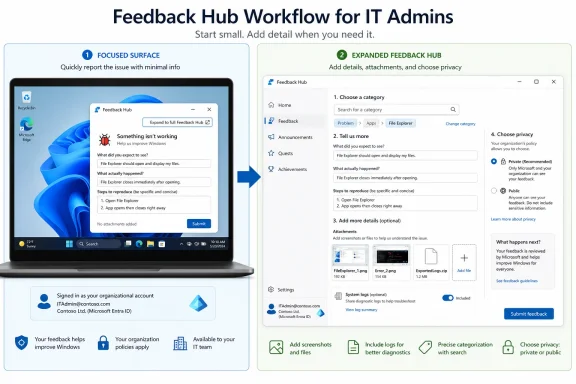
Admins testing Windows Insider flights should treat Microsoft’s March 20, 2026 Feedback Hub redesign as a routing change: use the new smaller focused feedback surface for clean, immediate repros, then expand to the full Hub when logs, screenshots, files, privacy choices, or organizational context matter. Microsoft’s own release notes say the focused surface is meant for quick, in-the-moment feedback, not as a replacement for the full submission workflow. The practical shift is simple but important: the first decision is no longer “file or wait,” but which filing path preserves the evidence best.
Microsoft introduced the redesigned Feedback Hub for Dev and Canary Windows Insider flights on March 20, 2026, according to the company’s Feedback Hub release notes. The update added a “new smaller Feedback Hub surface,” plus a button in the upper-right corner to expand into the full Feedback Hub experience.
That sounds like a small interface change. It is not. For enthusiasts, it lowers the friction of reporting a broken window, an odd animation, or a misbehaving inbox app while the failure is still on screen. For admins and OEM validation teams, it changes the reporting workflow around Insider flights because it introduces a fast path that may or may not be the right path.
The focused surface is best understood as a capture window. If a bug is visible, reproducible, and tied to what the tester is doing right now, the smaller surface is useful because it encourages immediate filing before the tester forgets the sequence. But when the issue affects multiple devices, requires attachments, depends on category-specific diagnostics, or needs organization-level framing, the full Hub remains the safer choice.
That distinction matters because Microsoft also kept the fuller submission model alive. The same redesign added a unified submission template, category search, private-versus-public feedback controls, and a new compliment type. In other words, the new Feedback Hub is trying to solve two problems at once: make casual reports easier, while still preserving the machinery needed for serious bug reports.
For an admin or OEM tester, the more disciplined workflow is different. Start with the focused surface only when the issue is happening in front of you and the reproduction is clean: one device, one action, one result. If the report needs a screenshot, a file, a longer description, a careful category choice, or privacy handling, use the expand button in the upper-right corner and move into the full Feedback Hub experience before submitting.
That is the key operational rule. The focused surface is a good place to begin a report, not necessarily the place to finish one.
Microsoft’s business guidance says organizations can submit feedback using a Microsoft Entra account on behalf of the organization, with category selection and screenshots or files available. That makes the full experience especially important for managed environments, because a work-account submission can carry more institutional meaning than a one-off consumer report from a test machine.
The danger is that the new surface will make weak reports easier to file. A quick complaint with a vague title still creates noise. A quick report with a crisp title, exact repro steps, and the right category can get routed to the correct team faster.
A good focused-surface report should be narrow. It should name the feature, state the expected result, state the actual result, and give the shortest reliable reproduction path. The point is not to write a forensic report; it is to preserve a bug while the tester still knows exactly what happened.
For example, an admin validating a new Insider flight on a pilot device might hit a reproducible failure in an inbox app after a specific click path. If the failure is visible and repeatable, the focused surface is enough to send a first signal. If several other pilot devices show the same behavior later, that initial report can become the anchor for a broader filing or internal escalation.
This is where the redesign could help Microsoft. Insider feedback has always suffered when testers delay reports until the end of a session, then compress several complaints into a single vague submission. A smaller surface nudges the tester to file the one thing that just happened.
WindowsForum readers have already been discussing the redesigned Hub in the context of compliments, privacy controls, and clearer Insider signals. That community angle is useful because the real test is not whether the app looks cleaner; it is whether the new workflow produces better issue reports before a problematic change escapes preview.
Microsoft’s guidance for good feedback emphasizes category selection, screenshots, files, and reproducing the problem where possible. It also notes that diagnostic collection depends on privacy settings and the category of feedback. That should make admins cautious about treating the smaller surface as a complete enterprise reporting mechanism.
The full Hub is where a report can become a usable engineering artifact. The title can be precise. The category can be checked instead of guessed. Screenshots can show the difference between expected and actual behavior. Files can provide supporting evidence. Public or private visibility can be chosen deliberately.
This matters most for OEMs and IT teams validating Insider builds against hardware, drivers, firmware-adjacent behavior, accessibility tools, security baselines, or line-of-business workflows. A quick report may alert Microsoft that something is wrong. A full report has a better chance of showing why it matters and how to reproduce it.
The practical rule is blunt: if the issue would require more than a minute to explain to another admin, expand to the full Hub.
A bad category can weaken a good bug report. If a display issue is filed under a broad app complaint, or a deployment-related issue is described only as a generic Windows problem, the report may still exist but lose some of its value. The new category search should reduce that failure mode by making it easier to find the best fit.
The single template also changes behavior. Instead of forcing users through visibly different flows early, Microsoft now asks for the type of feedback and supporting details within a more unified model. That can reduce hesitation, but it also puts more responsibility on the reporter to distinguish between a suggestion, a problem, and a compliment.
The new compliment type is not fluff. In Insider testing, positive feedback can tell Microsoft which changes should not be rolled back after a loud minority objects. But admins should use it sparingly and specifically. “This new policy surface reduces help desk calls in our pilot ring” is useful. “Looks good” is not.
Microsoft says attachments and diagnostic data are shared with Microsoft rather than publicly, but the visibility choice still matters because the text of a report can disclose more than the submitter intends. Admins should assume that any public description needs to be scrubbed of tenant names, internal hostnames, user identifiers, customer names, and operational details.
This is another reason the smaller focused surface should not become muscle memory for enterprise testers. When a problem involves managed devices, work accounts, policy configuration, or organization-specific workflows, the submission should be deliberate. Speed is useful only if it does not bypass governance.
The Entra-account path is important here. Filing on behalf of an organization can give Microsoft a clearer signal that the issue is not just a hobbyist annoyance. But it also means the report represents the organization, so the internal standard should be higher than “I saw a bug and clicked send.”
The smaller surface fits the first case. The full Hub fits the second and third. If multiple testers file separate shallow reports for the same fleet issue, Microsoft gets volume but not clarity. If one owner files a strong full report and others upvote or add similar feedback where appropriate, Microsoft gets a cleaner signal.
This is where OEMs should be especially careful. Hardware-adjacent issues are often subtle, timing-dependent, and specific to configurations. A smaller report may capture the symptom, but the full Hub is more likely to carry the context needed to separate a Windows regression from a driver, firmware, or app interaction.
Admins should also avoid bundling unrelated failures into one report. Microsoft’s feedback guidance has long pushed users toward one issue per submission because mixed reports are harder to route and group. The redesigned Hub does not change that principle; if anything, the faster surface makes discipline more important.
Admins should decide internally whether an Insider issue is informational, annoying, validation-blocking, or deployment-blocking. Feedback Hub can carry the repro and evidence to Microsoft, but the organization still needs to decide whether to pause testing, isolate the build, move affected devices out of a ring, or wait for the next flight.
This is especially true for Canary and Dev-style testing, where change is expected and stability is not the product promise. The value of filing feedback is to improve the platform before release. The value of triage is to prevent preview instability from consuming production time.
WindowsForum’s related coverage of the Windows Insider Program revamp has framed Microsoft’s recent changes as an attempt to make preview channels and feedback signals clearer. The smaller Feedback Hub surface fits that pattern, but clarity at Microsoft’s end depends on discipline at the tester’s end.
 Microsoft Made Feedback Faster, but Faster Is Not Always Better
Microsoft introduced the redesigned Feedback Hub for Dev and Canary Windows Insider flights on March 20, 2026, according to the company’s Feedback Hub release notes. The update added a “new smaller Feedback Hub surface,” plus a button in the upper-right corner to expand into the full Feedback Hub experience.That sounds like a small interface change. It is not. For enthusiasts, it lowers the friction of reporting a broken window, an odd animation, or a misbehaving inbox app while the failure is still on screen. For admins and OEM validation teams, it changes the reporting workflow around Insider flights because it introduces a fast path that may or may not be the right path.
The focused surface is best understood as a capture window. If a bug is visible, reproducible, and tied to what the tester is doing right now, the smaller surface is useful because it encourages immediate filing before the tester forgets the sequence. But when the issue affects multiple devices, requires attachments, depends on category-specific diagnostics, or needs organization-level framing, the full Hub remains the safer choice.
That distinction matters because Microsoft also kept the fuller submission model alive. The same redesign added a unified submission template, category search, private-versus-public feedback controls, and a new compliment type. In other words, the new Feedback Hub is trying to solve two problems at once: make casual reports easier, while still preserving the machinery needed for serious bug reports.
The First Decision Is Now the Reporting Surface
For an Insider on a single PC, the workflow is straightforward. Open Feedback Hub from Start, search for it, or press Win + F. If an inbox app launches the smaller focused Feedback Hub surface, describe the problem clearly, choose the appropriate type of feedback, and submit it if the issue is simple enough to stand on its own.For an admin or OEM tester, the more disciplined workflow is different. Start with the focused surface only when the issue is happening in front of you and the reproduction is clean: one device, one action, one result. If the report needs a screenshot, a file, a longer description, a careful category choice, or privacy handling, use the expand button in the upper-right corner and move into the full Feedback Hub experience before submitting.
That is the key operational rule. The focused surface is a good place to begin a report, not necessarily the place to finish one.
Microsoft’s business guidance says organizations can submit feedback using a Microsoft Entra account on behalf of the organization, with category selection and screenshots or files available. That makes the full experience especially important for managed environments, because a work-account submission can carry more institutional meaning than a one-off consumer report from a test machine.
The danger is that the new surface will make weak reports easier to file. A quick complaint with a vague title still creates noise. A quick report with a crisp title, exact repro steps, and the right category can get routed to the correct team faster.
A Clean Repro Belongs in the Small Window
The smaller focused Feedback Hub surface is most valuable when speed protects accuracy. If a Start menu behavior, Settings page glitch, inbox app crash path, or visible UI regression appears only during a narrow sequence, filing immediately can be better than reconstructing the issue later from memory.A good focused-surface report should be narrow. It should name the feature, state the expected result, state the actual result, and give the shortest reliable reproduction path. The point is not to write a forensic report; it is to preserve a bug while the tester still knows exactly what happened.
For example, an admin validating a new Insider flight on a pilot device might hit a reproducible failure in an inbox app after a specific click path. If the failure is visible and repeatable, the focused surface is enough to send a first signal. If several other pilot devices show the same behavior later, that initial report can become the anchor for a broader filing or internal escalation.
This is where the redesign could help Microsoft. Insider feedback has always suffered when testers delay reports until the end of a session, then compress several complaints into a single vague submission. A smaller surface nudges the tester to file the one thing that just happened.
WindowsForum readers have already been discussing the redesigned Hub in the context of compliments, privacy controls, and clearer Insider signals. That community angle is useful because the real test is not whether the app looks cleaner; it is whether the new workflow produces better issue reports before a problematic change escapes preview.
Fleet Problems Need the Full Hub, Not a Drive-By Report
The focused surface becomes less appropriate as soon as a problem looks bigger than one device. Fleet-wide symptoms need context: hardware family, deployment ring, whether the issue appeared after a specific flight, whether the behavior is reproducible across clean installs or upgrades, and whether the failure affects a business workflow.Microsoft’s guidance for good feedback emphasizes category selection, screenshots, files, and reproducing the problem where possible. It also notes that diagnostic collection depends on privacy settings and the category of feedback. That should make admins cautious about treating the smaller surface as a complete enterprise reporting mechanism.
The full Hub is where a report can become a usable engineering artifact. The title can be precise. The category can be checked instead of guessed. Screenshots can show the difference between expected and actual behavior. Files can provide supporting evidence. Public or private visibility can be chosen deliberately.
This matters most for OEMs and IT teams validating Insider builds against hardware, drivers, firmware-adjacent behavior, accessibility tools, security baselines, or line-of-business workflows. A quick report may alert Microsoft that something is wrong. A full report has a better chance of showing why it matters and how to reproduce it.
The practical rule is blunt: if the issue would require more than a minute to explain to another admin, expand to the full Hub.
Category Search Is More Than a Convenience
The redesigned Hub’s unified submission template and category search look like usability work, but for admins they are routing tools. Microsoft’s feedback documentation says categories help pull the right information and send feedback to the right teams. That makes category selection part of triage, not decoration.A bad category can weaken a good bug report. If a display issue is filed under a broad app complaint, or a deployment-related issue is described only as a generic Windows problem, the report may still exist but lose some of its value. The new category search should reduce that failure mode by making it easier to find the best fit.
The single template also changes behavior. Instead of forcing users through visibly different flows early, Microsoft now asks for the type of feedback and supporting details within a more unified model. That can reduce hesitation, but it also puts more responsibility on the reporter to distinguish between a suggestion, a problem, and a compliment.
The new compliment type is not fluff. In Insider testing, positive feedback can tell Microsoft which changes should not be rolled back after a loud minority objects. But admins should use it sparingly and specifically. “This new policy surface reduces help desk calls in our pilot ring” is useful. “Looks good” is not.
Private Feedback Is a Governance Choice
The redesigned Hub’s private-versus-public feedback option deserves more attention than it has received. Public feedback helps other Insiders discover, upvote, and comment on the same issue. Private feedback is better when a report includes organization-specific detail, screenshots that may reveal internal configuration, or files that should not become community artifacts.Microsoft says attachments and diagnostic data are shared with Microsoft rather than publicly, but the visibility choice still matters because the text of a report can disclose more than the submitter intends. Admins should assume that any public description needs to be scrubbed of tenant names, internal hostnames, user identifiers, customer names, and operational details.
This is another reason the smaller focused surface should not become muscle memory for enterprise testers. When a problem involves managed devices, work accounts, policy configuration, or organization-specific workflows, the submission should be deliberate. Speed is useful only if it does not bypass governance.
The Entra-account path is important here. Filing on behalf of an organization can give Microsoft a clearer signal that the issue is not just a hobbyist annoyance. But it also means the report represents the organization, so the internal standard should be higher than “I saw a bug and clicked send.”
The New Workflow Rewards Internal Triage Before External Filing
The best admin workflow starts before Feedback Hub opens. Insider devices should already be labeled by ring, build, role, and hardware class in whatever internal tracking system the organization uses. When a tester hits an issue, the first question should be whether it is a one-off repro, a repeated device-class problem, or a blocker for broader validation.The smaller surface fits the first case. The full Hub fits the second and third. If multiple testers file separate shallow reports for the same fleet issue, Microsoft gets volume but not clarity. If one owner files a strong full report and others upvote or add similar feedback where appropriate, Microsoft gets a cleaner signal.
This is where OEMs should be especially careful. Hardware-adjacent issues are often subtle, timing-dependent, and specific to configurations. A smaller report may capture the symptom, but the full Hub is more likely to carry the context needed to separate a Windows regression from a driver, firmware, or app interaction.
Admins should also avoid bundling unrelated failures into one report. Microsoft’s feedback guidance has long pushed users toward one issue per submission because mixed reports are harder to route and group. The redesigned Hub does not change that principle; if anything, the faster surface makes discipline more important.
Severity Still Lives Outside Feedback Hub
The Feedback Hub is a reporting channel, not a full incident-management system. That distinction is easy to forget when Microsoft improves the interface. A better submission surface does not replace internal severity ratings, escalation paths, rollback decisions, or support channels.Admins should decide internally whether an Insider issue is informational, annoying, validation-blocking, or deployment-blocking. Feedback Hub can carry the repro and evidence to Microsoft, but the organization still needs to decide whether to pause testing, isolate the build, move affected devices out of a ring, or wait for the next flight.
This is especially true for Canary and Dev-style testing, where change is expected and stability is not the product promise. The value of filing feedback is to improve the platform before release. The value of triage is to prevent preview instability from consuming production time.
WindowsForum’s related coverage of the Windows Insider Program revamp has framed Microsoft’s recent changes as an attempt to make preview channels and feedback signals clearer. The smaller Feedback Hub surface fits that pattern, but clarity at Microsoft’s end depends on discipline at the tester’s end.
The Admin Playbook for the Smaller Feedback Hub
The new Feedback Hub surface is useful because it shortens the distance between failure and report. It becomes risky only when organizations treat quick submission as a substitute for evidence, routing, and internal ownership.- Use the smaller focused Feedback Hub surface when a single-device issue is visible, reproducible, and easy to describe without extra files.
- Expand to the full Feedback Hub when the issue needs screenshots, attached files, careful category selection, privacy review, or organization-level context.
- Sign in with the appropriate Insider or work account before filing, especially when submitting on behalf of an organization.
- Search existing community feedback first when time allows, then upvote or add similar feedback if the existing report matches the issue.
- Keep each submission focused on one problem, because bundled reports are harder for Microsoft to route and act on.
- Treat Feedback Hub submission as one part of triage, not as a replacement for internal severity, escalation, or validation decisions.