

Microsoft is considering a redesigned flyout for PowerToys Awake, a free Windows 11 utility that keeps a PC from sleeping during long-running tasks, according to a newly opened proposal in the Microsoft PowerToys GitHub repository reported by Neowin on July 5, 2026. The change is not a shipping feature yet, and that distinction matters. But the proposal says something important about where Microsoft’s best Windows tooling is headed: away from buried settings pages and toward small, task-focused controls that meet users at the moment they need them.
That may sound like a minor interface tweak, because Awake itself is a minor-looking tool. It is not a new Start menu, a kernel feature, or another AI-branded sidebar. It is a switch that tells Windows, in effect, not now. Do not sleep in the middle of a download. Do not dim the display during a presentation. Do not interrupt a build, render, backup, or file transfer because the default power plan did exactly what it was designed to do.
That simplicity is the point. PowerToys has become the place where Microsoft quietly solves the kinds of daily Windows irritations that are too specific, too enthusiast-coded, or too workflow-dependent to justify a full Windows feature push. The proposed Awake redesign is interesting because it treats one of those small utilities not as a nerdy afterthought, but as a first-class control surface.
PowerToys occupies a strange and useful place in Microsoft’s Windows strategy. It is official Microsoft software, but it is not Windows. It is polished enough for normal users to trust, but experimental enough that features can arrive, change, and occasionally vanish without the ceremonial baggage of a Windows release cycle.
That makes it a pressure valve. When Windows itself becomes too cautious, too telemetry-driven, too enterprise-bound, or too politically loaded to satisfy power users, PowerToys can move faster. FancyZones, PowerRename, Color Picker, Text Extractor, Mouse Without Borders, Command Palette, and Awake all live in the space between “this should be in Windows” and “this would complicate Windows for everyone.”
Awake is perhaps the purest example. Windows already has power settings. It already lets users configure screen timeouts, sleep behavior, and battery preferences. But those settings are designed as defaults, not as momentary commands. Awake exists because many users do not want to rewrite their machine’s policy just because they need it to stay awake for the next 90 minutes.
Microsoft’s own documentation describes Awake as a tool that keeps a computer awake without modifying power and sleep settings. That is the distinction that gives it value. It does not ask users to remember what their old settings were. It temporarily overrides behavior, then gets out of the way.
The proposed redesign, as described by Neowin and outlined in Microsoft’s PowerToys GitHub discussion, appears to recognize that the current experience still has too much friction. If the purpose of Awake is temporary intent, then the interface should be temporary, quick, and obvious. A flyout is not just a cosmetic change. It is an admission that a power override is closer to volume, Wi-Fi, Bluetooth, or Focus than it is to a buried configuration panel.
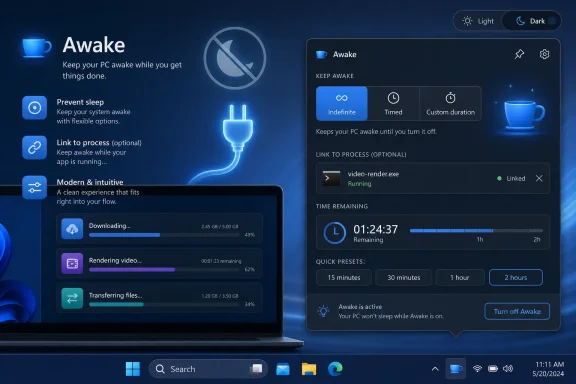
A redesigned flyout would bring Awake’s major modes into one lightweight interface. The proposal described by Neowin includes quick access to indefinite, timed, and passive modes without forcing the user through the Settings app or a system tray context menu. That matters because the use case for Awake is often discovered in the middle of another task.
You notice the laptop is about to sleep while a large ISO is downloading. You are about to step away while a render is still running. You are starting a long software build and do not want Windows to mistake silence for idleness. In those moments, the ideal interface is not a configuration tree. It is a small control that answers one question: how long should this machine stay awake?
The proposed custom duration support is the most obvious quality-of-life improvement. Presets are fine until they are not. A 30-minute or one-hour option covers many cases, but real work rarely lands cleanly on preset boundaries. Sometimes the right answer is 25 minutes, or 1 hour and 30 minutes, or just long enough to finish a maintenance window.
That custom duration feature also exposes an odd gap in the current user experience. Microsoft’s documentation already notes that advanced users can customize tray time options through Awake’s settings file, and Awake also supports command-line parameters for time limits. In other words, the capability has existed in more technical forms. The proposal is about making the same kind of control approachable from the interface.
This is the recurring PowerToys challenge. Its best utilities often begin as a wrapper around something a determined user could already accomplish with scripts, registry edits, command-line arguments, or third-party tools. The product work is not inventing the possibility. It is reducing the cost of using it safely.
That is a much bigger idea than a prettier flyout. A timer is an estimate. A process is a condition. The difference matters.
A user who sets Awake for two hours is making a guess about how long a job will take. If the task finishes in 20 minutes, the PC may remain awake longer than necessary. If it runs for three hours, Windows may sleep at exactly the wrong time. Process-aware behavior would attach the keep-awake request to the real unit of work: the build process, the backup tool, the encoding job, the installer, or the remote session helper.
Microsoft’s current documentation already lists command-line options that can attach Awake to a process ID or parent process, terminating Awake when that process ends. That means the proposed interface is not necessarily inventing an entirely new engine. It appears to be bringing a powerful existing behavior closer to ordinary use.
That is the right direction. A GUI for process attachment would make Awake feel less like a manual caffeine button and more like a workflow companion. It could reduce overuse, prevent forgotten indefinite sessions, and make the tool more energy-aware without making users think in energy-management terms.
For IT pros, the idea is immediately legible. A process-bound Awake session is easier to reason about than an open-ended override. It maps cleanly to maintenance tasks, installers, scripted jobs, lab machines, and workstations used for long-running operations. It is also less likely to create the “why was this machine awake all night?” mystery that can follow a casually toggled indefinite mode.
There are implementation questions, of course. Process names can be ambiguous. Process IDs change. Child processes can outlive parents. Some apps spawn helper services, update agents, or GPU workers that complicate any simple “while this app is running” model. But those are exactly the kinds of edge cases PowerToys can explore before anything like this graduates into Windows proper.
PowerToys succeeds because it does not try to resolve that tension with one grand design. It adds tools around the edges. It gives users escape hatches without asking Microsoft to redesign the house.
That approach has become more important as Windows itself has grown more opinionated. The Start menu is no longer just a launcher; it is a policy surface, a recommendation surface, and sometimes an advertising-adjacent surface. The taskbar is not just a strip of icons; it is a managed experience. Settings is not just a control panel replacement; it is a curated route through what Microsoft thinks most users should touch.
PowerToys, by contrast, still behaves like software for people who know what they want. It is not always elegant, and not every utility is for everyone. But it keeps alive a very Windows idea: the machine can be adapted to the user, not just the other way around.
Awake’s redesign matters because it shows Microsoft applying that same philosophy to the interface of PowerToys itself. The utility is not merely adding switches. It is trying to put the switch in the right place.
That is where small design decisions become large product signals. If a tool exists for momentary control, the control should be momentary. If a feature exists for long-running work, it should understand the work rather than only the clock. If a utility exists because Windows defaults are not always right, it should make deviation easy and reversible.
Microsoft’s documentation is careful on this point. Awake temporarily overrides power plan choices and is intended for use while the user is at the computer or in private environments. It does not function at the lock screen, because the lock screen runs in a separate security context from the user session. If a user needs a machine to remain awake while locked, Microsoft says the power plan itself should be configured directly.
That limitation is not a bug so much as a boundary. Awake is a convenience utility, not a device-management policy. It is meant to prevent accidental sleep during active work, not to replace enterprise power configuration or security-aware workstation management.
A redesigned flyout could make that boundary more visible or blur it, depending on execution. If Microsoft makes Awake easier to activate indefinitely, more users may forget that they have done so. If the interface foregrounds timers, custom durations, and process-bound sessions, it could nudge users toward safer, more precise overrides.
This is why process attachment is more than a power-user flourish. It is a better model of responsibility. Instead of asking a human to remember to turn off the exception, the exception can end with the task that justified it.
There is also a battery story here. On desktops and plugged-in workstations, Awake is mostly about convenience and reliability. On laptops, it can become a battery drain trap if used carelessly. A good flyout should make the active state unmistakable, show when the override will end, and make it easy to return to passive mode.
The history of Windows power management is full of settings that users changed once and forgot. Awake’s advantage is that it is temporary. The redesign should protect that advantage.
Command Palette is the clearest example. Microsoft has been exploring a more powerful launcher and command surface inside PowerToys, echoing ideas familiar from developer tools and macOS utilities. FancyZones has long offered a more capable window layout system than built-in Snap for users with complex monitor setups. Text Extractor brought OCR into a simple shortcut-driven workflow before Windows made similar ideas feel mainstream.
Awake fits that pattern at a smaller scale. Its redesign would not make headlines like a new Copilot integration or a Start menu overhaul. But it tests a principle Microsoft badly needs across Windows: advanced actions can be exposed without turning the operating system into a cockpit.
The flyout model is especially interesting because Windows 11 already leans heavily on compact panels. Quick Settings, the calendar, notification center, volume controls, network selection, and accessibility toggles all use flyout-like experiences. PowerToys adopting a similar pattern makes its utilities feel less bolted-on and more native, even though they remain outside the OS.
That has benefits and risks. The benefit is familiarity. Users understand small panels that appear, let them act, and disappear. The risk is that PowerToys could lose some of its transparent, tool-like character if every utility gets polished into a mini-Windows surface with hidden complexity.
Awake is a good candidate because its decision tree is compact. The user wants passive mode, indefinite mode, a duration, an expiration, or perhaps a process-linked session. That can fit in a flyout without becoming a mess. Not every PowerToy will be so lucky.
That does not make PowerToys a pure community project. Microsoft still decides what gets built, how it is prioritized, and what quality bar it must meet. But the public issue tracker changes the relationship. It gives enthusiasts and administrators a place to describe real workflow failures in a way that product teams can act on.
Neowin’s report frames the Awake redesign as something Microsoft is currently exploring, with community feedback likely to matter. That is the right level of certainty. A GitHub proposal is not a roadmap promise. It is a signal of intent and a request for validation.
This distinction is important in a Windows ecosystem where experimental ideas are often mistaken for imminent features. The PowerToys team may revise the design, split the work into stages, defer process attachment, or decide that some pieces are too error-prone for a stable release. None of that would be unusual.
But the discussion itself is useful. It reveals which problems Microsoft thinks are worth smoothing. In this case, the problem is not “Windows cannot stay awake.” It can. The problem is that temporary power intent is still too awkward to express.
That is a subtle but mature framing. Mature software does not merely add features. It reduces the number of steps between a user’s intention and the system’s behavior.
The answer is that Windows has to serve everyone, and every new control in the shell becomes a support, localization, accessibility, policy, documentation, and security commitment. A keep-awake flyout sounds simple until it intersects with battery saver, Modern Standby, lock screen rules, enterprise power policies, remote management, screen burn-in concerns, and device compliance requirements.
PowerToys has more freedom. It can target users who opted in. It can assume a higher tolerance for specialized controls. It can evolve faster. It can expose functionality that would be too niche or too dangerous for default placement in Windows.
That does not mean PowerToys is a dumping ground for things Microsoft is afraid to put in Windows. The better interpretation is that PowerToys is a staging area for power-user affordances. Some may remain there forever. Some may inspire Windows features later. Some may prove that the demand is real but the implementation needs guardrails.
Awake is probably best kept in PowerToys for now. The people who need it know why they need it. The people who do not need it should not be encouraged to keep laptops awake by accident. PowerToys provides the right opt-in boundary.
Still, the proposed redesign narrows the gap between PowerToys and the shell. If the flyout becomes polished enough, discoverable enough, and safe enough, it will inevitably raise the question of whether Windows should have a built-in temporary keep-awake control. That is how good utilities create pressure on the platform.
But small utilities often reveal more about an operating system’s health than splashy features do. A platform feels powerful when users can express intent precisely. It feels paternalistic when the system makes reasonable defaults hard to override. It feels sloppy when overrides exist but are scattered across old dialogs, JSON files, tray icons, and command-line switches.
The proposed Awake redesign is Microsoft trying to make one override coherent. That is not revolutionary, but it is the kind of improvement Windows needs more of. Not every user wants AI summaries in the shell. Many users do want the machine to stay awake while a job finishes and then go back to normal.
There is also a trust angle. Power management is one of those areas where users quickly learn whether the system is on their side. If a PC sleeps during a critical task, the user does not blame an elegant power policy. They blame Windows. A reliable, visible, temporary keep-awake control can prevent that kind of resentment.
The process-aware proposal strengthens that trust because it aligns the computer’s behavior with the user’s actual work. Stay awake while this thing runs. Stop when it ends. That is the kind of sentence software should understand more often.
For WindowsForum readers, the concrete implications are straightforward:
That may sound like a minor interface tweak, because Awake itself is a minor-looking tool. It is not a new Start menu, a kernel feature, or another AI-branded sidebar. It is a switch that tells Windows, in effect, not now. Do not sleep in the middle of a download. Do not dim the display during a presentation. Do not interrupt a build, render, backup, or file transfer because the default power plan did exactly what it was designed to do.
That simplicity is the point. PowerToys has become the place where Microsoft quietly solves the kinds of daily Windows irritations that are too specific, too enthusiast-coded, or too workflow-dependent to justify a full Windows feature push. The proposed Awake redesign is interesting because it treats one of those small utilities not as a nerdy afterthought, but as a first-class control surface.
 PowerToys Keeps Fixing the Windows That Windows Cannot Quite Be
PowerToys occupies a strange and useful place in Microsoft’s Windows strategy. It is official Microsoft software, but it is not Windows. It is polished enough for normal users to trust, but experimental enough that features can arrive, change, and occasionally vanish without the ceremonial baggage of a Windows release cycle.That makes it a pressure valve. When Windows itself becomes too cautious, too telemetry-driven, too enterprise-bound, or too politically loaded to satisfy power users, PowerToys can move faster. FancyZones, PowerRename, Color Picker, Text Extractor, Mouse Without Borders, Command Palette, and Awake all live in the space between “this should be in Windows” and “this would complicate Windows for everyone.”
Awake is perhaps the purest example. Windows already has power settings. It already lets users configure screen timeouts, sleep behavior, and battery preferences. But those settings are designed as defaults, not as momentary commands. Awake exists because many users do not want to rewrite their machine’s policy just because they need it to stay awake for the next 90 minutes.
Microsoft’s own documentation describes Awake as a tool that keeps a computer awake without modifying power and sleep settings. That is the distinction that gives it value. It does not ask users to remember what their old settings were. It temporarily overrides behavior, then gets out of the way.
The proposed redesign, as described by Neowin and outlined in Microsoft’s PowerToys GitHub discussion, appears to recognize that the current experience still has too much friction. If the purpose of Awake is temporary intent, then the interface should be temporary, quick, and obvious. A flyout is not just a cosmetic change. It is an admission that a power override is closer to volume, Wi-Fi, Bluetooth, or Focus than it is to a buried configuration panel.
The Real Upgrade Is Not the Flyout, It Is the Reduced Distance to Intent
The current Awake model works, but it still bears the shape of a utility built by and for people who do not mind living in settings panes and tray menus. That is not an insult; PowerToys’ core audience has always included users who like knobs. But there is a difference between offering control and making control inconvenient.A redesigned flyout would bring Awake’s major modes into one lightweight interface. The proposal described by Neowin includes quick access to indefinite, timed, and passive modes without forcing the user through the Settings app or a system tray context menu. That matters because the use case for Awake is often discovered in the middle of another task.
You notice the laptop is about to sleep while a large ISO is downloading. You are about to step away while a render is still running. You are starting a long software build and do not want Windows to mistake silence for idleness. In those moments, the ideal interface is not a configuration tree. It is a small control that answers one question: how long should this machine stay awake?
The proposed custom duration support is the most obvious quality-of-life improvement. Presets are fine until they are not. A 30-minute or one-hour option covers many cases, but real work rarely lands cleanly on preset boundaries. Sometimes the right answer is 25 minutes, or 1 hour and 30 minutes, or just long enough to finish a maintenance window.
That custom duration feature also exposes an odd gap in the current user experience. Microsoft’s documentation already notes that advanced users can customize tray time options through Awake’s settings file, and Awake also supports command-line parameters for time limits. In other words, the capability has existed in more technical forms. The proposal is about making the same kind of control approachable from the interface.
This is the recurring PowerToys challenge. Its best utilities often begin as a wrapper around something a determined user could already accomplish with scripts, registry edits, command-line arguments, or third-party tools. The product work is not inventing the possibility. It is reducing the cost of using it safely.
Process-Aware Awake Is the Feature Admins Will Notice
The more intriguing proposed addition is the ability to attach Awake to a specific process. In plain English, that would allow a user to keep the PC awake only while a selected app or process is running. Once that process exits, Awake would stop overriding the system’s sleep behavior and Windows would return to normal power management.That is a much bigger idea than a prettier flyout. A timer is an estimate. A process is a condition. The difference matters.
A user who sets Awake for two hours is making a guess about how long a job will take. If the task finishes in 20 minutes, the PC may remain awake longer than necessary. If it runs for three hours, Windows may sleep at exactly the wrong time. Process-aware behavior would attach the keep-awake request to the real unit of work: the build process, the backup tool, the encoding job, the installer, or the remote session helper.
Microsoft’s current documentation already lists command-line options that can attach Awake to a process ID or parent process, terminating Awake when that process ends. That means the proposed interface is not necessarily inventing an entirely new engine. It appears to be bringing a powerful existing behavior closer to ordinary use.
That is the right direction. A GUI for process attachment would make Awake feel less like a manual caffeine button and more like a workflow companion. It could reduce overuse, prevent forgotten indefinite sessions, and make the tool more energy-aware without making users think in energy-management terms.
For IT pros, the idea is immediately legible. A process-bound Awake session is easier to reason about than an open-ended override. It maps cleanly to maintenance tasks, installers, scripted jobs, lab machines, and workstations used for long-running operations. It is also less likely to create the “why was this machine awake all night?” mystery that can follow a casually toggled indefinite mode.
There are implementation questions, of course. Process names can be ambiguous. Process IDs change. Child processes can outlive parents. Some apps spawn helper services, update agents, or GPU workers that complicate any simple “while this app is running” model. But those are exactly the kinds of edge cases PowerToys can explore before anything like this graduates into Windows proper.
Microsoft’s Best Windows Work Is Happening in the Margins
The Awake proposal lands at a moment when Windows 11’s interface story is, generously, uneven. Microsoft has recently made positive changes around the Start menu, including new customization policies and fixes affecting core UI elements, as Neowin noted in its report. But the broader Windows 11 experience still carries a familiar tension: Microsoft wants Windows to feel modern and managed, while enthusiasts often want it to feel direct and under their control.PowerToys succeeds because it does not try to resolve that tension with one grand design. It adds tools around the edges. It gives users escape hatches without asking Microsoft to redesign the house.
That approach has become more important as Windows itself has grown more opinionated. The Start menu is no longer just a launcher; it is a policy surface, a recommendation surface, and sometimes an advertising-adjacent surface. The taskbar is not just a strip of icons; it is a managed experience. Settings is not just a control panel replacement; it is a curated route through what Microsoft thinks most users should touch.
PowerToys, by contrast, still behaves like software for people who know what they want. It is not always elegant, and not every utility is for everyone. But it keeps alive a very Windows idea: the machine can be adapted to the user, not just the other way around.
Awake’s redesign matters because it shows Microsoft applying that same philosophy to the interface of PowerToys itself. The utility is not merely adding switches. It is trying to put the switch in the right place.
That is where small design decisions become large product signals. If a tool exists for momentary control, the control should be momentary. If a feature exists for long-running work, it should understand the work rather than only the clock. If a utility exists because Windows defaults are not always right, it should make deviation easy and reversible.
The Energy Trade-Off Is Real, Even When the Feature Is Useful
There is a reason Windows puts machines to sleep. Sleep states save power, reduce heat, protect battery life, and help fleets behave predictably. A keep-awake tool is useful precisely because it overrides that logic, which means it can also be misused.Microsoft’s documentation is careful on this point. Awake temporarily overrides power plan choices and is intended for use while the user is at the computer or in private environments. It does not function at the lock screen, because the lock screen runs in a separate security context from the user session. If a user needs a machine to remain awake while locked, Microsoft says the power plan itself should be configured directly.
That limitation is not a bug so much as a boundary. Awake is a convenience utility, not a device-management policy. It is meant to prevent accidental sleep during active work, not to replace enterprise power configuration or security-aware workstation management.
A redesigned flyout could make that boundary more visible or blur it, depending on execution. If Microsoft makes Awake easier to activate indefinitely, more users may forget that they have done so. If the interface foregrounds timers, custom durations, and process-bound sessions, it could nudge users toward safer, more precise overrides.
This is why process attachment is more than a power-user flourish. It is a better model of responsibility. Instead of asking a human to remember to turn off the exception, the exception can end with the task that justified it.
There is also a battery story here. On desktops and plugged-in workstations, Awake is mostly about convenience and reliability. On laptops, it can become a battery drain trap if used carelessly. A good flyout should make the active state unmistakable, show when the override will end, and make it easy to return to passive mode.
The history of Windows power management is full of settings that users changed once and forgot. Awake’s advantage is that it is temporary. The redesign should protect that advantage.
PowerToys Is Becoming a Test Lab for the Windows Shell
PowerToys began its modern life as a revival of an old enthusiast brand, but it has evolved into something more structurally important. It is now a public lab for interaction patterns that Windows itself may be too slow or too constrained to try.Command Palette is the clearest example. Microsoft has been exploring a more powerful launcher and command surface inside PowerToys, echoing ideas familiar from developer tools and macOS utilities. FancyZones has long offered a more capable window layout system than built-in Snap for users with complex monitor setups. Text Extractor brought OCR into a simple shortcut-driven workflow before Windows made similar ideas feel mainstream.
Awake fits that pattern at a smaller scale. Its redesign would not make headlines like a new Copilot integration or a Start menu overhaul. But it tests a principle Microsoft badly needs across Windows: advanced actions can be exposed without turning the operating system into a cockpit.
The flyout model is especially interesting because Windows 11 already leans heavily on compact panels. Quick Settings, the calendar, notification center, volume controls, network selection, and accessibility toggles all use flyout-like experiences. PowerToys adopting a similar pattern makes its utilities feel less bolted-on and more native, even though they remain outside the OS.
That has benefits and risks. The benefit is familiarity. Users understand small panels that appear, let them act, and disappear. The risk is that PowerToys could lose some of its transparent, tool-like character if every utility gets polished into a mini-Windows surface with hidden complexity.
Awake is a good candidate because its decision tree is compact. The user wants passive mode, indefinite mode, a duration, an expiration, or perhaps a process-linked session. That can fit in a flyout without becoming a mess. Not every PowerToy will be so lucky.
The GitHub Proposal Is Also a Governance Model
The fact that this redesign is being discussed in the PowerToys GitHub repository is not incidental. It is part of what makes PowerToys different from most Windows features. Users can see proposals, comment on them, argue about workflows, and sometimes influence the implementation before it ships.That does not make PowerToys a pure community project. Microsoft still decides what gets built, how it is prioritized, and what quality bar it must meet. But the public issue tracker changes the relationship. It gives enthusiasts and administrators a place to describe real workflow failures in a way that product teams can act on.
Neowin’s report frames the Awake redesign as something Microsoft is currently exploring, with community feedback likely to matter. That is the right level of certainty. A GitHub proposal is not a roadmap promise. It is a signal of intent and a request for validation.
This distinction is important in a Windows ecosystem where experimental ideas are often mistaken for imminent features. The PowerToys team may revise the design, split the work into stages, defer process attachment, or decide that some pieces are too error-prone for a stable release. None of that would be unusual.
But the discussion itself is useful. It reveals which problems Microsoft thinks are worth smoothing. In this case, the problem is not “Windows cannot stay awake.” It can. The problem is that temporary power intent is still too awkward to express.
That is a subtle but mature framing. Mature software does not merely add features. It reduces the number of steps between a user’s intention and the system’s behavior.
Why This Belongs in PowerToys, Not Windows Settings
There is an obvious counterargument: if Awake is so useful, why is it not simply built into Windows 11? Why not add a “keep awake for…” button to Quick Settings and be done with it?The answer is that Windows has to serve everyone, and every new control in the shell becomes a support, localization, accessibility, policy, documentation, and security commitment. A keep-awake flyout sounds simple until it intersects with battery saver, Modern Standby, lock screen rules, enterprise power policies, remote management, screen burn-in concerns, and device compliance requirements.
PowerToys has more freedom. It can target users who opted in. It can assume a higher tolerance for specialized controls. It can evolve faster. It can expose functionality that would be too niche or too dangerous for default placement in Windows.
That does not mean PowerToys is a dumping ground for things Microsoft is afraid to put in Windows. The better interpretation is that PowerToys is a staging area for power-user affordances. Some may remain there forever. Some may inspire Windows features later. Some may prove that the demand is real but the implementation needs guardrails.
Awake is probably best kept in PowerToys for now. The people who need it know why they need it. The people who do not need it should not be encouraged to keep laptops awake by accident. PowerToys provides the right opt-in boundary.
Still, the proposed redesign narrows the gap between PowerToys and the shell. If the flyout becomes polished enough, discoverable enough, and safe enough, it will inevitably raise the question of whether Windows should have a built-in temporary keep-awake control. That is how good utilities create pressure on the platform.
The Small Tool Says Something Big About Windows 11
Windows 11’s most controversial changes tend to be large and visible: the centered taskbar, the redesigned Start menu, hardware requirements, account nudges, ads, recommendations, Copilot placement, and the slow migration from Control Panel to Settings. Awake sits at the opposite end of the spectrum. It is small, optional, and utilitarian.But small utilities often reveal more about an operating system’s health than splashy features do. A platform feels powerful when users can express intent precisely. It feels paternalistic when the system makes reasonable defaults hard to override. It feels sloppy when overrides exist but are scattered across old dialogs, JSON files, tray icons, and command-line switches.
The proposed Awake redesign is Microsoft trying to make one override coherent. That is not revolutionary, but it is the kind of improvement Windows needs more of. Not every user wants AI summaries in the shell. Many users do want the machine to stay awake while a job finishes and then go back to normal.
There is also a trust angle. Power management is one of those areas where users quickly learn whether the system is on their side. If a PC sleeps during a critical task, the user does not blame an elegant power policy. They blame Windows. A reliable, visible, temporary keep-awake control can prevent that kind of resentment.
The process-aware proposal strengthens that trust because it aligns the computer’s behavior with the user’s actual work. Stay awake while this thing runs. Stop when it ends. That is the kind of sentence software should understand more often.
The Awake Redesign Is a Test of Whether Microsoft Can Respect the Clock
The practical lesson from the proposal is not that every Windows user should install PowerToys immediately, although many enthusiasts already do. The lesson is that Microsoft is still finding value in small, reversible, user-controlled tools at a time when much of the Windows conversation is dominated by cloud services and AI surfaces.For WindowsForum readers, the concrete implications are straightforward:
- Microsoft has not announced a stable release date for the redesigned Awake flyout, so it should be treated as a proposal rather than a promised feature.
- The proposed flyout would make Awake’s main modes easier to reach without digging through PowerToys Settings or tray context menus.
- Custom durations would make the tool more practical for real workloads that do not fit Microsoft’s preset time blocks.
- Process-linked Awake sessions could reduce forgotten overrides by ending the keep-awake state when the relevant app or task exits.
- The redesign would be most useful if it makes the active state and end condition obvious, especially on laptops where battery drain matters.
- Administrators should still treat Awake as a user-session convenience tool, not as a replacement for managed Windows power policy.
References
- Primary source: Neowin
Published: 2026-07-05T21:10:09.405898
Loading…
www.neowin.net - Related coverage: windowscentral.com
What's new in PowerToys v0.98: Command Palette Dock and more | Windows Central
The new Command Palette Dock and an improved CursorWrap round out an impressive list of changes in the latest PowerToys update.www.windowscentral.com - Official source: learn.microsoft.com
Loading…
learn.microsoft.com - Related coverage: techradar.com
Loading…
www.techradar.com - Official source: github.com
GitHub - microsoft/PowerToys: Microsoft PowerToys is a collection of utilities that supercharge productivity and customization on Windows · GitHub
Microsoft PowerToys is a collection of utilities that supercharge productivity and customization on Windows - microsoft/PowerToys github.com
- Related coverage: techspot.com
11 Need-To-Know Tools in Microsoft PowerToys | TechSpot
Microsoft PowerToys packs more than 30 utilities into a single toolbox, but not all of them are worth using. These 11 stand out as genuinely useful, and...www.techspot.com