

Rufus is a free Windows utility that creates bootable USB installers and, as highlighted by Modernet Digital on July 6, 2026, remains one of the easiest ways to install Windows 11 on PCs that fail Microsoft’s TPM 2.0, Secure Boot, or processor checks. That makes it more than another repair-shop convenience. Rufus has become a pressure valve for the Windows ecosystem: a small, open-source tool sitting between Microsoft’s security ambitions and the millions of still-usable PCs left outside the official upgrade path.
At its simplest, Rufus does something Windows users have needed for decades: it takes an ISO image and writes it to a USB stick in a way a PC can boot. That sounds mundane until you are staring at a machine with a blank drive, a corrupted Windows install, or firmware old enough to make Microsoft’s modern setup tools unhelpful.
The utility’s appeal has always been its directness. It is portable, fast, and largely indifferent to whether the machine in front of you is a brand-new workstation or a dusty laptop rescued from a closet. For technicians, that makes it a trusted item in the toolkit. For home users, it turns a task that once smelled of command prompts and disk partitioning into a handful of dropdowns and a Start button.
Modernet Digital frames Rufus as a second-life tool for older PCs, and that is the right cultural read. The application is not famous because people enjoy formatting USB sticks. It is famous because Microsoft’s Windows 11 line in the sand created a giant population of capable-but-officially-unwanted hardware.
There is a serious argument behind Microsoft’s position. TPM-backed features can help protect encryption keys and support modern credential protections. Secure Boot is meant to reduce the ability of pre-OS malware to wedge itself into the startup chain. In an enterprise world full of ransomware, firmware attacks, and stolen credentials, raising the floor is not irrational.
But Windows is not only an enterprise platform. It is also the operating system on old family laptops, budget desktops, school hand-me-downs, point-of-sale boxes, hobbyist machines, and perfectly functional office PCs that happen to predate Microsoft’s preferred hardware era. For those users, Windows 11’s setup screen did not feel like security architecture. It felt like a stop sign.
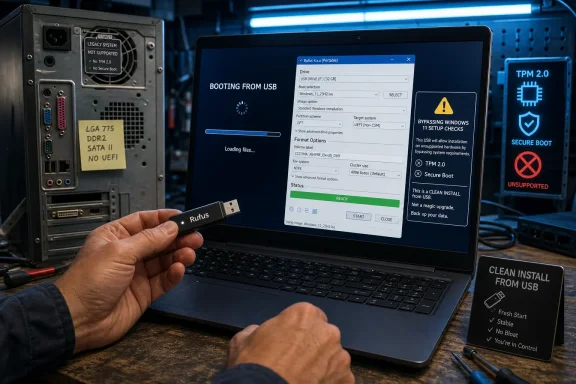
Rufus gained its current symbolic weight because it moved that stop sign. When creating Windows 11 installation media, Rufus can offer an “extended” installation path that removes checks such as TPM 2.0, Secure Boot, and minimum RAM requirements during setup. The important caveat, documented by the Rufus project itself, is that this is primarily about booting from the created media for a clean install, not magically transforming every unsupported in-place upgrade into a supported one.
That distinction matters because Rufus is often described too loosely. It does not make old hardware modern. It does not persuade Microsoft to support the machine. It does not guarantee every future feature update will install cleanly. It changes the installation media so Windows Setup does not block the door at the first encounter.
That is why technicians like it. The value is not only the bypass. The value is predictability. In a repair environment, a tool that behaves consistently across weird firmware, broken installs, and mixed hardware generations is worth more than one that is officially blessed but less flexible.
The Windows 11 options merely made Rufus visible to a wider audience. Before Windows 11, Rufus was already popular among people installing Linux distributions, flashing rescue environments, deploying Windows images, or preparing firmware tools. After Windows 11, it became the app ordinary users heard about when their PC Health Check result told them a working computer was suddenly unfit for the future.
This is the recurring pattern in Windows history. Microsoft changes the platform; independent utilities absorb the friction. Start menu replacements, debloat scripts, activation troubleshooters, driver tools, imaging utilities, registry editors, offline account workarounds — the Windows ecosystem has always had a shadow layer of community software that exists because the official path is not enough for every real machine.
But the company’s policy has a cost, and that cost lands unevenly. A business with a hardware refresh cycle can absorb Windows 11 requirements as procurement policy. A household, school, nonprofit, or small shop may see the same requirements as a forced replacement of equipment that still browses the web, runs Office, handles email, and performs basic productivity tasks.
That is where Rufus becomes politically interesting. It is not merely helping people install software. It is challenging the assumption that a vendor’s support boundary should be identical to a user’s usefulness boundary. Microsoft can say, reasonably, that unsupported hardware is unsupported. Users can respond, just as reasonably, that unsupported does not mean unusable.
The environmental argument also matters. Extending the life of a PC by even a few years reduces e-waste and delays new hardware purchases. That does not erase security tradeoffs, but it complicates the easy claim that every older Windows 10 machine should simply be replaced. A seven-year-old laptop with an SSD and enough RAM may be a poor fit for a corporate zero-trust fleet, but a perfectly good machine for a student, a workshop, or a secondary household computer.
That is not scaremongering; it is the logic of platform evolution. If an operating system eventually assumes hardware capabilities that an old processor simply lacks, no USB creation tool can paper over that forever. Rufus can bypass checks that Microsoft’s setup process is willing to let administrators bypass. It cannot emulate missing silicon.
There are also practical issues. Some games and anti-cheat systems increasingly care about Secure Boot and TPM state. Some corporate tools may flag unsupported installations. BitLocker behavior, firmware updates, driver availability, and future recovery scenarios may be less predictable on machines outside Microsoft’s supported list.
This does not mean users should never use Rufus for Windows 11. It means they should understand the bargain. Rufus is excellent for experimentation, reuse, lab machines, home systems, and certain repair scenarios. It is a poor substitute for a supported hardware baseline where compliance, auditability, endpoint security, and predictable lifecycle management matter.
Rufus has historically helped users create media from official ISOs, and the project’s open-source nature gives technically inclined users a way to inspect what it does. That transparency is important because boot media is an unusually sensitive category of software. A compromised installer is not just another bad download; it is a potential compromise of the operating system before the operating system even exists.
This is why users should be disciplined. Download Rufus from the official project site or its GitHub repository, not from SEO farms and “download” portals. Use official Microsoft Windows images where possible. Treat random modified ISOs as radioactive unless there is a strong reason and a trusted chain of custody.
Rufus’ popularity also says something uncomfortable about Microsoft’s own tooling. The official Media Creation Tool is fine for mainstream cases, but it is deliberately constrained. Rufus succeeds because real-world Windows installation is messier than Microsoft’s preferred workflow. When an independent utility becomes the default recommendation for jobs adjacent to Microsoft’s own installer, that is not just a compliment to the utility. It is feedback for the platform owner.
Rufus thrives in that ambiguity. It gives users a way to say: let me decide. That ethos has deep roots in PC culture. The personal computer was not supposed to be an appliance whose useful life was dictated entirely by a vendor compatibility table. It was supposed to be general-purpose hardware.
Microsoft, of course, has spent years trying to make Windows more appliance-like where security is concerned. That is understandable. The old anything-goes PC model produced a sprawling attack surface and decades of malware misery. But every move toward a more controlled Windows also creates resentment among users who bought PCs precisely because they were flexible.
Rufus sits at that fault line. It is not anti-security by nature. It is anti-friction. Sometimes that friction is needless bureaucracy. Sometimes it is a warning sign the user should heed. The tool does not decide which is which; it merely gives the user enough rope to repair a machine, revive a machine, or make a mess.
That distinction should be bright. A sysadmin using Rufus to create a rescue USB is practicing good preparedness. A company using Rufus to push Windows 11 onto a fleet of machines Microsoft does not support is assuming lifecycle risk it may not fully control. Feature updates, driver support, compliance posture, and endpoint security baselines all become harder to defend when the estate begins with “we bypassed the installer.”
The wiser enterprise response is to treat Rufus as a tool for exceptions, not policy. Lab machines, one-off recovery, test benches, and noncritical devices are reasonable territory. Production devices handling sensitive data should meet the platform baseline or remain on a managed, supported alternative until replaced.
Home users get a different calculation. If the choice is between discarding a working PC or running Windows 11 unsupported with eyes open, Rufus may be perfectly rational. The risk is not zero, but neither is the cost of unnecessary replacement. The right answer depends on what the machine does, who depends on it, and how much the user understands about backups and recovery.
 Rufus Turns a Flash Drive Into a Policy Dispute
At its simplest, Rufus does something Windows users have needed for decades: it takes an ISO image and writes it to a USB stick in a way a PC can boot. That sounds mundane until you are staring at a machine with a blank drive, a corrupted Windows install, or firmware old enough to make Microsoft’s modern setup tools unhelpful.The utility’s appeal has always been its directness. It is portable, fast, and largely indifferent to whether the machine in front of you is a brand-new workstation or a dusty laptop rescued from a closet. For technicians, that makes it a trusted item in the toolkit. For home users, it turns a task that once smelled of command prompts and disk partitioning into a handful of dropdowns and a Start button.
Modernet Digital frames Rufus as a second-life tool for older PCs, and that is the right cultural read. The application is not famous because people enjoy formatting USB sticks. It is famous because Microsoft’s Windows 11 line in the sand created a giant population of capable-but-officially-unwanted hardware.
Windows 11 Made the Installer the Battlefield
Microsoft’s Windows 11 requirements were never just about whether the operating system could technically run. The company’s published specification requires TPM 2.0 and UEFI Secure Boot capability, among other requirements, and Microsoft has repeatedly defended that baseline as a security decision rather than an arbitrary cutoff.There is a serious argument behind Microsoft’s position. TPM-backed features can help protect encryption keys and support modern credential protections. Secure Boot is meant to reduce the ability of pre-OS malware to wedge itself into the startup chain. In an enterprise world full of ransomware, firmware attacks, and stolen credentials, raising the floor is not irrational.
But Windows is not only an enterprise platform. It is also the operating system on old family laptops, budget desktops, school hand-me-downs, point-of-sale boxes, hobbyist machines, and perfectly functional office PCs that happen to predate Microsoft’s preferred hardware era. For those users, Windows 11’s setup screen did not feel like security architecture. It felt like a stop sign.
Rufus gained its current symbolic weight because it moved that stop sign. When creating Windows 11 installation media, Rufus can offer an “extended” installation path that removes checks such as TPM 2.0, Secure Boot, and minimum RAM requirements during setup. The important caveat, documented by the Rufus project itself, is that this is primarily about booting from the created media for a clean install, not magically transforming every unsupported in-place upgrade into a supported one.
That distinction matters because Rufus is often described too loosely. It does not make old hardware modern. It does not persuade Microsoft to support the machine. It does not guarantee every future feature update will install cleanly. It changes the installation media so Windows Setup does not block the door at the first encounter.
The Tool Is Simple Because the Problem Is Not
Rufus’ interface hides a surprising amount of technical work. It chooses partition schemes, file systems, and bootloader arrangements based on the target device and image. It can prepare media for UEFI or legacy BIOS systems, handle images too large for FAT32, and create USB drives that work in situations where Microsoft’s own Media Creation Tool may be too narrow for the job.That is why technicians like it. The value is not only the bypass. The value is predictability. In a repair environment, a tool that behaves consistently across weird firmware, broken installs, and mixed hardware generations is worth more than one that is officially blessed but less flexible.
The Windows 11 options merely made Rufus visible to a wider audience. Before Windows 11, Rufus was already popular among people installing Linux distributions, flashing rescue environments, deploying Windows images, or preparing firmware tools. After Windows 11, it became the app ordinary users heard about when their PC Health Check result told them a working computer was suddenly unfit for the future.
This is the recurring pattern in Windows history. Microsoft changes the platform; independent utilities absorb the friction. Start menu replacements, debloat scripts, activation troubleshooters, driver tools, imaging utilities, registry editors, offline account workarounds — the Windows ecosystem has always had a shadow layer of community software that exists because the official path is not enough for every real machine.
Microsoft’s Security Case Is Real, but So Is the Waste
It is tempting to turn the Rufus story into a clean morality play: plucky open-source tool versus controlling platform vendor. The truth is less tidy. Microsoft is not wrong that Windows security improves when hardware support is more consistent. A fleet of machines with TPM 2.0, Secure Boot, virtualization-based security, and supported CPUs is easier to harden than a zoo of decade-old PCs with inconsistent firmware.But the company’s policy has a cost, and that cost lands unevenly. A business with a hardware refresh cycle can absorb Windows 11 requirements as procurement policy. A household, school, nonprofit, or small shop may see the same requirements as a forced replacement of equipment that still browses the web, runs Office, handles email, and performs basic productivity tasks.
That is where Rufus becomes politically interesting. It is not merely helping people install software. It is challenging the assumption that a vendor’s support boundary should be identical to a user’s usefulness boundary. Microsoft can say, reasonably, that unsupported hardware is unsupported. Users can respond, just as reasonably, that unsupported does not mean unusable.
The environmental argument also matters. Extending the life of a PC by even a few years reduces e-waste and delays new hardware purchases. That does not erase security tradeoffs, but it complicates the easy claim that every older Windows 10 machine should simply be replaced. A seven-year-old laptop with an SSD and enough RAM may be a poor fit for a corporate zero-trust fleet, but a perfectly good machine for a student, a workshop, or a secondary household computer.
The Bypass Is Not a Warranty
The most dangerous myth around Rufus is that it converts an unsupported Windows 11 install into a normal one. It does not. The machine may receive updates today, but Microsoft has never promised that unsupported PCs will continue receiving every update or feature release indefinitely. The more Windows depends on specific CPU instructions, firmware behavior, and security primitives, the more fragile these installations may become.That is not scaremongering; it is the logic of platform evolution. If an operating system eventually assumes hardware capabilities that an old processor simply lacks, no USB creation tool can paper over that forever. Rufus can bypass checks that Microsoft’s setup process is willing to let administrators bypass. It cannot emulate missing silicon.
There are also practical issues. Some games and anti-cheat systems increasingly care about Secure Boot and TPM state. Some corporate tools may flag unsupported installations. BitLocker behavior, firmware updates, driver availability, and future recovery scenarios may be less predictable on machines outside Microsoft’s supported list.
This does not mean users should never use Rufus for Windows 11. It means they should understand the bargain. Rufus is excellent for experimentation, reuse, lab machines, home systems, and certain repair scenarios. It is a poor substitute for a supported hardware baseline where compliance, auditability, endpoint security, and predictable lifecycle management matter.
The ISO Question Reveals a Bigger Trust Problem
Modernet Digital notes tensions around official Windows ISO availability and Microsoft’s restrictions. That tension points to a wider trust problem: users want clean, official installation files, but they also want installation flexibility Microsoft would rather not foreground.Rufus has historically helped users create media from official ISOs, and the project’s open-source nature gives technically inclined users a way to inspect what it does. That transparency is important because boot media is an unusually sensitive category of software. A compromised installer is not just another bad download; it is a potential compromise of the operating system before the operating system even exists.
This is why users should be disciplined. Download Rufus from the official project site or its GitHub repository, not from SEO farms and “download” portals. Use official Microsoft Windows images where possible. Treat random modified ISOs as radioactive unless there is a strong reason and a trusted chain of custody.
Rufus’ popularity also says something uncomfortable about Microsoft’s own tooling. The official Media Creation Tool is fine for mainstream cases, but it is deliberately constrained. Rufus succeeds because real-world Windows installation is messier than Microsoft’s preferred workflow. When an independent utility becomes the default recommendation for jobs adjacent to Microsoft’s own installer, that is not just a compliment to the utility. It is feedback for the platform owner.
The Repair-Shop Utility Became a Consumer Rights Argument
The Windows 11 era changed the meaning of “unsupported.” In older Windows cycles, unsupported usually meant the operating system was out of updates. With Windows 11, unsupported often means the machine runs Windows 10 well but fails a Windows 11 gate. That shift made compatibility feel less like a technical reality and more like a product decision.Rufus thrives in that ambiguity. It gives users a way to say: let me decide. That ethos has deep roots in PC culture. The personal computer was not supposed to be an appliance whose useful life was dictated entirely by a vendor compatibility table. It was supposed to be general-purpose hardware.
Microsoft, of course, has spent years trying to make Windows more appliance-like where security is concerned. That is understandable. The old anything-goes PC model produced a sprawling attack surface and decades of malware misery. But every move toward a more controlled Windows also creates resentment among users who bought PCs precisely because they were flexible.
Rufus sits at that fault line. It is not anti-security by nature. It is anti-friction. Sometimes that friction is needless bureaucracy. Sometimes it is a warning sign the user should heed. The tool does not decide which is which; it merely gives the user enough rope to repair a machine, revive a machine, or make a mess.
Enterprises Should Admire Rufus, Not Imitate Its Bypass Habit
For IT departments, Rufus is both useful and dangerous. It is useful because bootable media remains essential for recovery, imaging, diagnostics, and lab work. It is dangerous because the same convenience that helps a technician revive a system can tempt an organization into normalizing unsupported endpoints.That distinction should be bright. A sysadmin using Rufus to create a rescue USB is practicing good preparedness. A company using Rufus to push Windows 11 onto a fleet of machines Microsoft does not support is assuming lifecycle risk it may not fully control. Feature updates, driver support, compliance posture, and endpoint security baselines all become harder to defend when the estate begins with “we bypassed the installer.”
The wiser enterprise response is to treat Rufus as a tool for exceptions, not policy. Lab machines, one-off recovery, test benches, and noncritical devices are reasonable territory. Production devices handling sensitive data should meet the platform baseline or remain on a managed, supported alternative until replaced.
Home users get a different calculation. If the choice is between discarding a working PC or running Windows 11 unsupported with eyes open, Rufus may be perfectly rational. The risk is not zero, but neither is the cost of unnecessary replacement. The right answer depends on what the machine does, who depends on it, and how much the user understands about backups and recovery.
The Few Things Users Should Know Before Clicking Start
Rufus deserves its reputation, but its Windows 11 role is best understood as a controlled workaround rather than a magic upgrade entitlement. The tool is powerful precisely because it refuses to pretend every PC fits the same template.- Rufus creates bootable USB media and can remove selected Windows 11 setup checks when preparing installation drives.
- Microsoft’s official Windows 11 requirements still include TPM 2.0 and Secure Boot capability, and bypassing setup checks does not make a PC officially supported.
- The Rufus bypass is most relevant to clean installs started by booting from USB media, not every in-place upgrade launched from inside Windows.
- Unsupported Windows 11 installations may work well, but future feature updates, drivers, security features, or application requirements can become points of failure.
- Users should obtain Rufus from the official project and use official Windows ISOs whenever possible, because installation media is too sensitive to trust to repackaged downloads.
- Businesses should treat unsupported Windows 11 installs as exceptions, while home users should weigh the security tradeoff against the cost and waste of replacing functional hardware.
References
- Primary source: Modernet Digital
Published: 2026-07-05T22:10:18.180158
Loading…
www.modernetdigital.cat - Official source: support.microsoft.com
Loading…
support.microsoft.com - Official source: microsoft.com
Loading…
www.microsoft.com - Official source: learn.microsoft.com
Loading…
learn.microsoft.com - Related coverage: tomshardware.com
How to Bypass Windows 11's TPM, CPU and RAM Requirements | Tom's Hardware
Use simple utilities to install Windows 11 on any PC.www.tomshardware.com - Official source: download.microsoft.com
- Related coverage: windowscentral.com
Enable secure boot & convert MBR to GPT for Windows 10 games | Windows Central
Learn how to convert MBR to GPT, switch BIOS to UEFI, and enable TPM 2.0 and Secure Boot on Windows 10 to run modern games like Battlefield 6.www.windowscentral.com - Related coverage: arstechnica.com
Loading…
arstechnica.com - Related coverage: download-rufus.com
Rufus Windows 11 — Create Bootable USB & Bypass TPM 2.0
Use Rufus Windows 11 to create a bootable USB and bypass TPM 2.0, Secure Boot and RAM requirements. Step-by-step guide for Rufus Windows 11 setup in 2026.download-rufus.com - Related coverage: windowslatest.com
Can you still bypass Windows 11 requirements as Windows 10 hits EOL? We tested it
Windows 10 has reached end of life. But you can upgrade unsupported PCs to Windows 11 by bypassing TPM and RAM checks without losing files. www.windowslatest.com
- Related coverage: itpro.com
Windows 11 minimum requirements: How to check your system | IT Pro
Your computer needs to meet several Windows 11 minimum requirements in order to upgrade and run the new OS effectivelywww.itpro.com - Related coverage: computersoftware-systems.com
UEFI Firmware TPM 2.0 Microsoft Windows 11 WDDM 2.0 Driver Windows 11 Pro Retail
PDF documentwww.computersoftware-systems.com
- Related coverage: versalogic.com
Windows 11 Compatibility and Performance Testing Across VersaLogic Unsupported SBCs
PDF documentwww.versalogic.com
- Related coverage: askwoody.com
- Official source: github.com
Loading…
github.com - Official source: techcommunity.microsoft.com
Loading…
techcommunity.microsoft.com - Related coverage: allthings.how
Make a Windows 11 25H2 USB for unsupported PCs — Rufus, Ventoy
Create bootable media that skips TPM, Secure Boot, RAM, and online account checks using official ISOs.allthings.how - Related coverage: docdroid.net
Loading…
www.docdroid.net