

Microsoft appears to be experimenting in recent Windows Insider builds with a hidden recovery feature named
The thesis is simple: if Microsoft is building a new Device Rebuild path for WinRE, it is tacitly admitting that “Reset this PC” has become too blunt an instrument for modern Windows. The company has spent years making Windows servicing more modular, more cloud-aware, and more capable of self-repair. Recovery, by contrast, still often feels like a cliff edge between “try Startup Repair” and “prepare for a reset.”
The current Windows recovery story is familiar to anyone who has had to rescue a machine at 11 p.m. There is Startup Repair for boot problems, System Restore if restore points exist and still work, Uninstall Updates if a bad patch is the obvious suspect, Command Prompt for those who know what they are doing, and Reset this PC when the system is too damaged to trust.
That menu covers a lot of ground, but it does not cover it gracefully. Startup Repair can be too narrow. Reset this PC can be too broad. A clean install remains the gold standard for certainty, but it is disruptive, slow, and often overkill for a system damaged by servicing corruption, failed updates, broken components, or driver fallout.
Microsoft’s own Windows Recovery Environment documentation describes WinRE as the built-in environment for troubleshooting and repairing systems that cannot boot normally. Microsoft Support also documents Reset this PC as available from either Windows Settings or WinRE, with options to keep or remove personal files. That is useful, but “keep my files” is not the same thing as preserving the user’s full working environment, installed applications, device configuration, enterprise enrollment state, and the thousand small assumptions that make a PC usable.
That is where the reported
That caveat matters. WinCentral’s report is careful on the key point: the feature is hidden and currently non-functional. Microsoft has not announced Device Rebuild, has not described what it does, and has not promised that it will ship in any public Windows release.
Still, feature names inside Windows are rarely random. Microsoft’s internal naming is not poetry, but it tends to be descriptive enough to reveal intent. A string combining servicing, device rebuild, and WinRE user experience strongly implies that someone inside the Windows organization is prototyping a recovery flow that belongs between surgical troubleshooting and full reset.
The most likely interpretation is not that Microsoft wants yet another button in Advanced Options for the sake of visual clutter. The better read is that Windows servicing has become capable enough to support a more ambitious repair path, and the company is now exploring how to expose that capability to users when Windows itself may not boot.
But the PC has changed around it. A Windows 11 machine today is not just a local OS image plus user files. It may be encrypted by default, joined to Entra ID, managed by Intune, protected by virtualization-based security, tied into OneDrive Known Folder Move, layered with OEM drivers, and configured through policies that matter more than the wallpaper and Downloads folder.
In that world, “reset” is both reassuring and threatening. It promises a way out, but it also implies reconstruction work. Even when personal files survive, users and admins may still face app reinstalls, profile oddities, driver cleanup, BitLocker prompts, update reapplication, and a long tail of “why is this not the way it was before?”
A Device Rebuild option would make sense if Microsoft wants a recovery path that treats Windows as a serviceable platform rather than a disposable image. The operating system already knows how to stage updates, repair components, replace packages, and download known-good payloads. The open question is whether that machinery can be packaged into a recovery action ordinary users can understand and administrators can trust.
In Microsoft vocabulary, servicing is the machinery that keeps Windows updated, patched, repaired, and componentized. It is the world of cumulative updates, component store health, repair sources, feature enablement, rollback, and deployment state. When servicing works, Windows quietly maintains itself. When servicing breaks, the user often experiences the failure as update loops, missing features, failed repairs, or a machine that cannot get healthy without drastic intervention.
That is why a recovery feature tied to servicing would be significant. It suggests Microsoft may be looking beyond the old recovery model of “restore an image” or “reset the installation” and toward a model where Windows can rebuild itself from trusted components. That could mean downloading fresh files, reconstructing damaged system state, reapplying packages, or refreshing the OS while retaining more of the device’s configuration than Reset this PC currently guarantees.
There is precedent for this direction. Microsoft has already tested and documented Windows repair mechanisms that use Windows Update to reinstall a repair version of Windows without removing files, settings, or apps. That capability lives in the running OS, not primarily as a WinRE emergency flow. Bringing a similar idea into the recovery environment would be the natural escalation: if Windows cannot reliably fix itself while booted, let the recovery environment broker the repair.
It may not be enough anymore. The recovery environment is now part of the resilience story for a continuously serviced OS. Windows Update can introduce problems. Driver updates can strand machines. Security changes can interact badly with recovery partitions. Enterprises need fleet-level recovery behavior, not just a local menu for a single panicked user.
Recent history has made the point brutally. Microsoft has had to address bugs that affected reset and recovery tools, and reporting from outlets such as Windows Central, Tom’s Hardware, and TechRadar has shown how damaging recovery failures can be when the rescue system itself is impaired. A recovery environment that cannot accept keyboard or mouse input, or a reset path that fails after an update, is not a small papercut. It is the emergency exit being jammed shut.
That context makes Device Rebuild more than a convenience feature. If real, it would fit into a larger pressure campaign inside Microsoft: Windows must not merely update faster or add AI features faster; it must recover from failure more intelligently.
That matters because it shows Microsoft’s direction of travel. WinRE is being repositioned from a static toolbox into a connected remediation environment. The old model says the user chooses a tool and hopes it works. The newer model says Windows can detect patterns, phone home within policy boundaries, and apply a targeted repair without a technician touching each machine.
A Device Rebuild flow could be a sibling to that idea rather than a replacement. Quick Machine Recovery is aimed at widespread boot issues and targeted remediations. Device Rebuild, judging only from the name, sounds more like a user- or admin-initiated reconstruction of a broken local installation.
If Microsoft connects those dots, WinRE becomes something closer to a service terminal for Windows: offline enough to rescue a damaged OS, online enough to fetch clean components, and guided enough that non-experts do not have to memorize deployment commands.
For IT departments, the promise is more complicated. Admins do not merely ask whether a recovery option works. They ask whether it is controllable, auditable, scriptable, policy-aware, compatible with encryption, respectful of compliance boundaries, and predictable across hardware models.
If Device Rebuild ever ships, Microsoft will need to answer practical questions quickly. Does it preserve domain join or Entra ID join? Does it keep management enrollment? How does it handle BitLocker recovery keys? Can admins disable it? Can it use local repair content instead of cloud downloads? What logs does it produce? Does it preserve third-party security agents, VPN clients, and line-of-business applications?
Those details will determine whether Device Rebuild becomes a beloved rescue feature or another consumer-facing button that enterprises hide by policy. Microsoft has learned this lesson repeatedly: a repair feature that cannot be governed becomes a risk surface, even if it is technically helpful.
That does not mean Device Rebuild would be unsafe. It means Microsoft has to design it as a security feature from day one, not as a convenience feature with authentication added later. A rebuild tool capable of replacing system components or restoring bootability could be extremely valuable to defenders. It could also become attractive to attackers if access control, tamper resistance, or recovery authentication is weak.
Microsoft’s existing WinRE documentation already discusses authentication and management considerations, including policy behavior around recovery environment access. Device Rebuild would raise the stakes because it sounds like a more consequential action than launching Startup Repair.
The safest implementation would likely require administrative authentication where possible, respect BitLocker protections, produce logs visible after recovery, and give enterprise admins clear policy controls. In a managed fleet, “repair this device” should not become “silently alter this device in a way the security team cannot reconstruct.”
IT pros trust the USB stick because it is comprehensible. Boot from external media, wipe or repair as needed, reinstall, rejoin, redeploy. It is tedious, but it is deterministic. When a Windows installation is sufficiently suspect, certainty matters more than elegance.
Device Rebuild has to earn trust against that standard. If it is too opaque, admins will avoid it. If it fails halfway, users will resent it. If it preserves too much damaged state, it will look like a cosmetic reset. If it discards too much, it will be Reset this PC with a new name.
The sweet spot is narrow but valuable. Microsoft needs a recovery operation that can say, in effect: we are going to reconstruct the Windows system layer from trusted sources, preserve the user and device state where safe, roll back or replace broken servicing components, and leave a machine that is both bootable and supportable. That is hard engineering. It is also exactly the sort of hard engineering Windows needs more than another surface-level UI refresh.
A rebuild operation in that world could eventually mean more than replacing system files. It could mean returning a managed device to a known-good operational state without forcing a full reprovisioning cycle. That would align with Autopilot, Intune, Windows Update for Business, and the broader Microsoft 365 endpoint management stack.
This is speculative, but it is not fanciful. The direction of Windows management has been toward declarative state: define what the device should be, then let cloud and client agents converge it toward that state. Recovery is the hardest place to apply that model because the normal agents may not be running. WinRE is the place where Microsoft can cheat that limitation by operating from outside the broken OS.
If Device Rebuild is merely a nicer wrapper around existing reset behavior, it will be disappointing. If it is the first visible step toward state-based recovery, it could be one of the more important Windows reliability upgrades in years.
A Device Rebuild option could make that worse if Microsoft does not explain it clearly. Users need to know what happens to files, apps, settings, accounts, encryption, drivers, and updates. Administrators need even more exactness. “Rebuild” sounds reassuring, but it is not self-defining.
The best version of the feature would present plain-English consequences before action, not marketing. It would say what is preserved, what may be removed, what connectivity is required, how long it might take, and how to recover logs afterward. It would also avoid pretending that every broken Windows installation can be repaired safely.
The worst version would become another ambiguous recovery tile that users click because it sounds less scary than reset. That would generate forum posts, support calls, and admin headaches. Recovery features succeed when they reduce uncertainty, not when they rename it.
Windows is now a constantly serviced platform running across wildly diverse hardware, driver stacks, consumer configurations, and enterprise policy environments. Failure is inevitable. What matters is whether failure becomes a reinstall, a support ticket, a lost afternoon, or a guided repair.
Microsoft’s public messaging often emphasizes new experiences: Copilot integrations, Settings changes, Start menu refinements, silicon features, and developer tooling. But for many WindowsForum readers, the features that matter most are the ones that make Windows less brittle. A smarter recovery path would be unglamorous in the best possible way.
That is why this hidden identifier deserves attention despite the uncertainty. It points to the unsexy layer of Windows where Microsoft’s reputation is often won or lost: servicing, repair, and the ability to get a machine back without making the user start over.
Today the support script often escalates too quickly. Try rebooting. Try Startup Repair. Try uninstalling the latest update. Try System Restore, if available. Back up what you can. Reset the PC. If that fails, create installation media.
A credible rebuild option could insert a new step before reset. That matters because support workflows are built around probabilities. If Device Rebuild works often enough, it becomes the recommendation before destructive recovery. If it is fast enough, it becomes the recommendation before a technician visit. If it is reliable enough, it becomes part of enterprise runbooks.
But Microsoft must resist the urge to overpromise. Not every damaged installation should be saved. Malware compromise, disk failure, firmware problems, severe filesystem corruption, and broken storage hardware are not solved by a friendlier WinRE menu. Device Rebuild would need to know when to stop and tell the truth.
The broader pattern is larger. Microsoft has been modernizing repair through Windows Update, testing Quick Machine Recovery, and framing Windows resilience as a strategic priority. WinRE has also been exposed as a critical dependency when updates break recovery behavior itself. Put together, the case for a smarter rebuild feature is strong.
That does not mean the feature will ship soon, or at all. Insider builds are laboratories, not contracts. Microsoft may rename the option, merge it into an existing repair flow, hold it for a future Windows release, or abandon it if reliability does not meet the bar.
Still, the direction is unmistakable. Windows recovery is moving away from static local tools and toward connected, servicing-aware repair. Device Rebuild, if real, would be a user-visible expression of that shift.
Servicing_DeviceRebuild_WinREUX, a non-functional identifier that WinCentral says points toward a possible “Device Rebuild” option inside the Windows Recovery Environment. That is not an announcement, and it is not yet a product. But it is a meaningful breadcrumb because of where it seems to live: not in Settings polish, not in onboarding, but in the last-resort machinery Windows users meet when the operating system has already gone sideways.The thesis is simple: if Microsoft is building a new Device Rebuild path for WinRE, it is tacitly admitting that “Reset this PC” has become too blunt an instrument for modern Windows. The company has spent years making Windows servicing more modular, more cloud-aware, and more capable of self-repair. Recovery, by contrast, still often feels like a cliff edge between “try Startup Repair” and “prepare for a reset.”
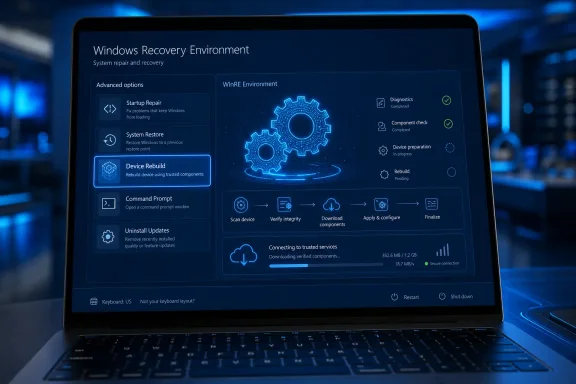 Microsoft’s Recovery Stack Has a Missing Middle
The current Windows recovery story is familiar to anyone who has had to rescue a machine at 11 p.m. There is Startup Repair for boot problems, System Restore if restore points exist and still work, Uninstall Updates if a bad patch is the obvious suspect, Command Prompt for those who know what they are doing, and Reset this PC when the system is too damaged to trust.That menu covers a lot of ground, but it does not cover it gracefully. Startup Repair can be too narrow. Reset this PC can be too broad. A clean install remains the gold standard for certainty, but it is disruptive, slow, and often overkill for a system damaged by servicing corruption, failed updates, broken components, or driver fallout.
Microsoft’s own Windows Recovery Environment documentation describes WinRE as the built-in environment for troubleshooting and repairing systems that cannot boot normally. Microsoft Support also documents Reset this PC as available from either Windows Settings or WinRE, with options to keep or remove personal files. That is useful, but “keep my files” is not the same thing as preserving the user’s full working environment, installed applications, device configuration, enterprise enrollment state, and the thousand small assumptions that make a PC usable.
That is where the reported
Servicing_DeviceRebuild_WinREUX name becomes interesting. “Servicing” suggests something tied to the Windows update and repair pipeline. “DeviceRebuild” sounds broader than a component scan but less destructive than a factory reset. “WinREUX” points toward the recovery environment’s user experience rather than a background-only repair primitive.A Hidden Identifier Is Not a Roadmap, But It Is Not Noise Either
Windows enthusiasts have built an entire cottage industry around dormant feature IDs in Insider builds. Sometimes those IDs lead to shipping features. Sometimes they lead to renamed experiments. Sometimes they are abandoned plumbing, A/B test scaffolding, or internal leftovers that never become visible to users.That caveat matters. WinCentral’s report is careful on the key point: the feature is hidden and currently non-functional. Microsoft has not announced Device Rebuild, has not described what it does, and has not promised that it will ship in any public Windows release.
Still, feature names inside Windows are rarely random. Microsoft’s internal naming is not poetry, but it tends to be descriptive enough to reveal intent. A string combining servicing, device rebuild, and WinRE user experience strongly implies that someone inside the Windows organization is prototyping a recovery flow that belongs between surgical troubleshooting and full reset.
The most likely interpretation is not that Microsoft wants yet another button in Advanced Options for the sake of visual clutter. The better read is that Windows servicing has become capable enough to support a more ambitious repair path, and the company is now exploring how to expose that capability to users when Windows itself may not boot.
“Reset This PC” Solved the Wrong Problem for Today’s Windows
Reset this PC was a major step forward when Microsoft introduced push-button reset concepts in the Windows 8 era and carried them forward into Windows 10 and 11. It gave users a built-in path away from OEM recovery DVDs, mystery partitions, and vendor-specific restore utilities. For consumers, it made Windows feel less fragile.But the PC has changed around it. A Windows 11 machine today is not just a local OS image plus user files. It may be encrypted by default, joined to Entra ID, managed by Intune, protected by virtualization-based security, tied into OneDrive Known Folder Move, layered with OEM drivers, and configured through policies that matter more than the wallpaper and Downloads folder.
In that world, “reset” is both reassuring and threatening. It promises a way out, but it also implies reconstruction work. Even when personal files survive, users and admins may still face app reinstalls, profile oddities, driver cleanup, BitLocker prompts, update reapplication, and a long tail of “why is this not the way it was before?”
A Device Rebuild option would make sense if Microsoft wants a recovery path that treats Windows as a serviceable platform rather than a disposable image. The operating system already knows how to stage updates, repair components, replace packages, and download known-good payloads. The open question is whether that machinery can be packaged into a recovery action ordinary users can understand and administrators can trust.
The Clue Is in the Word “Servicing”
The most important part of the hidden feature name may not be “Device Rebuild.” It may be “Servicing.”In Microsoft vocabulary, servicing is the machinery that keeps Windows updated, patched, repaired, and componentized. It is the world of cumulative updates, component store health, repair sources, feature enablement, rollback, and deployment state. When servicing works, Windows quietly maintains itself. When servicing breaks, the user often experiences the failure as update loops, missing features, failed repairs, or a machine that cannot get healthy without drastic intervention.
That is why a recovery feature tied to servicing would be significant. It suggests Microsoft may be looking beyond the old recovery model of “restore an image” or “reset the installation” and toward a model where Windows can rebuild itself from trusted components. That could mean downloading fresh files, reconstructing damaged system state, reapplying packages, or refreshing the OS while retaining more of the device’s configuration than Reset this PC currently guarantees.
There is precedent for this direction. Microsoft has already tested and documented Windows repair mechanisms that use Windows Update to reinstall a repair version of Windows without removing files, settings, or apps. That capability lives in the running OS, not primarily as a WinRE emergency flow. Bringing a similar idea into the recovery environment would be the natural escalation: if Windows cannot reliably fix itself while booted, let the recovery environment broker the repair.
WinRE Is No Longer Just the “Blue Screen of Life”
Microsoft’s Windows IT Pro Blog once described WinRE as the “blue screen of life,” a phrase that captures the odd comfort of seeing the recovery interface after a boot failure. It is not Windows proper, but it is Windows-adjacent enough to offer a way back. For years, that was enough.It may not be enough anymore. The recovery environment is now part of the resilience story for a continuously serviced OS. Windows Update can introduce problems. Driver updates can strand machines. Security changes can interact badly with recovery partitions. Enterprises need fleet-level recovery behavior, not just a local menu for a single panicked user.
Recent history has made the point brutally. Microsoft has had to address bugs that affected reset and recovery tools, and reporting from outlets such as Windows Central, Tom’s Hardware, and TechRadar has shown how damaging recovery failures can be when the rescue system itself is impaired. A recovery environment that cannot accept keyboard or mouse input, or a reset path that fails after an update, is not a small papercut. It is the emergency exit being jammed shut.
That context makes Device Rebuild more than a convenience feature. If real, it would fit into a larger pressure campaign inside Microsoft: Windows must not merely update faster or add AI features faster; it must recover from failure more intelligently.
Quick Machine Recovery Points to the Same Strategy
The hidden Device Rebuild name also lands in a period when Microsoft has been talking more openly about Windows resilience. At Ignite 2024, Microsoft announced the Windows Resiliency Initiative after a year in which endpoint reliability became a board-level concern for many organizations. One resulting feature, Quick Machine Recovery, has been tested with Windows Insiders as a way for devices stuck in boot failure to enter WinRE, connect to the network, send diagnostic data, and receive targeted fixes through Windows Update.That matters because it shows Microsoft’s direction of travel. WinRE is being repositioned from a static toolbox into a connected remediation environment. The old model says the user chooses a tool and hopes it works. The newer model says Windows can detect patterns, phone home within policy boundaries, and apply a targeted repair without a technician touching each machine.
A Device Rebuild flow could be a sibling to that idea rather than a replacement. Quick Machine Recovery is aimed at widespread boot issues and targeted remediations. Device Rebuild, judging only from the name, sounds more like a user- or admin-initiated reconstruction of a broken local installation.
If Microsoft connects those dots, WinRE becomes something closer to a service terminal for Windows: offline enough to rescue a damaged OS, online enough to fetch clean components, and guided enough that non-experts do not have to memorize deployment commands.
The Consumer Pitch Is Obvious, But the Enterprise Pitch Is Harder
For home users, the sales pitch writes itself. A button that can rebuild Windows without wiping the slate clean would be far less intimidating than Reset this PC. It would also match how people think about broken devices: they want the system repaired, not reborn.For IT departments, the promise is more complicated. Admins do not merely ask whether a recovery option works. They ask whether it is controllable, auditable, scriptable, policy-aware, compatible with encryption, respectful of compliance boundaries, and predictable across hardware models.
If Device Rebuild ever ships, Microsoft will need to answer practical questions quickly. Does it preserve domain join or Entra ID join? Does it keep management enrollment? How does it handle BitLocker recovery keys? Can admins disable it? Can it use local repair content instead of cloud downloads? What logs does it produce? Does it preserve third-party security agents, VPN clients, and line-of-business applications?
Those details will determine whether Device Rebuild becomes a beloved rescue feature or another consumer-facing button that enterprises hide by policy. Microsoft has learned this lesson repeatedly: a repair feature that cannot be governed becomes a risk surface, even if it is technically helpful.
The Security Trade-Off Cannot Be an Afterthought
Any powerful recovery feature lives in a dangerous neighborhood. WinRE exists outside the normal running Windows session. It can access repair tools, reset paths, command-line utilities, and sometimes sensitive local data depending on encryption state and authentication requirements.That does not mean Device Rebuild would be unsafe. It means Microsoft has to design it as a security feature from day one, not as a convenience feature with authentication added later. A rebuild tool capable of replacing system components or restoring bootability could be extremely valuable to defenders. It could also become attractive to attackers if access control, tamper resistance, or recovery authentication is weak.
Microsoft’s existing WinRE documentation already discusses authentication and management considerations, including policy behavior around recovery environment access. Device Rebuild would raise the stakes because it sounds like a more consequential action than launching Startup Repair.
The safest implementation would likely require administrative authentication where possible, respect BitLocker protections, produce logs visible after recovery, and give enterprise admins clear policy controls. In a managed fleet, “repair this device” should not become “silently alter this device in a way the security team cannot reconstruct.”
Microsoft Has to Beat the USB Stick
The benchmark for any new recovery feature is not merely Reset this PC. It is the clean install from known-good installation media.IT pros trust the USB stick because it is comprehensible. Boot from external media, wipe or repair as needed, reinstall, rejoin, redeploy. It is tedious, but it is deterministic. When a Windows installation is sufficiently suspect, certainty matters more than elegance.
Device Rebuild has to earn trust against that standard. If it is too opaque, admins will avoid it. If it fails halfway, users will resent it. If it preserves too much damaged state, it will look like a cosmetic reset. If it discards too much, it will be Reset this PC with a new name.
The sweet spot is narrow but valuable. Microsoft needs a recovery operation that can say, in effect: we are going to reconstruct the Windows system layer from trusted sources, preserve the user and device state where safe, roll back or replace broken servicing components, and leave a machine that is both bootable and supportable. That is hard engineering. It is also exactly the sort of hard engineering Windows needs more than another surface-level UI refresh.
The Name Suggests a Future Where Windows Repairs Itself Like a Platform
The phrase “Device Rebuild” is broader than “OS Repair.” That may be accidental, but it is worth noticing. Microsoft increasingly treats a Windows PC as a managed device rather than a standalone installation. The device has identity, policy, update state, recovery state, encryption state, driver state, and cloud relationships.A rebuild operation in that world could eventually mean more than replacing system files. It could mean returning a managed device to a known-good operational state without forcing a full reprovisioning cycle. That would align with Autopilot, Intune, Windows Update for Business, and the broader Microsoft 365 endpoint management stack.
This is speculative, but it is not fanciful. The direction of Windows management has been toward declarative state: define what the device should be, then let cloud and client agents converge it toward that state. Recovery is the hardest place to apply that model because the normal agents may not be running. WinRE is the place where Microsoft can cheat that limitation by operating from outside the broken OS.
If Device Rebuild is merely a nicer wrapper around existing reset behavior, it will be disappointing. If it is the first visible step toward state-based recovery, it could be one of the more important Windows reliability upgrades in years.
The Risk Is That Microsoft Adds Another Button Without Removing Confusion
Windows recovery is already full of terms that sound similar to normal users and dangerously imprecise to experts. Reset, restore, repair, recover, reinstall, rollback, uninstall, refresh — each has a specific meaning somewhere in Microsoft’s stack, but those meanings blur under stress.A Device Rebuild option could make that worse if Microsoft does not explain it clearly. Users need to know what happens to files, apps, settings, accounts, encryption, drivers, and updates. Administrators need even more exactness. “Rebuild” sounds reassuring, but it is not self-defining.
The best version of the feature would present plain-English consequences before action, not marketing. It would say what is preserved, what may be removed, what connectivity is required, how long it might take, and how to recover logs afterward. It would also avoid pretending that every broken Windows installation can be repaired safely.
The worst version would become another ambiguous recovery tile that users click because it sounds less scary than reset. That would generate forum posts, support calls, and admin headaches. Recovery features succeed when they reduce uncertainty, not when they rename it.
The Real Story Is Reliability, Not Recovery
It is tempting to treat Device Rebuild as a niche feature because most users do not spend their days in WinRE. That misses the point. Recovery improvements matter precisely because they are invisible until they are urgently needed.Windows is now a constantly serviced platform running across wildly diverse hardware, driver stacks, consumer configurations, and enterprise policy environments. Failure is inevitable. What matters is whether failure becomes a reinstall, a support ticket, a lost afternoon, or a guided repair.
Microsoft’s public messaging often emphasizes new experiences: Copilot integrations, Settings changes, Start menu refinements, silicon features, and developer tooling. But for many WindowsForum readers, the features that matter most are the ones that make Windows less brittle. A smarter recovery path would be unglamorous in the best possible way.
That is why this hidden identifier deserves attention despite the uncertainty. It points to the unsexy layer of Windows where Microsoft’s reputation is often won or lost: servicing, repair, and the ability to get a machine back without making the user start over.
A Rebuild Button Would Change the Support Conversation
If Microsoft ships Device Rebuild, the first audience may be ordinary users, but the second audience will be every family tech helper, help-desk technician, MSP, and sysadmin who has ever talked someone through recovery over the phone.Today the support script often escalates too quickly. Try rebooting. Try Startup Repair. Try uninstalling the latest update. Try System Restore, if available. Back up what you can. Reset the PC. If that fails, create installation media.
A credible rebuild option could insert a new step before reset. That matters because support workflows are built around probabilities. If Device Rebuild works often enough, it becomes the recommendation before destructive recovery. If it is fast enough, it becomes the recommendation before a technician visit. If it is reliable enough, it becomes part of enterprise runbooks.
But Microsoft must resist the urge to overpromise. Not every damaged installation should be saved. Malware compromise, disk failure, firmware problems, severe filesystem corruption, and broken storage hardware are not solved by a friendlier WinRE menu. Device Rebuild would need to know when to stop and tell the truth.
The Breadcrumbs Point Toward a More Ambitious WinRE
The immediate facts are narrow. WinCentral spotted a hidden, non-functional feature identifier. The name suggests a Device Rebuild experience tied to servicing and WinRE. Microsoft has not announced it.The broader pattern is larger. Microsoft has been modernizing repair through Windows Update, testing Quick Machine Recovery, and framing Windows resilience as a strategic priority. WinRE has also been exposed as a critical dependency when updates break recovery behavior itself. Put together, the case for a smarter rebuild feature is strong.
That does not mean the feature will ship soon, or at all. Insider builds are laboratories, not contracts. Microsoft may rename the option, merge it into an existing repair flow, hold it for a future Windows release, or abandon it if reliability does not meet the bar.
Still, the direction is unmistakable. Windows recovery is moving away from static local tools and toward connected, servicing-aware repair. Device Rebuild, if real, would be a user-visible expression of that shift.
The Device Rebuild Clue Leaves Microsoft With a Clear Bar to Meet
A hidden feature name is not enough to change anyone’s disaster recovery plan, but it is enough to sketch what Windows users should demand from whatever Microsoft is building.- Microsoft has not announced Device Rebuild, and the hidden
Servicing_DeviceRebuild_WinREUXidentifier should be treated as evidence of experimentation rather than a confirmed Windows feature. - The name strongly suggests a recovery experience tied to Windows servicing and the Windows Recovery Environment, not merely a cosmetic Settings shortcut.
- The most useful version of Device Rebuild would repair or reconstruct Windows more deeply than Startup Repair while preserving more user and device state than Reset this PC.
- Enterprise adoption would depend on policy controls, logging, BitLocker behavior, management enrollment preservation, and clear documentation.
- Microsoft’s recent work on Windows resilience and Quick Machine Recovery makes a smarter WinRE repair path feel like part of a larger strategy rather than an isolated experiment.
- The feature will only matter if it reduces uncertainty; a vaguely named recovery button that behaves unpredictably would make Windows recovery more confusing, not less.
References
- Primary source: thewincentral.com
Published: 2026-07-06T07:10:12.351738
Loading…
thewincentral.com - Official source: support.microsoft.com
Loading…
support.microsoft.com - Official source: learn.microsoft.com
Windows Recovery Environment (Windows RE) | Microsoft Learn
Windows Recovery Environment (Windows RE)learn.microsoft.com - Related coverage: tomshardware.com
Microsoft rushes out emergency Windows 11 patch after botched update breaks Recovery — restores USB keyboard and mouse input inside WinRE for Windows 11 versions 24H2 and 25H2 | Tom's Hardware
KB5070773 fixes a WinRE bug introduced by October’s cumulative update.www.tomshardware.com - Official source: techcommunity.microsoft.com
Loading…
techcommunity.microsoft.com - Related coverage: windowscentral.com
Microsoft's urgent update fixes Windows Recovery issues for versions 24H2 and 25H2 after KB5066835 mishap | Windows Central
Windows 11 update KB5070773 is now rolling out as an out of band patch that addresses a major issue with the Windows Recovery Environment on the latest version of the OS.www.windowscentral.com