

Microsoft has published an Australian education case study describing how Rehoboth Christian College in Perth, Western Australia, is standardising on 12-inch Microsoft Surface Pro devices powered by Snapdragon processors across its Wilson and Kenwick campuses for students and staff. The story is ostensibly about one school’s device choice, but the more interesting argument is larger: Microsoft is trying to make Surface less like a premium PC brand and more like an institutional platform for learning, endpoint management, data, and AI. Rehoboth’s deployment shows why that pitch is attractive to schools — and why the device is only one piece of a much harder operational puzzle.
For years, classroom computing was framed around access. Schools bought laptop carts, labs, Chromebooks, iPads, or Windows notebooks because students needed a screen and a keyboard within reach. The question was often brutally simple: how many devices can a school afford, and how much pain will the IT department tolerate to keep them alive?
The Rehoboth case study, published by Microsoft Australia, reflects a more mature phase of the education technology cycle. Rehoboth Christian College serves close to 1,100 students across two Perth campuses and has been operating for more than 60 years, but its device strategy is not being sold as a procurement refresh. It is being framed as part of an institutional plan to create “thriving learners, fruitful staff, and vibrant spaces,” in the words of ICT Manager Nathan Yurisich.
That phrasing matters because it is not the language of a spec sheet. It is the language of school leadership trying to justify technology as pedagogy, staff enablement, and culture. Microsoft’s Surface business has always leaned on this kind of positioning, but Rehoboth gives the company a useful education-sector example at a time when Windows devices must defend themselves against both low-cost Chromebooks and Apple’s long-running hold on creative classroom workflows.
The bet is that a Windows tablet-PC hybrid can be more than a typing machine. Surface Pro, in this telling, becomes a whiteboard, notebook, camera, microscope companion, lesson-control panel, AI endpoint, assessment bridge, and managed corporate asset. That is an ambitious role for any device, and the success or failure of the model depends less on the glamour of the hardware than on whether the school can make the device disappear into everyday teaching.
In schools, however, the hybrid form factor makes more practical sense. A teacher who can annotate a PDF, walk around the room, cast wirelessly to a display, switch to portrait orientation for document review, and then return to a keyboard for planning or marking is using the category as designed. A student who can type an essay, sketch a diagram, capture a field observation, and manipulate a 3D model is also closer to the original Surface promise than many office workers ever get.
Microsoft’s case study says Rehoboth selected the 12-inch Surface Pro powered by Snapdragon processors as the primary device for most students and staff. Official Microsoft technical specifications for the Surface Pro for Business 12-inch list a Snapdragon X Plus processor, a Qualcomm Hexagon NPU rated at 45 TOPS, and up to 16 hours of local video playback. Those numbers are not magic, and “up to” battery claims always deserve the usual real-world caveats. But they do explain why this device is being pushed into education: it is small, light, fanless-feeling in spirit even when the details vary by model, pen-friendly, and built around the Copilot+ PC narrative.
For Rehoboth, the mundane win appears to be battery life. Yurisich says students and teachers no longer need power packs in routine use, even with students using devices on long bus rides before and after school. That detail may sound minor, but school IT is won or lost in these dull logistics. A device that lasts the day changes classroom layout, reduces charger dependency, cuts cable clutter, and removes one more excuse for a lesson to collapse into troubleshooting.
The larger significance is that Arm-based Windows machines are finally being treated as plausible fleet devices rather than curiosities. For years, Windows on Arm carried a compatibility asterisk big enough to scare off cautious administrators. The Snapdragon X generation has not erased every concern, especially for specialist software, drivers, and niche classroom tools, but Microsoft now has a better story: long battery life, modern management, local AI acceleration, and enough performance for mainstream education workflows.
Microsoft’s case study says the school encourages inking for marking up documents and PDFs rather than printing handouts. That is a practical substitution, not a futuristic fantasy. If the pen is attached, charged, and ready, teachers can preserve familiar habits — circling, underlining, drawing arrows, showing working — while reducing the paper trail that usually follows classroom administration around like confetti.
The Surface Slim Pen’s storage and charging arrangement matters here. A pen that lives somewhere else is a pen that disappears. A pen that is flat when the lesson begins becomes an argument for returning to paper. Education technology succeeds when the path of least resistance points toward the desired behaviour, and Rehoboth’s example reinforces a basic rule: the accessory is not optional if the workflow depends on it.
The OneNote example is especially strong. Yurisich says maths and science teachers value replay inking because students can revisit the steps used to solve a problem, not merely the final answer. This is one of those cases where digital tools genuinely alter the learning artefact. A static answer on paper shows what a student or teacher ended with; replayable ink can show how they got there.
That distinction is pedagogically meaningful. Mathematics, chemistry, physics, and other step-driven subjects often require diagnosing where reasoning went wrong. If students can replay worked examples, and if teachers can review the process rather than only the output, the device supports formative learning instead of simply digitising submission.
A teacher anchored to a lectern is managing both the class and the machine. A teacher with a lightweight tablet can move through the room while still controlling the displayed material. That can make instruction feel less like a broadcast and more like a guided conversation.
This is where Surface has an advantage over conventional clamshell laptops. A laptop can be carried around, but it is rarely elegant as a handheld teaching device. A tablet can be excellent for mobility, but many schools still need full desktop-class browser workflows, Office apps, learning management systems, printing paths, identity integration, and peripheral compatibility. Surface Pro exists precisely in that overlap.
The risk, of course, is that hybrid devices can become mediocre at both jobs if software and classroom routines are not aligned. Tablet mode is only useful if the apps scale well, the display is comfortable, the wireless projection is reliable, and teachers have the confidence to improvise without derailing the lesson. Rehoboth’s case study suggests the school has reached that confidence gradually, with staff “a few steps up the ladder” in how they use the devices.
That phrase is more revealing than a polished marketing line. Technology adoption in schools rarely happens as a single dramatic leap. It happens as a ladder: one workflow improved, one teacher converted, one lesson redesigned, one frustration removed.
The value of ubiquitous classroom devices is often not a single spectacular project. It is the accumulation of small creative acts that become ordinary. A primary student photographing an insect is not “digital transformation” in the executive sense, but it may be the difference between passively hearing about observation and actively conducting it. A student rotating a model before 3D printing it is not merely consuming content; they are manipulating an object in a design workflow.
Yurisich’s anecdote about a student-made 3D printed headphone clip sitting on his desk is exactly the kind of detail that makes the deployment feel credible. It is not a grand claim about revolutionising education. It is a modest example of a student solving a real problem with digital tools.
This matters because schools are justifiably tired of technology programs that promise transformation and deliver another login screen. Rehoboth’s strongest argument for Surface is that the devices appear to be present at the moment of curiosity. The camera is there. The pen is there. The screen can become a page, a canvas, a model viewer, or a capture device. When that availability becomes routine, teachers do not need to schedule technology as a special event.
That is the difference between a device program and a digital learning culture. The former is counted in assets. The latter is visible in what students assume they can make.
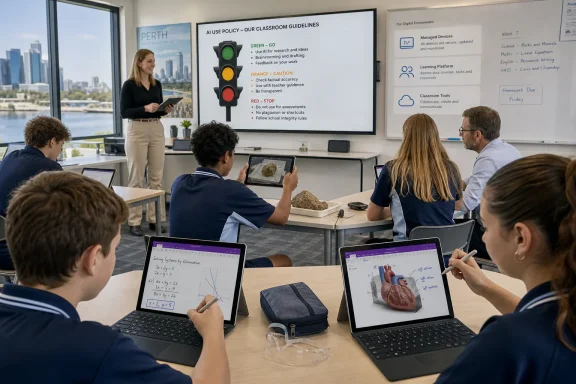
The school is rolling out a traffic light system for AI use: green for acceptable, orange for caution, and red for prohibited. This is a simple governance model, but simple may be exactly what schools need. Teachers, students, and parents are unlikely to navigate a dense AI policy in the middle of a class activity. They need a shared vocabulary for whether a tool is assisting learning, distorting evidence of learning, or crossing a line.
Yurisich gives examples that show the most defensible early uses of AI in education are not about replacing student thought. They are about access and adjustment. Simplifying language for a student with English as a second language, or changing spacing and font presentation for a student with dyslexia, are practical interventions that align AI with inclusion rather than shortcutting.
The local NPU in the Surface Pro also features in Rehoboth’s thinking. Yurisich says local AI tasks feel snappier because work does not always need to be pushed to the cloud and returned. That is exactly the claim Microsoft has been making for Copilot+ PCs: on-device AI can reduce latency, preserve responsiveness, and potentially keep certain workloads closer to the endpoint.
Schools should still be careful not to overread the NPU story. Many of the most powerful AI workflows in Microsoft 365, learning platforms, and custom agents remain cloud-connected. Local acceleration is useful, but it is not a privacy wand, nor does it automatically solve policy, consent, data residency, model behaviour, or assessment integrity. Still, the presence of NPUs in mainstream student and teacher devices changes the planning horizon. AI stops being a separate lab experiment and becomes part of the endpoint estate.
This is where AI in schools moves from novelty to infrastructure. A chatbot that helps students think through ethical considerations may be useful, but it also creates new questions. What does the bot know? What student data does it process? How are prompts and responses stored? Can teachers audit the interaction? Does the tool support learning, or does it quietly standardise the kinds of questions students learn to ask?
The Microsoft Assignments and marks-book workflow is more immediately operational. If work completed in Teams or through Schoolbox via LTI can be graded and reflected in the marks book without double entry, teachers save time. That is not glamorous, but it is arguably one of the most important promises in the whole case study.
Teacher workload is the hidden constraint in most education technology programs. A tool that adds five minutes of administrative friction to every lesson will fail no matter how impressive it looks in a demo. A tool that removes duplicate data entry, streamlines feedback, and gives teachers better visibility into student progress has a much stronger chance of survival.
Reading Progress is another example of AI that makes sense in schools because it targets a specific instructional task. AI-driven fluency analysis is not a replacement for teacher judgement, but it can help collect signals that would be time-consuming to gather manually at scale. The important thing is that such tools remain aids to professional judgement rather than opaque authorities.
In a fragmented school environment, data is messy by default. Students use different devices, teachers adopt different workflows, apps proliferate, files live in inconsistent places, and support teams spend their days translating between systems. Standardising on Surface does not automatically fix that, but it reduces variability. The IT team can manage a known hardware base, secure a consistent endpoint, and build assumptions into support, training, and analytics.
Rehoboth is also using data to understand device usage and learning behaviours, including signals from its Schoolbox LMS. The case study mentions monitoring patterns such as students consistently accessing resources late at night as a possible wellbeing indicator. That is a powerful example because it shows both the promise and sensitivity of educational data.
Used responsibly, such signals can help schools notice students who may be struggling, overloaded, anxious, or disengaged. Used carelessly, they can become surveillance dressed as pastoral care. The difference lies in governance, transparency, proportionality, and human interpretation. A late-night login is not a diagnosis. It is a prompt for context.
This is where schools need to be more cautious than vendors. Microsoft can talk about data foundations for AI uplift, trend visualisation, and productivity. A school must also ask who sees the data, how long it is retained, what students and families understand about it, and what safeguards prevent analytics from becoming labels. Rehoboth’s faith-and-character framing makes that question even more central: technology that supports whole-child development must be judged by more than efficiency.
A device strategy touches procurement cycles, warranties, repairs, enrolment, identity, classroom training, parent expectations, student behaviour, staff confidence, and budget politics. If deliveries miss the start of term, the problem is not merely logistical. It becomes a classroom problem. If repairs are slow, it becomes an equity problem. If finance is misaligned, it becomes a leadership problem.
That is why Yurisich’s distinction between vendors and partners is worth taking seriously. A vendor sells a box. A partner helps reduce institutional uncertainty. In education, that uncertainty is often the real cost.
Microsoft’s Surface Lighthouse community plays a similar role in the case study. Rehoboth is described as a long-standing member, with schools sharing experiences across Australia and beyond. Yurisich says the community helps schools make the most of tools they already have rather than simply pitching new purchases.
That point cuts against the grain of the technology industry’s normal incentive structure. The easiest answer to every problem is a new product, a new licence, or a new platform tier. The harder and usually better answer is deeper adoption of what the school already owns. If the Lighthouse community genuinely helps schools solve problems through shared practice, it may be as important as the hardware itself.
The school is not buying technology for its own sake. It has named learning goals, staff goals, and space goals. It has thought about inking, mobility, AI use, LMS integration, device management, data consistency, and partnerships. That makes Surface a catalyst, not the strategy itself.
This distinction matters for other schools considering a similar path. A fleet of Surface Pro devices will not automatically create creative learning, better wellbeing signals, efficient assessment, or confident AI use. Without training, governance, support, and curriculum integration, it could simply become an expensive Windows tablet fleet with detachable keyboards and underused pens.
But the Rehoboth example also rebuts the cynical view that premium devices have no place in school environments. If a single device can replace several weaker tools, support both staff and student workflows, reduce charging anxiety, enable accessible learning, improve marking and feedback, and fit into a managed Microsoft 365 environment, the total value calculation becomes more complex than sticker price.
That is the argument Microsoft wants education leaders to hear. Surface is not the cheapest way to put a browser in front of a student. It is a way to standardise a richer Windows endpoint across teaching, learning, management, and emerging AI workflows. For some schools, that will be overkill. For others, especially those already committed to Microsoft 365 and modern endpoint management, it may be the most coherent option.
In this case, those jobs are still emerging. Local AI responsiveness is useful. Accessibility adjustments are promising. LMS integration could save time. Student-facing agents may support deeper inquiry if carefully designed. Analytics could help staff identify patterns that would otherwise remain hidden.
But each of those gains depends on trust. Teachers need to trust the tools enough to use them. Students need to trust that AI rules are understandable and fair. Parents need to trust that data is not being casually exploited. IT teams need to trust that endpoints are manageable, secure, and supportable.
That is why Rehoboth’s unified endpoint strategy is more than procurement neatness. AI in education will punish fragmentation. If data is scattered, devices are inconsistent, and policies are vague, AI will amplify confusion. If the foundations are stable, AI has a chance to become an assistive layer rather than a disruptive force.
What they can copy is the sequence of thinking. Rehoboth starts with desired outcomes, then chooses devices and workflows that support them. It treats pen, battery, mobility, management, data, and AI as connected pieces. It uses partnerships not merely for procurement but for capability. It frames AI with practical guardrails before pretending to have all the answers.
That is a more credible model than the usual “future classroom” fantasy. It is also more demanding. The device is the visible part of the iceberg; the governance, training, integration, and support work sit below the surface.
The most useful lesson for IT leaders may be that standardisation is not the enemy of creativity. In consumer culture, variety often looks like freedom. In schools, too much variety can become friction. A consistent device platform can give teachers and students a common base from which to experiment.
 Microsoft’s Education Pitch Has Moved Beyond the Laptop Cart
For years, classroom computing was framed around access. Schools bought laptop carts, labs, Chromebooks, iPads, or Windows notebooks because students needed a screen and a keyboard within reach. The question was often brutally simple: how many devices can a school afford, and how much pain will the IT department tolerate to keep them alive?The Rehoboth case study, published by Microsoft Australia, reflects a more mature phase of the education technology cycle. Rehoboth Christian College serves close to 1,100 students across two Perth campuses and has been operating for more than 60 years, but its device strategy is not being sold as a procurement refresh. It is being framed as part of an institutional plan to create “thriving learners, fruitful staff, and vibrant spaces,” in the words of ICT Manager Nathan Yurisich.
That phrasing matters because it is not the language of a spec sheet. It is the language of school leadership trying to justify technology as pedagogy, staff enablement, and culture. Microsoft’s Surface business has always leaned on this kind of positioning, but Rehoboth gives the company a useful education-sector example at a time when Windows devices must defend themselves against both low-cost Chromebooks and Apple’s long-running hold on creative classroom workflows.
The bet is that a Windows tablet-PC hybrid can be more than a typing machine. Surface Pro, in this telling, becomes a whiteboard, notebook, camera, microscope companion, lesson-control panel, AI endpoint, assessment bridge, and managed corporate asset. That is an ambitious role for any device, and the success or failure of the model depends less on the glamour of the hardware than on whether the school can make the device disappear into everyday teaching.
The 12-Inch Surface Pro Is Doing the Job Microsoft Always Wanted Surface to Do
Surface was born as a bet that Windows could be touch-first without giving up its legacy as a productivity platform. In consumer markets, that proposition has sometimes been awkward. The keyboard is optional until it is essential, the tablet mode is liberating until a desktop app needs a mouse, and the price can make the whole thing feel like a luxury argument.In schools, however, the hybrid form factor makes more practical sense. A teacher who can annotate a PDF, walk around the room, cast wirelessly to a display, switch to portrait orientation for document review, and then return to a keyboard for planning or marking is using the category as designed. A student who can type an essay, sketch a diagram, capture a field observation, and manipulate a 3D model is also closer to the original Surface promise than many office workers ever get.
Microsoft’s case study says Rehoboth selected the 12-inch Surface Pro powered by Snapdragon processors as the primary device for most students and staff. Official Microsoft technical specifications for the Surface Pro for Business 12-inch list a Snapdragon X Plus processor, a Qualcomm Hexagon NPU rated at 45 TOPS, and up to 16 hours of local video playback. Those numbers are not magic, and “up to” battery claims always deserve the usual real-world caveats. But they do explain why this device is being pushed into education: it is small, light, fanless-feeling in spirit even when the details vary by model, pen-friendly, and built around the Copilot+ PC narrative.
For Rehoboth, the mundane win appears to be battery life. Yurisich says students and teachers no longer need power packs in routine use, even with students using devices on long bus rides before and after school. That detail may sound minor, but school IT is won or lost in these dull logistics. A device that lasts the day changes classroom layout, reduces charger dependency, cuts cable clutter, and removes one more excuse for a lesson to collapse into troubleshooting.
The larger significance is that Arm-based Windows machines are finally being treated as plausible fleet devices rather than curiosities. For years, Windows on Arm carried a compatibility asterisk big enough to scare off cautious administrators. The Snapdragon X generation has not erased every concern, especially for specialist software, drivers, and niche classroom tools, but Microsoft now has a better story: long battery life, modern management, local AI acceleration, and enough performance for mainstream education workflows.
The Pen Is Not a Gimmick When the Workflow Has Been Built Around It
The most persuasive part of Rehoboth’s deployment is not that students can ink on a screen. Schools have been promised digital handwriting revolutions for decades, often with disappointing results. The more convincing point is that Rehoboth appears to have identified specific classroom moments where ink beats paper or typing.Microsoft’s case study says the school encourages inking for marking up documents and PDFs rather than printing handouts. That is a practical substitution, not a futuristic fantasy. If the pen is attached, charged, and ready, teachers can preserve familiar habits — circling, underlining, drawing arrows, showing working — while reducing the paper trail that usually follows classroom administration around like confetti.
The Surface Slim Pen’s storage and charging arrangement matters here. A pen that lives somewhere else is a pen that disappears. A pen that is flat when the lesson begins becomes an argument for returning to paper. Education technology succeeds when the path of least resistance points toward the desired behaviour, and Rehoboth’s example reinforces a basic rule: the accessory is not optional if the workflow depends on it.
The OneNote example is especially strong. Yurisich says maths and science teachers value replay inking because students can revisit the steps used to solve a problem, not merely the final answer. This is one of those cases where digital tools genuinely alter the learning artefact. A static answer on paper shows what a student or teacher ended with; replayable ink can show how they got there.
That distinction is pedagogically meaningful. Mathematics, chemistry, physics, and other step-driven subjects often require diagnosing where reasoning went wrong. If students can replay worked examples, and if teachers can review the process rather than only the output, the device supports formative learning instead of simply digitising submission.
Mobility Changes the Teacher’s Posture, Not Just the Device’s Orientation
Rehoboth’s teachers are also using Surface Pro as a mobile teaching console. Yurisich describes the value of carrying the device around the classroom, switching into tablet mode, using portrait orientation for A4-style reading, and wirelessly projecting while not being stuck behind a desk. Again, the headline is not the technology itself; it is the shift in classroom posture.A teacher anchored to a lectern is managing both the class and the machine. A teacher with a lightweight tablet can move through the room while still controlling the displayed material. That can make instruction feel less like a broadcast and more like a guided conversation.
This is where Surface has an advantage over conventional clamshell laptops. A laptop can be carried around, but it is rarely elegant as a handheld teaching device. A tablet can be excellent for mobility, but many schools still need full desktop-class browser workflows, Office apps, learning management systems, printing paths, identity integration, and peripheral compatibility. Surface Pro exists precisely in that overlap.
The risk, of course, is that hybrid devices can become mediocre at both jobs if software and classroom routines are not aligned. Tablet mode is only useful if the apps scale well, the display is comfortable, the wireless projection is reliable, and teachers have the confidence to improvise without derailing the lesson. Rehoboth’s case study suggests the school has reached that confidence gradually, with staff “a few steps up the ladder” in how they use the devices.
That phrase is more revealing than a polished marketing line. Technology adoption in schools rarely happens as a single dramatic leap. It happens as a ladder: one workflow improved, one teacher converted, one lesson redesigned, one frustration removed.
The Creative Promise Is Small, Frequent, and Easy to Miss
Microsoft’s case study includes a familiar parade of classroom creativity: students capturing images with digital microscopes, recording songs and cooking classes, photographing bugs in the playground, rotating 3D models on touchscreens, and producing objects with 3D printers. In less careful hands, this can sound like brochure copy. But there is a real point underneath it.The value of ubiquitous classroom devices is often not a single spectacular project. It is the accumulation of small creative acts that become ordinary. A primary student photographing an insect is not “digital transformation” in the executive sense, but it may be the difference between passively hearing about observation and actively conducting it. A student rotating a model before 3D printing it is not merely consuming content; they are manipulating an object in a design workflow.
Yurisich’s anecdote about a student-made 3D printed headphone clip sitting on his desk is exactly the kind of detail that makes the deployment feel credible. It is not a grand claim about revolutionising education. It is a modest example of a student solving a real problem with digital tools.
This matters because schools are justifiably tired of technology programs that promise transformation and deliver another login screen. Rehoboth’s strongest argument for Surface is that the devices appear to be present at the moment of curiosity. The camera is there. The pen is there. The screen can become a page, a canvas, a model viewer, or a capture device. When that availability becomes routine, teachers do not need to schedule technology as a special event.
That is the difference between a device program and a digital learning culture. The former is counted in assets. The latter is visible in what students assume they can make.
AI Enters Through the Side Door, Not the Assembly Hall
The most current part of the Rehoboth story is its AI strategy. Like many schools, Rehoboth is not simply asking whether AI should be allowed. It is trying to define where AI fits into learning, accessibility, productivity, and assessment without turning the whole institution into a plagiarism tribunal.The school is rolling out a traffic light system for AI use: green for acceptable, orange for caution, and red for prohibited. This is a simple governance model, but simple may be exactly what schools need. Teachers, students, and parents are unlikely to navigate a dense AI policy in the middle of a class activity. They need a shared vocabulary for whether a tool is assisting learning, distorting evidence of learning, or crossing a line.
Yurisich gives examples that show the most defensible early uses of AI in education are not about replacing student thought. They are about access and adjustment. Simplifying language for a student with English as a second language, or changing spacing and font presentation for a student with dyslexia, are practical interventions that align AI with inclusion rather than shortcutting.
The local NPU in the Surface Pro also features in Rehoboth’s thinking. Yurisich says local AI tasks feel snappier because work does not always need to be pushed to the cloud and returned. That is exactly the claim Microsoft has been making for Copilot+ PCs: on-device AI can reduce latency, preserve responsiveness, and potentially keep certain workloads closer to the endpoint.
Schools should still be careful not to overread the NPU story. Many of the most powerful AI workflows in Microsoft 365, learning platforms, and custom agents remain cloud-connected. Local acceleration is useful, but it is not a privacy wand, nor does it automatically solve policy, consent, data residency, model behaviour, or assessment integrity. Still, the presence of NPUs in mainstream student and teacher devices changes the planning horizon. AI stops being a separate lab experiment and becomes part of the endpoint estate.
The LMS Is Where the AI Strategy Gets Serious
Rehoboth’s AI plans become more consequential when they touch the learning management system. The College uses Schoolbox and is looking at chatbot-style research assistance, including an agent for senior psychology students that could prompt deeper thinking about ethics considerations. It is also integrating the LMS with Microsoft 365 Learning Tools Interoperability, opening the door to workflows involving Microsoft Assignments and Learning Accelerators such as Reading Progress.This is where AI in schools moves from novelty to infrastructure. A chatbot that helps students think through ethical considerations may be useful, but it also creates new questions. What does the bot know? What student data does it process? How are prompts and responses stored? Can teachers audit the interaction? Does the tool support learning, or does it quietly standardise the kinds of questions students learn to ask?
The Microsoft Assignments and marks-book workflow is more immediately operational. If work completed in Teams or through Schoolbox via LTI can be graded and reflected in the marks book without double entry, teachers save time. That is not glamorous, but it is arguably one of the most important promises in the whole case study.
Teacher workload is the hidden constraint in most education technology programs. A tool that adds five minutes of administrative friction to every lesson will fail no matter how impressive it looks in a demo. A tool that removes duplicate data entry, streamlines feedback, and gives teachers better visibility into student progress has a much stronger chance of survival.
Reading Progress is another example of AI that makes sense in schools because it targets a specific instructional task. AI-driven fluency analysis is not a replacement for teacher judgement, but it can help collect signals that would be time-consuming to gather manually at scale. The important thing is that such tools remain aids to professional judgement rather than opaque authorities.
Unified Devices Create Better Data — and Bigger Responsibilities
Yurisich’s most strategically important claim is that unified endpoints lead to unified data, and unified data leads to good data. This is the sentence that turns the Surface deployment from a hardware story into an institutional architecture story.In a fragmented school environment, data is messy by default. Students use different devices, teachers adopt different workflows, apps proliferate, files live in inconsistent places, and support teams spend their days translating between systems. Standardising on Surface does not automatically fix that, but it reduces variability. The IT team can manage a known hardware base, secure a consistent endpoint, and build assumptions into support, training, and analytics.
Rehoboth is also using data to understand device usage and learning behaviours, including signals from its Schoolbox LMS. The case study mentions monitoring patterns such as students consistently accessing resources late at night as a possible wellbeing indicator. That is a powerful example because it shows both the promise and sensitivity of educational data.
Used responsibly, such signals can help schools notice students who may be struggling, overloaded, anxious, or disengaged. Used carelessly, they can become surveillance dressed as pastoral care. The difference lies in governance, transparency, proportionality, and human interpretation. A late-night login is not a diagnosis. It is a prompt for context.
This is where schools need to be more cautious than vendors. Microsoft can talk about data foundations for AI uplift, trend visualisation, and productivity. A school must also ask who sees the data, how long it is retained, what students and families understand about it, and what safeguards prevent analytics from becoming labels. Rehoboth’s faith-and-character framing makes that question even more central: technology that supports whole-child development must be judged by more than efficiency.
Partners Matter Because Schools Do Not Have Spare IT Departments
The Rehoboth deployment also highlights the role of Compnow, a Microsoft partner and major Australian Surface reseller. Yurisich praises Compnow’s understanding of education, including finance, deployment, delivery timing, and the realities of the school calendar. This is not a throwaway vendor acknowledgement. It is a reminder that schools rarely have the luxury of absorbing enterprise technology complexity alone.A device strategy touches procurement cycles, warranties, repairs, enrolment, identity, classroom training, parent expectations, student behaviour, staff confidence, and budget politics. If deliveries miss the start of term, the problem is not merely logistical. It becomes a classroom problem. If repairs are slow, it becomes an equity problem. If finance is misaligned, it becomes a leadership problem.
That is why Yurisich’s distinction between vendors and partners is worth taking seriously. A vendor sells a box. A partner helps reduce institutional uncertainty. In education, that uncertainty is often the real cost.
Microsoft’s Surface Lighthouse community plays a similar role in the case study. Rehoboth is described as a long-standing member, with schools sharing experiences across Australia and beyond. Yurisich says the community helps schools make the most of tools they already have rather than simply pitching new purchases.
That point cuts against the grain of the technology industry’s normal incentive structure. The easiest answer to every problem is a new product, a new licence, or a new platform tier. The harder and usually better answer is deeper adoption of what the school already owns. If the Lighthouse community genuinely helps schools solve problems through shared practice, it may be as important as the hardware itself.
The Surface Strategy Works Best When It Stops Looking Like a Surface Strategy
The risk in any vendor case study is that every institutional success becomes proof of the product. Rehoboth’s story is more interesting if read the other way around. Surface Pro appears to be working because the College has a coherent educational, operational, and cultural frame into which the device fits.The school is not buying technology for its own sake. It has named learning goals, staff goals, and space goals. It has thought about inking, mobility, AI use, LMS integration, device management, data consistency, and partnerships. That makes Surface a catalyst, not the strategy itself.
This distinction matters for other schools considering a similar path. A fleet of Surface Pro devices will not automatically create creative learning, better wellbeing signals, efficient assessment, or confident AI use. Without training, governance, support, and curriculum integration, it could simply become an expensive Windows tablet fleet with detachable keyboards and underused pens.
But the Rehoboth example also rebuts the cynical view that premium devices have no place in school environments. If a single device can replace several weaker tools, support both staff and student workflows, reduce charging anxiety, enable accessible learning, improve marking and feedback, and fit into a managed Microsoft 365 environment, the total value calculation becomes more complex than sticker price.
That is the argument Microsoft wants education leaders to hear. Surface is not the cheapest way to put a browser in front of a student. It is a way to standardise a richer Windows endpoint across teaching, learning, management, and emerging AI workflows. For some schools, that will be overkill. For others, especially those already committed to Microsoft 365 and modern endpoint management, it may be the most coherent option.
Rehoboth’s Surface Rollout Shows the Real Test for AI PCs in Schools
The industry has spent the past two years talking about AI PCs as if the NPU itself were the story. Rehoboth’s deployment suggests a more grounded interpretation. The AI PC matters only when the institution knows what jobs it wants AI to do.In this case, those jobs are still emerging. Local AI responsiveness is useful. Accessibility adjustments are promising. LMS integration could save time. Student-facing agents may support deeper inquiry if carefully designed. Analytics could help staff identify patterns that would otherwise remain hidden.
But each of those gains depends on trust. Teachers need to trust the tools enough to use them. Students need to trust that AI rules are understandable and fair. Parents need to trust that data is not being casually exploited. IT teams need to trust that endpoints are manageable, secure, and supportable.
That is why Rehoboth’s unified endpoint strategy is more than procurement neatness. AI in education will punish fragmentation. If data is scattered, devices are inconsistent, and policies are vague, AI will amplify confusion. If the foundations are stable, AI has a chance to become an assistive layer rather than a disruptive force.
The Perth Case Study Leaves a Playbook, Not a Template
Rehoboth Christian College’s experience is specific: a faith-based K-12 school in Perth, two campuses, an established digital education commitment, Microsoft ecosystem alignment, Surface Pro hardware, Schoolbox LMS, Compnow partnership, and a leadership team willing to connect device choices to educational purpose. Other schools will not be able to copy that context wholesale.What they can copy is the sequence of thinking. Rehoboth starts with desired outcomes, then chooses devices and workflows that support them. It treats pen, battery, mobility, management, data, and AI as connected pieces. It uses partnerships not merely for procurement but for capability. It frames AI with practical guardrails before pretending to have all the answers.
That is a more credible model than the usual “future classroom” fantasy. It is also more demanding. The device is the visible part of the iceberg; the governance, training, integration, and support work sit below the surface.
The most useful lesson for IT leaders may be that standardisation is not the enemy of creativity. In consumer culture, variety often looks like freedom. In schools, too much variety can become friction. A consistent device platform can give teachers and students a common base from which to experiment.
The Lesson Is Not That Every School Needs Surface
Rehoboth’s story is strong precisely because it does not prove a universal rule. It shows what can happen when a school’s educational intent, device strategy, management model, and AI planning point in the same direction.- Rehoboth’s Surface Pro deployment is best understood as a platform decision, not a simple hardware refresh.
- The 12-inch Snapdragon-based Surface Pro fits education because battery life, pen readiness, mobility, and manageability solve everyday classroom problems.
- The school’s most credible AI uses are practical and bounded, including accessibility support, workflow automation, guided inquiry, and learning analytics.
- LMS integration may matter more than flashy AI features because teacher time is one of the scarcest resources in education.
- Unified endpoints can improve security, support, and data quality, but they also increase the need for careful governance around student data and wellbeing signals.
- Vendor partnerships become strategically important when they help schools deploy, manage, repair, and actually use the technology they have already bought.
References
- Primary source: Microsoft
Published: 2026-07-06T10:52:07.332313
Flourishing in the classroom and beyond: How Rehoboth Christian College is driving strategic outcomes with Microsoft Surface Pro
Discover how Rehoboth Christian College has created a secure and unified device, data, and AI strategy with Microsoft Surface Prowww.microsoft.com - Official source: learn.microsoft.com
Tech specs—Surface Pro for Business, Copilot+ PC 12-inch - Surface | Microsoft Learn
See technical specifications for Surface Pro for Business with Snapdragon X Plus, including display, battery life, and ports.learn.microsoft.com - Related coverage: windowscentral.com
Surface Pro 12-inch review: Qualcomm makes all the difference for Microsoft's smaller tablet PC | Windows Central
Microsoft’s Surface Pro 12 drops some premium features (and some size) to become a more affordable tablet PC, and is mostly a winner on its first try.www.windowscentral.com - Related coverage: techspot.com
Microsoft refreshes Surface Pro and Surface Laptop with Snapdragon X2 chips, longer battery life, and higher prices | TechSpot
The new Surface Pro is the 13-inch 12th Edition model, while the Surface Laptop is now in its 8th Edition and remains available in 13.8-inch and 15-inch...www.techspot.com - Official source: news.microsoft.com
- Related coverage: tomshardware.com
Microsoft debuts Surface Pro and Surface Laptop with new jade green color and Qualcomm Snapdragon X2 chips — refreshed devices start at $1,499 with 16GB of RAM | Tom's Hardware
The Laptop features Microsoft's new haptic touchpad.www.tomshardware.com

- Related coverage: techradar.com
Microsoft reveals new Surface Pro and Surface Laptop with big graphics upgrades from Snapdragon X2 CPUs — but they're seriously pricey | TechRadar
Around an up to 50% boost in graphics performancewww.techradar.com - Related coverage: bestbuy.com
- Related coverage: gizmochina.com
Microsoft launches new Surface Pro and Surface Laptop with Snapdragon X2 chips - Gizmochina
Microsoft launches Surface Pro 13-inch and Surface Laptop with Snapdragon X2 chips, AI-ready 80 TOPS NPU, OLED option, and prices starting at $1,499. www.gizmochina.com
- Related coverage: electronicexpress.com
Microsoft Surface Pro Copilot+ PC 12", Snapdragon X Plus, 16GB RAM, 256GB UFS, Device Only (Latest Model), Platinum | Electronic Express
Buy the Microsoft Surface Pro Copilot+ PC 12", Snapdragon X Plus, 16GB RAM, 256GB UFS, Device Only (Latest Model), Platinum. Click to learn more.www.electronicexpress.com