

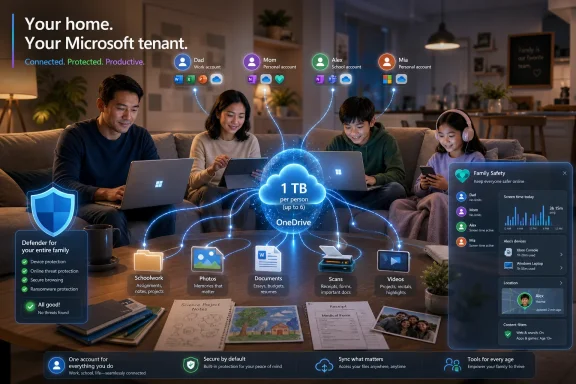
Microsoft 365 Family is Microsoft’s US consumer subscription for up to six people, priced by Microsoft at $99.99 per year or $9.99 per month as of July 2026, bundling Office apps, 1 TB of OneDrive storage per person, Defender protections, and Family Safety tools. The ad hoc news item frames it as a household productivity bundle with a stock-market footnote, but the more interesting story is how ordinary family software has become recurring cloud infrastructure. Microsoft is not merely selling Word and Excel to the kitchen table; it is turning the home into a small, identity-managed Microsoft tenant.
The old version of Office for the home was easy to understand. You bought a box, installed Word, Excel, and PowerPoint, and used them until the next school project or tax season forced an upgrade. Microsoft 365 Family is a different bargain: pay continuously, sync continuously, and let Microsoft become the default place where school essays, family photos, budgets, scanned documents, and device security warnings accumulate.
That shift matters because Microsoft has spent the last decade teaching consumers the same lesson it taught enterprises: the software is only the front door. The durable value sits in identity, storage, collaboration, security, and renewal behavior. A household subscription that covers six people is not just a nicer price-per-user calculation; it is a mechanism for normalizing Microsoft accounts across a family.
The ad hoc news write-up correctly points to the headline components: premium Office apps, up to 6 TB of OneDrive storage split as 1 TB per person, Microsoft Defender for individuals, and Microsoft Family Safety. Microsoft’s own product pages and support documents confirm the central structure of the plan, including sharing with up to five other people beyond the subscriber. But the promotional language undersells the strategic consequence. Once everyone in a household has a Microsoft account, a personal OneDrive, and a reason to keep signing in, Microsoft has moved from selling applications to managing domestic digital life.
That is why the product deserves more attention than a routine shopping-page blurb. Microsoft 365 Family sits at the intersection of Windows, Office, OneDrive, Outlook, mobile apps, parental controls, consumer security, and now AI branding. It is a consumer plan, but it behaves like a soft-edged version of the enterprise stack.
This is Microsoft’s strongest consumer advantage and also its most conservative one. Google Docs, Sheets, and Slides are good enough for many people, and Apple’s productivity apps are free on Apple hardware. Yet Office remains the compatibility default in schools, small businesses, volunteer groups, local governments, and workplaces where files still move as attachments rather than links.
That compatibility story is less glamorous than Copilot or cloud security, but it is the reason the subscription keeps renewing. A family may not wake up excited about Excel, but it will pay to avoid the risk of a broken formula, a misaligned résumé, or a corrupted school assignment. Microsoft’s consumer bundle monetizes the anxiety that “free” alternatives might be fine until the moment they are not.
The irony is that Microsoft 365 Family increasingly wraps those old desktop expectations in a cloud-first business model. The apps can be installed locally, used on Macs and PCs, and accessed through the web, but the subscription’s real power comes when documents follow users between devices. That is where Office stops being a program and becomes a service fabric.
Storage is sticky in a way applications are not. People can switch word processors with some annoyance, but moving years of photos, PDFs, schoolwork, tax documents, and shared folders is a weekend-killing project. Once OneDrive becomes the automatic destination for phone photos, Windows Desktop backups, scanned forms, and Office files, the subscription becomes harder to cancel than it was to start.
There is also a subtle correction to how many people misunderstand the plan. The “up to 6 TB” figure is not a single shared family bucket that one person can freely consume. Microsoft’s support material describes it as 1 TB per person, with each invited member using their own Microsoft account and their own OneDrive allocation. That structure is better for privacy and identity separation, but less flexible than a true pooled storage plan.
For Windows users, OneDrive’s integration cuts both ways. It can make a new PC feel instantly familiar, with files and folders reappearing after sign-in. It can also create confusion when local folders, cloud-backed folders, and sync status icons blur together. WindowsForum readers know this terrain well: convenience often arrives first, and the support tickets follow later.
Microsoft Defender for individuals is the clearest example. It extends the Defender brand beyond the enterprise and Windows Security context into a cross-device consumer security dashboard. For Windows purists, that branding can be confusing, because “Defender” now means several related but distinct things depending on whether one is talking about built-in Windows protection, Microsoft 365 consumer protections, or enterprise security products.
OneDrive’s ransomware detection and file recovery features are another practical piece of the value proposition. The ability to roll back files after suspicious activity is not a replacement for a proper backup strategy, but it is better than leaving ordinary users to discover too late that sync faithfully copied encrypted garbage to the cloud. In a family plan, that safety net may matter most for the least technical member of the household.
Family Safety adds a different kind of security: parental visibility and control. Screen-time limits, location sharing, content filters, and Xbox integration make Microsoft 365 Family feel less like an office suite and more like a household management layer. Whether that is reassuring or intrusive depends on the family, but it clearly broadens the subscription beyond productivity.
That is the psychology Microsoft wants. The buyer is not deciding whether Word is worth a monthly fee; the buyer is deciding whether a family’s documents, storage, security, and device continuity are worth less than many streaming bundles. In the subscription economy, that comparison matters. Microsoft does not need every household to love Office. It needs enough households to regard canceling it as more trouble than keeping it.
Retail discounts reinforce the habit. Annual activation codes at major retailers can periodically reduce the effective price or bundle the subscription with gift cards and seasonal promotions. That makes Microsoft 365 Family feel like a deal without requiring Microsoft to abandon the anchor price on its own store.
The plan also benefits from a kind of institutional memory. Millions of users grew up with Office as the “serious” productivity suite. Parents who used Word at work are likely to trust Word for a child’s school assignment. Excel remains the default name for spreadsheets even among people who have never written a complex formula. Microsoft is monetizing not just software but cultural default status.
This matters because Microsoft 365 Family historically sold clarity. Six people, Office apps, 1 TB each, one subscription. Add AI entitlements, usage limits, owner-only benefits, premium tiers, and “Copilot” labels, and the sales pitch starts to drift from household utility into licensing fog.
Microsoft’s own product language now emphasizes “innovative apps with AI” on consumer pages, while support pages note limits around which AI features are shareable. That distinction is crucial. A family plan can be shared, but not every AI capability necessarily travels equally to every family member. For Windows enthusiasts, this is familiar licensing territory; for normal households, it is fine print waiting to become disappointment.
The risk for Microsoft is not that AI features are unwanted. The risk is that they make a previously straightforward subscription feel like a cable package. Microsoft is trying to upsell intelligence while preserving the mass-market simplicity that made Microsoft 365 Family attractive in the first place.
For shareholders, the consumer plan’s significance is less about any one family paying $99.99 per year and more about Microsoft’s ability to turn legacy software franchises into durable services. Office could have become a slowly declining cash cow in a browser-first world. Instead, Microsoft rebuilt it as an account-based subscription with cloud storage, security, collaboration, and now AI as attachment points.
That does not make Microsoft 365 Family a stock thesis by itself. It is not Azure, and it is not the enterprise Copilot story that Wall Street watches most closely. But it is evidence of Microsoft’s operating pattern: take a familiar product, wrap it in cloud identity, bundle adjacent services, and make the renewal feel ordinary.
The plan also gives Microsoft a consumer bridge into households that may later buy Windows PCs, Xbox services, Surface devices, OneDrive storage, or AI subscriptions. The relationship starts with Office, but it does not have to end there. That is the ecosystem logic Apple and Google understand well, and Microsoft is applying it with a productivity-first accent.
Yet Microsoft has a specific advantage: trust in the file format and the workflow. A DOCX, XLSX, or PPTX document is still the lingua franca of many institutions. When a school, employer, bank, insurer, local club, or government agency sends a form or template, Microsoft Office remains the safest assumption.
Google’s strongest argument is collaboration. Docs and Sheets made real-time co-authoring feel natural long before many consumers associated Office with browser-native teamwork. Apple’s strongest argument is frictionless device integration for users who live entirely inside its hardware universe. Microsoft’s argument is broader but messier: the same subscription can serve a Windows desktop, a MacBook, an iPhone, an Android phone, and a browser session on a borrowed machine.
That cross-platform reach is underappreciated. Microsoft 365 Family is not a Windows-only product, even if Windows remains its most natural habitat. For mixed-device households, that matters. Apple’s family story is strongest inside Apple’s walls; Microsoft’s is designed for homes where the walls are full of holes.
This is where WindowsForum readers will see both the promise and the pain. Microsoft accounts are powerful, but account sprawl is real. A teenager may have a school account, an Xbox profile, a personal Outlook address, and a device sign-in that predates the current family setup. A parent may have an old Hotmail account, a work Microsoft Entra ID account, and a new Microsoft account created accidentally during Windows setup.
The product works best when identities are clean. Each person should have their own Microsoft account, their own OneDrive, and clear expectations about what is shared and what is private. But households are rarely clean identity environments. They are archaeological digs of forgotten passwords, reused devices, and accounts created under pressure.
Microsoft’s challenge is that the better Microsoft 365 Family becomes, the more account management matters. A broken sign-in is no longer just an email inconvenience. It can affect storage, Office activation, device security alerts, parental controls, and access to family documents.
OneDrive storage, Defender alerts, Family Safety controls, and Microsoft account identity all create a more coherent household technology layer. They also increase dependence on Microsoft’s terms, billing systems, security practices, and product decisions. If Microsoft changes a feature, renames an app, modifies storage behavior, or alters AI entitlements, the household has limited leverage beyond accepting the change or leaving.
This is not a conspiracy; it is the subscription model functioning as designed. Cloud convenience trades local autonomy for continuity, recovery, and managed services. Many users will consider that a good trade. The important thing is to recognize it as a trade rather than as a free upgrade from the old Office box.
For security-minded users, the answer is not necessarily to avoid Microsoft 365 Family. It is to use it deliberately. Keep independent backups of critical files. Understand which folders are syncing. Separate personal and work accounts. Make sure family members can recover their accounts. The cloud reduces some risks while concentrating others.
For Windows users, that makes the subscription both useful and worth scrutinizing. It can simplify a household full of devices, reduce file-loss anxiety, and preserve compatibility with the document formats that still run through schools and workplaces. It can also deepen dependence on Microsoft accounts, OneDrive sync behavior, and a licensing model that grows more complex as AI features are layered on top.
The future of Microsoft 365 Family will likely be shaped less by Word and Excel than by how far Microsoft can push the surrounding services without making the bundle feel overbuilt. If the company keeps the household bargain clear, it remains one of the more defensible consumer subscriptions in tech. If it lets Copilot branding, tier confusion, and account complexity overwhelm the simple promise, Microsoft may discover that even loyal Office families have limits.
 Microsoft’s Household Subscription Is Really a Miniature Cloud Strategy
The old version of Office for the home was easy to understand. You bought a box, installed Word, Excel, and PowerPoint, and used them until the next school project or tax season forced an upgrade. Microsoft 365 Family is a different bargain: pay continuously, sync continuously, and let Microsoft become the default place where school essays, family photos, budgets, scanned documents, and device security warnings accumulate.That shift matters because Microsoft has spent the last decade teaching consumers the same lesson it taught enterprises: the software is only the front door. The durable value sits in identity, storage, collaboration, security, and renewal behavior. A household subscription that covers six people is not just a nicer price-per-user calculation; it is a mechanism for normalizing Microsoft accounts across a family.
The ad hoc news write-up correctly points to the headline components: premium Office apps, up to 6 TB of OneDrive storage split as 1 TB per person, Microsoft Defender for individuals, and Microsoft Family Safety. Microsoft’s own product pages and support documents confirm the central structure of the plan, including sharing with up to five other people beyond the subscriber. But the promotional language undersells the strategic consequence. Once everyone in a household has a Microsoft account, a personal OneDrive, and a reason to keep signing in, Microsoft has moved from selling applications to managing domestic digital life.
That is why the product deserves more attention than a routine shopping-page blurb. Microsoft 365 Family sits at the intersection of Windows, Office, OneDrive, Outlook, mobile apps, parental controls, consumer security, and now AI branding. It is a consumer plan, but it behaves like a soft-edged version of the enterprise stack.
The Office Apps Still Carry the Bundle, Even as Microsoft Sells Everything Around Them
Microsoft can talk about cloud storage, AI, and security all it wants, but the gravitational center of Microsoft 365 Family remains Office. Word, Excel, PowerPoint, OneNote, and Outlook are still the names that make the subscription legible to ordinary buyers. For many households, the decision begins with a practical irritation: someone needs “real Word” for school, a spreadsheet must open without formatting drama, or a PowerPoint deck has to look the same on the family PC as it does on a teacher’s machine.This is Microsoft’s strongest consumer advantage and also its most conservative one. Google Docs, Sheets, and Slides are good enough for many people, and Apple’s productivity apps are free on Apple hardware. Yet Office remains the compatibility default in schools, small businesses, volunteer groups, local governments, and workplaces where files still move as attachments rather than links.
That compatibility story is less glamorous than Copilot or cloud security, but it is the reason the subscription keeps renewing. A family may not wake up excited about Excel, but it will pay to avoid the risk of a broken formula, a misaligned résumé, or a corrupted school assignment. Microsoft’s consumer bundle monetizes the anxiety that “free” alternatives might be fine until the moment they are not.
The irony is that Microsoft 365 Family increasingly wraps those old desktop expectations in a cloud-first business model. The apps can be installed locally, used on Macs and PCs, and accessed through the web, but the subscription’s real power comes when documents follow users between devices. That is where Office stops being a program and becomes a service fabric.
OneDrive Is the Quiet Lock-In Mechanism
The most important line in the Microsoft 365 Family offer may not be Word or Excel. It may be the storage allocation: 1 TB of OneDrive per person, up to six people. That gives Microsoft a simple, defensible value argument against scattered free accounts and low-capacity cloud tiers.Storage is sticky in a way applications are not. People can switch word processors with some annoyance, but moving years of photos, PDFs, schoolwork, tax documents, and shared folders is a weekend-killing project. Once OneDrive becomes the automatic destination for phone photos, Windows Desktop backups, scanned forms, and Office files, the subscription becomes harder to cancel than it was to start.
There is also a subtle correction to how many people misunderstand the plan. The “up to 6 TB” figure is not a single shared family bucket that one person can freely consume. Microsoft’s support material describes it as 1 TB per person, with each invited member using their own Microsoft account and their own OneDrive allocation. That structure is better for privacy and identity separation, but less flexible than a true pooled storage plan.
For Windows users, OneDrive’s integration cuts both ways. It can make a new PC feel instantly familiar, with files and folders reappearing after sign-in. It can also create confusion when local folders, cloud-backed folders, and sync status icons blur together. WindowsForum readers know this terrain well: convenience often arrives first, and the support tickets follow later.
Security Makes the Subscription Feel Less Optional
Microsoft’s consumer security pitch has grown more serious because the home has become a messier endpoint environment. Families now mix Windows PCs, Macs, iPhones, Android devices, game consoles, school accounts, personal accounts, shared passwords, and years of reused email addresses. A subscription that claims to protect identities, devices, and files is no longer a luxury pitch; it is a response to the reality that households have become unmanaged networks.Microsoft Defender for individuals is the clearest example. It extends the Defender brand beyond the enterprise and Windows Security context into a cross-device consumer security dashboard. For Windows purists, that branding can be confusing, because “Defender” now means several related but distinct things depending on whether one is talking about built-in Windows protection, Microsoft 365 consumer protections, or enterprise security products.
OneDrive’s ransomware detection and file recovery features are another practical piece of the value proposition. The ability to roll back files after suspicious activity is not a replacement for a proper backup strategy, but it is better than leaving ordinary users to discover too late that sync faithfully copied encrypted garbage to the cloud. In a family plan, that safety net may matter most for the least technical member of the household.
Family Safety adds a different kind of security: parental visibility and control. Screen-time limits, location sharing, content filters, and Xbox integration make Microsoft 365 Family feel less like an office suite and more like a household management layer. Whether that is reassuring or intrusive depends on the family, but it clearly broadens the subscription beyond productivity.
The Price Works Because Microsoft Sells the Family, Not the User
At Microsoft’s listed US price of $99.99 per year, Microsoft 365 Family becomes compelling as soon as more than one person actually uses it. A single-user subscription can look expensive if all someone wants is occasional document editing. A six-person subscription, by contrast, can be rationalized as a household utility.That is the psychology Microsoft wants. The buyer is not deciding whether Word is worth a monthly fee; the buyer is deciding whether a family’s documents, storage, security, and device continuity are worth less than many streaming bundles. In the subscription economy, that comparison matters. Microsoft does not need every household to love Office. It needs enough households to regard canceling it as more trouble than keeping it.
Retail discounts reinforce the habit. Annual activation codes at major retailers can periodically reduce the effective price or bundle the subscription with gift cards and seasonal promotions. That makes Microsoft 365 Family feel like a deal without requiring Microsoft to abandon the anchor price on its own store.
The plan also benefits from a kind of institutional memory. Millions of users grew up with Office as the “serious” productivity suite. Parents who used Word at work are likely to trust Word for a child’s school assignment. Excel remains the default name for spreadsheets even among people who have never written a complex formula. Microsoft is monetizing not just software but cultural default status.
The AI Layer Complicates a Product That Used to Be Easy to Explain
Microsoft’s recent consumer branding has made Microsoft 365 harder, not easier, to understand. The company has attached Copilot language across the Microsoft 365 universe, while also maintaining distinctions between Microsoft 365 Family, Microsoft 365 Personal, Microsoft 365 Premium, the Microsoft 365 Copilot app, and paid AI feature tiers. Coverage from Windows Central and other tech outlets has already noted how easily consumers can misread these names as a full Office rebrand rather than an app and subscription-branding shift.This matters because Microsoft 365 Family historically sold clarity. Six people, Office apps, 1 TB each, one subscription. Add AI entitlements, usage limits, owner-only benefits, premium tiers, and “Copilot” labels, and the sales pitch starts to drift from household utility into licensing fog.
Microsoft’s own product language now emphasizes “innovative apps with AI” on consumer pages, while support pages note limits around which AI features are shareable. That distinction is crucial. A family plan can be shared, but not every AI capability necessarily travels equally to every family member. For Windows enthusiasts, this is familiar licensing territory; for normal households, it is fine print waiting to become disappointment.
The risk for Microsoft is not that AI features are unwanted. The risk is that they make a previously straightforward subscription feel like a cable package. Microsoft is trying to upsell intelligence while preserving the mass-market simplicity that made Microsoft 365 Family attractive in the first place.
The Stock Angle Is Real, but It Should Not Be Oversold
The ad hoc news item explicitly mentions Microsoft stock, and investors are right to care about consumer subscriptions. Recurring revenue is valuable, especially when attached to products with low churn and high ecosystem pull. Microsoft 365 Family contributes to that broader subscription-heavy strategy, even if it is dwarfed by commercial Microsoft 365, Azure, server products, and enterprise security.For shareholders, the consumer plan’s significance is less about any one family paying $99.99 per year and more about Microsoft’s ability to turn legacy software franchises into durable services. Office could have become a slowly declining cash cow in a browser-first world. Instead, Microsoft rebuilt it as an account-based subscription with cloud storage, security, collaboration, and now AI as attachment points.
That does not make Microsoft 365 Family a stock thesis by itself. It is not Azure, and it is not the enterprise Copilot story that Wall Street watches most closely. But it is evidence of Microsoft’s operating pattern: take a familiar product, wrap it in cloud identity, bundle adjacent services, and make the renewal feel ordinary.
The plan also gives Microsoft a consumer bridge into households that may later buy Windows PCs, Xbox services, Surface devices, OneDrive storage, or AI subscriptions. The relationship starts with Office, but it does not have to end there. That is the ecosystem logic Apple and Google understand well, and Microsoft is applying it with a productivity-first accent.
Google and Apple Compete on Convenience, but Microsoft Competes on Trust in the File
Microsoft 365 Family does not exist in a vacuum. Google offers a powerful free productivity suite and paid Google One storage plans. Apple bundles iCloud storage and free productivity apps into an ecosystem that works beautifully for families already committed to iPhones, iPads, and Macs. Both rivals can make Microsoft look old-fashioned.Yet Microsoft has a specific advantage: trust in the file format and the workflow. A DOCX, XLSX, or PPTX document is still the lingua franca of many institutions. When a school, employer, bank, insurer, local club, or government agency sends a form or template, Microsoft Office remains the safest assumption.
Google’s strongest argument is collaboration. Docs and Sheets made real-time co-authoring feel natural long before many consumers associated Office with browser-native teamwork. Apple’s strongest argument is frictionless device integration for users who live entirely inside its hardware universe. Microsoft’s argument is broader but messier: the same subscription can serve a Windows desktop, a MacBook, an iPhone, an Android phone, and a browser session on a borrowed machine.
That cross-platform reach is underappreciated. Microsoft 365 Family is not a Windows-only product, even if Windows remains its most natural habitat. For mixed-device households, that matters. Apple’s family story is strongest inside Apple’s walls; Microsoft’s is designed for homes where the walls are full of holes.
The Admin Burden Moves Into the Living Room
Every subscription that promises simplicity creates a new kind of administration. Someone has to own the Microsoft 365 Family subscription, invite members, manage renewal, understand storage limits, deal with account recovery, and explain why a child’s school Microsoft account is not the same as their personal Microsoft account. The family organizer becomes a part-time tenant admin, even if Microsoft never uses that phrase.This is where WindowsForum readers will see both the promise and the pain. Microsoft accounts are powerful, but account sprawl is real. A teenager may have a school account, an Xbox profile, a personal Outlook address, and a device sign-in that predates the current family setup. A parent may have an old Hotmail account, a work Microsoft Entra ID account, and a new Microsoft account created accidentally during Windows setup.
The product works best when identities are clean. Each person should have their own Microsoft account, their own OneDrive, and clear expectations about what is shared and what is private. But households are rarely clean identity environments. They are archaeological digs of forgotten passwords, reused devices, and accounts created under pressure.
Microsoft’s challenge is that the better Microsoft 365 Family becomes, the more account management matters. A broken sign-in is no longer just an email inconvenience. It can affect storage, Office activation, device security alerts, parental controls, and access to family documents.
Privacy Is the Unspoken Price of Convenience
Microsoft 365 Family asks households to centralize more of their lives in Microsoft’s cloud. That can be sensible, especially compared with scattering important files across unprotected laptops, USB drives, and abandoned free accounts. But centralization is never neutral. It changes who holds the keys, who sees the metadata, and whose policies govern access.OneDrive storage, Defender alerts, Family Safety controls, and Microsoft account identity all create a more coherent household technology layer. They also increase dependence on Microsoft’s terms, billing systems, security practices, and product decisions. If Microsoft changes a feature, renames an app, modifies storage behavior, or alters AI entitlements, the household has limited leverage beyond accepting the change or leaving.
This is not a conspiracy; it is the subscription model functioning as designed. Cloud convenience trades local autonomy for continuity, recovery, and managed services. Many users will consider that a good trade. The important thing is to recognize it as a trade rather than as a free upgrade from the old Office box.
For security-minded users, the answer is not necessarily to avoid Microsoft 365 Family. It is to use it deliberately. Keep independent backups of critical files. Understand which folders are syncing. Separate personal and work accounts. Make sure family members can recover their accounts. The cloud reduces some risks while concentrating others.
The Household Bundle Reveals Microsoft’s Consumer Endgame
The concrete facts around Microsoft 365 Family are simple, but their implications are not.- Microsoft 365 Family remains most compelling when at least two people in a household actively use Office apps or need substantial cloud storage.
- The advertised storage value is split into individual 1 TB OneDrive allocations, not a single unrestricted 6 TB family pool.
- Microsoft Defender, OneDrive recovery, and Family Safety make the plan a security and account-management product, not just an Office subscription.
- The addition of AI branding and premium tiers risks making a once-simple consumer bundle harder to understand.
- For Microsoft, the subscription turns household productivity into recurring revenue and deepens account-based lock-in across Windows, mobile, web, and cloud services.
The Old Office Box Is Gone, and the Replacement Is Bigger Than Office
Microsoft 365 Family is easy to describe as a good deal for families that need Word, Excel, PowerPoint, and storage. That is true, but incomplete. The plan is Microsoft’s consumer cloud strategy in miniature: identity for everyone, storage for everything, security as a service, parental controls as a dashboard, and productivity apps as the familiar wrapper around it all.For Windows users, that makes the subscription both useful and worth scrutinizing. It can simplify a household full of devices, reduce file-loss anxiety, and preserve compatibility with the document formats that still run through schools and workplaces. It can also deepen dependence on Microsoft accounts, OneDrive sync behavior, and a licensing model that grows more complex as AI features are layered on top.
The future of Microsoft 365 Family will likely be shaped less by Word and Excel than by how far Microsoft can push the surrounding services without making the bundle feel overbuilt. If the company keeps the household bargain clear, it remains one of the more defensible consumer subscriptions in tech. If it lets Copilot branding, tier confusion, and account complexity overwhelm the simple promise, Microsoft may discover that even loyal Office families have limits.
References
- Primary source: AD HOC NEWS
Published: Mon, 06 Jul 2026 13:24:15 GMT
Loading…
www.ad-hoc-news.de - Official source: support.microsoft.com
Loading…
support.microsoft.com - Official source: microsoft.com
Loading…
www.microsoft.com - Official source: learn.microsoft.com
Loading…
learn.microsoft.com - Related coverage: techcrunch.com
Microsoft brings Teams to consumers and launches Microsoft 365 personal and family plans | TechCrunch
Microsoft today announced a slew of new products, but at the core of the release is a major change to how the company is marketing its tools and servicestechcrunch.com - Official source: news.microsoft.com
Office 365 evoluciona a Microsoft 365 – Centro de noticias
 news.microsoft.com
- Related coverage: digitaltrends.com
Loading…
www.digitaltrends.com - Related coverage: techadvisor.com
Loading…
www.techadvisor.com - Related coverage: windowscentral.com
Loading…
www.windowscentral.com - Related coverage: techradar.com
Microsoft Office has been rebranded to Microsoft 365 Copilot, or has it? | TechRadar
There's some serious confusion around a potential rebrand from Microsoftwww.techradar.com - Related coverage: pcgamer.com
In a truly galaxy-brained rebrand, Microsoft Office is now the 'Microsoft 365 Copilot app,' but Copilot is also still the name of the AI assistant | PC Gamer
Copilot is the app for launching the other apps, but it's also a chatbot inside the apps. Any questions?www.pcgamer.com - Official source: cdn-dynmedia-1.microsoft.com
microsoft 365 consumer and small business master product chooser
PDF documentcdn-dynmedia-1.microsoft.com
- Related coverage: tdsynnex.com
Loading…
www.tdsynnex.com - Related coverage: m365maps.com
Loading…
m365maps.com