

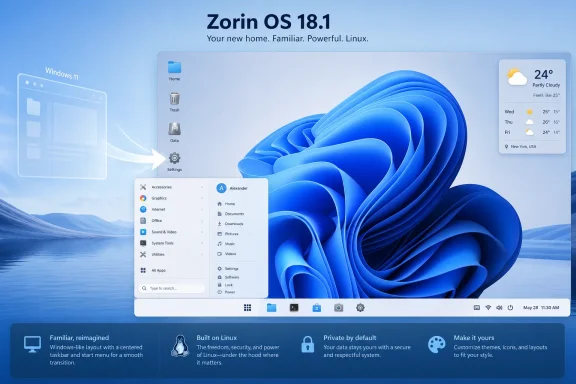
ZDNET’s Jack Wallen reported that Zorin OS 18.1 can be made to resemble Windows 11 without buying Zorin OS Pro by using the free edition’s layout switcher, taskbar settings, a GNOME weather extension, and a Windows-like wallpaper. That sounds like a cosmetic tip, and on the surface it is. But the more interesting story is that Linux distributions aimed at Windows refugees are now competing less on ideology than on muscle memory. Zorin’s pitch is not “learn Linux”; it is “keep your habits, change the plumbing.”
For decades, the Linux desktop has had a habit of treating familiarity as a compromise. If a distribution looked too much like Windows, someone would inevitably accuse it of being derivative, timid, or insufficiently true to the spirit of open-source computing. Zorin OS has always been more practical than that.
Its premise is brutally simple: most people do not want an operating system as a hobby. They want a screen with a launcher where they expect it, a taskbar that behaves predictably, a file manager that does not feel alien, and enough visual continuity that the first hour after installation does not feel like punishment.
That is why Wallen’s ZDNET walkthrough matters. The article is nominally about making the free version of Zorin OS look like Windows 11, but it is really about the degree to which “Windows-like” has become a migration feature. Zorin OS Pro sells this directly, offering additional desktop layouts including a Windows 11-style arrangement. But Wallen shows that even the free edition can get close enough with a few tweaks.
That “close enough” is doing a lot of work. It means centered taskbar icons, a bottom panel, a familiar menu pattern, squared-off panel geometry, and a wallpaper that signals Windows 11 without actually being Windows. It does not reproduce Microsoft’s shell. It recreates the comfort zone.
From there, the work is mostly panel surgery. Right-click the taskbar, open Taskbar Settings, square off the border radius, stretch the panel to full width, and move key interface elements toward the center. The result is not a pixel-perfect Windows 11 replica, but it is close enough that a casual user will understand the system before reading a manual.
That is the point. For a Windows user evaluating Linux, the first impression is rarely about package managers, init systems, kernel versions, or Wayland versus X11. It is about whether they can open the app menu, launch a browser, find files, switch between apps, and shut the machine down without feeling tricked.
Zorin OS’s free edition is important because it lowers the cost of curiosity to zero. The Pro edition, currently positioned as a paid upgrade with additional layouts, apps, wallpapers, and support, is a reasonable way to fund development. But the free route matters because the most likely Windows switcher is not yet a committed buyer. They are testing whether Linux can stop being an argument and start being a daily driver.
But visual familiarity is not trivial. Operating systems are habit machines. People learn where to click long before they understand why anything works. That is why Microsoft itself has historically been so cautious about shell changes, and why the Windows 8 Start screen revolt was so fierce.
Windows 11 changed less than Windows 8, but it still rearranged enough of the furniture to irritate longtime users. Centered taskbar icons, a simplified Start menu, context menu changes, Settings migration, and Microsoft account pressure all contributed to the sense that Windows was increasingly designed around Microsoft’s priorities rather than user continuity. Zorin’s clever move is to borrow the parts of Windows 11 that users recognize while leaving behind the parts that annoy them.
This is where the “look like Windows” critique misses the mark. Zorin is not trying to win originality points. It is trying to make the first boot less frightening.
That creates a useful tension. On one hand, it is good that Zorin has a paid tier. Desktop Linux projects need money, and expecting polished consumer-facing operating systems to survive purely on goodwill is one of the community’s most persistent fantasies. On the other hand, the free edition has to remain powerful enough that users do not feel like they are being punished for not paying.
Wallen’s walkthrough suggests Zorin has struck a reasonable balance. The Pro edition saves time. The free edition still gives users enough control to build the interface they want.
That distinction is healthier than the old shareware model of withholding essential functionality. Zorin is not saying, “Pay us or suffer.” It is saying, “Pay us if you want the curated version.” For a distribution courting Windows users, that is an important difference.
Zorin has tried to address some of this by focusing on Windows migration. Recent Zorin releases have emphasized app discovery, Windows app detection, and guidance toward Linux alternatives. Other outlets, including Windows Central and Tom’s Hardware, have framed Zorin’s recent momentum around Windows 10’s end-of-support cycle and dissatisfaction with Windows 11 hardware requirements. That context is essential: Zorin is not just another hobbyist distro hoping users wander in. It is explicitly presenting itself as a landing zone.
Still, there is a gap between visual migration and operational migration. A user who mostly lives in a browser, uses LibreOffice or web-based Microsoft 365, and has mainstream hardware may do very well. A user who depends on Adobe Creative Cloud, certain anticheat-protected games, proprietary VPN clients, or obscure device utilities may hit the wall quickly.
This is where journalists and Linux advocates need to be honest. Zorin can make Linux feel less foreign. It cannot make the entire Windows software ecosystem irrelevant.
The question stopped being “Should I upgrade Windows?” and became “Why am I replacing a computer that still works?” Linux distributions have always benefited from that kind of frustration, but the Windows 10 retirement cycle gave the pitch unusual urgency.
Zorin’s designers understand something Microsoft sometimes appears to forget: users do not experience an operating system as a list of security features. They experience it as a relationship with a machine they already own. If the vendor tells them that machine is no longer welcome, an alternative that says “bring it here” becomes more attractive.
That does not mean Microsoft is wrong to push hardware-backed security. It does mean the company created a migration moment, and projects like Zorin OS were ready with a friendlier answer than “buy a new PC.”
The customization layer is therefore not just decoration. It is product strategy. Zorin takes the stability and application base of Ubuntu, the modern underpinnings of GNOME, and then hides enough of GNOME’s unfamiliarity to make the system feel less like a philosophical statement.
That approach will annoy purists. It should not. Linux’s strength is that it allows this kind of adaptation. If GNOME can be a minimalist keyboard-driven workspace for one user and a Windows-like desktop for another, that is not inconsistency. It is the platform doing what open systems are supposed to do.
The risk is maintenance. Extensions, shell modifications, and layout tools can break when upstream components change. Zorin’s job is to absorb that complexity so users do not have to. The more it courts mainstream switchers, the less tolerance those users will have for “that broke because GNOME changed something.”
Microsoft knows this. Apple knows this. Every major platform vendor invests heavily in default visuals because defaults are identity. Zorin’s trick is to let users borrow the emotional grammar of Windows 11 while running something else entirely.
There is a line here, of course. A Linux distribution should not mislead users into thinking they are running Windows, nor should it rely on cloned branding. But there is nothing wrong with adopting a layout convention. The bottom taskbar became standard because it works. A centered launcher became popular because it feels balanced on modern wide displays. Rounded corners, translucent panels, and clean wallpapers are not proprietary ideas.
The desktop has a language. Zorin speaks it fluently.
But desktop Linux does not need to win all at once. It wins by becoming plausible for more categories of user. It wins when a retired Windows 10 laptop becomes a perfectly usable Zorin machine. It wins when a student realizes that browser-first computing does not require Windows. It wins when a home user stops assuming that Linux means a black terminal and a weekend lost to driver errors.
That is why a ZDNET how-to about taskbar settings has broader meaning. The migration story is no longer only about ideology, privacy, or open-source ethics. It is about whether the alternative feels ordinary enough to trust.
For many users, ordinary is the killer feature.
Zorin can fit some of those scenarios, especially in smaller environments with Linux expertise. But it is not a drop-in replacement for a Microsoft-managed fleet tied into Intune, Entra ID, Defender for Endpoint, Group Policy remnants, Microsoft 365 Apps, and legacy Windows software. The closer Zorin looks to Windows, the easier it is for nontechnical stakeholders to underestimate that gap.
That does not weaken Zorin’s value. It clarifies it. Zorin is strongest where the Windows dependency is shallower than assumed: browser-centric workflows, general productivity, education, older hardware reuse, privacy-conscious personal computing, and users who want a stable desktop without Microsoft’s increasing cloud nudges.
For sysadmins, the practical lesson is to evaluate workflows, not vibes. If the required apps are web-based or Linux-native, Zorin may be a surprisingly smooth migration target. If the environment depends on deep Windows integration, a Windows-like panel will not save the project.
That is the right question. Operating system migrations fail when they are framed as moral conversions. They succeed when they are framed as practical substitutions.
The free Zorin approach lets users experiment without paying for Pro and without committing to a new workflow. If the customized Core edition feels good, Pro becomes a convenience purchase rather than a leap of faith. If it does not, the user has learned something without spending money.
That is a healthy funnel for an open-source-adjacent consumer OS. Let people try the idea first. Sell refinement later.
 Zorin Has Learned the Oldest Lesson in Desktop Computing
For decades, the Linux desktop has had a habit of treating familiarity as a compromise. If a distribution looked too much like Windows, someone would inevitably accuse it of being derivative, timid, or insufficiently true to the spirit of open-source computing. Zorin OS has always been more practical than that.Its premise is brutally simple: most people do not want an operating system as a hobby. They want a screen with a launcher where they expect it, a taskbar that behaves predictably, a file manager that does not feel alien, and enough visual continuity that the first hour after installation does not feel like punishment.
That is why Wallen’s ZDNET walkthrough matters. The article is nominally about making the free version of Zorin OS look like Windows 11, but it is really about the degree to which “Windows-like” has become a migration feature. Zorin OS Pro sells this directly, offering additional desktop layouts including a Windows 11-style arrangement. But Wallen shows that even the free edition can get close enough with a few tweaks.
That “close enough” is doing a lot of work. It means centered taskbar icons, a bottom panel, a familiar menu pattern, squared-off panel geometry, and a wallpaper that signals Windows 11 without actually being Windows. It does not reproduce Microsoft’s shell. It recreates the comfort zone.
The Free Edition Is No Longer the Afterthought
Wallen’s method starts from Zorin Appearance, the distribution’s built-in customization tool. In the free edition, users get four layouts rather than the expanded set available in Pro. None is an exact Windows 11 clone, but one provides the right base: a bottom panel and a desktop menu arrangement that can be reshaped into something much closer to Microsoft’s current desktop.From there, the work is mostly panel surgery. Right-click the taskbar, open Taskbar Settings, square off the border radius, stretch the panel to full width, and move key interface elements toward the center. The result is not a pixel-perfect Windows 11 replica, but it is close enough that a casual user will understand the system before reading a manual.
That is the point. For a Windows user evaluating Linux, the first impression is rarely about package managers, init systems, kernel versions, or Wayland versus X11. It is about whether they can open the app menu, launch a browser, find files, switch between apps, and shut the machine down without feeling tricked.
Zorin OS’s free edition is important because it lowers the cost of curiosity to zero. The Pro edition, currently positioned as a paid upgrade with additional layouts, apps, wallpapers, and support, is a reasonable way to fund development. But the free route matters because the most likely Windows switcher is not yet a committed buyer. They are testing whether Linux can stop being an argument and start being a daily driver.
The Windows 11 Look Is a Bridge, Not a Destination
There is a temptation to dismiss this kind of customization as skin-deep. A Linux desktop that looks like Windows 11 is still Linux underneath. It still uses Linux applications, Linux permissions, Linux filesystems, Linux drivers, and Linux update mechanisms. A centered taskbar does not make Microsoft Office magically native, nor does it make every game, printer, VPN client, or line-of-business app behave.But visual familiarity is not trivial. Operating systems are habit machines. People learn where to click long before they understand why anything works. That is why Microsoft itself has historically been so cautious about shell changes, and why the Windows 8 Start screen revolt was so fierce.
Windows 11 changed less than Windows 8, but it still rearranged enough of the furniture to irritate longtime users. Centered taskbar icons, a simplified Start menu, context menu changes, Settings migration, and Microsoft account pressure all contributed to the sense that Windows was increasingly designed around Microsoft’s priorities rather than user continuity. Zorin’s clever move is to borrow the parts of Windows 11 that users recognize while leaving behind the parts that annoy them.
This is where the “look like Windows” critique misses the mark. Zorin is not trying to win originality points. It is trying to make the first boot less frightening.
Pro Sells Convenience; Core Sells Possibility
The business distinction between Zorin OS Core and Zorin OS Pro is straightforward. Core is free. Pro adds more layouts, bundled creative and productivity software, extra wallpapers, and installation support. ZDNET notes that the Pro Windows 11-style layout is the easy path, but that the free edition can be adjusted manually to achieve a similar feel.That creates a useful tension. On one hand, it is good that Zorin has a paid tier. Desktop Linux projects need money, and expecting polished consumer-facing operating systems to survive purely on goodwill is one of the community’s most persistent fantasies. On the other hand, the free edition has to remain powerful enough that users do not feel like they are being punished for not paying.
Wallen’s walkthrough suggests Zorin has struck a reasonable balance. The Pro edition saves time. The free edition still gives users enough control to build the interface they want.
That distinction is healthier than the old shareware model of withholding essential functionality. Zorin is not saying, “Pay us or suffer.” It is saying, “Pay us if you want the curated version.” For a distribution courting Windows users, that is an important difference.
The Price of Familiarity Is Expectation
The more Zorin looks like Windows 11, the more users will expect it to behave like Windows 11. That is both the benefit and the risk. A Windows-like shell gets people through the door, but it also raises expectations around app compatibility, peripheral support, gaming, authentication, cloud storage, and enterprise management.Zorin has tried to address some of this by focusing on Windows migration. Recent Zorin releases have emphasized app discovery, Windows app detection, and guidance toward Linux alternatives. Other outlets, including Windows Central and Tom’s Hardware, have framed Zorin’s recent momentum around Windows 10’s end-of-support cycle and dissatisfaction with Windows 11 hardware requirements. That context is essential: Zorin is not just another hobbyist distro hoping users wander in. It is explicitly presenting itself as a landing zone.
Still, there is a gap between visual migration and operational migration. A user who mostly lives in a browser, uses LibreOffice or web-based Microsoft 365, and has mainstream hardware may do very well. A user who depends on Adobe Creative Cloud, certain anticheat-protected games, proprietary VPN clients, or obscure device utilities may hit the wall quickly.
This is where journalists and Linux advocates need to be honest. Zorin can make Linux feel less foreign. It cannot make the entire Windows software ecosystem irrelevant.
Microsoft Made This Opening Bigger Than It Needed to Be
Zorin’s opportunity exists partly because Microsoft has spent years narrowing the definition of an acceptable Windows PC. Windows 11’s hardware requirements, especially around TPM 2.0 and supported CPUs, left many working machines outside the official upgrade path. For households, schools, small businesses, and enthusiasts with older but capable hardware, that created a psychological break.The question stopped being “Should I upgrade Windows?” and became “Why am I replacing a computer that still works?” Linux distributions have always benefited from that kind of frustration, but the Windows 10 retirement cycle gave the pitch unusual urgency.
Zorin’s designers understand something Microsoft sometimes appears to forget: users do not experience an operating system as a list of security features. They experience it as a relationship with a machine they already own. If the vendor tells them that machine is no longer welcome, an alternative that says “bring it here” becomes more attractive.
That does not mean Microsoft is wrong to push hardware-backed security. It does mean the company created a migration moment, and projects like Zorin OS were ready with a friendlier answer than “buy a new PC.”
The GNOME Underneath Still Matters
Zorin OS is based on Ubuntu and uses a heavily customized GNOME desktop. That matters because GNOME has become one of the most polished Linux desktop environments, but also one of the most opinionated. Stock GNOME is not trying to mimic Windows. Zorin’s value is that it reshapes GNOME into something more approachable for users who do not want GNOME’s default workflow.The customization layer is therefore not just decoration. It is product strategy. Zorin takes the stability and application base of Ubuntu, the modern underpinnings of GNOME, and then hides enough of GNOME’s unfamiliarity to make the system feel less like a philosophical statement.
That approach will annoy purists. It should not. Linux’s strength is that it allows this kind of adaptation. If GNOME can be a minimalist keyboard-driven workspace for one user and a Windows-like desktop for another, that is not inconsistency. It is the platform doing what open systems are supposed to do.
The risk is maintenance. Extensions, shell modifications, and layout tools can break when upstream components change. Zorin’s job is to absorb that complexity so users do not have to. The more it courts mainstream switchers, the less tolerance those users will have for “that broke because GNOME changed something.”
A Wallpaper Can Do More Than It Should
One of the final steps in Wallen’s guide is to add a Windows 11-like wallpaper. This sounds almost comically superficial, but it is a reminder that operating systems are emotional environments as much as technical ones. The wallpaper, spacing, icon placement, and panel shape all tell the user whether they are somewhere familiar.Microsoft knows this. Apple knows this. Every major platform vendor invests heavily in default visuals because defaults are identity. Zorin’s trick is to let users borrow the emotional grammar of Windows 11 while running something else entirely.
There is a line here, of course. A Linux distribution should not mislead users into thinking they are running Windows, nor should it rely on cloned branding. But there is nothing wrong with adopting a layout convention. The bottom taskbar became standard because it works. A centered launcher became popular because it feels balanced on modern wide displays. Rounded corners, translucent panels, and clean wallpapers are not proprietary ideas.
The desktop has a language. Zorin speaks it fluently.
This Is How Linux Wins Small
No serious observer should claim that Zorin OS is about to topple Windows on the desktop. Windows remains entrenched through OEM deals, enterprise management, gaming compatibility, Microsoft 365 integration, and decades of accumulated software dependency. The Linux desktop has been “nearly ready” for ordinary users for so long that the phrase itself has become a punchline.But desktop Linux does not need to win all at once. It wins by becoming plausible for more categories of user. It wins when a retired Windows 10 laptop becomes a perfectly usable Zorin machine. It wins when a student realizes that browser-first computing does not require Windows. It wins when a home user stops assuming that Linux means a black terminal and a weekend lost to driver errors.
That is why a ZDNET how-to about taskbar settings has broader meaning. The migration story is no longer only about ideology, privacy, or open-source ethics. It is about whether the alternative feels ordinary enough to trust.
For many users, ordinary is the killer feature.
The Catch Is That “Looks Like Windows” Does Not Mean “Managed Like Windows”
WindowsForum readers will see the enterprise caveat immediately. A Windows-like Zorin desktop may be appealing for individuals, labs, classrooms, kiosks, and repurposed PCs, but business deployment is a different animal. IT departments care about identity, device management, patch visibility, endpoint detection, application packaging, compliance reporting, and support contracts.Zorin can fit some of those scenarios, especially in smaller environments with Linux expertise. But it is not a drop-in replacement for a Microsoft-managed fleet tied into Intune, Entra ID, Defender for Endpoint, Group Policy remnants, Microsoft 365 Apps, and legacy Windows software. The closer Zorin looks to Windows, the easier it is for nontechnical stakeholders to underestimate that gap.
That does not weaken Zorin’s value. It clarifies it. Zorin is strongest where the Windows dependency is shallower than assumed: browser-centric workflows, general productivity, education, older hardware reuse, privacy-conscious personal computing, and users who want a stable desktop without Microsoft’s increasing cloud nudges.
For sysadmins, the practical lesson is to evaluate workflows, not vibes. If the required apps are web-based or Linux-native, Zorin may be a surprisingly smooth migration target. If the environment depends on deep Windows integration, a Windows-like panel will not save the project.
The Free Windows 11 Makeover Is Really a Test Drive
Wallen’s guide is useful because it gives users a low-risk way to answer a personal question: “Could I live here?” Not “Is Linux better?” Not “Is Microsoft evil?” Not “Can I compile my own kernel?” Just: can this machine feel comfortable enough for daily work?That is the right question. Operating system migrations fail when they are framed as moral conversions. They succeed when they are framed as practical substitutions.
The free Zorin approach lets users experiment without paying for Pro and without committing to a new workflow. If the customized Core edition feels good, Pro becomes a convenience purchase rather than a leap of faith. If it does not, the user has learned something without spending money.
That is a healthy funnel for an open-source-adjacent consumer OS. Let people try the idea first. Sell refinement later.
The Windows Refugee Path Now Has Fewer Excuses
The practical take is not that everyone should replace Windows 11 with Zorin OS. The practical take is that the distance between “curious about Linux” and “comfortable enough to try Linux” has narrowed. Zorin’s Windows-like customization is one of the reasons.- Zorin OS Core can be adjusted to resemble Windows 11 without paying for the Pro edition.
- Zorin OS Pro remains the easier path if the user wants the ready-made Windows 11-style layout and bundled extras.
- The cosmetic changes matter because they preserve muscle memory during the most fragile part of a migration.
- A Windows-like desktop does not guarantee Windows app compatibility, driver support, or enterprise manageability.
- Zorin’s strongest audience is the user whose computing life is already browser-heavy, hardware-flexible, and not tied to specialized Windows-only software.
- Microsoft’s Windows 11 requirements and Windows 10’s retirement have made alternatives like Zorin feel less theoretical and more timely.
References
- Primary source: ZDNET
Published: Mon, 06 Jul 2026 20:33:00 GMT
Loading…
www.zdnet.com - Related coverage: zorin.com
- Related coverage: windowsforum.com
Loading…
windowsforum.com - Related coverage: pcworld.com
Loading…
www.pcworld.com - Related coverage: zdnet.fr
Loading…
www.zdnet.fr - Related coverage: windowscentral.com
Zorin OS 18.1 adds guided migrations, stronger app compatibility and wider hardware support, making switching from Windows far more practical for millions [clone] | Windows Central
A practical update that reduces friction for Windows users considering a move to Linux.www.windowscentral.com
- Related coverage: forum.zorin.com
Loading…
forum.zorin.com - Related coverage: notebookcheck.net
Zorin OS 18.1 improves Windows app detection - Notebookcheck News
Six months after the release of version 18, Zorin OS gets updated to 18.1. In this refresh, the Ubuntu-based distro offers better Windows app detection, tiling window improvements, and updates for the desktop panel, which now works seamlessly with right-to-left scripts, enhancing the experience... www.notebookcheck.net
- Related coverage: tech.yahoo.com
Loading…
tech.yahoo.com - Related coverage: thurrott.com
Loading…
www.thurrott.com - Related coverage: tomshardware.com
In wake of Windows 10 retirement, over 780,000 Windows users skip Win 11 for Linux, says Zorin OS developers — distro hits unprecedented 1 million downloads in five weeks | Tom's Hardware
Windows-like Linux distribution claims over a million downloads in the past month for its latest build.www.tomshardware.com - Related coverage: techstoreon.com
Loading…
www.techstoreon.com - Related coverage: toxigon.com
Loading…
toxigon.com - Related coverage: pcguide.com
Loading…
www.pcguide.com - Related coverage: gcbcomputers.com
Loading…
gcbcomputers.com