

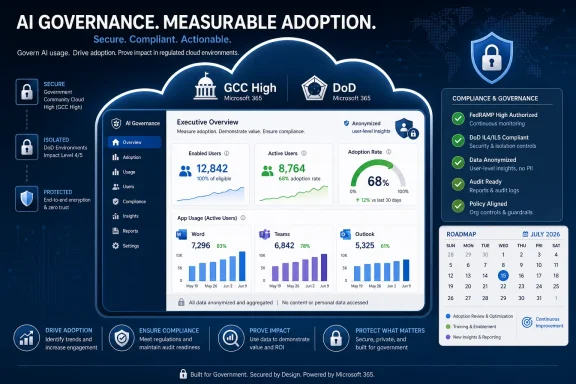
Microsoft says it will add a Microsoft 365 Copilot usage report to the Microsoft 365 admin center for GCC High and DoD tenants in July 2026, giving government administrators counts of enabled and active users plus app-level and anonymized user-level activity data. The roadmap item, published July 6, is small in interface terms but large in governance meaning. For agencies, defense contractors, and regulated public-sector organizations, Microsoft is turning Copilot from a licensed promise into a measurable workload. That measurement layer may become the difference between “we bought AI” and “we can prove whether anyone is using it.”
Microsoft’s new roadmap entry, ID 567120, says the report is in development for Microsoft 365 Copilot on the web, targeted for general availability in July 2026 across GCC High and DoD cloud instances. The feature is not a new Copilot capability for end users. It is a new administrative lens over the thing Microsoft has spent the last two years selling hardest: AI embedded inside everyday work.
According to Microsoft’s roadmap description, the report will show total enabled users, total active users, usage broken out by Microsoft 365 app, and user-level activity insights that are anonymized by default. That last phrase matters. In government clouds, where privacy, monitoring, and mission sensitivity collide daily, the default posture is as important as the data itself.
Microsoft Learn currently describes the Microsoft 365 Copilot usage report as a way to summarize adoption, retention, and engagement across Copilot and enabled apps, with activity data typically available within 72 hours after the end of a UTC day. Microsoft’s admin documentation also distinguishes the admin center’s usage reports from deeper tools such as Viva Insights Copilot Analytics, Purview audit logs, and Power Platform analytics. In other words, this is not the most exhaustive Copilot telemetry Microsoft offers, but it is the report many tenant administrators will see first.
That is precisely why the GCC High and DoD rollout is notable. These customers are usually last in line for fast-moving cloud features, not because Microsoft ignores them, but because compliance boundary, accreditation, data residency, and operational requirements make “ship it” a much slower verb. When reporting arrives for these clouds, it signals that Microsoft believes Copilot is mature enough to be managed, not just demonstrated.
The absence of full reporting in GCC High and DoD created an awkward gap. Organizations could license Copilot, run pilots, train users, and issue policy guidance, but they had fewer first-party tools to answer the questions executives inevitably ask: Who has it? Who uses it? Which apps justify the spend? Is adoption growing, flat, or cosmetic?
Commercial tenants have had more of this plumbing earlier. Microsoft’s own Microsoft 365 admin center usage reports overview has listed Microsoft 365 Copilot usage as available in public cloud and GCC while showing gaps for GCC High and DoD. The new roadmap entry is Microsoft’s promise to close part of that gap.
For a defense industrial base contractor, a federal agency component, or a public-sector organization operating under strict controls, that gap was not theoretical. Copilot is expensive, politically visible, and difficult to evaluate through ordinary software adoption metrics. A user opening Word is not the same as a user asking Copilot to draft a briefing, summarize a meeting, or reason across a policy library.
The new report does not solve all of that. It will not automatically prove productivity gains, mission value, or risk reduction. But it gives admins a baseline: enabled versus active users, activity by app, and user-level signals that can be governed under privacy controls. That baseline is the beginning of accountability.
That sequence matters. First comes eligibility. Then comes licensing. Then come workload integrations. Only after that does the harder question emerge: did the deployment actually change work?
The new usage report belongs to that fourth phase. It is not about convincing a CIO that Copilot exists. It is about giving the CIO, CISO, records officer, and program manager a shared set of numbers over which to argue.
That is an underappreciated maturity step. Early AI rollouts are full of anecdotes: someone saved an hour drafting a memo, someone summarized a long Teams meeting, someone produced a first-pass PowerPoint in minutes. Anecdotes are useful for pilots, but they do not survive budget season. Government and defense organizations need trend lines, license utilization, and adoption evidence across departments.
Microsoft’s report appears aimed at exactly that operational middle ground. It is more concrete than a readiness report, less invasive than audit-log spelunking, and simpler than a full Viva Insights analysis. For many administrators, that is the right altitude.
In commercial deployments, meeting summaries and email drafting often produce the easiest “aha” moments. Spreadsheet reasoning, document generation, and knowledge retrieval can deliver bigger value, but they also require better data hygiene and more user trust. Government tenants will likely show the same uneven adoption, amplified by policy and mission constraints.
That makes app-level reporting more than a curiosity. If Copilot activity clusters heavily in Teams and Outlook, an agency may conclude that Copilot is functioning mainly as a communications assistant. If usage appears in Word and PowerPoint, it may be supporting drafting and briefing workflows. If Excel adoption lags, the issue may be training, confidence, data sensitivity, or simply that users do not trust AI with quantitative work.
The report will also help identify where rollout messaging has failed. If an organization licenses hundreds of users but sees activity concentrated in a tiny group of early adopters, that is not a technology success story. It is a change-management problem with a premium SKU attached.
Microsoft has an obvious interest in surfacing these numbers. Copilot renewals will be easier to defend when admins can show usage growth. But the same data can cut the other way. A brutally honest usage report may reveal that a deployment is underused, uneven, or driven by curiosity rather than sustained habit.
Microsoft 365 admin center reports have long included privacy controls that can hide identifiable user, group, or site names in reports. That posture reflects a basic tension: administrators need enough detail to manage services, but organizations may not want routine productivity dashboards to become individual surveillance tools.
Copilot sharpens that tension. AI prompts and interactions can reveal sensitive work patterns even when the content itself is not shown. Knowing that a user is heavily active in Copilot for Word or summarizing meetings in Teams may be operationally mundane in one office and highly sensitive in another.
Anonymization by default is therefore a reasonable starting point, not a complete answer. Administrators still need to understand who is licensed, who needs support, and which groups are adopting the tool. Privacy officers will want to know whether de-anonymization is possible, who can perform it, and how those actions are logged or governed.
The best organizations will treat this as a policy conversation before the report lights up. They will decide whether managers get aggregate views only, whether help desks can see named users, and whether security teams rely on Purview audit logs rather than admin center adoption reports for investigative work. Microsoft can supply the controls, but customers still have to choose a governance model.
A user who invokes Copilot twenty times in a day may be accelerating work, experimenting aimlessly, or fighting bad outputs. Another user may invoke it twice and save an afternoon. Usage counts are necessary signals, but they are not a return-on-investment model by themselves.
Microsoft knows this, which is why its broader Copilot reporting story points beyond the admin center. Microsoft Learn describes Viva Insights Copilot Analytics as the place for more comprehensive adoption, usage-pattern, productivity-impact, and ROI-oriented analysis. Purview audit logs, meanwhile, exist for compliance and security tracking rather than adoption storytelling.
That segmentation is sensible, but it puts pressure on admins to explain what each report is for. The Microsoft 365 admin center usage report should be treated as an operational adoption report. It can answer whether licensed users are active and where they are using Copilot. It cannot, on its own, answer whether the organization is writing better policy, resolving cases faster, producing more accurate analysis, or reducing contractor hours.
This distinction will matter in GCC High and DoD because the buyers are often not the daily users. Leadership may want simple proof that Copilot “works.” IT can provide usage evidence, but mission owners must define value. If those definitions are not agreed on up front, the dashboard will become a proxy war for expectations Microsoft never promised it could satisfy.
For WindowsForum.com readers, the parallel with earlier Microsoft 365 workloads is familiar. Exchange Online, Teams, SharePoint, OneDrive, and Endpoint Manager all became real enterprise services only when organizations could see usage, configure policy, audit behavior, and assign responsibility. Copilot is going through the same institutionalization.
The difference is speed. Email and collaboration tools accumulated governance slowly over many years. Copilot is being pushed into the suite while the definitions of acceptable AI use, prompt retention, oversharing risk, and productivity measurement are still being written.
That makes the admin center report both useful and politically charged. It gives IT a sanctioned Microsoft number set, which is better than scraping anecdotes from champions or relying on vendor slideware. But it also makes underuse visible. Once a dashboard shows that only a fraction of licensed users are active, leaders will ask whether the problem is training, licensing strategy, policy friction, product fit, or all of the above.
This is where the report becomes a management tool rather than a technical artifact. The data will shape rollout waves, training investments, renewal decisions, and perhaps even which job roles are considered good candidates for Copilot licenses.
A commercial business can run a flashy Copilot pilot and tolerate some ambiguity while it learns. A defense contractor handling controlled unclassified information, or an agency working inside a mission system boundary, has less room for vibes. It needs to show that data handling, access control, retention, and monitoring match the environment’s obligations.
A usage report does not certify any of that. But it helps establish operational discipline. It lets admins see whether Copilot is being adopted in the places where policy allows it and whether licensed users are actually engaging with the tool after training.
It may also help with phased deployment. Organizations can start with tightly scoped user groups, watch app-level usage patterns, then expand deliberately. That is healthier than assigning licenses broadly and hoping the productivity story materializes.
The danger is that usage reports can become scoreboards detached from mission context. A high active-user count is not automatically good if users are applying Copilot to low-value tasks. A low count is not automatically bad if the licensed population is small, specialized, or constrained by legitimate policy. The report should inform judgment, not replace it.
Roadmap dates are not contractual guarantees, and Microsoft’s enterprise customers know to treat them as planning signals rather than etched stone. Still, a general availability target in the same month as publication usually means the feature is near release or already moving through final deployment steps.
For admins, the practical response is not to wait for a celebratory blog post. It is to prepare the surrounding controls now. That means reviewing who holds report-reader, global reader, AI administrator, or related roles; checking whether report anonymization settings match policy; and deciding who will consume the data once it appears.
The report’s arrival may also force cleanup around Copilot licensing. Enabled users are one of the headline metrics, and “enabled but inactive” is the number that will draw attention fastest. If an organization assigned licenses broadly during a pilot, the new dashboard may make that sprawl visible.
That visibility is good, but it can be uncomfortable. Microsoft has given customers a way to see whether Copilot adoption is real. Customers should be prepared for the answer to be mixed.
The licensing economics make that unavoidable. Microsoft 365 Copilot is not a background entitlement that organizations can ignore indefinitely. It is a premium investment layered on top of an already complex Microsoft 365 estate. If usage is thin, finance will notice. If usage is strong but concentrated, program owners will ask whether licenses should be redistributed. If usage grows in unexpected apps, training plans may need to change.
The report could also help counter a common failure mode in AI deployments: measuring only the loudest success stories. Champions and skeptics both distort reality. A dashboard showing actual activity over time gives IT a more defensible middle ground.
Still, the report should be paired with qualitative evidence. Admins should interview users, study workflows, and compare Copilot activity against specific outcomes. Did analysts produce briefings faster? Did case workers reduce time spent summarizing records? Did staff use Copilot in approved systems rather than unsanctioned tools? Those answers will not come from active-user counts alone.
Microsoft’s own reporting hierarchy implicitly acknowledges this. The admin center tells you what is happening at the adoption layer. Viva Insights and other analytics tools try to connect usage to work patterns. Purview tells security and compliance teams what they need to investigate and govern. No single pane of glass will settle the AI value debate.
That meeting should start with definitions. What counts as acceptable adoption? Which apps are expected to show early usage? Which groups are intentionally excluded? Who can request identified user data if anonymization is enabled? How will the organization distinguish low adoption caused by poor training from low adoption caused by sensible mission constraints?
The report will be most valuable when it is tied to action. If Outlook and Teams usage is high but Word and PowerPoint usage is low, the training team may need to adjust scenarios. If enabled users are inactive after 30 or 60 days, licenses may need reassignment. If activity is unexpectedly broad, security teams may want to review whether existing data-loss and oversharing controls are keeping pace.
That is the real story behind roadmap ID 567120. Microsoft is not just shipping a report. It is giving high-compliance customers a mirror, and mirrors are only useful if organizations are willing to look directly at what they show.
 Microsoft Brings the Meter to the Most Cautious Cloud
Microsoft’s new roadmap entry, ID 567120, says the report is in development for Microsoft 365 Copilot on the web, targeted for general availability in July 2026 across GCC High and DoD cloud instances. The feature is not a new Copilot capability for end users. It is a new administrative lens over the thing Microsoft has spent the last two years selling hardest: AI embedded inside everyday work.According to Microsoft’s roadmap description, the report will show total enabled users, total active users, usage broken out by Microsoft 365 app, and user-level activity insights that are anonymized by default. That last phrase matters. In government clouds, where privacy, monitoring, and mission sensitivity collide daily, the default posture is as important as the data itself.
Microsoft Learn currently describes the Microsoft 365 Copilot usage report as a way to summarize adoption, retention, and engagement across Copilot and enabled apps, with activity data typically available within 72 hours after the end of a UTC day. Microsoft’s admin documentation also distinguishes the admin center’s usage reports from deeper tools such as Viva Insights Copilot Analytics, Purview audit logs, and Power Platform analytics. In other words, this is not the most exhaustive Copilot telemetry Microsoft offers, but it is the report many tenant administrators will see first.
That is precisely why the GCC High and DoD rollout is notable. These customers are usually last in line for fast-moving cloud features, not because Microsoft ignores them, but because compliance boundary, accreditation, data residency, and operational requirements make “ship it” a much slower verb. When reporting arrives for these clouds, it signals that Microsoft believes Copilot is mature enough to be managed, not just demonstrated.
The Missing Report Was a Governance Problem, Not a Dashboard Problem
It is tempting to treat this as another admin center tile. That undersells it. In Microsoft 365, reports are not decoration; they are how IT turns a service into a managed estate.The absence of full reporting in GCC High and DoD created an awkward gap. Organizations could license Copilot, run pilots, train users, and issue policy guidance, but they had fewer first-party tools to answer the questions executives inevitably ask: Who has it? Who uses it? Which apps justify the spend? Is adoption growing, flat, or cosmetic?
Commercial tenants have had more of this plumbing earlier. Microsoft’s own Microsoft 365 admin center usage reports overview has listed Microsoft 365 Copilot usage as available in public cloud and GCC while showing gaps for GCC High and DoD. The new roadmap entry is Microsoft’s promise to close part of that gap.
For a defense industrial base contractor, a federal agency component, or a public-sector organization operating under strict controls, that gap was not theoretical. Copilot is expensive, politically visible, and difficult to evaluate through ordinary software adoption metrics. A user opening Word is not the same as a user asking Copilot to draft a briefing, summarize a meeting, or reason across a policy library.
The new report does not solve all of that. It will not automatically prove productivity gains, mission value, or risk reduction. But it gives admins a baseline: enabled versus active users, activity by app, and user-level signals that can be governed under privacy controls. That baseline is the beginning of accountability.
Copilot’s Government Rollout Is Entering Its Audit Phase
Microsoft 365 Copilot’s public-sector expansion has been gradual by design. Microsoft’s public-sector blog announced Copilot availability for GCC before broader movement into the higher-control environments, and later described Copilot as available for GCC High customers, with DoD expansion following the government-cloud cadence. The roadmap item now lands after that availability story, not before it.That sequence matters. First comes eligibility. Then comes licensing. Then come workload integrations. Only after that does the harder question emerge: did the deployment actually change work?
The new usage report belongs to that fourth phase. It is not about convincing a CIO that Copilot exists. It is about giving the CIO, CISO, records officer, and program manager a shared set of numbers over which to argue.
That is an underappreciated maturity step. Early AI rollouts are full of anecdotes: someone saved an hour drafting a memo, someone summarized a long Teams meeting, someone produced a first-pass PowerPoint in minutes. Anecdotes are useful for pilots, but they do not survive budget season. Government and defense organizations need trend lines, license utilization, and adoption evidence across departments.
Microsoft’s report appears aimed at exactly that operational middle ground. It is more concrete than a readiness report, less invasive than audit-log spelunking, and simpler than a full Viva Insights analysis. For many administrators, that is the right altitude.
App-Level Breakouts Will Expose Where Copilot Is Real
The most interesting part of the roadmap text is the promised breakout per Microsoft 365 app. Copilot is marketed as a cross-suite assistant, but adoption is rarely uniform across Word, Excel, PowerPoint, Outlook, Teams, OneNote, and the Microsoft 365 app. Users gravitate toward the places where the AI feels immediate and avoid the places where it feels bolted on or risky.In commercial deployments, meeting summaries and email drafting often produce the easiest “aha” moments. Spreadsheet reasoning, document generation, and knowledge retrieval can deliver bigger value, but they also require better data hygiene and more user trust. Government tenants will likely show the same uneven adoption, amplified by policy and mission constraints.
That makes app-level reporting more than a curiosity. If Copilot activity clusters heavily in Teams and Outlook, an agency may conclude that Copilot is functioning mainly as a communications assistant. If usage appears in Word and PowerPoint, it may be supporting drafting and briefing workflows. If Excel adoption lags, the issue may be training, confidence, data sensitivity, or simply that users do not trust AI with quantitative work.
The report will also help identify where rollout messaging has failed. If an organization licenses hundreds of users but sees activity concentrated in a tiny group of early adopters, that is not a technology success story. It is a change-management problem with a premium SKU attached.
Microsoft has an obvious interest in surfacing these numbers. Copilot renewals will be easier to defend when admins can show usage growth. But the same data can cut the other way. A brutally honest usage report may reveal that a deployment is underused, uneven, or driven by curiosity rather than sustained habit.
Anonymized by Default Is the Right Fight to Have
The roadmap’s note that user-level activity insights are anonymized by default is easy to skim past. It should not be. In public-sector environments, user telemetry is never just telemetry.Microsoft 365 admin center reports have long included privacy controls that can hide identifiable user, group, or site names in reports. That posture reflects a basic tension: administrators need enough detail to manage services, but organizations may not want routine productivity dashboards to become individual surveillance tools.
Copilot sharpens that tension. AI prompts and interactions can reveal sensitive work patterns even when the content itself is not shown. Knowing that a user is heavily active in Copilot for Word or summarizing meetings in Teams may be operationally mundane in one office and highly sensitive in another.
Anonymization by default is therefore a reasonable starting point, not a complete answer. Administrators still need to understand who is licensed, who needs support, and which groups are adopting the tool. Privacy officers will want to know whether de-anonymization is possible, who can perform it, and how those actions are logged or governed.
The best organizations will treat this as a policy conversation before the report lights up. They will decide whether managers get aggregate views only, whether help desks can see named users, and whether security teams rely on Purview audit logs rather than admin center adoption reports for investigative work. Microsoft can supply the controls, but customers still have to choose a governance model.
The Report Will Not Measure the Thing Everyone Wants Measured
The awkward truth is that a usage report does not prove productivity. It proves usage. Those are related, but not identical.A user who invokes Copilot twenty times in a day may be accelerating work, experimenting aimlessly, or fighting bad outputs. Another user may invoke it twice and save an afternoon. Usage counts are necessary signals, but they are not a return-on-investment model by themselves.
Microsoft knows this, which is why its broader Copilot reporting story points beyond the admin center. Microsoft Learn describes Viva Insights Copilot Analytics as the place for more comprehensive adoption, usage-pattern, productivity-impact, and ROI-oriented analysis. Purview audit logs, meanwhile, exist for compliance and security tracking rather than adoption storytelling.
That segmentation is sensible, but it puts pressure on admins to explain what each report is for. The Microsoft 365 admin center usage report should be treated as an operational adoption report. It can answer whether licensed users are active and where they are using Copilot. It cannot, on its own, answer whether the organization is writing better policy, resolving cases faster, producing more accurate analysis, or reducing contractor hours.
This distinction will matter in GCC High and DoD because the buyers are often not the daily users. Leadership may want simple proof that Copilot “works.” IT can provide usage evidence, but mission owners must define value. If those definitions are not agreed on up front, the dashboard will become a proxy war for expectations Microsoft never promised it could satisfy.
The Admin Center Becomes the AI Control Plane
Microsoft’s broader administrative strategy is becoming clearer: the Microsoft 365 admin center is being positioned as the first control plane for AI adoption, while specialized portals handle deeper analytics, security, compliance, and agent economics. That is a pragmatic choice. Admins already live there.For WindowsForum.com readers, the parallel with earlier Microsoft 365 workloads is familiar. Exchange Online, Teams, SharePoint, OneDrive, and Endpoint Manager all became real enterprise services only when organizations could see usage, configure policy, audit behavior, and assign responsibility. Copilot is going through the same institutionalization.
The difference is speed. Email and collaboration tools accumulated governance slowly over many years. Copilot is being pushed into the suite while the definitions of acceptable AI use, prompt retention, oversharing risk, and productivity measurement are still being written.
That makes the admin center report both useful and politically charged. It gives IT a sanctioned Microsoft number set, which is better than scraping anecdotes from champions or relying on vendor slideware. But it also makes underuse visible. Once a dashboard shows that only a fraction of licensed users are active, leaders will ask whether the problem is training, licensing strategy, policy friction, product fit, or all of the above.
This is where the report becomes a management tool rather than a technical artifact. The data will shape rollout waves, training investments, renewal decisions, and perhaps even which job roles are considered good candidates for Copilot licenses.
Government Tenants Need Evidence Before Enthusiasm
The government-cloud audience for this feature is not merely conservative; it is accountable to rules that commercial organizations can often treat as internal policy. GCC High and DoD tenants exist because some workloads cannot simply live in the standard commercial cloud. That changes the adoption psychology around AI.A commercial business can run a flashy Copilot pilot and tolerate some ambiguity while it learns. A defense contractor handling controlled unclassified information, or an agency working inside a mission system boundary, has less room for vibes. It needs to show that data handling, access control, retention, and monitoring match the environment’s obligations.
A usage report does not certify any of that. But it helps establish operational discipline. It lets admins see whether Copilot is being adopted in the places where policy allows it and whether licensed users are actually engaging with the tool after training.
It may also help with phased deployment. Organizations can start with tightly scoped user groups, watch app-level usage patterns, then expand deliberately. That is healthier than assigning licenses broadly and hoping the productivity story materializes.
The danger is that usage reports can become scoreboards detached from mission context. A high active-user count is not automatically good if users are applying Copilot to low-value tasks. A low count is not automatically bad if the licensed population is small, specialized, or constrained by legitimate policy. The report should inform judgment, not replace it.
Microsoft’s Roadmap Timing Carries Its Own Message
The July 2026 target is notable because the roadmap item was created and last updated on July 6, 2026. That suggests a short public runway, at least as presented in the roadmap. Microsoft is effectively saying this is not a distant conceptual feature; it is expected imminently.Roadmap dates are not contractual guarantees, and Microsoft’s enterprise customers know to treat them as planning signals rather than etched stone. Still, a general availability target in the same month as publication usually means the feature is near release or already moving through final deployment steps.
For admins, the practical response is not to wait for a celebratory blog post. It is to prepare the surrounding controls now. That means reviewing who holds report-reader, global reader, AI administrator, or related roles; checking whether report anonymization settings match policy; and deciding who will consume the data once it appears.
The report’s arrival may also force cleanup around Copilot licensing. Enabled users are one of the headline metrics, and “enabled but inactive” is the number that will draw attention fastest. If an organization assigned licenses broadly during a pilot, the new dashboard may make that sprawl visible.
That visibility is good, but it can be uncomfortable. Microsoft has given customers a way to see whether Copilot adoption is real. Customers should be prepared for the answer to be mixed.
The Numbers Will Matter Most After the First Renewal
The first wave of Copilot adoption was driven by promise. The next wave will be driven by evidence. For GCC High and DoD customers, this report arrives just as many organizations are trying to move from controlled pilots to durable operating models.The licensing economics make that unavoidable. Microsoft 365 Copilot is not a background entitlement that organizations can ignore indefinitely. It is a premium investment layered on top of an already complex Microsoft 365 estate. If usage is thin, finance will notice. If usage is strong but concentrated, program owners will ask whether licenses should be redistributed. If usage grows in unexpected apps, training plans may need to change.
The report could also help counter a common failure mode in AI deployments: measuring only the loudest success stories. Champions and skeptics both distort reality. A dashboard showing actual activity over time gives IT a more defensible middle ground.
Still, the report should be paired with qualitative evidence. Admins should interview users, study workflows, and compare Copilot activity against specific outcomes. Did analysts produce briefings faster? Did case workers reduce time spent summarizing records? Did staff use Copilot in approved systems rather than unsanctioned tools? Those answers will not come from active-user counts alone.
Microsoft’s own reporting hierarchy implicitly acknowledges this. The admin center tells you what is happening at the adoption layer. Viva Insights and other analytics tools try to connect usage to work patterns. Purview tells security and compliance teams what they need to investigate and govern. No single pane of glass will settle the AI value debate.
The First Dashboard View Should Trigger a Governance Meeting
When the report appears, administrators should resist the urge to treat it as merely another metric feed. The first dashboard review should be a governance meeting with IT, security, privacy, records, training, and business or mission owners in the room.That meeting should start with definitions. What counts as acceptable adoption? Which apps are expected to show early usage? Which groups are intentionally excluded? Who can request identified user data if anonymization is enabled? How will the organization distinguish low adoption caused by poor training from low adoption caused by sensible mission constraints?
The report will be most valuable when it is tied to action. If Outlook and Teams usage is high but Word and PowerPoint usage is low, the training team may need to adjust scenarios. If enabled users are inactive after 30 or 60 days, licenses may need reassignment. If activity is unexpectedly broad, security teams may want to review whether existing data-loss and oversharing controls are keeping pace.
That is the real story behind roadmap ID 567120. Microsoft is not just shipping a report. It is giving high-compliance customers a mirror, and mirrors are only useful if organizations are willing to look directly at what they show.
The July Copilot Meter Gives Federal IT Its First Hard Conversation
The new report is modest in scope, but it should change the way GCC High and DoD tenants talk about Microsoft 365 Copilot. It moves the conversation from aspiration to evidence, and from procurement to operations.- Microsoft is targeting July 2026 general availability for a Microsoft 365 Copilot usage report in the Microsoft 365 admin center for GCC High and DoD tenants.
- The report is expected to show enabled users, active users, app-level Copilot usage, and user-level activity insights that are anonymized by default.
- The feature closes an important reporting gap for higher-compliance government clouds that have lagged commercial Microsoft 365 environments in Copilot administration tooling.
- The report will help administrators manage adoption and licensing, but it will not by itself prove productivity gains or mission impact.
- Privacy and governance decisions should be made before named user-level reporting becomes part of routine management practice.
- The most useful organizations will pair the dashboard with training data, workflow outcomes, Purview controls, and renewal planning.
References
- Primary source: Microsoft 365 Roadmap
Published: 2026-07-06T23:00:50.6928566Z
Microsoft 365 Roadmap | Microsoft 365
The Microsoft 365 Roadmap lists updates that are currently planned for applicable subscribers. Check here for more information on the status of new features and updates.www.microsoft.com
- Official source: learn.microsoft.com
Microsoft 365 Copilot Usage Report - Microsoft 365 admin | Microsoft Learn
The Microsoft 365 Copilot usage report helps admins measure user adoption, prompt activity, and agent engagement. Explore key metrics and insights today.learn.microsoft.com - Official source: techcommunity.microsoft.com
- Related coverage: m365admin.handsontek.net
Microsoft 365 admin center: Usage reports - Microsoft 365 Copilot for GCC Moderate - M365 Admin
We will be introducing a new Usage report covering Microsoft 365 Copilot. This report will include total enabled and active users, Copilot usage with a breakout per Microsoft 365 app, and user-level activity insights (anonymized by default). Product Release phase Preview Release date September...m365admin.handsontek.net