

Microsoft has launched Microsoft 365 Roadmap ID 421612, a General Availability web feature for the Microsoft 365 app that gives organizations retention and deletion workflows for user-owned Microsoft Loop workspaces, including Copilot Pages, when employees leave the company. The feature reached GA in April 2026 and was last updated on Microsoft’s roadmap on July 6, 2026. Its importance is not that Loop finally gets another admin knob; it is that Microsoft is acknowledging a structural problem created by modern, user-owned collaboration surfaces. The company has spent years encouraging workers to pour project context into fluid canvases, and now IT departments need a credible way to rescue that context when the worker disappears.
This is the unglamorous side of AI-era productivity. Copilot Pages, Copilot Notebooks, and Loop workspaces are marketed as places where work becomes less fragmented, more collaborative, and more alive. But the more alive the workspace becomes, the more dangerous it is when its owner leaves and the content follows a personal lifecycle rather than a team lifecycle.
Microsoft’s own Learn documentation makes the underlying issue plain: Copilot Pages, Copilot Notebooks, and Loop personal workspace content live in user-owned SharePoint Embedded containers, and those containers do not behave exactly like the familiar OneDrive handoff model administrators have relied on for years. Roadmap ID 421612 is therefore less a feature launch than a concession to operational reality. If Loop is going to be a serious enterprise surface, departed-user content can no longer be treated as an edge case.
For years, Microsoft’s productivity story has moved in one direction: less file, more workspace. Word documents, Teams chats, meeting notes, task boards, and AI-generated summaries increasingly blur into shared canvases that promise continuity across apps. Loop is the purest expression of that strategy, because it treats work as a set of live, portable components rather than static artifacts.
That model works beautifully when everyone is still employed, licensed, and reachable. It becomes more complicated the moment the person who created the workspace leaves the organization. At that point, the business does not care whether the content is called a Loop page, a Copilot Page, a notebook, a component, or a SharePoint Embedded container; it cares whether the launch plan, customer notes, engineering decisions, or incident retrospective can still be recovered.
Microsoft’s roadmap language is deliberately administrative: “manage retention and deletion workflows,” “notify,” “provide temporary access,” “save important data.” Behind that calm phrasing is a familiar enterprise panic. A worker leaves, their account is disabled or deleted, and only afterward does someone discover that a critical piece of institutional memory lived in a personal workspace rather than a team-owned location.
That is not simply user error. Microsoft has encouraged people to use these tools as low-friction surfaces, which naturally means they will be used before governance taxonomies catch up. A Copilot Page can begin as a personal AI scratchpad and become, over a few days, the working draft of a strategy document. A Loop workspace can start as a private set of notes and become the only coherent record of a project.
The new workflow matters because it recognizes that collaboration content now has a messy middle state. It may be user-owned, but not purely personal. It may be private by default, but not irrelevant to the company. It may be scheduled for deletion, but still contain information the organization is legally, operationally, or commercially obliged to preserve.
That sounds tidy until administrators try to map it to older Microsoft 365 instincts. OneDrive has a well-known departed-user process, including manager access patterns and retention behavior that many IT teams have operationalized. SharePoint team sites have ownership and group constructs that fit project continuity more naturally. Loop’s user-owned container sits awkwardly between those worlds.
The result is a governance gap hidden behind a polished user experience. To the employee, Copilot Pages and Loop feel like parts of Microsoft 365. To the administrator, they are backed by SharePoint Embedded, governed through newer container management surfaces, and subject to lifecycle behavior that may not match the mental model built from OneDrive and SharePoint Online.
Microsoft’s documentation has become more explicit about this distinction. The company says user-owned containers require intervention if another person needs access before deletion, and that content may need to be copied elsewhere because the container itself is not simply reassigned as a permanent new home. That distinction is crucial. Temporary access is not the same thing as ownership transfer, and preservation is not the same thing as leaving the old workspace alive forever.
This is where many organizations will need to adjust their internal documentation. “Check the user’s OneDrive” is no longer a complete offboarding instruction. For employees who used Loop heavily, administrators must also think about Copilot Pages, Copilot Notebooks, and user-owned Loop content stored in SharePoint Embedded. The old filing cabinet has acquired a hidden drawer.
But this is not a magic “make Loop enterprise-safe” button. It is a workflow for a specific lifecycle event: the departure of a user who owns content. It helps with salvage. It does not decide what content should have been created in a personal space in the first place, who should have access to sensitive AI-generated notes, or which records require legal retention.
That distinction will matter most in organizations that adopted Copilot quickly. Copilot Pages are exactly the kind of surface where users may capture summaries, plans, meeting context, customer references, or draft decisions without thinking about records management. The content can be valuable precisely because it is informal. Unfortunately, informality is where governance usually arrives late.
The workflow also highlights a deeper Microsoft 365 tension. Microsoft is giving users more autonomous places to create knowledge while giving administrators more after-the-fact controls to contain the consequences. That is not necessarily wrong; modern collaboration cannot wait for every artifact to be classified before it exists. But it does mean IT must stop pretending that adoption and governance are separate phases.
If a company enables Loop, Copilot Pages, and Copilot Notebooks broadly, it should assume that business-critical content will appear in user-owned locations. The new departed-user workflow should be part of the governance design from day one, not an obscure recovery tool discovered after the first executive asks where the missing project notes went.
In practical terms, that means organizations should expect to copy, move, or recreate important content in a more durable location. A team-owned SharePoint site, a Microsoft 365 Group-backed workspace, a records-managed repository, or another approved destination may be the right target depending on the content. The departed user’s personal Loop container should not become a ghost workspace kept alive by administrative exception.
This is healthy design, even if it creates work. Personal productivity spaces should not silently become corporate archives just because they are convenient. If content has lasting business value, the organization should make an explicit decision about where it belongs and who owns it going forward.
The hard part is that Loop’s strength is also its governance challenge. Its components are fluid, contextual, and designed to travel. A page may contain copied text, embedded references, links to meetings, AI-generated summaries, and collaboratively edited material. Saving “the important data” may require human judgment, not just a bulk export.
That is why the workflow will likely become part of a broader offboarding playbook. IT can provide access, but business owners must decide what matters. Compliance teams can set retention expectations, but managers must know whether a departed employee’s Loop workspace contains live project material. The tooling can open the door; it cannot read the room.
That changes the risk profile. AI-generated summaries may condense meetings that were never formally documented elsewhere. Copilot-assisted plans may become the seed of business decisions. Drafts created in a personal space may contain sensitive source material from email, chat, or files, depending on permissions and user behavior.
Microsoft has been trying to reassure enterprise customers that Copilot respects existing Microsoft 365 permissions. That is necessary, but it is not sufficient. Respecting permissions at creation time does not answer the lifecycle question: what happens to the resulting artifact when the person who created or curated it leaves?
Roadmap ID 421612 is one answer. It gives administrators and designated employees a chance to intervene before content deletion takes effect. But it also underscores that AI-era productivity creates more derivative artifacts worth governing. The more Copilot helps users synthesize work, the more those syntheses become assets in their own right.
This is why security-minded readers should pay attention even if they do not use Loop heavily today. The pattern will repeat across Microsoft 365. AI features will create new surfaces where personal initiative and corporate knowledge overlap. The governance model will have to follow the content, not the branding.
Microsoft is not alone in this tradeoff, but it is especially exposed because Microsoft 365 is where many companies’ regulated, confidential, and operationally critical work already lives. When a lightweight canvas is embedded in the same ecosystem as email, Teams, SharePoint, OneDrive, and Copilot, users will treat it as approved by default. In most organizations, that assumption is probably fair — but approval without lifecycle clarity is a trap.
The departed-user workflow is therefore a retrofit, and not in a bad sense. Enterprise software is full of retrofits because real-world use reveals where the initial model was too tidy. Users adopt tools in ways vendors did not fully anticipate, and administrators then need levers to manage the resulting sprawl.
The danger is that Microsoft’s admin story becomes a scavenger hunt. One control lives in the Microsoft 365 admin center, another in SharePoint admin, another in Purview, another in a roadmap promise, another in PowerShell or Graph. IT pros can handle complexity, but they should not have to reverse-engineer a product’s storage model every time a new Microsoft 365 surface arrives.
To Microsoft’s credit, the Learn documentation around Loop storage and SharePoint Embedded containers has become more direct. It explains ownership types, container behavior, and the difference between user-owned and group-owned content. That documentation needs to be treated as operational material, not optional background reading.
The right owner for the process will vary. In smaller organizations, a Microsoft 365 admin may handle the entire recovery. In larger enterprises, HR triggers the account lifecycle, identity teams disable access, managers nominate custodians, and compliance teams define what must be retained. The new workflow helps only if those handoffs are clear.
The timing also matters. Microsoft’s roadmap item says the feature is launched, with General Availability listed for April 2026 in the Worldwide standard multi-tenant cloud. That does not mean every administrator has already operationalized it, nor does it mean every organization has communicated the process to managers. GA is the start of the operational work, not the end.
IT teams should also decide what “save important data” means before the next high-risk departure. Does the custodian copy pages into a team workspace? Export content where possible? Preserve screenshots? Move decisions into a formal system of record? The answer will differ by business function, but improvising during an offboarding event is a recipe for inconsistency.
This is especially true for legal holds and regulated records. The roadmap language is about workflows before deletion policies take effect, but regulated organizations will need to align Loop and Copilot Page handling with Microsoft Purview, retention policies, eDiscovery expectations, and internal records schedules. A temporary access workflow is not a compliance strategy by itself.
Personal workspaces are still valuable. They are good for drafts, scratchpads, individual research, and early-stage thinking. Copilot Pages in particular will often start as personal explorations. The mistake is letting them become the durable home for team knowledge without an intentional transition.
Group-owned or team-associated spaces are a better fit for projects that must survive personnel changes. They align ownership with the business unit or team rather than the individual. That does not remove every governance challenge, but it reduces the chance that a resignation turns into a content recovery incident.
The cultural challenge is that users rarely think in those terms. They create where the button is easiest, where Copilot placed the output, or where yesterday’s notes already live. If Microsoft wants better outcomes, it should make the “promote this to a team-owned location” path obvious and low-friction.
Administrators can help by writing guidance in plain language. Users do not need a lecture on SharePoint Embedded. They need to know that personal Loop and Copilot spaces are not the best long-term home for team-critical material, and that important project content should be moved into an approved shared workspace while the project is still alive.
The problem is not that Microsoft deletes user-owned content according to lifecycle rules. The problem is when organizations do not know what is being deleted, who had a chance to review it, and whether business-critical material was preserved before the clock ran out. Roadmap ID 421612 attacks that ambiguity.
Good retention practice is not the same as hoarding. Enterprises need defensible deletion as much as they need preservation. A departed employee’s personal workspace may contain valuable project notes, but it may also contain drafts, duplicated content, outdated AI summaries, or sensitive information that should not linger indefinitely.
The workflow’s value is that it creates a decision point. Someone can be notified. Someone can be granted access. Someone can decide what to keep. That is far better than both extremes: silent deletion on one side and indefinite orphaning on the other.
Still, decision points require accountable humans. If every departed user triggers a vague notification to an overloaded admin queue, important content will still be missed. The workflow should route to people who understand the employee’s work, not merely people with technical permission to open the container.
That is not inherently bad. SharePoint Embedded gives applications a way to use Microsoft 365 storage, security, and compliance foundations without forcing every experience to look like a SharePoint document library. For users, that abstraction is a benefit. For admins, it means the underlying map matters more than the surface interface.
Loop is one of the clearest examples. The user sees a workspace. The admin must understand container ownership, lifecycle management, permissions, storage, retention, and recovery. The branding says “Microsoft Loop,” but the operational questions are SharePoint questions, Purview questions, identity questions, and records questions.
This is where Microsoft must continue to improve the connective tissue. The company’s documentation now does a better job explaining that Copilot Pages, Copilot Notebooks, and Loop personal workspace content share the same user-owned container. But administrators should not have to wait for a departure event to discover that relationship.
The future Microsoft 365 admin experience should make these dependencies visible by default. If an employee is being offboarded, the admin center should surface not only mailbox and OneDrive status, but also user-owned app containers that may contain business content. Roadmap ID 421612 moves in that direction, but the broader interface challenge remains.
Loop made that scenario more likely because it lowered the barrier to creating useful shared material outside traditional document libraries. Copilot Pages may accelerate it further by turning AI-assisted conversations into artifacts people want to keep. The new departed-user workflow is Microsoft’s attempt to keep that productivity gain from becoming an offboarding liability.
The best outcome is not that admins become expert rescuers of abandoned Loop workspaces. The best outcome is that fewer rescues are needed because organizations learn when to use personal spaces and when to move work into durable shared homes. Recovery tooling is essential, but it should be a safety net, not the operating model.
There is also a trust dimension. Employees are more likely to use new productivity tools when they believe their work will not vanish arbitrarily. Managers are more likely to support those tools when they know business continuity does not depend on one person’s account. Admins are more likely to enable features when they can govern the lifecycle.
That is why this roadmap item deserves more attention than its dry wording suggests. It is a small administrative feature attached to a large product bet. Microsoft wants Loop and Copilot surfaces to become everyday workspaces. Everyday workspaces need everyday lifecycle controls.
This is the unglamorous side of AI-era productivity. Copilot Pages, Copilot Notebooks, and Loop workspaces are marketed as places where work becomes less fragmented, more collaborative, and more alive. But the more alive the workspace becomes, the more dangerous it is when its owner leaves and the content follows a personal lifecycle rather than a team lifecycle.
Microsoft’s own Learn documentation makes the underlying issue plain: Copilot Pages, Copilot Notebooks, and Loop personal workspace content live in user-owned SharePoint Embedded containers, and those containers do not behave exactly like the familiar OneDrive handoff model administrators have relied on for years. Roadmap ID 421612 is therefore less a feature launch than a concession to operational reality. If Loop is going to be a serious enterprise surface, departed-user content can no longer be treated as an edge case.
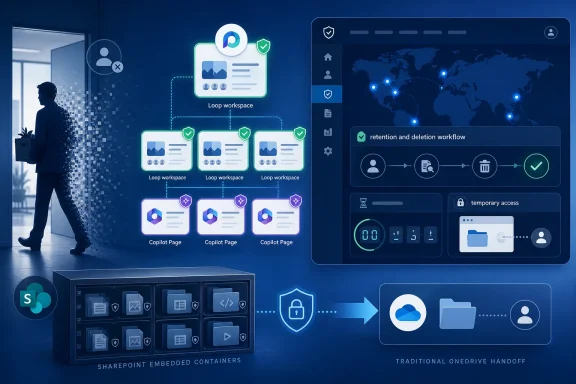 Loop’s Collaboration Pitch Has Finally Met the HR Offboarding Calendar
For years, Microsoft’s productivity story has moved in one direction: less file, more workspace. Word documents, Teams chats, meeting notes, task boards, and AI-generated summaries increasingly blur into shared canvases that promise continuity across apps. Loop is the purest expression of that strategy, because it treats work as a set of live, portable components rather than static artifacts.That model works beautifully when everyone is still employed, licensed, and reachable. It becomes more complicated the moment the person who created the workspace leaves the organization. At that point, the business does not care whether the content is called a Loop page, a Copilot Page, a notebook, a component, or a SharePoint Embedded container; it cares whether the launch plan, customer notes, engineering decisions, or incident retrospective can still be recovered.
Microsoft’s roadmap language is deliberately administrative: “manage retention and deletion workflows,” “notify,” “provide temporary access,” “save important data.” Behind that calm phrasing is a familiar enterprise panic. A worker leaves, their account is disabled or deleted, and only afterward does someone discover that a critical piece of institutional memory lived in a personal workspace rather than a team-owned location.
That is not simply user error. Microsoft has encouraged people to use these tools as low-friction surfaces, which naturally means they will be used before governance taxonomies catch up. A Copilot Page can begin as a personal AI scratchpad and become, over a few days, the working draft of a strategy document. A Loop workspace can start as a private set of notes and become the only coherent record of a project.
The new workflow matters because it recognizes that collaboration content now has a messy middle state. It may be user-owned, but not purely personal. It may be private by default, but not irrelevant to the company. It may be scheduled for deletion, but still contain information the organization is legally, operationally, or commercially obliged to preserve.
SharePoint Embedded Is the Invisible Filing Cabinet
The technical root of the problem is storage architecture. Microsoft Learn describes Copilot Pages, Copilot Notebooks, and Loop personal workspace content as residing in a single user-owned SharePoint Embedded container. Shared Loop workspaces and group-owned Loop workspaces follow different ownership models, but the personal container is tied to the user and follows a user-account lifecycle.That sounds tidy until administrators try to map it to older Microsoft 365 instincts. OneDrive has a well-known departed-user process, including manager access patterns and retention behavior that many IT teams have operationalized. SharePoint team sites have ownership and group constructs that fit project continuity more naturally. Loop’s user-owned container sits awkwardly between those worlds.
The result is a governance gap hidden behind a polished user experience. To the employee, Copilot Pages and Loop feel like parts of Microsoft 365. To the administrator, they are backed by SharePoint Embedded, governed through newer container management surfaces, and subject to lifecycle behavior that may not match the mental model built from OneDrive and SharePoint Online.
Microsoft’s documentation has become more explicit about this distinction. The company says user-owned containers require intervention if another person needs access before deletion, and that content may need to be copied elsewhere because the container itself is not simply reassigned as a permanent new home. That distinction is crucial. Temporary access is not the same thing as ownership transfer, and preservation is not the same thing as leaving the old workspace alive forever.
This is where many organizations will need to adjust their internal documentation. “Check the user’s OneDrive” is no longer a complete offboarding instruction. For employees who used Loop heavily, administrators must also think about Copilot Pages, Copilot Notebooks, and user-owned Loop content stored in SharePoint Embedded. The old filing cabinet has acquired a hidden drawer.
The Feature Solves a Real Problem, but It Does Not Eliminate Governance Debt
Roadmap ID 421612 gives Microsoft 365 tenants a more formal way to notify people, grant temporary access, and allow important data to be saved before deletion policies take effect. That is a meaningful improvement. It reduces the odds that content disappears merely because nobody knew where to look or how fast the clock was running.But this is not a magic “make Loop enterprise-safe” button. It is a workflow for a specific lifecycle event: the departure of a user who owns content. It helps with salvage. It does not decide what content should have been created in a personal space in the first place, who should have access to sensitive AI-generated notes, or which records require legal retention.
That distinction will matter most in organizations that adopted Copilot quickly. Copilot Pages are exactly the kind of surface where users may capture summaries, plans, meeting context, customer references, or draft decisions without thinking about records management. The content can be valuable precisely because it is informal. Unfortunately, informality is where governance usually arrives late.
The workflow also highlights a deeper Microsoft 365 tension. Microsoft is giving users more autonomous places to create knowledge while giving administrators more after-the-fact controls to contain the consequences. That is not necessarily wrong; modern collaboration cannot wait for every artifact to be classified before it exists. But it does mean IT must stop pretending that adoption and governance are separate phases.
If a company enables Loop, Copilot Pages, and Copilot Notebooks broadly, it should assume that business-critical content will appear in user-owned locations. The new departed-user workflow should be part of the governance design from day one, not an obscure recovery tool discovered after the first executive asks where the missing project notes went.
Temporary Access Is a Compromise, Not a Transfer of Memory
One of the most important words in Microsoft’s roadmap description is “temporary.” The feature is designed to notify and provide temporary access to other employees or administrators so they can save important data before deletion policies take effect. That phrasing matters because it frames the workflow as a preservation window, not a permanent reassignment model.In practical terms, that means organizations should expect to copy, move, or recreate important content in a more durable location. A team-owned SharePoint site, a Microsoft 365 Group-backed workspace, a records-managed repository, or another approved destination may be the right target depending on the content. The departed user’s personal Loop container should not become a ghost workspace kept alive by administrative exception.
This is healthy design, even if it creates work. Personal productivity spaces should not silently become corporate archives just because they are convenient. If content has lasting business value, the organization should make an explicit decision about where it belongs and who owns it going forward.
The hard part is that Loop’s strength is also its governance challenge. Its components are fluid, contextual, and designed to travel. A page may contain copied text, embedded references, links to meetings, AI-generated summaries, and collaboratively edited material. Saving “the important data” may require human judgment, not just a bulk export.
That is why the workflow will likely become part of a broader offboarding playbook. IT can provide access, but business owners must decide what matters. Compliance teams can set retention expectations, but managers must know whether a departed employee’s Loop workspace contains live project material. The tooling can open the door; it cannot read the room.
Copilot Makes the Stakes Bigger Than Loop Alone
If this were only about Loop, it would still matter. But the roadmap item explicitly calls out Copilot Pages, and that makes it part of Microsoft’s larger AI governance story. Copilot Pages are not merely documents; they are a place where AI-assisted work product can be collected, edited, shared, and turned into a collaborative artifact.That changes the risk profile. AI-generated summaries may condense meetings that were never formally documented elsewhere. Copilot-assisted plans may become the seed of business decisions. Drafts created in a personal space may contain sensitive source material from email, chat, or files, depending on permissions and user behavior.
Microsoft has been trying to reassure enterprise customers that Copilot respects existing Microsoft 365 permissions. That is necessary, but it is not sufficient. Respecting permissions at creation time does not answer the lifecycle question: what happens to the resulting artifact when the person who created or curated it leaves?
Roadmap ID 421612 is one answer. It gives administrators and designated employees a chance to intervene before content deletion takes effect. But it also underscores that AI-era productivity creates more derivative artifacts worth governing. The more Copilot helps users synthesize work, the more those syntheses become assets in their own right.
This is why security-minded readers should pay attention even if they do not use Loop heavily today. The pattern will repeat across Microsoft 365. AI features will create new surfaces where personal initiative and corporate knowledge overlap. The governance model will have to follow the content, not the branding.
Microsoft Is Retrofitting Enterprise Controls Onto Consumer-Simple Workflows
Loop’s product design is intentionally approachable. It does not greet users with records-management decisions, container ownership diagrams, or retention labels. It invites them to start typing, add collaborators, and let work evolve. That is the right design for adoption and the wrong design for clean governance.Microsoft is not alone in this tradeoff, but it is especially exposed because Microsoft 365 is where many companies’ regulated, confidential, and operationally critical work already lives. When a lightweight canvas is embedded in the same ecosystem as email, Teams, SharePoint, OneDrive, and Copilot, users will treat it as approved by default. In most organizations, that assumption is probably fair — but approval without lifecycle clarity is a trap.
The departed-user workflow is therefore a retrofit, and not in a bad sense. Enterprise software is full of retrofits because real-world use reveals where the initial model was too tidy. Users adopt tools in ways vendors did not fully anticipate, and administrators then need levers to manage the resulting sprawl.
The danger is that Microsoft’s admin story becomes a scavenger hunt. One control lives in the Microsoft 365 admin center, another in SharePoint admin, another in Purview, another in a roadmap promise, another in PowerShell or Graph. IT pros can handle complexity, but they should not have to reverse-engineer a product’s storage model every time a new Microsoft 365 surface arrives.
To Microsoft’s credit, the Learn documentation around Loop storage and SharePoint Embedded containers has become more direct. It explains ownership types, container behavior, and the difference between user-owned and group-owned content. That documentation needs to be treated as operational material, not optional background reading.
The Offboarding Checklist Needs a Loop Column Now
For administrators, the immediate consequence is simple: departed-user workflows for Microsoft 365 must be updated. If the organization uses Loop, Copilot Pages, or Copilot Notebooks, the offboarding process should include a check for user-owned SharePoint Embedded content. That check should happen before deletion timers make recovery more difficult.The right owner for the process will vary. In smaller organizations, a Microsoft 365 admin may handle the entire recovery. In larger enterprises, HR triggers the account lifecycle, identity teams disable access, managers nominate custodians, and compliance teams define what must be retained. The new workflow helps only if those handoffs are clear.
The timing also matters. Microsoft’s roadmap item says the feature is launched, with General Availability listed for April 2026 in the Worldwide standard multi-tenant cloud. That does not mean every administrator has already operationalized it, nor does it mean every organization has communicated the process to managers. GA is the start of the operational work, not the end.
IT teams should also decide what “save important data” means before the next high-risk departure. Does the custodian copy pages into a team workspace? Export content where possible? Preserve screenshots? Move decisions into a formal system of record? The answer will differ by business function, but improvising during an offboarding event is a recipe for inconsistency.
This is especially true for legal holds and regulated records. The roadmap language is about workflows before deletion policies take effect, but regulated organizations will need to align Loop and Copilot Page handling with Microsoft Purview, retention policies, eDiscovery expectations, and internal records schedules. A temporary access workflow is not a compliance strategy by itself.
Group-Owned Workspaces Look More Attractive After This Change
One lesson from the departed-user problem is that ownership architecture matters. If a workspace is truly a team asset, it should probably be owned by a team construct rather than by a single person. Microsoft’s documentation distinguishes user-owned, tenant-owned, and Microsoft 365 Group-owned Loop containers, and that distinction should shape how organizations teach employees to use Loop.Personal workspaces are still valuable. They are good for drafts, scratchpads, individual research, and early-stage thinking. Copilot Pages in particular will often start as personal explorations. The mistake is letting them become the durable home for team knowledge without an intentional transition.
Group-owned or team-associated spaces are a better fit for projects that must survive personnel changes. They align ownership with the business unit or team rather than the individual. That does not remove every governance challenge, but it reduces the chance that a resignation turns into a content recovery incident.
The cultural challenge is that users rarely think in those terms. They create where the button is easiest, where Copilot placed the output, or where yesterday’s notes already live. If Microsoft wants better outcomes, it should make the “promote this to a team-owned location” path obvious and low-friction.
Administrators can help by writing guidance in plain language. Users do not need a lecture on SharePoint Embedded. They need to know that personal Loop and Copilot spaces are not the best long-term home for team-critical material, and that important project content should be moved into an approved shared workspace while the project is still alive.
Deletion Is Not the Villain; Ambiguity Is
It is tempting to frame any deletion workflow as a threat. In reality, deletion is part of good governance. Keeping every personal workspace forever would create its own risks: stale sensitive data, unnecessary discovery scope, confusing search results, and orphaned content with unclear ownership.The problem is not that Microsoft deletes user-owned content according to lifecycle rules. The problem is when organizations do not know what is being deleted, who had a chance to review it, and whether business-critical material was preserved before the clock ran out. Roadmap ID 421612 attacks that ambiguity.
Good retention practice is not the same as hoarding. Enterprises need defensible deletion as much as they need preservation. A departed employee’s personal workspace may contain valuable project notes, but it may also contain drafts, duplicated content, outdated AI summaries, or sensitive information that should not linger indefinitely.
The workflow’s value is that it creates a decision point. Someone can be notified. Someone can be granted access. Someone can decide what to keep. That is far better than both extremes: silent deletion on one side and indefinite orphaning on the other.
Still, decision points require accountable humans. If every departed user triggers a vague notification to an overloaded admin queue, important content will still be missed. The workflow should route to people who understand the employee’s work, not merely people with technical permission to open the container.
The Admin Center Is Becoming the Map of Microsoft’s New Content Geography
The rise of SharePoint Embedded has changed what Microsoft 365 administrators must understand. Content is no longer neatly divided into Exchange mailboxes, OneDrive accounts, SharePoint sites, and Teams. Increasingly, Microsoft apps create their own containerized storage experiences on top of Microsoft 365 infrastructure.That is not inherently bad. SharePoint Embedded gives applications a way to use Microsoft 365 storage, security, and compliance foundations without forcing every experience to look like a SharePoint document library. For users, that abstraction is a benefit. For admins, it means the underlying map matters more than the surface interface.
Loop is one of the clearest examples. The user sees a workspace. The admin must understand container ownership, lifecycle management, permissions, storage, retention, and recovery. The branding says “Microsoft Loop,” but the operational questions are SharePoint questions, Purview questions, identity questions, and records questions.
This is where Microsoft must continue to improve the connective tissue. The company’s documentation now does a better job explaining that Copilot Pages, Copilot Notebooks, and Loop personal workspace content share the same user-owned container. But administrators should not have to wait for a departure event to discover that relationship.
The future Microsoft 365 admin experience should make these dependencies visible by default. If an employee is being offboarded, the admin center should surface not only mailbox and OneDrive status, but also user-owned app containers that may contain business content. Roadmap ID 421612 moves in that direction, but the broader interface challenge remains.
The Real Win Is Fewer Content Hostage Situations
Anyone who has administered collaboration platforms has seen the content hostage scenario. A project artifact exists, but the person with practical control is gone. The account is disabled, the license is removed, the manager is impatient, and IT is asked to “just get the files” from a system that does not quite store things like files.Loop made that scenario more likely because it lowered the barrier to creating useful shared material outside traditional document libraries. Copilot Pages may accelerate it further by turning AI-assisted conversations into artifacts people want to keep. The new departed-user workflow is Microsoft’s attempt to keep that productivity gain from becoming an offboarding liability.
The best outcome is not that admins become expert rescuers of abandoned Loop workspaces. The best outcome is that fewer rescues are needed because organizations learn when to use personal spaces and when to move work into durable shared homes. Recovery tooling is essential, but it should be a safety net, not the operating model.
There is also a trust dimension. Employees are more likely to use new productivity tools when they believe their work will not vanish arbitrarily. Managers are more likely to support those tools when they know business continuity does not depend on one person’s account. Admins are more likely to enable features when they can govern the lifecycle.
That is why this roadmap item deserves more attention than its dry wording suggests. It is a small administrative feature attached to a large product bet. Microsoft wants Loop and Copilot surfaces to become everyday workspaces. Everyday workspaces need everyday lifecycle controls.
The April Launch Turns Loop From Experiment Into Evidence
The concrete lesson from Roadmap ID 421612 is that Microsoft is moving Loop and Copilot Pages deeper into the managed Microsoft 365 estate. That does not make them risk-free; it makes the risks more visible and more governable. Organizations should treat the April 2026 GA milestone as a prompt to revisit offboarding, not as a reason to assume the problem has solved itself.- Microsoft has launched a departed-user workflow for user-owned Loop workspaces, including Copilot Pages, in the Microsoft 365 app on the web.
- The feature is listed as General Availability for Worldwide standard multi-tenant customers, with April 2026 as the GA date and a July 6, 2026 roadmap update.
- Copilot Pages, Copilot Notebooks, and Loop personal workspace content are backed by user-owned SharePoint Embedded containers, which require different handling from familiar OneDrive handoff scenarios.
- The workflow is designed to notify and provide temporary access so employees or administrators can preserve important data before deletion policies take effect.
- IT teams should update offboarding runbooks to include Loop and Copilot Page content, especially for employees who used Microsoft 365 Copilot heavily.
- Business-critical content should be moved into durable shared locations rather than left indefinitely in a departed user’s personal workspace.
References
- Primary source: Microsoft 365 Roadmap
Published: 2026-07-06T23:00:50.6928566Z
Loading…
www.microsoft.com - Official source: learn.microsoft.com
Loading…
learn.microsoft.com - Official source: support.microsoft.com
Loading…
support.microsoft.com - Related coverage: blog-en.topedia.com
Loading…
blog-en.topedia.com - Official source: techcommunity.microsoft.com
Loading…
techcommunity.microsoft.com - Official source: download.microsoft.com
Loading…
download.microsoft.com