

Android Authority’s Megan Ellis argued in a July 2026 hands-on column that five non-Google Android widgets — KWGT, Battery Widget Reborn, Fossify Notes, Fossify Calendar, and Samsung Health — now anchor her daily phone use. That list is not really about widgets. It is about the quiet shift from Android as a Google-shaped default experience to Android as a personal operating surface that users increasingly want to own, audit, and rearrange.
The obvious reading is simple: here are five useful home-screen tools. The more interesting reading is that each pick rejects a different piece of Google’s gravitational pull. One replaces Google’s visual language, one second-guesses Android’s battery abstractions, two move personal data away from cloud-first productivity apps, and one chooses Samsung’s health stack over Google’s.
Android widgets used to feel like accessories. They were weather tiles, clocks, calendar previews, and music controls — useful, but rarely central to how people thought about the operating system. In 2026, that framing is too small.
A modern Android home screen is less like a desktop wallpaper and more like a personal dashboard. It is where users decide which data deserves ambient visibility, which apps get daily attention, and which ecosystems are allowed to mediate the small rhythms of life. That makes widgets politically interesting in the small-p sense: they are where platform control meets user agency.
Google understands this, which is why its own widgets have become more polished, more Material You-friendly, and more deeply tied to services such as Calendar, Keep, Search, Maps, Fit, and Gemini-adjacent surfaces. But polish has a cost. The more attractive the default widget set becomes, the more it nudges users toward a Google account-centered life.
Ellis’ Android Authority list works because it starts from a different premise. The question is not whether Google’s widgets are good. Many of them are. The question is whether “good” is enough when the widget sits on the first screen you see dozens or hundreds of times a day.
That matters because Android customization has slowly become more managed. Launchers, icon packs, dynamic color, lock screen tweaks, and OEM theme stores still exist, but the mainstream experience has moved toward curated personalization rather than raw tinkering. Google and Samsung both want users to feel expressive without breaking the design system.
KWGT is the counterargument. It is messy in the way powerful tools are messy. Android Authority’s piece notes that its interface takes time to master and that it may be overkill for someone who simply wants a basic widget that works. But that learning curve is also the point: KWGT restores the sense that the phone belongs to the person willing to configure it.
There is an old Android culture embedded in that idea. Before every phone shipped with a tasteful clock and a weather pill, enthusiasts spent weekends building home screens that looked like spaceship consoles, minimalist notebooks, or desktop operating systems from another timeline. KWGT keeps that spirit alive, not as nostalgia but as a working utility.
It also exposes a tension in modern mobile design. The more polished stock Android becomes, the less space there is for weirdness. KWGT is valuable precisely because it refuses to collapse customization into a menu of approved choices.
Battery Widget Reborn fills that gap by turning battery status into something persistent and inspectable. Android Authority highlights its customizable layout, themes, colors, battery temperature readouts, remaining-time estimates, power shortcuts, and history features. The appeal is not just that it shows more numbers. It gives the user a feeling of instrumentation.
That feeling matters on devices where battery behavior is not always intuitive. Ellis mentions a Galaxy S24 with disappointing battery life even compared with other units of the same model. Anyone who has owned enough phones knows that story: two devices with the same name can behave differently because of signal conditions, background services, app mix, thermal limits, battery age, silicon variance, or plain bad luck.
Google and OEMs have good reasons to simplify battery reporting. Detailed estimates can be misleading, users can overinterpret short-term drain, and too much data can create anxiety. But hiding complexity does not make complexity disappear. It just means power users go looking elsewhere.
Battery Widget Reborn is a reminder that Android’s strength has always been the ability to put system reality closer to the surface. A battery percentage is a reassurance. A battery history widget is an argument: show me what is happening, and let me decide what matters.
Fossify Notes wins a different way. It is open-source, offline-first, ad-free, and privacy-oriented. Android Authority’s column frames the switch around discomfort with putting too much personal information into Google services and web servers generally. That is a familiar privacy concern, but the widget angle makes it concrete.
Notes are deceptively intimate. A quick note app often contains grocery lists, errands, gift ideas, medical reminders, travel details, household tasks, private worries, and fragments of work. None of this may seem sensitive in isolation. Together, it is a soft map of a person’s life.
The trade-off is real. Fossify Notes is less feature-packed than major cloud note apps, and the Android Authority piece notes that it lacks cloud syncing. Its widget is basic, and Ellis wishes checklist items could be checked off directly from the widget rather than requiring the app to open. In other words, privacy here is not magic. It is a design choice with costs.
But that is what makes the recommendation credible. Too much privacy software is sold as if users can have all the convenience of cloud services with none of the exposure. Fossify Notes represents the more honest bargain: fewer features, fewer dependencies, fewer invisible intermediaries.
That is why Fossify Calendar is an especially interesting pick. Android Authority describes it as privacy-focused, tracking-free, and fully offline, with a clutter-free widget that can display family events and other important dates. It can also view Google Calendar events, though Ellis notes that users cannot modify those Google events directly inside Fossify Calendar.
That limitation is not a flaw so much as a boundary. Fossify Calendar can be a local-first calendar, and it can be a window into Google Calendar, but it cannot make the whole cloud coordination problem vanish. Users who want a private main calendar must accept that private infrastructure behaves differently from Google’s integrated service.
This is where privacy moves from slogan to workflow. It is easy to say “use fewer Google services.” It is harder to decide which calendar is authoritative, where family members enter events, how backups work, what happens when a phone is lost, and how much convenience is worth trading away.
The widget makes that trade visible every day. A Google Calendar widget says: your schedule lives in Google’s cloud, and this is the polished surface. A Fossify Calendar widget says: your schedule can live closer to you, but you may have to manage the edges yourself.
Android Authority’s piece says Ellis moved away from Welltory’s premium model and spent the week with Samsung Health, finding it a strong alternative that fits her needs better than Google’s health offering. For users with both a Samsung phone and a Samsung wearable, the logic is straightforward. The hardware, sensors, watch software, phone app, and widget all come from the same vendor.
That integration has value. A steps widget is not glamorous, but it is exactly the kind of glanceable data that makes wearables feel worthwhile. The user does not want to open a full dashboard every time; the widget is the behavioral nudge. It turns health tracking from an app you consult into a number you live beside.
The trade-off is that Samsung Health is still an ecosystem choice. It may be a better choice than Google Fit or Health Connect-centered workflows for some Samsung owners, but it is not an escape from platform gravity. It is a migration from one orbit to another.
That distinction matters for IT-minded readers because consumer privacy often gets flattened into “Google versus not Google.” The real world is more layered. Samsung Health may keep a Galaxy owner in a more coherent hardware-software stack, while Fossify Notes moves data offline entirely. Both are non-Google choices, but they are not the same kind of choice.
The real target is the default. Google’s default widgets are good enough that many users never look elsewhere. Samsung’s defaults are good enough that many Galaxy users stay inside One UI. Apple’s defaults are famously sticky. The modern mobile economy is built on the power of “already there.”
These five widgets push against that inertia in different ways. KWGT says the default visual language is not enough. Battery Widget Reborn says the default battery view is too shallow. Fossify Notes and Calendar say the default cloud bargain deserves scrutiny. Samsung Health says the best default for a Galaxy owner may be Samsung’s, not Google’s.
That is a healthier way to think about Android. The platform’s value is not merely that users can replace everything. It is that they can replace selectively. The best Android setup is rarely the most ideologically pure one; it is the one where each surface has been chosen on purpose.
For WindowsForum readers, that should sound familiar. Windows power users have lived this way for decades, replacing Start menus, file managers, terminal apps, backup tools, browsers, password managers, monitoring utilities, and shell extensions not because Microsoft’s defaults are always bad, but because defaults are designed for the median user. Enthusiasts live outside the median by definition.
A note widget determines which tasks stay top of mind. A battery widget determines whether the user sees the phone as healthy or unreliable. A calendar widget determines which obligations feel immediate. A health widget can encourage a walk, a streak, or a small act of self-surveillance. A custom widget can turn the whole home screen into a personal control panel.
That means widget selection is also trust selection. Which app gets to sit on the front page of your phone? Which developer gets to render your reminders, your calendar, your battery state, or your daily movement? Which company gets the benefit of your glance?
Google’s advantage is that it already has trust by default. Smaller developers and open-source projects must earn it through transparency, restraint, or utility. Samsung earns it through hardware integration. KWGT earns it through power. Battery Widget Reborn earns it through specificity.
The Android Authority column works because it does not pretend these choices are universal. Ellis is clear that KWGT is for tinkerers, Fossify’s tools are for users who value privacy and simplicity, and Samsung Health is strongest for Samsung hardware owners. That specificity is better than the usual app-list mush, where every recommendation is somehow “best for everyone.”
That is especially true for the five categories in this list. You do not want to open a full battery analytics suite every time you wonder whether your phone will last until dinner. You do not want to open a sprawling productivity app just to see milk, eggs, and dish soap. You do not want a health dashboard when a step count will do.
Widgets compress intent. They make the phone less about app-hopping and more about ambient awareness. In a mobile environment increasingly optimized for engagement, that compression can feel almost subversive.
This is why small, focused widgets still matter even when operating systems become more capable. A widget is not merely a miniature app window. It is a declaration that some information deserves to exist without ceremony.
There is also the security reality. A widget that displays personal information needs permissions, and permissions are not morally purified by being non-Google. Users should still think carefully about what data a widget can access, how the app is maintained, whether it has a credible developer history, and whether it needs network access for the job it claims to do.
Fossify’s offline posture is reassuring precisely because it narrows the risk surface. KWGT, by contrast, is powerful because it can integrate many kinds of information and designs, which means users should be thoughtful about packs, permissions, and sources. Battery tools can be useful without needing to become all-seeing system agents. Health apps are inherently sensitive, whether the logo is Google’s, Samsung’s, or someone else’s.
The practical lesson is not “avoid Google and everything is solved.” It is “audit the surface you stare at all day.” That audit includes privacy, update history, business model, feature creep, and whether the widget actually reduces friction rather than adding another thing to maintain.
Google will keep making excellent widgets, and most Android users will keep using them because defaults are powerful and convenience usually wins. But lists like this show why Android remains culturally different from more locked-down platforms: the home screen can still be contested territory. The next phase of Android personalization will not be about louder themes or flashier animations; it will be about quieter choices over data, attention, and which companies are allowed to occupy the first glance of the morning.
The obvious reading is simple: here are five useful home-screen tools. The more interesting reading is that each pick rejects a different piece of Google’s gravitational pull. One replaces Google’s visual language, one second-guesses Android’s battery abstractions, two move personal data away from cloud-first productivity apps, and one chooses Samsung’s health stack over Google’s.
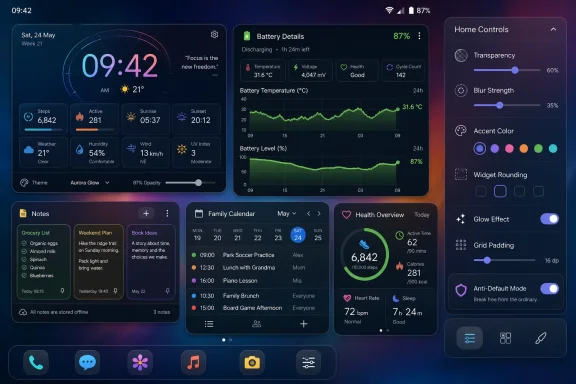 The Home Screen Has Become the New Settings Panel
Android widgets used to feel like accessories. They were weather tiles, clocks, calendar previews, and music controls — useful, but rarely central to how people thought about the operating system. In 2026, that framing is too small.A modern Android home screen is less like a desktop wallpaper and more like a personal dashboard. It is where users decide which data deserves ambient visibility, which apps get daily attention, and which ecosystems are allowed to mediate the small rhythms of life. That makes widgets politically interesting in the small-p sense: they are where platform control meets user agency.
Google understands this, which is why its own widgets have become more polished, more Material You-friendly, and more deeply tied to services such as Calendar, Keep, Search, Maps, Fit, and Gemini-adjacent surfaces. But polish has a cost. The more attractive the default widget set becomes, the more it nudges users toward a Google account-centered life.
Ellis’ Android Authority list works because it starts from a different premise. The question is not whether Google’s widgets are good. Many of them are. The question is whether “good” is enough when the widget sits on the first screen you see dozens or hundreds of times a day.
KWGT Turns Android Customization Back Into a Verb
KWGT Kustom Widget Maker is the least surprising app on the list and also the most revealing. It has long been a favorite of Android themers because it treats a widget not as a fixed product but as a canvas. Clocks, system monitors, quick notes, weather panels, calendar elements, and elaborate themed dashboards can all be assembled from scratch or adapted from packs.That matters because Android customization has slowly become more managed. Launchers, icon packs, dynamic color, lock screen tweaks, and OEM theme stores still exist, but the mainstream experience has moved toward curated personalization rather than raw tinkering. Google and Samsung both want users to feel expressive without breaking the design system.
KWGT is the counterargument. It is messy in the way powerful tools are messy. Android Authority’s piece notes that its interface takes time to master and that it may be overkill for someone who simply wants a basic widget that works. But that learning curve is also the point: KWGT restores the sense that the phone belongs to the person willing to configure it.
There is an old Android culture embedded in that idea. Before every phone shipped with a tasteful clock and a weather pill, enthusiasts spent weekends building home screens that looked like spaceship consoles, minimalist notebooks, or desktop operating systems from another timeline. KWGT keeps that spirit alive, not as nostalgia but as a working utility.
It also exposes a tension in modern mobile design. The more polished stock Android becomes, the less space there is for weirdness. KWGT is valuable precisely because it refuses to collapse customization into a menu of approved choices.
Battery Widget Reborn Shows Why System Dashboards Still Feel Thin
Battery life is one of the most important parts of the smartphone experience, yet most phones still present it as a deliberately simplified story. You get a percentage, a graph, a few app-level usage estimates, and perhaps a battery health setting if your vendor feels generous. For ordinary users, that may be enough. For enthusiasts, it is not.Battery Widget Reborn fills that gap by turning battery status into something persistent and inspectable. Android Authority highlights its customizable layout, themes, colors, battery temperature readouts, remaining-time estimates, power shortcuts, and history features. The appeal is not just that it shows more numbers. It gives the user a feeling of instrumentation.
That feeling matters on devices where battery behavior is not always intuitive. Ellis mentions a Galaxy S24 with disappointing battery life even compared with other units of the same model. Anyone who has owned enough phones knows that story: two devices with the same name can behave differently because of signal conditions, background services, app mix, thermal limits, battery age, silicon variance, or plain bad luck.
Google and OEMs have good reasons to simplify battery reporting. Detailed estimates can be misleading, users can overinterpret short-term drain, and too much data can create anxiety. But hiding complexity does not make complexity disappear. It just means power users go looking elsewhere.
Battery Widget Reborn is a reminder that Android’s strength has always been the ability to put system reality closer to the surface. A battery percentage is a reassurance. A battery history widget is an argument: show me what is happening, and let me decide what matters.
Fossify Notes Makes Privacy Feel Practical, Not Theoretical
The Fossify Notes pick is where the list becomes more than a customization roundup. Google Keep is one of Google’s stickiest lightweight productivity apps because it is fast, cross-platform, and deeply convenient. It is exactly the sort of app that wins by being frictionless.Fossify Notes wins a different way. It is open-source, offline-first, ad-free, and privacy-oriented. Android Authority’s column frames the switch around discomfort with putting too much personal information into Google services and web servers generally. That is a familiar privacy concern, but the widget angle makes it concrete.
Notes are deceptively intimate. A quick note app often contains grocery lists, errands, gift ideas, medical reminders, travel details, household tasks, private worries, and fragments of work. None of this may seem sensitive in isolation. Together, it is a soft map of a person’s life.
The trade-off is real. Fossify Notes is less feature-packed than major cloud note apps, and the Android Authority piece notes that it lacks cloud syncing. Its widget is basic, and Ellis wishes checklist items could be checked off directly from the widget rather than requiring the app to open. In other words, privacy here is not magic. It is a design choice with costs.
But that is what makes the recommendation credible. Too much privacy software is sold as if users can have all the convenience of cloud services with none of the exposure. Fossify Notes represents the more honest bargain: fewer features, fewer dependencies, fewer invisible intermediaries.
Fossify Calendar Is the Harder Privacy Compromise
Calendars are even more complicated than notes because they are social infrastructure. A useful calendar often needs invites, shared events, reminders, cross-device sync, work account integration, travel data, family schedules, and sometimes location awareness. Pulling that offline is not as easy as swapping one text editor for another.That is why Fossify Calendar is an especially interesting pick. Android Authority describes it as privacy-focused, tracking-free, and fully offline, with a clutter-free widget that can display family events and other important dates. It can also view Google Calendar events, though Ellis notes that users cannot modify those Google events directly inside Fossify Calendar.
That limitation is not a flaw so much as a boundary. Fossify Calendar can be a local-first calendar, and it can be a window into Google Calendar, but it cannot make the whole cloud coordination problem vanish. Users who want a private main calendar must accept that private infrastructure behaves differently from Google’s integrated service.
This is where privacy moves from slogan to workflow. It is easy to say “use fewer Google services.” It is harder to decide which calendar is authoritative, where family members enter events, how backups work, what happens when a phone is lost, and how much convenience is worth trading away.
The widget makes that trade visible every day. A Google Calendar widget says: your schedule lives in Google’s cloud, and this is the polished surface. A Fossify Calendar widget says: your schedule can live closer to you, but you may have to manage the edges yourself.
Samsung Health Wins by Being the Better Walled Garden for Samsung Users
Samsung Health is the odd one out because it is not a small privacy-forward indie app. It is a major vendor ecosystem in its own right. But that is what makes it a useful contrast. Avoiding Google does not always mean going fully independent; sometimes it means choosing a different giant whose incentives better match your hardware.Android Authority’s piece says Ellis moved away from Welltory’s premium model and spent the week with Samsung Health, finding it a strong alternative that fits her needs better than Google’s health offering. For users with both a Samsung phone and a Samsung wearable, the logic is straightforward. The hardware, sensors, watch software, phone app, and widget all come from the same vendor.
That integration has value. A steps widget is not glamorous, but it is exactly the kind of glanceable data that makes wearables feel worthwhile. The user does not want to open a full dashboard every time; the widget is the behavioral nudge. It turns health tracking from an app you consult into a number you live beside.
The trade-off is that Samsung Health is still an ecosystem choice. It may be a better choice than Google Fit or Health Connect-centered workflows for some Samsung owners, but it is not an escape from platform gravity. It is a migration from one orbit to another.
That distinction matters for IT-minded readers because consumer privacy often gets flattened into “Google versus not Google.” The real world is more layered. Samsung Health may keep a Galaxy owner in a more coherent hardware-software stack, while Fossify Notes moves data offline entirely. Both are non-Google choices, but they are not the same kind of choice.
The Anti-Google Story Is Really an Anti-Default Story
It would be easy to frame this list as another chapter in the long-running de-Googling narrative. That is partly true. Fossify Notes and Fossify Calendar are explicitly appealing because they reduce dependence on Google-style cloud services. But the broader story is less ideological.The real target is the default. Google’s default widgets are good enough that many users never look elsewhere. Samsung’s defaults are good enough that many Galaxy users stay inside One UI. Apple’s defaults are famously sticky. The modern mobile economy is built on the power of “already there.”
These five widgets push against that inertia in different ways. KWGT says the default visual language is not enough. Battery Widget Reborn says the default battery view is too shallow. Fossify Notes and Calendar say the default cloud bargain deserves scrutiny. Samsung Health says the best default for a Galaxy owner may be Samsung’s, not Google’s.
That is a healthier way to think about Android. The platform’s value is not merely that users can replace everything. It is that they can replace selectively. The best Android setup is rarely the most ideologically pure one; it is the one where each surface has been chosen on purpose.
For WindowsForum readers, that should sound familiar. Windows power users have lived this way for decades, replacing Start menus, file managers, terminal apps, backup tools, browsers, password managers, monitoring utilities, and shell extensions not because Microsoft’s defaults are always bad, but because defaults are designed for the median user. Enthusiasts live outside the median by definition.
Widgets Are Tiny Apps With Outsized Trust
A widget’s power is easy to underestimate because it occupies so little space. But its position is privileged. It can be visible before the user has consciously decided to do anything, and it can shape behavior through repetition.A note widget determines which tasks stay top of mind. A battery widget determines whether the user sees the phone as healthy or unreliable. A calendar widget determines which obligations feel immediate. A health widget can encourage a walk, a streak, or a small act of self-surveillance. A custom widget can turn the whole home screen into a personal control panel.
That means widget selection is also trust selection. Which app gets to sit on the front page of your phone? Which developer gets to render your reminders, your calendar, your battery state, or your daily movement? Which company gets the benefit of your glance?
Google’s advantage is that it already has trust by default. Smaller developers and open-source projects must earn it through transparency, restraint, or utility. Samsung earns it through hardware integration. KWGT earns it through power. Battery Widget Reborn earns it through specificity.
The Android Authority column works because it does not pretend these choices are universal. Ellis is clear that KWGT is for tinkerers, Fossify’s tools are for users who value privacy and simplicity, and Samsung Health is strongest for Samsung hardware owners. That specificity is better than the usual app-list mush, where every recommendation is somehow “best for everyone.”
The Widget Renaissance Is Also a Rejection of App Bloat
There is another undercurrent here: widgets are attractive because full apps have become exhausting. Opening an app increasingly means encountering onboarding screens, permissions prompts, upsells, notifications, AI features, account nudges, subscription tiers, and interface churn. A widget, at its best, bypasses the theater.That is especially true for the five categories in this list. You do not want to open a full battery analytics suite every time you wonder whether your phone will last until dinner. You do not want to open a sprawling productivity app just to see milk, eggs, and dish soap. You do not want a health dashboard when a step count will do.
Widgets compress intent. They make the phone less about app-hopping and more about ambient awareness. In a mobile environment increasingly optimized for engagement, that compression can feel almost subversive.
This is why small, focused widgets still matter even when operating systems become more capable. A widget is not merely a miniature app window. It is a declaration that some information deserves to exist without ceremony.
The Catch Is Maintenance, Trust, and Platform Drift
The case for non-Google widgets is strong, but it is not cost-free. Smaller apps can disappear, stagnate, change business models, or fall behind Android’s evolving background execution limits. Open-source apps can be transparent without being richly staffed. Customization tools can break when launchers, OEM skins, or Android versions change behavior.There is also the security reality. A widget that displays personal information needs permissions, and permissions are not morally purified by being non-Google. Users should still think carefully about what data a widget can access, how the app is maintained, whether it has a credible developer history, and whether it needs network access for the job it claims to do.
Fossify’s offline posture is reassuring precisely because it narrows the risk surface. KWGT, by contrast, is powerful because it can integrate many kinds of information and designs, which means users should be thoughtful about packs, permissions, and sources. Battery tools can be useful without needing to become all-seeing system agents. Health apps are inherently sensitive, whether the logo is Google’s, Samsung’s, or someone else’s.
The practical lesson is not “avoid Google and everything is solved.” It is “audit the surface you stare at all day.” That audit includes privacy, update history, business model, feature creep, and whether the widget actually reduces friction rather than adding another thing to maintain.
Five Widgets, One Pattern Android Users Should Notice
The best part of Android Authority’s list is that it is not a manifesto disguised as a shopping guide. It is a daily-use setup with compromises plainly visible. That makes the pattern more useful for ordinary users than a purist de-Googling checklist.- KWGT is the choice for users who want the home screen to be something they build, not something a platform owner hands down.
- Battery Widget Reborn is the choice for users who want battery behavior to be observable instead of abstracted into a single percentage.
- Fossify Notes is the choice for users who would rather give up cloud convenience than put every stray thought on a server.
- Fossify Calendar is the choice for users who want a local-first schedule, provided they can tolerate the rough edges around syncing and shared calendars.
- Samsung Health is the choice that shows non-Google does not always mean indie or offline; sometimes it means picking the ecosystem that best matches the hardware on your wrist and in your pocket.
Google will keep making excellent widgets, and most Android users will keep using them because defaults are powerful and convenience usually wins. But lists like this show why Android remains culturally different from more locked-down platforms: the home screen can still be contested territory. The next phase of Android personalization will not be about louder themes or flashier animations; it will be about quieter choices over data, attention, and which companies are allowed to occupy the first glance of the morning.
References
- Primary source: Android Authority
Published: Tue, 07 Jul 2026 09:54:36 GMT
5 Android widgets I use every single day — and none of them are made by Google
Looking for some widget recommendations outside of the usual Google-made suspects? Here are a few of my personal favorites.www.androidauthority.com - Official source: play.google.com
- Related coverage: androidcentral.com
Best theming widgets for Android | Android Central
Widgets are awesome, but they don't always play nice with your theme. Here are the widgets that you can rely on to make your home screen both beautiful and functional.www.androidcentral.com - Related coverage: androidmetro.com
Android Kwgt Widgets
KWGT (Kustom Widget Maker for Android) is one of the most popular customization apps for Android users who want to take their home screen personalizatwww.androidmetro.com
- Related coverage: positioniseverything.net
Best Widget Apps for Android - Position Is Everything
×AIChipps - Easy Way to Repair your PC Issues + AI AssistantFix My PC with AI →⚙️PC Running Slow or... www.positioniseverything.net
- Related coverage: guidingtech.com
How to Use KWGT to Make Stunning Home Screen Widgets
The KWGT Kustom Widget Maker could prove to be a handful for beginners. Here's how you can use KWGT to make your own custom widgets.www.guidingtech.com
- Related coverage: apprecs.com
S9 for Kustom - Widget, Locksc for Android | AppRecs
S9 for Kustom - Widget, Locksc for Android on Google Play. Awesome Galaxy S9's widgets and lockscreens pack for KWGT/KLCKapprecs.com