

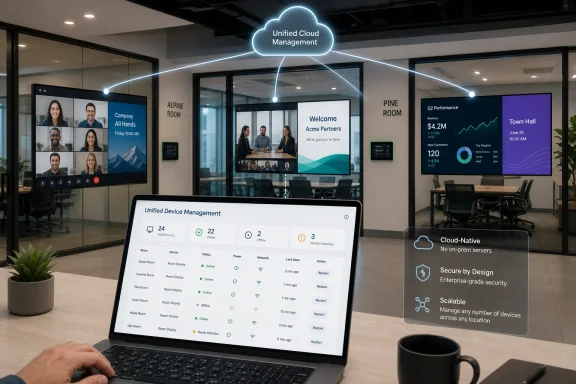
OptiSigns launched Unified Device Management on June 16, 2026, with broader coverage appearing July 7, giving IT teams one console for Microsoft Teams Rooms, Zoom Rooms, Cisco Webex, Google Meet, and idle-room digital signage across workplace displays. The move is not just a product launch; it is a bet that conference-room screens are too expensive, visible, and centrally located to remain dead assets between meetings. As reported by invidis and described in OptiSigns’ own launch materials, the platform turns room systems into part of the corporate communications estate without asking administrators to install new software on the room devices themselves. That small architectural choice may matter more than the signage pitch.
For years, the meeting-room display has lived in a strange category. It is not quite a PC, not quite a TV, not quite signage, and not quite collaboration hardware. It is often purchased by facilities, specified by AV integrators, maintained by IT, and complained about by everyone.
OptiSigns’ Unified Device Management lands squarely in that ambiguity. The company says the platform can manage rooms across Microsoft Teams Rooms, Zoom Rooms, Cisco Webex, and Google Meet while also displaying corporate content when the room is idle. That means the same screen that shows a Teams call at 10:00 can show a visitor welcome, sales dashboard, emergency notice, or internal campaign at 10:45.
The obvious pitch is efficiency: stop wasting screens. The deeper story is governance. Once a meeting-room display can be monitored, restarted, grouped, scheduled, and assigned content from a cloud dashboard, it starts to look less like AV furniture and more like an endpoint in the enterprise fleet.
That is where WindowsForum readers should pay attention. The category may be digital signage, but the operational questions are familiar: identity, permissions, device health, licensing, auditability, and the perennial fight against yet another admin portal.
OptiSigns’ answer is to put those rooms into one device list alongside conventional digital signage screens. According to the company, administrators can monitor health, restart room systems, adjust settings, and deploy content from a centralized dashboard. The supported platforms are the big four that define enterprise collaboration: Teams Rooms, Zoom Rooms, Webex, and Google Meet.
That does not mean OptiSigns replaces the native admin consoles. It almost certainly cannot, and serious IT teams should be wary of any vendor suggesting otherwise. Microsoft, Zoom, Cisco, and Google still own the room operating models, firmware paths, policy surfaces, and support boundaries.
But a cross-platform operational layer can still be useful if it handles the repetitive tasks well. If the service can show which rooms are online, which screens are idle, which signage playlists are active, and which devices need attention, then it becomes a triage console. In enterprise IT, the first pane of glass rarely needs to be the only pane of glass to justify its existence.
Room systems are fragile in ways ordinary users rarely see. A Teams Room appliance, a Zoom Room, or a Webex device is not just a generic display controller; it is a certified stack of hardware, software, management policy, peripheral control, and vendor support assumptions. Installing an extra agent can create patching obligations, warranty concerns, security review friction, and support finger-pointing.
By avoiding device-side installation, OptiSigns lowers the political cost of adoption. The company’s support documentation says Zoom and Webex can receive signage through official APIs, while Microsoft Teams Rooms and Google Meet hardware rely on a signage URL configured through the vendor’s admin path because those platforms do not offer the same push model. That distinction matters: “supported” does not mean “identical.”
This is the part buyers should read carefully. A unified dashboard can hide platform differences, but it cannot erase them. Teams Rooms, Zoom Rooms, Webex devices, and Google Meet hardware expose different controls, permissions, and automation surfaces. The product may offer a common workflow, but the underlying plumbing remains vendor-specific.
OptiSigns is arguing that this is wasted communications real estate. A company that already owns dozens or hundreds of room displays can use them for internal messaging without buying a second signage network. In hybrid offices, where foot traffic is uneven and employees are harder to reach through email or intranet posts, that is not a trivial proposition.
The content examples in the launch coverage are predictable but practical: company announcements, visitor welcomes, and business dashboards. The more interesting use cases are situational. A lobby-adjacent meeting room could welcome a customer delegation before a briefing. A sales floor room could show pipeline metrics between calls. A manufacturing office could display safety reminders or shift updates.
The risk is that every screen becomes another corporate nag surface. Digital signage works best when it is timely, local, and restrained. If Unified Device Management simply makes it easier to spray generic HR campaigns across every display, users will learn to ignore it as quickly as they ignore unread intranet banners.
OptiSigns’ ability to use Teams Rooms as signage surfaces therefore overlaps with a Microsoft-controlled workflow. Microsoft has added digital signage capabilities to Teams Rooms, and OptiSigns’ support materials describe configuring a source through the Teams Rooms Pro Management Portal and the OptiSigns web player. In practical terms, this means the integration lives adjacent to Microsoft’s own room management tooling rather than replacing it.
That is both good and limiting. It is good because administrators do not need to treat a Teams Room like an unmanaged kiosk. It is limiting because Teams Rooms remains governed by Microsoft’s platform rules, licensing expectations, and management model.
The broader WindowsForum lesson is familiar: the more specialized the endpoint, the more valuable standardized management becomes. A conference room PC or appliance may not look like a fleet laptop, but the operational mindset is converging. IT wants inventory, health, policy, remote action, and clear ownership.
That fragmentation has produced a cottage industry of interoperability features, certified devices, cloud video interop services, and awkward “bring your laptop and hope HDMI works” rituals. A unified management layer does not solve meeting interoperability. It does, however, acknowledge that IT has to live with multiple room ecosystems whether procurement likes it or not.
OptiSigns’ approach is less about joining every meeting from every room and more about managing the estate around those rooms. That distinction is important. A Teams Room struggling with a third-party meeting experience is still a Teams Room problem. A Webex device running in a mode that exposes different API behavior is still subject to Cisco’s design choices.
Where OptiSigns can help is in making mixed estates visible. If a facilities team asks why the office has so many dark screens, IT can show utilization opportunities. If communications wants a campaign on displays, IT can scope it by rooms and schedules. If support needs to restart a room system, the dashboard may reduce the number of places an admin has to check first.
Security teams will want to know which rooms can be read, which settings can be changed, which restart actions are possible, and whether signage content can be abused as an internal messaging vector. They will also want logs. If a display suddenly shows the wrong content in a boardroom, the organization needs to know whether the problem was a playlist mistake, a compromised admin account, a vendor outage, or a permission misconfiguration.
The no-agent architecture helps, but it does not eliminate risk. Cloud-to-cloud integrations concentrate authority in tokens and administrative grants. That can be cleaner than installing software on every room device, but it also makes identity hygiene and least privilege more important.
For regulated organizations, signage itself can become a compliance surface. A dashboard shown on a room display might expose sales figures, personal data, incident metrics, or customer names to passersby. The feature that makes idle screens useful is the same feature that can make them dangerous if content governance is weak.
A modern meeting room now has a compute device, a display, cameras, microphones, network dependencies, calendar integration, identity permissions, firmware updates, and vendor cloud management. It is both a physical space and a managed service. That means the old model of “AV installs it, IT gets called when it breaks” is increasingly untenable.
OptiSigns is positioning itself in the seam between those teams. Communications gets more screens. Facilities gets more value from installed displays. IT gets centralized management, or at least a claim of it. The buyer may not be the same person in every organization, which is why the product has to speak several dialects at once.
That cross-functional appeal can accelerate adoption, but it can also muddy ownership. Who approves what appears on the screen? Who pays for the subscription? Who grants the Teams, Zoom, Webex, or Google permissions? Who responds when the room display fails five minutes before an executive meeting?
The practical result is that many organizations will probably begin with discovery rather than full deployment. IT can connect a platform, see the room list, evaluate status visibility, and decide which rooms are worth activating for signage. That avoids the common SaaS trap of paying for every theoretical endpoint before proving value.
But licensing also determines behavior. If every activated room consumes a signage license, organizations will prioritize high-traffic spaces, lobbies, executive floors, training rooms, and customer-facing areas. Smaller huddle rooms may remain unmanaged or signage-free unless the operational benefits justify the cost.
This is where OptiSigns’ broader claim matters. If the product is only a way to show content on idle screens, it will compete with cheaper hacks and native signage options. If it becomes a credible room operations layer across vendors, the license is easier to defend.
The launch material suggests OptiSigns understands at least part of this reality. Its own documentation distinguishes between API-pushed signage for Zoom and Webex and URL-based configuration for Teams Rooms and Google Meet hardware. That is the sort of detail that separates a real integration story from a slide-deck abstraction.
Still, buyers should test the boring things. How quickly does signage clear when a meeting starts? What happens when a room calendar is wrong? How are offline rooms reported? Can content be scoped by building or department? What audit trail exists for remote restarts or settings changes?
The answers will matter more than the launch headline. Unified management is not proven by the existence of a dashboard. It is proven during the first outage, the first executive complaint, the first permission review, and the first time a regional office asks why its room behaves differently from headquarters.
That does not make every conference room a billboard. It does mean organizations should stop treating displays as sunk-cost peripherals. If a screen is network-connected, centrally visible, and physically prominent, then it belongs in an inventory and content strategy.
For IT pros, the evaluation should be practical rather than ideological.
 The Conference Room Screen Is Becoming an IT Endpoint
For years, the meeting-room display has lived in a strange category. It is not quite a PC, not quite a TV, not quite signage, and not quite collaboration hardware. It is often purchased by facilities, specified by AV integrators, maintained by IT, and complained about by everyone.OptiSigns’ Unified Device Management lands squarely in that ambiguity. The company says the platform can manage rooms across Microsoft Teams Rooms, Zoom Rooms, Cisco Webex, and Google Meet while also displaying corporate content when the room is idle. That means the same screen that shows a Teams call at 10:00 can show a visitor welcome, sales dashboard, emergency notice, or internal campaign at 10:45.
The obvious pitch is efficiency: stop wasting screens. The deeper story is governance. Once a meeting-room display can be monitored, restarted, grouped, scheduled, and assigned content from a cloud dashboard, it starts to look less like AV furniture and more like an endpoint in the enterprise fleet.
That is where WindowsForum readers should pay attention. The category may be digital signage, but the operational questions are familiar: identity, permissions, device health, licensing, auditability, and the perennial fight against yet another admin portal.
OptiSigns Is Selling Fewer Portals, Not Just More Signage
The launch material frames the problem bluntly. IT teams managing modern meeting rooms often have to bounce between the Microsoft Teams admin center, Zoom’s web portal, Cisco Control Hub, and Google Admin console. In a single-vendor organization, that is irritating. In a real enterprise with acquisitions, regional preferences, executive exceptions, and legacy rooms, it becomes a daily tax.OptiSigns’ answer is to put those rooms into one device list alongside conventional digital signage screens. According to the company, administrators can monitor health, restart room systems, adjust settings, and deploy content from a centralized dashboard. The supported platforms are the big four that define enterprise collaboration: Teams Rooms, Zoom Rooms, Webex, and Google Meet.
That does not mean OptiSigns replaces the native admin consoles. It almost certainly cannot, and serious IT teams should be wary of any vendor suggesting otherwise. Microsoft, Zoom, Cisco, and Google still own the room operating models, firmware paths, policy surfaces, and support boundaries.
But a cross-platform operational layer can still be useful if it handles the repetitive tasks well. If the service can show which rooms are online, which screens are idle, which signage playlists are active, and which devices need attention, then it becomes a triage console. In enterprise IT, the first pane of glass rarely needs to be the only pane of glass to justify its existence.
The No-Agent Claim Is the Most Important Part of the Launch
OptiSigns says Unified Device Management requires no software installation on meeting-room devices. Instead, it connects through each vendor’s existing enterprise integration methods. That sounds like marketing minimalism, but it is actually the heart of the product’s enterprise viability.Room systems are fragile in ways ordinary users rarely see. A Teams Room appliance, a Zoom Room, or a Webex device is not just a generic display controller; it is a certified stack of hardware, software, management policy, peripheral control, and vendor support assumptions. Installing an extra agent can create patching obligations, warranty concerns, security review friction, and support finger-pointing.
By avoiding device-side installation, OptiSigns lowers the political cost of adoption. The company’s support documentation says Zoom and Webex can receive signage through official APIs, while Microsoft Teams Rooms and Google Meet hardware rely on a signage URL configured through the vendor’s admin path because those platforms do not offer the same push model. That distinction matters: “supported” does not mean “identical.”
This is the part buyers should read carefully. A unified dashboard can hide platform differences, but it cannot erase them. Teams Rooms, Zoom Rooms, Webex devices, and Google Meet hardware expose different controls, permissions, and automation surfaces. The product may offer a common workflow, but the underlying plumbing remains vendor-specific.
Idle Displays Are the New Intranet Home Page
The signage use case is easy to dismiss until you walk through a modern office. The biggest screens in many workplaces are not on desks; they are behind glass walls in meeting rooms. They sit at eye level, in high-traffic corridors, often displaying nothing more than a logo, a clock, or a blank input.OptiSigns is arguing that this is wasted communications real estate. A company that already owns dozens or hundreds of room displays can use them for internal messaging without buying a second signage network. In hybrid offices, where foot traffic is uneven and employees are harder to reach through email or intranet posts, that is not a trivial proposition.
The content examples in the launch coverage are predictable but practical: company announcements, visitor welcomes, and business dashboards. The more interesting use cases are situational. A lobby-adjacent meeting room could welcome a customer delegation before a briefing. A sales floor room could show pipeline metrics between calls. A manufacturing office could display safety reminders or shift updates.
The risk is that every screen becomes another corporate nag surface. Digital signage works best when it is timely, local, and restrained. If Unified Device Management simply makes it easier to spray generic HR campaigns across every display, users will learn to ignore it as quickly as they ignore unread intranet banners.
Microsoft Teams Rooms Gives This Story a Windows Angle
For Windows-centric shops, Microsoft Teams Rooms is the gravitational center of this discussion. Teams Rooms on Windows remains a major enterprise deployment pattern, and Teams Rooms on Android has broadened the hardware ecosystem. Either way, these rooms sit inside a Microsoft management and identity universe that many sysadmins already understand.OptiSigns’ ability to use Teams Rooms as signage surfaces therefore overlaps with a Microsoft-controlled workflow. Microsoft has added digital signage capabilities to Teams Rooms, and OptiSigns’ support materials describe configuring a source through the Teams Rooms Pro Management Portal and the OptiSigns web player. In practical terms, this means the integration lives adjacent to Microsoft’s own room management tooling rather than replacing it.
That is both good and limiting. It is good because administrators do not need to treat a Teams Room like an unmanaged kiosk. It is limiting because Teams Rooms remains governed by Microsoft’s platform rules, licensing expectations, and management model.
The broader WindowsForum lesson is familiar: the more specialized the endpoint, the more valuable standardized management becomes. A conference room PC or appliance may not look like a fleet laptop, but the operational mindset is converging. IT wants inventory, health, policy, remote action, and clear ownership.
The Cross-Platform Room Is Still Messier Than the Dashboard Suggests
The launch speaks to a real workplace condition: organizations rarely standardize perfectly. One office prefers Zoom. Another standardized on Teams. An acquired company runs Webex. Executives receive Google Meet invites from partners. The calendar may be universal, but the meeting stack is not.That fragmentation has produced a cottage industry of interoperability features, certified devices, cloud video interop services, and awkward “bring your laptop and hope HDMI works” rituals. A unified management layer does not solve meeting interoperability. It does, however, acknowledge that IT has to live with multiple room ecosystems whether procurement likes it or not.
OptiSigns’ approach is less about joining every meeting from every room and more about managing the estate around those rooms. That distinction is important. A Teams Room struggling with a third-party meeting experience is still a Teams Room problem. A Webex device running in a mode that exposes different API behavior is still subject to Cisco’s design choices.
Where OptiSigns can help is in making mixed estates visible. If a facilities team asks why the office has so many dark screens, IT can show utilization opportunities. If communications wants a campaign on displays, IT can scope it by rooms and schedules. If support needs to restart a room system, the dashboard may reduce the number of places an admin has to check first.
The Security Review Will Decide Whether This Scales
Every product that promises a single pane of glass eventually runs into the same enterprise question: what permissions does it need? OptiSigns’ own materials say the integrations use vendor-approved enterprise methods, including patterns such as service principals, OAuth apps, service apps, and service accounts with delegated authority depending on the platform. Those are normal mechanisms, but normal does not mean automatic approval.Security teams will want to know which rooms can be read, which settings can be changed, which restart actions are possible, and whether signage content can be abused as an internal messaging vector. They will also want logs. If a display suddenly shows the wrong content in a boardroom, the organization needs to know whether the problem was a playlist mistake, a compromised admin account, a vendor outage, or a permission misconfiguration.
The no-agent architecture helps, but it does not eliminate risk. Cloud-to-cloud integrations concentrate authority in tokens and administrative grants. That can be cleaner than installing software on every room device, but it also makes identity hygiene and least privilege more important.
For regulated organizations, signage itself can become a compliance surface. A dashboard shown on a room display might expose sales figures, personal data, incident metrics, or customer names to passersby. The feature that makes idle screens useful is the same feature that can make them dangerous if content governance is weak.
Facilities, AV, and IT Are Colliding Again
The launch also reflects a long-running organizational shift. Digital signage used to belong to marketing, communications, or facilities. Meeting rooms often belonged to AV teams. Identity, device health, and cloud administration belonged to IT. Hybrid work collapsed those boundaries.A modern meeting room now has a compute device, a display, cameras, microphones, network dependencies, calendar integration, identity permissions, firmware updates, and vendor cloud management. It is both a physical space and a managed service. That means the old model of “AV installs it, IT gets called when it breaks” is increasingly untenable.
OptiSigns is positioning itself in the seam between those teams. Communications gets more screens. Facilities gets more value from installed displays. IT gets centralized management, or at least a claim of it. The buyer may not be the same person in every organization, which is why the product has to speak several dialects at once.
That cross-functional appeal can accelerate adoption, but it can also muddy ownership. Who approves what appears on the screen? Who pays for the subscription? Who grants the Teams, Zoom, Webex, or Google permissions? Who responds when the room display fails five minutes before an executive meeting?
Licensing Will Shape the Real Deployment Pattern
OptiSigns says Unified Device Management is available immediately on the Standard subscription plan and above. Its materials also describe a model where rooms can be synced before signage is activated, with licensing consumed when organizations turn signage on for specific rooms. That is a sensible way to reduce adoption friction.The practical result is that many organizations will probably begin with discovery rather than full deployment. IT can connect a platform, see the room list, evaluate status visibility, and decide which rooms are worth activating for signage. That avoids the common SaaS trap of paying for every theoretical endpoint before proving value.
But licensing also determines behavior. If every activated room consumes a signage license, organizations will prioritize high-traffic spaces, lobbies, executive floors, training rooms, and customer-facing areas. Smaller huddle rooms may remain unmanaged or signage-free unless the operational benefits justify the cost.
This is where OptiSigns’ broader claim matters. If the product is only a way to show content on idle screens, it will compete with cheaper hacks and native signage options. If it becomes a credible room operations layer across vendors, the license is easier to defend.
The Dashboard Is Useful Only If It Respects the Native Platforms
The biggest danger for any unification product is overpromising sameness. Enterprises do not actually need every platform to behave identically; they need the differences to be explicit and manageable. A good console should tell administrators what it can do for a Zoom Room, what it can do for a Teams Room, and where the vendor boundary begins.The launch material suggests OptiSigns understands at least part of this reality. Its own documentation distinguishes between API-pushed signage for Zoom and Webex and URL-based configuration for Teams Rooms and Google Meet hardware. That is the sort of detail that separates a real integration story from a slide-deck abstraction.
Still, buyers should test the boring things. How quickly does signage clear when a meeting starts? What happens when a room calendar is wrong? How are offline rooms reported? Can content be scoped by building or department? What audit trail exists for remote restarts or settings changes?
The answers will matter more than the launch headline. Unified management is not proven by the existence of a dashboard. It is proven during the first outage, the first executive complaint, the first permission review, and the first time a regional office asks why its room behaves differently from headquarters.
The Office Screen Estate Finally Gets a Strategy
The most concrete lesson from OptiSigns’ launch is that workplace screens are being reclassified. They are no longer just presentation surfaces waiting for a laptop or meeting client. They are becoming programmable, scheduled, monitored endpoints in a broader communications and operations system.That does not make every conference room a billboard. It does mean organizations should stop treating displays as sunk-cost peripherals. If a screen is network-connected, centrally visible, and physically prominent, then it belongs in an inventory and content strategy.
For IT pros, the evaluation should be practical rather than ideological.
- Organizations with mixed Teams, Zoom, Webex, and Google Meet estates may gain the most from a cross-platform room list.
- The no-agent model reduces deployment friction, but administrators still need to scrutinize cloud permissions and delegated access.
- Signage value will depend on content discipline, because irrelevant internal messaging will quickly train employees to ignore the screens.
- Teams Rooms and Google Meet integrations may not behave exactly like Zoom and Webex integrations because the underlying platform capabilities differ.
- The licensing model is likely to push early deployments toward high-traffic and customer-visible rooms rather than every huddle space.
- The product should be judged less by its launch promise than by how clearly it handles errors, audit trails, offline rooms, and vendor-specific limits.
References
- Primary source: Sixteen:Nine
Published: 2026-07-07T15:01:07.915570
Loading…
invidis.com - Related coverage: optisigns.com
Loading…
www.optisigns.com - Related coverage: prnewswire.com
Loading…
www.prnewswire.com - Related coverage: support.optisigns.com
Room Integrations: Turn Your Meeting Rooms into Digital Signage – OptiSigns
Your meeting rooms sit idle most of the day. OptiSigns Room Integrations put that screen time to work: when a room is between meetings,...support.optisigns.com - Related coverage: fbdepartment.com
Loading…
www.fbdepartment.com - Related coverage: aol.com
Loading…
www.aol.com
- Related coverage: app.dealroom.co
Loading…
app.dealroom.co - Related coverage: aijourn.com
OptiSigns launches Unified Device Management for meeting rooms | The AI Journal
The new platform runs digital signage on idle meeting-room displays. It also manages Zoom, Teams, Webex, and Google Meet rooms from one place. aijourn.com
- Related coverage: pexip.com