

Dave Plummer, the former Microsoft engineer best known for creating Windows Task Manager, recently demonstrated a Notepad-like Windows application called TinyRetroPad that fits into roughly 2,686 bytes, and Windows Central used the project to argue that modern Windows software often ships far more machinery than the job requires.
That is not a nostalgia stunt so much as an indictment. The point is not that every Windows app should be written in x86 assembly, or that Copilot-era Notepad should be judged against a weekend-sized demo from a veteran systems programmer. The point is sharper: Windows has become a platform where the easiest way to ship a small idea is often to drag along an enormous runtime, a browser engine, an updater, telemetry plumbing, and a dependency graph whose footprint overwhelms the thing the user actually asked for.
Plummer’s TinyRetroPad matters because it makes software bloat visible in a way Task Manager graphs rarely do. Users know when a machine feels sluggish, when a cold launch takes too long, when an “empty” app consumes hundreds of megabytes, or when a simple tool updates like a miniature operating system. What they do not usually see is the architectural choice underneath: whether an app is leaning on the operating system or arriving with its own private platform in tow.
Windows Central framed Plummer’s video around a line that should sting every modern desktop developer: “Not every app needs to bundle the universe.” In Plummer’s telling, the tiny editor works because it uses what Windows already provides instead of importing a full application civilization. The operating system has windows, controls, menus, message loops, fonts, file dialogs, and text-editing primitives; the program can be small because the platform is large.
That bargain used to be the whole point of a general-purpose operating system. Windows was not merely a bootloader for Electron apps, cross-platform runtimes, web views, and self-contained update stacks. It was a shared environment where applications could call into common facilities and let the OS absorb the complexity once.
The irony is that Windows itself is often blamed for the bloat users feel, while a growing portion of that heaviness comes from the way modern applications treat Windows as merely a delivery surface. The OS still deserves scrutiny, especially as Microsoft keeps adding cloud hooks, AI features, account flows, and background services. But Plummer’s demo reminds us that the app ecosystem has also learned to spend memory, storage, and CPU cycles as if the user will always have more.
The engineering logic is understandable. If a company wants one codebase across Windows, macOS, Linux, and perhaps the web, then bundling a runtime looks efficient from the developer’s side of the ledger. If the app’s interface is built with web technologies, embedding a browser engine can reduce hiring friction and speed feature work. If a vendor wants consistent rendering, telemetry, account logic, feature flags, experiments, and update behavior across platforms, relying on the host OS can feel like a constraint.
But users pay the invoice in aggregate. One bundled runtime is tolerable. Ten are a pattern. A workplace full of chat clients, launchers, password managers, note apps, sync tools, collaboration suites, RGB utilities, VPN agents, printer helpers, and cloud storage clients can quietly turn a fast PC into a machine that is mostly busy hosting everyone else’s abstraction layer.
This is why TinyRetroPad resonates beyond its size. Nobody is demanding that Visual Studio, Photoshop, Teams, Steam, or a modern game launcher fit inside a boot sector. The reasonable complaint is that too many trivial utilities now behave like complex platforms, and too many complex platforms treat local resources as effectively free.
The OS should provide shared services. Apps should use them when the job is ordinary. When every app instead brings its own renderer, its own updater, its own cache, its own crash reporter, and its own background agent, Windows stops feeling like a platform and starts feeling like a crowded apartment building where every tenant runs a diesel generator in the hallway.
The minimum spec is the floor Microsoft is willing to print, not the memory a user actually needs after opening a browser, a chat app, a cloud sync client, security software, and a few productivity tools. In 2015, a 4GB PC could be modest but workable for basic tasks. In 2026, an 8GB Windows 11 machine can feel like a compromise before the user has even installed their preferred apps.
This is where debates about Windows bloat often go wrong. The problem is not only that Windows 11 has a higher minimum requirement than Windows 10. Some of that increase reflects legitimate changes: 64-bit-only Windows, security baselines, modern drivers, higher display expectations, heavier web workloads, and users who expect real-time sync, search, notifications, encryption, sandboxing, and accessibility features that earlier PCs did not provide at the same level.
But “legitimate” does not mean “free.” Every security feature, every richer UI layer, every background indexer, every AI add-on, every cross-device convenience, and every app framework consumes some part of the machine. The question is not whether modern software should do more than it did in the Windows XP era. The question is whether the additional cost is proportional to the user-visible benefit.
TinyRetroPad is useful because it resets our intuition. It says: here is a recognizably useful Windows program measured in kilobytes, not megabytes. Once you have seen that, a 200MB installer for a glorified settings panel feels less like progress and more like a confession.
Electron and similar approaches are not villains in a cartoon. They enabled an enormous wave of cross-platform desktop software, lowered the barrier for web developers to ship native-ish apps, and gave vendors consistent behavior across operating systems. For fast-moving services, that matters. A chat client or collaboration app whose value lives in a constantly changing cloud service may be easier to maintain when the desktop shell is essentially a controlled browser environment.
But the convenience became contagious. Once teams are organized around web stacks, the browser engine stops being a deliberate tradeoff and becomes the default answer. Need a preferences app? Use the stack. Need a tray utility? Use the stack. Need a note-taking client? Use the stack. Need a launcher to open a game that is already installed? Use the stack.
The user sees an icon. The system sees a small city.
Plummer’s line about not shipping with a browser engine lands because the browser is now the universal solvent of desktop development. It can render anything, connect to anything, sandbox many things, and update rapidly. It is also one of the most complex pieces of software on the planet. When the task is writing plain text, listing files, toggling settings, or authenticating once a day, embedding that complexity can look absurd.
Windows itself has not been immune to this drift. Microsoft has spent years moving parts of the Windows experience toward web-backed surfaces, account-driven services, and cloud-mediated features. Some of that is strategic coherence; some of it is the reality of a company whose revenue center is no longer boxed operating systems. But for the user who just wants a local tool to be immediate, every extra layer feels like the machine is negotiating with a committee before drawing a window.
Microsoft has modernized Notepad in ways many users appreciate: tabs, dark mode, better handling of line endings, session restore, improved search, and other conveniences that make sense in a modern Windows environment. But the addition of AI-related features, including Copilot integration, turned a deliberately humble utility into another front in Microsoft’s platform strategy. That is where the backlash came from.
The complaint was never that Notepad must remain frozen in amber. Better Unicode handling, faster search, dark mode, and accessibility improvements are not bloat in the pejorative sense if they serve the core task. The complaint is that even the most basic Windows apps increasingly become distribution channels for broader corporate priorities: cloud accounts, AI services, engagement surfaces, and telemetry-fed product loops.
Plummer’s clone is therefore less a competitor to modern Notepad than a control sample. It strips the idea back to “a native Windows text editor,” then asks what was added and why. Some additions are defensible. Some are luxurious. Some are strategic. Some are there because nobody is forced to count bytes anymore.
That last part matters. Constraints do not automatically produce better software, but the absence of constraints almost always produces larger software. If a team is rewarded for features, velocity, engagement, and cross-platform parity, but not for memory discipline or cold-start latency on modest hardware, the outcome is predictable.
A plain utility that launches, does its job, and exits is commercially boring. It does not create daily active users. It does not gather much telemetry. It does not support server-side experiments. It does not keep a brand in the system tray. It does not cross-promote premium features. It does not maintain a persistent channel for notifications, upsells, or AI credits.
The modern app, by contrast, is often a client for a service. That service wants identity, analytics, experimentation, and retention. Those needs create background processes, startup entries, scheduled tasks, local caches, crash uploaders, notification daemons, and update agents. The app’s footprint is no longer determined only by what the user does; it is determined by what the vendor wants to know and influence when the user is not actively doing anything.
This is why “just add RAM” is such an unsatisfying answer. Hardware improvements should expand what users can do, not merely absorb the inefficiency of software that has forgotten how to leave. When a new PC with 16GB of RAM feels like the minimum civilized baseline for office work, some of that is because modern workloads are genuinely richer. Some of it is because every vendor decided their helper process deserved residency.
The bloat conversation is therefore a governance conversation. Who gets to run at startup? Who gets to update silently? Who gets to install a service? Who gets to summon a browser engine for a settings page? Who gets to assume network connectivity for a local task? Windows gives users some tools to answer those questions, but the defaults still tend to favor the app vendor’s desire to be always available.
Those constraints produced their own pathologies. Old software crashed, cut corners, reused unsafe APIs, made ugly assumptions, and often sacrificed security or maintainability for speed and size. Nobody should romanticize a past where a buffer overflow could become an entire exploit class and installers treated system directories like a junk drawer.
Still, constraint trained a certain respect for the machine. Developers understood that every allocation, every dependency, every redraw, and every disk access had a cost the user could feel. That did not make all old software good, but it made waste harder to ignore.
Modern development culture often optimizes for a different scarcity: developer time. That is not laziness; it is economics. Engineers are expensive, security demands are higher, platforms are fragmented, and users expect rapid feature delivery. If a 150MB framework saves a team six months and gets the same app onto three operating systems, the spreadsheet will usually bless the framework.
The missing line item is the externalized cost across millions of machines. One team’s reasonable choice becomes every user’s startup delay. One vendor’s runtime becomes another copy of the same runtime. One “small” background agent becomes a machine full of small background agents. The modern PC is not slow because any one app is indefensible; it is slow because everyone made locally rational decisions that compound globally.
Microsoft has made some efforts to expose and control app behavior. Task Manager shows startup impact. Settings surfaces startup apps. Windows Security and Smart App Control push toward safer software. App containerization, Store packaging, and MSIX-style deployment all gesture toward a cleaner model than the old Win32 free-for-all.
But Windows also remains the most permissive mainstream desktop platform, which is both its great strength and its recurring curse. Enterprises depend on decades of compatibility. Power users cherish the ability to run almost anything. Developers can build deep integrations that would be impossible on locked-down systems. The same openness that lets TinyRetroPad exist also lets heavyweight vendors plant services and updaters all over the machine.
This is why the solution cannot simply be “make Windows more like iOS.” Windows is valuable precisely because it is not a sealed appliance. Sysadmins need agents. Developers need tools. Gamers need launchers and anti-cheat systems. Hardware vendors need control panels. Accessibility vendors, security vendors, and line-of-business software vendors often require hooks that a purist platform would never allow.
The more realistic answer is pressure: pressure from Microsoft through better defaults and clearer controls, pressure from enterprises through procurement requirements, pressure from reviewers who measure resource usage, and pressure from users who stop treating huge idle footprints as normal. TinyRetroPad is not a policy proposal, but it is a useful piece of propaganda for that pressure campaign.
In other words, the next wave of bloat will not merely be a browser engine where a native dialog would do. It will be a model-serving stack, a semantic index, a prompt orchestration layer, and a telemetry loop wrapped around tasks that may or may not benefit from AI. The risk is not that AI exists in Windows. The risk is that AI becomes the new excuse to keep every app awake, every file preprocessed, every interaction measured, and every simple feature routed through infrastructure the user did not ask to operate.
Microsoft is already walking this tightrope. Copilot+ PCs, Recall-style experiences, local AI acceleration, and cloud-connected assistants all suggest a Windows future where more computation happens in anticipation of what the user might want. Done well, that could make PCs more capable and more personal. Done badly, it will turn idle time into an arms race of indexing, summarizing, and syncing.
Notepad with Copilot is a small example, almost too easy to mock. But it captures the boundary problem. A text editor can benefit from intelligent rewrite, summarization, or explanation features in some contexts. It can also stop being a refuge from complexity if those features become ambient expectations rather than optional tools.
The lesson from TinyRetroPad is not “never add AI.” It is “make the extra weight justify itself.” If a feature requires a service, a model, a cache, a background task, or a persistent identity layer, the value should be obvious enough that users do not need a marketing post to understand why their machine is busier.
The arithmetic is brutal at scale. A single app that consumes an extra few hundred megabytes at idle may not matter on a developer workstation with 64GB of RAM. Multiply that by several required tools across tens of thousands of endpoints, add browsers with dozens of tabs, endpoint detection, VPN, DLP, device management, collaboration clients, and cloud sync, and suddenly the “minimum” laptop specification becomes a budget issue.
Admins also inherit the operational mess of bundled universes. Each runtime has its own vulnerabilities, update cadence, policy knobs, proxy behavior, certificate assumptions, and logging model. A native app that relies on serviced OS components may still have bugs, but it participates in a shared maintenance regime. A fleet of self-contained apps can become a patchwork of mini-platforms, each demanding trust.
This is where procurement should become more aggressive. Enterprises routinely ask vendors about compliance, encryption, authentication, support lifecycle, and data residency. They should also ask about idle memory use, startup behavior, update mechanisms, dependency bundling, offline functionality, and whether the app uses native platform controls where appropriate. Resource efficiency is not a hobbyist concern when it affects refresh cycles and employee productivity.
The same logic applies to schools, public agencies, and small businesses that stretch hardware longer than marketing departments assume. A bloated app ecosystem pushes those users toward replacement before the hardware is truly obsolete. That is a sustainability issue as well as a budget issue. The greenest PC is often the one that remains useful for another year, and software has a vote in whether that happens.
The better criticism is that modern software often lacks proportionality. A complex creative suite may need a complex architecture. A high-end game may need huge assets and aggressive hardware. A secure enterprise client may need multiple services. But a tray app, notes utility, launcher, settings wrapper, or local text editor should not behave like a sovereign platform unless it is delivering sovereign-platform value.
Native development is not always the answer, but it deserves a comeback in places where the job is small and the platform facilities are mature. Windows still has deep APIs, common controls, WinUI, WPF, Win32, .NET options, and packaging models that can produce efficient software when teams care to use them well. The choice is not assembly language or bloat; there is a wide middle ground between 2.6KB and “why is this using 600MB?”
Microsoft could help by celebrating lightweight app design more visibly. The company often showcases AI integration, cloud reach, design refreshes, and cross-device experiences. It should also showcase fast launch, low idle memory, native accessibility, efficient update behavior, and restraint. If Windows is to remain credible on modest PCs, efficiency must become part of the platform story rather than a retro-computing party trick.
Reviewers have a role too. App reviews should treat resource usage as a first-class product quality metric, not a footnote. Users have been trained to compare features and screenshots while ignoring what an app does to the machine over time. That has to change, because bloat thrives when nobody measures it in public.
The concrete lessons are modest, but they cut across the whole Windows ecosystem.
Plummer’s tiny Notepad clone will not change the software industry by itself, and it was never meant to. Its value is that it makes an invisible norm visible: modern PCs are not heavy only because users ask them to do more, but because too much software now arrives carrying a private universe for jobs that once needed a lunchbox and a map. If Windows is going to feel modern without feeling swollen, Microsoft and its developer ecosystem will have to relearn the discipline that TinyRetroPad demonstrates in miniature: use the platform, spend weight only where it matters, and stop treating every text box like a reason to ship the world.
That is not a nostalgia stunt so much as an indictment. The point is not that every Windows app should be written in x86 assembly, or that Copilot-era Notepad should be judged against a weekend-sized demo from a veteran systems programmer. The point is sharper: Windows has become a platform where the easiest way to ship a small idea is often to drag along an enormous runtime, a browser engine, an updater, telemetry plumbing, and a dependency graph whose footprint overwhelms the thing the user actually asked for.
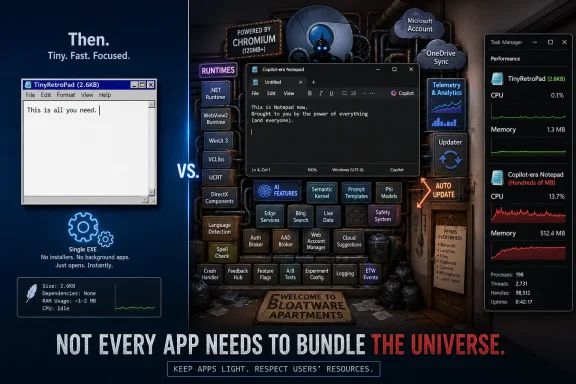 A 2.6KB Notepad Clone Lands Like a Protest
Plummer’s TinyRetroPad matters because it makes software bloat visible in a way Task Manager graphs rarely do. Users know when a machine feels sluggish, when a cold launch takes too long, when an “empty” app consumes hundreds of megabytes, or when a simple tool updates like a miniature operating system. What they do not usually see is the architectural choice underneath: whether an app is leaning on the operating system or arriving with its own private platform in tow.Windows Central framed Plummer’s video around a line that should sting every modern desktop developer: “Not every app needs to bundle the universe.” In Plummer’s telling, the tiny editor works because it uses what Windows already provides instead of importing a full application civilization. The operating system has windows, controls, menus, message loops, fonts, file dialogs, and text-editing primitives; the program can be small because the platform is large.
That bargain used to be the whole point of a general-purpose operating system. Windows was not merely a bootloader for Electron apps, cross-platform runtimes, web views, and self-contained update stacks. It was a shared environment where applications could call into common facilities and let the OS absorb the complexity once.
The irony is that Windows itself is often blamed for the bloat users feel, while a growing portion of that heaviness comes from the way modern applications treat Windows as merely a delivery surface. The OS still deserves scrutiny, especially as Microsoft keeps adding cloud hooks, AI features, account flows, and background services. But Plummer’s demo reminds us that the app ecosystem has also learned to spend memory, storage, and CPU cycles as if the user will always have more.
The Platform Was Supposed to Be the Shared Weight
A tiny native Windows program is not magic. It is a program that accepts the existence of the platform. That distinction sounds quaint in 2026 because many modern desktop apps are designed to minimize their dependence on the host OS, not maximize it.The engineering logic is understandable. If a company wants one codebase across Windows, macOS, Linux, and perhaps the web, then bundling a runtime looks efficient from the developer’s side of the ledger. If the app’s interface is built with web technologies, embedding a browser engine can reduce hiring friction and speed feature work. If a vendor wants consistent rendering, telemetry, account logic, feature flags, experiments, and update behavior across platforms, relying on the host OS can feel like a constraint.
But users pay the invoice in aggregate. One bundled runtime is tolerable. Ten are a pattern. A workplace full of chat clients, launchers, password managers, note apps, sync tools, collaboration suites, RGB utilities, VPN agents, printer helpers, and cloud storage clients can quietly turn a fast PC into a machine that is mostly busy hosting everyone else’s abstraction layer.
This is why TinyRetroPad resonates beyond its size. Nobody is demanding that Visual Studio, Photoshop, Teams, Steam, or a modern game launcher fit inside a boot sector. The reasonable complaint is that too many trivial utilities now behave like complex platforms, and too many complex platforms treat local resources as effectively free.
The OS should provide shared services. Apps should use them when the job is ordinary. When every app instead brings its own renderer, its own updater, its own cache, its own crash reporter, and its own background agent, Windows stops feeling like a platform and starts feeling like a crowded apartment building where every tenant runs a diesel generator in the hallway.
Minimum Specs Tell the Story, Even When They Don’t Tell the Whole Story
Windows Central rightly pointed to the creep in baseline expectations. Microsoft’s own published requirements list Windows 10 as needing 1GB of RAM for 32-bit installations or 2GB for 64-bit installations, while Windows 11 requires 4GB of RAM. Those numbers are not a real-world performance recommendation, and nobody doing modern work should confuse “boots” with “pleasant.” Still, the direction is revealing.The minimum spec is the floor Microsoft is willing to print, not the memory a user actually needs after opening a browser, a chat app, a cloud sync client, security software, and a few productivity tools. In 2015, a 4GB PC could be modest but workable for basic tasks. In 2026, an 8GB Windows 11 machine can feel like a compromise before the user has even installed their preferred apps.
This is where debates about Windows bloat often go wrong. The problem is not only that Windows 11 has a higher minimum requirement than Windows 10. Some of that increase reflects legitimate changes: 64-bit-only Windows, security baselines, modern drivers, higher display expectations, heavier web workloads, and users who expect real-time sync, search, notifications, encryption, sandboxing, and accessibility features that earlier PCs did not provide at the same level.
But “legitimate” does not mean “free.” Every security feature, every richer UI layer, every background indexer, every AI add-on, every cross-device convenience, and every app framework consumes some part of the machine. The question is not whether modern software should do more than it did in the Windows XP era. The question is whether the additional cost is proportional to the user-visible benefit.
TinyRetroPad is useful because it resets our intuition. It says: here is a recognizably useful Windows program measured in kilobytes, not megabytes. Once you have seen that, a 200MB installer for a glorified settings panel feels less like progress and more like a confession.
The Browser Engine Became the New Visual Basic Runtime
Every era has its fashionable shortcut. In the 1990s and early 2000s, Windows users complained about DLL hell, runtimes, setup programs that scattered files across the system, and applications that assumed shared components would be present. Today’s model often avoids those old failures by packaging more dependencies with the app itself. The result is more reliable deployment, but also more repetition.Electron and similar approaches are not villains in a cartoon. They enabled an enormous wave of cross-platform desktop software, lowered the barrier for web developers to ship native-ish apps, and gave vendors consistent behavior across operating systems. For fast-moving services, that matters. A chat client or collaboration app whose value lives in a constantly changing cloud service may be easier to maintain when the desktop shell is essentially a controlled browser environment.
But the convenience became contagious. Once teams are organized around web stacks, the browser engine stops being a deliberate tradeoff and becomes the default answer. Need a preferences app? Use the stack. Need a tray utility? Use the stack. Need a note-taking client? Use the stack. Need a launcher to open a game that is already installed? Use the stack.
The user sees an icon. The system sees a small city.
Plummer’s line about not shipping with a browser engine lands because the browser is now the universal solvent of desktop development. It can render anything, connect to anything, sandbox many things, and update rapidly. It is also one of the most complex pieces of software on the planet. When the task is writing plain text, listing files, toggling settings, or authenticating once a day, embedding that complexity can look absurd.
Windows itself has not been immune to this drift. Microsoft has spent years moving parts of the Windows experience toward web-backed surfaces, account-driven services, and cloud-mediated features. Some of that is strategic coherence; some of it is the reality of a company whose revenue center is no longer boxed operating systems. But for the user who just wants a local tool to be immediate, every extra layer feels like the machine is negotiating with a committee before drawing a window.
Notepad Is No Longer Just Notepad, and That Is the Point
Notepad has become a surprisingly useful symbol because it is supposed to be the app that does almost nothing. It opens text. It saves text. It starts fast. It is the thing users reach for when they do not want a document model, a ribbon, a subscription, a formatting engine, or a lecture.Microsoft has modernized Notepad in ways many users appreciate: tabs, dark mode, better handling of line endings, session restore, improved search, and other conveniences that make sense in a modern Windows environment. But the addition of AI-related features, including Copilot integration, turned a deliberately humble utility into another front in Microsoft’s platform strategy. That is where the backlash came from.
The complaint was never that Notepad must remain frozen in amber. Better Unicode handling, faster search, dark mode, and accessibility improvements are not bloat in the pejorative sense if they serve the core task. The complaint is that even the most basic Windows apps increasingly become distribution channels for broader corporate priorities: cloud accounts, AI services, engagement surfaces, and telemetry-fed product loops.
Plummer’s clone is therefore less a competitor to modern Notepad than a control sample. It strips the idea back to “a native Windows text editor,” then asks what was added and why. Some additions are defensible. Some are luxurious. Some are strategic. Some are there because nobody is forced to count bytes anymore.
That last part matters. Constraints do not automatically produce better software, but the absence of constraints almost always produces larger software. If a team is rewarded for features, velocity, engagement, and cross-platform parity, but not for memory discipline or cold-start latency on modest hardware, the outcome is predictable.
Bloat Is a Business Model Before It Is a Binary Size
It is tempting to reduce software bloat to file size, but that is the least interesting measurement. A small executable can behave badly, and a large application can be carefully engineered. The deeper issue is that modern software often has incentives to remain present, connected, measurable, and updateable at all times.A plain utility that launches, does its job, and exits is commercially boring. It does not create daily active users. It does not gather much telemetry. It does not support server-side experiments. It does not keep a brand in the system tray. It does not cross-promote premium features. It does not maintain a persistent channel for notifications, upsells, or AI credits.
The modern app, by contrast, is often a client for a service. That service wants identity, analytics, experimentation, and retention. Those needs create background processes, startup entries, scheduled tasks, local caches, crash uploaders, notification daemons, and update agents. The app’s footprint is no longer determined only by what the user does; it is determined by what the vendor wants to know and influence when the user is not actively doing anything.
This is why “just add RAM” is such an unsatisfying answer. Hardware improvements should expand what users can do, not merely absorb the inefficiency of software that has forgotten how to leave. When a new PC with 16GB of RAM feels like the minimum civilized baseline for office work, some of that is because modern workloads are genuinely richer. Some of it is because every vendor decided their helper process deserved residency.
The bloat conversation is therefore a governance conversation. Who gets to run at startup? Who gets to update silently? Who gets to install a service? Who gets to summon a browser engine for a settings page? Who gets to assume network connectivity for a local task? Windows gives users some tools to answer those questions, but the defaults still tend to favor the app vendor’s desire to be always available.
Efficiency Used to Be a Survival Skill
Plummer’s demo works as a cultural artifact because it comes from someone shaped by an older world of constraints. Early Windows development involved hardware ceilings that were not theoretical. Memory was scarce, disks were small, CPUs were slow, and distribution was expensive. Inefficiency could not hide behind next year’s laptop.Those constraints produced their own pathologies. Old software crashed, cut corners, reused unsafe APIs, made ugly assumptions, and often sacrificed security or maintainability for speed and size. Nobody should romanticize a past where a buffer overflow could become an entire exploit class and installers treated system directories like a junk drawer.
Still, constraint trained a certain respect for the machine. Developers understood that every allocation, every dependency, every redraw, and every disk access had a cost the user could feel. That did not make all old software good, but it made waste harder to ignore.
Modern development culture often optimizes for a different scarcity: developer time. That is not laziness; it is economics. Engineers are expensive, security demands are higher, platforms are fragmented, and users expect rapid feature delivery. If a 150MB framework saves a team six months and gets the same app onto three operating systems, the spreadsheet will usually bless the framework.
The missing line item is the externalized cost across millions of machines. One team’s reasonable choice becomes every user’s startup delay. One vendor’s runtime becomes another copy of the same runtime. One “small” background agent becomes a machine full of small background agents. The modern PC is not slow because any one app is indefensible; it is slow because everyone made locally rational decisions that compound globally.
Windows Takes the Blame Because Windows Hosts the Mess
For ordinary users, the distinction between OS bloat and app bloat is academic. If the machine is running Windows, and the machine feels heavy, Windows gets blamed. That may be unfair in individual cases, but it is not irrational. The operating system is the landlord, scheduler, shell, update broker, security boundary, and user-facing control plane. If the building is noisy, tenants and landlord both belong in the conversation.Microsoft has made some efforts to expose and control app behavior. Task Manager shows startup impact. Settings surfaces startup apps. Windows Security and Smart App Control push toward safer software. App containerization, Store packaging, and MSIX-style deployment all gesture toward a cleaner model than the old Win32 free-for-all.
But Windows also remains the most permissive mainstream desktop platform, which is both its great strength and its recurring curse. Enterprises depend on decades of compatibility. Power users cherish the ability to run almost anything. Developers can build deep integrations that would be impossible on locked-down systems. The same openness that lets TinyRetroPad exist also lets heavyweight vendors plant services and updaters all over the machine.
This is why the solution cannot simply be “make Windows more like iOS.” Windows is valuable precisely because it is not a sealed appliance. Sysadmins need agents. Developers need tools. Gamers need launchers and anti-cheat systems. Hardware vendors need control panels. Accessibility vendors, security vendors, and line-of-business software vendors often require hooks that a purist platform would never allow.
The more realistic answer is pressure: pressure from Microsoft through better defaults and clearer controls, pressure from enterprises through procurement requirements, pressure from reviewers who measure resource usage, and pressure from users who stop treating huge idle footprints as normal. TinyRetroPad is not a policy proposal, but it is a useful piece of propaganda for that pressure campaign.
AI Threatens to Make the Old Bloat Look Quaint
The uncomfortable timing of Plummer’s demo is that it arrives just as the industry is building a new justification for heavier client software. AI features are being threaded through operating systems, productivity suites, search boxes, editors, browsers, and developer tools. Some of these features are genuinely useful. Many will require local models, cloud calls, indexes, embeddings, caches, privacy controls, safety filters, and background preparation.In other words, the next wave of bloat will not merely be a browser engine where a native dialog would do. It will be a model-serving stack, a semantic index, a prompt orchestration layer, and a telemetry loop wrapped around tasks that may or may not benefit from AI. The risk is not that AI exists in Windows. The risk is that AI becomes the new excuse to keep every app awake, every file preprocessed, every interaction measured, and every simple feature routed through infrastructure the user did not ask to operate.
Microsoft is already walking this tightrope. Copilot+ PCs, Recall-style experiences, local AI acceleration, and cloud-connected assistants all suggest a Windows future where more computation happens in anticipation of what the user might want. Done well, that could make PCs more capable and more personal. Done badly, it will turn idle time into an arms race of indexing, summarizing, and syncing.
Notepad with Copilot is a small example, almost too easy to mock. But it captures the boundary problem. A text editor can benefit from intelligent rewrite, summarization, or explanation features in some contexts. It can also stop being a refuge from complexity if those features become ambient expectations rather than optional tools.
The lesson from TinyRetroPad is not “never add AI.” It is “make the extra weight justify itself.” If a feature requires a service, a model, a cache, a background task, or a persistent identity layer, the value should be obvious enough that users do not need a marketing post to understand why their machine is busier.
Enterprise IT Will See the Cost Before Consumers Name It
Home users experience bloat as annoyance. Enterprises experience it as fleet cost. A heavier baseline means more RAM in standard builds, shorter viable hardware lifecycles, longer login times, more help desk noise, more update traffic, more endpoint management exceptions, and a larger attack surface.The arithmetic is brutal at scale. A single app that consumes an extra few hundred megabytes at idle may not matter on a developer workstation with 64GB of RAM. Multiply that by several required tools across tens of thousands of endpoints, add browsers with dozens of tabs, endpoint detection, VPN, DLP, device management, collaboration clients, and cloud sync, and suddenly the “minimum” laptop specification becomes a budget issue.
Admins also inherit the operational mess of bundled universes. Each runtime has its own vulnerabilities, update cadence, policy knobs, proxy behavior, certificate assumptions, and logging model. A native app that relies on serviced OS components may still have bugs, but it participates in a shared maintenance regime. A fleet of self-contained apps can become a patchwork of mini-platforms, each demanding trust.
This is where procurement should become more aggressive. Enterprises routinely ask vendors about compliance, encryption, authentication, support lifecycle, and data residency. They should also ask about idle memory use, startup behavior, update mechanisms, dependency bundling, offline functionality, and whether the app uses native platform controls where appropriate. Resource efficiency is not a hobbyist concern when it affects refresh cycles and employee productivity.
The same logic applies to schools, public agencies, and small businesses that stretch hardware longer than marketing departments assume. A bloated app ecosystem pushes those users toward replacement before the hardware is truly obsolete. That is a sustainability issue as well as a budget issue. The greenest PC is often the one that remains useful for another year, and software has a vote in whether that happens.
The Right Lesson Is Discipline, Not Asceticism
There is a lazy version of this argument that says modern developers are simply worse than their predecessors. That is not true. Today’s developers contend with security expectations, accessibility requirements, internationalization, high-DPI displays, sandboxing, sync, collaboration, compliance, and user experience standards that would have seemed extravagant in the Windows 95 era. They are not failing because their binaries are larger than 1990s binaries.The better criticism is that modern software often lacks proportionality. A complex creative suite may need a complex architecture. A high-end game may need huge assets and aggressive hardware. A secure enterprise client may need multiple services. But a tray app, notes utility, launcher, settings wrapper, or local text editor should not behave like a sovereign platform unless it is delivering sovereign-platform value.
Native development is not always the answer, but it deserves a comeback in places where the job is small and the platform facilities are mature. Windows still has deep APIs, common controls, WinUI, WPF, Win32, .NET options, and packaging models that can produce efficient software when teams care to use them well. The choice is not assembly language or bloat; there is a wide middle ground between 2.6KB and “why is this using 600MB?”
Microsoft could help by celebrating lightweight app design more visibly. The company often showcases AI integration, cloud reach, design refreshes, and cross-device experiences. It should also showcase fast launch, low idle memory, native accessibility, efficient update behavior, and restraint. If Windows is to remain credible on modest PCs, efficiency must become part of the platform story rather than a retro-computing party trick.
Reviewers have a role too. App reviews should treat resource usage as a first-class product quality metric, not a footnote. Users have been trained to compare features and screenshots while ignoring what an app does to the machine over time. That has to change, because bloat thrives when nobody measures it in public.
The Little Editor Exposes the Big Lie
TinyRetroPad should not become another cudgel in the endless culture war over “old good, new bad.” Its real value is more precise than that. It proves that a useful Windows application can still be small when it trusts the operating system, limits its ambition, and treats the user’s machine as a shared resource rather than a private dumping ground.The concrete lessons are modest, but they cut across the whole Windows ecosystem.
- A small utility should have a small footprint unless it delivers a clearly larger service in return.
- Developers should treat bundled runtimes and embedded browser engines as tradeoffs to justify, not defaults to sleepwalk into.
- Microsoft’s higher Windows 11 baseline is only part of the pressure users feel, because third-party app architecture compounds the cost.
- Enterprises should evaluate resource usage, startup behavior, and update mechanisms as part of software procurement.
- AI features should earn their background work instead of becoming the next blanket excuse for heavier clients.
- Windows users should demand software that uses the platform intelligently rather than duplicating it badly.
Plummer’s tiny Notepad clone will not change the software industry by itself, and it was never meant to. Its value is that it makes an invisible norm visible: modern PCs are not heavy only because users ask them to do more, but because too much software now arrives carrying a private universe for jobs that once needed a lunchbox and a map. If Windows is going to feel modern without feeling swollen, Microsoft and its developer ecosystem will have to relearn the discipline that TinyRetroPad demonstrates in miniature: use the platform, spend weight only where it matters, and stop treating every text box like a reason to ship the world.
References
- Primary source: Windows Central
Published: Tue, 07 Jul 2026 17:57:25 GMT
"Not every app needs to bundle the universe": This tiny notepad app shows why Windows has become so bloated | Windows Central
Former Windows engineer Dave Plummer created a working notepad app under 3KB, proving modern software development has an efficiency problem.www.windowscentral.com - Related coverage: techradar.com
'Pure old-school Windows': Ex-Microsoft engineer shrinks down Notepad to 2.5 kilobytes with 'no bloat, no telemetry, no nonsense' | TechRadar
TinyRetroPad is vanishingly smallwww.techradar.com - Related coverage: pcgamer.com
'No bloat, no telemetry, no nonsense.' Former Microsoft coding wizard makes an OG Notepad clone that's just 2,686 bytes in size | PC Gamer
How about tackling File Explorer next?www.pcgamer.com - Official source: support.microsoft.com
Windows 10 system requirements - Microsoft Support
Windows 10 system requirementssupport.microsoft.com - Official source: microsoft.com
Windows 11 Specs and System Requirements | Microsoft Windows
View Windows 11 specs, system requirements, and features from Microsoft. Learn about the device specifications, versions, and languages available for Windows 11.www.microsoft.com - Related coverage: tomshardware.com
RetroPad is a ‘full-feature-parity version of Notepad from XP’ in just 2,749 bytes — x86 assembly coded apps comes from Windows legend Dave W Plummer | Tom's Hardware
You can grab the RetroPad code and .exe from GitHub.www.tomshardware.com
- Related coverage: berrall.com
Ex-Microsoft engineer rebuilds Notepad in 2.5KB using nothing but stuff Windows already had - Peer Networks UK
Wales & West leading provider of PC repairs & IT support for home & business. Peer Networks delivers prompt, no fuss, PC repair services to customers.www.berrall.com
- Related coverage: rilegislature.gov
- Related coverage: seca.com