

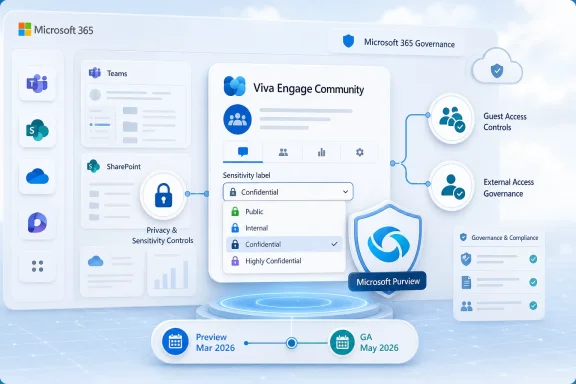
Microsoft has launched Microsoft Purview Information Protection sensitivity label support for Viva Engage communities, bringing manually applied labels to the web experience after preview availability in March 2026 and general availability in May 2026 for worldwide standard multi-tenant Microsoft 365 customers. The feature, listed on the Microsoft 365 Roadmap as ID 558684 and updated on July 7, 2026, lets administrators publish labels to selected users and groups so community owners can classify Engage communities and enforce privacy and external access controls. The change is not flashy, but it is consequential: Microsoft is turning Engage from a social layer that could be governed around the edges into a first-class participant in the Purview labeling model.
That matters because Engage has always occupied an awkward corner of Microsoft 365 governance. It is where organizations encourage broad conversation, leadership messaging, employee communities, and informal knowledge sharing — exactly the kind of content that often becomes sensitive without anyone planning for it. Microsoft’s own documentation now frames sensitivity labels in Engage as a way to protect and regulate access to sensitive organizational content in communities, and the real story is that Microsoft is continuing to collapse the distance between collaboration and compliance.
For years, the basic problem with enterprise social networks was not that people used them too much. It was that governance teams often treated them as less serious than email, files, or Teams channels until a legal, HR, product, or incident-response thread proved otherwise. Engage communities can hold discussions about reorganizations, customer escalations, internal roadmaps, regional labor issues, security incidents, and executive decisions. Those conversations may look like posts and replies, but from a compliance standpoint they are records, signals, and access-control problems.
Sensitivity labels give Microsoft a shared grammar for that problem. In Purview, labels are not just decorative tags; they can carry policy intent. They can define whether a workspace is public or private, whether guests can participate, and how the underlying Microsoft 365 group and connected resources should behave.
Microsoft’s Learn documentation distinguishes this from older group classification schemes, and that distinction is important. A classification is metadata that says something about a group. A sensitivity label is meant to make the service do something. That is the difference between putting “Confidential” on a door and having the lock actually change.
The Engage rollout extends the container-label model that Microsoft already uses across Teams, Microsoft 365 Groups, SharePoint sites, Loop workspaces, and now Viva Engage communities. Microsoft’s Purview documentation says container labels can protect collaborative workspaces by controlling settings such as privacy and external user access. Engage is now being pulled into that same enforcement orbit.
In practical terms, administrators create sensitivity labels and configure label publishing policies in Microsoft Purview. Those policies determine which users and groups can see and manually apply particular labels in Engage. End users with the right permissions can then apply labels to communities, allowing the organization to classify the community and enforce associated privacy and external access rules.
That sounds procedural, but it changes the governance posture of Engage. A community about general employee interests can remain broad and open. A community handling confidential strategy, an acquisition integration, a product launch, or a regional management issue can carry a more restrictive label. The policy follows the community rather than relying entirely on administrators to spot risk after the fact.
Microsoft’s Engage documentation also notes that community admins can change a community’s sensitivity label, subject to the labels and policies available to them. Once a label is applied, it can appear in the community banner, making the classification visible to users. That visibility matters because security controls work better when users understand the space they are in.
This is not data loss prevention in the narrow sense. It does not mean every risky phrase posted in Engage is automatically remediated. The feature is about container-level control: who can access the community, whether outsiders can be added, and how the community fits into a broader Microsoft 365 governance architecture.
That openness is also the risk. If every community defaults to broad visibility, sensitive discussions can sprawl. If every community defaults to locked-down privacy, Engage loses much of its point. Microsoft’s answer is to let administrators set different default labels for Engage communities than for SharePoint sites.
Microsoft’s documentation gives a telling example: an organization might use a more permissive “General” label for Engage communities while maintaining a more restrictive default for SharePoint sites. That is a sensible admission that not all Microsoft 365 containers should behave the same way. A document repository and a social community are not the same collaboration pattern, even if both are backed by Microsoft 365 infrastructure.
This is where the feature becomes less about compliance checkboxing and more about information architecture. Good governance is not merely making everything private. It is making the right thing easy, the risky thing visible, and the prohibited thing difficult.
Engage sensitivity labels give administrators a way to preserve openness without pretending every community carries the same risk. That is the right design direction, especially for large tenants where the alternative is either chaotic openness or a governance model so restrictive that users route around it.
A well-run tenant will not expose every label to every community owner. A frontline employee community probably does not need the same label set as a legal hold, M&A, board communications, or security operations community. Conversely, if only central IT can apply labels, the system will lag behind the way communities actually form.
The administrative challenge is to define a label taxonomy that ordinary community owners can understand. Too few labels, and the controls become blunt. Too many labels, and users guess. Sensitivity labeling programs often fail not because the technology is absent, but because the human vocabulary is a mess.
Engage raises the stakes because community owners are not always compliance-trained site administrators. They may be HR partners, program managers, department leads, employee resource group organizers, or executive communications staff. Microsoft is giving those owners a manual lever, but IT still has to decide how safe and legible that lever is.
This is why the launch should prompt governance teams to revisit their label catalog rather than simply enabling another workload. If the same labels used for files, Teams, and SharePoint are exposed in Engage without thought, the organization may inherit confusing semantics. A label that makes perfect sense for a document may be ambiguous when applied to a social community.
Guest access is also where mistakes are easiest to explain after the fact. If an internal-only leadership community accidentally permits external participants, the problem is obvious. If a community for customer advisory discussions needs outside participants, blocking all guests may break the business process. Labels let the organization define those patterns in advance.
This gives IT a cleaner governance story than ad hoc exception handling. Instead of asking whether a specific community can have guests, the organization can ask what kind of community it is. The label becomes a policy bundle and a record of intent.
But guest access controls are not magic. They work only if community owners choose appropriate labels, if defaults are sensible, and if administrators monitor exceptions. Manual labeling brings flexibility, but it also brings human judgment back into the loop.
The best deployment model will likely combine defaults, targeted label publishing, owner education, and periodic review. Engage communities are often long-lived, and the sensitivity of a community can change over time. A launch-planning community that begins as harmless coordination may become sensitive once financials, customer names, or unreleased product details enter the discussion.
Engage is exactly the sort of corpus that can contain institutional knowledge in messy form. Employees may explain why a decision was made, disclose customer-impacting details, discuss internal policy friction, or share operational practices that were never meant for broad reuse. The risk is not simply that someone reads a post they should not read. It is that sensitive context becomes machine-discoverable at scale.
Sensitivity labels are one part of Microsoft’s answer to that problem. They help define boundaries around communities so that access is constrained before downstream discovery tools amplify the content. This is especially important for organizations that are trying to make Copilot useful without turning every stale permission into a data-exposure incident.
Microsoft has spent the last several years telling customers that Purview is the control plane for data security and compliance across Microsoft 365. Engage label support makes that claim more credible. A governance model that excludes the company’s enterprise social layer is incomplete.
Still, administrators should resist the temptation to view labels as an AI safety blanket. Labels can restrict access and signal sensitivity, but they cannot correct years of overshared communities overnight. The arrival of Engage labeling should be treated as a trigger for cleanup, not merely a new configuration option.
In the broader Microsoft stack, however, this is part of a steady consolidation. Microsoft is aligning collaboration products under Purview’s information protection model, reducing the number of one-off governance mechanisms that administrators have to remember. Teams, SharePoint, Microsoft 365 Groups, Loop, and Engage are increasingly being treated as different faces of the same policy substrate.
That strategy has obvious benefits. It gives administrators a more consistent framework and gives users a familiar label concept across workloads. It also helps Microsoft argue that Purview is not just a compliance portal bolted onto Office, but the policy fabric beneath modern work.
The cost is complexity. Sensitivity labels now operate across files, emails, meetings, groups, sites, and collaborative workspaces, but the meaning of a label can vary by scope. A label applied to a Word document may encrypt content or add markings. A label applied to an Engage community is chiefly about the container and its access posture. The same label name can therefore imply different technical effects depending on where it is used.
That is not a reason to avoid the feature. It is a reason to document it carefully. Users should not have to infer whether “Confidential” means encryption, private membership, no guests, restricted sharing, or all of the above. Administrators need to make the label behavior explicit in policy descriptions, training, and community creation guidance.
That limitation matters for larger tenants. Enterprises often manage Microsoft 365 governance through automation, reporting, provisioning flows, and remediation scripts. If Engage labeling cannot be directly controlled through the expected PowerShell path, some organizations will have to adjust their operational playbooks.
The workaround is useful, but it also reveals the underlying architecture. Engage communities sit in a web of Microsoft 365 Groups and connected SharePoint sites, and labels propagate through that relationship. For admins who understand the substrate, this is manageable. For teams expecting a clean Engage-specific automation surface, it may feel unfinished.
The risk is not that the feature is unusable. The risk is that governance becomes uneven between communities created through guided processes and communities created organically. If an organization relies on scripts to normalize Teams and SharePoint labels, it will need to verify how Engage communities enter that lifecycle.
This is also where reporting becomes important. Admins should know which communities are unlabeled, which labels are in use, where guest-enabled labels appear, and whether high-sensitivity communities match the intended owner groups. Launching labels without visibility is just another way to create governance theater.
Some tenants use Engage primarily for all-company announcements and employee communities. Others use it for operational coordination, frontline communication, leadership Q&A, customer-facing communities, or knowledge sharing across regulated functions. The right label model depends on those patterns.
A healthcare organization, a defense contractor, a university, and a global retailer will not have the same risk profile. Even within one tenant, an employee resource group, a product launch community, a store operations community, and an executive communications space may require different rules. Purview provides the mechanism, but the organization has to supply the judgment.
That is why Microsoft’s decision to support a distinct Engage default label is more important than it first appears. It acknowledges that community collaboration is not simply SharePoint with comments. Engage communities have their own social dynamics, and governance that ignores those dynamics tends to either fail quietly or suppress the very participation the platform is meant to encourage.
IT leaders should involve compliance, HR, legal, communications, and business unit owners before making aggressive changes. If labels suddenly make communities private or block guest access without explanation, users will experience the rollout as another arbitrary Microsoft 365 restriction. If the labels are framed as a way to keep sensitive communities safe while preserving open discussion elsewhere, adoption has a better chance.
The first task is inventory. Which communities exist, who owns them, whether they allow guests, and what type of content they contain are not abstract questions. They determine whether sensitivity labels are a neat improvement or an urgent cleanup project.
The second task is label design. A small, readable set of community-appropriate labels will usually beat a sprawling taxonomy copied from document classification. Engage owners need labels they can choose correctly under real-world conditions.
The third task is defaults. Microsoft’s documentation describes default labels for newly created communities, and that default will shape behavior more than any training deck. If the default is too permissive, sensitive communities may be exposed. If it is too restrictive, users may create shadow channels elsewhere.
The fourth task is review. Communities age. Owners leave. Business contexts shift. A label chosen in May 2026 may not be right in November 2026, and governance teams should assume that community sensitivity is a lifecycle issue.
That matters because Engage has always occupied an awkward corner of Microsoft 365 governance. It is where organizations encourage broad conversation, leadership messaging, employee communities, and informal knowledge sharing — exactly the kind of content that often becomes sensitive without anyone planning for it. Microsoft’s own documentation now frames sensitivity labels in Engage as a way to protect and regulate access to sensitive organizational content in communities, and the real story is that Microsoft is continuing to collapse the distance between collaboration and compliance.
 Microsoft Moves Engage Into the Same Compliance Grammar as Teams and SharePoint
For years, the basic problem with enterprise social networks was not that people used them too much. It was that governance teams often treated them as less serious than email, files, or Teams channels until a legal, HR, product, or incident-response thread proved otherwise. Engage communities can hold discussions about reorganizations, customer escalations, internal roadmaps, regional labor issues, security incidents, and executive decisions. Those conversations may look like posts and replies, but from a compliance standpoint they are records, signals, and access-control problems.Sensitivity labels give Microsoft a shared grammar for that problem. In Purview, labels are not just decorative tags; they can carry policy intent. They can define whether a workspace is public or private, whether guests can participate, and how the underlying Microsoft 365 group and connected resources should behave.
Microsoft’s Learn documentation distinguishes this from older group classification schemes, and that distinction is important. A classification is metadata that says something about a group. A sensitivity label is meant to make the service do something. That is the difference between putting “Confidential” on a door and having the lock actually change.
The Engage rollout extends the container-label model that Microsoft already uses across Teams, Microsoft 365 Groups, SharePoint sites, Loop workspaces, and now Viva Engage communities. Microsoft’s Purview documentation says container labels can protect collaborative workspaces by controlling settings such as privacy and external user access. Engage is now being pulled into that same enforcement orbit.
The Community Is Now the Security Boundary
The most important part of the launch is not the label picker. It is the decision to treat the Engage community as a governable container.In practical terms, administrators create sensitivity labels and configure label publishing policies in Microsoft Purview. Those policies determine which users and groups can see and manually apply particular labels in Engage. End users with the right permissions can then apply labels to communities, allowing the organization to classify the community and enforce associated privacy and external access rules.
That sounds procedural, but it changes the governance posture of Engage. A community about general employee interests can remain broad and open. A community handling confidential strategy, an acquisition integration, a product launch, or a regional management issue can carry a more restrictive label. The policy follows the community rather than relying entirely on administrators to spot risk after the fact.
Microsoft’s Engage documentation also notes that community admins can change a community’s sensitivity label, subject to the labels and policies available to them. Once a label is applied, it can appear in the community banner, making the classification visible to users. That visibility matters because security controls work better when users understand the space they are in.
This is not data loss prevention in the narrow sense. It does not mean every risky phrase posted in Engage is automatically remediated. The feature is about container-level control: who can access the community, whether outsiders can be added, and how the community fits into a broader Microsoft 365 governance architecture.
A Public-First Product Learns Private-by-Policy Discipline
Engage has a cultural identity that makes this rollout more interesting than another Teams admin toggle. It is designed to be public-first inside the organization. The value of Engage is that people discover conversations they did not know they needed, leaders communicate at scale, and communities form around roles, interests, projects, and employee groups.That openness is also the risk. If every community defaults to broad visibility, sensitive discussions can sprawl. If every community defaults to locked-down privacy, Engage loses much of its point. Microsoft’s answer is to let administrators set different default labels for Engage communities than for SharePoint sites.
Microsoft’s documentation gives a telling example: an organization might use a more permissive “General” label for Engage communities while maintaining a more restrictive default for SharePoint sites. That is a sensible admission that not all Microsoft 365 containers should behave the same way. A document repository and a social community are not the same collaboration pattern, even if both are backed by Microsoft 365 infrastructure.
This is where the feature becomes less about compliance checkboxing and more about information architecture. Good governance is not merely making everything private. It is making the right thing easy, the risky thing visible, and the prohibited thing difficult.
Engage sensitivity labels give administrators a way to preserve openness without pretending every community carries the same risk. That is the right design direction, especially for large tenants where the alternative is either chaotic openness or a governance model so restrictive that users route around it.
The Label Policy Is Where the Real Power Sits
Microsoft’s roadmap language emphasizes that admins can create labels and configure publishing policies to determine which users and groups can manually label Engage content. That publishing-policy layer is the heart of the control model. Without it, sensitivity labels become either too broad to be useful or too powerful to delegate safely.A well-run tenant will not expose every label to every community owner. A frontline employee community probably does not need the same label set as a legal hold, M&A, board communications, or security operations community. Conversely, if only central IT can apply labels, the system will lag behind the way communities actually form.
The administrative challenge is to define a label taxonomy that ordinary community owners can understand. Too few labels, and the controls become blunt. Too many labels, and users guess. Sensitivity labeling programs often fail not because the technology is absent, but because the human vocabulary is a mess.
Engage raises the stakes because community owners are not always compliance-trained site administrators. They may be HR partners, program managers, department leads, employee resource group organizers, or executive communications staff. Microsoft is giving those owners a manual lever, but IT still has to decide how safe and legible that lever is.
This is why the launch should prompt governance teams to revisit their label catalog rather than simply enabling another workload. If the same labels used for files, Teams, and SharePoint are exposed in Engage without thought, the organization may inherit confusing semantics. A label that makes perfect sense for a document may be ambiguous when applied to a social community.
Guest Access Is the Feature Everyone Will Notice First
The clearest security outcome is external user access. Microsoft’s documentation says sensitivity labels can be used to control guest access to Engage communities, and communities with labels that do not allow guest access are available only to users inside the organization. That is straightforward, understandable, and likely to be the first use case many administrators test.Guest access is also where mistakes are easiest to explain after the fact. If an internal-only leadership community accidentally permits external participants, the problem is obvious. If a community for customer advisory discussions needs outside participants, blocking all guests may break the business process. Labels let the organization define those patterns in advance.
This gives IT a cleaner governance story than ad hoc exception handling. Instead of asking whether a specific community can have guests, the organization can ask what kind of community it is. The label becomes a policy bundle and a record of intent.
But guest access controls are not magic. They work only if community owners choose appropriate labels, if defaults are sensible, and if administrators monitor exceptions. Manual labeling brings flexibility, but it also brings human judgment back into the loop.
The best deployment model will likely combine defaults, targeted label publishing, owner education, and periodic review. Engage communities are often long-lived, and the sensitivity of a community can change over time. A launch-planning community that begins as harmless coordination may become sensitive once financials, customer names, or unreleased product details enter the discussion.
Microsoft’s Copilot Era Makes Old Social Posts Newly Interesting
The timing is not accidental, even if Microsoft’s roadmap item does not frame it this way. As Microsoft 365 Copilot and other AI-assisted discovery tools become more deeply embedded in enterprise work, the governance of old collaboration spaces becomes more urgent. Content that once depended on search, memory, or membership discovery can become easier to summarize, retrieve, and recombine.Engage is exactly the sort of corpus that can contain institutional knowledge in messy form. Employees may explain why a decision was made, disclose customer-impacting details, discuss internal policy friction, or share operational practices that were never meant for broad reuse. The risk is not simply that someone reads a post they should not read. It is that sensitive context becomes machine-discoverable at scale.
Sensitivity labels are one part of Microsoft’s answer to that problem. They help define boundaries around communities so that access is constrained before downstream discovery tools amplify the content. This is especially important for organizations that are trying to make Copilot useful without turning every stale permission into a data-exposure incident.
Microsoft has spent the last several years telling customers that Purview is the control plane for data security and compliance across Microsoft 365. Engage label support makes that claim more credible. A governance model that excludes the company’s enterprise social layer is incomplete.
Still, administrators should resist the temptation to view labels as an AI safety blanket. Labels can restrict access and signal sensitivity, but they cannot correct years of overshared communities overnight. The arrival of Engage labeling should be treated as a trigger for cleanup, not merely a new configuration option.
The Roadmap Item Is Small Because the Strategy Is Big
Roadmap ID 558684 is modestly worded: manual application of Purview Information Protection sensitivity labels in Engage, with policies determining which users and groups can label content. The status is launched, the platform is web, preview was March 2026, and general availability was May 2026. On paper, that is a contained Microsoft 365 feature update.In the broader Microsoft stack, however, this is part of a steady consolidation. Microsoft is aligning collaboration products under Purview’s information protection model, reducing the number of one-off governance mechanisms that administrators have to remember. Teams, SharePoint, Microsoft 365 Groups, Loop, and Engage are increasingly being treated as different faces of the same policy substrate.
That strategy has obvious benefits. It gives administrators a more consistent framework and gives users a familiar label concept across workloads. It also helps Microsoft argue that Purview is not just a compliance portal bolted onto Office, but the policy fabric beneath modern work.
The cost is complexity. Sensitivity labels now operate across files, emails, meetings, groups, sites, and collaborative workspaces, but the meaning of a label can vary by scope. A label applied to a Word document may encrypt content or add markings. A label applied to an Engage community is chiefly about the container and its access posture. The same label name can therefore imply different technical effects depending on where it is used.
That is not a reason to avoid the feature. It is a reason to document it carefully. Users should not have to infer whether “Confidential” means encryption, private membership, no guests, restricted sharing, or all of the above. Administrators need to make the label behavior explicit in policy descriptions, training, and community creation guidance.
The PowerShell Gap Is a Warning Label for Automation Teams
There is one limitation that administrators should not miss. Microsoft’s Engage documentation says PowerShell cmdlets do not directly support sensitivity labels for Engage communities. As a workaround, administrators can apply labels to the SharePoint site connected to an existing Engage community, which then causes the Engage community label to update correspondingly.That limitation matters for larger tenants. Enterprises often manage Microsoft 365 governance through automation, reporting, provisioning flows, and remediation scripts. If Engage labeling cannot be directly controlled through the expected PowerShell path, some organizations will have to adjust their operational playbooks.
The workaround is useful, but it also reveals the underlying architecture. Engage communities sit in a web of Microsoft 365 Groups and connected SharePoint sites, and labels propagate through that relationship. For admins who understand the substrate, this is manageable. For teams expecting a clean Engage-specific automation surface, it may feel unfinished.
The risk is not that the feature is unusable. The risk is that governance becomes uneven between communities created through guided processes and communities created organically. If an organization relies on scripts to normalize Teams and SharePoint labels, it will need to verify how Engage communities enter that lifecycle.
This is also where reporting becomes important. Admins should know which communities are unlabeled, which labels are in use, where guest-enabled labels appear, and whether high-sensitivity communities match the intended owner groups. Launching labels without visibility is just another way to create governance theater.
Engage Governance Is Now a Business Conversation, Not Just an Admin Setting
The most successful deployments will not begin in the Purview portal. They will begin with a conversation about how the organization uses Engage.Some tenants use Engage primarily for all-company announcements and employee communities. Others use it for operational coordination, frontline communication, leadership Q&A, customer-facing communities, or knowledge sharing across regulated functions. The right label model depends on those patterns.
A healthcare organization, a defense contractor, a university, and a global retailer will not have the same risk profile. Even within one tenant, an employee resource group, a product launch community, a store operations community, and an executive communications space may require different rules. Purview provides the mechanism, but the organization has to supply the judgment.
That is why Microsoft’s decision to support a distinct Engage default label is more important than it first appears. It acknowledges that community collaboration is not simply SharePoint with comments. Engage communities have their own social dynamics, and governance that ignores those dynamics tends to either fail quietly or suppress the very participation the platform is meant to encourage.
IT leaders should involve compliance, HR, legal, communications, and business unit owners before making aggressive changes. If labels suddenly make communities private or block guest access without explanation, users will experience the rollout as another arbitrary Microsoft 365 restriction. If the labels are framed as a way to keep sensitive communities safe while preserving open discussion elsewhere, adoption has a better chance.
The Admin Work Starts After the Feature Says “Launched”
The launch status should not be mistaken for completion. Microsoft has shipped the capability; customers still have to operationalize it. For many organizations, that will mean revisiting old assumptions about Engage.The first task is inventory. Which communities exist, who owns them, whether they allow guests, and what type of content they contain are not abstract questions. They determine whether sensitivity labels are a neat improvement or an urgent cleanup project.
The second task is label design. A small, readable set of community-appropriate labels will usually beat a sprawling taxonomy copied from document classification. Engage owners need labels they can choose correctly under real-world conditions.
The third task is defaults. Microsoft’s documentation describes default labels for newly created communities, and that default will shape behavior more than any training deck. If the default is too permissive, sensitive communities may be exposed. If it is too restrictive, users may create shadow channels elsewhere.
The fourth task is review. Communities age. Owners leave. Business contexts shift. A label chosen in May 2026 may not be right in November 2026, and governance teams should assume that community sensitivity is a lifecycle issue.
The Practical Reading of Microsoft’s Engage Label Rollout
Microsoft’s update is narrow enough to deploy carefully but broad enough to deserve attention from anyone responsible for Microsoft 365 governance. The practical reading is that Engage can no longer be treated as a compliance side street.- Organizations can now manually apply Microsoft Purview Information Protection sensitivity labels to Viva Engage communities in the web experience.
- Administrators control label availability through Purview label publishing policies that target specific users and groups.
- Labels can help enforce community privacy and external user access controls, including whether guests can be added.
- Engage communities can use a different default label from SharePoint sites, preserving a more public-first model where appropriate.
- PowerShell does not directly support Engage community sensitivity labels, so automation teams need to account for Microsoft’s connected SharePoint site workaround.
- The feature is launched for worldwide standard multi-tenant customers, with preview listed for March 2026 and general availability listed for May 2026 on the Microsoft 365 Roadmap.
References
- Primary source: Microsoft 365 Roadmap
Published: 2026-07-07T23:01:01.6729014Z
Loading…
www.microsoft.com - Official source: learn.microsoft.com
Loading…
learn.microsoft.com - Official source: support.microsoft.com
Loading…
support.microsoft.com - Related coverage: m365admin.handsontek.net
Loading…
m365admin.handsontek.net - Official source: techcommunity.microsoft.com
Loading…
techcommunity.microsoft.com - Official source: cdn-dynmedia-1.microsoft.com
- Related coverage: infrassist.com
- Related coverage: softip.sk
Loading…
www.softip.sk