

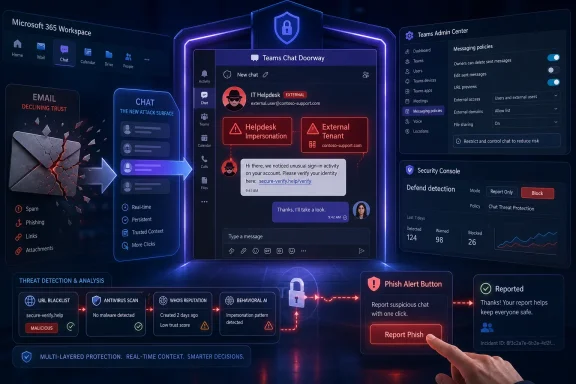
KnowBe4 has extended its Defend product to monitor and remediate external Microsoft Teams chats, arguing in a July 2026 company blog post that attackers are increasingly exploiting Teams’ trusted collaboration model to impersonate IT helpdesks, steal credentials, and bypass email-focused defenses. The move is less a product footnote than a marker of where enterprise phishing has gone: out of the inbox and into the workflows employees now treat as internal by default. Microsoft has warned this year about cross-tenant Teams abuse and helpdesk impersonation, while security vendors have been racing to put controls around collaboration tools that were originally optimized for frictionless work. The uncomfortable lesson is that “secure email” no longer means secure communication.
Enterprise security has spent two decades turning email into a heavily inspected border crossing. Messages are scored, rewritten, detonated, quarantined, bannered, and reported through workflows that security operations teams understand. That investment was rational: email remains the canonical delivery mechanism for credential theft, malware lures, invoice fraud, and executive impersonation.
But attackers are not romantics. They do not care whether a phishing lure arrives through SMTP, a Teams chat, a Slack message, a calendar invite, a fake helpdesk call, or a shared document notification. They care whether the victim trusts the context and whether security tooling sees the interaction in time.
That is why KnowBe4’s announcement matters beyond the usual vendor-feature rhythm. The company says Defend now ingests messages from external Microsoft Teams senders and runs them through detection layers such as URL blacklisting, antivirus scanning, WHOIS analysis, and behavioral AI. It also adds Teams posture management, surfacing risky external-access settings in the Teams Admin Center and guiding remediation.
The pitch is straightforward: the same organization that has built layered controls around inbound email may still be allowing unknown external tenants to initiate Teams conversations with employees. In other words, the front door has a camera, a guard, and a badge reader, while the side door opens into a conference room where everyone assumes the visitor already belongs.
Microsoft’s own security reporting this year has described threat actors abusing external Teams collaboration to impersonate IT or helpdesk staff. The pattern is depressingly plausible. A user receives a Teams message from someone presenting as support, the interaction carries the ambient authority of a workplace tool, and the attacker nudges the victim toward credential entry, MFA manipulation, or remote assistance.
This is not merely phishing with a different coat of paint. A Teams chat can feel more synchronous and personal than email. It can escalate naturally into a call. It can exploit the user’s muscle memory for “quick fixes” from IT. And because external collaboration is a legitimate business feature, blanket blocking can be politically difficult in companies that depend on customers, vendors, contractors, and managed service providers.
The same characteristics that make Teams useful also make it vulnerable to context hijacking. Attackers do not need to defeat cryptography or break Microsoft 365 itself. They need to appear at the right moment, with the right display name, in a channel where users expect fast, informal communication.
External access in Teams is distinct from guest access. Guest access brings an outside user into a tenant’s Teams and channels under more deliberate governance. External access allows communication with users in other organizations, making it easier to chat and meet across tenant boundaries. That convenience is the point, but so is the risk.
Microsoft provides controls for managing external communication, including allow lists and block lists for domains. The problem is not that the feature exists. The problem is that in many organizations, the ownership of collaboration policy sits awkwardly between IT operations, security, messaging administrators, compliance, and business units that simply want partner conversations to work.
That ownership gap is where risky defaults become durable. A setting enabled during a migration, pandemic-era collaboration push, merger, or vendor onboarding project can remain in place long after anyone remembers the rationale. Security teams may assume Teams is covered by Microsoft 365 controls. Messaging teams may assume security owns policy. Business users may assume anything that appears in Teams has already been vetted.
KnowBe4’s addition of Teams posture management is aimed squarely at that gray zone. Detection helps with malicious messages, but posture management asks the more important architectural question: who is allowed to start the conversation in the first place?
KnowBe4 is framing Defend’s Teams expansion as unified protection across email and chat. That is a sensible product story, but it also reflects a larger operational truth. SOC teams need comparable visibility across the communication surfaces where social engineering actually happens.
The company says Teams threat data appears natively in the Defend console, including a Recent Messages tab and a Teams Security Posture section. That matters because tool switching is not just annoying; it fragments investigations. If a user reports a suspicious Teams message, analysts need to know whether related emails arrived, whether URLs were seen elsewhere, whether the sender domain is newly registered, and whether other users were contacted.
The harder challenge is remediation. KnowBe4 says administrators can start in Report Only mode, then move to Block mode to automatically remove dangerous messages before users interact with them. That graduated model is important because collaboration tools are noisy, informal, and business-sensitive. Overblocking in Teams can break legitimate customer conversations faster than an email quarantine can.
The best version of this approach treats Teams detection as part of a broader communication-risk fabric. The worst version becomes another dashboard with partial telemetry and unclear response authority. Whether customers land in the former or the latter will depend less on the product brochure than on integration discipline, tuning, and whether security teams are empowered to change collaboration settings.
Those safeguards are useful, but they are not a complete answer. Labels are only as effective as the humans interpreting them, and users are habituated to clicking through warnings when work is blocked. If the attacker’s message is plausible enough — “This is IT, we’re resolving your ticket” — the external badge becomes a speed bump rather than a wall.
Microsoft’s April 2026 security blog on cross-tenant helpdesk impersonation highlighted exactly this tension. The attacks abuse legitimate collaboration and remote assistance patterns rather than a single exotic exploit. That makes them harder to eliminate with one patch Tuesday fix.
The tenant administrator remains central. If external access is broadly open, every employee may be reachable by any sufficiently convincing outsider with a Microsoft identity. If remote assistance tools are loosely governed, a chat can become an interactive intrusion path. If reporting workflows are unclear, suspicious messages may die in screenshots, hallway conversations, or ignored helpdesk tickets.
This is why posture matters as much as detection. Security tooling can identify and remove some malicious chats, but a tenant configured to allow broad unsolicited external contact will keep producing risk. Microsoft can ship better warnings; customers still have to decide which strangers are allowed to knock.
That is the uncomfortable overlap between productivity and social engineering. A real helpdesk technician and a malicious actor may both sound helpful, time-sensitive, and procedural. The difference is not always obvious to an employee under deadline pressure.
Teams amplifies that ambiguity because it sits closer to the flow of work than email. A chat message can arrive while the user is already in a meeting, working through a ticket, or dealing with an outage. The psychological distance between “message received” and “action taken” is short.
Security awareness programs have long told users to be suspicious of unexpected emails. The same instincts must now be rebuilt for collaboration tools. An external Teams message from “Help Desk” should trigger skepticism, not compliance. A remote assistance request should follow a known internal process, not an ad hoc chat thread. A link shared by a supposed support worker should be validated through a trusted channel.
KnowBe4’s positioning naturally leans into training because that is the company’s heritage. But the broader lesson is not that users must become perfect. It is that security teams must design processes that make the safe action easier than the risky one.
Reporting matters because no detection system catches everything. Users will see edge cases: odd partner requests, suspicious but non-malicious spam, compromised legitimate accounts, and conversations that feel wrong before a URL is ever sent. A reporting button gives that ambiguity somewhere to go.
But user reporting in Teams cannot simply replicate the email playbook. Chat threads are conversational. A suspicious message may be followed by clarifying replies, calls, file shares, deleted content, or lateral contact with other employees. The context around the message can be as important as the message itself.
That makes integration with SOC workflows essential. If a Teams report becomes a static ticket without tenant-wide search, sender correlation, and remediation options, it will frustrate analysts and users alike. If it helps analysts pivot quickly from one report to a campaign-level view, it becomes a meaningful sensor.
The pairing of automated detection and user reporting is the right model. Automation handles scale and obvious malicious indicators. Humans flag the weird, socially engineered, and context-dependent interactions that machines still struggle to classify. Neither side is sufficient alone.
That shift changes procurement and governance. A company would not expose email to the internet without defined ownership, logging, retention, threat detection, and response procedures. Yet many organizations still treat chat security as a secondary setting buried somewhere in an admin center.
The KnowBe4 announcement reflects a market correction already underway. Email security vendors, identity providers, CASB and SSE platforms, endpoint vendors, and collaboration platform owners all want a piece of the same problem: attackers exploit human communication across channels. The category boundaries are blurring because the attacks have already blurred them.
For Windows administrators, this is especially relevant because Teams is deeply embedded in Microsoft 365 environments that also include Entra ID, SharePoint, OneDrive, Exchange, Defender, Intune, and Windows remote assistance pathways. A malicious Teams conversation is not isolated from the rest of the Microsoft estate. It can become the social preface to identity compromise, device access, data theft, and lateral movement.
That does not mean every organization needs another standalone security product. It does mean Teams policy can no longer be left as a collaboration afterthought. If the chat platform is part of how work gets authorized, it must be part of how security gets enforced.
The 74 percent figure about organizations with unrestricted external Teams access is useful, but it needs context. Survey methodology, sample composition, customer profile, and definitions of “no domain restrictions” all matter. A vendor’s dataset may skew toward organizations already concerned about human-risk management or already in a sales funnel.
Still, the direction of travel is well supported. Microsoft has warned about Teams helpdesk impersonation. Security publications have covered campaigns using Teams and remote assistance lures. Administrators on professional forums have been debating external Teams access risks for years. The product announcement is riding a real wave, not inventing one.
The more important question is effectiveness. Can KnowBe4 reliably classify malicious Teams messages without drowning SOC teams in false positives? Can it remove harmful messages quickly enough to matter? Does its posture guidance map cleanly to complex tenant realities, where subsidiaries, partners, and regulated workflows may require nuanced access rules?
Those are implementation questions customers should test in pilots, not assumptions to accept from any vendor. Report Only mode is therefore not a minor feature; it is the sane way to evaluate whether detection fits the organization’s communication patterns before automation starts deleting chats.
That is how many enterprise security failures work. They are not always failures of intelligence or tooling. They are failures of governance around mundane settings that become dangerous at scale.
For IT pros, the immediate task is not to panic-disable every external interaction. It is to map business need against exposure. Which domains truly need external Teams access? Which users or groups require it? Are external chats logged, monitored, and reportable? Are users trained to distinguish internal support from external impostors? Are remote support tools governed tightly enough that a chat cannot casually become a device takeover?
These are policy questions as much as technical ones. Security teams may recommend domain allow lists, but business units must help identify trusted partners. Helpdesk leaders must define how legitimate support contacts users. Compliance teams must understand whether chat retention and investigation processes are adequate. Identity teams must ensure conditional access and MFA policies reduce downstream damage if a user is fooled.
The best outcome is not a locked-down organization that cannot talk to customers. It is an organization where external collaboration is explicit, observable, and reversible. That is a very different posture from “enabled because nobody complained.”
That means Teams phishing belongs in the same mental bucket as identity protection, endpoint hardening, and helpdesk process control. If an attacker can convince a user to approve MFA, share a screen, run a command, or install a remote management tool, the chat was merely the opening move.
Defenses should therefore be layered. Restricting external domains reduces unsolicited contact. User reporting increases visibility. Message scanning catches known bad URLs and attachments. Conditional access can limit what compromised accounts can do. Endpoint controls can block or constrain remote support tools. Logging and alerting can reveal unusual sign-ins, device actions, and cross-tenant activity.
The risk is treating Teams as a silo. A suspicious chat from an external “IT Support” tenant should not be investigated only as a chat event. Analysts should ask what the user clicked, whether authentication prompts followed, whether remote access tools launched, whether files were accessed, and whether similar messages reached colleagues.
KnowBe4’s unified-console language points toward that need, but Microsoft-native shops will also look to Defender, Purview, Entra, Teams Admin Center, and Graph-based workflows. The right answer may vary by licensing, staffing, and risk appetite. The wrong answer is assuming email security has the problem covered.
Some organizations will decide that broad external Teams access is unacceptable. Others will maintain open collaboration but add better monitoring and user prompts. Still others will segment access by department, geography, or partner domain. The correct policy depends on business reality, but the decision should be explicit.
Admins should also revisit the helpdesk’s public-facing identity. If legitimate IT support sometimes contacts users through Teams, the process should be standardized and communicated. If remote assistance is used, users should know what a real request looks like, which tools are approved, and how to verify the technician out of band.
The deeper shift is cultural. Employees have been trained to distrust email because email is “where phishing happens.” That mental model is now obsolete. Phishing happens wherever trust can be borrowed, urgency can be manufactured, and a user can be moved from message to action.
 The Inbox Was Hardened, So Attackers Walked Into Chat
Enterprise security has spent two decades turning email into a heavily inspected border crossing. Messages are scored, rewritten, detonated, quarantined, bannered, and reported through workflows that security operations teams understand. That investment was rational: email remains the canonical delivery mechanism for credential theft, malware lures, invoice fraud, and executive impersonation.But attackers are not romantics. They do not care whether a phishing lure arrives through SMTP, a Teams chat, a Slack message, a calendar invite, a fake helpdesk call, or a shared document notification. They care whether the victim trusts the context and whether security tooling sees the interaction in time.
That is why KnowBe4’s announcement matters beyond the usual vendor-feature rhythm. The company says Defend now ingests messages from external Microsoft Teams senders and runs them through detection layers such as URL blacklisting, antivirus scanning, WHOIS analysis, and behavioral AI. It also adds Teams posture management, surfacing risky external-access settings in the Teams Admin Center and guiding remediation.
The pitch is straightforward: the same organization that has built layered controls around inbound email may still be allowing unknown external tenants to initiate Teams conversations with employees. In other words, the front door has a camera, a guard, and a badge reader, while the side door opens into a conference room where everyone assumes the visitor already belongs.
Microsoft Teams Became the New Social Engineering Surface
Teams’ security problem is inseparable from Teams’ success. Microsoft’s collaboration platform is not merely a chat app; for many organizations it is the day-to-day interface for meetings, file sharing, quick decisions, helpdesk exchanges, project coordination, and external partner work. That centrality gives attackers something email often lacks: implied intimacy.Microsoft’s own security reporting this year has described threat actors abusing external Teams collaboration to impersonate IT or helpdesk staff. The pattern is depressingly plausible. A user receives a Teams message from someone presenting as support, the interaction carries the ambient authority of a workplace tool, and the attacker nudges the victim toward credential entry, MFA manipulation, or remote assistance.
This is not merely phishing with a different coat of paint. A Teams chat can feel more synchronous and personal than email. It can escalate naturally into a call. It can exploit the user’s muscle memory for “quick fixes” from IT. And because external collaboration is a legitimate business feature, blanket blocking can be politically difficult in companies that depend on customers, vendors, contractors, and managed service providers.
The same characteristics that make Teams useful also make it vulnerable to context hijacking. Attackers do not need to defeat cryptography or break Microsoft 365 itself. They need to appear at the right moment, with the right display name, in a channel where users expect fast, informal communication.
External Access Is a Business Feature With Security Consequences
KnowBe4’s most striking claim is not that Teams phishing exists; Microsoft and the broader security community have already made that clear. It is the company’s statement that 74 percent of surveyed organizations have external Teams access enabled without domain restrictions. Even allowing for the usual caution around vendor survey data, that figure captures a configuration reality many administrators will recognize.External access in Teams is distinct from guest access. Guest access brings an outside user into a tenant’s Teams and channels under more deliberate governance. External access allows communication with users in other organizations, making it easier to chat and meet across tenant boundaries. That convenience is the point, but so is the risk.
Microsoft provides controls for managing external communication, including allow lists and block lists for domains. The problem is not that the feature exists. The problem is that in many organizations, the ownership of collaboration policy sits awkwardly between IT operations, security, messaging administrators, compliance, and business units that simply want partner conversations to work.
That ownership gap is where risky defaults become durable. A setting enabled during a migration, pandemic-era collaboration push, merger, or vendor onboarding project can remain in place long after anyone remembers the rationale. Security teams may assume Teams is covered by Microsoft 365 controls. Messaging teams may assume security owns policy. Business users may assume anything that appears in Teams has already been vetted.
KnowBe4’s addition of Teams posture management is aimed squarely at that gray zone. Detection helps with malicious messages, but posture management asks the more important architectural question: who is allowed to start the conversation in the first place?
Detection Has to Follow the User, Not the Protocol
The security industry’s traditional channel boundaries are increasingly artificial. Users do not think in terms of SMTP, Graph APIs, external tenants, or identity federation. They think: “A message from IT arrived.” If the security stack only watches one category of message, attackers will choose another.KnowBe4 is framing Defend’s Teams expansion as unified protection across email and chat. That is a sensible product story, but it also reflects a larger operational truth. SOC teams need comparable visibility across the communication surfaces where social engineering actually happens.
The company says Teams threat data appears natively in the Defend console, including a Recent Messages tab and a Teams Security Posture section. That matters because tool switching is not just annoying; it fragments investigations. If a user reports a suspicious Teams message, analysts need to know whether related emails arrived, whether URLs were seen elsewhere, whether the sender domain is newly registered, and whether other users were contacted.
The harder challenge is remediation. KnowBe4 says administrators can start in Report Only mode, then move to Block mode to automatically remove dangerous messages before users interact with them. That graduated model is important because collaboration tools are noisy, informal, and business-sensitive. Overblocking in Teams can break legitimate customer conversations faster than an email quarantine can.
The best version of this approach treats Teams detection as part of a broader communication-risk fabric. The worst version becomes another dashboard with partial telemetry and unclear response authority. Whether customers land in the former or the latter will depend less on the product brochure than on integration discipline, tuning, and whether security teams are empowered to change collaboration settings.
Microsoft Is Adding Guardrails, But Tenants Still Own the Blast Radius
Microsoft has not ignored the problem. Teams already labels external users, warns about first-time external contacts, and provides user-facing prompts intended to make outside-origin conversations more obvious. Microsoft support guidance also tells users how to report phishing or spam in Teams, and Microsoft Learn documentation describes administrative controls for external access.Those safeguards are useful, but they are not a complete answer. Labels are only as effective as the humans interpreting them, and users are habituated to clicking through warnings when work is blocked. If the attacker’s message is plausible enough — “This is IT, we’re resolving your ticket” — the external badge becomes a speed bump rather than a wall.
Microsoft’s April 2026 security blog on cross-tenant helpdesk impersonation highlighted exactly this tension. The attacks abuse legitimate collaboration and remote assistance patterns rather than a single exotic exploit. That makes them harder to eliminate with one patch Tuesday fix.
The tenant administrator remains central. If external access is broadly open, every employee may be reachable by any sufficiently convincing outsider with a Microsoft identity. If remote assistance tools are loosely governed, a chat can become an interactive intrusion path. If reporting workflows are unclear, suspicious messages may die in screenshots, hallway conversations, or ignored helpdesk tickets.
This is why posture matters as much as detection. Security tooling can identify and remove some malicious chats, but a tenant configured to allow broad unsolicited external contact will keep producing risk. Microsoft can ship better warnings; customers still have to decide which strangers are allowed to knock.
The Helpdesk Impersonation Playbook Works Because It Mirrors Real Work
Helpdesk impersonation is effective because it imitates an interaction employees already know. IT support asks users to verify identity. IT support asks users to install tools. IT support asks users to join calls, share screens, approve prompts, reset passwords, or follow links. The attacker does not need to invent a strange ritual; the enterprise has already trained employees that urgent technical interruptions are normal.That is the uncomfortable overlap between productivity and social engineering. A real helpdesk technician and a malicious actor may both sound helpful, time-sensitive, and procedural. The difference is not always obvious to an employee under deadline pressure.
Teams amplifies that ambiguity because it sits closer to the flow of work than email. A chat message can arrive while the user is already in a meeting, working through a ticket, or dealing with an outage. The psychological distance between “message received” and “action taken” is short.
Security awareness programs have long told users to be suspicious of unexpected emails. The same instincts must now be rebuilt for collaboration tools. An external Teams message from “Help Desk” should trigger skepticism, not compliance. A remote assistance request should follow a known internal process, not an ad hoc chat thread. A link shared by a supposed support worker should be validated through a trusted channel.
KnowBe4’s positioning naturally leans into training because that is the company’s heritage. But the broader lesson is not that users must become perfect. It is that security teams must design processes that make the safe action easier than the risky one.
The Phish Alert Button Moves From Inbox Habit to Chat Reflex
KnowBe4 says the new Defend capabilities pair with its Microsoft Teams Phish Alert Button, which the company announced earlier this year. The idea is familiar from email: give users a one-click way to report suspicious content so security teams can analyze it and respond. Porting that muscle memory into Teams is a practical step.Reporting matters because no detection system catches everything. Users will see edge cases: odd partner requests, suspicious but non-malicious spam, compromised legitimate accounts, and conversations that feel wrong before a URL is ever sent. A reporting button gives that ambiguity somewhere to go.
But user reporting in Teams cannot simply replicate the email playbook. Chat threads are conversational. A suspicious message may be followed by clarifying replies, calls, file shares, deleted content, or lateral contact with other employees. The context around the message can be as important as the message itself.
That makes integration with SOC workflows essential. If a Teams report becomes a static ticket without tenant-wide search, sender correlation, and remediation options, it will frustrate analysts and users alike. If it helps analysts pivot quickly from one report to a campaign-level view, it becomes a meaningful sensor.
The pairing of automated detection and user reporting is the right model. Automation handles scale and obvious malicious indicators. Humans flag the weird, socially engineered, and context-dependent interactions that machines still struggle to classify. Neither side is sufficient alone.
The Security Stack Is Being Forced to Admit Collaboration Is Infrastructure
For years, collaboration platforms were treated as productivity software with security controls attached. That framing is no longer adequate. Teams, Slack, Zoom, Google Workspace, and similar tools are now identity-adjacent infrastructure. They mediate trust, grant access to files, expose presence, connect tenants, and create paths into remote support workflows.That shift changes procurement and governance. A company would not expose email to the internet without defined ownership, logging, retention, threat detection, and response procedures. Yet many organizations still treat chat security as a secondary setting buried somewhere in an admin center.
The KnowBe4 announcement reflects a market correction already underway. Email security vendors, identity providers, CASB and SSE platforms, endpoint vendors, and collaboration platform owners all want a piece of the same problem: attackers exploit human communication across channels. The category boundaries are blurring because the attacks have already blurred them.
For Windows administrators, this is especially relevant because Teams is deeply embedded in Microsoft 365 environments that also include Entra ID, SharePoint, OneDrive, Exchange, Defender, Intune, and Windows remote assistance pathways. A malicious Teams conversation is not isolated from the rest of the Microsoft estate. It can become the social preface to identity compromise, device access, data theft, and lateral movement.
That does not mean every organization needs another standalone security product. It does mean Teams policy can no longer be left as a collaboration afterthought. If the chat platform is part of how work gets authorized, it must be part of how security gets enforced.
Vendor Claims Deserve Scrutiny, Even When the Direction Is Right
KnowBe4’s blog is a product announcement, and readers should treat it as such. The company is making a case for why customers should extend Defend into Teams, and its framing naturally emphasizes the gap its product is designed to close. That does not invalidate the argument, but it should temper how we read the details.The 74 percent figure about organizations with unrestricted external Teams access is useful, but it needs context. Survey methodology, sample composition, customer profile, and definitions of “no domain restrictions” all matter. A vendor’s dataset may skew toward organizations already concerned about human-risk management or already in a sales funnel.
Still, the direction of travel is well supported. Microsoft has warned about Teams helpdesk impersonation. Security publications have covered campaigns using Teams and remote assistance lures. Administrators on professional forums have been debating external Teams access risks for years. The product announcement is riding a real wave, not inventing one.
The more important question is effectiveness. Can KnowBe4 reliably classify malicious Teams messages without drowning SOC teams in false positives? Can it remove harmful messages quickly enough to matter? Does its posture guidance map cleanly to complex tenant realities, where subsidiaries, partners, and regulated workflows may require nuanced access rules?
Those are implementation questions customers should test in pilots, not assumptions to accept from any vendor. Report Only mode is therefore not a minor feature; it is the sane way to evaluate whether detection fits the organization’s communication patterns before automation starts deleting chats.
The Admin Center Setting Nobody Wants to Own Becomes a Board-Level Risk
The ownership problem may be the most underappreciated part of this story. Teams external access is not glamorous. It is not a zero-day. It is not a ransomware note. It is a configuration choice that often survives because no one wants to break collaboration and no one is explicitly accountable for the risk.That is how many enterprise security failures work. They are not always failures of intelligence or tooling. They are failures of governance around mundane settings that become dangerous at scale.
For IT pros, the immediate task is not to panic-disable every external interaction. It is to map business need against exposure. Which domains truly need external Teams access? Which users or groups require it? Are external chats logged, monitored, and reportable? Are users trained to distinguish internal support from external impostors? Are remote support tools governed tightly enough that a chat cannot casually become a device takeover?
These are policy questions as much as technical ones. Security teams may recommend domain allow lists, but business units must help identify trusted partners. Helpdesk leaders must define how legitimate support contacts users. Compliance teams must understand whether chat retention and investigation processes are adequate. Identity teams must ensure conditional access and MFA policies reduce downstream damage if a user is fooled.
The best outcome is not a locked-down organization that cannot talk to customers. It is an organization where external collaboration is explicit, observable, and reversible. That is a very different posture from “enabled because nobody complained.”
Windows Shops Should Treat Teams Phishing as an Identity Incident Waiting to Happen
For WindowsForum.com readers, the Teams angle intersects with familiar administrative terrain. The most damaging Teams social engineering scenarios do not end in Teams. They end in compromised Microsoft 365 accounts, stolen tokens, remote access sessions, malicious PowerShell, cloud data exfiltration, and persistence across the Windows and Entra ecosystem.That means Teams phishing belongs in the same mental bucket as identity protection, endpoint hardening, and helpdesk process control. If an attacker can convince a user to approve MFA, share a screen, run a command, or install a remote management tool, the chat was merely the opening move.
Defenses should therefore be layered. Restricting external domains reduces unsolicited contact. User reporting increases visibility. Message scanning catches known bad URLs and attachments. Conditional access can limit what compromised accounts can do. Endpoint controls can block or constrain remote support tools. Logging and alerting can reveal unusual sign-ins, device actions, and cross-tenant activity.
The risk is treating Teams as a silo. A suspicious chat from an external “IT Support” tenant should not be investigated only as a chat event. Analysts should ask what the user clicked, whether authentication prompts followed, whether remote access tools launched, whether files were accessed, and whether similar messages reached colleagues.
KnowBe4’s unified-console language points toward that need, but Microsoft-native shops will also look to Defender, Purview, Entra, Teams Admin Center, and Graph-based workflows. The right answer may vary by licensing, staffing, and risk appetite. The wrong answer is assuming email security has the problem covered.
The Practical Read for Admins Is Smaller Than the Marketing and Bigger Than a Toggle
The practical lesson from KnowBe4’s announcement is not “buy this product” or “turn off Teams external access tomorrow.” It is that collaboration security needs the same disciplined treatment organizations already apply to email. That means inventory, policy, detection, reporting, remediation, and ownership.Some organizations will decide that broad external Teams access is unacceptable. Others will maintain open collaboration but add better monitoring and user prompts. Still others will segment access by department, geography, or partner domain. The correct policy depends on business reality, but the decision should be explicit.
Admins should also revisit the helpdesk’s public-facing identity. If legitimate IT support sometimes contacts users through Teams, the process should be standardized and communicated. If remote assistance is used, users should know what a real request looks like, which tools are approved, and how to verify the technician out of band.
The deeper shift is cultural. Employees have been trained to distrust email because email is “where phishing happens.” That mental model is now obsolete. Phishing happens wherever trust can be borrowed, urgency can be manufactured, and a user can be moved from message to action.
The Teams Chat Door Now Needs the Same Locks as the Inbox
KnowBe4’s Teams expansion is one more sign that collaboration security has entered its operational phase. The concept is no longer theoretical, and the controls are no longer limited to awareness posters and external-user labels. Security teams now have to decide how much external Teams contact they permit, how they inspect it, and how they respond when it turns hostile.- Organizations should review Microsoft Teams external access settings and decide whether unrestricted cross-tenant chat is actually required.
- Security teams should assign clear ownership for Teams collaboration policy instead of leaving it between messaging, identity, and SOC responsibilities.
- Helpdesk teams should publish a predictable support-contact process so employees can verify requests before sharing credentials, approving MFA prompts, or allowing remote access.
- User reporting should extend into Teams because suspicious collaboration messages often depend on context that automated detection may miss.
- Automated remediation should be piloted carefully in report-only modes before messages are removed from user chats at scale.
- Teams phishing investigations should be treated as possible identity and endpoint incidents, not merely as isolated chat events.
References
- Primary source: KnowBe4 Blog
Published: Wed, 08 Jul 2026 11:04:17 GMT
Loading…
blog.knowbe4.com - Official source: support.microsoft.com
Loading…
support.microsoft.com - Related coverage: knowbe4.com
Loading…
www.knowbe4.com - Official source: microsoft.com
Loading…
www.microsoft.com - Related coverage: support.knowbe4.com
Loading…
support.knowbe4.com - Official source: learn.microsoft.com
Security guide for Microsoft Teams overview - Microsoft Teams
Security advice and learnings for IT admins in installing, configuring, and maintaining Microsoft Teams.learn.microsoft.com
- Related coverage: businesswire.com
Loading…
www.businesswire.com - Related coverage: techradar.com
Loading…
www.techradar.com - Related coverage: pcgamer.com
There's a devious hacking scheme that involves a hijacked Microsoft Teams account, a fake IT helpdesk, and a covert infection tool | PC Gamer
IT's a pretty bad one.www.pcgamer.com - Related coverage: windowscentral.com
Microsoft Teams will add new protections as attackers target external calls with brand impersonation tactics | Windows Central
Microsoft Teams will soon warn you about brand impersonators who call you.www.windowscentral.com - Related coverage: itpro.com
Thousands of Microsoft Teams users are being targeted in a new phishing campaign
Microsoft Teams users should be on the alert, according to researchers at Check Point www.itpro.com
- Related coverage: ccn-cert.cni.es
Loading…
www.ccn-cert.cni.es - Related coverage: labs.cloudsecurityalliance.org
Microsoft Teams as Phishing Infrastructure: The A0Backdoor Campaign and the Industrialization of Collaboration-Platform Attacks
PDF documentlabs.cloudsecurityalliance.org