

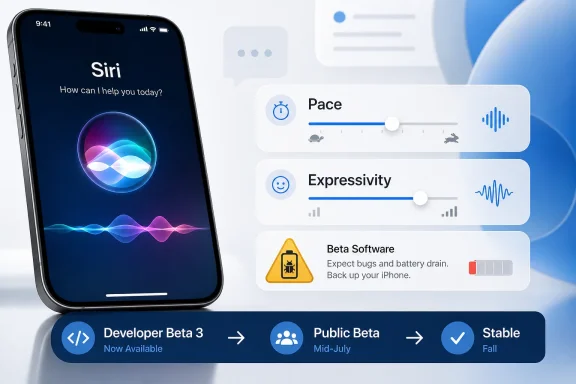
Apple has released the third iOS 27 developer beta, and the practical takeaway is straightforward: beta 3’s most visible change is a new pair of Siri voice controls for Pace and Expressivity; anyone willing to register as an Apple developer can try the developer beta now; a public beta is expected in mid-July; and most users should still wait, preferably for the public beta at minimum and the stable fall release if the iPhone is their daily device. The update is not a broad new-feature drop. It is a Siri refinement release that gives early testers more control over how Apple’s assistant sounds, while the bigger iOS 27 caveats remain unchanged: beta software can be buggy, battery life may suffer, not every feature may be present yet, and Apple Intelligence remains limited to newer hardware.
The headline change in the third iOS 27 beta is not a redesign, a new compatibility list, or a sweeping AI rollout. PCMag reports that Apple’s latest beta adds controls for Siri’s Pace and Expressivity, letting users adjust how quickly or expressively Siri talks. That is a modest feature on paper, but it is the actual beta 3 news and the clearest sign of what Apple is refining right now.
The value is practical. Some users may want Siri to speak faster and get out of the way. Others may prefer a slower or more expressive voice that is easier to follow when they are driving, cooking, multitasking, or using the phone hands-free. A voice assistant’s usefulness is not only about whether it can return the right answer; it is also about whether the user can comfortably listen to it.
That makes beta 3 less about adding another big Siri capability and more about tuning the interaction. If Apple expects people to use Siri more often across iOS 27, the assistant cannot feel irritating after the first few replies. Pace and Expressivity are small controls, but they address a common problem with voice interfaces: the same delivery style does not work for every person or every setting.
The important restraint is not to overstate the change. Based on the supplied reporting, beta 3 adds voice-delivery controls. It does not prove that Siri has become a new “presence” across every part of the operating system, and it does not tell us how complete the broader Siri AI experience will be at launch. The responsible read is narrower: Apple is making Siri more configurable, and beta 3 gives testers a specific way to hear that change.
In this case, Apple is spending a beta turn on how Siri sounds. That tells users what to test: not just whether Siri responds, but whether the new voice settings make the assistant feel faster, calmer, clearer, or less distracting. It also tells developers and IT teams what not to assume. A Siri voice refinement does not mean every promised iOS 27 feature is complete, stable, or present in the developer beta.
The install path comes next because it shapes the risk. PCMag says the developer beta is available now to anyone who registers as an Apple developer, while the public beta is expected in mid-July. That makes beta 3 easy to reach, but easy access should not be confused with readiness for everyday use.
The short version for readers is this: if you have a spare iPhone and want to test Siri’s new speaking controls, the developer beta is available now. If you are simply curious, wait for the public beta. If your iPhone is your main work, travel, payment, authentication, or emergency device, wait for the stable release expected this fall.
The important point is that “developer beta” no longer functions as a hard barrier. PCMag notes that anyone can register as an Apple developer and test the iOS 27 developer beta now. That is useful for developers, journalists, IT evaluators, and enthusiasts, but it also increases the chance that ordinary users install unfinished software on the phone they rely on every day.
Apple’s channel design provides the common-sense answer. The public beta exists because the developer beta is an earlier and riskier build. PCMag also warns that beta software can be buggier than the final release and could be a battery hog, recommending installation on an extra device. That advice should be treated as the baseline, not fine print.
For WindowsForum readers, the cross-platform angle is simple: many iPhone users also live in Microsoft 365, Teams, Outlook, OneDrive, Windows PCs, Android group chats, and enterprise identity systems. A beta iPhone that drains faster, misbehaves, or changes messaging behavior can become a support problem even in an otherwise Windows-centered environment.
That is why the risk message needs to be plain. This is not a routine security update. It is unfinished software. It may contain bugs, it may drain the battery faster, and it may not yet include every feature expected in iOS 27. A user installing it for one Siri feature may end up testing many other unfinished parts of the system.
PCMag’s caveat that the developer beta might not include every feature coming to iOS 27 is especially important. Many people install betas because they want access to the most exciting feature they saw discussed. If that feature is incomplete, absent, device-limited, or unstable, the beta can disappoint the very users most eager to try it.
A better mental model is not “get iOS 27 early.” It is “use one of your devices to help test Apple’s remaining iOS 27 development cycle.” That cycle may include visible changes, battery issues, app compatibility problems, and behavior that changes again before the stable release. Beta 3’s Siri voice controls are real, but they do not make the whole release finished.
The bigger dividing line is Apple Intelligence. According to the supplied material, Apple Intelligence features work only on the iPhone 15 Pro, iPhone 15 Pro Max, and newer models. That creates a two-tier iOS 27 experience: many iPhones may be able to install the operating system, while only newer devices get the full Apple Intelligence layer.
That distinction will be easy for users to miss. “My phone supports iOS 27” does not necessarily mean “my phone supports every iOS 27 feature.” A user on an older supported iPhone may receive the operating system update, design changes, and some app updates, while missing features tied to Apple Intelligence.
For enterprise and education deployments, this is a planning issue. If a fleet includes iPhone 11-era devices and newer Pro-class models, support teams should not assume that every device running iOS 27 has the same capabilities. Training materials, help-desk scripts, and user guidance should separate OS compatibility from Apple Intelligence compatibility.
That split also affects expectations around Siri AI. The source material says the developer beta lets users test the long-awaited Siri revamp, now called Siri AI, but it also warns that testing may be limited depending on device. In practice, the beta is not a universal preview of the same experience for every iPhone owner. It is a preview shaped by both software channel and hardware model.
The Write with Siri keyboard button matters because it puts Siri closer to text input. Instead of being used only through spoken commands, Siri appears in a place where users already compose messages, notes, searches, and other text. That is a concrete behavior from the supplied reporting and a useful one for testers to watch.
Apple Wallet’s Insights feature is also listed in the source material, though the supplied details do not explain exactly what it does. That means the responsible conclusion should be limited: beta 2 included an Apple Wallet feature called Insights, but its practical value needs more testing and detail before drawing broad conclusions.
The RCS changes are especially relevant outside Apple-only households. iPhone-to-Android messaging has long been a cross-platform friction point, and PCMag reports that beta 2 included updates to RCS chats. The supplied material does not specify exactly what changed, so it would be irresponsible to claim improvements or regressions. The supported takeaway is simpler: messaging behavior is part of the iOS 27 beta cycle, and mixed-device users should be aware of that before installing beta software.
Beta 3 then adds a different kind of Siri change. Beta 2 put Siri into writing through the keyboard button. Beta 3 adjusts how Siri speaks. Together, those changes show Apple refining both input and output, but the article should not stretch that into unsupported claims about a fully transformed operating-system layer. The verified facts are enough: Siri is becoming more configurable, and the beta channel is where Apple is testing those changes first.
A dedicated Siri app gives users an obvious place to start. Dynamic Island access gives supported iPhones a visible way to interact with Siri without treating it only as a background voice. OS-level access means Siri may appear in more workflows than a single app or wake phrase would allow. Those are meaningful changes, but they should be described in terms of the specific behaviors reported, not as proof of an undefined assistant “presence.”
That is where beta 3’s Pace and Expressivity controls fit. If Siri is available from more access points, users will benefit from more control over how it communicates. Speaking speed and expressiveness are not just cosmetic preferences. They affect how quickly users can understand a response and how comfortable Siri feels in repeated use.
There is also a reasonable accessibility angle, though the source material does not frame the feature that way. Different users process spoken information differently. Some may prefer a brisk voice; others may need slower delivery. Some may like a more expressive assistant; others may find it distracting. Giving users the ability to adjust these traits is a practical improvement even if the beta itself remains unfinished.
The key caution is that voice customization is not the same as full intelligence. Beta 3 lets testers adjust Siri’s speaking style. It does not, by itself, establish how powerful Siri AI will be at the stable release or which features will be available on which devices beyond the Apple Intelligence hardware limits already described.
The developer beta makes sense for app developers, IT teams validating compatibility, journalists covering feature changes, and enthusiasts with spare hardware. It makes much less sense for someone whose iPhone is their work authenticator, payment device, travel wallet, car key, family camera, or emergency contact tool.
The battery warning is especially important. A beta that could be a battery hog is not just annoying; it can affect whether a phone lasts through a commute, work shift, trip, or day of field use. Users often tolerate small visual bugs. They are less forgiving when their main phone dies early.
There is also the matter of incomplete features. If the developer beta does not include everything coming to iOS 27, installing it now may not deliver the experience a user wants. Someone hoping for the full Siri AI revamp may encounter a partial implementation, a device-limited feature set, or behavior that changes before the final release.
For many users, the best answer is even simpler: wait for the stable release expected this fall alongside new iPhones. The beta cycle is useful to watch and valuable to test, but the stable release is the version Apple expects ordinary users to live with.
The first concern is user-driven installation. Because anyone can register as an Apple developer and access the developer beta, organizations should assume that some employees may install it on personal devices used for work. In bring-your-own-device environments, that creates a blurry support boundary: the phone is personal, but the email, authentication, calendar, or messaging complaint may land with IT.
The second concern is feature inconsistency. iOS 27 compatibility reportedly stretches back to the iPhone 11, while Apple Intelligence requires iPhone 15 Pro, iPhone 15 Pro Max, and newer models. That means two employees can both say they are “on iOS 27” while having different AI capabilities. Support teams should avoid guidance that assumes all iOS 27 devices behave the same way.
The third concern is RCS. PCMag reports that beta 2 included updates to iPhone-to-Android RCS chats, but the supplied material does not specify the exact changes. That still matters because messaging behavior is visible to users. If a beta changes mixed-device chat behavior, the complaint may arrive as a general messaging problem rather than a beta-software problem.
The fourth concern is testing discipline. The supplied reporting does not provide enterprise policy details, management settings, or data-handling specifics for Siri AI. IT teams should not invent conclusions about controls that have not been verified. The supported action is to test on spare hardware, document observed behavior, and prepare user guidance before the public beta and stable release.
Apple can argue that advanced AI features need newer hardware. Users can argue that an operating system’s headline experience should be clearer about what older supported devices will and will not receive. Both points can be true. The result is an iOS 27 release that may look broad in installation support while remaining narrower for the most advanced AI features.
For users on an iPhone 11, the message is mixed. The device is still reportedly supported, which is good news for longevity. But Apple Intelligence is outside that device’s feature set. A user may get iOS 27 while missing some of the features most closely associated with Apple’s AI push.
For organizations, this complicates lifecycle planning. If the goal is simply to keep devices current with operating-system updates, older supported iPhones may remain viable. If the goal is to standardize around Apple Intelligence workflows, the practical device floor rises. Software support and feature support are no longer the same planning line.
That distinction should be written into upgrade guidance. A procurement note that says “supports iOS 27” is not specific enough. A better note says whether the device supports iOS 27, whether it supports Apple Intelligence, and whether the organization intends to use any AI-dependent workflows.
Screen Time is a consequential system app because it touches parental controls, personal limits, usage awareness, and device habits. The supplied material does not detail the redesign, so there is not enough evidence to assess whether it is a major improvement. The safe conclusion is that Screen Time is part of the iOS 27 feature set and should be evaluated when fuller builds are available.
Liquid Glass customizations point to the visual side of the update. In a release cycle dominated by AI discussion, appearance still matters because users notice interface changes immediately. Visual customization can also make older supported devices feel refreshed, even if those devices do not receive every Apple Intelligence feature.
That combination is important. iOS 27 appears to serve several audiences at once: older-device owners who can still install the OS, newer-device owners who can use Apple Intelligence, developers preparing apps, and testers trying unfinished builds. Siri may be the center of the beta 3 story, but the final release will be judged as a whole operating system.
The supplied material does not specify what the RCS updates changed. That limits the conclusion. It would be too strong to claim that beta 2 fixed specific messaging problems or introduced specific regressions. What can be said is that iOS 27 beta 2 included updates to iPhone-to-Android RCS chats, meaning cross-platform messaging remains part of the beta cycle.
For users, that makes the beta more consequential than a Siri preview alone. Messaging is daily infrastructure. If a beta changes the way mixed-device chats behave, users may notice quickly. That is another reason not to install the developer beta casually on a primary phone.
For IT, RCS is a support visibility problem. Many organizations do not officially support consumer messaging, yet employees use it constantly for coordination. If messaging behavior changes on a beta iPhone, the issue may be reported as a general communications problem. Knowing who is running pre-release software can save time.
The main timing issue is not whether users can install iOS 27 now. They can, if they register as Apple developers and use the beta update path. The better question is whether they should. For most people, the answer is no.
The developer beta is most useful for people with a reason to test: app compatibility, device-management behavior, Siri changes, RCS behavior, or coverage of new features. The public beta is a better fit for broader early adopters. The stable fall release is the right fit for users who need their phone to be predictable.
For Apple, that means the iOS 27 rollout has to be clear. Users need to know which beta they are installing, which features are actually present, which devices support Apple Intelligence, and why a supported iPhone may still miss marquee AI capabilities. If that message is muddy, excitement over Siri AI can quickly turn into frustration.
For users, the advice is simple. Install the developer beta only on a spare device or a phone you can afford to troubleshoot. Wait for the public beta if curiosity is the main motivation. Wait for the stable fall release if the iPhone is essential to work, travel, payments, authentication, or family communication.
For WindowsForum readers and IT teams, the best move is preparation rather than panic. Track beta devices, separate iOS 27 support from Apple Intelligence support, test work apps on spare hardware, and be ready for questions about RCS and Siri changes. Beta 3 is a small release, but it points to the bigger iOS 27 challenge: Apple is making Siri more adjustable while keeping the most advanced AI experience tied to newer hardware. That combination will shape user expectations long before the stable release arrives.
 Apple’s Siri Bet Is Moving From Intelligence to Personality
The headline change in the third iOS 27 beta is not a redesign, a new compatibility list, or a sweeping AI rollout. PCMag reports that Apple’s latest beta adds controls for Siri’s Pace and Expressivity, letting users adjust how quickly or expressively Siri talks. That is a modest feature on paper, but it is the actual beta 3 news and the clearest sign of what Apple is refining right now.The value is practical. Some users may want Siri to speak faster and get out of the way. Others may prefer a slower or more expressive voice that is easier to follow when they are driving, cooking, multitasking, or using the phone hands-free. A voice assistant’s usefulness is not only about whether it can return the right answer; it is also about whether the user can comfortably listen to it.
That makes beta 3 less about adding another big Siri capability and more about tuning the interaction. If Apple expects people to use Siri more often across iOS 27, the assistant cannot feel irritating after the first few replies. Pace and Expressivity are small controls, but they address a common problem with voice interfaces: the same delivery style does not work for every person or every setting.
The important restraint is not to overstate the change. Based on the supplied reporting, beta 3 adds voice-delivery controls. It does not prove that Siri has become a new “presence” across every part of the operating system, and it does not tell us how complete the broader Siri AI experience will be at launch. The responsible read is narrower: Apple is making Siri more configurable, and beta 3 gives testers a specific way to hear that change.
Beta 3 Is a Small Feature Drop With a Clear Signal
The third iOS 27 beta appears to be a focused release. Its concrete new addition, as reported by PCMag, is the Siri voice control set for Pace and Expressivity. That matters because beta cycles are not only about the number of features added. They also show which parts of the platform are being polished before release.In this case, Apple is spending a beta turn on how Siri sounds. That tells users what to test: not just whether Siri responds, but whether the new voice settings make the assistant feel faster, calmer, clearer, or less distracting. It also tells developers and IT teams what not to assume. A Siri voice refinement does not mean every promised iOS 27 feature is complete, stable, or present in the developer beta.
The install path comes next because it shapes the risk. PCMag says the developer beta is available now to anyone who registers as an Apple developer, while the public beta is expected in mid-July. That makes beta 3 easy to reach, but easy access should not be confused with readiness for everyday use.
The short version for readers is this: if you have a spare iPhone and want to test Siri’s new speaking controls, the developer beta is available now. If you are simply curious, wait for the public beta. If your iPhone is your main work, travel, payment, authentication, or emergency device, wait for the stable release expected this fall.
The Two-Beta System Is Apple’s Risk Filter
Apple is keeping iOS 27 early access split across two channels: a developer beta available now and a public beta expected in mid-July. That split matters because the developer beta is not the same thing as a consumer-ready update, even though access is now broad enough that many non-developers can install it.| Release channel | Availability | Intended audience | Access path | Practical risk |
|---|---|---|---|---|
| Developer beta | Available now | Developers, testers, and advanced users with spare hardware | Register as an Apple developer, then use Settings > General > Software Update > Beta Updates | More likely to be buggy; may reduce battery life; may not include every iOS 27 feature yet |
| Public beta | Expected in mid-July | Broader early adopters willing to accept unfinished software | Sign up through Apple’s beta program | Expected to be slightly more stable, but still unfinished |
| Stable release | Expected this fall | Most users | Standard software update path when released | Best option for primary devices |
Apple’s channel design provides the common-sense answer. The public beta exists because the developer beta is an earlier and riskier build. PCMag also warns that beta software can be buggier than the final release and could be a battery hog, recommending installation on an extra device. That advice should be treated as the baseline, not fine print.
For WindowsForum readers, the cross-platform angle is simple: many iPhone users also live in Microsoft 365, Teams, Outlook, OneDrive, Windows PCs, Android group chats, and enterprise identity systems. A beta iPhone that drains faster, misbehaves, or changes messaging behavior can become a support problem even in an otherwise Windows-centered environment.
The Install Path Is Simple Enough to Be Risky
The developer beta installation flow is straightforward: register as an Apple developer, restart the phone, then go to Settings > General > Software Update > Beta Updates. The iOS 27 developer beta should appear there. That simplicity is convenient, but it also reduces the friction that used to keep casual users away from pre-release operating systems.That is why the risk message needs to be plain. This is not a routine security update. It is unfinished software. It may contain bugs, it may drain the battery faster, and it may not yet include every feature expected in iOS 27. A user installing it for one Siri feature may end up testing many other unfinished parts of the system.
PCMag’s caveat that the developer beta might not include every feature coming to iOS 27 is especially important. Many people install betas because they want access to the most exciting feature they saw discussed. If that feature is incomplete, absent, device-limited, or unstable, the beta can disappoint the very users most eager to try it.
A better mental model is not “get iOS 27 early.” It is “use one of your devices to help test Apple’s remaining iOS 27 development cycle.” That cycle may include visible changes, battery issues, app compatibility problems, and behavior that changes again before the stable release. Beta 3’s Siri voice controls are real, but they do not make the whole release finished.
Compatibility Is Wide, but the AI Line Is Much Narrower
Apple’s compatible-device story for iOS 27 is broad on paper. PCMag reports that iOS 27 support goes back to 2019’s iPhone 11. For households, schools, and organizations trying to keep older hardware in service, that matters. The update is not being presented as a cutoff for every older iPhone.The bigger dividing line is Apple Intelligence. According to the supplied material, Apple Intelligence features work only on the iPhone 15 Pro, iPhone 15 Pro Max, and newer models. That creates a two-tier iOS 27 experience: many iPhones may be able to install the operating system, while only newer devices get the full Apple Intelligence layer.
That distinction will be easy for users to miss. “My phone supports iOS 27” does not necessarily mean “my phone supports every iOS 27 feature.” A user on an older supported iPhone may receive the operating system update, design changes, and some app updates, while missing features tied to Apple Intelligence.
For enterprise and education deployments, this is a planning issue. If a fleet includes iPhone 11-era devices and newer Pro-class models, support teams should not assume that every device running iOS 27 has the same capabilities. Training materials, help-desk scripts, and user guidance should separate OS compatibility from Apple Intelligence compatibility.
That split also affects expectations around Siri AI. The source material says the developer beta lets users test the long-awaited Siri revamp, now called Siri AI, but it also warns that testing may be limited depending on device. In practice, the beta is not a universal preview of the same experience for every iPhone owner. It is a preview shaped by both software channel and hardware model.
Beta 2 Was About Input, Wallet, and Messaging; Beta 3 Is About Siri’s Feel
The third beta makes more sense when placed next to the second. PCMag reports that iOS 27 beta 2 added a dedicated Write with Siri button on the keyboard, an Insights feature in Apple Wallet, and updates to iPhone-to-Android RCS chats. Beta 3’s Pace and Expressivity controls are narrower, but they continue the same Siri-focused thread.The Write with Siri keyboard button matters because it puts Siri closer to text input. Instead of being used only through spoken commands, Siri appears in a place where users already compose messages, notes, searches, and other text. That is a concrete behavior from the supplied reporting and a useful one for testers to watch.
Apple Wallet’s Insights feature is also listed in the source material, though the supplied details do not explain exactly what it does. That means the responsible conclusion should be limited: beta 2 included an Apple Wallet feature called Insights, but its practical value needs more testing and detail before drawing broad conclusions.
The RCS changes are especially relevant outside Apple-only households. iPhone-to-Android messaging has long been a cross-platform friction point, and PCMag reports that beta 2 included updates to RCS chats. The supplied material does not specify exactly what changed, so it would be irresponsible to claim improvements or regressions. The supported takeaway is simpler: messaging behavior is part of the iOS 27 beta cycle, and mixed-device users should be aware of that before installing beta software.
Beta 3 then adds a different kind of Siri change. Beta 2 put Siri into writing through the keyboard button. Beta 3 adjusts how Siri speaks. Together, those changes show Apple refining both input and output, but the article should not stretch that into unsupported claims about a fully transformed operating-system layer. The verified facts are enough: Siri is becoming more configurable, and the beta channel is where Apple is testing those changes first.
Siri AI Is Broader Than a Voice Slider, but the Evidence Has Limits
The supplied material describes Siri AI as accessible through a dedicated Siri app, directly from the Dynamic Island, and throughout the rest of the operating system. Those are important access points, and they suggest Apple wants Siri to be easier to reach in more places than before.A dedicated Siri app gives users an obvious place to start. Dynamic Island access gives supported iPhones a visible way to interact with Siri without treating it only as a background voice. OS-level access means Siri may appear in more workflows than a single app or wake phrase would allow. Those are meaningful changes, but they should be described in terms of the specific behaviors reported, not as proof of an undefined assistant “presence.”
That is where beta 3’s Pace and Expressivity controls fit. If Siri is available from more access points, users will benefit from more control over how it communicates. Speaking speed and expressiveness are not just cosmetic preferences. They affect how quickly users can understand a response and how comfortable Siri feels in repeated use.
There is also a reasonable accessibility angle, though the source material does not frame the feature that way. Different users process spoken information differently. Some may prefer a brisk voice; others may need slower delivery. Some may like a more expressive assistant; others may find it distracting. Giving users the ability to adjust these traits is a practical improvement even if the beta itself remains unfinished.
The key caution is that voice customization is not the same as full intelligence. Beta 3 lets testers adjust Siri’s speaking style. It does not, by itself, establish how powerful Siri AI will be at the stable release or which features will be available on which devices beyond the Apple Intelligence hardware limits already described.
The Public Beta Is the Sensible Line for Most Users
The public beta expected in mid-July is the release most curious users should wait for. That does not mean it will be polished. It means Apple has a separate channel for broader testing, and PCMag describes it as slightly more stable than the developer beta.The developer beta makes sense for app developers, IT teams validating compatibility, journalists covering feature changes, and enthusiasts with spare hardware. It makes much less sense for someone whose iPhone is their work authenticator, payment device, travel wallet, car key, family camera, or emergency contact tool.
The battery warning is especially important. A beta that could be a battery hog is not just annoying; it can affect whether a phone lasts through a commute, work shift, trip, or day of field use. Users often tolerate small visual bugs. They are less forgiving when their main phone dies early.
There is also the matter of incomplete features. If the developer beta does not include everything coming to iOS 27, installing it now may not deliver the experience a user wants. Someone hoping for the full Siri AI revamp may encounter a partial implementation, a device-limited feature set, or behavior that changes before the final release.
For many users, the best answer is even simpler: wait for the stable release expected this fall alongside new iPhones. The beta cycle is useful to watch and valuable to test, but the stable release is the version Apple expects ordinary users to live with.
Where Windows-Centric IT Should Pay Attention
At first glance, iOS 27 beta 3 looks like an Apple enthusiast story. In practice, it can also become a workplace support issue. Many iPhones connect to Microsoft 365, Outlook, Teams, OneDrive, enterprise identity systems, Windows PCs, and Android messaging circles. A beta operating system on the phone can affect support even when the desktop environment is unchanged.The first concern is user-driven installation. Because anyone can register as an Apple developer and access the developer beta, organizations should assume that some employees may install it on personal devices used for work. In bring-your-own-device environments, that creates a blurry support boundary: the phone is personal, but the email, authentication, calendar, or messaging complaint may land with IT.
The second concern is feature inconsistency. iOS 27 compatibility reportedly stretches back to the iPhone 11, while Apple Intelligence requires iPhone 15 Pro, iPhone 15 Pro Max, and newer models. That means two employees can both say they are “on iOS 27” while having different AI capabilities. Support teams should avoid guidance that assumes all iOS 27 devices behave the same way.
The third concern is RCS. PCMag reports that beta 2 included updates to iPhone-to-Android RCS chats, but the supplied material does not specify the exact changes. That still matters because messaging behavior is visible to users. If a beta changes mixed-device chat behavior, the complaint may arrive as a general messaging problem rather than a beta-software problem.
The fourth concern is testing discipline. The supplied reporting does not provide enterprise policy details, management settings, or data-handling specifics for Siri AI. IT teams should not invent conclusions about controls that have not been verified. The supported action is to test on spare hardware, document observed behavior, and prepare user guidance before the public beta and stable release.
Action checklist for admins
- Identify beta devices. Ask whether any managed or work-accessing iPhones are running the iOS 27 developer beta.
- Record device models. Track model information because Apple Intelligence requires iPhone 15 Pro, iPhone 15 Pro Max, or newer hardware.
- Use spare hardware for testing. Validate core work apps, sign-in flows, and device management behavior on a non-production iPhone where possible.
- Warn about beta risk. Tell users the developer beta may be buggier than the final release, may reduce battery life, and may not include every iOS 27 feature yet.
- Watch mixed-device messaging. If users rely on iPhone-to-Android RCS chats, note that beta 2 included RCS updates and collect reports from beta testers before escalating messaging complaints.
- Prepare staged guidance. Publish one message for the developer beta now, update it when the public beta arrives in mid-July, and revise again before the stable fall release.
Apple’s Hardware Split Turns AI Into an Upgrade Argument
The most commercially important detail in the supplied material may be the hardware requirement for Apple Intelligence. iOS 27 reportedly supports devices as old as the iPhone 11, but Apple Intelligence works only on the iPhone 15 Pro, iPhone 15 Pro Max, and newer models. That is not just a compatibility note. It is a user-expectation problem.Apple can argue that advanced AI features need newer hardware. Users can argue that an operating system’s headline experience should be clearer about what older supported devices will and will not receive. Both points can be true. The result is an iOS 27 release that may look broad in installation support while remaining narrower for the most advanced AI features.
For users on an iPhone 11, the message is mixed. The device is still reportedly supported, which is good news for longevity. But Apple Intelligence is outside that device’s feature set. A user may get iOS 27 while missing some of the features most closely associated with Apple’s AI push.
For organizations, this complicates lifecycle planning. If the goal is simply to keep devices current with operating-system updates, older supported iPhones may remain viable. If the goal is to standardize around Apple Intelligence workflows, the practical device floor rises. Software support and feature support are no longer the same planning line.
That distinction should be written into upgrade guidance. A procurement note that says “supports iOS 27” is not specific enough. A better note says whether the device supports iOS 27, whether it supports Apple Intelligence, and whether the organization intends to use any AI-dependent workflows.
Liquid Glass and Screen Time Show Apple Is Still Selling the Whole OS
The Siri AI story will draw much of the attention, but iOS 27 is not only an assistant release. PCMag’s source material also points to a redesigned Screen Time app and more Liquid Glass customizations. Those details matter because they show Apple continuing to tune both behavior-focused apps and the visual layer of iOS.Screen Time is a consequential system app because it touches parental controls, personal limits, usage awareness, and device habits. The supplied material does not detail the redesign, so there is not enough evidence to assess whether it is a major improvement. The safe conclusion is that Screen Time is part of the iOS 27 feature set and should be evaluated when fuller builds are available.
Liquid Glass customizations point to the visual side of the update. In a release cycle dominated by AI discussion, appearance still matters because users notice interface changes immediately. Visual customization can also make older supported devices feel refreshed, even if those devices do not receive every Apple Intelligence feature.
That combination is important. iOS 27 appears to serve several audiences at once: older-device owners who can still install the OS, newer-device owners who can use Apple Intelligence, developers preparing apps, and testers trying unfinished builds. Siri may be the center of the beta 3 story, but the final release will be judged as a whole operating system.
The RCS Detail Is Small, but the Ecosystem Stakes Are Not
The beta 2 mention of iPhone-to-Android RCS updates deserves attention because RCS is one of the iOS changes that affects people outside Apple’s hardware base. When Apple changes mixed-platform messaging behavior, Android users can feel the result too.The supplied material does not specify what the RCS updates changed. That limits the conclusion. It would be too strong to claim that beta 2 fixed specific messaging problems or introduced specific regressions. What can be said is that iOS 27 beta 2 included updates to iPhone-to-Android RCS chats, meaning cross-platform messaging remains part of the beta cycle.
For users, that makes the beta more consequential than a Siri preview alone. Messaging is daily infrastructure. If a beta changes the way mixed-device chats behave, users may notice quickly. That is another reason not to install the developer beta casually on a primary phone.
For IT, RCS is a support visibility problem. Many organizations do not officially support consumer messaging, yet employees use it constantly for coordination. If messaging behavior changes on a beta iPhone, the issue may be reported as a general communications problem. Knowing who is running pre-release software can save time.
Timeline: What Readers Should Expect Next
| Moment | What changes | Best audience | Reader guidance |
|---|---|---|---|
| iOS 27 developer beta 3 | Adds Siri Pace and Expressivity controls | Developers, testers, and enthusiasts with spare devices | Try it only if you accept bugs, battery impact, and incomplete features |
| Public beta expected in mid-July | Broader beta access | Curious users who understand beta risk | Better waiting point than the developer beta, but still not final software |
| Stable release expected this fall | General release window | Most users | Best choice for primary iPhones |
The developer beta is most useful for people with a reason to test: app compatibility, device-management behavior, Siri changes, RCS behavior, or coverage of new features. The public beta is a better fit for broader early adopters. The stable fall release is the right fit for users who need their phone to be predictable.
The Real Preview Is Apple’s New Support Problem
The most revealing thing about iOS 27 beta 3 is not that Siri can now speak at a different pace or with a different level of expressiveness. It is that even a small Siri change now sits inside a larger web of beta access, hardware limits, messaging changes, and AI expectations.For Apple, that means the iOS 27 rollout has to be clear. Users need to know which beta they are installing, which features are actually present, which devices support Apple Intelligence, and why a supported iPhone may still miss marquee AI capabilities. If that message is muddy, excitement over Siri AI can quickly turn into frustration.
For users, the advice is simple. Install the developer beta only on a spare device or a phone you can afford to troubleshoot. Wait for the public beta if curiosity is the main motivation. Wait for the stable fall release if the iPhone is essential to work, travel, payments, authentication, or family communication.
For WindowsForum readers and IT teams, the best move is preparation rather than panic. Track beta devices, separate iOS 27 support from Apple Intelligence support, test work apps on spare hardware, and be ready for questions about RCS and Siri changes. Beta 3 is a small release, but it points to the bigger iOS 27 challenge: Apple is making Siri more adjustable while keeping the most advanced AI experience tied to newer hardware. That combination will shape user expectations long before the stable release arrives.
References
- Primary source: PCMag Australia
Published: 2026-07-08T02:20:08.376842
Loading…
au.pcmag.com