

Microsoft added Microsoft 365 Roadmap ID 567004 on July 8, 2026, putting an in-development Microsoft 365 Copilot web feature on track for worldwide general availability in September 2026: AI that automatically links customer meetings to the right CRM records so sellers can prepare with deal context. The pitch is almost aggressively mundane, which is exactly why it matters. Microsoft is not merely adding another Copilot button; it is trying to make CRM hygiene an invisible side effect of calendar use. For sales teams, admins, and Windows-heavy Microsoft 365 shops, that turns one of the oldest productivity lies — “just update the CRM” — into a governance problem disguised as convenience.
The new roadmap item is formally listed for Microsoft Copilot in Microsoft 365, on the web, in the General Availability release ring, for the Worldwide standard multi-tenant cloud. Microsoft’s description is concise: the feature saves time by automatically connecting meetings to the correct CRM records, putting deal insights in front of sellers before customer conversations so they can spend less time updating records and more time selling with context. That sounds like a small workflow improvement until you remember that sales organizations have spent decades trying to make people manually associate emails, calls, meetings, notes, contacts, accounts, and opportunities after the fact.
This is Microsoft’s broader Copilot strategy in miniature. The company is no longer satisfied with AI that summarizes text after a user asks; it wants Copilot to infer work context before the user begins. The reward is less switching between Outlook, Teams, Copilot, Dynamics 365, Salesforce, and browser tabs. The risk is that the machine now becomes an active participant in deciding which customer, account, or deal a meeting belongs to.
The most important word in Microsoft’s roadmap entry is not “AI.” It is “automatically.” CRM systems fail in practice not because companies lack fields, dashboards, or forecasting rituals, but because the people closest to the customer often experience those systems as administrative drag. A meeting happens in one tool, the opportunity lives in another, the prep notes are scattered across inboxes and chats, and the seller is expected to stitch everything together before the call and clean it up afterward.
Microsoft’s new Copilot feature attacks that seam. Instead of waiting for a seller to manually link a meeting to an opportunity or account, Copilot is expected to connect the meeting to the correct CRM record and surface the relevant deal insights during preparation. In the version of the feature described in Microsoft’s release-plan material, meeting prep sets CRM context for upcoming customer meetings by linking each meeting to the most relevant CRM record, with the match used to generate meeting-prep insights.
That is a small design change with large behavioral implications. If sellers routinely skip manual linking, then prep experiences that depend on those links become inconsistent. If the link is inferred automatically, Microsoft can make CRM-aware meeting prep feel like a default state rather than a premium workflow a disciplined user remembers to invoke. It is the same pattern Microsoft has followed elsewhere in Copilot: remove the explicit prompt, watch the surrounding work graph, and turn context into an ambient service.
The feature also shows how Microsoft is pushing Copilot for sales work into the spaces where sellers already live. Microsoft’s adoption and Learn materials describe the sales solution in Microsoft 365 Copilot as a way to bring sales data and insights into the flow of work, with connections to Dynamics 365 and Salesforce CRMs. That positioning matters because the competition is not merely another AI assistant. It is the old habit of keeping the “real” sales narrative in email, Teams chat, and private notes while the CRM receives a sanitized version later.
For WindowsForum readers who administer Microsoft 365 environments, the practical question is not whether automatic meeting-to-CRM linking is useful. It almost certainly is. The practical question is whether the organization’s identity, permissions, CRM data model, meeting culture, and sales-process rules are ready for Copilot to infer context at scale.
Microsoft’s adjacent documentation fills in the missing mechanics. Its Sales agent material says sellers can use Microsoft 365 Copilot to interact with sales data through natural language, ask questions about CRM data and past customer conversations, and access meeting experiences that combine AI-generated insights, CRM data, and recent communications. Microsoft’s Teams-focused Sales agent documentation already describes viewing and editing a connected CRM record during a meeting, and it notes that the connected record appears in the meeting experience when the meeting is associated with CRM.
The new roadmap feature appears to target the step before all of that: getting the meeting connected in the first place. In Microsoft’s release-plan description, AI evaluates meeting details and existing CRM relationships to identify the most relevant open opportunity. If no opportunity clears the confidence threshold, the system falls back to an account-level match. The selected record is described as a soft link, and the seller can accept, change, or remove the suggested match.
That distinction between inference and confirmation is crucial. Microsoft is trying to benefit from automatic context without pretending the model’s first guess should always become the durable CRM truth. A soft link can power meeting prep. A confirmed link can become a stronger record of intent. That is a sane design, provided admins and users understand the difference.
The table is simple, but the operational line it draws is not. If a sales leader starts treating soft-linked activity as equivalent to user-confirmed CRM activity, reporting can drift. If admins disable or distrust the feature entirely, sellers lose the productivity benefit. The best path is to treat automatic linking as a recommendation layer first and a data-quality accelerator second.
That does not mean Dynamics 365 is the only intended beneficiary. Microsoft’s adoption materials explicitly position the sales solution in Microsoft 365 Copilot as connecting to Dynamics and Salesforce CRMs. That is an important concession to enterprise reality. Many Microsoft 365 customers run Salesforce as the system of record, and Microsoft’s opportunity is not necessarily to replace Salesforce outright; it is to make Microsoft 365 the place where sales work is experienced.
Automatic meeting-to-record linking is therefore more than a CRM convenience. It is a way to make the calendar, the meeting, the chat transcript, the email thread, and the opportunity feel like one object. If Copilot can resolve the meeting’s customer context before the seller starts preparing, it can generate more relevant briefings, suggest better follow-ups, and reduce the mental cost of moving from conversation to record.
This is also where Microsoft’s approach differs from older sales-productivity integrations. For years, vendors have offered side panels, browser extensions, email sync tools, and calendar capture. Those tools often improved logging but did not eliminate the user’s responsibility to decide which record mattered. Microsoft’s newer Copilot design leans on a richer work graph: meeting metadata, participants, CRM relationships, recent communications, and account or opportunity data.
That richer context is both the product and the liability. In a clean tenant with disciplined CRM ownership, well-modeled opportunities, accurate contacts, and stable account hierarchies, automatic linking may feel obvious. In a messy tenant, it may expose exactly how ambiguous the underlying data is. Two opportunities under the same account, a consultant invited to multiple customer calls, a partner-led deal, a renewal and an expansion motion running in parallel — these are not edge cases in enterprise sales. They are Tuesday.
Microsoft’s confidence-threshold language is meant to reassure users that the system will not always force an opportunity match. Falling back to an account-level match is sensible when the opportunity signal is weak. But even an account-level association can be politically or operationally meaningful in complex organizations, especially where account ownership, territory credit, forecasting, and compliance obligations intersect.
Microsoft’s roadmap language aims at that gap. The feature promises the “right deal insights” when preparing for customer conversations. The ideal experience is straightforward: a seller sees an upcoming meeting, Copilot has already inferred the relevant CRM record, and meeting prep includes the opportunity or account context without a scavenger hunt. The seller corrects the match if needed, but the default path is less admin, more preparation.
That can matter in ways that do not show up in a demo. A five-minute reduction in prep time before a call is nice. A more consistent habit of looking at current opportunity context before every customer conversation is better. A sales manager getting cleaner meeting association data because sellers are prompted to confirm inferred links may be better still.
The feature also fits the reality that many sales meetings are created casually. A customer replies to an email thread and asks for time. A seller forwards an invite to a specialist. A partner joins late. The formal CRM opportunity may exist, but no one stops to attach the calendar object to it. By the time the meeting happens, the missing link becomes one more tiny data-quality failure.
Microsoft is not wrong to attack that failure with AI. Rules-based matching can only go so far; customer names, subsidiaries, contacts, aliases, partner domains, and deal names often do not line up neatly. A model that considers meeting details and CRM relationships can potentially make better suggestions than a static rule looking for a domain match.
The important caveat is that better than manual neglect is not the same as perfect. Admins should expect a learning curve, a correction loop, and some early user skepticism. Sellers will forgive a wrong suggestion if it is easy to fix and does not pollute the CRM. They will not forgive a system that confidently attaches the wrong deal and forces them to unwind downstream effects.
The second failure mode is silent data bleed across related records. A seller working a strategic account may have multiple open opportunities with overlapping contacts. If Copilot selects the largest opportunity because it has the strongest relationship signal, but the meeting is actually about a smaller support-driven expansion, the prep brief could skew the conversation. The seller might still catch the error, but only if the interface makes the linked record obvious and changeable.
The third failure mode is organizational overreach. Sales operations teams love activity data, and for good reason: it feeds forecasting, coaching, coverage analysis, and pipeline inspection. But inferred links should not automatically become a new surveillance metric without careful explanation. If sellers believe Copilot is quietly assigning their meetings to records for management review, adoption will suffer.
The fourth failure mode is permissions confusion. Microsoft generally emphasizes that Copilot experiences respect user permissions, but CRM integrations add another boundary. A seller’s access to an opportunity, an account, a contact, or a related activity may depend on CRM roles, Microsoft 365 permissions, connector configuration, and tenant policy. If the automatic linking feature exposes less than expected, users will call it broken. If it exposes more than expected, admins will have a much bigger problem.
Finally, there is the quality of the CRM itself. AI does not magically fix duplicate accounts, orphaned contacts, stale opportunities, inconsistent naming conventions, or sales teams that use private spreadsheets as shadow pipeline. It may reveal those defects faster. That is still valuable, but only if the organization treats bad matches as signals of data-quality debt rather than proof that Copilot is useless.
The first job is to identify who will actually be in scope. The roadmap entry names Microsoft Copilot in Microsoft 365 and the web platform, while Microsoft’s broader sales documentation points to Sales agent experiences, CRM sign-in, Teams, Outlook, and connected CRM systems. Licensing and feature availability can vary by tenant and product configuration, so admins should map the affected user population rather than assume “all Copilot users” or “all sellers.”
The second job is to inspect CRM connection health. If sellers are not signed in to the CRM-backed sales experience, if Salesforce or Dynamics 365 integration is inconsistently deployed, or if only part of the sales org has the relevant add-ins and agents available, automatic linking will produce uneven outcomes. Uneven AI features are worse than missing ones because they create support tickets that look like user confusion but are really deployment drift.
The third job is data-model review. The feature’s usefulness depends on Copilot being able to infer the right relationship among meetings, contacts, accounts, and open opportunities. That means duplicate contacts, inconsistent external domains, stale opportunity ownership, and vague opportunity names are not merely CRM annoyances; they directly affect AI match quality.
The fourth job is user communication. Sellers need to know that an AI-suggested CRM association is not a moral judgment, a management trap, or a permanent record they cannot correct. Microsoft’s release-plan language says users can accept, change, or remove the suggested match. That control should be front and center in training.
The release-plan framing of confidence-based matching is promising because it suggests Microsoft knows there must be a threshold. If the system cannot identify a relevant opportunity, falling back to account-level context is safer than pretending every meeting maps cleanly to a deal. But the interface must make that downgrade visible. A seller should know whether Copilot is preparing them for a specific opportunity or merely for the broader account relationship.
The accept-change-remove pattern is also the right one. It turns the seller into the reviewer of the AI’s proposed context instead of the clerk responsible for creating the association from scratch. That is a better human-machine bargain: the model does the first pass, the user applies judgment, and the corrected signal can improve future matching.
But this only works if correction is lightweight. If changing the linked record requires opening a separate CRM tab, waiting through authentication, searching through a long list of similarly named opportunities, and saving multiple times, sellers will ignore it. Worse, they may stop trusting the prep experience altogether. Microsoft’s own Sales agent documentation emphasizes staying in the flow of work; automatic linking must honor that principle when the AI is wrong, not just when it is right.
There is also a cultural dimension. In some sales organizations, CRM discipline is already high and automatic linking will be treated as a convenience. In others, the CRM is viewed as an obligation imposed by management. In those environments, AI-powered linking may be read as yet another way to force compliance. The same feature can feel like assistance or enforcement depending on how leaders introduce it.
The better rollout message is not “Copilot will update the CRM for you.” That overpromises and triggers resistance. The better message is: Copilot will suggest the most likely CRM context for your meetings so your prep starts closer to the right account or opportunity, and you remain responsible for confirming or correcting it.
For IT teams, that means the usual Windows-era support instincts still apply. Is the user signed into the right work account? Is the browser profile correct? Is Teams using the same identity as Microsoft 365 Copilot? Is the CRM session valid? Are third-party cookies, conditional access rules, or browser isolation tools affecting embedded CRM experiences? Has the user been assigned the necessary license, app, or agent access?
The “web” label should also make admins think about change management outside the traditional desktop update cycle. A web-delivered Copilot feature can appear without a monthly Windows patch or Office build being the obvious cause. Users may describe it as a Teams change, a Copilot change, an Outlook change, or a CRM change depending on where they first see the suggested link. Help desks will need a shared vocabulary.
There is also a security-review angle. Any feature that combines meetings, CRM data, customer context, and AI-generated preparation sits at the intersection of collaboration governance and sales-data governance. Many enterprises review those areas separately. Copilot collapses them. A meeting invite is no longer just a calendar object; it becomes a trigger for retrieving and presenting CRM context.
That does not mean the feature is unsafe. It means the blast radius of misconfiguration is broader than with a conventional CRM plug-in. Conditional access, data-loss prevention, sensitivity labels, CRM roles, retention policies, and audit expectations may all be relevant, even if none of them are named in the short roadmap entry.
Microsoft’s advantage is distribution. If the seller already uses Outlook, Teams, Microsoft 365 Copilot, and a Windows PC, Microsoft has multiple surfaces on which to present the same CRM-aware context. If the organization also uses Dynamics 365, the data path is even more native. If it uses Salesforce, Microsoft still has the calendar, email, meeting, and chat surfaces where much of the selling work happens.
That distribution advantage also raises the standard for trust. A niche sales tool can fail quietly because only power users touch it. Microsoft 365 Copilot features land in the default productivity environment. When they work, they reshape habits. When they misfire, they become another example for users who already believe AI has been pushed into too many corners of the workday.
The recent broader coverage of Microsoft’s Copilot strategy has often focused on visibility, licensing, app placement, and whether users can turn AI features on or off in familiar Microsoft 365 surfaces. This roadmap item is subtler. It is not about a giant Copilot icon. It is about letting Copilot make a context decision that changes what business data appears before a customer meeting. That may be less flashy, but it is closer to where AI either proves its value or becomes noise.
Microsoft’s challenge is to resist the temptation to make the feature feel magical at the expense of accountability. Sellers do not need magic. They need a reliable suggestion, a clear explanation of what record is being used, and a fast way to correct it. Admins need visibility into availability, permissions, and data flow. Managers need to know when inferred activity is fit for reporting and when it is merely a useful prep aid.
Automatic meeting linking sits exactly on that boundary. If it merely makes meeting prep prettier, it will be a nice feature. If it nudges sellers to confirm the right associations and gradually improves the completeness of CRM activity data, it becomes more strategically important. It could reduce the gulf between what sales leaders inspect and what sellers actually do.
But the system of record can only improve if the AI’s recommendations are handled with humility. A confirmed correction from a seller is valuable. An unreviewed inference is not the same thing. Enterprises that understand this distinction can use the feature to reduce friction without corrupting reporting. Enterprises that blur it may discover that AI has simply automated a new kind of ambiguity.
This is where Microsoft’s soft-link design deserves attention. The company appears to understand that there must be a middle state between no CRM context and permanent CRM linkage. That middle state is where Copilot can be most useful: it can prepare the seller, expose likely context, and invite confirmation without pretending the model owns the truth.
The open question is how much administrative control and transparency Microsoft will provide as the feature reaches general availability. Admins will want to know whether the feature can be scoped, monitored, explained, disabled, or tuned. Sales operations teams will want to know how suggested links appear in reporting, if at all. Security teams will want to know which data sources are used for matching and how permission boundaries are enforced. Sellers will want to know only one thing: does it help me have a better customer conversation?
The concrete takeaways are narrow enough to act on now, even before September 2026 arrives:
By September 2026, the most successful deployments of this feature will not be the ones where Copilot guesses perfectly from day one. They will be the ones where admins have cleaned the obvious CRM messes, sellers understand the difference between a suggestion and a confirmed record, and managers resist turning inferred context into a blunt performance metric. Microsoft is betting that AI can make CRM discipline feel less like paperwork and more like preparation; whether that bet pays off will depend less on the model’s cleverness than on how carefully enterprises teach people to trust, verify, and correct it.
The new roadmap item is formally listed for Microsoft Copilot in Microsoft 365, on the web, in the General Availability release ring, for the Worldwide standard multi-tenant cloud. Microsoft’s description is concise: the feature saves time by automatically connecting meetings to the correct CRM records, putting deal insights in front of sellers before customer conversations so they can spend less time updating records and more time selling with context. That sounds like a small workflow improvement until you remember that sales organizations have spent decades trying to make people manually associate emails, calls, meetings, notes, contacts, accounts, and opportunities after the fact.
This is Microsoft’s broader Copilot strategy in miniature. The company is no longer satisfied with AI that summarizes text after a user asks; it wants Copilot to infer work context before the user begins. The reward is less switching between Outlook, Teams, Copilot, Dynamics 365, Salesforce, and browser tabs. The risk is that the machine now becomes an active participant in deciding which customer, account, or deal a meeting belongs to.
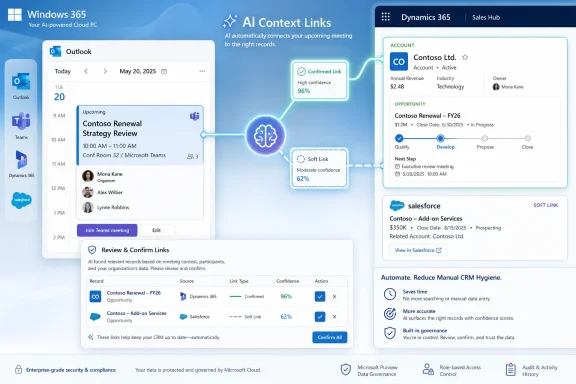 Microsoft Turns CRM Hygiene Into a Background Process
The most important word in Microsoft’s roadmap entry is not “AI.” It is “automatically.” CRM systems fail in practice not because companies lack fields, dashboards, or forecasting rituals, but because the people closest to the customer often experience those systems as administrative drag. A meeting happens in one tool, the opportunity lives in another, the prep notes are scattered across inboxes and chats, and the seller is expected to stitch everything together before the call and clean it up afterward.Microsoft’s new Copilot feature attacks that seam. Instead of waiting for a seller to manually link a meeting to an opportunity or account, Copilot is expected to connect the meeting to the correct CRM record and surface the relevant deal insights during preparation. In the version of the feature described in Microsoft’s release-plan material, meeting prep sets CRM context for upcoming customer meetings by linking each meeting to the most relevant CRM record, with the match used to generate meeting-prep insights.
That is a small design change with large behavioral implications. If sellers routinely skip manual linking, then prep experiences that depend on those links become inconsistent. If the link is inferred automatically, Microsoft can make CRM-aware meeting prep feel like a default state rather than a premium workflow a disciplined user remembers to invoke. It is the same pattern Microsoft has followed elsewhere in Copilot: remove the explicit prompt, watch the surrounding work graph, and turn context into an ambient service.
The feature also shows how Microsoft is pushing Copilot for sales work into the spaces where sellers already live. Microsoft’s adoption and Learn materials describe the sales solution in Microsoft 365 Copilot as a way to bring sales data and insights into the flow of work, with connections to Dynamics 365 and Salesforce CRMs. That positioning matters because the competition is not merely another AI assistant. It is the old habit of keeping the “real” sales narrative in email, Teams chat, and private notes while the CRM receives a sanitized version later.
For WindowsForum readers who administer Microsoft 365 environments, the practical question is not whether automatic meeting-to-CRM linking is useful. It almost certainly is. The practical question is whether the organization’s identity, permissions, CRM data model, meeting culture, and sales-process rules are ready for Copilot to infer context at scale.
The Roadmap Entry Is Short, but the Architecture Behind It Is Not
Roadmap ID 567004 is sparse by design. Microsoft lists it as in development, created and last updated at the same July 8, 2026 UTC timestamp, with general availability planned for September 2026. The product is Microsoft Copilot in Microsoft 365, the platform is web, and the release target is the standard worldwide cloud. Those details are bureaucratic, but they tell admins where to look: this is not being framed as a narrow Dynamics-only feature or a Windows desktop client change, but as a Microsoft 365 Copilot web experience tied to CRM-backed sales workflows.Microsoft’s adjacent documentation fills in the missing mechanics. Its Sales agent material says sellers can use Microsoft 365 Copilot to interact with sales data through natural language, ask questions about CRM data and past customer conversations, and access meeting experiences that combine AI-generated insights, CRM data, and recent communications. Microsoft’s Teams-focused Sales agent documentation already describes viewing and editing a connected CRM record during a meeting, and it notes that the connected record appears in the meeting experience when the meeting is associated with CRM.
The new roadmap feature appears to target the step before all of that: getting the meeting connected in the first place. In Microsoft’s release-plan description, AI evaluates meeting details and existing CRM relationships to identify the most relevant open opportunity. If no opportunity clears the confidence threshold, the system falls back to an account-level match. The selected record is described as a soft link, and the seller can accept, change, or remove the suggested match.
That distinction between inference and confirmation is crucial. Microsoft is trying to benefit from automatic context without pretending the model’s first guess should always become the durable CRM truth. A soft link can power meeting prep. A confirmed link can become a stronger record of intent. That is a sane design, provided admins and users understand the difference.
| Link state | How it is created | What it does | Seller control | Governance implication |
|---|---|---|---|---|
| Soft-linked meeting | AI suggests the most relevant CRM record from meeting details and CRM relationships | Supplies CRM context for meeting-prep insights by default | Seller can accept, change, or remove the match | Useful but should be treated as inferred context, not final CRM truth |
| Hard-linked meeting | Seller confirms the suggested CRM match | Makes the meeting’s CRM association more explicit | Seller confirmation is the key step | Better suited for reporting, audit expectations, and downstream process reliance |
Microsoft’s Sales Copilot Bet Is Really a Data-Gravity Bet
The sales pitch for Copilot is that it saves time. The platform strategy is that it increases Microsoft 365’s gravitational pull around business data. Every time Copilot can answer a sales question inside Teams, summarize an account inside Microsoft 365 Copilot, or prepare a meeting using CRM context without making the seller open the CRM, Microsoft reduces the perceived need to leave its work surface.That does not mean Dynamics 365 is the only intended beneficiary. Microsoft’s adoption materials explicitly position the sales solution in Microsoft 365 Copilot as connecting to Dynamics and Salesforce CRMs. That is an important concession to enterprise reality. Many Microsoft 365 customers run Salesforce as the system of record, and Microsoft’s opportunity is not necessarily to replace Salesforce outright; it is to make Microsoft 365 the place where sales work is experienced.
Automatic meeting-to-record linking is therefore more than a CRM convenience. It is a way to make the calendar, the meeting, the chat transcript, the email thread, and the opportunity feel like one object. If Copilot can resolve the meeting’s customer context before the seller starts preparing, it can generate more relevant briefings, suggest better follow-ups, and reduce the mental cost of moving from conversation to record.
This is also where Microsoft’s approach differs from older sales-productivity integrations. For years, vendors have offered side panels, browser extensions, email sync tools, and calendar capture. Those tools often improved logging but did not eliminate the user’s responsibility to decide which record mattered. Microsoft’s newer Copilot design leans on a richer work graph: meeting metadata, participants, CRM relationships, recent communications, and account or opportunity data.
That richer context is both the product and the liability. In a clean tenant with disciplined CRM ownership, well-modeled opportunities, accurate contacts, and stable account hierarchies, automatic linking may feel obvious. In a messy tenant, it may expose exactly how ambiguous the underlying data is. Two opportunities under the same account, a consultant invited to multiple customer calls, a partner-led deal, a renewal and an expansion motion running in parallel — these are not edge cases in enterprise sales. They are Tuesday.
Microsoft’s confidence-threshold language is meant to reassure users that the system will not always force an opportunity match. Falling back to an account-level match is sensible when the opportunity signal is weak. But even an account-level association can be politically or operationally meaningful in complex organizations, especially where account ownership, territory credit, forecasting, and compliance obligations intersect.
The Productivity Gain Is Real Because the Manual Process Is Broken
It is easy to mock AI features that automate office chores, but meeting-to-CRM linking is a real pain point. Sellers often prepare for customer conversations by triangulating across calendar invites, previous emails, Teams chats, CRM notes, account pages, opportunity records, support escalations, and documents. The CRM may contain the official pipeline story, but the freshest context often lives elsewhere.Microsoft’s roadmap language aims at that gap. The feature promises the “right deal insights” when preparing for customer conversations. The ideal experience is straightforward: a seller sees an upcoming meeting, Copilot has already inferred the relevant CRM record, and meeting prep includes the opportunity or account context without a scavenger hunt. The seller corrects the match if needed, but the default path is less admin, more preparation.
That can matter in ways that do not show up in a demo. A five-minute reduction in prep time before a call is nice. A more consistent habit of looking at current opportunity context before every customer conversation is better. A sales manager getting cleaner meeting association data because sellers are prompted to confirm inferred links may be better still.
The feature also fits the reality that many sales meetings are created casually. A customer replies to an email thread and asks for time. A seller forwards an invite to a specialist. A partner joins late. The formal CRM opportunity may exist, but no one stops to attach the calendar object to it. By the time the meeting happens, the missing link becomes one more tiny data-quality failure.
Microsoft is not wrong to attack that failure with AI. Rules-based matching can only go so far; customer names, subsidiaries, contacts, aliases, partner domains, and deal names often do not line up neatly. A model that considers meeting details and CRM relationships can potentially make better suggestions than a static rule looking for a domain match.
The important caveat is that better than manual neglect is not the same as perfect. Admins should expect a learning curve, a correction loop, and some early user skepticism. Sellers will forgive a wrong suggestion if it is easy to fix and does not pollute the CRM. They will not forgive a system that confidently attaches the wrong deal and forces them to unwind downstream effects.
Where the Feature Could Go Wrong
The first failure mode is false confidence. AI-generated context has a way of arriving with the visual polish of certainty, even when it is probabilistic underneath. If Copilot presents a meeting brief tied to the wrong opportunity, a seller may enter a customer conversation with irrelevant pricing context, stale stakeholder assumptions, or the wrong renewal history.The second failure mode is silent data bleed across related records. A seller working a strategic account may have multiple open opportunities with overlapping contacts. If Copilot selects the largest opportunity because it has the strongest relationship signal, but the meeting is actually about a smaller support-driven expansion, the prep brief could skew the conversation. The seller might still catch the error, but only if the interface makes the linked record obvious and changeable.
The third failure mode is organizational overreach. Sales operations teams love activity data, and for good reason: it feeds forecasting, coaching, coverage analysis, and pipeline inspection. But inferred links should not automatically become a new surveillance metric without careful explanation. If sellers believe Copilot is quietly assigning their meetings to records for management review, adoption will suffer.
The fourth failure mode is permissions confusion. Microsoft generally emphasizes that Copilot experiences respect user permissions, but CRM integrations add another boundary. A seller’s access to an opportunity, an account, a contact, or a related activity may depend on CRM roles, Microsoft 365 permissions, connector configuration, and tenant policy. If the automatic linking feature exposes less than expected, users will call it broken. If it exposes more than expected, admins will have a much bigger problem.
Finally, there is the quality of the CRM itself. AI does not magically fix duplicate accounts, orphaned contacts, stale opportunities, inconsistent naming conventions, or sales teams that use private spreadsheets as shadow pipeline. It may reveal those defects faster. That is still valuable, but only if the organization treats bad matches as signals of data-quality debt rather than proof that Copilot is useless.
Admins Should Treat September as a Deployment Deadline, Not a Surprise
Because Roadmap ID 567004 is listed for general availability in September 2026, the sensible enterprise posture is preparation, not panic. Microsoft roadmap dates are estimates, and Microsoft’s own roadmap language says release information can change. But the item is already in development, and the administrative work it implies is not something most organizations should leave until a launch banner appears.The first job is to identify who will actually be in scope. The roadmap entry names Microsoft Copilot in Microsoft 365 and the web platform, while Microsoft’s broader sales documentation points to Sales agent experiences, CRM sign-in, Teams, Outlook, and connected CRM systems. Licensing and feature availability can vary by tenant and product configuration, so admins should map the affected user population rather than assume “all Copilot users” or “all sellers.”
The second job is to inspect CRM connection health. If sellers are not signed in to the CRM-backed sales experience, if Salesforce or Dynamics 365 integration is inconsistently deployed, or if only part of the sales org has the relevant add-ins and agents available, automatic linking will produce uneven outcomes. Uneven AI features are worse than missing ones because they create support tickets that look like user confusion but are really deployment drift.
The third job is data-model review. The feature’s usefulness depends on Copilot being able to infer the right relationship among meetings, contacts, accounts, and open opportunities. That means duplicate contacts, inconsistent external domains, stale opportunity ownership, and vague opportunity names are not merely CRM annoyances; they directly affect AI match quality.
The fourth job is user communication. Sellers need to know that an AI-suggested CRM association is not a moral judgment, a management trap, or a permanent record they cannot correct. Microsoft’s release-plan language says users can accept, change, or remove the suggested match. That control should be front and center in training.
Action checklist for admins
- Review Microsoft 365 Roadmap ID 567004 and track its status ahead of the planned September 2026 general availability window.
- Identify which sellers use Microsoft 365 Copilot sales experiences on the web and which CRM systems they connect to, including Dynamics 365 or Salesforce where applicable.
- Validate that CRM sign-in, Sales agent deployment, and required Microsoft 365 Copilot access are consistent across the intended pilot group.
- Clean high-impact CRM data before rollout: duplicate accounts, stale open opportunities, missing contacts, and ambiguous account relationships.
- Tell sellers how soft links differ from confirmed links, and document when they should accept, change, or remove a suggested CRM match.
- Decide how, or whether, inferred meeting associations will be used in sales reporting before managers start relying on the data.
Sellers Will Judge the Feature by the First Wrong Match
AI adoption in sales teams is brutally pragmatic. A feature that saves time five times and embarrasses a seller once may be remembered for the embarrassment. Microsoft’s challenge is not only to produce good matches; it is to make uncertainty legible.The release-plan framing of confidence-based matching is promising because it suggests Microsoft knows there must be a threshold. If the system cannot identify a relevant opportunity, falling back to account-level context is safer than pretending every meeting maps cleanly to a deal. But the interface must make that downgrade visible. A seller should know whether Copilot is preparing them for a specific opportunity or merely for the broader account relationship.
The accept-change-remove pattern is also the right one. It turns the seller into the reviewer of the AI’s proposed context instead of the clerk responsible for creating the association from scratch. That is a better human-machine bargain: the model does the first pass, the user applies judgment, and the corrected signal can improve future matching.
But this only works if correction is lightweight. If changing the linked record requires opening a separate CRM tab, waiting through authentication, searching through a long list of similarly named opportunities, and saving multiple times, sellers will ignore it. Worse, they may stop trusting the prep experience altogether. Microsoft’s own Sales agent documentation emphasizes staying in the flow of work; automatic linking must honor that principle when the AI is wrong, not just when it is right.
There is also a cultural dimension. In some sales organizations, CRM discipline is already high and automatic linking will be treated as a convenience. In others, the CRM is viewed as an obligation imposed by management. In those environments, AI-powered linking may be read as yet another way to force compliance. The same feature can feel like assistance or enforcement depending on how leaders introduce it.
The better rollout message is not “Copilot will update the CRM for you.” That overpromises and triggers resistance. The better message is: Copilot will suggest the most likely CRM context for your meetings so your prep starts closer to the right account or opportunity, and you remain responsible for confirming or correcting it.
This Is Also a Windows Story, Even Though the Platform Says Web
The roadmap platform is web, but Windows shops should not ignore the item. Microsoft 365 Copilot is increasingly experienced across browser sessions, Teams, Outlook, and the Microsoft 365 app surface on managed Windows PCs. The endpoint may not be where the matching logic runs, but it is where users encounter the feature, where identity state breaks, where browser policies interfere, and where support tickets begin.For IT teams, that means the usual Windows-era support instincts still apply. Is the user signed into the right work account? Is the browser profile correct? Is Teams using the same identity as Microsoft 365 Copilot? Is the CRM session valid? Are third-party cookies, conditional access rules, or browser isolation tools affecting embedded CRM experiences? Has the user been assigned the necessary license, app, or agent access?
The “web” label should also make admins think about change management outside the traditional desktop update cycle. A web-delivered Copilot feature can appear without a monthly Windows patch or Office build being the obvious cause. Users may describe it as a Teams change, a Copilot change, an Outlook change, or a CRM change depending on where they first see the suggested link. Help desks will need a shared vocabulary.
There is also a security-review angle. Any feature that combines meetings, CRM data, customer context, and AI-generated preparation sits at the intersection of collaboration governance and sales-data governance. Many enterprises review those areas separately. Copilot collapses them. A meeting invite is no longer just a calendar object; it becomes a trigger for retrieving and presenting CRM context.
That does not mean the feature is unsafe. It means the blast radius of misconfiguration is broader than with a conventional CRM plug-in. Conditional access, data-loss prevention, sensitivity labels, CRM roles, retention policies, and audit expectations may all be relevant, even if none of them are named in the short roadmap entry.
The Competitive Pressure Is Coming From Both CRM and Productivity Suites
Microsoft is not developing this feature in a vacuum. Every major CRM and productivity vendor wants to own the pre-meeting brief, the post-meeting summary, and the next-best action. Salesforce has its own AI strategy, Google has pushed Gemini into Workspace, and specialized sales-engagement vendors have long sold automation around call prep, activity capture, and CRM updates. The market is converging on the same premise: the seller should not have to assemble context manually.Microsoft’s advantage is distribution. If the seller already uses Outlook, Teams, Microsoft 365 Copilot, and a Windows PC, Microsoft has multiple surfaces on which to present the same CRM-aware context. If the organization also uses Dynamics 365, the data path is even more native. If it uses Salesforce, Microsoft still has the calendar, email, meeting, and chat surfaces where much of the selling work happens.
That distribution advantage also raises the standard for trust. A niche sales tool can fail quietly because only power users touch it. Microsoft 365 Copilot features land in the default productivity environment. When they work, they reshape habits. When they misfire, they become another example for users who already believe AI has been pushed into too many corners of the workday.
The recent broader coverage of Microsoft’s Copilot strategy has often focused on visibility, licensing, app placement, and whether users can turn AI features on or off in familiar Microsoft 365 surfaces. This roadmap item is subtler. It is not about a giant Copilot icon. It is about letting Copilot make a context decision that changes what business data appears before a customer meeting. That may be less flashy, but it is closer to where AI either proves its value or becomes noise.
Microsoft’s challenge is to resist the temptation to make the feature feel magical at the expense of accountability. Sellers do not need magic. They need a reliable suggestion, a clear explanation of what record is being used, and a fast way to correct it. Admins need visibility into availability, permissions, and data flow. Managers need to know when inferred activity is fit for reporting and when it is merely a useful prep aid.
The Real Test Is Whether Copilot Improves the System of Record
The phrase “system of record” has always carried a little wishful thinking. The CRM is supposed to be the authoritative account of customer reality, but much of that reality happens elsewhere: in meetings, mailboxes, chats, files, and hallway conversations. Microsoft 365 Copilot’s sales strategy is to bridge that gap by bringing CRM context into work and, increasingly, by bringing work context back toward CRM.Automatic meeting linking sits exactly on that boundary. If it merely makes meeting prep prettier, it will be a nice feature. If it nudges sellers to confirm the right associations and gradually improves the completeness of CRM activity data, it becomes more strategically important. It could reduce the gulf between what sales leaders inspect and what sellers actually do.
But the system of record can only improve if the AI’s recommendations are handled with humility. A confirmed correction from a seller is valuable. An unreviewed inference is not the same thing. Enterprises that understand this distinction can use the feature to reduce friction without corrupting reporting. Enterprises that blur it may discover that AI has simply automated a new kind of ambiguity.
This is where Microsoft’s soft-link design deserves attention. The company appears to understand that there must be a middle state between no CRM context and permanent CRM linkage. That middle state is where Copilot can be most useful: it can prepare the seller, expose likely context, and invite confirmation without pretending the model owns the truth.
The open question is how much administrative control and transparency Microsoft will provide as the feature reaches general availability. Admins will want to know whether the feature can be scoped, monitored, explained, disabled, or tuned. Sales operations teams will want to know how suggested links appear in reporting, if at all. Security teams will want to know which data sources are used for matching and how permission boundaries are enforced. Sellers will want to know only one thing: does it help me have a better customer conversation?
A Small Roadmap Item With a Large Trust Surface
Roadmap ID 567004 is not the loudest Copilot announcement Microsoft will make this year, but it is one of the more revealing. It shows the company moving from generative AI as an assistant you ask to an assistant that prepares the workspace before you arrive. In sales, that shift is powerful because context is the job.The concrete takeaways are narrow enough to act on now, even before September 2026 arrives:
- Microsoft lists the feature as in development for Microsoft Copilot in Microsoft 365 on the web, with general availability planned for September 2026 in the worldwide standard multi-tenant cloud.
- The feature is intended to automatically connect meetings to the correct CRM records so sellers get deal insights while preparing for customer conversations.
- Microsoft’s related release-plan language describes AI-driven, confidence-based matching, with suggested links that users can accept, change, or remove.
- The most important operational distinction is between inferred soft links used for meeting prep and confirmed links suitable for stronger reliance.
- Admins should review CRM data quality, permissions, licensing, Sales agent deployment, and reporting assumptions before treating the feature as production-ready.
- Sellers should be trained to review the suggested CRM context, not blindly trust it or ignore it.
By September 2026, the most successful deployments of this feature will not be the ones where Copilot guesses perfectly from day one. They will be the ones where admins have cleaned the obvious CRM messes, sellers understand the difference between a suggestion and a confirmed record, and managers resist turning inferred context into a blunt performance metric. Microsoft is betting that AI can make CRM discipline feel less like paperwork and more like preparation; whether that bet pays off will depend less on the model’s cleverness than on how carefully enterprises teach people to trust, verify, and correct it.
References
- Primary source: Microsoft 365 Roadmap
Published: 2026-07-08T23:10:57.8991775Z
Loading…
www.microsoft.com - Related coverage: windowscentral.com
Microsoft Teams just made it easier to shut down Copilot and other AI tools | Windows Central
Microsoft simplified the controls for Copilot, Facilitator, and Intelligent Recap, giving licensed meeting organizers a clear way to turn off meeting AI.www.windowscentral.com - Related coverage: techradar.com
Microsoft makes major AI U-turn following user revolt — will let Teams users turn off Copilot, Facilitator and Recap | TechRadar
Microsoft Teams AI backlash leads to major changeswww.techradar.com - Official source: learn.microsoft.com
Loading…
learn.microsoft.com - Official source: adoption.microsoft.com
Loading…
adoption.microsoft.com - Related coverage: crmcurator.com
Loading…
crmcurator.com
- Official source: support.microsoft.com
Loading…
support.microsoft.com - Official source: download.microsoft.com
- Official source: news.microsoft.com
- Official source: techcommunity.microsoft.com
Loading…
techcommunity.microsoft.com - Official source: marketingassets.microsoft.com
Loading…
marketingassets.microsoft.com