

HoYoverse is previewing Genshin Impact Version 7.0 as a visually upgraded Snezhnaya-era release that mostly preserves the published PC, iOS, iPadOS, PlayStation 5, and Xbox Series X|S requirements while warning that some older Android GPU families may run into crashes, black screens, freezing, or other stability problems. The immediate device guidance is simple: Windows players should compare their PCs against the supported GTX 1050-class baseline and the recommended GTX 1060 6GB-class target; Android players should check whether their device uses Mali-G52 MP2, Mali-G57 MP, Imagination BXM, or older PowerVR graphics; iPhone and iPad users should verify whether they are only at the supported floor or closer to the recommended Apple A13-or-newer tier. Storage remains the major unresolved number because HoYoverse says Version 7.0 storage requirements will be announced later.
Genshin Impact Version 7.0 is being framed around Snezhnaya, a long-awaited major region for the game’s next era. According to GosuGamers’ report on HoYoverse’s device-performance preview, Version 7.0 will bring upgraded character models, enhanced environment textures, and improved visual effects while keeping most listed system requirements largely unchanged.
That combination matters more than the usual patch-note excitement. HoYoverse is not presenting Version 7.0 as a sweeping hardware cutoff. Instead, the message is more targeted: the game is getting a visual upgrade, most platforms keep familiar requirements, but certain older Android graphics processors may struggle badly enough to cause stability failures rather than ordinary frame-rate drops.
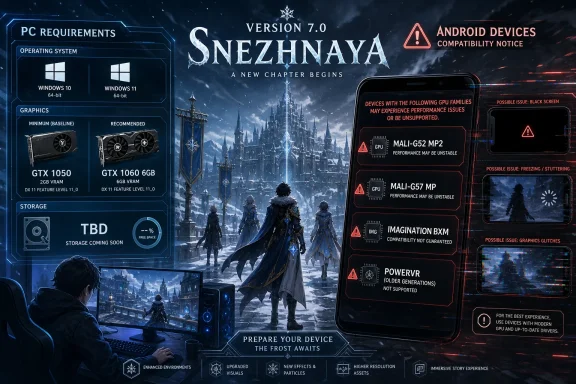
For Windows players, the headline is reassuring. The supported PC configuration remains Windows 10 64-bit, an Intel Core i5 6th Gen or AMD Ryzen equivalent, 8GB of RAM, and an NVIDIA GeForce GTX 1050 or equivalent. The recommended PC configuration remains Windows 10/11 64-bit, an Intel Core i7 7th Gen or AMD Ryzen 5000 series or better, 16GB of RAM, and an NVIDIA GeForce GTX 1060 6GB or better.
For Android players, the published baseline is Android 10 or later, Snapdragon 660 or Helio G88 or above, and 4GB of RAM. The recommended target is Android 12 or later, Snapdragon 855, Dimensity 1000, Kirin 980 or above, and 6GB of RAM. Those numbers alone do not describe the full risk, because HoYoverse’s warning focuses on specific GPU families: Mali-G52 MP2, Mali-G57 MP, Imagination BXM, and older PowerVR graphics processors.
That is the most meaningful platform divide in the preview. PC, iOS, iPadOS, PlayStation 5, Xbox Series X|S, and most Android devices remain inside the advertised envelope. The sharper concern is that some Android phones or tablets may appear acceptable by OS, processor, and RAM but still run into black screens, freezing, crashes, or other technical issues after the Version 7.0 update.
Mobile compatibility is also harder for ordinary users to read. On Windows, a player can usually identify the CPU, RAM, GPU, OS version, and driver status. On Android, the phone model, Android version, and memory amount may be easier to find than the exact GPU. That makes HoYoverse’s named GPU warning especially important: “Android 10 and 4GB RAM” should not be treated as a complete safety guarantee if the graphics processor is in one of the affected families.
If your machine is already comfortably above the recommended tier, Version 7.0 is not a reason to panic-buy a new PC. If your machine only barely clears the supported floor, expect to use lower settings and wait for real-world Version 7.0 performance reports before assuming the new region will feel the same as current content.
Also leave storage headroom. HoYoverse has not yet announced the Version 7.0 storage requirement, so do not rely on a hard number. Make sure the drive that holds Genshin Impact has enough free space for a major update, patch staging, and temporary files.
Before the update, confirm that your HoYoverse account login is secure and accessible on another device or browser. If Version 7.0 causes black screens or crashes on your Android device, you do not want account recovery to become part of the troubleshooting process.
If your device is near the minimum spec, avoid assuming that reinstalling the game will fix a GPU-related stability issue. Reinstalling may help with corrupted files in some cases, but HoYoverse’s warning is about hardware families that may have trouble with the update itself.
If you are on an older supported iPhone or iPad, wait for Version 7.0 impressions before assuming the visual upgrade will feel identical to the current game. The requirement list may remain stable, but older supported devices can still have less headroom than newer recommended ones.
The supported hardware line — Intel Core i5 6th Gen or AMD Ryzen equivalent, 8GB RAM, and NVIDIA GeForce GTX 1050 or equivalent — describes an older but still recognizable entry-level gaming configuration. The recommended line — Intel Core i7 7th Gen or AMD Ryzen 5000 series or better, 16GB RAM, and NVIDIA GeForce GTX 1060 6GB or better — remains modest by modern enthusiast standards but more realistic for a smoother experience.
The Windows 11 angle is also straightforward. HoYoverse is not making Windows 11 mandatory for PC players. Windows 10 64-bit remains the supported baseline, while Windows 10/11 64-bit appears in the recommended row. For WindowsForum readers, that distinction matters: a Windows 10 gaming desktop or laptop that already meets the listed hardware requirements is not being pushed out by the Version 7.0 preview.
That does not mean every supported PC will feel equally good. A GTX 1050-class system with 8GB of RAM has less headroom for upgraded models, higher-resolution textures, and heavier visual effects than a machine at or above the recommended spec. The requirements may be stable, but the workload can still become more demanding in the new region.
The unresolved PC issue is storage. HoYoverse says Version 7.0 storage requirements will be announced later. Until then, storage should be treated as an open planning item rather than a known requirement. A PC can satisfy the CPU, RAM, GPU, and OS rows but still have a frustrating update experience if the install drive is nearly full.
That is especially relevant for older gaming laptops and budget desktops. Many systems that fit the GTX 1050 or GTX 1060 era shipped with smaller SSDs. If Genshin Impact is installed on a cramped system drive, the eventual Version 7.0 storage figure may matter more to the update process than the CPU requirement does.
Those numbers do not suggest a broad Android cutoff. The concern is more specific: GosuGamers reports that HoYoverse identified Mali-G52 MP2, Mali-G57 MP, Imagination BXM, and older PowerVR graphics processors as potentially affected architectures. The possible symptoms include crashes, black screens, freezing, and other technical issues after the Version 7.0 update.
That is more serious than a normal performance warning. Lower frame rates can sometimes be managed with reduced graphics settings, lower resolution, and realistic expectations. Black screens, freezing, or repeated crashes can make the game unreliable even if it technically installs and launches.
The practical takeaway is that Android players should not stop at checking the Android version and RAM amount. A device may satisfy broad published requirements and still be at risk if it uses one of the named GPU families. This is the kind of issue that can affect budget or older midrange devices where the OS version and memory look acceptable but the graphics hardware is near the edge.
The warning should also shape buying decisions. If someone is purchasing a low-cost Android tablet or used phone specifically for Genshin Impact, Version 7.0 makes GPU identification more important than usual. A device that looks good on storage and RAM but uses an affected graphics family may not be a safe choice for the Snezhnaya update.
For existing Android players, the safest approach is to verify the GPU now, keep account access ready on another platform if possible, and wait for early Version 7.0 feedback before troubleshooting aggressively. If the device belongs to a named GPU family, crashes or black screens after the update may not be caused by Wi-Fi, login status, or a bad install.
This shorter comparison shows the main point more clearly than a long platform-by-platform grid: Android compatibility risk is the meaningful new warning, while PC, iOS, iPadOS, and current-generation console requirements are mostly a continuity story.
For Windows users, that continuity is welcome. Genshin Impact is adding a major region and visual enhancements without moving the supported PC floor to Windows 11 or to a much newer GPU class. For iPhone and iPad users, the support list still reaches back to older Apple devices, though the recommended tier is a better planning guide for comfort. For console users, the list is simple: PlayStation 5 and Xbox Series X|S.
Android is different because the platform is more fragmented. SoC names, GPU cores, manufacturer firmware, thermals, and memory behavior can vary widely across devices. HoYoverse’s warning does not mean every Android device with one of the named GPU families will necessarily fail, but it does mean those users have a specific reason to be cautious.
Version 7.0 makes that distinction important. HoYoverse can keep most listed requirements stable while still adding upgraded character models, enhanced environment textures, and improved visual effects. The requirement sheet defines entry points; the actual experience depends on how the device handles the new workload.
For a Windows player, that means a GTX 1050-class system may remain supported but should not be expected to behave like a GTX 1060 6GB-class or newer machine. For an Android player, it means meeting Android 10 and 4GB RAM may not be enough if the GPU is one of the families HoYoverse has singled out. For an iOS player, it means an iPhone 8 Plus or iPhone X may remain supported while an iPhone 12-series device or newer is the safer performance expectation.
The better mental model is to treat the supported spec as the entry line and the recommended spec as the comfort zone. Supported means the device is in the advertised range. Recommended means it has more room for the update’s heavier visual presentation.
That distinction is especially important because Version 7.0 is not just another small event patch. Snezhnaya is being treated as a major step for the game, and the preview specifically mentions visual improvements. More detailed models, richer textures, and stronger effects all create pressure on GPU performance, memory, and storage.
None of this changes the basic message for PC players: if your Windows machine already plays Genshin Impact comfortably and meets or exceeds the recommended target, the Version 7.0 preview does not suggest an emergency upgrade. But if your device is only at the supported floor, the smart move is to prepare for lower settings, watch early reports, and keep storage available.
That matters because major live-service updates often require more than just the final installed size. A game may need room for downloads, temporary extraction, patch staging, file verification, and cleanup. Users with nearly full drives can run into update problems even when the finished installation would theoretically fit.
For Windows players, the immediate action is basic maintenance. Check the drive where Genshin Impact is installed. Remove unnecessary files, move large media elsewhere, and avoid running the system drive down to its last few gigabytes before the Version 7.0 update. If the game is installed on a small SSD, storage planning may be more important than CPU planning.
For Android and iOS users, the same principle applies in a simpler form: keep enough internal storage free before attempting the update. Mobile devices with marginal hardware often also have limited storage, and a failed or interrupted update can make troubleshooting harder.
The important editorial line is caution, not prediction. Because HoYoverse has not announced the storage requirement yet, any hard number for Version 7.0’s footprint should be treated as unconfirmed unless it comes from HoYoverse. The storage question remains one of the few major practical blanks in the preview.
That distinction matters because patch-cycle expectations can harden into assumed dates very quickly in gaming communities. For planning purposes, the safe approach is to wait for HoYoverse to confirm timing through official channels.
The sequencing is still useful. If Version 7.0 may arrive in August 2026, players have a limited but meaningful window to check hardware. Windows users can verify OS, RAM, CPU, GPU, and free storage. Android users can identify the exact GPU family. iPhone and iPad users can compare their devices against the supported and recommended tiers.
This is also the right time to make account access boring. Players who rely on one older Android device should make sure they know their login method, recovery email, and any linked account details before Version 7.0 lands. That is not because account systems are the focus of the preview, but because a device that crashes or black-screens after an update is much easier to deal with if the player can log in elsewhere.
For households with multiple Genshin players, the same advice applies at a smaller scale. Check the weakest device first. A newer desktop or console is less likely to be the problem. The older Android tablet, older iPhone, small-SSD laptop, or minimum-spec PC deserves attention before launch day.
Version 7.0 appears to be HoYoverse walking that line. PC requirements remain familiar. iOS and iPadOS requirements remain stable in the available preview. PlayStation 5 and Xbox Series X|S keep the console story simple. The one clearly elevated warning sits on Android, where specific older GPU families may encounter serious stability issues.
That warning should be taken seriously because it is specific. HoYoverse is not merely saying “some devices may have problems” in the abstract. The preview names Mali-G52 MP2, Mali-G57 MP, Imagination BXM, and older PowerVR graphics processors as potentially affected. That gives players a concrete hardware list to check before Version 7.0 arrives.
At the same time, the warning should not be exaggerated into a universal Android panic. The published Android baseline and recommendation remain broad, and the affected group is described as a subset of older GPU architectures. Most of the platform story is continuity; the Android GPU note is the exception that matters.
For WindowsForum readers, the cleanest conclusion is practical rather than dramatic. Windows players should verify that their machines are at or above the listed baseline, aim for the recommended target where possible, and keep storage free until HoYoverse announces the final storage requirement. Android players should identify their GPU now, especially if they use an older or budget device. iPhone and iPad players should check whether they are merely supported or comfortably recommended.
Version 7.0 is not being presented as a hard reset for Genshin Impact hardware support. It is a visual step forward with a targeted compatibility warning. The players who act on that warning early — especially those on older Android graphics hardware or cramped Windows storage — will be in the best position when Snezhnaya moves from preview to patch day.
 Snezhnaya Turns a Graphics Upgrade Into a Hardware Reality Check
Genshin Impact Version 7.0 is being framed around Snezhnaya, a long-awaited major region for the game’s next era. According to GosuGamers’ report on HoYoverse’s device-performance preview, Version 7.0 will bring upgraded character models, enhanced environment textures, and improved visual effects while keeping most listed system requirements largely unchanged.That combination matters more than the usual patch-note excitement. HoYoverse is not presenting Version 7.0 as a sweeping hardware cutoff. Instead, the message is more targeted: the game is getting a visual upgrade, most platforms keep familiar requirements, but certain older Android graphics processors may struggle badly enough to cause stability failures rather than ordinary frame-rate drops.
For Windows players, the headline is reassuring. The supported PC configuration remains Windows 10 64-bit, an Intel Core i5 6th Gen or AMD Ryzen equivalent, 8GB of RAM, and an NVIDIA GeForce GTX 1050 or equivalent. The recommended PC configuration remains Windows 10/11 64-bit, an Intel Core i7 7th Gen or AMD Ryzen 5000 series or better, 16GB of RAM, and an NVIDIA GeForce GTX 1060 6GB or better.
For Android players, the published baseline is Android 10 or later, Snapdragon 660 or Helio G88 or above, and 4GB of RAM. The recommended target is Android 12 or later, Snapdragon 855, Dimensity 1000, Kirin 980 or above, and 6GB of RAM. Those numbers alone do not describe the full risk, because HoYoverse’s warning focuses on specific GPU families: Mali-G52 MP2, Mali-G57 MP, Imagination BXM, and older PowerVR graphics processors.
That is the most meaningful platform divide in the preview. PC, iOS, iPadOS, PlayStation 5, Xbox Series X|S, and most Android devices remain inside the advertised envelope. The sharper concern is that some Android phones or tablets may appear acceptable by OS, processor, and RAM but still run into black screens, freezing, crashes, or other technical issues after the Version 7.0 update.
Mobile compatibility is also harder for ordinary users to read. On Windows, a player can usually identify the CPU, RAM, GPU, OS version, and driver status. On Android, the phone model, Android version, and memory amount may be easier to find than the exact GPU. That makes HoYoverse’s named GPU warning especially important: “Android 10 and 4GB RAM” should not be treated as a complete safety guarantee if the graphics processor is in one of the affected families.
What to Do Now
Windows players
Check whether your PC is closer to the supported floor or the recommended target. The supported baseline is Windows 10 64-bit, Intel Core i5 6th Gen or AMD Ryzen equivalent, 8GB RAM, and GTX 1050-class graphics. The recommended target is Windows 10/11 64-bit, Intel Core i7 7th Gen or AMD Ryzen 5000 series or better, 16GB RAM, and GTX 1060 6GB-class graphics or better.If your machine is already comfortably above the recommended tier, Version 7.0 is not a reason to panic-buy a new PC. If your machine only barely clears the supported floor, expect to use lower settings and wait for real-world Version 7.0 performance reports before assuming the new region will feel the same as current content.
Also leave storage headroom. HoYoverse has not yet announced the Version 7.0 storage requirement, so do not rely on a hard number. Make sure the drive that holds Genshin Impact has enough free space for a major update, patch staging, and temporary files.
Android players
Find your device’s SoC and GPU, not just the marketing name of the phone or tablet. If it uses Mali-G52 MP2, Mali-G57 MP, Imagination BXM, or an older PowerVR GPU, treat Version 7.0 as higher risk even if the device meets Android 10, processor, and RAM requirements.Before the update, confirm that your HoYoverse account login is secure and accessible on another device or browser. If Version 7.0 causes black screens or crashes on your Android device, you do not want account recovery to become part of the troubleshooting process.
If your device is near the minimum spec, avoid assuming that reinstalling the game will fix a GPU-related stability issue. Reinstalling may help with corrupted files in some cases, but HoYoverse’s warning is about hardware families that may have trouble with the update itself.
iPhone and iPad players
Check whether your device is only supported or actually recommended. The supported iPhone floor is iPhone 8 Plus or iPhone X or newer, while the recommended iPhone target is the iPhone 12 series or newer. For iPad, supported devices start from iPad mini 5th generation, iPad Air 3rd generation, iPad 8th generation, or newer. The recommended iPad target is iPad 9th generation or newer, with Apple A13 or later and 4GB of RAM.If you are on an older supported iPhone or iPad, wait for Version 7.0 impressions before assuming the visual upgrade will feel identical to the current game. The requirement list may remain stable, but older supported devices can still have less headroom than newer recommended ones.
Windows Players Get the Rare Gift of a Stable Requirement Sheet
For Windows users, Version 7.0 is notable because the listed PC requirements are largely unchanged. The supported operating-system requirement remains Windows 10 64-bit, and the recommended operating-system target remains Windows 10/11 64-bit. That is an important signal for a game with years of accumulated installs and a broad player base.The supported hardware line — Intel Core i5 6th Gen or AMD Ryzen equivalent, 8GB RAM, and NVIDIA GeForce GTX 1050 or equivalent — describes an older but still recognizable entry-level gaming configuration. The recommended line — Intel Core i7 7th Gen or AMD Ryzen 5000 series or better, 16GB RAM, and NVIDIA GeForce GTX 1060 6GB or better — remains modest by modern enthusiast standards but more realistic for a smoother experience.
The Windows 11 angle is also straightforward. HoYoverse is not making Windows 11 mandatory for PC players. Windows 10 64-bit remains the supported baseline, while Windows 10/11 64-bit appears in the recommended row. For WindowsForum readers, that distinction matters: a Windows 10 gaming desktop or laptop that already meets the listed hardware requirements is not being pushed out by the Version 7.0 preview.
That does not mean every supported PC will feel equally good. A GTX 1050-class system with 8GB of RAM has less headroom for upgraded models, higher-resolution textures, and heavier visual effects than a machine at or above the recommended spec. The requirements may be stable, but the workload can still become more demanding in the new region.
The unresolved PC issue is storage. HoYoverse says Version 7.0 storage requirements will be announced later. Until then, storage should be treated as an open planning item rather than a known requirement. A PC can satisfy the CPU, RAM, GPU, and OS rows but still have a frustrating update experience if the install drive is nearly full.
That is especially relevant for older gaming laptops and budget desktops. Many systems that fit the GTX 1050 or GTX 1060 era shipped with smaller SSDs. If Genshin Impact is installed on a cramped system drive, the eventual Version 7.0 storage figure may matter more to the update process than the CPU requirement does.
The Android Warning Is Narrow, but It Is Not Cosmetic
The most important change in HoYoverse’s preview is the Android warning. The general supported Android configuration remains Android 10 or later, Snapdragon 660 or Helio G88 or above, and 4GB of RAM. The recommended Android configuration remains Android 12 or later, Snapdragon 855, Dimensity 1000, Kirin 980 or above, and 6GB of RAM.Those numbers do not suggest a broad Android cutoff. The concern is more specific: GosuGamers reports that HoYoverse identified Mali-G52 MP2, Mali-G57 MP, Imagination BXM, and older PowerVR graphics processors as potentially affected architectures. The possible symptoms include crashes, black screens, freezing, and other technical issues after the Version 7.0 update.
That is more serious than a normal performance warning. Lower frame rates can sometimes be managed with reduced graphics settings, lower resolution, and realistic expectations. Black screens, freezing, or repeated crashes can make the game unreliable even if it technically installs and launches.
The practical takeaway is that Android players should not stop at checking the Android version and RAM amount. A device may satisfy broad published requirements and still be at risk if it uses one of the named GPU families. This is the kind of issue that can affect budget or older midrange devices where the OS version and memory look acceptable but the graphics hardware is near the edge.
The warning should also shape buying decisions. If someone is purchasing a low-cost Android tablet or used phone specifically for Genshin Impact, Version 7.0 makes GPU identification more important than usual. A device that looks good on storage and RAM but uses an affected graphics family may not be a safe choice for the Snezhnaya update.
For existing Android players, the safest approach is to verify the GPU now, keep account access ready on another platform if possible, and wait for early Version 7.0 feedback before troubleshooting aggressively. If the device belongs to a named GPU family, crashes or black screens after the update may not be caused by Wi-Fi, login status, or a bad install.
A Tighter Platform Summary
The spec sheet does not point to a universal hardware reset. It points to mostly stable requirements, with Android GPU compatibility as the main risk area.| Platform | Version 7.0 takeaway |
|---|---|
| Windows PC | Requirements are largely unchanged. Supported: Windows 10 64-bit, Intel Core i5 6th Gen or AMD Ryzen equivalent, 8GB RAM, GTX 1050 or equivalent. Recommended: Windows 10/11 64-bit, Intel Core i7 7th Gen or AMD Ryzen 5000 series or better, 16GB RAM, GTX 1060 6GB or better. Storage is still TBD. |
| Android | Published CPU, OS, and RAM requirements remain broad, but Mali-G52 MP2, Mali-G57 MP, Imagination BXM, and older PowerVR GPUs may face crashes, black screens, freezing, or other technical issues. |
| iOS and iPadOS | Listed requirements remain stable. Supported iPhones start at iPhone 8 Plus or iPhone X; recommended iPhones are iPhone 12 series or newer. Supported iPads start at iPad mini 5th gen, iPad Air 3rd gen, iPad 8th gen, or newer; recommended iPads are iPad 9th gen or newer with Apple A13 or later and 4GB RAM. |
| Consoles | PlayStation 5 and Xbox Series X|S remain the current listed console platforms. |
For Windows users, that continuity is welcome. Genshin Impact is adding a major region and visual enhancements without moving the supported PC floor to Windows 11 or to a much newer GPU class. For iPhone and iPad users, the support list still reaches back to older Apple devices, though the recommended tier is a better planning guide for comfort. For console users, the list is simple: PlayStation 5 and Xbox Series X|S.
Android is different because the platform is more fragmented. SoC names, GPU cores, manufacturer firmware, thermals, and memory behavior can vary widely across devices. HoYoverse’s warning does not mean every Android device with one of the named GPU families will necessarily fail, but it does mean those users have a specific reason to be cautious.
“Minimum” Is Not the Same as “Comfortable”
One recurring misunderstanding in game requirements is the belief that minimum means smooth. It usually does not. A minimum requirement is a threshold for running the software under expected conditions, often with reduced settings, longer loading times, lower frame rates, or less headroom during demanding scenes.Version 7.0 makes that distinction important. HoYoverse can keep most listed requirements stable while still adding upgraded character models, enhanced environment textures, and improved visual effects. The requirement sheet defines entry points; the actual experience depends on how the device handles the new workload.
For a Windows player, that means a GTX 1050-class system may remain supported but should not be expected to behave like a GTX 1060 6GB-class or newer machine. For an Android player, it means meeting Android 10 and 4GB RAM may not be enough if the GPU is one of the families HoYoverse has singled out. For an iOS player, it means an iPhone 8 Plus or iPhone X may remain supported while an iPhone 12-series device or newer is the safer performance expectation.
The better mental model is to treat the supported spec as the entry line and the recommended spec as the comfort zone. Supported means the device is in the advertised range. Recommended means it has more room for the update’s heavier visual presentation.
That distinction is especially important because Version 7.0 is not just another small event patch. Snezhnaya is being treated as a major step for the game, and the preview specifically mentions visual improvements. More detailed models, richer textures, and stronger effects all create pressure on GPU performance, memory, and storage.
None of this changes the basic message for PC players: if your Windows machine already plays Genshin Impact comfortably and meets or exceeds the recommended target, the Version 7.0 preview does not suggest an emergency upgrade. But if your device is only at the supported floor, the smart move is to prepare for lower settings, watch early reports, and keep storage available.
Storage Is the Missing Number That Could Still Matter
HoYoverse has not yet announced Version 7.0 storage requirements. That missing figure should not be filled in with guesses. The only safe statement is that storage remains TBD.That matters because major live-service updates often require more than just the final installed size. A game may need room for downloads, temporary extraction, patch staging, file verification, and cleanup. Users with nearly full drives can run into update problems even when the finished installation would theoretically fit.
For Windows players, the immediate action is basic maintenance. Check the drive where Genshin Impact is installed. Remove unnecessary files, move large media elsewhere, and avoid running the system drive down to its last few gigabytes before the Version 7.0 update. If the game is installed on a small SSD, storage planning may be more important than CPU planning.
For Android and iOS users, the same principle applies in a simpler form: keep enough internal storage free before attempting the update. Mobile devices with marginal hardware often also have limited storage, and a failed or interrupted update can make troubleshooting harder.
The important editorial line is caution, not prediction. Because HoYoverse has not announced the storage requirement yet, any hard number for Version 7.0’s footprint should be treated as unconfirmed unless it comes from HoYoverse. The storage question remains one of the few major practical blanks in the preview.
The Snezhnaya Launch Window Remains an Estimate, Not a Date
Version 7.0 comes after Version Luna VIII and may launch in August 2026, according to the provided reporting. HoYoverse has not announced a specific Version 7.0 release date in the available fact set, so August should be treated as a watch window rather than a confirmed launch day.That distinction matters because patch-cycle expectations can harden into assumed dates very quickly in gaming communities. For planning purposes, the safe approach is to wait for HoYoverse to confirm timing through official channels.
The sequencing is still useful. If Version 7.0 may arrive in August 2026, players have a limited but meaningful window to check hardware. Windows users can verify OS, RAM, CPU, GPU, and free storage. Android users can identify the exact GPU family. iPhone and iPad users can compare their devices against the supported and recommended tiers.
This is also the right time to make account access boring. Players who rely on one older Android device should make sure they know their login method, recovery email, and any linked account details before Version 7.0 lands. That is not because account systems are the focus of the preview, but because a device that crashes or black-screens after an update is much easier to deal with if the player can log in elsewhere.
For households with multiple Genshin players, the same advice applies at a smaller scale. Check the weakest device first. A newer desktop or console is less likely to be the problem. The older Android tablet, older iPhone, small-SSD laptop, or minimum-spec PC deserves attention before launch day.
Action Checklist for WindowsForum Readers
- Verify whether your Windows PC meets the supported baseline: Windows 10 64-bit, Intel Core i5 6th Gen or AMD Ryzen equivalent, 8GB RAM, and GTX 1050 or equivalent.
- Compare that with the recommended PC target: Windows 10/11 64-bit, Intel Core i7 7th Gen or AMD Ryzen 5000 series or better, 16GB RAM, and GTX 1060 6GB or better.
- Do not assume storage is settled. HoYoverse says Version 7.0 storage requirements will be announced later.
- Clear space on the drive where Genshin Impact is installed before the update window.
- On Android, check the exact GPU. Treat Mali-G52 MP2, Mali-G57 MP, Imagination BXM, and older PowerVR graphics as higher-risk for Version 7.0.
- On Android devices near the minimum spec, secure account access before the update so you can move to another platform if needed.
- On iPhone, remember that iPhone 8 Plus and iPhone X are the supported floor, while iPhone 12 series or newer is the recommended target.
- On iPad, check whether the device is at least iPad mini 5th generation, iPad Air 3rd generation, iPad 8th generation, or newer; the recommended iPad target is iPad 9th generation or newer with Apple A13 or later and 4GB RAM.
- Wait for HoYoverse’s confirmed release date and storage figure before making final upgrade or cleanup decisions.
HoYoverse Is Protecting Reach While Warning the Weakest Android Hardware
The business logic behind the preview is clear enough: Genshin Impact depends on broad device reach. A game of this scale cannot casually abandon lower-end hardware without affecting part of its audience. At the same time, a visually upgraded major region cannot be delivered with no added pressure on older devices.Version 7.0 appears to be HoYoverse walking that line. PC requirements remain familiar. iOS and iPadOS requirements remain stable in the available preview. PlayStation 5 and Xbox Series X|S keep the console story simple. The one clearly elevated warning sits on Android, where specific older GPU families may encounter serious stability issues.
That warning should be taken seriously because it is specific. HoYoverse is not merely saying “some devices may have problems” in the abstract. The preview names Mali-G52 MP2, Mali-G57 MP, Imagination BXM, and older PowerVR graphics processors as potentially affected. That gives players a concrete hardware list to check before Version 7.0 arrives.
At the same time, the warning should not be exaggerated into a universal Android panic. The published Android baseline and recommendation remain broad, and the affected group is described as a subset of older GPU architectures. Most of the platform story is continuity; the Android GPU note is the exception that matters.
For WindowsForum readers, the cleanest conclusion is practical rather than dramatic. Windows players should verify that their machines are at or above the listed baseline, aim for the recommended target where possible, and keep storage free until HoYoverse announces the final storage requirement. Android players should identify their GPU now, especially if they use an older or budget device. iPhone and iPad players should check whether they are merely supported or comfortably recommended.
Version 7.0 is not being presented as a hard reset for Genshin Impact hardware support. It is a visual step forward with a targeted compatibility warning. The players who act on that warning early — especially those on older Android graphics hardware or cramped Windows storage — will be in the best position when Snezhnaya moves from preview to patch day.
References
- Primary source: GosuGamers
Published: 2026-07-09T04:52:08.482844
Loading…
www.gosugamers.net - Related coverage: support.hoyoverse.com
Loading…
support.hoyoverse.com - Related coverage: gadgets360.com
Loading…
www.gadgets360.com - Related coverage: game8.co
Loading…
game8.co - Related coverage: pockettactics.com
Loading…
www.pockettactics.com - Related coverage: vcgamers.com
Loading…
www.vcgamers.com