

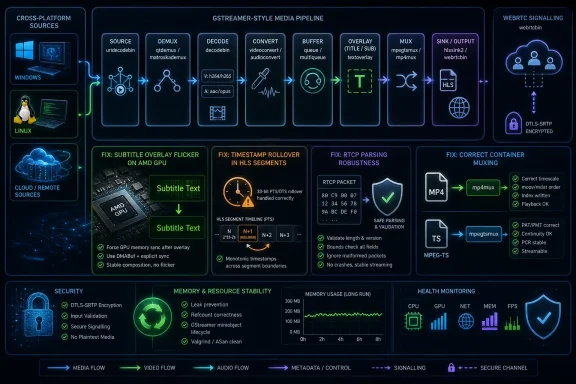
GStreamer 1.28.5 is a maintenance update Windows, Linux, and cross-platform media teams should treat as a practical reliability and security release. It adds H.266/VVC decoding support to the gopbuffer element, fixes green subtitle flicker when using VA decoders on AMD GPUs, improves WebRTC negotiation behavior, addresses intermittent YouTube HLS corruption tied to timestamp rollover handling, corrects muxing and container edge cases in MPEG-TS, MP4, and fMP4 paths, fixes an RTCP parsing regression, and includes security, playback, memory-leak, and stability fixes. If you ship or administer software that embeds GStreamer 1.28.x, update through your distribution, package manager, or application vendor after normal validation; prioritize testing on AMD GPU subtitle playback, WebRTC sessions, HLS playback, and MP4/MPEG-TS mux workflows.
As reported by 9to5Linux, GStreamer 1.28.5 arrives as the fifth maintenance update in the GStreamer 1.28 series. The GStreamer project’s own release notes describe it as a bug-fix release containing important security fixes, which is the key framing: this is not a major-feature release dressed up as maintenance, but a consolidation pass over a multimedia stack that sits below a remarkable amount of desktop, server, embedded, and application-level media work.
That matters because GStreamer is not just “a Linux video thing.” It is a cross-platform multimedia framework used by media players, conferencing tools, browser-adjacent components, cameras, embedded devices, signage systems, transcoding workflows, and custom applications that need to ingest, transform, encode, decode, mux, demux, display, or stream audio and video. On Windows, it may appear through bundled application runtimes, cross-platform SDKs, developer builds, MSYS2-style environments, WSL-based workloads, container images, or software stacks that treat GStreamer as the pluggable media layer rather than as a user-facing product.
The most visible addition is H.266/VVC decoding support in gopbuffer, but the rest of the release notes read like a map of where real media systems fail: wrong colors because DRM formats were negotiated incorrectly, green subtitle flicker on AMD GPU VA paths, bad timestamp behavior, AC-3 caps that fail to line up with parser output, WebRTC negotiation friction, RTP control packet parsing regressions, and intermittent corruption in YouTube HLS streams.
Those are the tickets that keep support desks and developers busy because users rarely report them in protocol language. They say subtitles flash green, a stream occasionally corrupts, a WebRTC session refuses to settle, colors look swapped, or one file from one camera fails while another works. GStreamer 1.28.5 is a reminder that the media stack is less a single pipeline than a negotiation between codecs, clocks, buffers, caps, muxers, parsers, drivers, and network conditions.
The placement matters. The gopbuffer element is not the user-facing “play this video” button; it is part of the deeper machinery that can buffer groups of pictures and help pipelines handle coded video structure. Supporting H.266/VVC there is the sort of incremental capability that becomes important when application developers start assembling more complex VVC-aware workflows. Codec adoption is not one switch. It is a chain of demuxers, parsers, decoders, buffers, muxers, timestamp handling, caps negotiation, and hardware surfaces all learning how to agree with one another.
That is why GStreamer’s progress on VVC should be read less as a consumer announcement and more as ecosystem groundwork. Users may not immediately see new “H.266 works everywhere” behavior after installing 1.28.5 from a distribution repository. Developers, however, get another piece of framework-level support that may reduce the number of custom workarounds needed when experimenting with newer video standards.
There is also a broader security point that does not depend on any single parser advisory. The GStreamer project’s 1.28.5 notes explicitly include security fixes among the reasons to update. Media parsers are security-sensitive because they process complex, often untrusted binary inputs. Newer codecs bring dense bitstreams and many edge cases, and media files remain a durable attack surface precisely because they are complex inputs often opened, previewed, transcoded, or streamed automatically.
For IT teams, the practical rule is simple: treat media parser updates as security updates, not cosmetic updates. A crash or denial-of-service bug in a codec parser may not sound like the sort of vulnerability that drives an emergency executive briefing, but multimedia components sit in workflows where untrusted input is routine. Users download videos, open attachments, ingest streams, process customer media, and test files from third parties. That is enough exposure to justify timely patching.
The fact pattern reported by 9to5Linux and reflected in the release notes is specific: GStreamer 1.28.5 fixes subtitle green flickering with VA decoders on AMD GPUs. That specificity is important because it avoids the lazy conclusion that “AMD video is broken” or “GStreamer subtitles are broken.” The problem sits in the intersection: subtitles, VA decoder paths, AMD GPU behavior, and whatever negotiation or surface handling caused the visible flicker.
For WindowsForum readers, this should sound familiar even if the exact acceleration stack differs by application and runtime. Hardware acceleration bugs often present as visual corruption, flicker, wrong colors, failed overlays, black video frames, or intermittent playback defects. They are especially difficult to triage because the same media file may work under one player, fail under another, behave differently after a driver update, or disappear when hardware acceleration is disabled.
GStreamer 1.28.5’s related gldownload fix points in the same direction. The release corrects wrong DRM format negotiation in the gldownload element that caused an R/B channel swap. In plain English: the pipeline could agree on the wrong format description when moving or downloading graphics-backed data, producing swapped red and blue channels. That is not a codec failure in the usual sense. It is a negotiation failure between components that thought they understood the same pixel data.
This is where mature multimedia frameworks earn their keep. A user sees “the colors are wrong.” A developer has to trace caps, memory types, GL handling, DRM formats, and downstream assumptions. GStreamer’s architecture makes those pipelines composable, but composability means correctness depends on contracts between elements. A one-line changelog fix may represent hours of debugging across drivers, display paths, and buffer metadata.
WebRTC negotiation issues are rarely elegant. The user experience is binary — a session connects or it does not, media flows or it does not — but the cause may involve codecs, SDP negotiation, ICE connectivity, transport state, encoder settings, caps, latency, or application assumptions. Improvements to webrtcsink negotiation do not make for a flashy release headline, but they matter for developers building conferencing, remote collaboration, browser-connected capture, monitoring, and low-latency streaming systems.
The YouTube HLS corruption fix is more concrete for ordinary users. The release improves PTS rollover handling in ignore-pcr mode, fixing intermittent corruption with YouTube HLS streams. That is a classic multimedia bug description: the visible symptom is corruption, the trigger is intermittent, the affected service is recognizable, and the underlying cause lives in timestamp behavior that most users will never know exists.
PTS, or presentation timestamp, is one of those details that separates “decoded bytes” from usable playback. In streaming workflows, timestamps tell the pipeline when buffers should be presented, synchronized, dropped, delayed, or stitched across boundaries. Rollover behavior is especially treacherous because systems with finite timestamp fields eventually wrap. If the pipeline handles that transition poorly, corruption may appear only after certain durations, discontinuities, segment patterns, or service-specific stream behavior.
The RTCP fix is similarly revealing. GStreamer 1.28.5 fixes parsing of SR+SDES compound packets in rtcpbuffer, with the project noting this as a regression from a security fix. That is the kind of sentence that should humble anyone who thinks patching is merely additive. Security hardening can change parser behavior. Parser behavior can break interoperability. Interoperability fixes must then preserve the security intent without reintroducing the original weakness.
That cycle is not a failure of open-source maintenance; it is the maintenance. Network media protocols are full of compound structures, optional fields, historical behavior, and real-world implementations that do not always match idealized examples. A secure parser must reject what is dangerous without rejecting what is legitimate. Every stable point release is partly an argument about where that line belongs.
That cluster matters because containers are not passive boxes. MPEG-TS and MP4 carry encoded media plus timing, structure, metadata, and expectations about how downstream consumers will parse and play the result. If timestamps are absent, wrong, or inconsistent, playback may appear jerky, drift, break at boundaries, or fail in only some players. If caps do not match what a parser produces, a theoretically valid pipeline can fail before the media content itself is even the problem.
The fMP4 muxer also receives various fixes for splitting at fragment boundaries. Fragmented MP4 is central to many streaming and low-latency workflows, where media is delivered in chunks rather than as one monolithic file. Fragment boundaries are therefore not bookkeeping trivia. They are where playback continuity, segment generation, player compatibility, and live-stream behavior meet.
The avtp element correction — ptime generation from avtp timestamp — belongs in the same family. Timestamp derivation is infrastructure. Nobody buys software because its ptime generation is correct, but entire classes of real-time media behavior depend on that correctness. When clocks, packet times, and presentation times disagree, symptoms surface far away from the code that caused them.
For developers, these fixes argue for testing beyond “the sample file plays.” Media applications need test cases that include CBR MPEG-TS, fragmented MP4 splitting, AC-3 through ac3parse into MP4, EOS handling, HLS streams, live WebRTC negotiation, and GPU-backed display paths. That is a lot to ask, but GStreamer’s own changelog is effectively a test-plan generator: every fixed edge case is a clue about where your application may have been skating on undefined luck.
A race in sticky event handling is not the kind of bug that produces a neat, deterministic failure. It may surface under load, on faster hardware, on slower hardware, with particular timing, or only in live pipelines where buffers and events are moving while topology changes. Those are the bugs developers dread because logging changes timing, reproduction depends on scheduling, and user reports sound random.
Sticky events in GStreamer carry state that newly linked pads need to receive, such as stream-start, caps, segment, or other contextual information. If pads are linked while data is already being pushed, the framework must ensure the receiving side still gets the necessary state in a coherent order. A race here can cause downstream elements to miss context, mishandle buffers, or behave inconsistently.
This fix also illustrates why maintenance releases matter even when an application does not use the newly advertised codec. If your product builds dynamic pipelines, hot-plugs branches, handles live sources, or links pads based on runtime discovery, a core race fix may be more valuable than any individual codec improvement. It can turn an intermittent production bug into something that simply stops happening.
That is also why distributions tend to prefer stable bug-fix releases over forcing every user onto a brand-new major line. GStreamer 1.28.5 is in the same 1.28 series, and the project describes updating from 1.28.x as safe. The goal is not novelty. The goal is to make existing 1.28 deployments less surprising.
A media player opening a downloaded file, a thumbnailer scanning a folder, a conferencing tool receiving a stream, a transcoder processing customer uploads, or a surveillance system ingesting feeds all rely on parsers that must survive malformed, malicious, or just weird data. Attackers have long understood that codecs and containers are rich targets because they involve dense binary formats, nested metadata, arithmetic-heavy parsing, and performance-sensitive code.
Memory leak fixes belong in the same operational category. A leak in a short-lived command-line test may be invisible. In a 24/7 camera pipeline, signage player, monitoring appliance, or streaming service, it becomes a slow-motion outage. Stability work is security-adjacent because availability is part of the promise administrators have to keep.
This is one reason the installation guidance matters. 9to5Linux points readers to the official source tarball but strongly recommends installing GStreamer from a distribution’s software repositories. That is not just convenience advice. Distribution packages carry integration testing, dependency alignment, plugin policy, ABI expectations, and security-update channels. Building from source can be appropriate for developers, vendors, and urgent validation, but it also moves responsibility for patch cadence and dependency management onto the person doing the build.
The affected Windows deployments are not “all Windows PCs.” They are systems where GStreamer is present in one of several operational forms:
For enterprise IT, inventory is the hard part. Security teams often track browsers, Office, VPN clients, endpoint agents, and runtimes, but multimedia libraries hidden inside creative tools, conferencing apps, digital signage players, or custom line-of-business software can be harder to see. A GStreamer security fix may require action from an upstream vendor before it reaches the Windows endpoint.
The same is true for quality fixes. If users report green subtitle flicker on AMD GPU systems in a cross-platform app, the app vendor may need to update its GStreamer runtime before the fix is available. If a WebRTC-based application has negotiation issues, the relevant fix may not arrive through a browser patch but through the media framework shipped by the app. If YouTube HLS streams intermittently corrupt in a GStreamer-backed player, the fix is not “install a different GPU driver” by default; it may be “move to the GStreamer release containing the timestamp rollover fix.”
To check what version an application is using, start with the application’s About box, diagnostics screen, debug log, or support bundle. Many GStreamer-backed apps print the runtime version during startup or when verbose logging is enabled. For developer and package-manager installs, run the available GStreamer inspection tool from the same environment that launches the app, not from an unrelated shell. On many installations, commands such as
Windows admins should therefore think in layers. Driver updates matter. Application updates matter. Codec packs can complicate matters. But for apps that bring their own media pipeline, the embedded framework version is often decisive. The release of GStreamer 1.28.5 is a prompt to ask vendors what they ship, not an assumption that the OS has already solved it.
That is the normal rhythm of mature infrastructure. Major releases expand the possible. Maintenance releases make the possible dependable. Users rarely remember which point release fixed their intermittent corruption, but they remember when playback stopped failing.
The H.265 decoder’s HEVC-with-alpha improvement is a good example. HEVC is no longer a novel codec, but alpha handling is still a specialized enough path that applications can hit rough edges. Transparent video, compositing workflows, overlays, creative tools, and certain streaming or post-production pipelines depend on alpha behaving correctly. A fix there can unblock a class of professional or application-specific media that ordinary playback tests never exercise.
Likewise,
The
That is the recurring trade-off in GStreamer. The framework is powerful because it lets developers assemble precisely the media pipeline they need. That same flexibility lets them assemble a pipeline that is insecure, fragile, or poorly tested. A release like 1.28.5 improves the pieces, but it cannot make every downstream decision correct.
The maintenance-release label should not cause admins to delay without thought. Maintenance releases are often where multimedia frameworks become safer and more predictable. They are the releases that turn “it usually works” into “it survives the weird file, the long stream, the driver path, the timestamp wrap, the live session, and the production workload.”
For ordinary desktop users, the best answer is simple: take the update when your operating system or application vendor offers it. For developers and media-stack maintainers, the answer is more specific: read the fixed areas as a test plan. If your application touches VVC-aware buffering, AMD VA subtitle playback, GL download paths, WebRTC, HLS, RTCP, MPEG-TS CBR muxing, fMP4 fragmentation, MP4 AC-3 muxing, EOS handling, dynamic pad linking, or long-running pipelines where leaks matter, this is a release to validate deliberately rather than passively.
For Windows environments, the operational lesson is even sharper. The presence of GStreamer is not always obvious from the Start menu. It may be hidden inside a conferencing tool, creative suite, signage player, industrial camera app, transcoding service, developer SDK, MSYS2 environment, container image, or WSL workload. The right question is not “Did Microsoft ship this through Windows Update?” The right question is “Which applications and runtimes in our environment include GStreamer, and are they on a fixed 1.28.x build?”
That is the forward-looking value of GStreamer 1.28.5. It is not just another small version number. It is a maintenance checkpoint for the systems that increasingly carry modern video: hardware-accelerated, adaptive, live, networked, timestamp-sensitive, and codec-diverse. The more invisible that layer is to users, the more important it is for vendors, developers, and administrators to keep it current.
 GStreamer’s New Point Release Is Really a Pipeline Reliability Release
As reported by 9to5Linux, GStreamer 1.28.5 arrives as the fifth maintenance update in the GStreamer 1.28 series. The GStreamer project’s own release notes describe it as a bug-fix release containing important security fixes, which is the key framing: this is not a major-feature release dressed up as maintenance, but a consolidation pass over a multimedia stack that sits below a remarkable amount of desktop, server, embedded, and application-level media work.That matters because GStreamer is not just “a Linux video thing.” It is a cross-platform multimedia framework used by media players, conferencing tools, browser-adjacent components, cameras, embedded devices, signage systems, transcoding workflows, and custom applications that need to ingest, transform, encode, decode, mux, demux, display, or stream audio and video. On Windows, it may appear through bundled application runtimes, cross-platform SDKs, developer builds, MSYS2-style environments, WSL-based workloads, container images, or software stacks that treat GStreamer as the pluggable media layer rather than as a user-facing product.
The most visible addition is H.266/VVC decoding support in gopbuffer, but the rest of the release notes read like a map of where real media systems fail: wrong colors because DRM formats were negotiated incorrectly, green subtitle flicker on AMD GPU VA paths, bad timestamp behavior, AC-3 caps that fail to line up with parser output, WebRTC negotiation friction, RTP control packet parsing regressions, and intermittent corruption in YouTube HLS streams.
Those are the tickets that keep support desks and developers busy because users rarely report them in protocol language. They say subtitles flash green, a stream occasionally corrupts, a WebRTC session refuses to settle, colors look swapped, or one file from one camera fails while another works. GStreamer 1.28.5 is a reminder that the media stack is less a single pipeline than a negotiation between codecs, clocks, buffers, caps, muxers, parsers, drivers, and network conditions.
H.266/VVC Gets a Small but Symbolic Step Forward
The most marketable change is support for H.266/VVC decoding in the gopbuffer element. H.266/VVC is commonly discussed as a newer-generation video coding standard in the same broad strategic conversation as HEVC and AV1: more efficient compression, more complex implementation realities, and a slower path to universal deployment than its technical merits alone might suggest. Adding VVC support inside another GStreamer component does not mean VVC suddenly becomes frictionless on every desktop. It does mean GStreamer’s plumbing continues to prepare for codec workflows that depend on coordinated support across many elements.The placement matters. The gopbuffer element is not the user-facing “play this video” button; it is part of the deeper machinery that can buffer groups of pictures and help pipelines handle coded video structure. Supporting H.266/VVC there is the sort of incremental capability that becomes important when application developers start assembling more complex VVC-aware workflows. Codec adoption is not one switch. It is a chain of demuxers, parsers, decoders, buffers, muxers, timestamp handling, caps negotiation, and hardware surfaces all learning how to agree with one another.
That is why GStreamer’s progress on VVC should be read less as a consumer announcement and more as ecosystem groundwork. Users may not immediately see new “H.266 works everywhere” behavior after installing 1.28.5 from a distribution repository. Developers, however, get another piece of framework-level support that may reduce the number of custom workarounds needed when experimenting with newer video standards.
There is also a broader security point that does not depend on any single parser advisory. The GStreamer project’s 1.28.5 notes explicitly include security fixes among the reasons to update. Media parsers are security-sensitive because they process complex, often untrusted binary inputs. Newer codecs bring dense bitstreams and many edge cases, and media files remain a durable attack surface precisely because they are complex inputs often opened, previewed, transcoded, or streamed automatically.
For IT teams, the practical rule is simple: treat media parser updates as security updates, not cosmetic updates. A crash or denial-of-service bug in a codec parser may not sound like the sort of vulnerability that drives an emergency executive briefing, but multimedia components sit in workflows where untrusted input is routine. Users download videos, open attachments, ingest streams, process customer media, and test files from third parties. That is enough exposure to justify timely patching.
The AMD Subtitle Fix Shows How Fragile GPU Video Paths Remain
The fix for subtitle green flickering with VA decoders on AMD GPUs is the kind of line item that reads narrow and feels enormous if you are affected by it. Video acceleration paths are supposed to move decode work off the CPU and onto hardware-backed interfaces, but once subtitles, overlays, color conversion, and display surfaces enter the pipeline, the simple story of “GPU decode equals better playback” becomes much messier.The fact pattern reported by 9to5Linux and reflected in the release notes is specific: GStreamer 1.28.5 fixes subtitle green flickering with VA decoders on AMD GPUs. That specificity is important because it avoids the lazy conclusion that “AMD video is broken” or “GStreamer subtitles are broken.” The problem sits in the intersection: subtitles, VA decoder paths, AMD GPU behavior, and whatever negotiation or surface handling caused the visible flicker.
For WindowsForum readers, this should sound familiar even if the exact acceleration stack differs by application and runtime. Hardware acceleration bugs often present as visual corruption, flicker, wrong colors, failed overlays, black video frames, or intermittent playback defects. They are especially difficult to triage because the same media file may work under one player, fail under another, behave differently after a driver update, or disappear when hardware acceleration is disabled.
GStreamer 1.28.5’s related gldownload fix points in the same direction. The release corrects wrong DRM format negotiation in the gldownload element that caused an R/B channel swap. In plain English: the pipeline could agree on the wrong format description when moving or downloading graphics-backed data, producing swapped red and blue channels. That is not a codec failure in the usual sense. It is a negotiation failure between components that thought they understood the same pixel data.
This is where mature multimedia frameworks earn their keep. A user sees “the colors are wrong.” A developer has to trace caps, memory types, GL handling, DRM formats, and downstream assumptions. GStreamer’s architecture makes those pipelines composable, but composability means correctness depends on contracts between elements. A one-line changelog fix may represent hours of debugging across drivers, display paths, and buffer metadata.
WebRTC, HLS, and RTP Fixes Aim at the Live-Media Reality
GStreamer 1.28.5 also brings negotiation fixes and improvements to webrtcsink, improves PTS rollover handling in ignore-pcr mode to fix intermittent corruption with YouTube HLS streams, and fixes parsing of SR+SDES compound packets in rtcpbuffer. These are all different pieces of the same larger reality: modern media is increasingly live, networked, adaptive, and stateful.WebRTC negotiation issues are rarely elegant. The user experience is binary — a session connects or it does not, media flows or it does not — but the cause may involve codecs, SDP negotiation, ICE connectivity, transport state, encoder settings, caps, latency, or application assumptions. Improvements to webrtcsink negotiation do not make for a flashy release headline, but they matter for developers building conferencing, remote collaboration, browser-connected capture, monitoring, and low-latency streaming systems.
The YouTube HLS corruption fix is more concrete for ordinary users. The release improves PTS rollover handling in ignore-pcr mode, fixing intermittent corruption with YouTube HLS streams. That is a classic multimedia bug description: the visible symptom is corruption, the trigger is intermittent, the affected service is recognizable, and the underlying cause lives in timestamp behavior that most users will never know exists.
PTS, or presentation timestamp, is one of those details that separates “decoded bytes” from usable playback. In streaming workflows, timestamps tell the pipeline when buffers should be presented, synchronized, dropped, delayed, or stitched across boundaries. Rollover behavior is especially treacherous because systems with finite timestamp fields eventually wrap. If the pipeline handles that transition poorly, corruption may appear only after certain durations, discontinuities, segment patterns, or service-specific stream behavior.
The RTCP fix is similarly revealing. GStreamer 1.28.5 fixes parsing of SR+SDES compound packets in rtcpbuffer, with the project noting this as a regression from a security fix. That is the kind of sentence that should humble anyone who thinks patching is merely additive. Security hardening can change parser behavior. Parser behavior can break interoperability. Interoperability fixes must then preserve the security intent without reintroducing the original weakness.
That cycle is not a failure of open-source maintenance; it is the maintenance. Network media protocols are full of compound structures, optional fields, historical behavior, and real-world implementations that do not always match idealized examples. A secure parser must reject what is dangerous without rejecting what is legitimate. Every stable point release is partly an argument about where that line belongs.
Containers and Timestamps Get the Unfashionable Fixes Users Actually Notice
The muxing and timestamp changes in 1.28.5 are easy to skim past, but they address failure modes that can make files unplayable, streams unreliable, or downstream tools behave inconsistently. The MPEG-TS muxer now supports assigning PTS to output buffers in CBR mode, and the release also addresses output buffers with PCR-only bitrate-padding packets having wrong PTS. The MP4 muxer fixes AC-3 template caps so it can accept input from ac3parse and handles EOS events uniformly.That cluster matters because containers are not passive boxes. MPEG-TS and MP4 carry encoded media plus timing, structure, metadata, and expectations about how downstream consumers will parse and play the result. If timestamps are absent, wrong, or inconsistent, playback may appear jerky, drift, break at boundaries, or fail in only some players. If caps do not match what a parser produces, a theoretically valid pipeline can fail before the media content itself is even the problem.
The fMP4 muxer also receives various fixes for splitting at fragment boundaries. Fragmented MP4 is central to many streaming and low-latency workflows, where media is delivered in chunks rather than as one monolithic file. Fragment boundaries are therefore not bookkeeping trivia. They are where playback continuity, segment generation, player compatibility, and live-stream behavior meet.
The avtp element correction — ptime generation from avtp timestamp — belongs in the same family. Timestamp derivation is infrastructure. Nobody buys software because its ptime generation is correct, but entire classes of real-time media behavior depend on that correctness. When clocks, packet times, and presentation times disagree, symptoms surface far away from the code that caused them.
For developers, these fixes argue for testing beyond “the sample file plays.” Media applications need test cases that include CBR MPEG-TS, fragmented MP4 splitting, AC-3 through ac3parse into MP4, EOS handling, HLS streams, live WebRTC negotiation, and GPU-backed display paths. That is a lot to ask, but GStreamer’s own changelog is effectively a test-plan generator: every fixed edge case is a clue about where your application may have been skating on undefined luck.
The Quiet Race Fix May Be One of the Most Important Changes
One of the most consequential fixes in 1.28.5 may be the least legible to non-developers: GStreamer fixes sticky event raciness when pads are linked mid-push. This is framework-core territory, and it matters because GStreamer pipelines are dynamic. Pads can be linked as streams appear, formats are discovered, branches are added, and application logic responds to runtime conditions.A race in sticky event handling is not the kind of bug that produces a neat, deterministic failure. It may surface under load, on faster hardware, on slower hardware, with particular timing, or only in live pipelines where buffers and events are moving while topology changes. Those are the bugs developers dread because logging changes timing, reproduction depends on scheduling, and user reports sound random.
Sticky events in GStreamer carry state that newly linked pads need to receive, such as stream-start, caps, segment, or other contextual information. If pads are linked while data is already being pushed, the framework must ensure the receiving side still gets the necessary state in a coherent order. A race here can cause downstream elements to miss context, mishandle buffers, or behave inconsistently.
This fix also illustrates why maintenance releases matter even when an application does not use the newly advertised codec. If your product builds dynamic pipelines, hot-plugs branches, handles live sources, or links pads based on runtime discovery, a core race fix may be more valuable than any individual codec improvement. It can turn an intermittent production bug into something that simply stops happening.
That is also why distributions tend to prefer stable bug-fix releases over forcing every user onto a brand-new major line. GStreamer 1.28.5 is in the same 1.28 series, and the project describes updating from 1.28.x as safe. The goal is not novelty. The goal is to make existing 1.28 deployments less surprising.
Security Fixes Are Part of the Media Stack, Not an Add-On
The 1.28.5 release includes various security and playback fixes, plus memory leak fixes and broader stability and reliability improvements. That phrasing is generic, but the implications are not. Multimedia frameworks parse hostile inputs for a living, even when nobody describes them that way.A media player opening a downloaded file, a thumbnailer scanning a folder, a conferencing tool receiving a stream, a transcoder processing customer uploads, or a surveillance system ingesting feeds all rely on parsers that must survive malformed, malicious, or just weird data. Attackers have long understood that codecs and containers are rich targets because they involve dense binary formats, nested metadata, arithmetic-heavy parsing, and performance-sensitive code.
Memory leak fixes belong in the same operational category. A leak in a short-lived command-line test may be invisible. In a 24/7 camera pipeline, signage player, monitoring appliance, or streaming service, it becomes a slow-motion outage. Stability work is security-adjacent because availability is part of the promise administrators have to keep.
This is one reason the installation guidance matters. 9to5Linux points readers to the official source tarball but strongly recommends installing GStreamer from a distribution’s software repositories. That is not just convenience advice. Distribution packages carry integration testing, dependency alignment, plugin policy, ABI expectations, and security-update channels. Building from source can be appropriate for developers, vendors, and urgent validation, but it also moves responsibility for patch cadence and dependency management onto the person doing the build.
| Release | Role in the 1.28 line | Timing described by sources | What changes for users | Best update posture |
|---|---|---|---|---|
| GStreamer 1.28.4 | Previous maintenance release | Described by 9to5Linux as preceding 1.28.5 | Baseline for many current 1.28 deployments | Accept distro or vendor updates when offered |
| GStreamer 1.28.5 | Fifth maintenance update | Current 1.28 maintenance update covered by the project release notes and 9to5Linux | Adds gopbuffer H.266/VVC support and fixes security, playback, GPU, muxing, WebRTC, timestamp, RTCP, race, and leak issues | Prioritize for 1.28.x systems after normal testing |
Windows Users Should Care Even If They Never Installed GStreamer Directly
WindowsForum readers may reasonably ask why a GStreamer release belongs on their radar. The answer is that cross-platform media frameworks often arrive invisibly. You may not have installed GStreamer as a system component, but an application, development stack, container image, SDK, or compatibility layer may include it. Developers targeting Windows may bundle GStreamer binaries. Linux workloads running under virtualization or WSL may depend on distro-provided GStreamer packages. Media applications with Windows builds may pull in GStreamer as their decode, encode, capture, or streaming substrate.The affected Windows deployments are not “all Windows PCs.” They are systems where GStreamer is present in one of several operational forms:
- Windows desktop applications that bundle their own GStreamer runtime for playback, capture, streaming, editing, conferencing, transcoding, or camera ingest.
- Developer workstations with GStreamer installed through a Windows package manager, SDK, MSYS2-style environment, or manually unpacked runtime.
- CI/CD build agents that compile, test, or package GStreamer-backed applications.
- Windows servers running media processing tools that call GStreamer directly or through an application framework.
- WSL environments, Linux containers, or virtualized Linux workloads on Windows hosts where the Linux distribution provides GStreamer packages.
- Digital signage, kiosk, monitoring, video-wall, or appliance-style products built on Windows but maintained through a vendor image or updater.
For enterprise IT, inventory is the hard part. Security teams often track browsers, Office, VPN clients, endpoint agents, and runtimes, but multimedia libraries hidden inside creative tools, conferencing apps, digital signage players, or custom line-of-business software can be harder to see. A GStreamer security fix may require action from an upstream vendor before it reaches the Windows endpoint.
The same is true for quality fixes. If users report green subtitle flicker on AMD GPU systems in a cross-platform app, the app vendor may need to update its GStreamer runtime before the fix is available. If a WebRTC-based application has negotiation issues, the relevant fix may not arrive through a browser patch but through the media framework shipped by the app. If YouTube HLS streams intermittently corrupt in a GStreamer-backed player, the fix is not “install a different GPU driver” by default; it may be “move to the GStreamer release containing the timestamp rollover fix.”
To check what version an application is using, start with the application’s About box, diagnostics screen, debug log, or support bundle. Many GStreamer-backed apps print the runtime version during startup or when verbose logging is enabled. For developer and package-manager installs, run the available GStreamer inspection tool from the same environment that launches the app, not from an unrelated shell. On many installations, commands such as
gst-launch-1.0 --version or gst-inspect-1.0 --version reveal the installed framework version. For bundled Windows apps, search the installation directory for GStreamer runtime files and check whether the vendor documents the bundled version in release notes, logs, or a support manifest. The key is to verify the embedded runtime actually used by the application, not merely a separate system-wide copy.Windows admins should therefore think in layers. Driver updates matter. Application updates matter. Codec packs can complicate matters. But for apps that bring their own media pipeline, the embedded framework version is often decisive. The release of GStreamer 1.28.5 is a prompt to ask vendors what they ship, not an assumption that the OS has already solved it.
What to do now
- Update through your distribution, vendor package, application updater, or approved package manager; avoid ad hoc source builds unless you own the maintenance process.
- Verify bundled application runtimes by checking the app’s About screen, startup logs, diagnostics bundle, install directory, or
gst-launch-1.0 --version/gst-inspect-1.0 --versionfrom the same runtime environment. - If relevant to your estate, test AMD VA subtitle playback, WebRTC negotiation and media flow, YouTube-style HLS playback, MPEG-TS CBR muxing, MP4 muxing with AC-3 input from
ac3parse, fMP4 fragment splitting, and EOS handling before broad rollout.
Action checklist for admins
- Identify applications, appliances, containers, WSL environments, developer workstations, CI systems, and servers that bundle or depend on GStreamer 1.28.x.
- Prefer distribution or vendor-provided packages over ad hoc source builds unless you own the full maintenance process.
- Prioritize testing on systems using AMD GPUs with VA decoder paths, especially where subtitle rendering has been unreliable.
- Validate WebRTC workflows that use
webrtcsink, including negotiation behavior across expected browsers and clients. - Test HLS playback, MPEG-TS CBR output, fMP4 fragment splitting, AC-3 through
ac3parseinto MP4, and EOS behavior if those paths are production-critical. - For Windows applications that bundle GStreamer, ask vendors when they will incorporate GStreamer 1.28.5 or the relevant security and playback fixes.
The 1.28 Series Is Becoming the Stable Ground Under Moving Media Standards
GStreamer 1.28.5 is best understood as a stabilizing layer over a fast-moving media world. The GStreamer 1.28 series has already been the base for broader work around modern GPU, codec, and media-processing capabilities. A fifth maintenance update is where those ambitions meet the edge cases that only show up after deployment.That is the normal rhythm of mature infrastructure. Major releases expand the possible. Maintenance releases make the possible dependable. Users rarely remember which point release fixed their intermittent corruption, but they remember when playback stopped failing.
The H.265 decoder’s HEVC-with-alpha improvement is a good example. HEVC is no longer a novel codec, but alpha handling is still a specialized enough path that applications can hit rough edges. Transparent video, compositing workflows, overlays, creative tools, and certain streaming or post-production pipelines depend on alpha behaving correctly. A fix there can unblock a class of professional or application-specific media that ordinary playback tests never exercise.
Likewise,
gdkpixbufdec gaining support for handling resolution and format changes addresses dynamic behavior that static image assumptions can miss. Resolution and format changes are routine in modern media pipelines, especially where adaptive streams, image sequences, or mixed inputs are involved. If an element assumes too much stability, the pipeline becomes brittle.The
rtspsrc2 change is also worth treating carefully. GStreamer 1.28.5 adds support for disabling SRTP/SRTCP encryption and SRTP authentication in rtspsrc2. That does not mean admins should casually disable security controls. It means the element can accommodate environments where compatibility, testing, legacy devices, or particular deployment models require those switches. Flexibility is useful, but it also creates configuration responsibility.That is the recurring trade-off in GStreamer. The framework is powerful because it lets developers assemble precisely the media pipeline they need. That same flexibility lets them assemble a pipeline that is insecure, fragile, or poorly tested. A release like 1.28.5 improves the pieces, but it cannot make every downstream decision correct.
Timeline
| Milestone | What it means |
|---|---|
| Earlier 1.28.x deployments | Existing systems on the 1.28 branch may already contain the baseline features and behaviors that 1.28.5 now refines. |
| GStreamer 1.28.4 | The prior maintenance point for many 1.28 users, described by 9to5Linux as the release before 1.28.5. |
| GStreamer 1.28.5 | The fifth 1.28 maintenance update, adding gopbuffer H.266/VVC decoding support and fixing security, playback, GPU, muxing, timestamp, WebRTC, RTCP, race, and leak issues. |
| Vendor and distribution rollout | The point at which most users actually receive the fixes, depending on Linux repositories, Windows application bundles, SDK updates, container images, or vendor-maintained runtimes. |
Why This Release Is Bigger Than Its Version Number
GStreamer 1.28.5 is not trying to be exciting in the way a major release is exciting. Its importance comes from the number of real-world failure paths it closes. A subtitle rendering issue on AMD GPU VA paths is not abstract to the user staring at flickering green text. A timestamp rollover fix is not abstract to the person watching a YouTube HLS stream corrupt intermittently. A WebRTC negotiation improvement is not abstract to a developer whose low-latency pipeline works in testing but fails in front of customers. An MP4 caps fix is not abstract to the engineer whose AC-3 pipeline should be valid but refuses to link cleanly.The maintenance-release label should not cause admins to delay without thought. Maintenance releases are often where multimedia frameworks become safer and more predictable. They are the releases that turn “it usually works” into “it survives the weird file, the long stream, the driver path, the timestamp wrap, the live session, and the production workload.”
For ordinary desktop users, the best answer is simple: take the update when your operating system or application vendor offers it. For developers and media-stack maintainers, the answer is more specific: read the fixed areas as a test plan. If your application touches VVC-aware buffering, AMD VA subtitle playback, GL download paths, WebRTC, HLS, RTCP, MPEG-TS CBR muxing, fMP4 fragmentation, MP4 AC-3 muxing, EOS handling, dynamic pad linking, or long-running pipelines where leaks matter, this is a release to validate deliberately rather than passively.
For Windows environments, the operational lesson is even sharper. The presence of GStreamer is not always obvious from the Start menu. It may be hidden inside a conferencing tool, creative suite, signage player, industrial camera app, transcoding service, developer SDK, MSYS2 environment, container image, or WSL workload. The right question is not “Did Microsoft ship this through Windows Update?” The right question is “Which applications and runtimes in our environment include GStreamer, and are they on a fixed 1.28.x build?”
That is the forward-looking value of GStreamer 1.28.5. It is not just another small version number. It is a maintenance checkpoint for the systems that increasingly carry modern video: hardware-accelerated, adaptive, live, networked, timestamp-sensitive, and codec-diverse. The more invisible that layer is to users, the more important it is for vendors, developers, and administrators to keep it current.
References
- Primary source: 9to5Linux
Published: 2026-07-09T05:00:17.910206
Loading…
9to5linux.com - Related coverage: gstreamer.freedesktop.org
Loading…
gstreamer.freedesktop.org - Related coverage: discourse.gstreamer.org
Loading…
discourse.gstreamer.org - Related coverage: eosl.date
Loading…
eosl.date - Related coverage: fosdem.org
Loading…
fosdem.org