

Microsoft is rolling out Point-in-Time Restore for Windows 11 as part of its Windows Resiliency Initiative, a recovery feature shaped by the July 2024 CrowdStrike outage and aimed at helping users and IT teams roll PCs back from serious update or system-change failures through locally stored system snapshots. The practical takeaway is straightforward: this is not a replacement for phased deployment, backup, endpoint detection, or disciplined change control. It is a recovery backstop for the moment when a trusted update leaves a Windows 11 device unable to boot or operate normally.
For administrators, the early deployment question should come before the broader industry analysis: which Windows 11 devices are eligible, where will the feature appear, what recovery path will users follow, and what must be validated before it is trusted in a real incident? Point-in-Time Restore is expected to apply to eligible Windows 11 systems that support the required recovery and snapshot infrastructure, with Microsoft positioning it for modern Windows 11 environments rather than legacy Windows estates. Admins should plan around Windows 11 devices that are already supportable under current hardware requirements, have Windows Recovery Environment available, have sufficient local storage, and are managed in a way that lets IT verify encryption, recovery-key access, update behavior, and restore-point health.
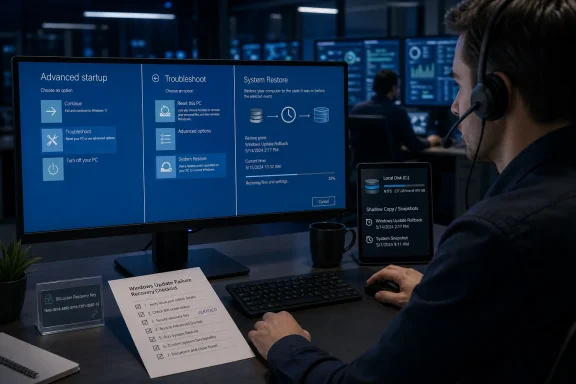
The feature is meant to be reached through the Windows recovery flow rather than through a normal desktop session after the machine is already broken. In practice, that means administrators should document the path through Windows Recovery Environment, typically reached from Settings > System > Recovery > Advanced startup on a working PC, by forced recovery after repeated failed boots, or by recovery media when a device cannot start normally. The expected operator path is the familiar troubleshooting branch: Troubleshoot > Advanced options, then the restore option when Point-in-Time Restore is available. Before broad rollout, IT teams should confirm the exact labels, prompts, authorization requirements, and behavior on their own builds, because recovery-screen wording and management exposure can vary across Windows releases, editions, and deployment channels.
That concrete workflow matters more than the marketing label. During a mass endpoint incident, a recovery feature is useful only if a help desk can tell a user exactly what to do, if BitLocker recovery keys are available, if the restore point exists, if the device has enough storage to maintain snapshots, and if the post-restore state is predictable enough to rejoin normal management. Point-in-Time Restore deserves attention because it targets the hardest part of a bad update event: getting a non-booting or unstable Windows endpoint back to a known working state without asking every technician to perform one-off surgery on every affected machine.
Before treating Point-in-Time Restore as part of an incident-response plan, IT teams should test it deliberately on representative devices rather than assume it will behave consistently across the fleet.
The distinction between attack and accident matters for accountability, but it does not reduce the recovery challenge. A trusted security update can cause the same immediate endpoint problem as malicious disruption if it leaves machines unable to boot. That is the gap Microsoft is trying to narrow with its Windows Resiliency Initiative: not by claiming every failure can be prevented, but by making Windows better prepared when a low-level component or system update goes wrong.
Point-in-Time Restore sits at the center of that effort because it addresses the operational pain that followed the CrowdStrike event. The hardest part was not merely identifying the bad update. It was reaching affected devices and getting them back to a bootable state. Manual recovery can work for a small number of machines. It becomes a major business-continuity problem when many endpoints fail in a narrow window.
Early coverage has described Point-in-Time Restore as an “insurance policy” against another CrowdStrike-style failure. That analogy is useful if it is kept narrow. Insurance does not prevent the incident; it reduces the damage after the incident occurs. Likewise, Point-in-Time Restore does not validate third-party updates, prevent kernel-mode failures, or remove the need for vendor controls. It gives Windows a more deliberate recovery path when prevention does not hold.
This should not be read as a formal Microsoft admission that Windows itself caused the CrowdStrike outage. The faulty content came from CrowdStrike. The broader interpretation is that Microsoft now has a platform incentive to improve recovery because Windows is where the failure was experienced by users and administrators. In that sense, Point-in-Time Restore is less about blame than about resilience: a modern endpoint platform needs a reliable way back when trusted software breaks it.
It is not a general backup product. Admins should not rely on it to preserve every user file, every application cache, every local database, or every post-snapshot change. User data protection still belongs to OneDrive Known Folder Move, enterprise backup tools, application-level sync, cloud storage, and retention policies.
It is not a substitute for deployment rings. Canary groups, phased rollouts, pilot devices, vendor update controls, maintenance windows, and staged approval processes remain necessary. A rollback feature can reduce the cost of failure, but it should not increase the organization’s appetite for reckless update velocity.
It is not proof that every Windows failure can be recovered automatically. Devices with disk corruption, missing recovery partitions, damaged boot configuration, unavailable encryption keys, failed storage hardware, or incomplete snapshots may still require hands-on repair or reimaging.
It is not only a consumer convenience feature. Its most important value is operational: giving IT and users a repeatable recovery path when the desktop is unavailable or unstable.
For operators, the decision point is simple. Use Point-in-Time Restore when the suspected cause is a recent Windows update, driver change, security-agent update, or system-level configuration change and when a known-good restore point exists. Do not use it as the first answer for suspected hardware failure, data-loss incidents, malware containment without security approval, or cases where rollback would violate legal, forensic, or compliance requirements.
The difference Microsoft is aiming for is practical rather than nostalgic: more deliberate snapshot behavior, better integration with the recovery path, and a clearer role in severe update-related failures. The key requirement is not that the feature feel familiar. The key requirement is that it produce a bootable, manageable, supportable endpoint after rollback.
That is the only comparison that matters in a crisis. A restore mechanism that works only when Windows is already healthy is useful but limited. A restore mechanism that can be selected from Windows Recovery Environment after a failed update is more relevant to the kinds of incidents enterprises now worry about.
The CrowdStrike recovery process showed why. Many affected machines needed recovery-level access rather than ordinary desktop troubleshooting. Technicians had to get into environments where they could remove or bypass the problematic component. Even when the manual steps were known, the work was repetitive and time-consuming. Point-in-Time Restore attempts to replace some of that machine-by-machine cleanup with a controlled rollback to a pre-failure state.
That does not make it automatic salvation. Enterprises will judge it by repeatability. If it reliably returns devices to a bootable, encrypted, policy-compliant, managed state, it becomes part of the continuity plan. If it behaves inconsistently, lacks fleet visibility, or creates uncertainty about data and security posture, admins will treat it as another emergency option rather than a primary procedure.
That model has benefits, but the tradeoff is obvious. Failures at low levels can have system-wide consequences. A mistake in a deeply integrated security component may affect the entire machine before ordinary management tools can intervene.
Point-in-Time Restore does not solve that architectural tension. It does not prevent a security vendor from shipping faulty content. It does not replace safer driver design, better pre-release validation, staged deployment, customer-controlled update rings, or stronger vendor accountability. It is a recovery layer for the cases where all those protections fail.
That framing is important. Calling this a “post-CrowdStrike doctrine” would overstate what Microsoft has formally said. A more careful interpretation is that Microsoft is expanding Windows recovery planning in response to a visible class of failure: trusted, low-level software changes that can disable endpoints quickly and broadly. That is a sensible platform response, but it should not be treated as a complete strategy by itself.
The better enterprise posture combines two ideas. First, reduce the odds of a bad update reaching everyone at once through phased deployment and vendor governance. Second, reduce the cost of failure through rollback, recovery scripting, and help-desk readiness. Prevention without recovery is brittle. Recovery without prevention is careless.
Until Microsoft provides complete operational detail for every supported management scenario, admins should treat retention and storage as validation items, not assumptions. The action item is simple: measure restore-point creation, retention, and disk impact on pilot hardware before enabling the feature broadly.
Storage is not a minor concern. A snapshot mechanism competes with Windows updates, application caches, user files, security tools, logs, and corporate data that should not be living only on local disks. Devices with small SSDs, heavy application footprints, or poor cleanup practices may not maintain restore data reliably enough to be trusted.
Retention is just as important. A restore point that disappears too quickly may not help if the bad update is discovered late. A restore point that lingers too long may consume space or create confusion over which state is safe to return to. The correct balance will vary by device class and business function.
The practical policy should be concise:
Manual recovery can be technically simple and still operationally brutal. A technician may know exactly which file or update caused the issue, yet still need recovery-level access to each machine. Remote workers may be away from corporate networks. Branch offices may lack IT staff. BitLocker keys may be needed. Some devices may be offline, misreported, or affected by unrelated issues. Executives may want restoration timelines before IT has a clean inventory of impacted endpoints.
Point-in-Time Restore aims to improve that ratio. If users or local staff can be guided to Windows Recovery Environment and told to select the restore point immediately before the bad change, the organization can recover more devices with less expert intervention. That does not eliminate escalations, but it gives support teams a standard first move.
The best recovery process is boring and repeatable:
Enterprises will want to know which devices are eligible, which have the feature enabled, when the last restore point was created, whether it is healthy, how much storage is being used, whether policy can enforce or disable behavior, and whether reporting can identify devices with no viable recovery point. A recovery feature without fleet visibility is difficult to operationalize.
It also has to fit existing management practice. Many organizations already use Windows Update for Business, Autopatch, Intune, Configuration Manager, third-party management tools, endpoint detection and response platforms, disk encryption, compliance baselines, and staged deployment rings. Point-in-Time Restore becomes valuable when it complements those systems, not when it creates a parallel process that only a few specialists understand.
The feature also needs predictable defaults. IT teams often disable or avoid features that consume disk space, confuse users, complicate support, or behave differently across hardware. Microsoft will need to make the experience clear: when snapshots appear, how long they remain, what storage they use, what happens when space is low, what users see in recovery, and how admins can confirm readiness before an incident.
The CrowdStrike event may make organizations more willing to accept some overhead for resilience, but it should not make them less disciplined. Restore capability is a backstop. It should sit behind careful update governance, not replace it.
A good recovery workflow turns a chaotic incident into a sequence of repeatable actions. “Start recovery. Choose Troubleshoot. Open Advanced options. Select the restore point before the update. Confirm. Wait for reboot. Call us if you see BitLocker, no restore point, or a failed restore.” That kind of instruction can be read over the phone, sent by text, printed for branch offices, or included in business-continuity materials.
The human factor should not be ignored. Windows Recovery Environment is not the normal desktop. Users may be nervous. They may see unfamiliar menus. They may be asked for recovery keys. They may fear data loss. Some will choose the wrong option if the instructions are vague. Some will be remote, traveling, or working without another device nearby.
That is why organizations should prepare before the next major incident. Help-desk teams should know what the screens look like. Service owners should know when restore is authorized. Security teams should know when rollback might interfere with investigation. Business units should know that local-only work may not be protected by a system restore mechanism.
In regulated environments, even emergency rollback may require procedure. Who approved it? Which restore point was selected? Was the device confirmed healthy afterward? Did the endpoint security agent resume operation? Was the user’s data state checked? These questions are easier to answer if the process is documented before the outage.
Administrators need clear answers from Microsoft on supported editions, release channels, policy controls, management reporting, storage behavior, restore-point retention, interaction with BitLocker, behavior on low-disk devices, and the exact Windows Recovery Environment user experience. They also need to know how Point-in-Time Restore behaves when the failed component is a security agent, driver, VPN client, identity component, or update stack element.
Until those details are fully validated in each environment, the right approach is staged adoption. Start with lab devices. Move to IT-owned pilots. Include encrypted laptops, remote-user devices, constrained-storage devices, and machines with the same security stack used in production. Then test a realistic failure: install a driver or controlled system change, confirm snapshot creation, restore from Windows Recovery Environment, and validate post-restore management and security health.
The validation should be written down as pass-or-fail evidence, not treated as an informal experiment. A feature that will be used during a crisis must have a known success rate in the organization’s own conditions. If a device class fails because of storage, encryption, firmware, recovery partition problems, or management conflicts, IT should know that before the feature is advertised as a recovery option.
Point-in-Time Restore should also be included in tabletop exercises. The incident scenario is easy to imagine: a security update causes boot failures across a pilot group, then appears in a broader ring. Who pauses deployment? Who confirms the restore point? Who writes the help-desk script? Who decides whether remote users should attempt recovery themselves? Who tracks restored devices? Who verifies that the bad update does not reinstall immediately? Those questions turn a feature into an operational capability.
Modern Windows endpoints are not just personal productivity devices. They are check-in terminals, clinical workstations, dispatch consoles, trading desks, engineering laptops, retail systems, and remote-work lifelines. When they fail together, the outage is not just an IT queue. It can interrupt business operations.
That is the lesson administrators should take from the CrowdStrike incident and Microsoft’s response. Trusted software can fail. Low-level failures can be severe. Manual recovery does not scale well. Recovery procedures must be tested before they are needed. And rollback must be treated as one layer in a broader resilience plan, not as an excuse to weaken deployment controls.
Point-in-Time Restore will prove itself only through real-world manageability: eligible devices clearly identified, restore points created when expected, storage impact understood, recovery paths documented, encryption keys available, help-desk scripts tested, and post-restore health verified. If Microsoft delivers that level of predictability, the feature could become a practical part of Windows incident response. If not, it will remain another tool that admins remember only after the crisis has already begun.
The forward-looking view is cautiously positive. Windows does need stronger recovery primitives for the age of rapid updates, deeply integrated security tools, and distributed workforces. Point-in-Time Restore is a step in that direction. Its value will not come from the promise that the next bad update can be avoided. Its value will come from giving organizations a faster, clearer way back when avoidance fails.
For administrators, the early deployment question should come before the broader industry analysis: which Windows 11 devices are eligible, where will the feature appear, what recovery path will users follow, and what must be validated before it is trusted in a real incident? Point-in-Time Restore is expected to apply to eligible Windows 11 systems that support the required recovery and snapshot infrastructure, with Microsoft positioning it for modern Windows 11 environments rather than legacy Windows estates. Admins should plan around Windows 11 devices that are already supportable under current hardware requirements, have Windows Recovery Environment available, have sufficient local storage, and are managed in a way that lets IT verify encryption, recovery-key access, update behavior, and restore-point health.
The feature is meant to be reached through the Windows recovery flow rather than through a normal desktop session after the machine is already broken. In practice, that means administrators should document the path through Windows Recovery Environment, typically reached from Settings > System > Recovery > Advanced startup on a working PC, by forced recovery after repeated failed boots, or by recovery media when a device cannot start normally. The expected operator path is the familiar troubleshooting branch: Troubleshoot > Advanced options, then the restore option when Point-in-Time Restore is available. Before broad rollout, IT teams should confirm the exact labels, prompts, authorization requirements, and behavior on their own builds, because recovery-screen wording and management exposure can vary across Windows releases, editions, and deployment channels.
That concrete workflow matters more than the marketing label. During a mass endpoint incident, a recovery feature is useful only if a help desk can tell a user exactly what to do, if BitLocker recovery keys are available, if the restore point exists, if the device has enough storage to maintain snapshots, and if the post-restore state is predictable enough to rejoin normal management. Point-in-Time Restore deserves attention because it targets the hardest part of a bad update event: getting a non-booting or unstable Windows endpoint back to a known working state without asking every technician to perform one-off surgery on every affected machine.
 Admin Checklist: What to Test Before You Need It
Before treating Point-in-Time Restore as part of an incident-response plan, IT teams should test it deliberately on representative devices rather than assume it will behave consistently across the fleet.- Endpoint engineering teams should test snapshot creation before major Windows updates, driver changes, security-agent updates, and management-policy changes. Validate that restore points are created when expected and that they remain selectable from Windows Recovery Environment.
- Help-desk and field-support teams should rehearse the user-facing recovery path: reaching Windows Recovery Environment, choosing the correct restore point, handling restart loops, and confirming successful boot afterward. The script should be short enough to read over the phone.
- Security operations teams should validate behavior with endpoint detection and response agents, kernel-mode security components, tamper-protection settings, VPN clients, disk encryption, and privileged-access tooling. A restored device must not come back in a blind or unmanaged state.
- Intune, Autopatch, Windows Update for Business, Configuration Manager, or third-party management owners should verify whether the restored endpoint resumes policy check-in, update compliance reporting, and device-health telemetry after rollback.
- Identity and access teams should confirm how sign-in behaves after rollback, especially for remote users, cached credentials, Windows Hello for Business, certificate-based access, and devices that may not immediately reach domain or cloud identity services.
- Data-protection teams should test local-only files, synced folders, offline application caches, and line-of-business application state. The policy message must be clear: Point-in-Time Restore is not backup.
- Compliance and audit teams should decide who may authorize restore, how the action is recorded, and what evidence must be retained after a large incident.
- Procurement and hardware lifecycle teams should identify constrained devices where local storage pressure may make snapshot retention unreliable or too costly.
Microsoft Turns an Outage Lesson Into a Windows Recovery Requirement
The July 2024 CrowdStrike incident is the unavoidable context for this feature. A faulty Falcon sensor update caused Windows systems to crash, sending organizations into emergency recovery procedures. CrowdStrike described the problem as bad update content rather than a cyberattack, but for affected organizations the operational impact still looked like a major technology failure: devices were unavailable, users could not work normally, and IT teams had to recover machines at scale.The distinction between attack and accident matters for accountability, but it does not reduce the recovery challenge. A trusted security update can cause the same immediate endpoint problem as malicious disruption if it leaves machines unable to boot. That is the gap Microsoft is trying to narrow with its Windows Resiliency Initiative: not by claiming every failure can be prevented, but by making Windows better prepared when a low-level component or system update goes wrong.
Point-in-Time Restore sits at the center of that effort because it addresses the operational pain that followed the CrowdStrike event. The hardest part was not merely identifying the bad update. It was reaching affected devices and getting them back to a bootable state. Manual recovery can work for a small number of machines. It becomes a major business-continuity problem when many endpoints fail in a narrow window.
Early coverage has described Point-in-Time Restore as an “insurance policy” against another CrowdStrike-style failure. That analogy is useful if it is kept narrow. Insurance does not prevent the incident; it reduces the damage after the incident occurs. Likewise, Point-in-Time Restore does not validate third-party updates, prevent kernel-mode failures, or remove the need for vendor controls. It gives Windows a more deliberate recovery path when prevention does not hold.
This should not be read as a formal Microsoft admission that Windows itself caused the CrowdStrike outage. The faulty content came from CrowdStrike. The broader interpretation is that Microsoft now has a platform incentive to improve recovery because Windows is where the failure was experienced by users and administrators. In that sense, Point-in-Time Restore is less about blame than about resilience: a modern endpoint platform needs a reliable way back when trusted software breaks it.
What Point-in-Time Restore Is, and What It Is Not
Point-in-Time Restore is best understood as a short-horizon system rollback mechanism for Windows 11. It creates or uses snapshots tied to major updates or system changes, stores recovery data locally, and makes a restore point available from the recovery environment when the normal operating path is impaired. The goal is to return the PC to a known working state without a full rebuild.It is not a general backup product. Admins should not rely on it to preserve every user file, every application cache, every local database, or every post-snapshot change. User data protection still belongs to OneDrive Known Folder Move, enterprise backup tools, application-level sync, cloud storage, and retention policies.
It is not a substitute for deployment rings. Canary groups, phased rollouts, pilot devices, vendor update controls, maintenance windows, and staged approval processes remain necessary. A rollback feature can reduce the cost of failure, but it should not increase the organization’s appetite for reckless update velocity.
It is not proof that every Windows failure can be recovered automatically. Devices with disk corruption, missing recovery partitions, damaged boot configuration, unavailable encryption keys, failed storage hardware, or incomplete snapshots may still require hands-on repair or reimaging.
It is not only a consumer convenience feature. Its most important value is operational: giving IT and users a repeatable recovery path when the desktop is unavailable or unstable.
For operators, the decision point is simple. Use Point-in-Time Restore when the suspected cause is a recent Windows update, driver change, security-agent update, or system-level configuration change and when a known-good restore point exists. Do not use it as the first answer for suspected hardware failure, data-loss incidents, malware containment without security approval, or cases where rollback would violate legal, forensic, or compliance requirements.
Why System Restore Was Never Enough for This Scenario
Windows has long had System Restore, and many administrators have mixed memories of it. Sometimes it helped. Sometimes it was disabled. Sometimes it rolled back enough to matter, and sometimes it did not. That history is why Microsoft must be careful in positioning Point-in-Time Restore. If enterprises see it merely as a renamed legacy feature, they will not build incident plans around it.The difference Microsoft is aiming for is practical rather than nostalgic: more deliberate snapshot behavior, better integration with the recovery path, and a clearer role in severe update-related failures. The key requirement is not that the feature feel familiar. The key requirement is that it produce a bootable, manageable, supportable endpoint after rollback.
That is the only comparison that matters in a crisis. A restore mechanism that works only when Windows is already healthy is useful but limited. A restore mechanism that can be selected from Windows Recovery Environment after a failed update is more relevant to the kinds of incidents enterprises now worry about.
The CrowdStrike recovery process showed why. Many affected machines needed recovery-level access rather than ordinary desktop troubleshooting. Technicians had to get into environments where they could remove or bypass the problematic component. Even when the manual steps were known, the work was repetitive and time-consuming. Point-in-Time Restore attempts to replace some of that machine-by-machine cleanup with a controlled rollback to a pre-failure state.
That does not make it automatic salvation. Enterprises will judge it by repeatability. If it reliably returns devices to a bootable, encrypted, policy-compliant, managed state, it becomes part of the continuity plan. If it behaves inconsistently, lacks fleet visibility, or creates uncertainty about data and security posture, admins will treat it as another emergency option rather than a primary procedure.
The Kernel Problem Remains
The CrowdStrike outage also revived a deeper Windows platform issue: security tools often operate at low levels because they need broad visibility, early enforcement, performance, and tamper resistance. Endpoint security products may rely on drivers and privileged components to observe process, file, network, and boot-time activity before malware can hide or interfere.That model has benefits, but the tradeoff is obvious. Failures at low levels can have system-wide consequences. A mistake in a deeply integrated security component may affect the entire machine before ordinary management tools can intervene.
Point-in-Time Restore does not solve that architectural tension. It does not prevent a security vendor from shipping faulty content. It does not replace safer driver design, better pre-release validation, staged deployment, customer-controlled update rings, or stronger vendor accountability. It is a recovery layer for the cases where all those protections fail.
That framing is important. Calling this a “post-CrowdStrike doctrine” would overstate what Microsoft has formally said. A more careful interpretation is that Microsoft is expanding Windows recovery planning in response to a visible class of failure: trusted, low-level software changes that can disable endpoints quickly and broadly. That is a sensible platform response, but it should not be treated as a complete strategy by itself.
The better enterprise posture combines two ideas. First, reduce the odds of a bad update reaching everyone at once through phased deployment and vendor governance. Second, reduce the cost of failure through rollback, recovery scripting, and help-desk readiness. Prevention without recovery is brittle. Recovery without prevention is careless.
Retention, Storage, and the Admin Takeaway
The biggest unanswered deployment questions are about retention, storage, and manageability. How many restore points are kept? How long do they persist? How much disk space is reserved or consumed? How clearly can admins report which devices have a usable restore point? Can policy enforce the feature consistently? What telemetry shows that a snapshot is healthy?Until Microsoft provides complete operational detail for every supported management scenario, admins should treat retention and storage as validation items, not assumptions. The action item is simple: measure restore-point creation, retention, and disk impact on pilot hardware before enabling the feature broadly.
Storage is not a minor concern. A snapshot mechanism competes with Windows updates, application caches, user files, security tools, logs, and corporate data that should not be living only on local disks. Devices with small SSDs, heavy application footprints, or poor cleanup practices may not maintain restore data reliably enough to be trusted.
Retention is just as important. A restore point that disappears too quickly may not help if the bad update is discovered late. A restore point that lingers too long may consume space or create confusion over which state is safe to return to. The correct balance will vary by device class and business function.
The practical policy should be concise:
- Define which device groups need Point-in-Time Restore first.
- Confirm how much storage it consumes during normal update cycles.
- Verify that at least one recent, usable restore point exists after routine maintenance.
- Monitor devices that fall below storage thresholds.
- Document what user data and application state may be affected by rollback.
- Keep endpoint backup and cloud synchronization policies separate from restore planning.
Manual Recovery Does Not Scale
The CrowdStrike incident showed how quickly endpoint recovery can become a scale problem. The public reporting made clear that airlines, hospitals, financial institutions, and other organizations were affected, but administrators do not need a precise global device count to understand the lesson. When many PCs fail at roughly the same time, the bottleneck becomes people: technicians, help-desk agents, field support, and users trying to follow unfamiliar instructions under pressure.Manual recovery can be technically simple and still operationally brutal. A technician may know exactly which file or update caused the issue, yet still need recovery-level access to each machine. Remote workers may be away from corporate networks. Branch offices may lack IT staff. BitLocker keys may be needed. Some devices may be offline, misreported, or affected by unrelated issues. Executives may want restoration timelines before IT has a clean inventory of impacted endpoints.
Point-in-Time Restore aims to improve that ratio. If users or local staff can be guided to Windows Recovery Environment and told to select the restore point immediately before the bad change, the organization can recover more devices with less expert intervention. That does not eliminate escalations, but it gives support teams a standard first move.
The best recovery process is boring and repeatable:
- Confirm the device symptoms match the known incident.
- Boot or direct the user into Windows Recovery Environment.
- Navigate to the restore option under advanced troubleshooting.
- Select the restore point created before the suspected update or system change.
- Complete the restore.
- Validate boot, sign-in, network access, management check-in, security-agent health, and application availability.
- Record the outcome and escalate only the devices that fail the standard path.
Enterprise IT Will Judge This by Manageability
For WindowsForum readers in IT roles, the interesting question is not whether Point-in-Time Restore sounds useful. It does. The real question is whether it can be governed across a managed fleet.Enterprises will want to know which devices are eligible, which have the feature enabled, when the last restore point was created, whether it is healthy, how much storage is being used, whether policy can enforce or disable behavior, and whether reporting can identify devices with no viable recovery point. A recovery feature without fleet visibility is difficult to operationalize.
It also has to fit existing management practice. Many organizations already use Windows Update for Business, Autopatch, Intune, Configuration Manager, third-party management tools, endpoint detection and response platforms, disk encryption, compliance baselines, and staged deployment rings. Point-in-Time Restore becomes valuable when it complements those systems, not when it creates a parallel process that only a few specialists understand.
The feature also needs predictable defaults. IT teams often disable or avoid features that consume disk space, confuse users, complicate support, or behave differently across hardware. Microsoft will need to make the experience clear: when snapshots appear, how long they remain, what storage they use, what happens when space is low, what users see in recovery, and how admins can confirm readiness before an incident.
The CrowdStrike event may make organizations more willing to accept some overhead for resilience, but it should not make them less disciplined. Restore capability is a backstop. It should sit behind careful update governance, not replace it.
The Help Desk May Be the Most Important Audience
Point-in-Time Restore is strategically an enterprise resilience feature, but in a crisis its success may depend on the help desk. Front-line support teams need a script that works. They do not need abstract discussion about kernel drivers while users are staring at recovery screens.A good recovery workflow turns a chaotic incident into a sequence of repeatable actions. “Start recovery. Choose Troubleshoot. Open Advanced options. Select the restore point before the update. Confirm. Wait for reboot. Call us if you see BitLocker, no restore point, or a failed restore.” That kind of instruction can be read over the phone, sent by text, printed for branch offices, or included in business-continuity materials.
The human factor should not be ignored. Windows Recovery Environment is not the normal desktop. Users may be nervous. They may see unfamiliar menus. They may be asked for recovery keys. They may fear data loss. Some will choose the wrong option if the instructions are vague. Some will be remote, traveling, or working without another device nearby.
That is why organizations should prepare before the next major incident. Help-desk teams should know what the screens look like. Service owners should know when restore is authorized. Security teams should know when rollback might interfere with investigation. Business units should know that local-only work may not be protected by a system restore mechanism.
In regulated environments, even emergency rollback may require procedure. Who approved it? Which restore point was selected? Was the device confirmed healthy afterward? Did the endpoint security agent resume operation? Was the user’s data state checked? These questions are easier to answer if the process is documented before the outage.
The Missing Details Are Where Deployment Work Begins
Early coverage understandably focuses on the big idea: Windows needs a rollback mechanism that can survive serious software failures. But deployment will turn on details that are less dramatic and more important.Administrators need clear answers from Microsoft on supported editions, release channels, policy controls, management reporting, storage behavior, restore-point retention, interaction with BitLocker, behavior on low-disk devices, and the exact Windows Recovery Environment user experience. They also need to know how Point-in-Time Restore behaves when the failed component is a security agent, driver, VPN client, identity component, or update stack element.
Until those details are fully validated in each environment, the right approach is staged adoption. Start with lab devices. Move to IT-owned pilots. Include encrypted laptops, remote-user devices, constrained-storage devices, and machines with the same security stack used in production. Then test a realistic failure: install a driver or controlled system change, confirm snapshot creation, restore from Windows Recovery Environment, and validate post-restore management and security health.
The validation should be written down as pass-or-fail evidence, not treated as an informal experiment. A feature that will be used during a crisis must have a known success rate in the organization’s own conditions. If a device class fails because of storage, encryption, firmware, recovery partition problems, or management conflicts, IT should know that before the feature is advertised as a recovery option.
Point-in-Time Restore should also be included in tabletop exercises. The incident scenario is easy to imagine: a security update causes boot failures across a pilot group, then appears in a broader ring. Who pauses deployment? Who confirms the restore point? Who writes the help-desk script? Who decides whether remote users should attempt recovery themselves? Who tracks restored devices? Who verifies that the bad update does not reinstall immediately? Those questions turn a feature into an operational capability.
The Bigger Meaning for Windows
The significance of Point-in-Time Restore is not that Windows is getting another recovery menu. It is that Microsoft is treating endpoint recovery as a design requirement for a world where software distribution can fail quickly and widely.Modern Windows endpoints are not just personal productivity devices. They are check-in terminals, clinical workstations, dispatch consoles, trading desks, engineering laptops, retail systems, and remote-work lifelines. When they fail together, the outage is not just an IT queue. It can interrupt business operations.
That is the lesson administrators should take from the CrowdStrike incident and Microsoft’s response. Trusted software can fail. Low-level failures can be severe. Manual recovery does not scale well. Recovery procedures must be tested before they are needed. And rollback must be treated as one layer in a broader resilience plan, not as an excuse to weaken deployment controls.
Point-in-Time Restore will prove itself only through real-world manageability: eligible devices clearly identified, restore points created when expected, storage impact understood, recovery paths documented, encryption keys available, help-desk scripts tested, and post-restore health verified. If Microsoft delivers that level of predictability, the feature could become a practical part of Windows incident response. If not, it will remain another tool that admins remember only after the crisis has already begun.
The forward-looking view is cautiously positive. Windows does need stronger recovery primitives for the age of rapid updates, deeply integrated security tools, and distributed workforces. Point-in-Time Restore is a step in that direction. Its value will not come from the promise that the next bad update can be avoided. Its value will come from giving organizations a faster, clearer way back when avoidance fails.
References
- Primary source: The Tech Buzz
Published: Thu, 09 Jul 2026 10:10:00 GMT
Loading…
www.techbuzz.ai - Official source: learn.microsoft.com
Point-in-time restore for Windows | Microsoft Learn
documentation for point-in-time restore featurelearn.microsoft.com - Official source: microsoft.com
Loading…
www.microsoft.com - Official source: support.microsoft.com
Loading…
support.microsoft.com - Related coverage: npr.org
Loading…
www.npr.org - Official source: techcommunity.microsoft.com
Loading…
techcommunity.microsoft.com
- Related coverage: techrepublic.com
Loading…
www.techrepublic.com - Related coverage: washingtonpost.com
Loading…
www.washingtonpost.com - Related coverage: techcrunch.com
Loading…
techcrunch.com - Related coverage: crowdstrike.com
Loading…
www.crowdstrike.com - Related coverage: aha.org
Loading…
www.aha.org - Related coverage: cyberalberta.ca
Loading…
cyberalberta.ca - Related coverage: techxplore.com
Loading…
techxplore.com - Related coverage: windowscentral.com
"Minimize downtime and simplify troubleshooting": Microsoft's powerful new recovery tool is quietly fixing System Restore. Here's how it actually works. | Windows Central
System Restore has long been the go-to option for Windows recovery, but it's certainly not perfect. Microsoft's new Point-in-Time Restore aims to fill in the blanks.www.windowscentral.com - Related coverage: time.com
Loading…
time.com - Related coverage: techradar.com
Microsoft reveals new plan to make your Windows 11 PC more stable and reliable – and help you recover from disasters | TechRadar
Better drivers, and potentially a nifty new recovery featurewww.techradar.com