

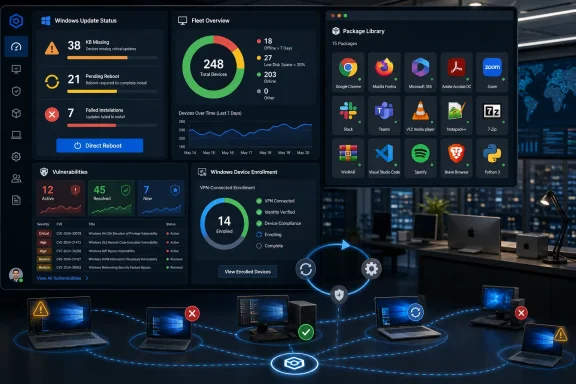
PDQ has added Windows and macOS endpoint management features to its platform, bringing a new administrator dashboard, Windows update visibility, macOS Package Library support, direct reboots, and VPN-connected Windows device enrollment into the same operational workflow. The release is not a glamorous reinvention of endpoint management; it is a bet that the winning tool in 2026 is the one that removes the most swivel-chair work. For Windows admins in particular, PDQ is trying to turn patch visibility, deployment status, reboot debt, and vulnerability drift into one continuous loop rather than four separate chores. For mixed Windows-and-Mac shops, the bigger message is that PDQ no longer wants to be treated as merely the tidy Windows deployment tool in the corner.
The most important thing about this PDQ release is not any one feature. It is the way the features cluster around a very old IT problem: administrators are rarely missing information entirely, but they are often missing it in the place where they can act on it.
As reported by IT Brief UK and reflected in PDQ’s own product materials, the update adds an IT administrator dashboard, a dedicated Windows updates view, support for macOS applications in the PDQ Package Library, a direct reboot function, and a lightweight installer for enrolling VPN-connected Windows devices. That list sounds modest until you map it onto a normal patching week. An admin checks which machines are stale, finds missing KBs, deploys updates, waits for failures, chases reboots, discovers remote devices that were never enrolled properly, and then repeats the process for third-party apps.
PDQ’s thesis is that this is not a reporting problem. It is a workflow problem. The release gives administrators more places to act from the same surfaces where they discover risk.
That matters because endpoint management has become a strange halfway house between classic desktop administration and full security operations. Windows patching, third-party software updates, vulnerability remediation, device health, user disruption, remote enrollment, and now macOS coverage all sit on the same team’s desk. In a smaller business, that team may be one or two people. In a larger organization, it may be an operations group that has inherited security expectations without receiving security-team staffing.
PDQ is not pretending to replace every piece of that estate. It is instead sharpening its old pitch: make common endpoint jobs obvious, fast, and repeatable. The new release is best understood as a set of pressure valves for the places where everyday administration still leaks time.
Those thresholds are deliberately practical. A device that has been offline for more than seven days may simply be in a drawer, but it may also be missing critical patches. A machine with less than 20% disk space remaining may not be compromised, but it is a patch failure waiting to happen. A reboot-needed indicator is not a security control by itself, yet it is often the difference between an installed update and an effective one.
The vulnerability summary is similarly operational rather than academic. PDQ says the dashboard shows active, resolved, and newly identified vulnerabilities. That framing gives admins a way to distinguish between backlog, progress, and fresh exposure without building custom reports just to answer basic management questions.
This is where PDQ’s positioning is clever. Most endpoint tools can produce reports, and many can produce dashboards. Fewer make the dashboard feel like the start of an action rather than the end of an export.
PDQ’s own release notes describe the dashboard as a way to identify what needs attention and move directly into the workflow that fixes it. IT Brief UK put the same point more plainly: the dashboard is meant to reduce the need for custom reporting and give teams a clearer picture of their device estates. In practice, that is the difference between “we have a visibility project” and “we know which machines need work this morning.”
The dashboard also hints at PDQ’s target customer. This is not a console designed first for a security executive who wants risk scoring by business unit. It is a console for the admin who has to decide whether to retry a failed deployment, free disk space, reboot a fleet, or investigate machines that have gone dark.
That is not a small distinction. Endpoint management vendors often talk about visibility as if seeing the problem were the hard part. In most IT departments, seeing the problem is only the first 10 minutes. The next several hours are spent turning that visibility into safe, auditable, low-drama action.
That is a meaningful change because KB tracking is still one of the least elegant parts of Windows administration. Microsoft’s servicing model has improved over the years, but real-world fleets do not update in perfectly synchronized waves. Laptops sleep. VPNs disconnect. Users defer restarts. Disk space runs low. Some machines report compliance while still waiting for a reboot. Others fail silently until someone asks why the same vulnerability is still open.
PDQ’s release notes describe a centralized Windows Updates tab that shows applicable KBs across the environment and breaks them down by status such as not installed, in progress, pending reboot, failed, or installed. The important part is not merely the status list; it is that admins can drill into a KB, see affected devices, and trigger installs directly.
That turns Windows updating into a more PDQ-like workflow. Instead of treating OS updates as a separate ritual handled through external reports, manual checks, or scripts, PDQ is putting them near the same deployment muscle memory admins already use for packages and automations.
This will not erase the complexity of Windows servicing. It will not decide maintenance windows, negotiate user disruption, or cure every driver and firmware edge case. But it can reduce the dead zone between “we know this KB is missing” and “we are pushing it to the right machines.”
For many administrators, that dead zone is where patch programs lose momentum. Vulnerability scanners flag exposure. A spreadsheet or dashboard shows missing updates. The remediation tool lives elsewhere. Someone builds a group, confirms targeting, triggers deployment, checks results, and then reconciles the scanner again. Every handoff adds delay and every delay increases the chance that a known issue remains known but unfixed.
PDQ’s move is to collapse at least part of that chain. That is why the Windows updates view matters more than its name suggests.
That asymmetry is the story. PDQ’s Windows library is mature, deep, and central to the company’s identity. The macOS support is early and much smaller. But the addition changes the frame: PDQ is no longer offering a Windows-only answer to an increasingly mixed endpoint world.
IT Brief UK described the macOS addition as a response to the wider shift toward mixed operating system environments, especially in remote and hybrid settings. That is exactly right. Even organizations that remain overwhelmingly Windows-based often have islands of Macs in engineering, design, executive, marketing, or bring-your-own-device-adjacent workflows. Those Macs still need software updates, vulnerability remediation, inventory visibility, and predictable deployment.
The real operational pain is not that Macs exist. It is that they often live in a parallel process. A Windows admin may use one tool for Windows applications, another for Mac software, another for inventory, another for vulnerability tracking, and a separate MDM for Apple-specific controls. That fragmentation is survivable when there are a handful of Macs. It becomes harder to defend when the Mac estate grows but the IT team does not.
PDQ’s Package Library expansion gives admins a familiar deployment model for supported macOS applications. PDQ’s own documentation says packages can support multiple operating systems and deploy the correct OS version to matching devices. That is the right abstraction: the admin thinks in terms of the application and the target population, while the platform handles the OS-specific package path.
The caveat is that 15 macOS applications is an opening move, not parity. No serious Mac admin should read this as a replacement for Apple-native management disciplines or full macOS lifecycle management. But Windows-heavy teams with a growing Mac population may see it as something more valuable in the short term: a way to bring common third-party app patching into the same operational rhythm.
The table shows the product reality more clearly than a slogan would. PDQ is not claiming Windows-and-Mac equality across every feature. It is extending the same product philosophy into macOS while preserving the Windows-first strengths that made PDQ familiar to many sysadmins.
PDQ now lets administrators restart single devices or groups from within the platform. IT Brief UK notes that this removes the need to create scripts, commands, or custom packages for a basic maintenance task. PDQ’s release notes add an important operational detail: bulk reboots include a confirmation step, a sensible safeguard because a mass reboot is one of the easiest ways for an admin to create an outage without touching a server.
Reboots are the unglamorous hinge of endpoint security. A patch may be downloaded. An installer may complete. A vulnerability may appear remediated in one console but remain effectively unresolved until the system restarts. Users, understandably, hate being interrupted. Admins, understandably, delay disruption. Attackers, just as understandably, do not care about either side’s calendar.
This is why reboot visibility belongs next to patch visibility. A device that needs a reboot is not merely an annoyance; it is a state that must be managed. Treating reboots as an afterthought creates a false sense of completion.
PDQ’s direct reboot function also recognizes a reality of small and midsize IT: not every organization has polished orchestration around maintenance windows, user notification, and staged restarts. Many still use scripts, ad hoc commands, scheduled tasks, or package-based workarounds. Those methods can work, but they add another thing to maintain and another place for mistakes.
Bringing reboots into the product does not make disruption disappear. It does, however, make reboot action more visible and more accountable. If reboot activity appears alongside deployments, admins can see what ran and whether it succeeded. That matters when help desk calls arrive after a patch cycle or when management asks why a vulnerability still shows up after updates were supposedly installed.
The best endpoint tools are not the ones that pretend reboots are elegant. They are the ones that admit reboots are messy and give admins a safer way to handle them.
That detail is more revealing than it first appears. In the idealized world of modern endpoint management, every device is cloud-enrolled, policy-driven, internet-reachable, and known from day one. In the real world, many organizations still have remote Windows machines that are reachable only under certain conditions, tied to VPN behavior, or managed through habits left over from on-premises infrastructure.
PDQ is addressing that messy middle. These are not unmanaged endpoints because the IT team does not care. They are unmanaged because the path from “machine exists somewhere” to “machine is enrolled and patchable” is often annoyingly manual.
For smaller IT teams and businesses with remote workers, this can be the difference between an endpoint management rollout that stalls and one that reaches critical mass. If the first wave of enrollment requires another deployment tool that the customer does not have, the project becomes circular. You need endpoint management to deploy the endpoint management agent.
The new installer does not solve every onboarding scenario. It is specifically described for VPN-connected Windows devices. But that specificity is useful. It says PDQ understands the transitional environments many customers inhabit: partly remote, partly domain-era, partly cloud-managed, not yet cleanly standardized.
The importance of enrollment is easy to underrate because it happens before the more visible work of patching and reporting. But endpoint management coverage is binary at the device level. A machine is either in the system or it is not. Every device outside the system becomes an exception, and exceptions are where patch programs quietly decay.
PDQ’s broader release is about acting faster once devices are visible. The installer is about getting more devices into view in the first place.
The word doing the work there is practical. PDQ is not pitching artificial intelligence, autonomous remediation as magic, or a grand unified endpoint theory. It is pitching fewer context switches.
That is very on-brand for PDQ. The company, founded in 2001 and based in Salt Lake City, Utah, has long appealed to administrators who want tools that feel built by people who have actually deployed software to cranky Windows fleets. Its reported customer count of more than 33,000 suggests that this practical posture has found a durable market.
The question is whether that posture can scale into the current endpoint management moment. Endpoint tools now compete not only on package deployment, but on vulnerability context, remote access, automation, cross-platform management, compliance evidence, and integrations. Microsoft Intune looms over the Windows side of the market. RMM platforms court managed service providers. Apple-focused tools own deeper Mac workflows. Security platforms increasingly want to drive remediation from risk findings.
PDQ’s answer, at least in this release, is not to out-platform every platform. It is to make the everyday admin path shorter.
That makes sense. In many organizations, the biggest endpoint management failures are not caused by a lack of theoretical capability. They are caused by friction. The update exists but is not targeted. The vulnerability is known but not tied to the deployment action. The package exists but the Mac version is handled elsewhere. The reboot is needed but deferred indefinitely. The remote device is technically reachable but not enrolled.
PDQ is attacking those seams. The release is therefore less about feature novelty than feature adjacency. Dashboard next to action. KB visibility next to install. Package Library next to macOS. Reboot next to deployment tracking. Enrollment next to the remote Windows machines that need managing.
June 23, 2026 — PDQ added the ability to reboot devices directly from PDQ Connect, including single-device and multiple-device reboot workflows.
June 30, 2026 — PDQ introduced the Dashboard in PDQ Connect to surface devices needing attention, failed deployments, vulnerabilities, and other fleet-health signals.
July 7, 2026 — PDQ said Windows updates had graduated from early access and become available to all PDQ Connect customers, with a centralized KB view and direct install actions.
Microsoft’s ecosystem emphasizes policy, identity, compliance, and integration with the broader Microsoft cloud. RMM vendors emphasize remote control, automation, monitoring, and multi-customer management. Apple specialists emphasize the MDM and declarative-management realities of macOS and iOS. Security platforms emphasize exposure and risk prioritization.
PDQ’s release says its center of gravity remains the working sysadmin. That is both an advantage and a constraint.
The advantage is trust. Admins who have used PDQ-style workflows tend to value speed, clarity, and low ceremony. A package should deploy. A failure should be visible. A retry should not require a governance summit. A reboot should not require writing a one-off script unless the environment truly needs one.
The constraint is that modern endpoint management increasingly has to satisfy other stakeholders. Security teams want vulnerability evidence. Compliance teams want auditability. Finance wants predictable licensing. Executives want dashboards. Help desks want fewer tickets. Users want fewer interruptions. A tool that delights admins still has to produce artifacts and controls for everyone around them.
That is why the new dashboard and vulnerability categories matter strategically. They are not just convenience features. They help PDQ speak beyond the admin terminal without abandoning the admin workflow.
The dedicated Windows updates view makes a similar move. KB-level visibility is granular enough for technical teams but concrete enough for reporting. “These devices are missing this KB” is a sentence that can travel from a sysadmin to a security analyst to a manager without losing meaning. “These updates are pending reboot” is even better because it explains why remediation may still be incomplete.
The macOS Package Library support, meanwhile, gives PDQ a stronger argument in organizations where Windows admins are increasingly asked to help manage Macs. The company does not need to become the deepest Apple management vendor overnight to win some of that work. It needs to make the common app-patching path good enough that admins stop treating Mac software deployment as an awkward side quest.
Windows update installation from a dedicated PDQ section should be tested like any other patching mechanism. PDQ’s own release notes advised testing updates on a few devices during early access before triggering broader updates. That advice remains sound even after a feature becomes generally available. A centralized install button is useful precisely because it can affect many machines; that is also why it deserves restraint.
The direct reboot function deserves the same respect. A reboot button inside an endpoint platform is convenient, but convenience can be dangerous when admins are tired, filters are wrong, or device groups are broader than expected. PDQ’s confirmation step for multiple devices is a good guardrail, not a substitute for operational discipline.
The dashboard thresholds should also be treated as triage cues rather than universal policy. More than seven days offline is a reasonable signal, but some environments have legitimate long-offline devices. Less than 20% disk space remaining is a useful warning, but the urgency differs between a small system drive and a larger workstation disk. Devices needing reboot are important, but the timing of that reboot still depends on business context.
The macOS support needs especially careful expectation-setting. Fifteen initial applications can be useful, but it is not the same as full parity with a Windows library of more than 700 packages. Mixed-OS deployment workflows should be piloted with the applications that matter most to the organization, not assumed to cover the full Mac estate.
Finally, the VPN-connected Windows enrollment tool should not become an excuse to postpone a cleaner device lifecycle. It can help bring remote machines under management, especially for new customers without existing deployment infrastructure. But over time, organizations still need reliable join, enrollment, ownership, and offboarding processes that do not depend on heroic cleanup.
PDQ is choosing the workbench. It is adding enough visibility to satisfy the modern need for status and vulnerability context, but the release remains grounded in the jobs admins actually perform. That is why the Windows updates view and reboot function feel more important than their individual feature descriptions. They turn two chronic sources of admin toil into first-class actions.
The macOS support shows the same realism. PDQ is not declaring victory over mixed-platform management. It is acknowledging that Windows-centered IT teams increasingly manage Macs too, and that a package workflow that ignores macOS is less useful every year. Starting with 15 applications is modest, but it creates a path.
The dashboard is the connective tissue. It says the platform should not merely hold tools; it should tell admins where attention is needed. Offline devices, low disk space, reboot debt, deployment failures, and vulnerability movement are not separate stories. They are different symptoms of endpoint drift.
For WindowsForum readers, that drift is the enemy. A well-managed fleet is rarely perfect, but it is legible. You know what is missing, what failed, what needs a reboot, what has gone offline, and what is newly vulnerable. More importantly, you know where to click next.
The danger for every endpoint management tool is gradual accretion. A dashboard becomes a wall of widgets. A patching feature becomes a maze of states. Cross-platform support becomes a set of exceptions. Reboot controls become a policy engine. Enrollment helpers become deployment infrastructure by another name. The tool that once felt fast starts to feel like the tools it was meant to escape.
PDQ’s advantage is that its brand gives it a clear constraint: if the feature does not make an admin’s day easier, it probably does not belong in the main path. The new release mostly honors that constraint. It adds information where action is nearby. It removes scripts for a basic reboot task. It brings KB gaps into the deployment console. It starts macOS app support without pretending the Mac story is complete. It helps new customers get VPN-connected Windows devices enrolled without requiring them to already have a mature deployment stack.
That is the right shape for a company serving system administrators, managed service providers, and in-house IT teams responsible for patching, deployment, and vulnerability management. Those customers do not need another console that admires the problem. They need one that shortens the distance to resolution.
Those are not glamorous questions, but they are the questions that decide whether patching programs actually work. The value of the release is that PDQ is putting more of those answers in places where the next action is obvious.
For administrators evaluating the update, the concrete implications are straightforward:
 PDQ Turns the Sysadmin Console Into the Product Strategy
The most important thing about this PDQ release is not any one feature. It is the way the features cluster around a very old IT problem: administrators are rarely missing information entirely, but they are often missing it in the place where they can act on it.As reported by IT Brief UK and reflected in PDQ’s own product materials, the update adds an IT administrator dashboard, a dedicated Windows updates view, support for macOS applications in the PDQ Package Library, a direct reboot function, and a lightweight installer for enrolling VPN-connected Windows devices. That list sounds modest until you map it onto a normal patching week. An admin checks which machines are stale, finds missing KBs, deploys updates, waits for failures, chases reboots, discovers remote devices that were never enrolled properly, and then repeats the process for third-party apps.
PDQ’s thesis is that this is not a reporting problem. It is a workflow problem. The release gives administrators more places to act from the same surfaces where they discover risk.
That matters because endpoint management has become a strange halfway house between classic desktop administration and full security operations. Windows patching, third-party software updates, vulnerability remediation, device health, user disruption, remote enrollment, and now macOS coverage all sit on the same team’s desk. In a smaller business, that team may be one or two people. In a larger organization, it may be an operations group that has inherited security expectations without receiving security-team staffing.
PDQ is not pretending to replace every piece of that estate. It is instead sharpening its old pitch: make common endpoint jobs obvious, fast, and repeatable. The new release is best understood as a set of pressure valves for the places where everyday administration still leaks time.
The Dashboard Is a Triage Board, Not a Pretty Graph
The new administrator dashboard is the release’s organizing idea. It gives IT teams a single view of device health, deployment results, and vulnerability trends, including indicators for devices that have been offline for more than seven days, machines with less than 20% disk space remaining, devices that need a reboot, and a breakdown of successful versus failed deployments.Those thresholds are deliberately practical. A device that has been offline for more than seven days may simply be in a drawer, but it may also be missing critical patches. A machine with less than 20% disk space remaining may not be compromised, but it is a patch failure waiting to happen. A reboot-needed indicator is not a security control by itself, yet it is often the difference between an installed update and an effective one.
The vulnerability summary is similarly operational rather than academic. PDQ says the dashboard shows active, resolved, and newly identified vulnerabilities. That framing gives admins a way to distinguish between backlog, progress, and fresh exposure without building custom reports just to answer basic management questions.
This is where PDQ’s positioning is clever. Most endpoint tools can produce reports, and many can produce dashboards. Fewer make the dashboard feel like the start of an action rather than the end of an export.
PDQ’s own release notes describe the dashboard as a way to identify what needs attention and move directly into the workflow that fixes it. IT Brief UK put the same point more plainly: the dashboard is meant to reduce the need for custom reporting and give teams a clearer picture of their device estates. In practice, that is the difference between “we have a visibility project” and “we know which machines need work this morning.”
The dashboard also hints at PDQ’s target customer. This is not a console designed first for a security executive who wants risk scoring by business unit. It is a console for the admin who has to decide whether to retry a failed deployment, free disk space, reboot a fleet, or investigate machines that have gone dark.
That is not a small distinction. Endpoint management vendors often talk about visibility as if seeing the problem were the hard part. In most IT departments, seeing the problem is only the first 10 minutes. The next several hours are spent turning that visibility into safe, auditable, low-drama action.
Windows Updates Finally Get a Native Seat at the PDQ Table
The dedicated Windows updates view is likely to be the feature that draws the most immediate attention from WindowsForum readers. According to IT Brief UK, the new Windows update visibility tool lets administrators identify missing knowledge base updates, see which devices are affected, and install updates from a dedicated section of the platform.That is a meaningful change because KB tracking is still one of the least elegant parts of Windows administration. Microsoft’s servicing model has improved over the years, but real-world fleets do not update in perfectly synchronized waves. Laptops sleep. VPNs disconnect. Users defer restarts. Disk space runs low. Some machines report compliance while still waiting for a reboot. Others fail silently until someone asks why the same vulnerability is still open.
PDQ’s release notes describe a centralized Windows Updates tab that shows applicable KBs across the environment and breaks them down by status such as not installed, in progress, pending reboot, failed, or installed. The important part is not merely the status list; it is that admins can drill into a KB, see affected devices, and trigger installs directly.
That turns Windows updating into a more PDQ-like workflow. Instead of treating OS updates as a separate ritual handled through external reports, manual checks, or scripts, PDQ is putting them near the same deployment muscle memory admins already use for packages and automations.
This will not erase the complexity of Windows servicing. It will not decide maintenance windows, negotiate user disruption, or cure every driver and firmware edge case. But it can reduce the dead zone between “we know this KB is missing” and “we are pushing it to the right machines.”
For many administrators, that dead zone is where patch programs lose momentum. Vulnerability scanners flag exposure. A spreadsheet or dashboard shows missing updates. The remediation tool lives elsewhere. Someone builds a group, confirms targeting, triggers deployment, checks results, and then reconciles the scanner again. Every handoff adds delay and every delay increases the chance that a known issue remains known but unfixed.
PDQ’s move is to collapse at least part of that chain. That is why the Windows updates view matters more than its name suggests.
The Mac Support Is Small, But the Direction Is Not
PDQ has also extended its Package Library to include macOS applications. The initial macOS release includes 15 applications, while the Windows Package Library now contains more than 700 packages.That asymmetry is the story. PDQ’s Windows library is mature, deep, and central to the company’s identity. The macOS support is early and much smaller. But the addition changes the frame: PDQ is no longer offering a Windows-only answer to an increasingly mixed endpoint world.
IT Brief UK described the macOS addition as a response to the wider shift toward mixed operating system environments, especially in remote and hybrid settings. That is exactly right. Even organizations that remain overwhelmingly Windows-based often have islands of Macs in engineering, design, executive, marketing, or bring-your-own-device-adjacent workflows. Those Macs still need software updates, vulnerability remediation, inventory visibility, and predictable deployment.
The real operational pain is not that Macs exist. It is that they often live in a parallel process. A Windows admin may use one tool for Windows applications, another for Mac software, another for inventory, another for vulnerability tracking, and a separate MDM for Apple-specific controls. That fragmentation is survivable when there are a handful of Macs. It becomes harder to defend when the Mac estate grows but the IT team does not.
PDQ’s Package Library expansion gives admins a familiar deployment model for supported macOS applications. PDQ’s own documentation says packages can support multiple operating systems and deploy the correct OS version to matching devices. That is the right abstraction: the admin thinks in terms of the application and the target population, while the platform handles the OS-specific package path.
The caveat is that 15 macOS applications is an opening move, not parity. No serious Mac admin should read this as a replacement for Apple-native management disciplines or full macOS lifecycle management. But Windows-heavy teams with a growing Mac population may see it as something more valuable in the short term: a way to bring common third-party app patching into the same operational rhythm.
| Capability | Windows in this release | macOS in this release | Practical consequence |
|---|---|---|---|
| Package Library coverage | More than 700 packages | 15 applications initially | Windows remains the mature library; macOS begins catching up |
| Update visibility | Dedicated Windows updates view for missing KBs and affected devices | Application deployment support through Package Library | Windows OS patching gets a native workflow; Mac support starts with apps |
| Deployment workflow | Existing PDQ deployment model plus Windows update installs | macOS apps deploy alongside Windows software where supported | Mixed fleets can use a more consistent package workflow |
| Reboot control | Direct reboot for single devices or groups | Release emphasizes endpoint workflow control, but reboot scope is stated generally | Admins can reduce custom scripting for routine restart actions |
| Enrollment help | Lightweight installer for VPN-connected Windows devices | Not described for macOS in the release | Remote Windows onboarding gets a lower-friction path |
Reboot Debt Is Where Good Patch Programs Go to Die
The new direct reboot function may sound like the least exciting part of the release. It may also be one of the most useful.PDQ now lets administrators restart single devices or groups from within the platform. IT Brief UK notes that this removes the need to create scripts, commands, or custom packages for a basic maintenance task. PDQ’s release notes add an important operational detail: bulk reboots include a confirmation step, a sensible safeguard because a mass reboot is one of the easiest ways for an admin to create an outage without touching a server.
Reboots are the unglamorous hinge of endpoint security. A patch may be downloaded. An installer may complete. A vulnerability may appear remediated in one console but remain effectively unresolved until the system restarts. Users, understandably, hate being interrupted. Admins, understandably, delay disruption. Attackers, just as understandably, do not care about either side’s calendar.
This is why reboot visibility belongs next to patch visibility. A device that needs a reboot is not merely an annoyance; it is a state that must be managed. Treating reboots as an afterthought creates a false sense of completion.
PDQ’s direct reboot function also recognizes a reality of small and midsize IT: not every organization has polished orchestration around maintenance windows, user notification, and staged restarts. Many still use scripts, ad hoc commands, scheduled tasks, or package-based workarounds. Those methods can work, but they add another thing to maintain and another place for mistakes.
Bringing reboots into the product does not make disruption disappear. It does, however, make reboot action more visible and more accountable. If reboot activity appears alongside deployments, admins can see what ran and whether it succeeded. That matters when help desk calls arrive after a patch cycle or when management asks why a vulnerability still shows up after updates were supposedly installed.
The best endpoint tools are not the ones that pretend reboots are elegant. They are the ones that admit reboots are messy and give admins a safer way to handle them.
VPN-Connected Enrollment Is a Nod to the Messy Middle
The lightweight installer for enrolling VPN-connected Windows devices is aimed at new customers that do not already have deployment infrastructure in place. The desktop tool is designed to deploy the PDQ agent to multiple VPN-connected Windows devices.That detail is more revealing than it first appears. In the idealized world of modern endpoint management, every device is cloud-enrolled, policy-driven, internet-reachable, and known from day one. In the real world, many organizations still have remote Windows machines that are reachable only under certain conditions, tied to VPN behavior, or managed through habits left over from on-premises infrastructure.
PDQ is addressing that messy middle. These are not unmanaged endpoints because the IT team does not care. They are unmanaged because the path from “machine exists somewhere” to “machine is enrolled and patchable” is often annoyingly manual.
For smaller IT teams and businesses with remote workers, this can be the difference between an endpoint management rollout that stalls and one that reaches critical mass. If the first wave of enrollment requires another deployment tool that the customer does not have, the project becomes circular. You need endpoint management to deploy the endpoint management agent.
The new installer does not solve every onboarding scenario. It is specifically described for VPN-connected Windows devices. But that specificity is useful. It says PDQ understands the transitional environments many customers inhabit: partly remote, partly domain-era, partly cloud-managed, not yet cleanly standardized.
The importance of enrollment is easy to underrate because it happens before the more visible work of patching and reporting. But endpoint management coverage is binary at the device level. A machine is either in the system or it is not. Every device outside the system becomes an exception, and exceptions are where patch programs quietly decay.
PDQ’s broader release is about acting faster once devices are visible. The installer is about getting more devices into view in the first place.
A Product Release Built Around Fewer Custom Reports and Fewer Scripts
Mark Littlefield, PDQ’s Vice President of Product, summarized the company’s argument in two sentences that read like a manifesto against administrative sprawl. “IT teams don't need more complexity. They need tools that help them see what's happening, take action quickly, and keep work moving,” he said. He added: “This release gives teams more practical control across everyday endpoint management workflows, from Windows updates and macOS software deployment to reboots and device enrollment.”The word doing the work there is practical. PDQ is not pitching artificial intelligence, autonomous remediation as magic, or a grand unified endpoint theory. It is pitching fewer context switches.
That is very on-brand for PDQ. The company, founded in 2001 and based in Salt Lake City, Utah, has long appealed to administrators who want tools that feel built by people who have actually deployed software to cranky Windows fleets. Its reported customer count of more than 33,000 suggests that this practical posture has found a durable market.
The question is whether that posture can scale into the current endpoint management moment. Endpoint tools now compete not only on package deployment, but on vulnerability context, remote access, automation, cross-platform management, compliance evidence, and integrations. Microsoft Intune looms over the Windows side of the market. RMM platforms court managed service providers. Apple-focused tools own deeper Mac workflows. Security platforms increasingly want to drive remediation from risk findings.
PDQ’s answer, at least in this release, is not to out-platform every platform. It is to make the everyday admin path shorter.
That makes sense. In many organizations, the biggest endpoint management failures are not caused by a lack of theoretical capability. They are caused by friction. The update exists but is not targeted. The vulnerability is known but not tied to the deployment action. The package exists but the Mac version is handled elsewhere. The reboot is needed but deferred indefinitely. The remote device is technically reachable but not enrolled.
PDQ is attacking those seams. The release is therefore less about feature novelty than feature adjacency. Dashboard next to action. KB visibility next to install. Package Library next to macOS. Reboot next to deployment tracking. Enrollment next to the remote Windows machines that need managing.
Timeline
June 8, 2026 — PDQ opened early access to its Windows Updates feature, describing a shift from scanning only installed KBs to pulling broader update states from devices.June 23, 2026 — PDQ added the ability to reboot devices directly from PDQ Connect, including single-device and multiple-device reboot workflows.
June 30, 2026 — PDQ introduced the Dashboard in PDQ Connect to surface devices needing attention, failed deployments, vulnerabilities, and other fleet-health signals.
July 7, 2026 — PDQ said Windows updates had graduated from early access and become available to all PDQ Connect customers, with a centralized KB view and direct install actions.
The Competitive Signal Is About Trust, Not Just Features
The endpoint management market is crowded because the problem is universal. Every organization has devices. Every device needs software. Every software estate produces vulnerabilities, update failures, inventory gaps, and user complaints. The vendors differ mostly in which pain they consider central.Microsoft’s ecosystem emphasizes policy, identity, compliance, and integration with the broader Microsoft cloud. RMM vendors emphasize remote control, automation, monitoring, and multi-customer management. Apple specialists emphasize the MDM and declarative-management realities of macOS and iOS. Security platforms emphasize exposure and risk prioritization.
PDQ’s release says its center of gravity remains the working sysadmin. That is both an advantage and a constraint.
The advantage is trust. Admins who have used PDQ-style workflows tend to value speed, clarity, and low ceremony. A package should deploy. A failure should be visible. A retry should not require a governance summit. A reboot should not require writing a one-off script unless the environment truly needs one.
The constraint is that modern endpoint management increasingly has to satisfy other stakeholders. Security teams want vulnerability evidence. Compliance teams want auditability. Finance wants predictable licensing. Executives want dashboards. Help desks want fewer tickets. Users want fewer interruptions. A tool that delights admins still has to produce artifacts and controls for everyone around them.
That is why the new dashboard and vulnerability categories matter strategically. They are not just convenience features. They help PDQ speak beyond the admin terminal without abandoning the admin workflow.
The dedicated Windows updates view makes a similar move. KB-level visibility is granular enough for technical teams but concrete enough for reporting. “These devices are missing this KB” is a sentence that can travel from a sysadmin to a security analyst to a manager without losing meaning. “These updates are pending reboot” is even better because it explains why remediation may still be incomplete.
The macOS Package Library support, meanwhile, gives PDQ a stronger argument in organizations where Windows admins are increasingly asked to help manage Macs. The company does not need to become the deepest Apple management vendor overnight to win some of that work. It needs to make the common app-patching path good enough that admins stop treating Mac software deployment as an awkward side quest.
Where Admins Should Be Careful
There is a temptation with releases like this to treat consolidation as automatic simplification. That is not always true. Putting more actions in one console can reduce friction, but it can also concentrate blast radius if permissions, testing, and change control are sloppy.Windows update installation from a dedicated PDQ section should be tested like any other patching mechanism. PDQ’s own release notes advised testing updates on a few devices during early access before triggering broader updates. That advice remains sound even after a feature becomes generally available. A centralized install button is useful precisely because it can affect many machines; that is also why it deserves restraint.
The direct reboot function deserves the same respect. A reboot button inside an endpoint platform is convenient, but convenience can be dangerous when admins are tired, filters are wrong, or device groups are broader than expected. PDQ’s confirmation step for multiple devices is a good guardrail, not a substitute for operational discipline.
The dashboard thresholds should also be treated as triage cues rather than universal policy. More than seven days offline is a reasonable signal, but some environments have legitimate long-offline devices. Less than 20% disk space remaining is a useful warning, but the urgency differs between a small system drive and a larger workstation disk. Devices needing reboot are important, but the timing of that reboot still depends on business context.
The macOS support needs especially careful expectation-setting. Fifteen initial applications can be useful, but it is not the same as full parity with a Windows library of more than 700 packages. Mixed-OS deployment workflows should be piloted with the applications that matter most to the organization, not assumed to cover the full Mac estate.
Finally, the VPN-connected Windows enrollment tool should not become an excuse to postpone a cleaner device lifecycle. It can help bring remote machines under management, especially for new customers without existing deployment infrastructure. But over time, organizations still need reliable join, enrollment, ownership, and offboarding processes that do not depend on heroic cleanup.
Action checklist for admins
- Review the new dashboard indicators and decide how your team will treat devices offline for more than seven days, machines below 20% disk space, reboot-needed devices, failed deployments, and vulnerability categories.
- Pilot the Windows updates view on a small Windows device group before using it broadly for missing KB installation.
- Build a reboot policy that distinguishes urgent security reboots from routine maintenance reboots, then test PDQ’s single-device and group reboot workflows.
- Inventory your Mac estate and compare the initial 15 macOS Package Library applications against the apps your users actually run.
- Use the lightweight installer to enroll eligible VPN-connected Windows devices that are not yet under management, then verify they appear in patching and monitoring workflows.
- Update internal runbooks so help desk and endpoint admins know where deployment results, Windows update status, reboot activity, and vulnerability summaries now live.
This Is the Endpoint Management Market Moving Down to the Workbench
The broader significance of PDQ’s release is that endpoint management is being pulled in two directions at once. At the top, vendors are selling risk platforms, AI-assisted remediation, executive dashboards, and policy-driven automation. At the bottom, administrators still need to install the update, reboot the machine, find the failed deployment, and get the remote laptop enrolled.PDQ is choosing the workbench. It is adding enough visibility to satisfy the modern need for status and vulnerability context, but the release remains grounded in the jobs admins actually perform. That is why the Windows updates view and reboot function feel more important than their individual feature descriptions. They turn two chronic sources of admin toil into first-class actions.
The macOS support shows the same realism. PDQ is not declaring victory over mixed-platform management. It is acknowledging that Windows-centered IT teams increasingly manage Macs too, and that a package workflow that ignores macOS is less useful every year. Starting with 15 applications is modest, but it creates a path.
The dashboard is the connective tissue. It says the platform should not merely hold tools; it should tell admins where attention is needed. Offline devices, low disk space, reboot debt, deployment failures, and vulnerability movement are not separate stories. They are different symptoms of endpoint drift.
For WindowsForum readers, that drift is the enemy. A well-managed fleet is rarely perfect, but it is legible. You know what is missing, what failed, what needs a reboot, what has gone offline, and what is newly vulnerable. More importantly, you know where to click next.
The Real Test Is Whether PDQ Can Keep the Workflow Simple
A release like this creates a new burden for PDQ. The company is adding surfaces, states, and operating-system coverage while promising not to add complexity. That is a harder product problem than it sounds.The danger for every endpoint management tool is gradual accretion. A dashboard becomes a wall of widgets. A patching feature becomes a maze of states. Cross-platform support becomes a set of exceptions. Reboot controls become a policy engine. Enrollment helpers become deployment infrastructure by another name. The tool that once felt fast starts to feel like the tools it was meant to escape.
PDQ’s advantage is that its brand gives it a clear constraint: if the feature does not make an admin’s day easier, it probably does not belong in the main path. The new release mostly honors that constraint. It adds information where action is nearby. It removes scripts for a basic reboot task. It brings KB gaps into the deployment console. It starts macOS app support without pretending the Mac story is complete. It helps new customers get VPN-connected Windows devices enrolled without requiring them to already have a mature deployment stack.
That is the right shape for a company serving system administrators, managed service providers, and in-house IT teams responsible for patching, deployment, and vulnerability management. Those customers do not need another console that admires the problem. They need one that shortens the distance to resolution.
The Admin’s Map Gets More Useful
PDQ’s release is best judged by the number of common endpoint questions it can answer without forcing an admin to leave the workflow. Which devices have been offline too long? Which machines are low on disk space? Which deployments failed? Which vulnerabilities are active, resolved, or newly identified? Which KBs are missing, and which devices are affected? Which endpoints need a reboot? Which remote Windows devices still need the agent?Those are not glamorous questions, but they are the questions that decide whether patching programs actually work. The value of the release is that PDQ is putting more of those answers in places where the next action is obvious.
For administrators evaluating the update, the concrete implications are straightforward:
- Windows update work becomes more direct because missing KBs, affected devices, and install actions now live in a dedicated platform section.
- Reboot debt becomes harder to ignore because reboot-needed devices appear as a dashboard signal and reboots can be triggered directly.
- Mac application management begins moving into the PDQ workflow with 15 initial macOS applications in the Package Library.
- Dashboard triage becomes a daily operating surface for offline devices, low disk space, failed deployments, and vulnerability movement.
- Remote Windows enrollment gets a simpler starting path for VPN-connected devices when no deployment infrastructure is already in place.
- The Windows library remains the mature side of the house with more than 700 packages, so Mac support should be piloted with realistic expectations.