

AMD, Intel, and Arm are redesigning upcoming processors so more generative-AI work can run directly on Windows 11 laptops and next-generation smartphones. AMD advertises Ryzen AI 300 at up to 50 NPU TOPS, Intel’s Lunar Lake is expected to clear the 40-TOPS threshold cited in Softonic’s reporting, and Arm claims a 41% AI-performance improvement for Cortex-X925.
Those figures do not establish a single race ranking. They refer to different silicon blocks, test methods, workloads, and performance measurements. AMD’s peak NPU throughput cannot be directly ranked against Arm’s CPU-focused percentage or Intel’s product-category positioning.
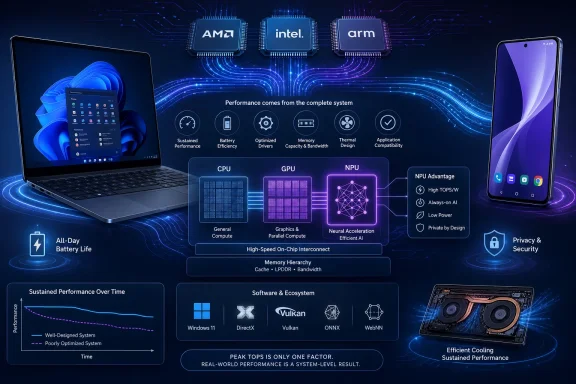
The buyer and administrator takeaway is straightforward: do not buy on TOPS alone. Verify that the specific applications and Windows features you need can use the NPU on the exact device under consideration, then compare independent sustained-performance and battery testing. A high peak rating is useful as a qualification signal, but software support, memory capacity, drivers, thermal design, and whole-system efficiency determine whether that capability produces a practical benefit.
The first generation of consumer generative AI taught users to think of AI as a website or remote service. A prompt left the PC, traveled to a data center, and returned as text, an image, or a recommendation; the laptop itself was mostly a terminal attached to somebody else’s expensive hardware.
The next wave is intended to blur that boundary. A Windows laptop or smartphone will still call the cloud when it needs a model too large or computationally demanding to run locally, but smaller and more immediate tasks can be assigned to processors inside the device. The practical goal is not to replace the cloud outright but to avoid depending on it for every operation.
That changes the silicon design problem. CPUs remain necessary for operating systems, application logic, data preparation, and workloads that do not map neatly onto accelerators. GPUs remain powerful parallel processors, particularly when an AI workload is large, flexible, or intertwined with graphics. NPUs are designed for a narrower purpose: executing supported neural-network operations efficiently.
Softonic’s account places many NPU workloads in an estimated 5-to-10W range, compared with roughly 30 to 40W for GPU execution in the same general context. Those are reported estimates, not universal measurements. Actual power consumption will vary by model, processor, runtime, memory traffic, device configuration, cooling system, and the amount of CPU or GPU work surrounding the accelerated operation.
If the estimated difference survives independent device-level testing, it could determine whether an always-available assistant is a practical laptop feature or an elaborate way to empty the battery and warm the keyboard. This is why performance per watt is the defining objective, even if TOPS receives the largest type in product announcements.
The most valuable AI processor will not necessarily be the one that completes a short demonstration fastest. It will be the one capable of handling useful background and interactive tasks without making the rest of the computer substantially slower, hotter, louder, or shorter-lived.
AMD says its Zen 5-based Ryzen AI 300 processors can deliver up to 50 NPU TOPS and approximately three times the performance of the preceding generation. Intel says Lunar Lake and Arrow Lake target roughly triple the neural performance of earlier chips, with Lunar Lake expected to clear the reported 40-TOPS threshold.
Arm is making a different kind of claim. It says Cortex-X925 improves AI performance by 41%, while its Kleidi libraries are intended to expose CPU acceleration through frameworks including PyTorch and TensorFlow. That percentage is not directly comparable with AMD’s maximum NPU figure or Intel’s product positioning.
The table should be read as a summary of separate announcements, not a benchmark leaderboard. The figures concern different components and measurements, and the underlying tests may differ in model, precision, duration, power target, software stack, and output requirements.
TOPS is therefore best used as an initial filter. It can indicate whether an NPU has enough theoretical throughput for a particular hardware category, but it cannot show how quickly a complete application finishes, how much energy the system consumes, or whether the required software path exists.
After that first filter, the useful questions are concrete: Does the application name the processor or runtime as supported? Does the complete model execute on the NPU? Are drivers available for the shipping version of Windows? What happens when an operator is unsupported? Does performance persist after several minutes rather than one short demonstration?
AMD’s Ryzen AI 300 pitch combines Zen 5 CPU architecture with an NPU rated at up to 50 TOPS. The company’s claim of roughly three times the previous generation indicates that AMD intends the NPU to be more than a small accelerator reserved for camera effects or occasional demonstrations.
Intel’s Lunar Lake and Arrow Lake messaging points in the same direction. Intel says the two target roughly triple the neural performance of earlier processors, while Softonic reports that Lunar Lake is expected to pass the 40-TOPS threshold associated with Copilot+ systems.
Clearing a recognized threshold can be commercially important because it gives PC makers a category to market and buyers a minimum specification to request. It also helps distinguish systems with substantial NPU capability from machines whose “AI” branding may refer to much smaller accelerators or conventional CPU and GPU execution.
Certification or category eligibility should not be confused with uniform performance, however. Two processors that meet the same minimum can differ in CPU speed, GPU capability, memory configuration, sustained NPU performance, driver quality, cooling, and application support. They may also receive Windows features on different schedules or support different third-party runtimes.
The more consequential convergence may be ACE, the standardization effort supported by Intel and AMD for x86 AI features. Dedicated NPUs can accelerate selected workloads, but developers also need predictable CPU capabilities for model setup, fallback operations, preprocessing, post-processing, and smaller inference tasks that may not justify engaging another engine.
If ACE reduces the need for developers to maintain divergent Intel and AMD paths, it could matter over the life of a machine more than a narrow lead in peak TOPS. Hardware becomes a durable platform only when software can use it without requiring a separate optimization project for every processor family.
That remains a strategic expectation rather than a guaranteed outcome. Procurement teams should look for evidence that the standards and runtimes needed by their applications are implemented in shipping software, not merely listed on a roadmap.
This is a useful corrective to the idea that all local AI will migrate to NPUs. Neural processors can be efficient when a model’s operations, data formats, and runtime are supported, but real applications consist of more than a single uninterrupted accelerator job. They load and transform data, tokenize input, invoke operating-system services, manage memory, and handle operations that may execute more naturally on a CPU.
Arm’s Kleidi strategy addresses that software reality. The company is promoting optimized libraries intended for integration with frameworks including PyTorch and TensorFlow, allowing developers to reach accelerated CPU paths through familiar tools rather than writing architecture-specific computational kernels for every device.
The strategic promise is performance through commonly used software layers: improve the framework or runtime, and multiple Arm-based products may benefit without every application team becoming an expert in processor microarchitecture.
That approach could be especially important for smartphones. Phone makers have long combined CPUs, GPUs, image processors, and neural accelerators, but differences among chips and software stacks can make it difficult for developers to assume that one optimization will behave consistently across devices.
A framework-level library can hide some of those differences. It cannot erase every hardware limitation or guarantee identical performance, but it can reduce the engineering required to reach an acceptable CPU path on multiple products.
Arm’s 41% figure should still be treated strictly as a vendor claim, not as a guarantee for every application. Without a common test covering the same model, precision, runtime, power target, and output quality, it cannot be converted into a direct ranking against AMD’s NPU TOPS or Intel’s expected qualification threshold.
The more durable part of Arm’s strategy may therefore be its effort to place optimized execution beneath mainstream development frameworks. Broadly deployed software support can matter more than a percentage that applies only under a particular vendor test.
GPUs remain valuable because they provide broad, programmable parallel computing and can handle workloads that exceed an NPU’s supported operators, memory limits, or practical model size. They may also be preferable when maximum speed matters more than battery life, when an application already has a mature GPU backend, or when graphics and AI operations need to share data closely.
The NPU’s advantage is specialization. When both the model and its runtime are supported, dedicated hardware may perform common neural-network operations without the flexibility and associated overhead of a general-purpose graphics processor.
Softonic’s estimated 5-to-10W NPU range versus roughly 30 to 40W for GPU execution illustrates the hoped-for efficiency opportunity, but those figures should not be presented as fixed characteristics of every workload. Whole-system energy use depends on the accelerator, memory traffic, CPU assistance, runtime overhead, power management, and the time required to complete the task.
Editorial analysis: In practice, Windows, application runtimes, and drivers may divide an AI pipeline among the CPU, GPU, and NPU. The details can vary by application and implementation, and buyers should not assume that Windows always selects the most efficient engine or that every unsupported operation produces the same fallback behavior.
A product may advertise local AI while using the NPU for only part of the pipeline. Another application may choose the GPU because its NPU backend is incomplete, while a small task may remain on the CPU because transferring it to another engine would add unnecessary overhead.
This reinforces the central purchasing rule without requiring another TOPS comparison: ask the software vendor for the supported execution path on the exact processor family, driver version, runtime, and application release you intend to deploy.
The attribution and qualification are essential. The 1.5-to-3-hour figure is Softonic’s estimate, not a demonstrated gain for every NPU-equipped laptop and not a general promise from AMD, Intel, Arm, or Microsoft.
A lower-power accelerator does not automatically add its theoretical savings to the end of a battery test. The display, wireless radios, memory, storage, background applications, CPU activity, and idle behavior continue consuming power regardless of where an AI model runs.
The result also depends on how often the feature is active. A user who invokes a writing assistant twice a day will not receive the same benefit as someone running live transcription, noise suppression, translation, visual recognition, or continuous local analysis for hours.
Offloading a suitable task may allow the CPU or GPU to spend more time in lower-power states. That is a plausible efficiency mechanism, but its effect must be measured on a complete shipping device. The NPU’s own power reading does not show whether the rest of the system actually reached those lower-power states or whether data movement and supporting work consumed the expected savings.
Conversely, an AI feature can reduce battery life even when it uses an efficient NPU if the feature creates a workload that would otherwise not exist. Continuous indexing, analysis, or transcription consumes energy. An NPU may make the new workload less expensive than CPU or GPU execution, but “more efficient” is not the same as “free.”
Independent testing should distinguish among three measurements:
Softonic’s estimated 1.5-to-3-hour gain is therefore best understood as a possible upside under favorable conditions. Whether a specific Windows laptop realizes any such gain remains a question for independent, device-level battery testing.
It can also allow features to function when a connection is slow, restricted, or unavailable. A local transcription or translation engine does not need to wait for a server round trip, and an enterprise application may be able to process protected material without uploading the underlying content.
But “runs on the NPU” is not a privacy policy. An application may perform inference locally while still transmitting telemetry, prompts, metadata, feedback, or generated results. It may also synchronize local files, indexes, or settings through a cloud account.
Administrators should distinguish among three separate properties:
Editorial analysis: Local AI can also shift part of the security burden from a cloud service to the endpoint. If an application creates searchable indexes, embeddings, summaries, caches, or model histories, those artifacts may require the same attention as the original documents. Their actual protection will depend on the application, Windows configuration, identity controls, encryption, retention behavior, and enterprise management capabilities.
Administrators should ask which data enters the model, where intermediate artifacts are stored, what leaves the device, which identities and processes can query the results, and how the data can be disabled, cleared, or retained. Those controls should be verified in product documentation or testing rather than inferred from the presence of an NPU.
ACE, supported by AMD and Intel, is an attempt to reduce at least part of that fragmentation on x86. A shared definition of AI-oriented CPU features could give compiler, framework, operating-system, and application developers a more stable target across the two major x86 vendors.
Arm’s Kleidi effort approaches the software problem from another direction. Rather than requiring every developer to call architecture-specific acceleration interfaces directly, Arm is working through frameworks such as PyTorch and TensorFlow so optimized CPU kernels can sit beneath tools developers already use.
These strategies are complementary in principle. ACE addresses consistency in x86 CPU capabilities, while Kleidi is intended to make Arm CPU acceleration accessible through common software layers. Both reflect the same underlying reality: silicon has limited value if mainstream applications cannot reach it reliably.
Windows is one of the pivotal software layers for AI PCs, but the maturity of support should be judged feature by feature. Drivers, model packaging, runtimes, operator coverage, application integration, and servicing can all affect whether a workload reaches the NPU.
An application needs a defined response when a model or operation is unsupported. It may reject the workload, use another processor, reduce functionality, or continue at lower performance. The behavior should be documented and tested; procurement teams should not assume a universal Windows fallback policy.
Enterprise deployment adds another layer. IT departments need predictable behavior across fleets that may contain several processor vendors, device models, and hardware generations. An AI feature that performs well on one premium demonstration unit but takes a different execution path on much of the fleet can be difficult to support and budget for.
The successful standard will not necessarily be the one with the most elegant specification. It will be the one incorporated into operating systems, frameworks, compilers, applications, deployment tools, and procurement requirements deeply enough that compatibility becomes routine rather than exceptional.
Editorial analysis: The logical objective is to place each supported task on an appropriate engine. A foreground image operation might prioritize latency, while background transcription might prioritize efficiency. The actual decision may be made by the application, its AI runtime, a driver, Windows components, or some combination of those layers.
Battery state, thermal conditions, power mode, application priority, model support, and data-transfer overhead could all affect the best execution path. That does not mean every current Windows application evaluates all of those factors or that administrators can control each decision through a universal policy.
The operating system and applications also need to coexist with ordinary work. Local AI can consume memory capacity and bandwidth even when an NPU performs most of the arithmetic. A feature that competes with a video call, spreadsheet, game, or software build may affect responsiveness without saturating the CPU.
Editorial recommendation: Windows and application vendors should provide clearer diagnostics showing which process requested an AI workload, which engine executed it, how much memory and energy it used, and whether an operation moved to another processor. Buyers should verify which of those diagnostics exist today rather than assuming that all NPU activity is fully exposed in Task Manager or enterprise reporting tools.
The same caution applies to management controls. Organizations may want to restrict background analysis, prevent selected folders from being indexed, limit a feature on battery power, or approve only specific applications. Whether those controls are available and enforceable depends on the exact Windows feature, application, management service, licensing arrangement, and product version.
A hardware threshold can create a useful baseline. The quality of software integration, diagnostics, and management will determine whether that hardware operates as a coherent platform or remains a collection of accelerators with inconsistent support.
A 40-TOPS-class NPU may place a device within the performance range associated with Copilot+ systems, while AMD’s up-to-50-TOPS figure may provide additional theoretical headroom. Neither number proves that a company’s transcription, security, collaboration, design, or line-of-business software has an optimized path for that accelerator.
Buyers should begin with deployed applications. Vendors should identify which models run locally, which processor families are supported, whether the complete pipeline uses the NPU, and what happens when acceleration is unavailable. A vague promise of future optimization should not be treated as equivalent to support in the shipping application.
Memory and storage also matter. Local models, caches, temporary files, indexes, and ordinary applications all consume capacity. A strong NPU cannot compensate for a system configured too narrowly for the intended AI workload and the user’s daily software to coexist.
Thermal design is equally important. The same processor can behave differently in a thin chassis and a system with more cooling capacity. Short benchmark runs may conceal sustained throttling, power-limit changes, or shifts in workload placement. Buyers evaluating repeated transcription, image processing, model inference, or content analysis should seek longer tests rather than relying on a brief demonstration.
Driver and runtime support deserves its own procurement line item. The machine should be evaluated with the Windows build, firmware, driver package, AI runtime, and application version intended for deployment. A benchmark using a vendor’s development stack may not represent the behavior of a shipping enterprise application.
Battery testing should be workload-specific. A general video-playback figure cannot prove that the NPU improves runtime during local AI, while an NPU-only power measurement cannot establish total system endurance. The most useful review will compare the same AI task on battery, record completion time and output quality, and show the resulting effect on complete-device energy use.
First, establish eligibility. Determine whether the machine meets the hardware requirements for the Windows features and applications you intend to use. This is where NPU TOPS is useful: it can eliminate systems that clearly lack the required acceleration class.
Second, establish software support. Confirm that the actual workload has a shipping NPU path for the exact processor, runtime, and application version. If the vendor cannot identify that path, the TOPS figure has limited procurement value.
Third, establish sustained system behavior. Test performance, thermals, noise, memory use, and battery life in the final laptop chassis. Peak throughput cannot reveal whether a thin device maintains its speed or whether the workload causes another component to consume the expected energy savings.
Fourth, establish operational control. For managed fleets, verify update procedures, diagnostics, data handling, fallback behavior, and administrative settings. A feature that cannot be observed, governed, or supported may create more operational cost than its acceleration saves.
These stages also produce a simple comparison rule. If two laptops both meet the required NPU threshold and support the same applications, prefer the one with stronger independent evidence for sustained performance, battery endurance, software stability, and serviceability. If only one has verified application support, that support is likely more valuable than a modest advantage in peak TOPS.
AMD, Intel, and Arm are all pursuing a credible shift toward more local AI, but they are approaching it through different processors, measurements, and software strategies. AMD’s up-to-50-TOPS NPU claim, Intel’s expected passage of the reported 40-TOPS threshold, and Arm’s claimed 41% CPU AI improvement are useful signals within their own contexts—not interchangeable scores in a universal contest.
The next generation of hardware should make more on-device processing possible. Whether it makes that processing worthwhile will depend on applications, frameworks, drivers, memory configurations, cooling systems, Windows integration, and management controls that buyers can verify on shipping products.
The winning AI PC will not be the machine with the most impressive number on its sticker. It will be the one that runs the buyer’s actual software locally, sustains that performance without disruptive heat or noise, protects data according to documented policy, and demonstrates a battery advantage in independent testing. Until those conditions are met, TOPS remains an admission ticket—not the final verdict.
Those figures do not establish a single race ranking. They refer to different silicon blocks, test methods, workloads, and performance measurements. AMD’s peak NPU throughput cannot be directly ranked against Arm’s CPU-focused percentage or Intel’s product-category positioning.
The buyer and administrator takeaway is straightforward: do not buy on TOPS alone. Verify that the specific applications and Windows features you need can use the NPU on the exact device under consideration, then compare independent sustained-performance and battery testing. A high peak rating is useful as a qualification signal, but software support, memory capacity, drivers, thermal design, and whole-system efficiency determine whether that capability produces a practical benefit.
 The AI Race Moves From the Cloud Into the Power Budget
The first generation of consumer generative AI taught users to think of AI as a website or remote service. A prompt left the PC, traveled to a data center, and returned as text, an image, or a recommendation; the laptop itself was mostly a terminal attached to somebody else’s expensive hardware.The next wave is intended to blur that boundary. A Windows laptop or smartphone will still call the cloud when it needs a model too large or computationally demanding to run locally, but smaller and more immediate tasks can be assigned to processors inside the device. The practical goal is not to replace the cloud outright but to avoid depending on it for every operation.
That changes the silicon design problem. CPUs remain necessary for operating systems, application logic, data preparation, and workloads that do not map neatly onto accelerators. GPUs remain powerful parallel processors, particularly when an AI workload is large, flexible, or intertwined with graphics. NPUs are designed for a narrower purpose: executing supported neural-network operations efficiently.
Softonic’s account places many NPU workloads in an estimated 5-to-10W range, compared with roughly 30 to 40W for GPU execution in the same general context. Those are reported estimates, not universal measurements. Actual power consumption will vary by model, processor, runtime, memory traffic, device configuration, cooling system, and the amount of CPU or GPU work surrounding the accelerated operation.
If the estimated difference survives independent device-level testing, it could determine whether an always-available assistant is a practical laptop feature or an elaborate way to empty the battery and warm the keyboard. This is why performance per watt is the defining objective, even if TOPS receives the largest type in product announcements.
The most valuable AI processor will not necessarily be the one that completes a short demonstration fastest. It will be the one capable of handling useful background and interactive tasks without making the rest of the computer substantially slower, hotter, louder, or shorter-lived.
TOPS Has Become an Admission Ticket, Not a Verdict
TOPS—trillions of operations per second—gives vendors and buyers a simple headline number. In Softonic’s reporting, Lunar Lake is expected to clear a 40-TOPS threshold associated with Copilot+ PCs. Buyers should still confirm the current eligibility requirements and the status of the exact system configuration before treating a quoted NPU rating as proof that every Copilot+ feature will be available.AMD says its Zen 5-based Ryzen AI 300 processors can deliver up to 50 NPU TOPS and approximately three times the performance of the preceding generation. Intel says Lunar Lake and Arrow Lake target roughly triple the neural performance of earlier chips, with Lunar Lake expected to clear the reported 40-TOPS threshold.
Arm is making a different kind of claim. It says Cortex-X925 improves AI performance by 41%, while its Kleidi libraries are intended to expose CPU acceleration through frameworks including PyTorch and TensorFlow. That percentage is not directly comparable with AMD’s maximum NPU figure or Intel’s product positioning.
| Platform effort | Main silicon named | Vendor claim or reported expectation | Measurement context | Expected destination |
|---|---|---|---|---|
| AMD | Zen 5-based Ryzen AI 300 | About three times the previous generation; up to 50 NPU TOPS | Peak NPU capability and a claimed generational gain | Upcoming Windows 11 PCs |
| Intel | Lunar Lake and Arrow Lake | Roughly triple earlier neural performance; Lunar Lake expected to clear 40 TOPS | Product-family claims and a reported NPU threshold | Upcoming Windows 11 PCs |
| Arm | Cortex-X925 | 41% AI-performance improvement | CPU-focused percentage rather than an NPU TOPS result | Next-generation smartphones and other Arm devices |
TOPS is therefore best used as an initial filter. It can indicate whether an NPU has enough theoretical throughput for a particular hardware category, but it cannot show how quickly a complete application finishes, how much energy the system consumes, or whether the required software path exists.
After that first filter, the useful questions are concrete: Does the application name the processor or runtime as supported? Does the complete model execute on the NPU? Are drivers available for the shipping version of Windows? What happens when an operator is unsupported? Does performance persist after several minutes rather than one short demonstration?
AMD and Intel Are Converging on the Same Windows Strategy
AMD and Intel are arriving at the AI PC from different product histories, but their strategic destination is increasingly similar. Both want the Windows laptop to become a heterogeneous computing system in which work moves among general-purpose CPU cores, integrated graphics, and a dedicated NPU.AMD’s Ryzen AI 300 pitch combines Zen 5 CPU architecture with an NPU rated at up to 50 TOPS. The company’s claim of roughly three times the previous generation indicates that AMD intends the NPU to be more than a small accelerator reserved for camera effects or occasional demonstrations.
Intel’s Lunar Lake and Arrow Lake messaging points in the same direction. Intel says the two target roughly triple the neural performance of earlier processors, while Softonic reports that Lunar Lake is expected to pass the 40-TOPS threshold associated with Copilot+ systems.
Clearing a recognized threshold can be commercially important because it gives PC makers a category to market and buyers a minimum specification to request. It also helps distinguish systems with substantial NPU capability from machines whose “AI” branding may refer to much smaller accelerators or conventional CPU and GPU execution.
Certification or category eligibility should not be confused with uniform performance, however. Two processors that meet the same minimum can differ in CPU speed, GPU capability, memory configuration, sustained NPU performance, driver quality, cooling, and application support. They may also receive Windows features on different schedules or support different third-party runtimes.
The more consequential convergence may be ACE, the standardization effort supported by Intel and AMD for x86 AI features. Dedicated NPUs can accelerate selected workloads, but developers also need predictable CPU capabilities for model setup, fallback operations, preprocessing, post-processing, and smaller inference tasks that may not justify engaging another engine.
If ACE reduces the need for developers to maintain divergent Intel and AMD paths, it could matter over the life of a machine more than a narrow lead in peak TOPS. Hardware becomes a durable platform only when software can use it without requiring a separate optimization project for every processor family.
That remains a strategic expectation rather than a guaranteed outcome. Procurement teams should look for evidence that the standards and runtimes needed by their applications are implemented in shipping software, not merely listed on a roadmap.
Arm Is Fighting the Same Battle From the Software Layer
Arm’s role differs because it licenses processor designs and platform technology to a broad ecosystem rather than selling a Windows laptop processor in the same manner as AMD or Intel. Its Cortex-X925 claim of a 41% AI-performance improvement shows that Arm sees the CPU itself as an important AI engine, even when dedicated accelerators are present elsewhere in a system.This is a useful corrective to the idea that all local AI will migrate to NPUs. Neural processors can be efficient when a model’s operations, data formats, and runtime are supported, but real applications consist of more than a single uninterrupted accelerator job. They load and transform data, tokenize input, invoke operating-system services, manage memory, and handle operations that may execute more naturally on a CPU.
Arm’s Kleidi strategy addresses that software reality. The company is promoting optimized libraries intended for integration with frameworks including PyTorch and TensorFlow, allowing developers to reach accelerated CPU paths through familiar tools rather than writing architecture-specific computational kernels for every device.
The strategic promise is performance through commonly used software layers: improve the framework or runtime, and multiple Arm-based products may benefit without every application team becoming an expert in processor microarchitecture.
That approach could be especially important for smartphones. Phone makers have long combined CPUs, GPUs, image processors, and neural accelerators, but differences among chips and software stacks can make it difficult for developers to assume that one optimization will behave consistently across devices.
A framework-level library can hide some of those differences. It cannot erase every hardware limitation or guarantee identical performance, but it can reduce the engineering required to reach an acceptable CPU path on multiple products.
Arm’s 41% figure should still be treated strictly as a vendor claim, not as a guarantee for every application. Without a common test covering the same model, precision, runtime, power target, and output quality, it cannot be converted into a direct ranking against AMD’s NPU TOPS or Intel’s expected qualification threshold.
The more durable part of Arm’s strategy may therefore be its effort to place optimized execution beneath mainstream development frameworks. Broadly deployed software support can matter more than a percentage that applies only under a particular vendor test.
The NPU Is a Specialist, Not a Replacement for the GPU
The industry’s enthusiasm for NPUs can create the impression that GPUs are becoming obsolete for AI on personal devices. That is not what the architecture suggests.GPUs remain valuable because they provide broad, programmable parallel computing and can handle workloads that exceed an NPU’s supported operators, memory limits, or practical model size. They may also be preferable when maximum speed matters more than battery life, when an application already has a mature GPU backend, or when graphics and AI operations need to share data closely.
The NPU’s advantage is specialization. When both the model and its runtime are supported, dedicated hardware may perform common neural-network operations without the flexibility and associated overhead of a general-purpose graphics processor.
Softonic’s estimated 5-to-10W NPU range versus roughly 30 to 40W for GPU execution illustrates the hoped-for efficiency opportunity, but those figures should not be presented as fixed characteristics of every workload. Whole-system energy use depends on the accelerator, memory traffic, CPU assistance, runtime overhead, power management, and the time required to complete the task.
Editorial analysis: In practice, Windows, application runtimes, and drivers may divide an AI pipeline among the CPU, GPU, and NPU. The details can vary by application and implementation, and buyers should not assume that Windows always selects the most efficient engine or that every unsupported operation produces the same fallback behavior.
A product may advertise local AI while using the NPU for only part of the pipeline. Another application may choose the GPU because its NPU backend is incomplete, while a small task may remain on the CPU because transferring it to another engine would add unnecessary overhead.
This reinforces the central purchasing rule without requiring another TOPS comparison: ask the software vendor for the supported execution path on the exact processor family, driver version, runtime, and application release you intend to deploy.
The Battery-Life Claim Is the Prize—and the Least Settled Number
Softonic estimates that the cited power difference could provide approximately 1.5 to 3 additional hours of laptop battery life if its assumptions hold. That is a potentially persuasive benefit because battery life matters even to users who never generate an image or summarize a document.The attribution and qualification are essential. The 1.5-to-3-hour figure is Softonic’s estimate, not a demonstrated gain for every NPU-equipped laptop and not a general promise from AMD, Intel, Arm, or Microsoft.
A lower-power accelerator does not automatically add its theoretical savings to the end of a battery test. The display, wireless radios, memory, storage, background applications, CPU activity, and idle behavior continue consuming power regardless of where an AI model runs.
The result also depends on how often the feature is active. A user who invokes a writing assistant twice a day will not receive the same benefit as someone running live transcription, noise suppression, translation, visual recognition, or continuous local analysis for hours.
Offloading a suitable task may allow the CPU or GPU to spend more time in lower-power states. That is a plausible efficiency mechanism, but its effect must be measured on a complete shipping device. The NPU’s own power reading does not show whether the rest of the system actually reached those lower-power states or whether data movement and supporting work consumed the expected savings.
Conversely, an AI feature can reduce battery life even when it uses an efficient NPU if the feature creates a workload that would otherwise not exist. Continuous indexing, analysis, or transcription consumes energy. An NPU may make the new workload less expensive than CPU or GPU execution, but “more efficient” is not the same as “free.”
Independent testing should distinguish among three measurements:
- The power consumed by the NPU while active.
- The total energy required to complete the application workload.
- The change in complete laptop runtime under a repeatable usage pattern.
Softonic’s estimated 1.5-to-3-hour gain is therefore best understood as a possible upside under favorable conditions. Whether a specific Windows laptop realizes any such gain remains a question for independent, device-level battery testing.
Local Processing Improves Privacy, but It Does Not Guarantee It
Running AI locally can reduce the amount of information sent to a remote service. For assistants working with private documents, messages, photographs, voice recordings, or meeting transcripts, that can be a meaningful architectural improvement.It can also allow features to function when a connection is slow, restricted, or unavailable. A local transcription or translation engine does not need to wait for a server round trip, and an enterprise application may be able to process protected material without uploading the underlying content.
But “runs on the NPU” is not a privacy policy. An application may perform inference locally while still transmitting telemetry, prompts, metadata, feedback, or generated results. It may also synchronize local files, indexes, or settings through a cloud account.
Administrators should distinguish among three separate properties:
- Local computation: The model or part of it executes on the device.
- Local storage: Source data, indexes, embeddings, and generated output remain on the endpoint.
- Local-only operation: The feature does not transmit relevant content or metadata to an external service.
Editorial analysis: Local AI can also shift part of the security burden from a cloud service to the endpoint. If an application creates searchable indexes, embeddings, summaries, caches, or model histories, those artifacts may require the same attention as the original documents. Their actual protection will depend on the application, Windows configuration, identity controls, encryption, retention behavior, and enterprise management capabilities.
Administrators should ask which data enters the model, where intermediate artifacts are stored, what leaves the device, which identities and processes can query the results, and how the data can be disabled, cleared, or retained. Those controls should be verified in product documentation or testing rather than inferred from the presence of an NPU.
Standards Will Decide Whether the Hardware Outlives the Marketing Cycle
The history of PC acceleration includes capable hardware that remained underused because developers faced fragmented APIs, inconsistent drivers, and limited incentives to maintain several optimization paths. The AI PC could repeat that pattern if every vendor requires a separate runtime, model format, deployment process, and troubleshooting method.ACE, supported by AMD and Intel, is an attempt to reduce at least part of that fragmentation on x86. A shared definition of AI-oriented CPU features could give compiler, framework, operating-system, and application developers a more stable target across the two major x86 vendors.
Arm’s Kleidi effort approaches the software problem from another direction. Rather than requiring every developer to call architecture-specific acceleration interfaces directly, Arm is working through frameworks such as PyTorch and TensorFlow so optimized CPU kernels can sit beneath tools developers already use.
These strategies are complementary in principle. ACE addresses consistency in x86 CPU capabilities, while Kleidi is intended to make Arm CPU acceleration accessible through common software layers. Both reflect the same underlying reality: silicon has limited value if mainstream applications cannot reach it reliably.
Windows is one of the pivotal software layers for AI PCs, but the maturity of support should be judged feature by feature. Drivers, model packaging, runtimes, operator coverage, application integration, and servicing can all affect whether a workload reaches the NPU.
An application needs a defined response when a model or operation is unsupported. It may reject the workload, use another processor, reduce functionality, or continue at lower performance. The behavior should be documented and tested; procurement teams should not assume a universal Windows fallback policy.
Enterprise deployment adds another layer. IT departments need predictable behavior across fleets that may contain several processor vendors, device models, and hardware generations. An AI feature that performs well on one premium demonstration unit but takes a different execution path on much of the fleet can be difficult to support and budget for.
The successful standard will not necessarily be the one with the most elegant specification. It will be the one incorporated into operating systems, frameworks, compilers, applications, deployment tools, and procurement requirements deeply enough that compatibility becomes routine rather than exceptional.
Windows 11 Is Becoming a Compute Traffic Controller
The shift to local AI gives Windows 11 and its application ecosystem a role beyond exposing another accelerator. AI workloads may involve computing engines with different performance, power, thermal, memory, and compatibility characteristics.Editorial analysis: The logical objective is to place each supported task on an appropriate engine. A foreground image operation might prioritize latency, while background transcription might prioritize efficiency. The actual decision may be made by the application, its AI runtime, a driver, Windows components, or some combination of those layers.
Battery state, thermal conditions, power mode, application priority, model support, and data-transfer overhead could all affect the best execution path. That does not mean every current Windows application evaluates all of those factors or that administrators can control each decision through a universal policy.
The operating system and applications also need to coexist with ordinary work. Local AI can consume memory capacity and bandwidth even when an NPU performs most of the arithmetic. A feature that competes with a video call, spreadsheet, game, or software build may affect responsiveness without saturating the CPU.
Editorial recommendation: Windows and application vendors should provide clearer diagnostics showing which process requested an AI workload, which engine executed it, how much memory and energy it used, and whether an operation moved to another processor. Buyers should verify which of those diagnostics exist today rather than assuming that all NPU activity is fully exposed in Task Manager or enterprise reporting tools.
The same caution applies to management controls. Organizations may want to restrict background analysis, prevent selected folders from being indexed, limit a feature on battery power, or approve only specific applications. Whether those controls are available and enforceable depends on the exact Windows feature, application, management service, licensing arrangement, and product version.
A hardware threshold can create a useful baseline. The quality of software integration, diagnostics, and management will determine whether that hardware operates as a coherent platform or remains a collection of accelerators with inconsistent support.
Procurement Must Start With Workloads, Not Logos
For consumers, the temptation will be to treat the highest TOPS number as the most future-proof purchase. For enterprises, the same mistake can appear in more formal language: specifying an NPU threshold without establishing which applications will use it.A 40-TOPS-class NPU may place a device within the performance range associated with Copilot+ systems, while AMD’s up-to-50-TOPS figure may provide additional theoretical headroom. Neither number proves that a company’s transcription, security, collaboration, design, or line-of-business software has an optimized path for that accelerator.
Buyers should begin with deployed applications. Vendors should identify which models run locally, which processor families are supported, whether the complete pipeline uses the NPU, and what happens when acceleration is unavailable. A vague promise of future optimization should not be treated as equivalent to support in the shipping application.
Memory and storage also matter. Local models, caches, temporary files, indexes, and ordinary applications all consume capacity. A strong NPU cannot compensate for a system configured too narrowly for the intended AI workload and the user’s daily software to coexist.
Thermal design is equally important. The same processor can behave differently in a thin chassis and a system with more cooling capacity. Short benchmark runs may conceal sustained throttling, power-limit changes, or shifts in workload placement. Buyers evaluating repeated transcription, image processing, model inference, or content analysis should seek longer tests rather than relying on a brief demonstration.
Driver and runtime support deserves its own procurement line item. The machine should be evaluated with the Windows build, firmware, driver package, AI runtime, and application version intended for deployment. A benchmark using a vendor’s development stack may not represent the behavior of a shipping enterprise application.
Battery testing should be workload-specific. A general video-playback figure cannot prove that the NPU improves runtime during local AI, while an NPU-only power measurement cannot establish total system endurance. The most useful review will compare the same AI task on battery, record completion time and output quality, and show the resulting effect on complete-device energy use.
What to check before buying
- NPU TOPS and eligibility: Confirm the NPU rating and verify that the exact device, processor, Windows edition, and configuration qualify for the features you expect. Do not infer eligibility from a family name alone.
- Exact local-AI applications: Obtain a list of the Windows features and third-party applications that currently use the NPU on that processor. Ask whether the full pipeline is accelerated or only selected operations.
- RAM and storage configuration: Size memory for the model, application, and normal workload together. Include space for model downloads, indexes, caches, updates, and user data.
- Driver and runtime support: Confirm the required firmware, NPU driver, AI runtime, model format, application version, and servicing process. Check how updates are distributed and rolled back.
- Sustained thermals: Look for long-duration tests in the actual laptop chassis, not only peak processor specifications or short demonstrations.
- Independent battery tests: Compare complete-device runtime while performing the same local-AI task at equivalent output quality. Treat Softonic’s 1.5-to-3-hour estimate as an estimate until verified on the specific device.
Administrator validation checklist
Before approving an AI PC fleet, administrators should run a controlled pilot and document:- The business workloads expected to use local acceleration.
- The application and model versions tested on each hardware family.
- Whether each workload uses the NPU, GPU, CPU, or a mixed path.
- Performance after sustained operation, including temperature, noise, and responsiveness.
- Battery impact under a repeatable employee usage pattern.
- Memory and storage consumption after models and indexes are installed.
- Network activity during supposedly local operations.
- The location, protection, retention, and deletion behavior of AI-generated artifacts.
- Available controls for disabling features, limiting data sources, and approving applications.
- Driver, firmware, runtime, and Windows update procedures.
- Behavior when NPU acceleration is unavailable or an update introduces incompatibility.
- Help-desk diagnostics that can identify the active execution path.
A Practical Decision Framework
The emerging AI processor market can be reduced to four decision stages.First, establish eligibility. Determine whether the machine meets the hardware requirements for the Windows features and applications you intend to use. This is where NPU TOPS is useful: it can eliminate systems that clearly lack the required acceleration class.
Second, establish software support. Confirm that the actual workload has a shipping NPU path for the exact processor, runtime, and application version. If the vendor cannot identify that path, the TOPS figure has limited procurement value.
Third, establish sustained system behavior. Test performance, thermals, noise, memory use, and battery life in the final laptop chassis. Peak throughput cannot reveal whether a thin device maintains its speed or whether the workload causes another component to consume the expected energy savings.
Fourth, establish operational control. For managed fleets, verify update procedures, diagnostics, data handling, fallback behavior, and administrative settings. A feature that cannot be observed, governed, or supported may create more operational cost than its acceleration saves.
These stages also produce a simple comparison rule. If two laptops both meet the required NPU threshold and support the same applications, prefer the one with stronger independent evidence for sustained performance, battery endurance, software stability, and serviceability. If only one has verified application support, that support is likely more valuable than a modest advantage in peak TOPS.
AMD, Intel, and Arm are all pursuing a credible shift toward more local AI, but they are approaching it through different processors, measurements, and software strategies. AMD’s up-to-50-TOPS NPU claim, Intel’s expected passage of the reported 40-TOPS threshold, and Arm’s claimed 41% CPU AI improvement are useful signals within their own contexts—not interchangeable scores in a universal contest.
The next generation of hardware should make more on-device processing possible. Whether it makes that processing worthwhile will depend on applications, frameworks, drivers, memory configurations, cooling systems, Windows integration, and management controls that buyers can verify on shipping products.
The winning AI PC will not be the machine with the most impressive number on its sticker. It will be the one that runs the buyer’s actual software locally, sustains that performance without disruptive heat or noise, protects data according to documented policy, and demonstrates a battery advantage in independent testing. Until those conditions are met, TOPS remains an admission ticket—not the final verdict.
References
- Primary source: en.softonic.com
Published: Thu, 09 Jul 2026 17:51:06 GMT
Loading…
en.softonic.com - Related coverage: amd.com
Loading…
www.amd.com - Related coverage: tomshardware.com
Loading…
www.tomshardware.com - Related coverage: newsroom.intel.com
Loading…
newsroom.intel.com - Related coverage: techspot.com
Loading…
www.techspot.com - Related coverage: intel.com
Loading…
www.intel.com