

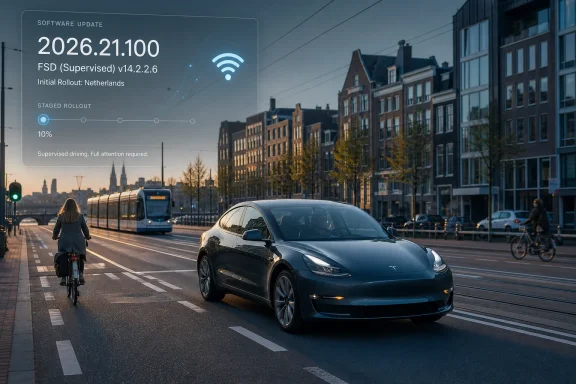
Tesla’s firmware 2026.21.100, carrying FSD (Supervised) v14.2.2.6, reportedly began downloading to an initial group of owners in the Netherlands during the early hours of July 10, 2026. The release moves participating Model 3, Model Y, Model S, and Model X vehicles onto Tesla’s 2026.20+ software branch. For owners, the immediate advice is straightforward: set the update preference to Advanced, keep the vehicle connected to reliable Wi-Fi, confirm that the expected entitlement appears for the car, and avoid beginning installation before a required journey.
The reported package combines base firmware 2026.21.100 with FSD (Supervised) v14.2.2.6. That pairing is more informative than either number in isolation because it identifies both the underlying vehicle-software branch and the reported driving-system version.
It does not, however, provide a complete specification of what a Dutch owner will receive. A matching FSD version label does not by itself establish that every control, maneuver, warning, or operating condition seen in another country will appear in the Netherlands. Until Tesla provides release-specific public documentation, owners should avoid using reports from North American vehicles as a definitive guide to the Dutch build.
The practical distinction is simple: a version number identifies software, while the vehicle’s own notes and controls show what that software currently makes available to that car. If a control is absent after installation, a screenshot from another owner does not create eligibility. If an in-car warning imposes a limitation, a broader description posted online does not override it.
This makes the 2026.20+ branch transition the clearest technical milestone supported by the rollout report. FSD branding may attract the most attention, but the branch assignment determines the package being downloaded and installed. The exact changes included beyond the reported FSD version remain unconfirmed until they are documented in the vehicle or in official release notes.
BASENOR notes that Tesla builds ending in “.100” have previously appeared in limited or validation-like distribution. That should be treated as an observed pattern, not as an official Tesla rule. Tesla has not provided, in the material available here, a public naming convention establishing that every “.100” build has the same purpose.
The initial-cohort structure is nevertheless consistent with a cautious release. A limited deployment gives Tesla an opportunity to observe downloads, installations, calibration requests, interface behavior, and real-world driving reports before deciding whether to expand distribution. The exact size and selection method of the Dutch cohort have not been established.
For an owner, the update is a potentially significant software and driving-feature change. For Tesla, it may also be an opportunity to assess how this exact package performs outside internal or pre-release vehicles. Those two perspectives explain why an update can be important without yet being broadly available.
The lack of public notes places more weight on what appears inside the car. Before installation, owners should photograph or otherwise record the current software screen and relevant settings. After installation, they should preserve the new release notes and compare the available controls with the earlier baseline.
That record will not explain every difference, but it will help separate three distinct situations: a feature that was never offered, a feature that appeared in the notes but not in the controls, and a feature that appeared but behaved unexpectedly. Those distinctions are useful when reporting an issue or comparing experiences with other owners.
Dutch owners may see different functionality, warnings, or limitations. The available information does not establish the cause of any such difference, and it would be speculative to assign it to specific national permissions, geofencing rules, road classes, activation flows, or configuration switches without direct evidence.
The correct conclusion is narrower: visible version parity is not sufficient evidence of feature parity. Owners must check the in-car release notes and the controls actually displayed by their vehicle.
This caution is particularly important when online videos show a maneuver or interface option that a Dutch vehicle does not display. Such a difference might reflect rollout timing, vehicle configuration, software state, or another condition not visible in the video. Without official documentation, the cause should remain an open question.
FSD (Supervised) also remains a supervised driver-assistance system. The driver must continue watching the road, be prepared to intervene immediately, and retain responsibility for controlling the vehicle. The addition of “Supervised” is operationally important: installation does not make the car autonomous.
The most important separation is between receiving an update offer and seeing an FSD entitlement for the vehicle. Owners should not infer entitlement solely from the base firmware number, model name, or another owner’s screenshot.
Likewise, the presence of an entitlement does not guarantee that every expected control will appear before installation or immediately afterward. The in-car notes may require an additional step or calibration, or they may describe a more limited set of functions than an owner expected. Owners should follow the instructions displayed by their own vehicle rather than assuming a universal sequence.
A staged rollout is intentionally uneven. Two apparently similar cars can receive an update at different times without either vehicle being defective. The available reporting does not establish why Tesla selected one vehicle before another, so named explanations involving factories, cameras, service status, model years, or internal configuration groups should not be presented as fact.
After installation, read the in-car notes before using any new driving feature. Confirm which controls actually appeared and compare them with the baseline recorded before installation.
Do not assume that repeated refreshes can force an assignment. If no update appears, the most supportable explanation is that the vehicle has not yet been included in the rollout presented to it. Fleetwide timing has not been confirmed.
If the expected entitlement is absent, verify the account and vehicle information before drawing conclusions from the firmware number. The available report does not support a definitive list of package, subscription, market, hardware, trim, or model-year conditions, so the owner should rely on what Tesla displays for that specific vehicle and seek support if the displayed status appears inconsistent with the purchase record.
If installation fails, preserve the exact error message and the time of failure. Avoid improvised electrical or service procedures. Use the vehicle’s normal support path and provide the recorded software information and screenshots.
If a newly enabled function produces a repeatable driving issue, regain full control first. Once safe, use “Report.” immediately so the event is submitted as close as possible to the behavior being reported.
Choose a familiar, low-complexity route with enough space and time to intervene smoothly. The purpose is to learn how the installed system behaves in that vehicle: how it positions the car, approaches turns, changes speed, responds to traffic, and returns control to the driver.
A familiar route helps because the driver already knows where unusual lane choices, difficult junctions, or abrupt traffic changes are likely to occur. That knowledge makes it easier to recognize an unexpected decision early instead of waiting for the situation to become urgent.
The first outing should not test how long the car can proceed without assistance. It should identify where the driver’s expectations and the software’s behavior diverge. A maneuver can look plausible while still being inappropriate for the situation, so supervision must be based on understanding the road rather than merely waiting for an alert.
Keep the cabin camera area unobstructed and sit in a normal driving position. If attention warnings appear repeatedly, do not attempt to defeat them. Reassess the driving environment, seating position, camera visibility, and whether the feature should remain engaged.
The driver should already know how to disengage the system and should remain ready to steer or brake immediately. FSD (Supervised) should not be engaged while the driver is tired, distracted, rushed, or otherwise unable to monitor the road continuously.
The useful question is not whether the system completes one impressive route. It is whether a supervising driver can recognize its decisions early enough to correct them safely.
Owners should focus on repeatable patterns. Examples include late lane selection, hesitation at a particular type of junction, uncomfortable positioning near cyclists, abrupt braking, inconsistent speed choices, or confusion around temporary markings. A clearly described recurring issue is more informative than a general statement that the car “drove badly.”
When a problem occurs, intervention comes first. Reporting follows only after the vehicle is safe and stable. BASENOR says owners can use the voice command “Report.” to submit an event. Using it immediately after a repeatable issue may help associate the report with the relevant moment, although it does not guarantee an individual response or a specific software change.
Greater capability can also create complacency. A system that performs well repeatedly may encourage the driver to relax immediately before encountering an unusual situation. That is why the supervised designation must be taken literally throughout the drive, not only during difficult maneuvers.
The installed release notes are the most relevant description available to the owner of that vehicle. They should be read before using newly displayed functionality. Owners should look for changes to controls, calibration instructions, operating limits, warnings, and any conditions the car says must be met.
Where the article, a social-media post, or a video conflicts with the vehicle’s instructions, the vehicle’s instructions should take priority. This is especially important while public release notes for 2026.21.100 remain unconfirmed.
Screenshots of the notes and software screen can help with later comparison or support requests. Personal information and location data should be removed before sharing them publicly.
Version strings are valuable identifiers, but they are not substitutes for observation. The relevant owner-level evidence is the complete combination visible in the car: installed firmware, displayed entitlement, release notes, available controls, calibration state, and actual behavior.
A broader rollout would suggest that Tesla is comfortable exposing more Dutch vehicles to the package. It would not prove that the release is free of defects. A pause would be ambiguous because the available evidence would not reveal whether Tesla had found a software issue, completed the intended initial sample, or changed its deployment plan.
Owners should therefore avoid treating silence as a diagnosis. If another nearby Tesla receives 2026.21.100 first, the difference is consistent with staged distribution. It is not, by itself, evidence that the waiting vehicle has a fault.
BASENOR has speculated about possible follow-up identifiers such as FSD v14.2.2.7 or firmware 2026.21.101. Those identifiers have not been announced in the material available here and should not be treated as likely, scheduled, or operational outcomes. Owners gain little from planning around hypothetical version numbers; the useful signal will be the next package actually offered to their vehicle and the documentation attached to it.
The strongest evidence of a maturing Dutch release would be a combination of broader distribution, official notes, consistent controls across participating vehicles, and fewer unresolved installation or driving reports. Until then, 2026.21.100 should be understood as an important but initially limited rollout.
For owners, the decision path is concrete. If the update is offered, prepare the vehicle and leave enough time. If it is not offered, keep the appropriate preference selected and wait for vehicle-specific assignment. If the entitlement is absent, verify the account status rather than inferring eligibility from another car. If installation fails or a feature is missing, preserve the evidence shown by the vehicle and use Tesla’s support process.
The final preparation sequence is simple: set Advanced at Controls → Software → Software Update Preferences → Advanced; keep Wi-Fi connected; check status through a Tesla app screen refresh or a tap on the software version under Controls → Software; reserve 45–90 minutes plus calibration time; read the in-car notes before driving; and use “Report.” immediately after a repeatable issue once the car is safely under control.
 Owner checklist
- Record the vehicle’s current firmware version, FSD version, and relevant driving settings before installation.
- Check whether the expected FSD entitlement is visible for the vehicle in the Tesla app or on the vehicle’s software screen.
- Set Controls → Software → Software Update Preferences → Advanced if receiving earlier releases is acceptable.
- Leave the vehicle connected to stable Wi-Fi while waiting for and downloading the update.
- Refresh the Tesla app screen or tap the software version under Controls → Software to check the displayed update status.
- Reserve at least 45–90 minutes for installation, plus additional time for any calibration requested by the vehicle.
- Do not start installation shortly before a journey.
- Read the in-car release notes before attempting to use newly displayed functionality.
- Begin any first evaluation on a familiar, low-complexity route.
- Use the voice command “Report.” immediately after a clear, repeatable issue, once the vehicle is under safe control.
What is confirmed vs. not yet confirmed
Confirmed in the rollout report
Not yet confirmed
- The rollout was reported on July 10, 2026.
- The reported base firmware is 2026.21.100.
- The reported FSD version is FSD (Supervised) v14.2.2.6.
- Distribution began with an initial cohort, not the entire Dutch fleet at once.
- The reported owner preparation path includes reliable Wi-Fi and the Advanced software-update preference.
Owners should treat the update notification, in-car release notes, displayed controls, and actual post-installation behavior as the most relevant evidence for their individual vehicle.
- Public, official release notes for this specific Dutch package.
- The exact FSD functions enabled on each participating vehicle.
- A fleetwide distribution date.
- Whether all listed models and hardware configurations will receive identical functionality.
- Any future corrective firmware or FSD patch.
The Real Milestone Is the Software Branch, Not the Branding
BASENOR, citing The Tesla Newswire account @TeslaNewswire, describes the deployment as the first time FSD has reached Dutch customer cars in any form. No conflicting earlier Dutch customer deployment needs to be assumed here. Based on the information available, the report should be understood as a claim about the July 10 rollout rather than as independently verified proof covering every previous Tesla test or customer configuration in the Netherlands.The reported package combines base firmware 2026.21.100 with FSD (Supervised) v14.2.2.6. That pairing is more informative than either number in isolation because it identifies both the underlying vehicle-software branch and the reported driving-system version.
It does not, however, provide a complete specification of what a Dutch owner will receive. A matching FSD version label does not by itself establish that every control, maneuver, warning, or operating condition seen in another country will appear in the Netherlands. Until Tesla provides release-specific public documentation, owners should avoid using reports from North American vehicles as a definitive guide to the Dutch build.
The practical distinction is simple: a version number identifies software, while the vehicle’s own notes and controls show what that software currently makes available to that car. If a control is absent after installation, a screenshot from another owner does not create eligibility. If an in-car warning imposes a limitation, a broader description posted online does not override it.
This makes the 2026.20+ branch transition the clearest technical milestone supported by the rollout report. FSD branding may attract the most attention, but the branch assignment determines the package being downloaded and installed. The exact changes included beyond the reported FSD version remain unconfirmed until they are documented in the vehicle or in official release notes.
A Validation-Like Build Shifts the Burden to the Car
Tesla had not published public release notes for 2026.21.100 when BASENOR described the rollout. That absence does not prove that the release is incomplete or unsafe, but it limits what outside observers can responsibly claim about its contents.BASENOR notes that Tesla builds ending in “.100” have previously appeared in limited or validation-like distribution. That should be treated as an observed pattern, not as an official Tesla rule. Tesla has not provided, in the material available here, a public naming convention establishing that every “.100” build has the same purpose.
The initial-cohort structure is nevertheless consistent with a cautious release. A limited deployment gives Tesla an opportunity to observe downloads, installations, calibration requests, interface behavior, and real-world driving reports before deciding whether to expand distribution. The exact size and selection method of the Dutch cohort have not been established.
For an owner, the update is a potentially significant software and driving-feature change. For Tesla, it may also be an opportunity to assess how this exact package performs outside internal or pre-release vehicles. Those two perspectives explain why an update can be important without yet being broadly available.
The lack of public notes places more weight on what appears inside the car. Before installation, owners should photograph or otherwise record the current software screen and relevant settings. After installation, they should preserve the new release notes and compare the available controls with the earlier baseline.
That record will not explain every difference, but it will help separate three distinct situations: a feature that was never offered, a feature that appeared in the notes but not in the controls, and a feature that appeared but behaved unexpectedly. Those distinctions are useful when reporting an issue or comparing experiences with other owners.
“Same Generation” Does Not Mean “Same European Product”
BASENOR characterizes v14.2.2.6 as belonging to the same FSD generation used in North America. That comparison is relevant because it identifies the software lineage being reported, but it should not be presented as proof of identical operation.Dutch owners may see different functionality, warnings, or limitations. The available information does not establish the cause of any such difference, and it would be speculative to assign it to specific national permissions, geofencing rules, road classes, activation flows, or configuration switches without direct evidence.
The correct conclusion is narrower: visible version parity is not sufficient evidence of feature parity. Owners must check the in-car release notes and the controls actually displayed by their vehicle.
This caution is particularly important when online videos show a maneuver or interface option that a Dutch vehicle does not display. Such a difference might reflect rollout timing, vehicle configuration, software state, or another condition not visible in the video. Without official documentation, the cause should remain an open question.
FSD (Supervised) also remains a supervised driver-assistance system. The driver must continue watching the road, be prepared to intervene immediately, and retain responsibility for controlling the vehicle. The addition of “Supervised” is operationally important: installation does not make the car autonomous.
Four Models Enter One Rollout Through Different Gates
The report names Tesla’s four main passenger-vehicle lines: Model 3, Model Y, Model S, and Model X. That broad model list should not be interpreted as a promise that every Dutch vehicle in those families will receive the update simultaneously or display the same features.| Vehicle or group | Reported change | What owners can verify | What remains uncertain |
|---|---|---|---|
| Model 3 | Included in the reported initial rollout | Assigned firmware, displayed entitlement, in-car notes and controls | Timing and exact enabled functions for each car |
| Model Y | Included in the reported initial rollout | Assigned firmware, displayed entitlement, in-car notes and controls | Timing and exact enabled functions for each car |
| Model S | Included in the reported initial rollout | Assigned firmware, displayed entitlement, in-car notes and controls | Timing and exact enabled functions for each car |
| Model X | Included in the reported initial rollout | Assigned firmware, displayed entitlement, in-car notes and controls | Timing and exact enabled functions for each car |
| Wider Dutch fleet | Possible later movement to the 2026.20+ branch | Vehicle-specific update offer | Fleetwide schedule and final scope |
Likewise, the presence of an entitlement does not guarantee that every expected control will appear before installation or immediately afterward. The in-car notes may require an additional step or calibration, or they may describe a more limited set of functions than an owner expected. Owners should follow the instructions displayed by their own vehicle rather than assuming a universal sequence.
A staged rollout is intentionally uneven. Two apparently similar cars can receive an update at different times without either vehicle being defective. The available reporting does not establish why Tesla selected one vehicle before another, so named explanations involving factories, cameras, service status, model years, or internal configuration groups should not be presented as fact.
A Compact Owner Decision Tree
The rollout can be reduced to four practical cases.1. The update is offered
Connect the vehicle to stable Wi-Fi, review the version shown, and choose an installation window with at least 45–90 minutes available. Add extra time in case the car requests calibration or the process takes longer than expected. Do not schedule the installation immediately before work, an airport trip, or another fixed departure.After installation, read the in-car notes before using any new driving feature. Confirm which controls actually appeared and compare them with the baseline recorded before installation.
2. The update is not offered
Confirm that Controls → Software → Software Update Preferences is set to Advanced if earlier updates are desired. Keep Wi-Fi connected and check periodically through a Tesla app screen refresh or by tapping the software version under Controls → Software.Do not assume that repeated refreshes can force an assignment. If no update appears, the most supportable explanation is that the vehicle has not yet been included in the rollout presented to it. Fleetwide timing has not been confirmed.
3. The FSD entitlement is visible—or absent
If the expected entitlement is visible, preserve a screenshot and then follow the instructions shown in the car when the update arrives. Visibility establishes what the account or vehicle currently displays; it does not, by itself, prove the exact functions that will be enabled after installation.If the expected entitlement is absent, verify the account and vehicle information before drawing conclusions from the firmware number. The available report does not support a definitive list of package, subscription, market, hardware, trim, or model-year conditions, so the owner should rely on what Tesla displays for that specific vehicle and seek support if the displayed status appears inconsistent with the purchase record.
4. The feature does not appear—or installation fails
If installation completes but the expected feature does not appear, first read the in-car notes and check whether calibration or another displayed prerequisite remains incomplete. Record the installed version, entitlement screen, release notes, and available controls before contacting support.If installation fails, preserve the exact error message and the time of failure. Avoid improvised electrical or service procedures. Use the vehicle’s normal support path and provide the recorded software information and screenshots.
If a newly enabled function produces a repeatable driving issue, regain full control first. Once safe, use “Report.” immediately so the event is submitted as close as possible to the behavior being reported.
Installation Is Easier Than Operational Adoption
The update process is largely passive; responsible use after installation is not. A first drive should be treated as familiarization rather than as a demonstration.Choose a familiar, low-complexity route with enough space and time to intervene smoothly. The purpose is to learn how the installed system behaves in that vehicle: how it positions the car, approaches turns, changes speed, responds to traffic, and returns control to the driver.
A familiar route helps because the driver already knows where unusual lane choices, difficult junctions, or abrupt traffic changes are likely to occur. That knowledge makes it easier to recognize an unexpected decision early instead of waiting for the situation to become urgent.
The first outing should not test how long the car can proceed without assistance. It should identify where the driver’s expectations and the software’s behavior diverge. A maneuver can look plausible while still being inappropriate for the situation, so supervision must be based on understanding the road rather than merely waiting for an alert.
Keep the cabin camera area unobstructed and sit in a normal driving position. If attention warnings appear repeatedly, do not attempt to defeat them. Reassess the driving environment, seating position, camera visibility, and whether the feature should remain engaged.
The driver should already know how to disengage the system and should remain ready to steer or brake immediately. FSD (Supervised) should not be engaged while the driver is tired, distracted, rushed, or otherwise unable to monitor the road continuously.
Dutch Roads Will Expose Repeatable Edge Cases
Dutch traffic can place cars in close interaction with cyclists, pedestrians, mopeds, public transportation, delivery vehicles, temporary road works, compact streets, and complicated junctions. Those conditions make predictable behavior more important than a single uninterrupted drive.The useful question is not whether the system completes one impressive route. It is whether a supervising driver can recognize its decisions early enough to correct them safely.
Owners should focus on repeatable patterns. Examples include late lane selection, hesitation at a particular type of junction, uncomfortable positioning near cyclists, abrupt braking, inconsistent speed choices, or confusion around temporary markings. A clearly described recurring issue is more informative than a general statement that the car “drove badly.”
When a problem occurs, intervention comes first. Reporting follows only after the vehicle is safe and stable. BASENOR says owners can use the voice command “Report.” to submit an event. Using it immediately after a repeatable issue may help associate the report with the relevant moment, although it does not guarantee an individual response or a specific software change.
Greater capability can also create complacency. A system that performs well repeatedly may encourage the driver to relax immediately before encountering an unusual situation. That is why the supervised designation must be taken literally throughout the drive, not only during difficult maneuvers.
The In-Car Notes Are the Deployment Record That Matters
Social posts and software trackers can reveal that a rollout has started, but they cannot establish what every individual vehicle has received. Another owner’s update screen provides context, not entitlement.The installed release notes are the most relevant description available to the owner of that vehicle. They should be read before using newly displayed functionality. Owners should look for changes to controls, calibration instructions, operating limits, warnings, and any conditions the car says must be met.
Where the article, a social-media post, or a video conflicts with the vehicle’s instructions, the vehicle’s instructions should take priority. This is especially important while public release notes for 2026.21.100 remain unconfirmed.
Screenshots of the notes and software screen can help with later comparison or support requests. Personal information and location data should be removed before sharing them publicly.
Version strings are valuable identifiers, but they are not substitutes for observation. The relevant owner-level evidence is the complete combination visible in the car: installed firmware, displayed entitlement, release notes, available controls, calibration state, and actual behavior.
What to Watch After the Initial Cohort
The next meaningful development will be evidence that distribution is expanding, pausing, or being replaced. No fleetwide schedule has been confirmed, so a short delay cannot reliably be interpreted as either a problem or a promise that an update is imminent.A broader rollout would suggest that Tesla is comfortable exposing more Dutch vehicles to the package. It would not prove that the release is free of defects. A pause would be ambiguous because the available evidence would not reveal whether Tesla had found a software issue, completed the intended initial sample, or changed its deployment plan.
Owners should therefore avoid treating silence as a diagnosis. If another nearby Tesla receives 2026.21.100 first, the difference is consistent with staged distribution. It is not, by itself, evidence that the waiting vehicle has a fault.
BASENOR has speculated about possible follow-up identifiers such as FSD v14.2.2.7 or firmware 2026.21.101. Those identifiers have not been announced in the material available here and should not be treated as likely, scheduled, or operational outcomes. Owners gain little from planning around hypothetical version numbers; the useful signal will be the next package actually offered to their vehicle and the documentation attached to it.
The strongest evidence of a maturing Dutch release would be a combination of broader distribution, official notes, consistent controls across participating vehicles, and fewer unresolved installation or driving reports. Until then, 2026.21.100 should be understood as an important but initially limited rollout.
The Practical Meaning of the Dutch Rollout
The July 10, 2026 report matters because it places firmware 2026.21.100 and FSD (Supervised) v14.2.2.6 in an initial Dutch customer cohort. It does not yet establish the exact enabled feature set, a universal eligibility rule, or a date for fleetwide availability.For owners, the decision path is concrete. If the update is offered, prepare the vehicle and leave enough time. If it is not offered, keep the appropriate preference selected and wait for vehicle-specific assignment. If the entitlement is absent, verify the account status rather than inferring eligibility from another car. If installation fails or a feature is missing, preserve the evidence shown by the vehicle and use Tesla’s support process.
The final preparation sequence is simple: set Advanced at Controls → Software → Software Update Preferences → Advanced; keep Wi-Fi connected; check status through a Tesla app screen refresh or a tap on the software version under Controls → Software; reserve 45–90 minutes plus calibration time; read the in-car notes before driving; and use “Report.” immediately after a repeatable issue once the car is safely under control.