

Valve’s Steam client now exposes separate Steam Machine and general SteamOS compatibility ratings through a new interface reported Friday, July 10, 2026, available only inside SteamOS through the Steam Deck client or Big Picture mode and tucked beneath the “SteamOS compatibility” block. The change looks modest because Valve has hidden it behind a fly-out window, but its strategic importance is much larger: Steam is beginning to describe game compatibility as a property of an operating-system ecosystem rather than a single handheld. For Windows users, developers, and gaming-PC administrators, that turns Proton support from an enthusiast concern into visible purchasing information.
Valve is not merely adding two more badges. It is building the labeling system required to sell SteamOS across handhelds, living-room PCs, and eventually a VR headset without asking customers to understand Linux distributions, translation layers, launchers, anti-cheat behavior, or device-specific performance limits before buying a game.
Steam Deck Verified worked because it answered a narrow question: can this particular game provide an acceptable experience on this particular handheld? The hardware, display, controls, and operating environment were sufficiently predictable for Valve to compress a complicated technical assessment into a consumer-facing verdict.
Steam Machine changes that equation. The living-room system is still a defined Valve experience, but it occupies a different physical and commercial role: it connects SteamOS to televisions, controllers, multiplayer sessions, and the expectations people bring to consoles and conventional gaming PCs.
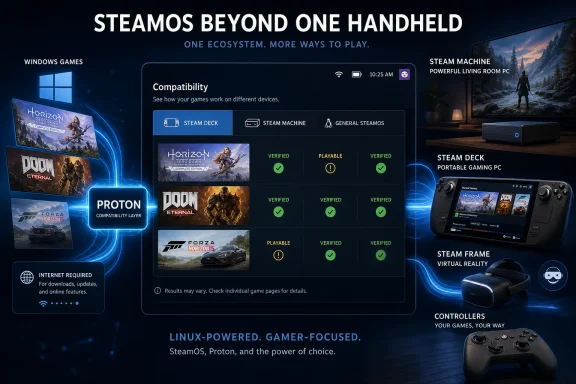
The newly exposed interface therefore separates three questions that previously tended to blur together. A game may suit Steam Deck, qualify for the Steam Machine Verified program, and run through Proton on SteamOS, but those statements are not interchangeable.
That distinction is the most important part of TechPowerUp’s July 10 report. The outlet found that the SteamOS compatibility block now opens a fly-out window with tabs for Steam Deck, Steam Machine, and general SteamOS, each presenting compatibility information relevant to a different environment.
Valve has effectively admitted that “runs on Linux” is too vague to carry a commercial storefront. A title can launch through Proton yet still be a poor fit for a specific device, and a device-specific rating can say little about what will happen on another SteamOS computer.
The result is the beginning of a compatibility hierarchy. SteamOS is the software foundation, Steam Machine and Steam Deck are hardware experiences built on top of it, and the badges translate those layers into information ordinary buyers can use.
That structure matters more than the visual treatment. Valve can now tell customers that a game runs on SteamOS while separately warning that its interface, controls, or performance may not meet the expectations attached to a particular Steam-branded device.
This is what mature platforms do. They separate basic software execution from the quality standard promised by a piece of hardware.
Valve’s new UI brings the first-order answer into Steam itself. According to TechPowerUp’s description of the Steam Store interface, the SteamOS tab states whether a game will run on SteamOS through the Proton compatibility layer.
That wording gives Proton a more formal role in the buying journey. It is no longer simply the machinery SteamOS invokes after installation; it becomes part of the storefront’s representation of the product.
Valve’s official SteamOS material describes Proton as the compatibility layer that allows Windows games to run on the Linux-based operating system. The practical effect is that publishers can continue distributing Windows builds while Valve handles much of the operating-system translation beneath the Steam client.
For users, however, “launches through Proton” is only the start of compatibility. A game can reach its title screen while suffering from broken video playback, inaccessible launchers, controller problems, inconsistent updates, or online components that behave differently from the core executable.
The Verified model exists because technical execution and acceptable experience are different standards. The new three-tab design makes that separation visible: SteamOS communicates broad software viability, while Steam Deck and Steam Machine communicate whether Valve is prepared to associate a device-specific quality judgment with the game.
This is also why the general SteamOS rating could prove valuable beyond Valve’s own hardware. TechPowerUp argues that the rating is likely to be relevant to many modern Linux distributions because Proton is the underlying compatibility mechanism, although Valve’s label should not be mistaken for a universal guarantee across every distribution, graphics stack, driver combination, or desktop configuration.
That caveat is essential. A SteamOS result describes Valve’s software environment and testing assumptions; it does not certify every Linux PC assembled by a user or managed by an organization.
Even so, the direction is unmistakable. Linux gaming compatibility is moving from an informal body of community knowledge toward first-class Steam catalog metadata.
A desktop gamer may assume connectivity is always available. A handheld user, living-room player, event organizer, repair technician, or gaming-lab administrator cannot make the same assumption.
A game that needs the internet once for activation is operationally different from one that requires connectivity every time it launches. Both are different again from an online-only title whose core gameplay depends on remote services.
Steam’s compatibility interface appears to be surfacing that distinction where the user makes the purchase decision. That is a welcome correction to the industry habit of reducing compatibility to processor, memory, and graphics requirements while relegating account systems and network dependencies to fine print.
For Steam Machine in particular, network behavior affects whether the device can credibly function like a console. Living-room hardware is expected to resume predictably, tolerate controller-only navigation, and avoid turning an evening game session into an account-recovery exercise.
Initial setup requirements also matter for archived libraries. Proton may preserve the ability to execute a Windows game on a Linux-based system, but a mandatory external login, activation server, or publisher launcher can remain the weakest link.
The new interface does not solve those dependencies. It does something almost as important: it makes them harder to conceal behind the comforting language of compatibility.
This is a recurring tension in modern PC gaming. The executable may be technically portable while the service around it is not.
By presenting internet requirements alongside Proton status, Valve is implicitly defining compatibility as more than code execution. A game is only meaningfully compatible when the customer can complete the path from installation to play.
That placement makes sense for a feature aimed at SteamOS hardware, but it also limits the usefulness of compatibility information at precisely the point when many customers are researching games from another device. Someone evaluating a Steam Machine library from a Windows desktop or web browser should not need to walk over to SteamOS hardware to inspect the full device-specific breakdown.
TechPowerUp notes that Steam already displays SteamOS and Steam Deck compatibility information in library views on desktop and the web, making a broader rollout appear plausible. Valve has not, in the supplied reporting, confirmed that the same full interface will appear in those clients.
The distinction between evidence and expectation matters here. Valve has established the data model, but the client presentation remains incomplete.
The fly-out itself is also an awkward compromise. It prevents multiple badges from overwhelming a store page, yet it hides the most useful detail behind an extra interaction and a label that may not signal that Steam Machine information is inside.
A customer looking specifically for Steam Machine compatibility may reasonably expect to find a clearly labeled Steam Machine section. Instead, the report describes that information as living under “SteamOS compatibility,” requiring the user to understand that Steam Machine is one branch of the broader SteamOS platform.
That may be conceptually accurate, but storefront design cannot assume that buyers already understand Valve’s platform taxonomy. If the company wants Steam Machine to compete with consoles, its compatibility messaging must become nearly impossible to misread.
The current design feels like infrastructure exposed before the final merchandising layer is ready. Valve has the ratings and the tabs; it has not yet made them prominent enough to carry the purchasing decision.
PC gaming reverses that expectation. Every purchase can involve a mental checklist covering operating system, processor, graphics hardware, driver behavior, display resolution, input support, launchers, and online services.
Steam Machine sits between those models. It offers the breadth of a PC library while trying to present the lower-friction experience of dedicated living-room hardware.
The Steam Machine Verified program is therefore not decorative. It is part of the product’s core usability, because a console-like box cannot rely on customers to perform desktop-style compatibility research for every purchase.
TechPowerUp’s report says the Steam Machine tab contains information relating to that Verified program. The general SteamOS tab, by contrast, gives the broader Proton and connectivity verdict.
That separation prevents a dangerous overclaim. If Valve displayed only a generic SteamOS badge, customers could interpret “runs through Proton” as “works perfectly from a couch,” even when a title expected mouse input, exposed tiny text, invoked an awkward launcher, or otherwise failed to deliver an appliance-like experience.
Conversely, a title that does not receive the strongest hardware-specific assessment may still be useful to technically confident SteamOS users. The tiered interface lets Valve preserve access without pretending that every accessible game provides the same experience.
This was the conceptual strength of Steam Deck Verified: Valve did not use compatibility labels to lock games out. It used them to set expectations.
Steam Machine needs the same candor at a larger scale. A living-room computer connected to a television magnifies small usability defects because the user is farther from the display, less likely to have a keyboard available, and more likely to be sharing the experience with other people.
A Windows desktop can fall back to the desktop. A Steam Machine session that unexpectedly demands desktop intervention has failed its central promise, even if the game technically runs.
The new rating system gives Valve the vocabulary to distinguish those outcomes. Its success will depend on whether the Store makes that vocabulary prominent and whether ratings remain current after game, Proton, SteamOS, and driver updates.
A publisher can update a launcher and break controller navigation. An anti-cheat change can alter multiplayer access. A Proton update can fix a long-standing failure or introduce a regression that affects a subset of games.
That means Valve’s expanding badge system creates an operational burden as well as a marketing advantage. The more hardware categories Steam supports, the more frequently it must reassess what each label means.
A single game may eventually carry meaningful judgments for Steam Deck, Steam Machine, SteamOS, and Steam Frame. Those judgments may differ without any of them being wrong because each answers a different question.
SteamOS asks whether the software runs through the platform’s compatibility stack. Steam Machine asks whether that software meets the expectations of Valve’s living-room experience. Steam Frame will add another environment with its own local execution, controls, display, and form-factor considerations.
The danger is badge fatigue. If customers encounter several ratings without understanding their scope, Valve’s attempt at clarity could recreate the confusion it was designed to remove.
The three-tab fly-out is one answer: keep the high-level UI compact while allowing customers to inspect each environment. But the interface will also need concise explanations of why ratings differ.
A game that works on SteamOS but is not Steam Machine Verified should not appear contradictory. It should appear as software that executes but falls short of a device-specific standard.
That distinction will be familiar to IT professionals. An application can be installable on an operating system without being validated for a managed endpoint, kiosk, virtual desktop, or specialized input environment.
Valve is bringing a similar model to consumer gaming. The storefront becomes a lightweight compatibility database, and each hardware label represents a tested deployment profile rather than a generic assertion that the binary opens.
That sequence suggests the testing and catalog work are moving ahead of the finished consumer presentation. Valve is populating compatibility data before all customers can see it in its intended form.
Official Steamworks documentation describes Steam Frame as a standalone virtual-reality headset that runs SteamOS while also supporting streamed PC content. That creates another important compatibility split: a game running locally on the headset presents a different technical problem from one rendered on a PC and streamed to it.
Valve’s published compatibility process for Steam Frame emphasizes the standalone experience. The documentation says the results affect how games are presented in the Store and library, even though an unfavorable result does not necessarily prevent customers from obtaining the game.
That is the same philosophy underlying the wider Verified ecosystem. Valve is ranking confidence, not erecting a traditional console certification wall.
The missing final UI is nevertheless significant. A rating that exists in Valve’s systems but is not clearly exposed to customers cannot yet perform its central function.
Steam Frame will also test whether the tabbed model can scale. Steam Deck and Steam Machine are conventional flat-screen gaming devices despite their different form factors. A headset introduces far greater differences in display behavior, input, comfort, local performance, and the distinction between VR and non-VR software.
Simply adding another tab may not be enough. Valve will need to explain whether a rating applies to local headset execution or streamed play without forcing shoppers to decode the architecture.
TechPowerUp’s report treats the arrival of Steam Frame compatibility in the interface as a matter of time because the headset is promised for 2026 and ratings are already appearing on certain games. That is a reasonable inference, but the supplied evidence does not establish when the final Store or client presentation will arrive.
What it does establish is intent. Valve is building a unified compatibility framework that can follow a Steam purchase across several classes of hardware.
Most PC game catalogs were built around Windows binaries and Windows-oriented middleware. Proton allows SteamOS to consume much of that catalog without waiting for publishers to produce and maintain separate native releases.
The new compatibility UI adds the missing commercial layer. Translation technology is valuable to enthusiasts; storefront confidence is what makes it valuable to a mass market.
A customer considering Steam Machine no longer has to ask only whether Proton exists. The customer can inspect a game’s Steam Machine verdict, its broader SteamOS operation, and its network requirements from a Valve-controlled interface.
That moves the burden of explanation away from Linux communities and toward the platform vendor. Valve, not the buyer, becomes responsible for turning implementation complexity into a usable purchasing signal.
Windows still benefits from its position as the default development and distribution target for PC games. Proton’s purpose is often to run those Windows builds elsewhere rather than convince studios to abandon them.
But that same arrangement weakens Windows as a mandatory consumer dependency. If a publisher can continue shipping its Windows game while Valve makes it behave acceptably on SteamOS, neither the publisher nor the customer must make a dramatic platform decision.
This is a more credible threat to Windows gaming dominance than a demand for thousands of native Linux ports. It works with the existing software economy instead of asking the economy to rebuild itself.
Microsoft’s advantage remains broad compatibility and the expectation that PC games target Windows first. Valve’s counterargument is becoming: that can remain true without every gaming device running Windows.
The expanded ratings make that counterargument visible in the Store. Each successful SteamOS verdict tells the buyer that the Windows-targeted catalog can travel.
Its Store presence can communicate a general Proton result, a Steam Deck result, and a Steam Machine result, with Steam Frame becoming another visible category as Valve completes the headset UI. Differences among those ratings can expose exactly where the product stops behaving like a platform-native experience.
That is valuable diagnostic pressure. A title that runs on SteamOS but performs poorly on a specific device has a hardware-profile problem. A title that fails broadly through Proton has a deeper software-stack problem.
A requirement for internet access may reveal yet another issue—one unrelated to local rendering or operating-system translation but crucial to the customer’s ability to play. The Store can now place all of these facts near one another.
Developers should not interpret a positive general SteamOS rating as the end of the work. Device-specific Verified programs evaluate the experience customers receive after the compatibility layer has done its job.
Controller support, launch flow, readable interfaces, sensible defaults, and predictable updates remain product responsibilities. Proton can translate system calls; it cannot redesign a launcher or make a keyboard-dependent setup screen pleasant from a sofa.
Publishers also need to treat compatibility ratings as release-sensitive. A patch that introduces a new dependency can change the experience even if the core game engine is untouched.
The larger Valve’s hardware family becomes, the less defensible it will be to test only whether the Windows build starts on a conventional desktop. Steam is turning alternative form factors into visible Store categories, and customers will increasingly judge developers by those results.
Customers buy confidence before they buy compatibility. They want to know whether tonight’s game will work without becoming tonight’s troubleshooting project.
Valve’s ratings can provide that confidence only if they are discoverable, understandable, and current. The present rollout achieves the third dimension of Valve’s compatibility model—general SteamOS, handheld, and living-room hardware—but does not yet present it with the simplicity the platform ultimately needs.
Hiding Steam Machine information under a SteamOS block is defensible as taxonomy. It is less successful as retail communication.
Restricting the complete UI to SteamOS clients is similarly understandable during a targeted rollout, but compatibility research often happens before the customer boots the target device. The desktop and web storefronts are not secondary surfaces; they are part of the hardware sales funnel.
Valve should eventually make the same rating detail visible wherever a Steam customer can evaluate a game. A person using Windows today may be the prospective SteamOS hardware customer the interface needs to persuade.
The Store should also preserve the reasoning behind each verdict. A badge without an explanation can prevent an informed purchase as easily as it enables one, particularly when different devices assign different ratings to the same title.
Steam Deck taught users to inspect compatibility details rather than trust a green icon blindly. Steam Machine and Steam Frame will require even clearer explanations because the relationships among operating system, hardware, local execution, and streaming are more complex.
The ideal interface will conceal that complexity until the customer needs it, not conceal the information itself.
Valve is not merely adding two more badges. It is building the labeling system required to sell SteamOS across handhelds, living-room PCs, and eventually a VR headset without asking customers to understand Linux distributions, translation layers, launchers, anti-cheat behavior, or device-specific performance limits before buying a game.
 Valve Turns One Verified Badge Into a Hardware Platform
Steam Deck Verified worked because it answered a narrow question: can this particular game provide an acceptable experience on this particular handheld? The hardware, display, controls, and operating environment were sufficiently predictable for Valve to compress a complicated technical assessment into a consumer-facing verdict.Steam Machine changes that equation. The living-room system is still a defined Valve experience, but it occupies a different physical and commercial role: it connects SteamOS to televisions, controllers, multiplayer sessions, and the expectations people bring to consoles and conventional gaming PCs.
The newly exposed interface therefore separates three questions that previously tended to blur together. A game may suit Steam Deck, qualify for the Steam Machine Verified program, and run through Proton on SteamOS, but those statements are not interchangeable.
That distinction is the most important part of TechPowerUp’s July 10 report. The outlet found that the SteamOS compatibility block now opens a fly-out window with tabs for Steam Deck, Steam Machine, and general SteamOS, each presenting compatibility information relevant to a different environment.
Valve has effectively admitted that “runs on Linux” is too vague to carry a commercial storefront. A title can launch through Proton yet still be a poor fit for a specific device, and a device-specific rating can say little about what will happen on another SteamOS computer.
The result is the beginning of a compatibility hierarchy. SteamOS is the software foundation, Steam Machine and Steam Deck are hardware experiences built on top of it, and the badges translate those layers into information ordinary buyers can use.
| Rating or tab | What it describes | What the user learns | Current UI status |
|---|---|---|---|
| Steam Deck | Compatibility with Valve’s handheld environment | Whether the title is suitable for Steam Deck | Present in the compatibility fly-out |
| Steam Machine | The Steam Machine Verified program | Device-specific information for the living-room system | Present in the compatibility fly-out |
| SteamOS | General operation through SteamOS and Proton | Whether the game runs and whether internet access is required for setup or gameplay | Present in the compatibility fly-out |
| Steam Frame | Compatibility ratings for Valve’s upcoming VR headset | Ratings are already being attached to certain games | Final Store and client UI not yet implemented |
This is what mature platforms do. They separate basic software execution from the quality standard promised by a piece of hardware.
Proton Becomes Storefront Metadata Instead of Tribal Knowledge
The general SteamOS tab is the most consequential addition because it addresses a longstanding problem with Linux gaming: compatibility information has often lived outside the store where purchases happen. Users have relied on community reports, configuration guides, experimental Proton versions, and discussions whose accuracy can decay as games and compatibility software change.Valve’s new UI brings the first-order answer into Steam itself. According to TechPowerUp’s description of the Steam Store interface, the SteamOS tab states whether a game will run on SteamOS through the Proton compatibility layer.
That wording gives Proton a more formal role in the buying journey. It is no longer simply the machinery SteamOS invokes after installation; it becomes part of the storefront’s representation of the product.
Valve’s official SteamOS material describes Proton as the compatibility layer that allows Windows games to run on the Linux-based operating system. The practical effect is that publishers can continue distributing Windows builds while Valve handles much of the operating-system translation beneath the Steam client.
For users, however, “launches through Proton” is only the start of compatibility. A game can reach its title screen while suffering from broken video playback, inaccessible launchers, controller problems, inconsistent updates, or online components that behave differently from the core executable.
The Verified model exists because technical execution and acceptable experience are different standards. The new three-tab design makes that separation visible: SteamOS communicates broad software viability, while Steam Deck and Steam Machine communicate whether Valve is prepared to associate a device-specific quality judgment with the game.
This is also why the general SteamOS rating could prove valuable beyond Valve’s own hardware. TechPowerUp argues that the rating is likely to be relevant to many modern Linux distributions because Proton is the underlying compatibility mechanism, although Valve’s label should not be mistaken for a universal guarantee across every distribution, graphics stack, driver combination, or desktop configuration.
That caveat is essential. A SteamOS result describes Valve’s software environment and testing assumptions; it does not certify every Linux PC assembled by a user or managed by an organization.
Even so, the direction is unmistakable. Linux gaming compatibility is moving from an informal body of community knowledge toward first-class Steam catalog metadata.
The Internet Requirement Is a Small Label With Large Consequences
The SteamOS tab does more than report whether Proton can run a game. It also indicates whether an internet connection is needed for initial setup or gameplay, a detail that becomes especially important when SteamOS machines are treated as appliances rather than conventional PCs.A desktop gamer may assume connectivity is always available. A handheld user, living-room player, event organizer, repair technician, or gaming-lab administrator cannot make the same assumption.
A game that needs the internet once for activation is operationally different from one that requires connectivity every time it launches. Both are different again from an online-only title whose core gameplay depends on remote services.
Steam’s compatibility interface appears to be surfacing that distinction where the user makes the purchase decision. That is a welcome correction to the industry habit of reducing compatibility to processor, memory, and graphics requirements while relegating account systems and network dependencies to fine print.
For Steam Machine in particular, network behavior affects whether the device can credibly function like a console. Living-room hardware is expected to resume predictably, tolerate controller-only navigation, and avoid turning an evening game session into an account-recovery exercise.
Initial setup requirements also matter for archived libraries. Proton may preserve the ability to execute a Windows game on a Linux-based system, but a mandatory external login, activation server, or publisher launcher can remain the weakest link.
The new interface does not solve those dependencies. It does something almost as important: it makes them harder to conceal behind the comforting language of compatibility.
This is a recurring tension in modern PC gaming. The executable may be technically portable while the service around it is not.
By presenting internet requirements alongside Proton status, Valve is implicitly defining compatibility as more than code execution. A game is only meaningfully compatible when the customer can complete the path from installation to play.
The Interface Is Arriving Before the Information Architecture Is Finished
Valve’s rollout is not yet polished. TechPowerUp reports that the new compatibility interface is only available in SteamOS through the Steam Deck client or Big Picture mode, and that the ratings are hidden inside a fly-out beneath the SteamOS compatibility block.That placement makes sense for a feature aimed at SteamOS hardware, but it also limits the usefulness of compatibility information at precisely the point when many customers are researching games from another device. Someone evaluating a Steam Machine library from a Windows desktop or web browser should not need to walk over to SteamOS hardware to inspect the full device-specific breakdown.
TechPowerUp notes that Steam already displays SteamOS and Steam Deck compatibility information in library views on desktop and the web, making a broader rollout appear plausible. Valve has not, in the supplied reporting, confirmed that the same full interface will appear in those clients.
The distinction between evidence and expectation matters here. Valve has established the data model, but the client presentation remains incomplete.
The fly-out itself is also an awkward compromise. It prevents multiple badges from overwhelming a store page, yet it hides the most useful detail behind an extra interaction and a label that may not signal that Steam Machine information is inside.
A customer looking specifically for Steam Machine compatibility may reasonably expect to find a clearly labeled Steam Machine section. Instead, the report describes that information as living under “SteamOS compatibility,” requiring the user to understand that Steam Machine is one branch of the broader SteamOS platform.
That may be conceptually accurate, but storefront design cannot assume that buyers already understand Valve’s platform taxonomy. If the company wants Steam Machine to compete with consoles, its compatibility messaging must become nearly impossible to misread.
The current design feels like infrastructure exposed before the final merchandising layer is ready. Valve has the ratings and the tabs; it has not yet made them prominent enough to carry the purchasing decision.
Steam Machine Needs Trust More Than It Needs Another Specification
Living-room gaming PCs have historically struggled not because they could not run games, but because they could not eliminate uncertainty. Consoles succeed by making hardware support implicit: a customer sees the platform name and expects the software to work.PC gaming reverses that expectation. Every purchase can involve a mental checklist covering operating system, processor, graphics hardware, driver behavior, display resolution, input support, launchers, and online services.
Steam Machine sits between those models. It offers the breadth of a PC library while trying to present the lower-friction experience of dedicated living-room hardware.
The Steam Machine Verified program is therefore not decorative. It is part of the product’s core usability, because a console-like box cannot rely on customers to perform desktop-style compatibility research for every purchase.
TechPowerUp’s report says the Steam Machine tab contains information relating to that Verified program. The general SteamOS tab, by contrast, gives the broader Proton and connectivity verdict.
That separation prevents a dangerous overclaim. If Valve displayed only a generic SteamOS badge, customers could interpret “runs through Proton” as “works perfectly from a couch,” even when a title expected mouse input, exposed tiny text, invoked an awkward launcher, or otherwise failed to deliver an appliance-like experience.
Conversely, a title that does not receive the strongest hardware-specific assessment may still be useful to technically confident SteamOS users. The tiered interface lets Valve preserve access without pretending that every accessible game provides the same experience.
This was the conceptual strength of Steam Deck Verified: Valve did not use compatibility labels to lock games out. It used them to set expectations.
Steam Machine needs the same candor at a larger scale. A living-room computer connected to a television magnifies small usability defects because the user is farther from the display, less likely to have a keyboard available, and more likely to be sharing the experience with other people.
A Windows desktop can fall back to the desktop. A Steam Machine session that unexpectedly demands desktop intervention has failed its central promise, even if the game technically runs.
The new rating system gives Valve the vocabulary to distinguish those outcomes. Its success will depend on whether the Store makes that vocabulary prominent and whether ratings remain current after game, Proton, SteamOS, and driver updates.
Compatibility Is Now a Moving Relationship, Not a Permanent Stamp
Any Verified program risks being interpreted as a permanent certification. In reality, compatibility is a relationship among several moving components: the game build, Proton, SteamOS, graphics drivers, external launchers, online services, and the target hardware.A publisher can update a launcher and break controller navigation. An anti-cheat change can alter multiplayer access. A Proton update can fix a long-standing failure or introduce a regression that affects a subset of games.
That means Valve’s expanding badge system creates an operational burden as well as a marketing advantage. The more hardware categories Steam supports, the more frequently it must reassess what each label means.
A single game may eventually carry meaningful judgments for Steam Deck, Steam Machine, SteamOS, and Steam Frame. Those judgments may differ without any of them being wrong because each answers a different question.
SteamOS asks whether the software runs through the platform’s compatibility stack. Steam Machine asks whether that software meets the expectations of Valve’s living-room experience. Steam Frame will add another environment with its own local execution, controls, display, and form-factor considerations.
The danger is badge fatigue. If customers encounter several ratings without understanding their scope, Valve’s attempt at clarity could recreate the confusion it was designed to remove.
The three-tab fly-out is one answer: keep the high-level UI compact while allowing customers to inspect each environment. But the interface will also need concise explanations of why ratings differ.
A game that works on SteamOS but is not Steam Machine Verified should not appear contradictory. It should appear as software that executes but falls short of a device-specific standard.
That distinction will be familiar to IT professionals. An application can be installable on an operating system without being validated for a managed endpoint, kiosk, virtual desktop, or specialized input environment.
Valve is bringing a similar model to consumer gaming. The storefront becomes a lightweight compatibility database, and each hardware label represents a tested deployment profile rather than a generic assertion that the binary opens.
Steam Frame Reveals the Scale of Valve’s Plan
Steam Frame shows why Valve needed to expand compatibility beyond Steam Deck. The VR headset is expected to launch in 2026, and Valve is already assigning Steam Frame Verified ratings to certain games even though the final Steam Store and client interface for those ratings has not yet been implemented.That sequence suggests the testing and catalog work are moving ahead of the finished consumer presentation. Valve is populating compatibility data before all customers can see it in its intended form.
Official Steamworks documentation describes Steam Frame as a standalone virtual-reality headset that runs SteamOS while also supporting streamed PC content. That creates another important compatibility split: a game running locally on the headset presents a different technical problem from one rendered on a PC and streamed to it.
Valve’s published compatibility process for Steam Frame emphasizes the standalone experience. The documentation says the results affect how games are presented in the Store and library, even though an unfavorable result does not necessarily prevent customers from obtaining the game.
That is the same philosophy underlying the wider Verified ecosystem. Valve is ranking confidence, not erecting a traditional console certification wall.
The missing final UI is nevertheless significant. A rating that exists in Valve’s systems but is not clearly exposed to customers cannot yet perform its central function.
Steam Frame will also test whether the tabbed model can scale. Steam Deck and Steam Machine are conventional flat-screen gaming devices despite their different form factors. A headset introduces far greater differences in display behavior, input, comfort, local performance, and the distinction between VR and non-VR software.
Simply adding another tab may not be enough. Valve will need to explain whether a rating applies to local headset execution or streamed play without forcing shoppers to decode the architecture.
TechPowerUp’s report treats the arrival of Steam Frame compatibility in the interface as a matter of time because the headset is promised for 2026 and ratings are already appearing on certain games. That is a reasonable inference, but the supplied evidence does not establish when the final Store or client presentation will arrive.
What it does establish is intent. Valve is building a unified compatibility framework that can follow a Steam purchase across several classes of hardware.
Windows Remains the Source Platform, but No Longer the Required Destination
For Windows users, the strategic consequence is not that Valve has suddenly replaced Windows gaming. It is that Steam is steadily reducing the amount of platform knowledge required to leave Windows behind.Most PC game catalogs were built around Windows binaries and Windows-oriented middleware. Proton allows SteamOS to consume much of that catalog without waiting for publishers to produce and maintain separate native releases.
The new compatibility UI adds the missing commercial layer. Translation technology is valuable to enthusiasts; storefront confidence is what makes it valuable to a mass market.
A customer considering Steam Machine no longer has to ask only whether Proton exists. The customer can inspect a game’s Steam Machine verdict, its broader SteamOS operation, and its network requirements from a Valve-controlled interface.
That moves the burden of explanation away from Linux communities and toward the platform vendor. Valve, not the buyer, becomes responsible for turning implementation complexity into a usable purchasing signal.
Windows still benefits from its position as the default development and distribution target for PC games. Proton’s purpose is often to run those Windows builds elsewhere rather than convince studios to abandon them.
But that same arrangement weakens Windows as a mandatory consumer dependency. If a publisher can continue shipping its Windows game while Valve makes it behave acceptably on SteamOS, neither the publisher nor the customer must make a dramatic platform decision.
This is a more credible threat to Windows gaming dominance than a demand for thousands of native Linux ports. It works with the existing software economy instead of asking the economy to rebuild itself.
Microsoft’s advantage remains broad compatibility and the expectation that PC games target Windows first. Valve’s counterargument is becoming: that can remain true without every gaming device running Windows.
The expanded ratings make that counterargument visible in the Store. Each successful SteamOS verdict tells the buyer that the Windows-targeted catalog can travel.
Developers Now Have Multiple Experiences to Protect
For game developers and publishers, the expanded interface increases both reach and accountability. A title is no longer represented by one vague answer to the question of SteamOS support.Its Store presence can communicate a general Proton result, a Steam Deck result, and a Steam Machine result, with Steam Frame becoming another visible category as Valve completes the headset UI. Differences among those ratings can expose exactly where the product stops behaving like a platform-native experience.
That is valuable diagnostic pressure. A title that runs on SteamOS but performs poorly on a specific device has a hardware-profile problem. A title that fails broadly through Proton has a deeper software-stack problem.
A requirement for internet access may reveal yet another issue—one unrelated to local rendering or operating-system translation but crucial to the customer’s ability to play. The Store can now place all of these facts near one another.
Developers should not interpret a positive general SteamOS rating as the end of the work. Device-specific Verified programs evaluate the experience customers receive after the compatibility layer has done its job.
Controller support, launch flow, readable interfaces, sensible defaults, and predictable updates remain product responsibilities. Proton can translate system calls; it cannot redesign a launcher or make a keyboard-dependent setup screen pleasant from a sofa.
Publishers also need to treat compatibility ratings as release-sensitive. A patch that introduces a new dependency can change the experience even if the core game engine is untouched.
The larger Valve’s hardware family becomes, the less defensible it will be to test only whether the Windows build starts on a conventional desktop. Steam is turning alternative form factors into visible Store categories, and customers will increasingly judge developers by those results.
Action checklist for admins
- Confirm that managed SteamOS devices are using the Steam Deck client or Big Picture mode before expecting the new fly-out to appear.
- Open the “SteamOS compatibility” block and check each relevant tab rather than treating the general SteamOS result as a Steam Machine verdict.
- Record whether required games need internet access for initial setup, ongoing gameplay, or both before deploying systems to restricted or unreliable networks.
- Test critical titles after game, SteamOS, Proton, or graphics-stack updates instead of relying indefinitely on an earlier rating.
- Keep a keyboard and mouse recovery path available where a game, launcher, or account workflow may still require desktop intervention.
- Do not assume that a SteamOS rating guarantees identical behavior on every Linux distribution or unmanaged hardware configuration.
The Store Must Become as Reliable as the Compatibility Layer
The technical achievement behind Proton is easy to admire because failures are visible: a game either launches, renders, accepts input, and remains stable, or it does not. The information layer is harder to evaluate, yet it may be just as important to SteamOS adoption.Customers buy confidence before they buy compatibility. They want to know whether tonight’s game will work without becoming tonight’s troubleshooting project.
Valve’s ratings can provide that confidence only if they are discoverable, understandable, and current. The present rollout achieves the third dimension of Valve’s compatibility model—general SteamOS, handheld, and living-room hardware—but does not yet present it with the simplicity the platform ultimately needs.
Hiding Steam Machine information under a SteamOS block is defensible as taxonomy. It is less successful as retail communication.
Restricting the complete UI to SteamOS clients is similarly understandable during a targeted rollout, but compatibility research often happens before the customer boots the target device. The desktop and web storefronts are not secondary surfaces; they are part of the hardware sales funnel.
Valve should eventually make the same rating detail visible wherever a Steam customer can evaluate a game. A person using Windows today may be the prospective SteamOS hardware customer the interface needs to persuade.
The Store should also preserve the reasoning behind each verdict. A badge without an explanation can prevent an informed purchase as easily as it enables one, particularly when different devices assign different ratings to the same title.
Steam Deck taught users to inspect compatibility details rather than trust a green icon blindly. Steam Machine and Steam Frame will require even clearer explanations because the relationships among operating system, hardware, local execution, and streaming are more complex.
The ideal interface will conceal that complexity until the customer needs it, not conceal the information itself.
What This Quiet Rollout Changes Now
The immediate change is narrow: SteamOS users can open a compatibility fly-out and move among Steam Deck, Steam Machine, and general SteamOS information. The larger change is that Valve now has a customer-facing structure capable of describing one library across several devices.- Steam Machine compatibility is now represented separately from general SteamOS operation.
- The complete new interface is currently limited to SteamOS in the Steam Deck client or Big Picture mode.
- The ratings sit inside a fly-out beneath the “SteamOS compatibility” block rather than appearing as equally prominent standalone sections.
- The SteamOS tab identifies Proton operation and discloses internet requirements for setup or gameplay.
- Steam Frame ratings are already being added to some games, but their final Store and client UI is not yet in place.
- A SteamOS result should not be treated as a universal guarantee for every Linux distribution, hardware configuration, or device-specific experience.
References
- Primary source: TechPowerUp
Published: 2026-07-10T15:50:18.684955
Steam Now Shows Steam Machine and SteamOS Verified Ratings | TechPowerUp
Following the launch of the Steam Machine, Valve has finally rolled out its compatibility rating system for its living room gaming experience in Steam, with a new UI that shows both Steam Machine and SteamOS compatibility ratings. The new UI is only available in SteamOS in the Steam Deck client...www.techpowerup.com - Related coverage: windowscentral.com
Valve releases Windows PC drivers for Steam Machine — but official dual-boot support for SteamOS gaming is still missing | Windows Central
Valve still allows Steam hardware owners to install Windows, providing compatible drivers to everyone.www.windowscentral.com - Related coverage: techradar.com
How to build a Steam Machine-killing compact gaming PC for less | TechRadar
Orange box? Black box!www.techradar.com - Related coverage: store.steampowered.com
SteamOS
SteamOS is Valve’s Linux-based operating system. It features a seamless user experience optimized for gaming, while retaining access to the power and flexibility of a PC, and plays tens of thousands of games on Steam. SteamOS officially ships on Steam Deck, and will soon ship with certain Legion...store.steampowered.com
- Related coverage: vr.org
Valve Steam Frame: Release Date, Price, Specs & Everything We Know | VR.org
Valve's Steam Frame is confirmed for summer 2026 with reservations imminent. The latest on the release date, price signals ($899 to $1,199 expected), full specs, and every development, tracked by VR.org.vr.org - Related coverage: steamhardware.io
Steam Frame Explained | Steam Hardware Hub
Steam Frame 2026 status: Valve gives it a mid-2026 shipping window, but final price, exact sale date, standalone compatibility, and streaming tests still matter.steamhardware.io
- Related coverage: vrrare.com
Valve Steam Frame: Specs, Price & Release Date (2026) | VRRare
Everything known about the Valve Steam Frame VR headset: confirmed specs, estimated pricing, release window, and how it compares to Quest 3 and other headsets.vrrare.com - Related coverage: techspot.com
Valve details performance targets for Steam Machine and Steam Frame | TechSpot
Unsurprisingly, Steam Machine verification requirements will be more lenient than those for the Steam Deck, since the Machine is expected to provide roughly six times more performance...www.techspot.com - Related coverage: techtimes.com
Steam Frame Gets First Compatibility Ratings, Signaling Imminent Launch
Steam Frame VR headset earned its first compatibility ratings on June 30, 2026 — Portal 2 passed four of Valve’s five certification checks but failed the native 2,160-by-2,160 resolution test,www.techtimes.com - Related coverage: cdn.steamstatic.com
- Related coverage: gamespot.com
Steam Frame Release Date Window, Possible Price, Specs, And Everything We Know About Valve's Next-Gen VR Headset - GameSpot
Valve isn't done with VR headsets, and its latest one is its most compelling one yet. Here's everything we know about the Steam Frame.www.gamespot.com - Related coverage: tomsguide.com
Valve announces Steam Frame VR headset — a premium standalone rival to the Meta Quest 3 | Tom's Guide
Valve's long-rumored Steam Frame VR headset is real, with a Snapdragon ARM processor, pancake lenses, 4K visuals and up to a 120Hz refresh rate. Here's what you need to know.www.tomsguide.com - Related coverage: pcgamer.com
Valve clarifies what's required for a game to be Steam Machine and Steam Frame verified, but it just makes me worry about the Gabecube even more | PC Gamer
Still, its advice for games being made with SteamOS in mind is all top-notch.www.pcgamer.com - Related coverage: tomshardware.com
Steam shown running on Nintendo Switch thanks to latest Proton Beta — FEX 2604 translates x86 to ARM-friendly instructions on Linux | Tom's Hardware
Arm gaming gets serious.www.tomshardware.com