

GitHub’s five-release VS Code push culminated on July 1, 2026, with Copilot browser tools becoming generally available and enabled by default for paid subscribers, allowing agents to write code, operate a live browser, inspect failures, and manage multiple development sessions without leaving the editor. The browser is the missing actuator that turns Copilot from a code-generating assistant into a system capable of attempting a complete build-test-fix cycle. Parallel sessions, million-token context support, session synchronization, and granular cost reporting reinforce the same shift. VS Code is becoming an agent operations console, not merely an editor with AI attached.
That change is more consequential than the individual feature announcements suggest. Developers gain an unusually convenient way to delegate implementation and verification, but enterprises inherit a new networked execution surface, teams must coordinate agents sharing the same working directory, and every ambitious autonomous workflow now has a token-denominated price.
Before this release cycle, a Copilot agent in VS Code could edit files, invoke terminal commands, run tests, and interpret their output. It could work through a substantial portion of a software task, but the process broke at the point where a human would open the application and determine whether it actually behaved correctly.
That gap mattered most in web development. Passing unit tests does not prove that a menu opens, a form submits, an error message appears, a dialog remains usable, or a responsive layout survives interaction. Developers still had to leave the editor, reproduce the flow manually, collect a screenshot or console error, and return that evidence to Copilot.
The browser tools that became generally available on July 1 eliminate much of that interruption. Per GitHub’s announcement and the June batch changelog highlighted by Tech Times, an agent can open and navigate pages, click, type, hover, drag, handle dialogs, read page content, capture console errors, and attach screenshots to chat. These are programmatic browser actions analogous to the operations exposed by automation technologies such as Playwright and Puppeteer, running against a Chromium-based browser surface.
The important feature is not browsing in isolation. It is that Copilot can use browser observations as feedback for another coding pass: implement a component, start the application, open it, attempt the intended flow, inspect what happened, revise the code, and test again.
That is the closed-loop development workflow GitHub has been building toward. The agent no longer needs to treat the developer as a courier carrying evidence between the codebase and the running application. Human review remains necessary, but the human can increasingly review a completed attempt rather than manually advancing every intermediate step.
GitHub’s official VS Code release notes frame browser validation as a way for agents to verify their own work. That phrasing should not be mistaken for proof that an agent’s verification is equivalent to independent testing. An agent can overlook a requirement, misread a visual state, choose a shallow test path, or congratulate itself for satisfying an interpretation that was wrong in the first place.
The browser therefore closes the mechanical loop, not the epistemic one. Copilot can now act, observe, and revise; it cannot guarantee that the test it devised was sufficient, that the expected behavior was correct, or that the resulting application is safe to ship.
Developers can add full or area screenshots to chat, which is especially useful when the problem is spatial or visual. Instead of describing a misplaced control in prose, a developer can capture the affected region and give the model a more precise artifact to inspect.
Remote development receives a strategically important addition as well. In public preview, HTTP and HTTPS traffic from the integrated browser can be proxied through the remote connection, allowing the browser to reach services that exist inside a remote workspace rather than on the developer’s local machine.
That solves an awkward topology problem. A service running in a container, hosted environment, or remote development machine may not be reachable from a conventional local browser without forwarding ports or reproducing the environment locally. Routing the integrated browser through the remote connection makes agent-driven validation more practical for the cloud-based setups where agents are arguably most valuable.
The result is a browser that participates in the development environment’s identity and network context. That convenience is precisely why the controls around it matter: a browser available to an autonomous agent is simultaneously a testing tool, a data-ingestion channel, and a route to external systems.
Developer-opened tabs remain private unless the user explicitly selects Share with Agent. That access can be revoked, creating a visible boundary between autonomous browsing and pages the developer has deliberately exposed.
Sensitive capabilities receive another layer of gating. Camera, microphone, location, notifications, and clipboard reads are never granted automatically; every such request requires explicit developer approval, and the agent cannot approve the request for itself. That is a necessary constraint because an approval mechanism is meaningless if the autonomous party being constrained can operate it.
This architecture also creates a predictable limitation. An agent-opened tab has no inherited authentication, so Copilot cannot test a feature requiring real credentials unless the developer shares an already-authenticated tab. Otherwise, the agent reaches the login screen without the cookies or secrets required to proceed.
For public pages, unauthenticated user journeys, development endpoints, and many local applications, that limitation is minor. For administration panels, paid services, internal dashboards, and authenticated customer workflows, developers will have to decide whether sharing a live session is justified.
That decision should be treated as a trust escalation, not a routine convenience. Sharing a tab can expose whatever the authenticated session is authorized to see or do, even if the browser’s broader isolation remains intact. Developers should prefer purpose-built test identities and low-privilege environments over sharing a daily administrative session.
Orca Security’s February 2026 RoguePilot research demonstrated the severity of that pattern. According to Orca, malicious instructions embedded in GitHub issue content could passively prompt-inject Copilot and ultimately enable a full repository takeover in the demonstrated chain.
GitHub’s own security research has also shown that prior versions of the Simple Browser tool could be manipulated through web content to exfiltrate developer tokens before a fix was applied. The details differ, but the lesson is consistent: content that appears to be mere data can become instructions when an agent interprets it.
Traditional browser security assumes that a web page may attack the browser, another origin, or the user. Agentic browser security must add another possibility: the page may persuade the agent to misuse legitimate tools already available to it.
That threat does not require a conventional software exploit. A malicious page can instead try to redirect the model’s reasoning, convince it to reveal data, induce it to visit another endpoint, or disguise an unrelated action as part of the developer’s task.
GitHub has introduced several meaningful mitigations. Its fetch tool requires confirmation before accessing a URL the developer has not previously approved, while Content Security Policy sandbox directives isolate external HTML rendered inside the browser surface. Fresh agent sessions reduce exposure to the developer’s existing browser state.
The network filtering controls are particularly important for organizations. Administrators can enable
None of these controls makes prompt injection disappear. They constrain what a successfully manipulated agent can reach, which is often the most practical defensive objective. The model may still follow a malicious instruction, but domain restrictions can prevent that instruction from turning into unrestricted network access.
The default is understandable from a product perspective. A headline capability that remains hidden behind an experimental toggle rarely changes daily behavior, while a browser that works immediately lets developers experience the complete agent loop without setup.
The governance consequence is less comfortable. Organizations that allow automatic updates may acquire a materially expanded Copilot capability before security, compliance, and platform teams have reviewed its domain access, authentication boundaries, and data-handling implications.
Regulated organizations should not answer this problem with a reflexive universal ban. Agent-driven browser testing can be useful in controlled environments, particularly when restricted to development domains, local services, documentation portals, and approved test systems.
The better response is least-privilege browsing. An agent validating an internal web application does not generally need unrestricted access to personal email, cloud administration consoles, public file-sharing services, or arbitrary domains supplied by repository content.
The obvious pattern is to assign feature implementation to one session, code review to another, and documentation to a third. A developer can keep moving among those workstreams, intervene when a session requires judgment, and leave the agents to continue when their tasks are mechanical.
Multi-chat sessions add another organizational layer. Implementation, review, testing, and documentation can each occupy separate chat threads while remaining under a shared session, reducing the tendency for one enormous conversation to accumulate conflicting instructions and unrelated history.
The Agents window supports drag-and-drop rearrangement and session grouping because orchestration creates its own interface problem. Once developers have several agents running across multiple projects, the scarce resource is no longer the ability to generate another answer. It is the ability to determine which agent is working, waiting, finished, blocked, or operating on stale assumptions.
This is where GitHub’s productivity pitch becomes more complicated. Parallelism reduces idle time, but it also multiplies opportunities for interference. The value depends on whether the workstreams are genuinely separable and whether the developer can review their outputs without becoming the bottleneck.
The implementation model differs significantly between VS Code and the standalone GitHub Copilot desktop app.
Shared-directory parallelism is convenient, but it is not true filesystem isolation. Two agents can inspect changing files, build against intermediate states, or edit overlapping regions unless the developer partitions their assignments carefully.
A documentation pass and a focused review may coexist safely with an implementation session. Two agents refactoring the same subsystem are more likely to overwrite assumptions, invalidate tests, or produce diffs that only make sense in the sequence in which they happened.
The desktop app’s Git-worktree model gives each session an isolated branch, making it more suitable for genuinely independent implementation tasks. The cost is that somebody must later compare, reconcile, and merge those branches.
VS Code’s approach is lighter because it treats parallelism primarily as conversation orchestration. It can be highly productive, but teams should not confuse multiple visible sessions with multiple isolated developers.
That is a substantial increase from the previous 200,000-token cap affecting VS Code Copilot Claude sessions, documented in VS Code issue 298901. One million tokens is roughly equivalent to 750,000 English words, providing enough nominal capacity for extensive repository content, long conversations, specifications, and documentation.
The immediate benefit is less manual curation. A developer facing a large codebase no longer has to make as many early guesses about which files, design notes, and previous discussions the model will need.
But a large context window is storage capacity, not guaranteed comprehension. Models can accept more information than they reliably retrieve, prioritize, or reconcile.
The 2026 long-context result cited in the source material gives Claude Opus 4.6 a 78.3 percent recall score at 1 million tokens. That may be strong relative performance, but it still means developers cannot assume that every detail placed somewhere in a huge context will be available at the moment it matters.
The familiar lost in the middle problem therefore becomes an engineering concern. Critical constraints should remain in concise project instructions, architecture summaries, test plans, and task-specific prompts rather than being entrusted solely to their presence in a giant corpus.
Long context can even make weak task definition harder to notice. When an agent has access to hundreds of files and a sprawling conversation, it can construct a confident narrative from abundant evidence while still missing the one policy, interface contract, or migration rule that invalidates its solution.
Teams should treat 1 million tokens as a way to widen the search space, not eliminate the need for structure. Repository maps, explicit acceptance criteria, authoritative design documents, and targeted context remain useful precisely because model attention is not perfectly uniform.
The Copilot Pro plan includes a monthly credit allotment valued at $10. According to the reporting summarized by Tech Times, developers running heavy agentic workflows projected costs 10 to 50 times higher than the previous flat-rate subscriptions, and some users found that a substantial session could consume the monthly allotment rapidly.
The June releases respond with session-level cost visibility. VS Code can show total credit consumption across an entire chat and break out consumption by individual subagent sections when work is delegated.
Additional spending can be tracked through the GitHub Copilot status dashboard. This is more useful than a per-request figure because agentic tasks often contain planning, file retrieval, repeated model calls, tool results, corrections, subagents, and validation passes that a developer experiences as one assignment.
The product’s incentives now pull in two directions. GitHub wants developers to run longer contexts, more autonomous tasks, and multiple parallel agents, while its billing system charges for the model activity those workflows generate.
Cost visibility makes that tension legible; it does not remove it. Developers will have to decide when a million-token context is justified, when a cheaper or less intensive model is sufficient, and when three simultaneous agents are performing useful work rather than producing three bills that converge on the same answer.
This may improve agent discipline over time. Flat-rate systems encourage indiscriminate use, whereas token billing rewards tighter task definitions, smaller relevant contexts, deliberate model selection, and early termination of unproductive loops.
It may also create a new class of engineering-management problem. Organizations will need to distinguish valuable high consumption from waste, set budgets without discouraging experimentation, and investigate sessions whose cost is disproportionate to their output.
That interface reflects a maturing market in which “use Copilot” no longer describes a single computational choice. Model capability, reasoning depth, context allocation, latency, and credit consumption can all vary within the same editor.
For simple transformations, the largest context and highest reasoning level may be wasteful. For a repository-wide migration, architectural review, or cross-cutting debugging task, the additional capacity may be worth the expense.
The model picker therefore becomes analogous to choosing a build profile or deployment target. It is not merely a preference for response style; it affects cost, speed, available context, and the likelihood that the agent can sustain a complex task.
GitHub’s improvements to Autopilot fit the same pattern. Autopilot is the permission level that allows an agent to continue through multi-step tasks without requesting approval at every stage, and the June refinements reportedly improve its ability to recognize when work is actually complete.
That sounds incremental, but completion judgment is central to autonomous software work. An agent that stops too soon leaves a partially implemented task. An agent that continues unnecessarily burns credits, introduces avoidable changes, and may disturb code that was already correct.
The economic and technical definitions of “done” are now intertwined. Better stopping behavior is not only a quality improvement; under token-based billing, it is a cost-control feature.
For developers who move between a desktop, laptop, remote workspace, and multiple repositories, this can remove a substantial amount of reconstruction. A previous agent conversation can be found rather than recreated from memory, and ongoing work can survive a machine change.
The same capability raises predictable governance questions. Agent chats may contain source-code excerpts, file references, debugging output, architectural discussion, customer-specific details, and summaries of internal systems.
Organizations already comfortable storing repositories and development metadata on GitHub may consider this an acceptable extension. Others may have policies that distinguish source hosting from conversational retention, especially when prompts aggregate material from several systems or include information that was not intended to become durable history.
Session sync should therefore be reviewed as a data-retention feature, not merely a convenience toggle. Searchable cross-machine memory is valuable because it persists context; persistence is also exactly what privacy, discovery, residency, and access-control policies regulate.
April 2025: Agent Mode reached general availability in VS Code, establishing the editor’s interactive agent workflow.
September 2025: GitHub shipped its cloud coding agent, expanding delegated work beyond the local editor session.
February 2026: Orca Security published RoguePilot research describing repository takeover through prompt injection delivered via GitHub issue content.
June 1, 2026: GitHub moved Copilot plans from flat-rate pricing to token-based billing.
June 2026: Autopilot became the default mode as GitHub pushed Copilot toward more continuous task execution.
July 1, 2026: Browser tools became generally available and enabled by default for paid Copilot users in VS Code.
July 8, 2026: GitHub published the batch changelog covering VS Code versions 1.123 through 1.127, shipped across June and early July.
That distinction matters. A feature appearing in an AI-native tool is adopted by users who deliberately chose an experimental workflow. The same feature arriving enabled by default in VS Code can reach developers who did not set out to redesign how they build software.
GitHub’s five releases in five weeks show an attempt to compress what had been separate capabilities into a coherent operating model. Browser tools provide observation and interaction; parallel sessions provide concurrency; long context provides capacity; Autopilot provides continuity; session sync provides memory; and usage reporting exposes the bill.
No individual component makes VS Code autonomous. Combined, however, they reduce the number of points at which the agent must return control to the developer.
That is the real threshold crossed by this release cycle. The editor is no longer waiting only for keystrokes and explicit one-shot questions. It is hosting multiple stateful actors that can read, modify, execute, browse, observe, remember, and continue.
The developer’s role consequently moves upward. Less time may be spent transferring errors between tools, but more time must be spent defining boundaries, decomposing work, reviewing outcomes, controlling access, and deciding which agent activity is worth paying for.
That change is more consequential than the individual feature announcements suggest. Developers gain an unusually convenient way to delegate implementation and verification, but enterprises inherit a new networked execution surface, teams must coordinate agents sharing the same working directory, and every ambitious autonomous workflow now has a token-denominated price.
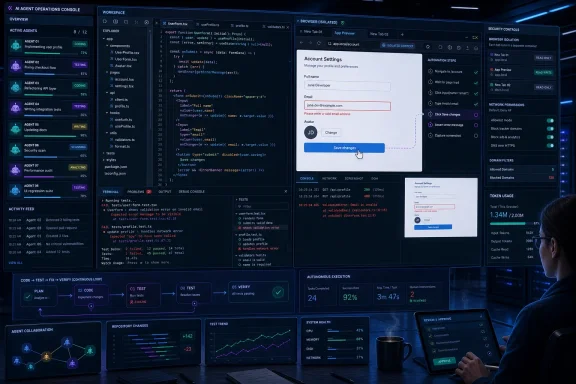 The Browser Turns Code Generation Into a Closed Loop
Before this release cycle, a Copilot agent in VS Code could edit files, invoke terminal commands, run tests, and interpret their output. It could work through a substantial portion of a software task, but the process broke at the point where a human would open the application and determine whether it actually behaved correctly.That gap mattered most in web development. Passing unit tests does not prove that a menu opens, a form submits, an error message appears, a dialog remains usable, or a responsive layout survives interaction. Developers still had to leave the editor, reproduce the flow manually, collect a screenshot or console error, and return that evidence to Copilot.
The browser tools that became generally available on July 1 eliminate much of that interruption. Per GitHub’s announcement and the June batch changelog highlighted by Tech Times, an agent can open and navigate pages, click, type, hover, drag, handle dialogs, read page content, capture console errors, and attach screenshots to chat. These are programmatic browser actions analogous to the operations exposed by automation technologies such as Playwright and Puppeteer, running against a Chromium-based browser surface.
The important feature is not browsing in isolation. It is that Copilot can use browser observations as feedback for another coding pass: implement a component, start the application, open it, attempt the intended flow, inspect what happened, revise the code, and test again.
That is the closed-loop development workflow GitHub has been building toward. The agent no longer needs to treat the developer as a courier carrying evidence between the codebase and the running application. Human review remains necessary, but the human can increasingly review a completed attempt rather than manually advancing every intermediate step.
GitHub’s official VS Code release notes frame browser validation as a way for agents to verify their own work. That phrasing should not be mistaken for proof that an agent’s verification is equivalent to independent testing. An agent can overlook a requirement, misread a visual state, choose a shallow test path, or congratulate itself for satisfying an interpretation that was wrong in the first place.
The browser therefore closes the mechanical loop, not the epistemic one. Copilot can now act, observe, and revise; it cannot guarantee that the test it devised was sufficient, that the expected behavior was correct, or that the resulting application is safe to ship.
GitHub Is Making the Integrated Browser a Working Surface
The browser changes are broader than agent control. GitHub has added favorites, history, web search, and explicit permission handling for camera, location, and microphone, making the integrated browser more credible as an everyday development tool rather than a minimal preview pane.Developers can add full or area screenshots to chat, which is especially useful when the problem is spatial or visual. Instead of describing a misplaced control in prose, a developer can capture the affected region and give the model a more precise artifact to inspect.
Remote development receives a strategically important addition as well. In public preview, HTTP and HTTPS traffic from the integrated browser can be proxied through the remote connection, allowing the browser to reach services that exist inside a remote workspace rather than on the developer’s local machine.
That solves an awkward topology problem. A service running in a container, hosted environment, or remote development machine may not be reachable from a conventional local browser without forwarding ports or reproducing the environment locally. Routing the integrated browser through the remote connection makes agent-driven validation more practical for the cloud-based setups where agents are arguably most valuable.
The result is a browser that participates in the development environment’s identity and network context. That convenience is precisely why the controls around it matter: a browser available to an autonomous agent is simultaneously a testing tool, a data-ingestion channel, and a route to external systems.
Isolation Is the First Line of Defense, Not a Security Proof
GitHub’s browser isolation model is thoughtfully designed for a feature enabled by default. Tabs opened by an agent start in fresh sessions and do not inherit cookies, local storage, or session state from the developer’s ordinary browsing. Parallel agents also keep their browser tabs isolated from one another.Developer-opened tabs remain private unless the user explicitly selects Share with Agent. That access can be revoked, creating a visible boundary between autonomous browsing and pages the developer has deliberately exposed.
Sensitive capabilities receive another layer of gating. Camera, microphone, location, notifications, and clipboard reads are never granted automatically; every such request requires explicit developer approval, and the agent cannot approve the request for itself. That is a necessary constraint because an approval mechanism is meaningless if the autonomous party being constrained can operate it.
This architecture also creates a predictable limitation. An agent-opened tab has no inherited authentication, so Copilot cannot test a feature requiring real credentials unless the developer shares an already-authenticated tab. Otherwise, the agent reaches the login screen without the cookies or secrets required to proceed.
For public pages, unauthenticated user journeys, development endpoints, and many local applications, that limitation is minor. For administration panels, paid services, internal dashboards, and authenticated customer workflows, developers will have to decide whether sharing a live session is justified.
That decision should be treated as a trust escalation, not a routine convenience. Sharing a tab can expose whatever the authenticated session is authorized to see or do, even if the browser’s broader isolation remains intact. Developers should prefer purpose-built test identities and low-privilege environments over sharing a daily administrative session.
Prompt Injection Moves From a Research Problem Into Daily Tooling
Browser isolation prevents accidental inheritance of credentials, but it does not solve the deeper problem of untrusted content influencing an agent. When Copilot reads a page, issue, document, or error output, that content becomes input to a model capable of taking actions.Orca Security’s February 2026 RoguePilot research demonstrated the severity of that pattern. According to Orca, malicious instructions embedded in GitHub issue content could passively prompt-inject Copilot and ultimately enable a full repository takeover in the demonstrated chain.
GitHub’s own security research has also shown that prior versions of the Simple Browser tool could be manipulated through web content to exfiltrate developer tokens before a fix was applied. The details differ, but the lesson is consistent: content that appears to be mere data can become instructions when an agent interprets it.
Traditional browser security assumes that a web page may attack the browser, another origin, or the user. Agentic browser security must add another possibility: the page may persuade the agent to misuse legitimate tools already available to it.
That threat does not require a conventional software exploit. A malicious page can instead try to redirect the model’s reasoning, convince it to reveal data, induce it to visit another endpoint, or disguise an unrelated action as part of the developer’s task.
GitHub has introduced several meaningful mitigations. Its fetch tool requires confirmation before accessing a URL the developer has not previously approved, while Content Security Policy sandbox directives isolate external HTML rendered inside the browser surface. Fresh agent sessions reduce exposure to the developer’s existing browser state.
The network filtering controls are particularly important for organizations. Administrators can enable
chat.agent.networkFilter, define permitted destinations through chat.agent.allowedNetworkDomains, and block destinations through chat.agent.deniedNetworkDomains. Wildcards such as *.example.com are supported, and denied entries take precedence over allowed ones.None of these controls makes prompt injection disappear. They constrain what a successfully manipulated agent can reach, which is often the most practical defensive objective. The model may still follow a malicious instruction, but domain restrictions can prevent that instruction from turning into unrestricted network access.
The Default-On Decision Transfers Work to Administrators
GitHub’s decision to enable browser tools by default for developers using VS Code with a paid Copilot subscription will accelerate adoption. It also means enterprises cannot assume that a network-capable agent remains dormant until an employee deliberately opts in.The default is understandable from a product perspective. A headline capability that remains hidden behind an experimental toggle rarely changes daily behavior, while a browser that works immediately lets developers experience the complete agent loop without setup.
The governance consequence is less comfortable. Organizations that allow automatic updates may acquire a materially expanded Copilot capability before security, compliance, and platform teams have reviewed its domain access, authentication boundaries, and data-handling implications.
Regulated organizations should not answer this problem with a reflexive universal ban. Agent-driven browser testing can be useful in controlled environments, particularly when restricted to development domains, local services, documentation portals, and approved test systems.
The better response is least-privilege browsing. An agent validating an internal web application does not generally need unrestricted access to personal email, cloud administration consoles, public file-sharing services, or arbitrary domains supplied by repository content.
Action checklist for admins
- Inventory teams using paid Copilot subscriptions and determine when VS Code versions 1.123 through 1.127 are entering managed environments.
- Enable
chat.agent.networkFilterbefore broad deployment where unrestricted agent browsing is inappropriate. - Populate
chat.agent.allowedNetworkDomainswith required development, testing, documentation, and package-service destinations. - Use
chat.agent.deniedNetworkDomainsfor sensitive or high-risk destinations, remembering that denied domains take precedence. - Test wildcard rules against remote workspaces and integrated-browser traffic before enforcing them organization-wide.
- Require dedicated, low-privilege test accounts for authenticated browser workflows instead of daily administrative identities.
- Review whether server-side session synchronization aligns with retention, confidentiality, and data-residency policies.
- Monitor Copilot credit use after enabling parallel agents and large-context sessions.
Parallel Sessions Replace Waiting With Coordination
Browser automation closes the verification loop, while the new Agents window changes how much work can be placed inside that loop. Developers can now run multiple agent sessions simultaneously and keep them visible at once rather than waiting for one conversation to finish before beginning another.The obvious pattern is to assign feature implementation to one session, code review to another, and documentation to a third. A developer can keep moving among those workstreams, intervene when a session requires judgment, and leave the agents to continue when their tasks are mechanical.
Multi-chat sessions add another organizational layer. Implementation, review, testing, and documentation can each occupy separate chat threads while remaining under a shared session, reducing the tendency for one enormous conversation to accumulate conflicting instructions and unrelated history.
The Agents window supports drag-and-drop rearrangement and session grouping because orchestration creates its own interface problem. Once developers have several agents running across multiple projects, the scarce resource is no longer the ability to generate another answer. It is the ability to determine which agent is working, waiting, finished, blocked, or operating on stale assumptions.
This is where GitHub’s productivity pitch becomes more complicated. Parallelism reduces idle time, but it also multiplies opportunities for interference. The value depends on whether the workstreams are genuinely separable and whether the developer can review their outputs without becoming the bottleneck.
The implementation model differs significantly between VS Code and the standalone GitHub Copilot desktop app.
| Capability | VS Code parallel sessions | Copilot desktop app |
|---|---|---|
| Primary isolation unit | Chat or agent session | Git worktree and branch |
| Repository workspace | Sessions share the same working directory | Each session uses an isolated repository branch |
| Best suited to | Related tasks that can be coordinated in one workspace | Independent tasks that may edit overlapping code |
| Main operational risk | Sessions can encounter or modify the same files | Branch divergence and later integration work |
| Management trade-off | Simpler and immediate inside the editor | Stronger separation with more repository coordination |
A documentation pass and a focused review may coexist safely with an implementation session. Two agents refactoring the same subsystem are more likely to overwrite assumptions, invalidate tests, or produce diffs that only make sense in the sequence in which they happened.
The desktop app’s Git-worktree model gives each session an isolated branch, making it more suitable for genuinely independent implementation tasks. The cost is that somebody must later compare, reconcile, and merge those branches.
VS Code’s approach is lighter because it treats parallelism primarily as conversation orchestration. It can be highly productive, but teams should not confuse multiple visible sessions with multiple isolated developers.
Million-Token Context Expands Capacity, Not Understanding
The June cycle also introduces support for context windows of up to 1 million tokens with compatible Anthropic and OpenAI models. Tech Times identifies Claude Sonnet 4.6 and Opus 4.6 among the supported Anthropic models, enabled through the relevant API header Anthropic introduced in August 2025.That is a substantial increase from the previous 200,000-token cap affecting VS Code Copilot Claude sessions, documented in VS Code issue 298901. One million tokens is roughly equivalent to 750,000 English words, providing enough nominal capacity for extensive repository content, long conversations, specifications, and documentation.
The immediate benefit is less manual curation. A developer facing a large codebase no longer has to make as many early guesses about which files, design notes, and previous discussions the model will need.
But a large context window is storage capacity, not guaranteed comprehension. Models can accept more information than they reliably retrieve, prioritize, or reconcile.
The 2026 long-context result cited in the source material gives Claude Opus 4.6 a 78.3 percent recall score at 1 million tokens. That may be strong relative performance, but it still means developers cannot assume that every detail placed somewhere in a huge context will be available at the moment it matters.
The familiar lost in the middle problem therefore becomes an engineering concern. Critical constraints should remain in concise project instructions, architecture summaries, test plans, and task-specific prompts rather than being entrusted solely to their presence in a giant corpus.
Long context can even make weak task definition harder to notice. When an agent has access to hundreds of files and a sprawling conversation, it can construct a confident narrative from abundant evidence while still missing the one policy, interface contract, or migration rule that invalidates its solution.
Teams should treat 1 million tokens as a way to widen the search space, not eliminate the need for structure. Repository maps, explicit acceptance criteria, authoritative design documents, and targeted context remain useful precisely because model attention is not perfectly uniform.
Every Expanded Capability Now Has a Meter Attached
Large context and parallel agents arrived immediately after a major economic change. On June 1, GitHub replaced flat-rate Copilot pricing with token-based billing across Copilot plans, turning the size and frequency of agent interactions into direct cost variables.The Copilot Pro plan includes a monthly credit allotment valued at $10. According to the reporting summarized by Tech Times, developers running heavy agentic workflows projected costs 10 to 50 times higher than the previous flat-rate subscriptions, and some users found that a substantial session could consume the monthly allotment rapidly.
The June releases respond with session-level cost visibility. VS Code can show total credit consumption across an entire chat and break out consumption by individual subagent sections when work is delegated.
Additional spending can be tracked through the GitHub Copilot status dashboard. This is more useful than a per-request figure because agentic tasks often contain planning, file retrieval, repeated model calls, tool results, corrections, subagents, and validation passes that a developer experiences as one assignment.
The product’s incentives now pull in two directions. GitHub wants developers to run longer contexts, more autonomous tasks, and multiple parallel agents, while its billing system charges for the model activity those workflows generate.
Cost visibility makes that tension legible; it does not remove it. Developers will have to decide when a million-token context is justified, when a cheaper or less intensive model is sufficient, and when three simultaneous agents are performing useful work rather than producing three bills that converge on the same answer.
This may improve agent discipline over time. Flat-rate systems encourage indiscriminate use, whereas token billing rewards tighter task definitions, smaller relevant contexts, deliberate model selection, and early termination of unproductive loops.
It may also create a new class of engineering-management problem. Organizations will need to distinguish valuable high consumption from waste, set budgets without discouraging experimentation, and investigate sessions whose cost is disproportionate to their output.
Model Choice Becomes Part of the Development Workflow
GitHub is surfacing model management more directly inside VS Code. A Language Models editor exposes available model-provider extensions and connects developers to filtered Marketplace results, while a unified picker provides controls for context size and reasoning effort.That interface reflects a maturing market in which “use Copilot” no longer describes a single computational choice. Model capability, reasoning depth, context allocation, latency, and credit consumption can all vary within the same editor.
For simple transformations, the largest context and highest reasoning level may be wasteful. For a repository-wide migration, architectural review, or cross-cutting debugging task, the additional capacity may be worth the expense.
The model picker therefore becomes analogous to choosing a build profile or deployment target. It is not merely a preference for response style; it affects cost, speed, available context, and the likelihood that the agent can sustain a complex task.
GitHub’s improvements to Autopilot fit the same pattern. Autopilot is the permission level that allows an agent to continue through multi-step tasks without requesting approval at every stage, and the June refinements reportedly improve its ability to recognize when work is actually complete.
That sounds incremental, but completion judgment is central to autonomous software work. An agent that stops too soon leaves a partially implemented task. An agent that continues unnecessarily burns credits, introduces avoidable changes, and may disturb code that was already correct.
The economic and technical definitions of “done” are now intertwined. Better stopping behavior is not only a quality improvement; under token-based billing, it is a cost-control feature.
Session Sync Trades Friction for Centralized History
The/chronicle command and session-sync capability give developers searchable access to chat sessions across machines and workspaces. Conversation history is persisted to the developer’s GitHub account and stored server-side by GitHub.For developers who move between a desktop, laptop, remote workspace, and multiple repositories, this can remove a substantial amount of reconstruction. A previous agent conversation can be found rather than recreated from memory, and ongoing work can survive a machine change.
The same capability raises predictable governance questions. Agent chats may contain source-code excerpts, file references, debugging output, architectural discussion, customer-specific details, and summaries of internal systems.
Organizations already comfortable storing repositories and development metadata on GitHub may consider this an acceptable extension. Others may have policies that distinguish source hosting from conversational retention, especially when prompts aggregate material from several systems or include information that was not intended to become durable history.
Session sync should therefore be reviewed as a data-retention feature, not merely a convenience toggle. Searchable cross-machine memory is valuable because it persists context; persistence is also exactly what privacy, discovery, residency, and access-control policies regulate.
Timeline
August 2025: Anthropic introduced the API header later used to unlock 1-million-token context for supported Claude models.April 2025: Agent Mode reached general availability in VS Code, establishing the editor’s interactive agent workflow.
September 2025: GitHub shipped its cloud coding agent, expanding delegated work beyond the local editor session.
February 2026: Orca Security published RoguePilot research describing repository takeover through prompt injection delivered via GitHub issue content.
June 1, 2026: GitHub moved Copilot plans from flat-rate pricing to token-based billing.
June 2026: Autopilot became the default mode as GitHub pushed Copilot toward more continuous task execution.
July 1, 2026: Browser tools became generally available and enabled by default for paid Copilot users in VS Code.
July 8, 2026: GitHub published the batch changelog covering VS Code versions 1.123 through 1.127, shipped across June and early July.
VS Code Reaches the Point Its Rivals Reached First—At Much Larger Scale
Cursor and Claude Code reportedly shipped agentic browser verification before VS Code. GitHub is therefore not claiming invention of the category so much as integrating its major components into a broadly deployed development environment.That distinction matters. A feature appearing in an AI-native tool is adopted by users who deliberately chose an experimental workflow. The same feature arriving enabled by default in VS Code can reach developers who did not set out to redesign how they build software.
GitHub’s five releases in five weeks show an attempt to compress what had been separate capabilities into a coherent operating model. Browser tools provide observation and interaction; parallel sessions provide concurrency; long context provides capacity; Autopilot provides continuity; session sync provides memory; and usage reporting exposes the bill.
No individual component makes VS Code autonomous. Combined, however, they reduce the number of points at which the agent must return control to the developer.
That is the real threshold crossed by this release cycle. The editor is no longer waiting only for keystrokes and explicit one-shot questions. It is hosting multiple stateful actors that can read, modify, execute, browse, observe, remember, and continue.
The developer’s role consequently moves upward. Less time may be spent transferring errors between tools, but more time must be spent defining boundaries, decomposing work, reviewing outcomes, controlling access, and deciding which agent activity is worth paying for.
The Practical Meaning of GitHub’s Agentic Editor
The June batch is best understood not as a pile of Copilot conveniences, but as an architectural statement about where software development is going. The concrete implications are already visible:- Paid Copilot users now receive agentic browser tools enabled by default in updated VS Code environments.
- Agents can perform browser-based validation, but authenticated testing requires a developer to share an already-authenticated tab.
- Parallel VS Code sessions share one working directory and should not be treated as isolated branches.
- Enterprise network filters should be configured before unrestricted browsing becomes routine.
- One-million-token context expands what a model can receive, not what it can recall perfectly.
- Parallel agents, long contexts, and Autopilot can all increase credit consumption under token-based billing.
References
- Primary source: Tech Times
Published: Thu, 09 Jul 2026 12:49:56 GMT
Loading…
www.techtimes.com - Related coverage: github.blog
Browser tools for GitHub Copilot in VS Code are generally available - GitHub Changelog
Browser tools in VS Code are now generally available. Agents can now drive a real browser, navigate web apps, and feed findings back into the chat.github.blog
- Related coverage: code.visualstudio.com
Loading…
code.visualstudio.com - Official source: docs.github.com
Usage-based billing for individuals - GitHub Docs
Your Copilot plan includes a monthly allowance of GitHub AI Credits. If you exhaust your AI credits, you can pay extra to keep working. docs.github.com
- Related coverage: orca.security
Loading…
orca.security - Official source: claude.com
Loading…
claude.com
- Official source: support.claude.com
Loading…
support.claude.com - Related coverage: marketplace.visualstudio.com
Loading…
marketplace.visualstudio.com - Related coverage: barc.wi.mit.edu
Loading…
barc.wi.mit.edu - Related coverage: davejjwilliams.github.io
Loading…
davejjwilliams.github.io - Related coverage: windowscentral.com
Claude Code comes to the web — so you can pay to manage the AI that’s taking your job | Windows Central
Anthropic brings its AI coding assistant to the browser, making Claude Code more accessible than ever.www.windowscentral.com - Related coverage: techradar.com
I tried 70+ best AI tools in 2026 | TechRadar
The tools, the guides, the insights. If it’s AI, it’s herewww.techradar.com - Related coverage: time.com
AI Is Moving Past Chatbots. Claude Cowork Shows What's Next
An AI powerful enough to analyze DNA, file taxes, and grow tomato plants is being redesigned for everyday work, pointing toward life beyond chatbots.time.com