

Verdict: deploy the June 2026 Windows security updates to managed devices that do not depend on third-party applications launching or controlling Microsoft Office through OLE automation, while holding or mitigating only the identified workflow-dependent cohorts until Microsoft ships its permanent fix. This is not evidence of a fleet-wide Office outage. It is a compatibility failure at a specific integration boundary, and treating every Windows PC as equally exposed would trade a targeted business-app risk for an unnecessarily broad delay in security servicing.
Microsoft documented the problem on June 16, one week after the affected Windows updates began shipping on June 9. Its release notes say certain third-party applications may no longer launch Office applications or open Office documents through OLE automation, sometimes without displaying an error. The practical response is to classify devices by workflow, validate the relevant application-to-Office path, and continue deployment everywhere that path is absent or demonstrably unaffected.
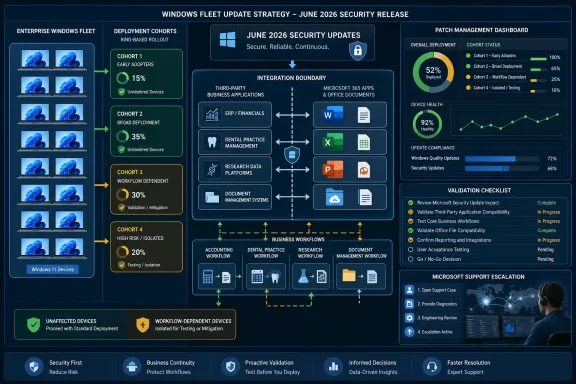
The safest default is not “pause June everywhere.” It is patch by dependency cohort.
Start by identifying devices whose users launch Word, Excel, PowerPoint, Access, or Office documents from another business application. Microsoft explicitly names CCH Engagement, Workpaper Manager, Dentrix, Softdent, and Zotero among the reported examples, while warning that similar products may also be affected. The product list is useful as a starting point, but the technical behavior matters more than the brand name.
A workstation should enter the high-risk cohort when a third-party program creates, opens, exports, edits, prints, merges, or otherwise controls an Office file by invoking an Office application. That includes workflows where the user never deliberately opens Word or Excel because the line-of-business application performs the action in the background.
Devices that merely have Office installed are not automatically part of this cohort. Neither are PCs whose users open documents directly from File Explorer, the Office application, or a known unaffected document portal. Microsoft’s documented workaround—opening the application or document directly—confirms that the affected boundary is the handoff from a third-party application into Office, not necessarily Office itself.
This distinction should drive deployment immediately. Patch standard knowledge-worker devices, kiosks, development systems, administrative workstations, and other endpoints after normal validation if they do not rely on that handoff. Hold or obtain Microsoft’s enterprise mitigation for the smaller group running integration-dependent accounting, dental, research, document-management, or records workflows.
Validation therefore has to begin inside the third-party application. An accounting test might open an engagement record and generate its Word or Excel output. A dental workflow might select a patient document and invoke its associated Office operation. A Zotero test should exercise the actual Office-connected process used by researchers rather than simply proving that Zotero and Word each open independently.
The validation sequence is straightforward. First, capture a known-good transaction on an unpatched representative device. Second, install the applicable June update on a matching pilot device. Third, repeat the transaction from the third-party application using the same document type, user role, permissions, and Office configuration. Fourth, verify not only that Office appears, but that the expected document opens, data transfers, and the workflow completes.
Test silent failures deliberately. Microsoft says the application or document may fail to open without an error message, which means a help-desk script that asks users for an error code will miss part of the incident. A button that appears to do nothing, a stalled export, or a generated document that never opens may be the relevant symptom.
A direct launch should then be tested separately. If Word or Excel opens normally outside the business application, the result supports the documented OLE diagnosis and gives the service desk a viable temporary workflow. If direct Office launch also fails, administrators should not assume it is the same issue; that result needs separate troubleshooting.
Those identifiers tell administrators whether a device has received an affected update, but they do not establish whether the device will experience the failure. Exposure is a combination of Windows update state, installed application behavior, Office integration, user workflow, and potentially configuration details that Microsoft has not publicly enumerated.
That is why inventory queries alone cannot close the incident. A report listing every device with KB5094126 or KB5093998 identifies the population requiring assessment, not the population requiring rollback. The second dataset must describe application and workflow dependency.
At minimum, deployment owners need to correlate the Windows version and build with the installed third-party product, the business unit using it, the Office operation it invokes, and the availability of a direct-launch workaround. That turns a generic known issue into an actionable deployment map.
The June 23 preview documentation reinforces the need for this separation. Microsoft still describes a permanent resolution as forthcoming in a future Windows update, while offering an enterprise workaround through Microsoft Support for affected devices. In other words, installing the preview is not documented as the permanent answer to the Office-launch problem.
The first cohort contains devices with no identified third-party-to-Office automation dependency. These systems should proceed through the organization’s normal deployment rings. Administrators should still monitor them, but the documented issue does not justify freezing their security baseline merely because Office is installed.
The second cohort contains devices that run potentially relevant software but pass representative workflow testing after the update. These devices can also proceed, preferably in a controlled ring with enhanced monitoring. Their inclusion matters because software inventory may overstate risk: an application can be installed without its Office integration being configured, licensed, or used.
The third cohort contains confirmed failures or business-critical integrations that have not yet been tested. These systems warrant a temporary hold, Microsoft’s enterprise mitigation, or a documented direct-launch workaround if that workaround preserves the required business process. The hold should apply to the affected device collection, not automatically to the entire department or company.
This model also accommodates shared systems. If a workstation serves multiple users and even one critical workflow depends on OLE automation, the device belongs in the dependency cohort until testing or mitigation clears it. Device targeting must follow actual use, not the job title of its nominal owner.
Virtual desktops and pooled environments require similar care. A small number of images may support a large user population, so the blast radius is determined by image assignment and application publishing rather than physical device count. The same transaction-level testing remains necessary.
A third-party application may do more than start Word. It can select a template, inject client or patient data, set document properties, invoke macros, manage the save location, register the completed file, or return status information to the originating system. Directly opening Word bypasses the failing launch path, but it may also bypass those surrounding controls.
Administrators should therefore ask the process owner—not merely the endpoint team—whether direct launch is an acceptable workaround. If the user can manually open and edit the document but cannot generate it with the required metadata, the workaround may be technically successful and operationally useless.
The same caution applies to regulated or auditable workflows. Manual document handling can introduce naming errors, misplaced files, missing records, or steps that the integration normally enforces. Nothing in Microsoft’s public workaround guarantees equivalence with the original business process.
Where direct launch is acceptable, service-desk instructions should identify the document’s approved location, the Office application used to open it, and the steps required to return the completed file to the business system. “Open Word manually” is not enough if the user does not know which file, template, or repository is involved.
Where it is not acceptable, the device belongs in the hold-or-mitigate cohort. That is precisely the kind of case for which Microsoft says organizations can contact Microsoft Support for business to obtain the available enterprise workaround.
Microsoft did, however, state that a workaround is available for affected organizational devices through Microsoft Support for business. That creates an important distinction between the public workaround and the enterprise mitigation.
The public workaround changes how the user opens Office or the document. The support-provided mitigation is intended to be applied to affected devices, although Microsoft’s public release notes do not disclose its implementation details. Administrators should not guess at registry changes, security-policy reversals, or undocumented files based on forum speculation.
Organizations opening a support case should bring reproducible evidence. The case should identify the affected KB and OS build, the third-party product, the Office application being invoked, whether direct launch succeeds, whether the failure is silent, and the smallest repeatable transaction that demonstrates the problem.
A pilot collection should receive the mitigation before broad application to the affected cohort. The team should repeat both the integration test and ordinary Office-launch tests, then monitor the business application for secondary effects. A mitigation that restores process startup still needs to be validated through document creation, editing, saving, and handoff.
The support-only route also means organizations should budget time for case handling rather than waiting until the final deployment deadline. A business application that “might use Office somehow” should be tested now, not discovered after the security-update deferral window has nearly expired.
The June releases are security updates. Microsoft’s own documentation describes KB5094126 as including current security fixes and improvements, meaning a broad rollback also removes the security baseline delivered by that cumulative package. Without verified evidence that the OLE failure affects most devices, fleet-wide removal is an unnecessarily blunt trade.
Rollback can also obscure the dependency map. If every pilot device is immediately reverted after the first report, administrators may never determine which application versions, configurations, or workflows are actually affected. That leaves the organization unable to make a rational decision when the next cumulative update arrives.
The better sequence is containment, reproduction, classification, and then recovery. Stop deployment to the suspected collection, reproduce the business transaction, confirm that direct Office launch still works, and decide whether the public workaround or Microsoft’s enterprise mitigation is viable. Roll back only where business continuity requires it and no acceptable mitigation is available.
Any rollback should carry an exit condition. The device remains an exception until Microsoft’s permanent fix is deployed and the original workflow is retested. An exception without an owner and retest date quietly becomes a permanently underpatched machine.
The same discipline applies to pausing. A hold is not a resolution; it is time purchased for testing, mitigation, and vendor coordination. Administrators should record why each device group is held and what evidence will permit deployment to resume.
Microsoft’s OLE documentation is specific: third-party applications may fail to launch Office applications or documents. It does not establish that every Explorer complaint, unresponsive shortcut, missing customization, or failed document open shares the same cause. Similar timing is not proof of a shared technical root.
The useful pattern is operational rather than diagnostic. June’s servicing documentation shows why administrators must track several narrowly scoped regressions from the same cumulative-update cycle without collapsing them into one supposed mega-bug. A device can experience more than one issue after an update, but each issue still needs its own affected path and validation procedure.
For the OLE problem, the decisive test begins in the third-party application. For an Explorer problem, the decisive test begins with the relevant shell action and execution context. If a user says “Office won’t open from Explorer,” that is materially different from “our accounting application’s Generate Document button no longer launches Word.”
This distinction should be preserved in ticket categorization. Labeling every report “KB5094126 broke Office” creates a noisy incident queue in which confirmed OLE failures, ordinary Office failures, Explorer symptoms, and unrelated application problems become indistinguishable.
WindowsForum’s earlier coverage of KB5094126 and KB5093998 focused on the confirmed Office automation failure, while its June 23 preview coverage showed the issue persisting into Microsoft’s later documentation. Taken together, those updates support caution around integrated workflows, not a claim that every post-update complaint has one cause.
Many organizations have internal utilities, legacy databases, scripts, document generators, case-management clients, and industry-specific front ends that invoke Office without advertising OLE automation to users. The program may have been built years ago, transferred between teams, and left running because it performs a narrow but essential task.
Users may describe these systems in business terms rather than technical ones: “create the report,” “export the workpaper,” “open the letter,” or “print the patient form.” None of those descriptions tells the deployment team that Word or Excel is being automated behind the scenes.
Application owners should review workflows that generate Office-format output, not just products on Microsoft’s list. Packaging records, software catalogs, help-desk histories, process documentation, and interviews with departmental power users may reveal dependencies that ordinary endpoint inventory cannot.
Developers and application support teams should also inspect integrations that instantiate or control Office applications rather than simply writing a document file. A system that produces a DOCX or XLSX file through its own library is not necessarily exercising the same path as an application that launches Word or Excel to perform the operation.
The absence of a failure report is not proof of safety if the workflow runs weekly, monthly, or only during a particular business cycle. Quarter-end reporting, audit preparation, claims processing, academic citation work, and scheduled patient communications may expose the issue long after the update first reaches the device.
That delayed visibility is why the most business-critical automation deserves proactive testing even if users have not yet complained.
An early-adopter ring dominated by IT personnel may never exercise CCH Engagement, Dentrix, Zotero, or a custom Office document generator. The pilot can report perfect stability while missing the only workflow that matters to a finance, dental, research, or records team.
The correct pilot unit is therefore a representative business transaction. Each critical integration needs at least one test device that mirrors its production Windows version, Office environment, third-party application, permissions, and document flow.
This does not require every application owner to become a Windows servicing expert. Endpoint teams can provide the patched test system and capture update state, while the business owner performs the real workflow and confirms the result. Both parties must sign off on different questions: IT verifies the platform; the process owner verifies that the job still gets done.
Deployment policy should then attach an application gate to the relevant device collection. A passed gate releases that cohort. A failed gate moves it to mitigation or hold. An untested critical gate remains pending rather than being treated as a silent pass.
This approach scales better than organization-wide delay because testing effort follows dependency, not head count. A fleet of thousands may contain only a few hundred devices with the risky integration, while a much smaller company may find that nearly every production workstation depends on it.
A device held because it runs a confirmed affected workflow is not equivalent to a laptop that has simply failed installation. Likewise, a patched device with a broken business process should not appear healthy merely because the KB is present.
For this incident, reporting should distinguish patched and validated, patched and awaiting workflow validation, held for known dependency, mitigated through Microsoft Support, operating under direct-launch workaround, and rolled back as an emergency exception. Those states explain risk in a way a single compliance percentage cannot.
The operational objective is not immediate numerical uniformity. It is the maximum safe deployment of the security baseline while preserving critical business transactions. A temporarily mixed fleet can be more controlled than a uniformly patched fleet that has silently broken document generation.
Management communication should make that logic explicit. “We paused the update” sounds like the entire organization is waiting. “We deployed to unaffected cohorts and isolated devices using Office automation” describes a deliberate risk decision.
That language also prevents a compatibility exception from turning into a generalized fear of Windows Update. The update has a documented problem, but the problem has a boundary. Good fleet management finds that boundary and acts on it.
Administrators should retain the original failure reproduction. When the fix arrives, apply it first to a device that previously failed, remove or supersede any temporary mitigation according to Microsoft’s instructions, and repeat the same business transaction.
Test the workaround path and normal path separately. The goal is not merely to make Word appear but to restore the complete third-party-driven process without requiring the user to bypass the integration.
Organizations using the support-provided mitigation should ask Microsoft how that mitigation interacts with the permanent update. An interim compatibility measure can require removal, can be superseded automatically, or can remain present without effect; the public documentation available through June 23 does not provide those details.
Update owners should also watch the release notes for KB5094126, KB5093998, and subsequent cumulative updates rather than assuming that an optional preview necessarily contains the fix. As of the documented June 23 state, Microsoft continued to promise the resolution in a future Windows update.
Microsoft documented the problem on June 16, one week after the affected Windows updates began shipping on June 9. Its release notes say certain third-party applications may no longer launch Office applications or open Office documents through OLE automation, sometimes without displaying an error. The practical response is to classify devices by workflow, validate the relevant application-to-Office path, and continue deployment everywhere that path is absent or demonstrably unaffected.
 Patch the Fleet, Not the Org Chart
The safest default is not “pause June everywhere.” It is patch by dependency cohort.Start by identifying devices whose users launch Word, Excel, PowerPoint, Access, or Office documents from another business application. Microsoft explicitly names CCH Engagement, Workpaper Manager, Dentrix, Softdent, and Zotero among the reported examples, while warning that similar products may also be affected. The product list is useful as a starting point, but the technical behavior matters more than the brand name.
A workstation should enter the high-risk cohort when a third-party program creates, opens, exports, edits, prints, merges, or otherwise controls an Office file by invoking an Office application. That includes workflows where the user never deliberately opens Word or Excel because the line-of-business application performs the action in the background.
Devices that merely have Office installed are not automatically part of this cohort. Neither are PCs whose users open documents directly from File Explorer, the Office application, or a known unaffected document portal. Microsoft’s documented workaround—opening the application or document directly—confirms that the affected boundary is the handoff from a third-party application into Office, not necessarily Office itself.
This distinction should drive deployment immediately. Patch standard knowledge-worker devices, kiosks, development systems, administrative workstations, and other endpoints after normal validation if they do not rely on that handoff. Hold or obtain Microsoft’s enterprise mitigation for the smaller group running integration-dependent accounting, dental, research, document-management, or records workflows.
The First Test Must Reproduce the Business Transaction
A conventional smoke test that opens Word, creates a blank document, saves it, and exits can pass while the production workflow remains broken. Direct Office launch is the workaround, not a complete test of the affected scenario.Validation therefore has to begin inside the third-party application. An accounting test might open an engagement record and generate its Word or Excel output. A dental workflow might select a patient document and invoke its associated Office operation. A Zotero test should exercise the actual Office-connected process used by researchers rather than simply proving that Zotero and Word each open independently.
The validation sequence is straightforward. First, capture a known-good transaction on an unpatched representative device. Second, install the applicable June update on a matching pilot device. Third, repeat the transaction from the third-party application using the same document type, user role, permissions, and Office configuration. Fourth, verify not only that Office appears, but that the expected document opens, data transfers, and the workflow completes.
Test silent failures deliberately. Microsoft says the application or document may fail to open without an error message, which means a help-desk script that asks users for an error code will miss part of the incident. A button that appears to do nothing, a stalled export, or a generated document that never opens may be the relevant symptom.
A direct launch should then be tested separately. If Word or Excel opens normally outside the business application, the result supports the documented OLE diagnosis and gives the service desk a viable temporary workflow. If direct Office launch also fails, administrators should not assume it is the same issue; that result needs separate troubleshooting.
The June Builds Define Exposure, Not Business Impact
For Windows 11 versions 24H2 and 25H2, the June 9 security update is KB5094126, bringing the systems to OS Builds 26100.8655 and 26200.8655 respectively. Windows 11 version 23H2 received KB5093998.Those identifiers tell administrators whether a device has received an affected update, but they do not establish whether the device will experience the failure. Exposure is a combination of Windows update state, installed application behavior, Office integration, user workflow, and potentially configuration details that Microsoft has not publicly enumerated.
That is why inventory queries alone cannot close the incident. A report listing every device with KB5094126 or KB5093998 identifies the population requiring assessment, not the population requiring rollback. The second dataset must describe application and workflow dependency.
At minimum, deployment owners need to correlate the Windows version and build with the installed third-party product, the business unit using it, the Office operation it invokes, and the availability of a direct-launch workaround. That turns a generic known issue into an actionable deployment map.
The June 23 preview documentation reinforces the need for this separation. Microsoft still describes a permanent resolution as forthcoming in a future Windows update, while offering an enterprise workaround through Microsoft Support for affected devices. In other words, installing the preview is not documented as the permanent answer to the Office-launch problem.
Three Cohorts Replace the Patch-or-Pause Binary
A practical fleet plan needs three groups rather than a single global decision.The first cohort contains devices with no identified third-party-to-Office automation dependency. These systems should proceed through the organization’s normal deployment rings. Administrators should still monitor them, but the documented issue does not justify freezing their security baseline merely because Office is installed.
The second cohort contains devices that run potentially relevant software but pass representative workflow testing after the update. These devices can also proceed, preferably in a controlled ring with enhanced monitoring. Their inclusion matters because software inventory may overstate risk: an application can be installed without its Office integration being configured, licensed, or used.
The third cohort contains confirmed failures or business-critical integrations that have not yet been tested. These systems warrant a temporary hold, Microsoft’s enterprise mitigation, or a documented direct-launch workaround if that workaround preserves the required business process. The hold should apply to the affected device collection, not automatically to the entire department or company.
This model also accommodates shared systems. If a workstation serves multiple users and even one critical workflow depends on OLE automation, the device belongs in the dependency cohort until testing or mitigation clears it. Device targeting must follow actual use, not the job title of its nominal owner.
Virtual desktops and pooled environments require similar care. A small number of images may support a large user population, so the blast radius is determined by image assignment and application publishing rather than physical device count. The same transaction-level testing remains necessary.
A Direct-Launch Workaround Is Useful but Operationally Incomplete
Microsoft’s public workaround is simple: open the Office application or document directly instead of launching it from the affected third-party application. That can restore access to a document, but it may not restore the complete integrated process.A third-party application may do more than start Word. It can select a template, inject client or patient data, set document properties, invoke macros, manage the save location, register the completed file, or return status information to the originating system. Directly opening Word bypasses the failing launch path, but it may also bypass those surrounding controls.
Administrators should therefore ask the process owner—not merely the endpoint team—whether direct launch is an acceptable workaround. If the user can manually open and edit the document but cannot generate it with the required metadata, the workaround may be technically successful and operationally useless.
The same caution applies to regulated or auditable workflows. Manual document handling can introduce naming errors, misplaced files, missing records, or steps that the integration normally enforces. Nothing in Microsoft’s public workaround guarantees equivalence with the original business process.
Where direct launch is acceptable, service-desk instructions should identify the document’s approved location, the Office application used to open it, and the steps required to return the completed file to the business system. “Open Word manually” is not enough if the user does not know which file, template, or repository is involved.
Where it is not acceptable, the device belongs in the hold-or-mitigate cohort. That is precisely the kind of case for which Microsoft says organizations can contact Microsoft Support for business to obtain the available enterprise workaround.
Microsoft’s Support-Only Mitigation Changes the Escalation Plan
As of Microsoft’s June 23 preview documentation, the company had not published a permanent Office-launch fix in the normal update channel. It said a resolution remained in progress and would arrive in a future Windows update.Microsoft did, however, state that a workaround is available for affected organizational devices through Microsoft Support for business. That creates an important distinction between the public workaround and the enterprise mitigation.
The public workaround changes how the user opens Office or the document. The support-provided mitigation is intended to be applied to affected devices, although Microsoft’s public release notes do not disclose its implementation details. Administrators should not guess at registry changes, security-policy reversals, or undocumented files based on forum speculation.
Organizations opening a support case should bring reproducible evidence. The case should identify the affected KB and OS build, the third-party product, the Office application being invoked, whether direct launch succeeds, whether the failure is silent, and the smallest repeatable transaction that demonstrates the problem.
A pilot collection should receive the mitigation before broad application to the affected cohort. The team should repeat both the integration test and ordinary Office-launch tests, then monitor the business application for secondary effects. A mitigation that restores process startup still needs to be validated through document creation, editing, saving, and handoff.
The support-only route also means organizations should budget time for case handling rather than waiting until the final deployment deadline. A business application that “might use Office somehow” should be tested now, not discovered after the security-update deferral window has nearly expired.
Rollback Is a Recovery Tool, Not the Fleet Strategy
Removing an affected cumulative update can appear to be the fastest recovery when a critical workflow fails. It may be appropriate as a controlled emergency action on a limited number of devices, but it should not become the default design for the whole fleet.The June releases are security updates. Microsoft’s own documentation describes KB5094126 as including current security fixes and improvements, meaning a broad rollback also removes the security baseline delivered by that cumulative package. Without verified evidence that the OLE failure affects most devices, fleet-wide removal is an unnecessarily blunt trade.
Rollback can also obscure the dependency map. If every pilot device is immediately reverted after the first report, administrators may never determine which application versions, configurations, or workflows are actually affected. That leaves the organization unable to make a rational decision when the next cumulative update arrives.
The better sequence is containment, reproduction, classification, and then recovery. Stop deployment to the suspected collection, reproduce the business transaction, confirm that direct Office launch still works, and decide whether the public workaround or Microsoft’s enterprise mitigation is viable. Roll back only where business continuity requires it and no acceptable mitigation is available.
Any rollback should carry an exit condition. The device remains an exception until Microsoft’s permanent fix is deployed and the original workflow is retested. An exception without an owner and retest date quietly becomes a permanently underpatched machine.
The same discipline applies to pausing. A hold is not a resolution; it is time purchased for testing, mitigation, and vendor coordination. Administrators should record why each device group is held and what evidence will permit deployment to resume.
Explorer Complaints Should Not Be Folded into the OLE Incident
The June update cycle has also produced complaints involving Windows shell behavior, encouraging a narrative that a broader remediation pattern may be forming. That narrative should be handled carefully.Microsoft’s OLE documentation is specific: third-party applications may fail to launch Office applications or documents. It does not establish that every Explorer complaint, unresponsive shortcut, missing customization, or failed document open shares the same cause. Similar timing is not proof of a shared technical root.
The useful pattern is operational rather than diagnostic. June’s servicing documentation shows why administrators must track several narrowly scoped regressions from the same cumulative-update cycle without collapsing them into one supposed mega-bug. A device can experience more than one issue after an update, but each issue still needs its own affected path and validation procedure.
For the OLE problem, the decisive test begins in the third-party application. For an Explorer problem, the decisive test begins with the relevant shell action and execution context. If a user says “Office won’t open from Explorer,” that is materially different from “our accounting application’s Generate Document button no longer launches Word.”
This distinction should be preserved in ticket categorization. Labeling every report “KB5094126 broke Office” creates a noisy incident queue in which confirmed OLE failures, ordinary Office failures, Explorer symptoms, and unrelated application problems become indistinguishable.
WindowsForum’s earlier coverage of KB5094126 and KB5093998 focused on the confirmed Office automation failure, while its June 23 preview coverage showed the issue persisting into Microsoft’s later documentation. Taken together, those updates support caution around integrated workflows, not a claim that every post-update complaint has one cause.
The Real Blind Spot Is Undocumented Automation
Microsoft’s named applications are likely to receive immediate attention because administrators can search software inventory for recognizable product names. The larger risk is bespoke or poorly documented automation.Many organizations have internal utilities, legacy databases, scripts, document generators, case-management clients, and industry-specific front ends that invoke Office without advertising OLE automation to users. The program may have been built years ago, transferred between teams, and left running because it performs a narrow but essential task.
Users may describe these systems in business terms rather than technical ones: “create the report,” “export the workpaper,” “open the letter,” or “print the patient form.” None of those descriptions tells the deployment team that Word or Excel is being automated behind the scenes.
Application owners should review workflows that generate Office-format output, not just products on Microsoft’s list. Packaging records, software catalogs, help-desk histories, process documentation, and interviews with departmental power users may reveal dependencies that ordinary endpoint inventory cannot.
Developers and application support teams should also inspect integrations that instantiate or control Office applications rather than simply writing a document file. A system that produces a DOCX or XLSX file through its own library is not necessarily exercising the same path as an application that launches Word or Excel to perform the operation.
The absence of a failure report is not proof of safety if the workflow runs weekly, monthly, or only during a particular business cycle. Quarter-end reporting, audit preparation, claims processing, academic citation work, and scheduled patient communications may expose the issue long after the update first reaches the device.
That delayed visibility is why the most business-critical automation deserves proactive testing even if users have not yet complained.
Deployment Rings Need Business-App Gates
Traditional update rings are often organized around IT staff, early adopters, broad users, and critical systems. The June OLE regression shows the limitation of rings based solely on user tolerance or device criticality.An early-adopter ring dominated by IT personnel may never exercise CCH Engagement, Dentrix, Zotero, or a custom Office document generator. The pilot can report perfect stability while missing the only workflow that matters to a finance, dental, research, or records team.
The correct pilot unit is therefore a representative business transaction. Each critical integration needs at least one test device that mirrors its production Windows version, Office environment, third-party application, permissions, and document flow.
This does not require every application owner to become a Windows servicing expert. Endpoint teams can provide the patched test system and capture update state, while the business owner performs the real workflow and confirms the result. Both parties must sign off on different questions: IT verifies the platform; the process owner verifies that the job still gets done.
Deployment policy should then attach an application gate to the relevant device collection. A passed gate releases that cohort. A failed gate moves it to mitigation or hold. An untested critical gate remains pending rather than being treated as a silent pass.
This approach scales better than organization-wide delay because testing effort follows dependency, not head count. A fleet of thousands may contain only a few hundred devices with the risky integration, while a much smaller company may find that nearly every production workstation depends on it.
Patch Metrics Must Stop Rewarding False Uniformity
Many patch dashboards reduce deployment to installed, pending, failed, or excluded. Those states are useful for compliance reporting but insufficient for compatibility decisions.A device held because it runs a confirmed affected workflow is not equivalent to a laptop that has simply failed installation. Likewise, a patched device with a broken business process should not appear healthy merely because the KB is present.
For this incident, reporting should distinguish patched and validated, patched and awaiting workflow validation, held for known dependency, mitigated through Microsoft Support, operating under direct-launch workaround, and rolled back as an emergency exception. Those states explain risk in a way a single compliance percentage cannot.
The operational objective is not immediate numerical uniformity. It is the maximum safe deployment of the security baseline while preserving critical business transactions. A temporarily mixed fleet can be more controlled than a uniformly patched fleet that has silently broken document generation.
Management communication should make that logic explicit. “We paused the update” sounds like the entire organization is waiting. “We deployed to unaffected cohorts and isolated devices using Office automation” describes a deliberate risk decision.
That language also prevents a compatibility exception from turning into a generalized fear of Windows Update. The update has a documented problem, but the problem has a boundary. Good fleet management finds that boundary and acts on it.
Microsoft’s Next Update Must Pass the Same Transaction Test
A future Windows update carrying Microsoft’s permanent resolution should not be treated as self-validating. The fact that Microsoft marks an issue resolved means a fix has been released; it does not prove that every organization’s particular integration works again.Administrators should retain the original failure reproduction. When the fix arrives, apply it first to a device that previously failed, remove or supersede any temporary mitigation according to Microsoft’s instructions, and repeat the same business transaction.
Test the workaround path and normal path separately. The goal is not merely to make Word appear but to restore the complete third-party-driven process without requiring the user to bypass the integration.
Organizations using the support-provided mitigation should ask Microsoft how that mitigation interacts with the permanent update. An interim compatibility measure can require removal, can be superseded automatically, or can remain present without effect; the public documentation available through June 23 does not provide those details.
Update owners should also watch the release notes for KB5094126, KB5093998, and subsequent cumulative updates rather than assuming that an optional preview necessarily contains the fix. As of the documented June 23 state, Microsoft continued to promise the resolution in a future Windows update.
The June OLE Decision Fits on One Deployment Card
The decision can be reduced to a small set of concrete actions, provided each action follows application behavior rather than broad assumptions about Office:- Deploy the June security baseline to devices with no identified third-party-to-Office automation dependency after normal pilot validation.
- Test critical workflows from inside the originating business application, because launching Office directly does not exercise the affected path.
- Hold only untested or confirmed-failing cohorts, and document an owner and exit condition for every exception.
- Use direct Office or document launch only when the business owner confirms that the manual workflow preserves the required process.
- Contact Microsoft Support for business for the enterprise device mitigation when direct launch is inadequate and continued patching is required.
- Retest previously failing transactions when Microsoft ships the permanent Windows fix rather than relying solely on update installation status.
References
- Primary source: learn.microsoft.com
Loading…
learn.microsoft.com - Independent coverage: support.microsoft.com
June 9, 2026—KB5094126 (OS Builds 26200.8655 and 26100.8655) - Microsoft Support
 support.microsoft.com
- Independent coverage: reddit.com
Loading…
www.reddit.com - Independent coverage: hoploninfosec.com
Windows 11 KB5094126 & KB5093998 June 2026 Update
Windows 11 KB5094126 & KB5093998 June 2026, Patch Tuesday updates fixing 200+ flaws, 3 zero-days, adding Shared Audio & Low Latency Profile. Install now!hoploninfosec.com - Independent coverage: drwindows.de
Loading…
www.drwindows.de - Primary source: WindowsForum
Loading…
windowsforum.com