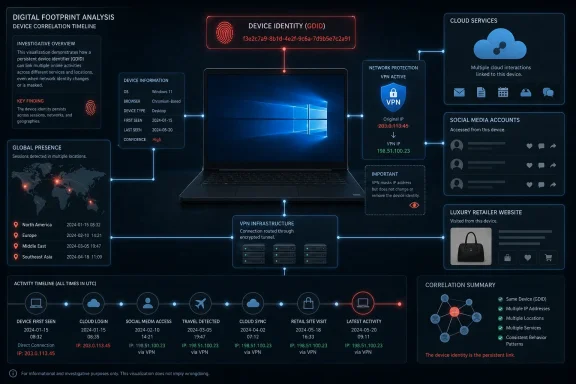
Peter Stokes, a 19-year-old accused of being part of Scattered Spider, was reportedly linked to alleged activity after Microsoft provided the FBI with IP-address history tied to a Windows Global Device Identifier, according to Korben’s account of a 39-page complaint made public in early July. The uncomfortable part is not that investigators used a technical lead; modern cybercrime cases are built from precisely that kind of correlation. The uncomfortable part is that Windows, according to the report, carries a persistent installation-level identifier that ordinary users never see, cannot meaningfully consent to, and apparently cannot switch off. For anyone who assumed a VPN was the hard boundary between their machine and the outside world, the case is a reminder that the operating system itself can be the more durable witness.
Korben’s article frames the Stokes case as a revelation about a hidden Windows identifier called the GDID, or Global Device Identifier. The report says the GDID is assigned at every Windows installation and is used for telemetry, crash reporting, and license verification. That makes it sound like infrastructure plumbing: the kind of internal token a platform vendor uses to keep a sprawling software ecosystem measurable, supportable, and licensable.
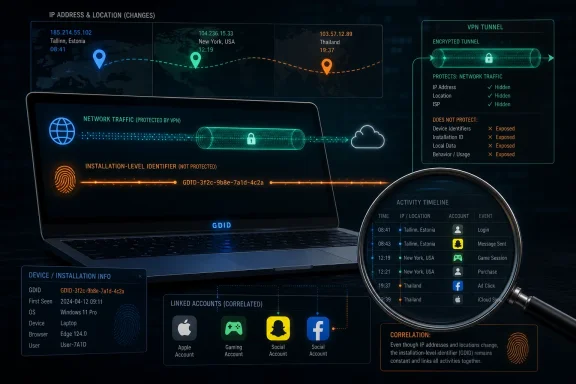
But plumbing becomes surveillance architecture when it is persistent, centrally meaningful, and available to investigators. According to Korben, the GDID stays the same even after updates and does not change when the user changes IP address. That is the crucial distinction. An IP address is a location clue; a persistent device or installation identifier is a continuity clue.
The report says Microsoft provided the FBI with the full IP address history tied to a specific GDID. Investigators then allegedly cross-referenced that history with Stokes’s personal accounts, including an Apple account, gaming accounts, Snapchat, and Facebook. The article says this produced IP addresses in Tallinn, New York, and Thailand that matched his movements.
If accurate, that is an elegant investigative pivot. Instead of trying to prove that a person behind one IP address was the same person behind another IP address, investigators could follow a stable Windows-side identifier across a changing network trail. The VPN becomes less a cloak than a costume change performed in front of a camera that never stopped recording.
The report does not make the GDID sound like malware, and that matters. The identifier is described as part of Windows’ ordinary operating machinery: telemetry, crash reporting, license verification. That is exactly why the story lands harder than a tale about spyware. The most sensitive systems are often not exotic implants; they are mundane administrative mechanisms that become powerful when joined to logs, accounts, and legal process.
Korben’s source material makes that point sharply. The article says the GDID “doesn’t budge” when the IP address changes. That means a user could appear to connect from one place today and another place tomorrow while the underlying Windows installation remains linkable in Microsoft’s records, at least according to the report.
That is why the Stokes example is bigger than one defendant and one alleged cybercrime group. The case illustrates the gap between consumer privacy tools and platform-level identity. A VPN can help obscure network origin from some observers, but it does not neutralize the telemetry relationships that already exist between the operating system and its vendor.
For ordinary users, this does not mean VPNs are useless. They can still reduce exposure on untrusted networks, complicate some forms of tracking, and prevent local network operators or internet providers from seeing certain traffic details. But a VPN is not a general anonymity engine, and it was never a magic eraser for device-bound or account-bound identifiers.
For administrators, the lesson is more operational. If a system generates persistent identifiers for telemetry, crash reporting, licensing, endpoint management, or cloud sign-in, those identifiers should be treated as identity data. They may not be names, emails, or passwords, but they can become personally revealing when correlated with IP histories and consumer accounts.
That does not make the GDID harmless. It makes it predictable. The modern operating system is no longer just a local runtime; it is a continuously serviced product tied to cloud diagnostics, activation systems, account flows, and update channels. A stable identifier is convenient for that model because the vendor needs to understand whether a specific installation is healthy, genuine, patched, and recurring.
The privacy problem appears when the same durability that helps engineering teams also helps investigators build a movement history. Korben’s report says Microsoft had a full IP address history tied to the GDID at issue. That phrase is the center of gravity. A single identifier is one thing; a time-linked trail of where that identifier appeared is another.
The article does not describe the legal mechanism by which Microsoft provided the information, and it would be irresponsible to fill in that blank. The important point is narrower: according to the report, Microsoft had data that could connect a Windows installation to a changing set of IP addresses, and the FBI received that data during a criminal investigation. That alone is enough to raise questions about transparency, retention, minimization, and user control.
There is also a trust asymmetry. Microsoft can describe telemetry as essential for quality, reliability, and security, and in many cases that argument is credible. Users still have little practical ability to inspect what durable identifiers exist, how long associated histories are retained, or how often they become responsive to law-enforcement requests.
The story’s emotional charge comes from that asymmetry. People understand that their phone number, email address, or Microsoft account can identify them. Fewer understand that a Windows installation itself may carry a stable identifier that can outlast updates and network changes. If the operating system has an identity independent of the user’s visible choices, privacy controls become harder to reason about.
That is why the mention of Apple, gaming accounts, Snapchat, and Facebook matters. The report is not merely saying Microsoft identified a Windows installation. It is saying investigators cross-referenced the Microsoft-provided GDID-linked IP history against other consumer account trails. The operating system identifier was one thread in a larger fabric.
This is how many digital investigations work in practice. One log rarely tells the whole story. Instead, investigators stack signals: IP addresses, login times, account histories, device traces, payment records, messages, recovery emails, and location patterns. Each piece may be ambiguous alone; together they can become persuasive.
The locations named in the article — Tallinn, New York, and Thailand — illustrate the power of that approach. A person trying to hide behind changing network paths may assume that movement itself creates plausible deniability. But if a persistent Windows identifier appears across those locations and personal accounts show related traces, movement becomes evidence rather than camouflage.
For defenders, journalists, activists, and privacy-conscious users, the same lesson cuts the other way. Avoiding one kind of tracking is not enough if other identifiers remain stable. Account hygiene, device hygiene, browser hygiene, app telemetry, cloud sync, and operating-system diagnostics all matter because correlation thrives on leftovers.
The hard truth is that perfect compartmentalization is difficult on a general-purpose consumer operating system built for convenience. Windows is designed to keep you signed in, licensed, updated, recoverable, diagnosable, and synchronized. Each of those features has a privacy cost when the resulting identifiers and logs can be combined.
But the article is explicit that these steps do not disable the GDID. It says there is “no button” for that. That is the point users should not miss. The visible privacy switches in Windows may affect some data collection categories, but they do not necessarily govern every identifier used internally for servicing, licensing, diagnostics, or reliability.
This gap is not unique to Microsoft, but Windows’ scale makes it especially consequential. Korben says Microsoft has a permanent identifier on over a billion machines. Even if that statement is understood as the article’s characterization rather than a full technical audit, the scale changes the privacy debate. A durable identifier on a niche app is one thing; a durable identifier on the dominant PC operating system is infrastructure.
For home users, the limitation is frustrating because it means the best available controls are partial. You can avoid signing in with a Microsoft account during Windows 11 setup, where possible. You can disable optional telemetry. You can avoid mixing sensitive activity with personal accounts. But if the GDID exists and behaves as described, the installation still has an identifier outside normal user control.
For enterprise users, the question is sharper. Businesses already assume Windows endpoints are manageable, identifiable, and auditable. That is part of the bargain of modern IT. But enterprise privacy, legal, and compliance teams still need to understand what identifiers Microsoft can associate with corporate devices and under what circumstances those associations can be disclosed.
The Stokes case, as described, should push organizations to treat OS-generated identifiers as part of their data map. Not because every endpoint is a legal risk, but because logs connected to persistent identifiers can become discoverable, subpoenaed, requested, or otherwise pulled into investigations. Asset identity is not merely an IT convenience; it is a legal artifact.
But hidden does not necessarily mean nefarious in origin. Operating systems contain countless internal identifiers that users never see. Some exist to prevent fraud, deduplicate reports, diagnose bugs, or enforce licensing. The scandal, if the report is accurate, is less that Microsoft has an identifier and more that the identifier is persistent, practically opaque, and potentially useful as a law-enforcement bridge across IP changes.
That distinction matters because the right response is not panic. It is governance. Users need clear disclosures. Administrators need documentation. Regulators need to understand retention and access practices. Microsoft needs to explain what the identifier is, what it links to, how long histories are stored, and what controls exist for consumers and managed organizations.
The public debate often gets trapped between two bad extremes. One side treats any diagnostic identifier as proof of surveillance capitalism. The other side treats telemetry as harmless engineering exhaust. The Stokes story shows why neither answer is sufficient. Diagnostic identifiers can be legitimate and still create serious privacy risk when retained and correlated.
A mature policy would ask several concrete questions. Is the identifier unique per installation, per device, per account, or per license? Can it be reset? What events cause it to change? What logs are associated with it? How long are those logs retained? What legal standards govern disclosure? What user-facing documentation explains it?
Korben’s source material does not answer all of those questions. It does, however, provide enough to make the absence of answers conspicuous. If a Windows installation has a durable identifier that persists through updates and survives IP changes, then users deserve more than a privacy dashboard whose most important boundary is invisible.
The answer is that privacy rules are not designed only for sympathetic defendants. They are designed for everyone who lives under the same technical architecture. A tool used in a serious criminal case can also define the baseline of what a platform vendor knows about ordinary people, journalists, lawyers, activists, employees, students, and businesses.
That does not mean law enforcement should never obtain platform data. It means the existence of platform data should be governed by transparency, proportionality, retention limits, and meaningful controls. A society can support legitimate investigations while still questioning whether every Windows installation should be linkable to a persistent history that users cannot reset.
“Just don’t do crime” is also technically naive. Data collected for one purpose has a way of finding new purposes. A telemetry identifier created for reliability can help with licensing. A licensing identifier can help with fraud prevention. A fraud signal can become an investigative lead. Over time, the categories blur because the same durable token sits underneath them.
The best privacy systems reduce unnecessary collection before trust becomes an issue. They do not depend entirely on corporate restraint or after-the-fact legal process. If Microsoft does not need long-lived IP histories tied to a GDID for ordinary reliability purposes, it should not keep them indefinitely. If it does need them, it should say why, for how long, and under what safeguards.
The report’s most important implication is not that Microsoft helped the FBI in one case. It is that the Windows telemetry and identity stack may produce records with investigative value far beyond what users understand when they click through setup screens. Consent is not meaningful if the most consequential identifier is never plainly disclosed.
An Apple account, gaming accounts, Snapchat, and Facebook each carry their own login histories and metadata. Some may record IP addresses. Some may preserve device or session information. Some may connect to phone numbers, emails, payment methods, recovery contacts, or social graphs. Once investigators have one strong technical thread, other platforms can supply corroboration.
That is the modern internet’s privacy trap. Users think in brands: Microsoft, Apple, Meta, gaming networks, chat apps. Investigators and data brokers think in joins. The meaningful identity is not stored in one place; it emerges when separate records overlap.
This is also why changing IP addresses can be a weak defense. If the same person signs into familiar accounts from the new network path, the new path is no longer anonymous. If the same device or installation continues to communicate with a platform vendor, the new path may become part of an older continuity record. If multiple accounts appear from the same shifting set of addresses, the pattern strengthens.
For Windows users, the immediate lesson is compartmentalization. Do not assume that separating network paths is enough if the same operating system installation, browser profile, cloud account, and app accounts remain in use. The more layers remain constant, the easier the correlation becomes.
For IT departments, the lesson is inventory. Organizations should know which endpoint identifiers exist across Microsoft services, management tools, security products, VPNs, endpoint detection platforms, and cloud sign-ins. The privacy and legal posture of a managed device is the sum of those identifiers, not the marketing category of any single product.
The table is the privacy story in miniature. A changing IP address can create noise, but a stable installation identifier can restore continuity. A local Windows account can reduce direct Microsoft-account linkage, but it cannot erase every OS-level signal. Disabling optional telemetry can reduce collection, but it does not necessarily affect identifiers used for licensing, crash reporting, or required diagnostics.
The danger for ordinary users is not that the FBI is watching everyone’s desktop in real time. Korben’s report does not establish that, and it should not be exaggerated into that claim. The danger is that a vast platform can maintain durable logs whose investigative value users do not understand until a criminal complaint shows the machinery in action.
For admins, this is a documentation problem as much as a privacy problem. Endpoint fleets already generate identifiers across Windows activation, device management, security tooling, update compliance, and cloud identity. If legal or compliance teams ask what data can associate a device with an IP history, “we are not sure” is no longer an acceptable answer.
It also complicates bring-your-own-device environments. A personal Windows installation used for work may carry Microsoft-side identifiers outside the employer’s visibility. Conversely, a corporate device used for personal accounts can create cross-contamination between enterprise infrastructure and private activity. The Stokes report underscores how quickly those boundaries collapse when logs are cross-referenced.
There is no simple toggle that turns a modern PC into an untraceable object. The better goal is explicitness: know what accounts are attached, know what telemetry settings are enabled, know what management agents are installed, know what logs your organization keeps, and know what the platform vendor may be keeping beyond your console.
Korben’s article says the identifier is never openly communicated about and that there is no way to disable it. If that characterization is right, Microsoft has a trust problem. A hidden but durable identifier used for telemetry, crash reporting, and license verification may be technically defensible, but technical defensibility is not the same as informed consent.
The company should be able to answer basic questions without hiding behind generic privacy language. What exactly is the GDID? Is it unique to every Windows installation? Does reinstalling Windows change it? Does hardware replacement affect it? Which Microsoft services receive it? What categories of logs can be tied to it? How long are IP histories retained? Can enterprise administrators audit or reset it?
Those questions matter because Windows is not an optional niche platform for many people. It is the default operating environment for schools, businesses, government offices, gamers, developers, hospitals, and home users. A privacy design that might be tolerable in a small app becomes a public infrastructure issue at Windows scale.
Microsoft also needs to separate diagnostic necessity from data retention habit. It may need a stable identifier to deduplicate crash reports or validate licenses. That does not automatically justify retaining a long IP address history in a form that can be tied back to a specific installation. Data minimization is not an aesthetic preference; it is the difference between a useful diagnostic system and a ready-made investigative ledger.
The company’s defenders may argue that law-enforcement cooperation is normal. That is true as far as it goes. But normal legal compliance does not answer whether the underlying data should exist in such a persistent and user-opaque form. The fact that data can help solve a serious case does not settle whether collecting and retaining it at mass scale is proportionate.
Installing without a Microsoft account can reduce direct association between the Windows installation and a cloud identity. That matters because account sign-in creates a clean bridge between a human-readable identity and a device environment. For users who do not need Microsoft account features, a local setup can be a meaningful privacy choice.
Disabling optional telemetry is also sensible. Optional diagnostic data can enrich the picture a vendor has of how a machine is used and how software behaves. Turning it off is not paranoia; it is data minimization. If a user does not want to contribute additional diagnostic information, the privacy settings should reflect that preference.
But the GDID, as described in the article, remains outside those controls. That means the advice should be understood as harm reduction, not anonymity. A user can shorten some leashes while leaving the thickest cable untouched.
For high-risk users, the implications are more severe. Anyone whose safety depends on resisting correlation — investigative journalists, dissidents, security researchers, whistleblowers, or people under targeted threat — should not assume consumer Windows privacy settings provide strong compartmentalization. Threat models that require real anonymity need purpose-built operational discipline, not just a VPN and a few toggles.
For everyday users, the conclusion is less dramatic but still important. You should not treat Windows as a private island. It is a cloud-connected operating system whose vendor may maintain identifiers and histories that are invisible during normal use. That does not mean abandoning Windows is practical for everyone, but it does mean understanding the bargain more clearly.
That is a harder fight because the identifiers are often useful. Crash reporting really does help fix bugs. Telemetry really can improve reliability. License verification really does protect commercial software models. Security investigations really do benefit from durable signals when suspects route traffic through shifting networks.
The question is not whether identifiers should exist at all. The question is whether they should be persistent by default, obscure to users, difficult or impossible to reset, and linked to histories that can reconstruct movement across networks. A privacy-respecting architecture would make the strongest identifiers rare, bounded, documented, and governed.
Korben’s report suggests Windows may fall short of that ideal. The article says the GDID is assigned at every Windows installation, survives updates, is used for telemetry, crash reporting, and license verification, and cannot be disabled through a user-facing control. It also says Microsoft provided the FBI with the full IP address history tied to a specific GDID.
That combination is what turns a technical identifier into a public-interest story. A hidden installation ID used only locally would be dull. A resettable diagnostic token with short retention would be manageable. A durable identifier tied to an IP history and disclosed in a criminal investigation is something else: a map of continuity that users did not know they were carrying.
The technology industry has repeatedly learned this lesson the hard way. Identifiers created for convenience become identifiers used for tracking. Logs created for debugging become logs used for investigations. Metadata dismissed as harmless becomes decisive when correlated. The GDID story fits that pattern too neatly to ignore.
Microsoft should now explain the GDID in plain language, define its retention practices, and give users and administrators meaningful controls rather than forcing them to infer the system from a criminal complaint. Until then, the safest assumption is that changing networks is not the same as changing identity, and that the next generation of Windows privacy fights will be fought not over what users can see, but over the identifiers they never knew existed.
 The Identifier Is the Story, Not the Arrest
Korben’s article frames the Stokes case as a revelation about a hidden Windows identifier called the GDID, or Global Device Identifier. The report says the GDID is assigned at every Windows installation and is used for telemetry, crash reporting, and license verification. That makes it sound like infrastructure plumbing: the kind of internal token a platform vendor uses to keep a sprawling software ecosystem measurable, supportable, and licensable.But plumbing becomes surveillance architecture when it is persistent, centrally meaningful, and available to investigators. According to Korben, the GDID stays the same even after updates and does not change when the user changes IP address. That is the crucial distinction. An IP address is a location clue; a persistent device or installation identifier is a continuity clue.
The report says Microsoft provided the FBI with the full IP address history tied to a specific GDID. Investigators then allegedly cross-referenced that history with Stokes’s personal accounts, including an Apple account, gaming accounts, Snapchat, and Facebook. The article says this produced IP addresses in Tallinn, New York, and Thailand that matched his movements.
If accurate, that is an elegant investigative pivot. Instead of trying to prove that a person behind one IP address was the same person behind another IP address, investigators could follow a stable Windows-side identifier across a changing network trail. The VPN becomes less a cloak than a costume change performed in front of a camera that never stopped recording.
The report does not make the GDID sound like malware, and that matters. The identifier is described as part of Windows’ ordinary operating machinery: telemetry, crash reporting, license verification. That is exactly why the story lands harder than a tale about spyware. The most sensitive systems are often not exotic implants; they are mundane administrative mechanisms that become powerful when joined to logs, accounts, and legal process.
VPNs Hide the Route, Not Necessarily the Machine
The basic privacy lesson here is simple but often misunderstood: VPNs primarily affect the network layer. They can change the apparent IP address seen by websites, services, and other network endpoints, but they do not automatically change identifiers generated by the operating system, browser, apps, accounts, hardware, or cloud services.Korben’s source material makes that point sharply. The article says the GDID “doesn’t budge” when the IP address changes. That means a user could appear to connect from one place today and another place tomorrow while the underlying Windows installation remains linkable in Microsoft’s records, at least according to the report.
That is why the Stokes example is bigger than one defendant and one alleged cybercrime group. The case illustrates the gap between consumer privacy tools and platform-level identity. A VPN can help obscure network origin from some observers, but it does not neutralize the telemetry relationships that already exist between the operating system and its vendor.
For ordinary users, this does not mean VPNs are useless. They can still reduce exposure on untrusted networks, complicate some forms of tracking, and prevent local network operators or internet providers from seeing certain traffic details. But a VPN is not a general anonymity engine, and it was never a magic eraser for device-bound or account-bound identifiers.
For administrators, the lesson is more operational. If a system generates persistent identifiers for telemetry, crash reporting, licensing, endpoint management, or cloud sign-in, those identifiers should be treated as identity data. They may not be names, emails, or passwords, but they can become personally revealing when correlated with IP histories and consumer accounts.
Microsoft’s Useful Plumbing Becomes a Legal Map
Every major operating system vendor has reasons to want durable identifiers. Crash reporting works better if repeated failures can be associated with the same installation. Telemetry is more useful if Microsoft can distinguish one troubled machine from a million unrelated ones. License verification depends on some notion of continuity between software, device, and entitlement.That does not make the GDID harmless. It makes it predictable. The modern operating system is no longer just a local runtime; it is a continuously serviced product tied to cloud diagnostics, activation systems, account flows, and update channels. A stable identifier is convenient for that model because the vendor needs to understand whether a specific installation is healthy, genuine, patched, and recurring.
The privacy problem appears when the same durability that helps engineering teams also helps investigators build a movement history. Korben’s report says Microsoft had a full IP address history tied to the GDID at issue. That phrase is the center of gravity. A single identifier is one thing; a time-linked trail of where that identifier appeared is another.
The article does not describe the legal mechanism by which Microsoft provided the information, and it would be irresponsible to fill in that blank. The important point is narrower: according to the report, Microsoft had data that could connect a Windows installation to a changing set of IP addresses, and the FBI received that data during a criminal investigation. That alone is enough to raise questions about transparency, retention, minimization, and user control.
There is also a trust asymmetry. Microsoft can describe telemetry as essential for quality, reliability, and security, and in many cases that argument is credible. Users still have little practical ability to inspect what durable identifiers exist, how long associated histories are retained, or how often they become responsive to law-enforcement requests.
The story’s emotional charge comes from that asymmetry. People understand that their phone number, email address, or Microsoft account can identify them. Fewer understand that a Windows installation itself may carry a stable identifier that can outlast updates and network changes. If the operating system has an identity independent of the user’s visible choices, privacy controls become harder to reason about.
The Case Shows How Correlation Beats Obfuscation
The alleged investigative path in Korben’s account is not technically mystical. It is correlation. One data source says a Windows installation used a sequence of IP addresses. Other data sources say personal accounts used overlapping or matching IP addresses. Put together, the pattern becomes harder to dismiss as coincidence.That is why the mention of Apple, gaming accounts, Snapchat, and Facebook matters. The report is not merely saying Microsoft identified a Windows installation. It is saying investigators cross-referenced the Microsoft-provided GDID-linked IP history against other consumer account trails. The operating system identifier was one thread in a larger fabric.
This is how many digital investigations work in practice. One log rarely tells the whole story. Instead, investigators stack signals: IP addresses, login times, account histories, device traces, payment records, messages, recovery emails, and location patterns. Each piece may be ambiguous alone; together they can become persuasive.
The locations named in the article — Tallinn, New York, and Thailand — illustrate the power of that approach. A person trying to hide behind changing network paths may assume that movement itself creates plausible deniability. But if a persistent Windows identifier appears across those locations and personal accounts show related traces, movement becomes evidence rather than camouflage.
For defenders, journalists, activists, and privacy-conscious users, the same lesson cuts the other way. Avoiding one kind of tracking is not enough if other identifiers remain stable. Account hygiene, device hygiene, browser hygiene, app telemetry, cloud sync, and operating-system diagnostics all matter because correlation thrives on leftovers.
The hard truth is that perfect compartmentalization is difficult on a general-purpose consumer operating system built for convenience. Windows is designed to keep you signed in, licensed, updated, recoverable, diagnosable, and synchronized. Each of those features has a privacy cost when the resulting identifiers and logs can be combined.
The Consumer Privacy Controls Do Not Reach the Core Claim
Korben’s article offers two practical mitigations: install Windows 11 without a Microsoft account and disable optional telemetry. Both are sensible within their limits. Reducing account attachment can reduce the number of direct identity links between a person and a Windows installation, and disabling optional telemetry can reduce some diagnostic data flows.But the article is explicit that these steps do not disable the GDID. It says there is “no button” for that. That is the point users should not miss. The visible privacy switches in Windows may affect some data collection categories, but they do not necessarily govern every identifier used internally for servicing, licensing, diagnostics, or reliability.
This gap is not unique to Microsoft, but Windows’ scale makes it especially consequential. Korben says Microsoft has a permanent identifier on over a billion machines. Even if that statement is understood as the article’s characterization rather than a full technical audit, the scale changes the privacy debate. A durable identifier on a niche app is one thing; a durable identifier on the dominant PC operating system is infrastructure.
For home users, the limitation is frustrating because it means the best available controls are partial. You can avoid signing in with a Microsoft account during Windows 11 setup, where possible. You can disable optional telemetry. You can avoid mixing sensitive activity with personal accounts. But if the GDID exists and behaves as described, the installation still has an identifier outside normal user control.
For enterprise users, the question is sharper. Businesses already assume Windows endpoints are manageable, identifiable, and auditable. That is part of the bargain of modern IT. But enterprise privacy, legal, and compliance teams still need to understand what identifiers Microsoft can associate with corporate devices and under what circumstances those associations can be disclosed.
The Stokes case, as described, should push organizations to treat OS-generated identifiers as part of their data map. Not because every endpoint is a legal risk, but because logs connected to persistent identifiers can become discoverable, subpoenaed, requested, or otherwise pulled into investigations. Asset identity is not merely an IT convenience; it is a legal artifact.
A Hidden Identifier Is Not the Same as a Secret Conspiracy
The word “secret” does a lot of work in Korben’s headline. It captures the user experience: most people have never heard of a GDID, never chose it, and do not know where to inspect it. In that sense, the identifier is hidden from ordinary Windows users.But hidden does not necessarily mean nefarious in origin. Operating systems contain countless internal identifiers that users never see. Some exist to prevent fraud, deduplicate reports, diagnose bugs, or enforce licensing. The scandal, if the report is accurate, is less that Microsoft has an identifier and more that the identifier is persistent, practically opaque, and potentially useful as a law-enforcement bridge across IP changes.
That distinction matters because the right response is not panic. It is governance. Users need clear disclosures. Administrators need documentation. Regulators need to understand retention and access practices. Microsoft needs to explain what the identifier is, what it links to, how long histories are stored, and what controls exist for consumers and managed organizations.
The public debate often gets trapped between two bad extremes. One side treats any diagnostic identifier as proof of surveillance capitalism. The other side treats telemetry as harmless engineering exhaust. The Stokes story shows why neither answer is sufficient. Diagnostic identifiers can be legitimate and still create serious privacy risk when retained and correlated.
A mature policy would ask several concrete questions. Is the identifier unique per installation, per device, per account, or per license? Can it be reset? What events cause it to change? What logs are associated with it? How long are those logs retained? What legal standards govern disclosure? What user-facing documentation explains it?
Korben’s source material does not answer all of those questions. It does, however, provide enough to make the absence of answers conspicuous. If a Windows installation has a durable identifier that persists through updates and survives IP changes, then users deserve more than a privacy dashboard whose most important boundary is invisible.
The Case Against “Just Don’t Do Crime” Privacy Logic
A predictable response to the Stokes report is that the system worked. A 19-year-old accused of being part of Scattered Spider was allegedly tracked despite VPN use, and investigators tied technical evidence to personal accounts and movements. If someone is accused of serious cybercrime, why should ordinary users object?The answer is that privacy rules are not designed only for sympathetic defendants. They are designed for everyone who lives under the same technical architecture. A tool used in a serious criminal case can also define the baseline of what a platform vendor knows about ordinary people, journalists, lawyers, activists, employees, students, and businesses.
That does not mean law enforcement should never obtain platform data. It means the existence of platform data should be governed by transparency, proportionality, retention limits, and meaningful controls. A society can support legitimate investigations while still questioning whether every Windows installation should be linkable to a persistent history that users cannot reset.
“Just don’t do crime” is also technically naive. Data collected for one purpose has a way of finding new purposes. A telemetry identifier created for reliability can help with licensing. A licensing identifier can help with fraud prevention. A fraud signal can become an investigative lead. Over time, the categories blur because the same durable token sits underneath them.
The best privacy systems reduce unnecessary collection before trust becomes an issue. They do not depend entirely on corporate restraint or after-the-fact legal process. If Microsoft does not need long-lived IP histories tied to a GDID for ordinary reliability purposes, it should not keep them indefinitely. If it does need them, it should say why, for how long, and under what safeguards.
The report’s most important implication is not that Microsoft helped the FBI in one case. It is that the Windows telemetry and identity stack may produce records with investigative value far beyond what users understand when they click through setup screens. Consent is not meaningful if the most consequential identifier is never plainly disclosed.
The Real-World Identity Stack Is Wider Than Windows
Korben’s account does not say the GDID alone proved the case. It says Microsoft provided the full IP address history tied to the specific GDID, and investigators cross-referenced that with personal accounts. That distinction is important because it shows how identity is assembled across ecosystems.An Apple account, gaming accounts, Snapchat, and Facebook each carry their own login histories and metadata. Some may record IP addresses. Some may preserve device or session information. Some may connect to phone numbers, emails, payment methods, recovery contacts, or social graphs. Once investigators have one strong technical thread, other platforms can supply corroboration.
That is the modern internet’s privacy trap. Users think in brands: Microsoft, Apple, Meta, gaming networks, chat apps. Investigators and data brokers think in joins. The meaningful identity is not stored in one place; it emerges when separate records overlap.
This is also why changing IP addresses can be a weak defense. If the same person signs into familiar accounts from the new network path, the new path is no longer anonymous. If the same device or installation continues to communicate with a platform vendor, the new path may become part of an older continuity record. If multiple accounts appear from the same shifting set of addresses, the pattern strengthens.
For Windows users, the immediate lesson is compartmentalization. Do not assume that separating network paths is enough if the same operating system installation, browser profile, cloud account, and app accounts remain in use. The more layers remain constant, the easier the correlation becomes.
For IT departments, the lesson is inventory. Organizations should know which endpoint identifiers exist across Microsoft services, management tools, security products, VPNs, endpoint detection platforms, and cloud sign-ins. The privacy and legal posture of a managed device is the sum of those identifiers, not the marketing category of any single product.
Where the Risk Lands for Windows Users and Admins
| Identity signal | What it can show | What changes it | What the Stokes report implies |
|---|---|---|---|
| IP address | Network location or provider path | VPN use, roaming, new network | Useful but not decisive when other identifiers persist |
| GDID | Continuity of a Windows installation | Not described as user-resettable in the report | Can reportedly tie many IP addresses to one installation |
| Microsoft account | User identity and service activity | Local account use may reduce linkage | Avoiding account setup may cut part of the leash |
| App and social accounts | Personal identity, logins, habits | Separate accounts and strict compartmentalization | Cross-referencing can turn weak clues into strong ones |
| Optional telemetry | Additional diagnostic data | Windows privacy settings | Disabling it may reduce leaks but does not touch GDID |
The danger for ordinary users is not that the FBI is watching everyone’s desktop in real time. Korben’s report does not establish that, and it should not be exaggerated into that claim. The danger is that a vast platform can maintain durable logs whose investigative value users do not understand until a criminal complaint shows the machinery in action.
For admins, this is a documentation problem as much as a privacy problem. Endpoint fleets already generate identifiers across Windows activation, device management, security tooling, update compliance, and cloud identity. If legal or compliance teams ask what data can associate a device with an IP history, “we are not sure” is no longer an acceptable answer.
It also complicates bring-your-own-device environments. A personal Windows installation used for work may carry Microsoft-side identifiers outside the employer’s visibility. Conversely, a corporate device used for personal accounts can create cross-contamination between enterprise infrastructure and private activity. The Stokes report underscores how quickly those boundaries collapse when logs are cross-referenced.
There is no simple toggle that turns a modern PC into an untraceable object. The better goal is explicitness: know what accounts are attached, know what telemetry settings are enabled, know what management agents are installed, know what logs your organization keeps, and know what the platform vendor may be keeping beyond your console.
Microsoft Owes Users a Plain-English Accounting
The central unanswered question is not whether Microsoft has technical reasons to identify Windows installations. It almost certainly does. The central question is whether Microsoft has given users and administrators a sufficiently clear explanation of the GDID, its persistence, its associated records, and its availability in legal processes.Korben’s article says the identifier is never openly communicated about and that there is no way to disable it. If that characterization is right, Microsoft has a trust problem. A hidden but durable identifier used for telemetry, crash reporting, and license verification may be technically defensible, but technical defensibility is not the same as informed consent.
The company should be able to answer basic questions without hiding behind generic privacy language. What exactly is the GDID? Is it unique to every Windows installation? Does reinstalling Windows change it? Does hardware replacement affect it? Which Microsoft services receive it? What categories of logs can be tied to it? How long are IP histories retained? Can enterprise administrators audit or reset it?
Those questions matter because Windows is not an optional niche platform for many people. It is the default operating environment for schools, businesses, government offices, gamers, developers, hospitals, and home users. A privacy design that might be tolerable in a small app becomes a public infrastructure issue at Windows scale.
Microsoft also needs to separate diagnostic necessity from data retention habit. It may need a stable identifier to deduplicate crash reports or validate licenses. That does not automatically justify retaining a long IP address history in a form that can be tied back to a specific installation. Data minimization is not an aesthetic preference; it is the difference between a useful diagnostic system and a ready-made investigative ledger.
The company’s defenders may argue that law-enforcement cooperation is normal. That is true as far as it goes. But normal legal compliance does not answer whether the underlying data should exist in such a persistent and user-opaque form. The fact that data can help solve a serious case does not settle whether collecting and retaining it at mass scale is proportionate.
The Privacy Advice Is Useful, but It Is Not a Cure
Korben recommends installing Windows 11 without a Microsoft account and disabling optional telemetry. Those are reasonable steps for users who want to reduce unnecessary linkage. They are also reminders of how limited user control can be when the strongest identifiers sit below the level of visible settings.Installing without a Microsoft account can reduce direct association between the Windows installation and a cloud identity. That matters because account sign-in creates a clean bridge between a human-readable identity and a device environment. For users who do not need Microsoft account features, a local setup can be a meaningful privacy choice.
Disabling optional telemetry is also sensible. Optional diagnostic data can enrich the picture a vendor has of how a machine is used and how software behaves. Turning it off is not paranoia; it is data minimization. If a user does not want to contribute additional diagnostic information, the privacy settings should reflect that preference.
But the GDID, as described in the article, remains outside those controls. That means the advice should be understood as harm reduction, not anonymity. A user can shorten some leashes while leaving the thickest cable untouched.
For high-risk users, the implications are more severe. Anyone whose safety depends on resisting correlation — investigative journalists, dissidents, security researchers, whistleblowers, or people under targeted threat — should not assume consumer Windows privacy settings provide strong compartmentalization. Threat models that require real anonymity need purpose-built operational discipline, not just a VPN and a few toggles.
For everyday users, the conclusion is less dramatic but still important. You should not treat Windows as a private island. It is a cloud-connected operating system whose vendor may maintain identifiers and histories that are invisible during normal use. That does not mean abandoning Windows is practical for everyone, but it does mean understanding the bargain more clearly.
Action checklist for admins
- Inventory where Windows endpoints are tied to Microsoft accounts, work accounts, management tools, and security agents.
- Review Windows telemetry settings and disable optional telemetry where business needs do not require it.
- Document which endpoint identifiers your organization can see, which Microsoft may hold, and which appear in logs.
- Separate corporate and personal account use on managed devices wherever possible.
- Revisit BYOD policies with explicit attention to device identifiers, IP histories, and account cross-correlation.
- Treat persistent OS-level identifiers as legal and privacy data, not merely technical metadata.
The Next Privacy Fight Is About Identifiers Users Never See
The Windows GDID story is part of a larger shift in privacy politics. The old debate focused on obvious identifiers: names, email addresses, phone numbers, cookies, advertising IDs, and IP addresses. The newer fight is about infrastructure identifiers that sit beneath the user interface and become powerful only when joined to other records.That is a harder fight because the identifiers are often useful. Crash reporting really does help fix bugs. Telemetry really can improve reliability. License verification really does protect commercial software models. Security investigations really do benefit from durable signals when suspects route traffic through shifting networks.
The question is not whether identifiers should exist at all. The question is whether they should be persistent by default, obscure to users, difficult or impossible to reset, and linked to histories that can reconstruct movement across networks. A privacy-respecting architecture would make the strongest identifiers rare, bounded, documented, and governed.
Korben’s report suggests Windows may fall short of that ideal. The article says the GDID is assigned at every Windows installation, survives updates, is used for telemetry, crash reporting, and license verification, and cannot be disabled through a user-facing control. It also says Microsoft provided the FBI with the full IP address history tied to a specific GDID.
That combination is what turns a technical identifier into a public-interest story. A hidden installation ID used only locally would be dull. A resettable diagnostic token with short retention would be manageable. A durable identifier tied to an IP history and disclosed in a criminal investigation is something else: a map of continuity that users did not know they were carrying.
The technology industry has repeatedly learned this lesson the hard way. Identifiers created for convenience become identifiers used for tracking. Logs created for debugging become logs used for investigations. Metadata dismissed as harmless becomes decisive when correlated. The GDID story fits that pattern too neatly to ignore.
What Windows Users Should Actually Remember
The useful lesson from the Stokes report is not “never use Windows” and not “VPNs are pointless.” It is that privacy depends on layers, and the operating system is one of the deepest layers. If that layer emits or stores a stable identifier, every layer above it must be understood in that context.- Peter Stokes, 19, was reportedly accused of being part of Scattered Spider, and Korben says a 39-page complaint made public in early July described Microsoft providing the FBI with IP-address history tied to a GDID.
- The GDID is described as a Global Device Identifier assigned at every Windows installation and used for telemetry, crash reporting, and license verification.
- According to the article, the identifier persists through updates and does not change just because the user changes IP address.
- Investigators reportedly cross-referenced the GDID-linked IP history with an Apple account, gaming accounts, Snapchat, and Facebook.
- Installing Windows 11 without a Microsoft account and disabling optional telemetry may reduce some linkage, but Korben says there is no user-facing way to disable the GDID.
- The practical risk is correlation: separate logs become much more revealing when a stable OS-level identifier connects them.
Microsoft should now explain the GDID in plain language, define its retention practices, and give users and administrators meaningful controls rather than forcing them to infer the system from a criminal complaint. Until then, the safest assumption is that changing networks is not the same as changing identity, and that the next generation of Windows privacy fights will be fought not over what users can see, but over the identifiers they never knew existed.
References
- Primary source: Korben
Published: 2026-07-08T13:10:14.949654
Windows hides a secret identifier that Microsoft hands over to the FBI - Korben
Holy crap, this is wild — wait till you hear this. Peter Stokes, 19, accused of being part of the Scattered Spider group, was chaining VPNs and hopping ...korben.info