

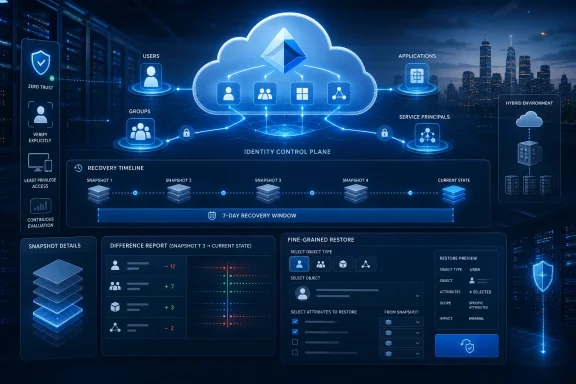
Microsoft Entra Backup and Recovery is now generally available for commercial customers, giving identity administrators point-in-time protection and fine-grained restoration for supported users, groups, application registrations, service principals, authentication settings, and access configurations after accidental changes, malicious activity, or damaging configuration drift.
The launch closes a conspicuous gap in Microsoft’s cloud identity platform: Entra ID, formerly Azure AD, has long been the control plane for access, but recovering that control plane after a bad change has often required logs, scripts, institutional memory, and hurried manual reconstruction. Microsoft is not eliminating that operational burden, but it is finally giving administrators a native way to compare states and restore supported identity data rather than merely diagnose how it broke.
The important number is seven days. Microsoft extended retention from five days during the public preview to seven days at general availability, a useful improvement that also exposes the service’s central limitation: this is a short-window operational recovery system, not a complete long-term backup strategy.
Traditional backup thinking starts with files, databases, virtual machines, and application workloads. Identity infrastructure is harder to visualize because much of its value exists as relationships and policy: who belongs to which group, which application trusts which service principal, which authentication setting is enforced, and which access configuration decides whether a user can reach a resource.
That abstraction does not make identity data less critical. It makes failures more difficult to recognize and reconstruct, because the directory can remain online and responsive while its logical state is catastrophically wrong.
A storage outage is obvious. A deleted application registration, corrupted group assignment, or badly scoped access policy may instead appear as hundreds of unrelated login failures, broken applications, rejected automation jobs, and service-desk tickets. The identity service is still running; it is faithfully enforcing the wrong state.
That distinction matters for Windows administrators. A healthy Windows endpoint is of limited use if the employee cannot authenticate, reach an enterprise application, obtain the expected authorization, or use a workload whose service principal has been altered. What presents as a desktop, application, networking, or productivity problem may actually be a directory-state problem upstream.
Petri’s coverage correctly frames Microsoft Entra Backup and Recovery as protection against accidental errors and cyber threats, but its larger significance is architectural. Microsoft is acknowledging that cloud identity requires a recovery model distinct from platform availability.
Keeping Entra ID available is Microsoft’s service-resilience problem. Recovering a tenant after one of the customer’s administrators, automation systems, or compromised accounts changes its contents is a tenant-recoverability problem. The new service is aimed squarely at the latter.
This is why the word backup can be misleading if read too broadly. Microsoft is not promising that every identity object, dependency, configuration, and historical state can be restored indefinitely. It is providing point-in-time snapshots for supported directory data, tools to understand the differences, and guided recovery operations that can return selected items to a prior state.
That is narrower than an all-encompassing backup platform. It is also far more useful than a log entry telling administrators what they should now rebuild by hand.
Two extra days may sound minor, but incident response is governed by detection time rather than change time. A damaging modification made before a weekend, holiday, maintenance freeze, or low-activity period may not become obvious until users return and dependent systems begin failing.
The extension therefore improves the odds that a usable snapshot will still exist when the organization understands what happened. It gives administrators more room to separate symptoms from causes, generate a difference report, evaluate the scope, and select a recovery action without immediately racing the expiration clock.
Microsoft summarized the change by saying it had increased retention “from 5 days to 7 days to provide extended protection.” The company added that administrators now have more flexibility to inspect snapshots, generate difference reports, and run recovery jobs that return objects to a prior state.
That is a practical improvement, but seven days remains a deliberately short horizon. A dormant malicious change, an unnoticed configuration drift, or a subtle application-permission problem could survive beyond it before producing a visible incident.
The correct interpretation is not that Entra ID now has complete backup. It is that Entra ID now has a native rollback window for supported changes.
Organizations should treat the seven-day history as the fast lane for recent incidents. Longer-term recoverability still depends on retaining evidence, documenting known-good states, exporting critical configuration where appropriate, and preserving recovery materials outside the failure domain they are meant to repair.
Seven days is an incident-response window, not an archive.
That distinction should shape expectations from the beginning. If administrators market the feature internally as “Entra is backed up now,” the organization may become less prepared precisely because a useful new control has been mistaken for comprehensive protection.
Identity environments rarely remain static after a damaging change. While one administrator is investigating an incident, other administrators, automated workflows, HR integrations, application teams, and governance processes may continue making legitimate updates.
A blunt rollback can therefore repair yesterday’s mistake while erasing today’s valid work. The more interconnected the tenant, the greater the risk that a broad restoration creates a second incident.
Microsoft Entra Backup and Recovery addresses this through difference reports. Administrators can compare the current state against a previous snapshot to understand what changed before deciding what to restore.
That changes recovery from a guess into a controlled decision. Instead of asking, “Which backup looks old enough to work?” the responder can ask, “Which objects and attributes differ, which differences are suspicious, and which current values must be preserved?”
Petri highlights the ability to compare current and previous states as a way to avoid overwriting valid newer changes. That is not merely a convenience feature; it is the mechanism that makes fine-grained recovery operationally credible.
Consider an application that suddenly rejects users. The visible failure might originate in a changed service principal, an altered application registration, a group modification, or an access configuration. Returning the entire identity environment to an earlier state would be disproportionate and potentially dangerous.
A difference report narrows the investigation. The administrator can inspect the relevant state changes, correlate them with the timing and symptoms of the incident, and identify whether recovery should apply to an object, an attribute, or a configuration.
That same process is valuable when the suspected cause is malicious. A compromised administrator account may make several changes intended to preserve access or weaken controls. Restoring only the first obvious setting could leave the attacker’s other modifications intact.
The comparison is therefore both a recovery aid and an investigative artifact. It shows the delta between a prior state and the tenant as it now exists, helping responders decide whether they are dealing with a single mistake, a cascade of automation failures, or a coordinated set of unauthorized changes.
It does not replace audit records. A difference tells the team what diverged; investigation still needs to establish who or what made the change, whether credentials remain compromised, what downstream systems were affected, and whether restoring the value is safe.
That makes the intended workflow clear: detect, compare, investigate, scope, recover, validate. Administrators who jump directly to recovery sacrifice much of the feature’s value and risk turning a targeted repair into an uncontrolled rollback.
A user account may still exist and contain legitimate recent updates while one attribute is wrong. An application registration may remain necessary while part of its configuration has been damaged. A group may be valid while a changed relationship or access-related property causes the operational failure.
Reverting an entire object can discard good data. Reverting a specific supported attribute or configuration gives the administrator a chance to repair the harmful change while preserving unrelated updates.
This is the difference between rebuilding a machine and correcting a registry value, or between restoring an entire database and repairing a row. Both approaches have a place, but the narrower operation usually carries less collateral risk when the fault is well understood.
Fine-grained restoration also makes identity recovery more compatible with real organizational boundaries. Application owners, security teams, identity administrators, and service managers may each own different parts of the affected system. A narrowly scoped operation is easier to review, approve, communicate, and validate.
The danger, however, is false precision. A restore operation can be technically narrow while its consequences remain broad. An individual authentication or access setting may govern a large population, and a single application or service principal may sit behind many dependent services.
Administrators therefore need to evaluate blast radius by dependency, not merely by object count. Restoring one configuration does not necessarily mean making a small change.
That is another reason the difference-report stage matters. It allows responders to see the prospective repair in context and to identify newer changes that should not be overwritten.
The service’s point-in-time model gives teams a known earlier state. Fine-grained recovery lets them select the portion of that state they actually need. Together, these capabilities make Entra recovery less like rewinding the tenant and more like performing controlled surgery on it.
Users and groups are the most familiar. They define people, organizational collections, and access relationships that appear throughout enterprise applications and security controls.
Damage here can manifest as missing access, excessive access, broken group-based assignments, or users who no longer receive the policies and resources expected for their role. A small group change can propagate widely when that group is reused across applications and access decisions.
Application registrations and service principals represent the workload side of identity. They allow applications, services, and automation to participate in the tenant’s trust model.
These objects are often less visible to end users but can be more operationally concentrated. A damaged workload identity may interrupt automated processes or application access for a large population without any corresponding problem on employee accounts or Windows devices.
Authentication and access configurations are the policy layer. They determine how identities prove themselves and under which conditions access is allowed.
Misconfigurations in this category can be especially disruptive because the directory may apply them consistently and immediately. A logically valid but incorrectly designed policy can lock out legitimate users, weaken protection, or produce a confusing pattern in which only particular locations, devices, applications, or user groups fail.
Backup coverage across these categories is important because identity incidents rarely respect product boundaries. An application outage may originate in the application registration, a user’s group relationship, or an access configuration controlling the session.
For an administrator troubleshooting from the endpoint inward, the symptoms can look nearly identical. The recovery platform’s value lies partly in bringing these identity states into one investigative and restoration workflow.
The table would be tempting as a second comparison asset, but the service’s significance is better understood in prose: Microsoft is protecting not just accounts, but parts of the trust fabric that connect people, applications, and policy. That fabric is what makes the directory a control plane rather than a contact list.
An accidental change is often contained. The team identifies the modification, verifies the administrator’s intent, restores the supported state, and corrects the process that allowed the error.
A compromised-account scenario is not complete when the old configuration reappears. The identity that made the change may still be controlled by an attacker, and the attacker may have created other access paths not addressed by the selected recovery job.
Restoration must therefore follow containment, or at least proceed in coordination with it. Otherwise, the compromised administrator or automation identity may simply reapply the malicious configuration.
The recovery team should determine whether the account, session, credential, application, or administrative workflow responsible for the change remains trusted. It should also look for related modifications rather than assuming the most visible difference is the only one.
This is where snapshots, difference reports, and audit evidence serve complementary roles. The snapshot supplies a prior state. The difference report shows supported changes relative to that state. Audit and security investigation help establish origin, intent, sequence, and scope.
Restoring a known-good state does not prove that the tenant is now trustworthy. It proves only that selected supported values have been returned to an earlier condition.
Recovery restores state; investigation restores confidence.
The distinction is central to Zero Trust. Microsoft says the service aligns with Zero Trust principles, and the connection is sensible: assume that identity systems can be changed maliciously, limit the effects of those changes, preserve evidence, and provide a path back to a trusted state.
Yet Zero Trust should not become a slogan pasted onto the restore workflow. Its practical expression is continued verification after the recovery job completes.
Administrators must verify that legitimate users can authenticate, critical applications work, security controls are active, restored settings match the intended baseline, and no unauthorized access mechanism remains. A successful job status is not equivalent to a successful incident recovery.
Before a built-in workflow, recovery could depend on whether the organization had exported the right configuration, retained the right script, documented the right relationship, or employed the one administrator who remembered how the object had been configured. That is a fragile operating model for the system controlling enterprise access.
A native interface for browsing available snapshots, generating comparisons, and running guided recovery jobs lowers the barrier. It can reduce the amount of bespoke tooling needed for first-line identity recovery and give administrators a common procedure under pressure.
That ease should not be confused with permission to improvise. The more accessible a recovery feature becomes, the more important it is to define who can inspect backup state, who can authorize a recovery, and how high-impact operations are reviewed.
A poorly governed recovery tool can become another source of damaging changes. An administrator may select the wrong snapshot, misunderstand a difference, restore too broadly, or return a security configuration to a state that was operationally functional but no longer acceptable.
Organizations should put the recovery service inside their change and incident processes rather than beside them. Emergency procedures may need to move faster than routine change control, but they should still preserve decision records, peer review where feasible, communication, and post-recovery validation.
The service also raises an ownership question. Identity teams may operate Entra, but application teams understand application registrations, security teams understand access policy intent, and business owners understand which services are truly critical.
A mature recovery runbook should identify those decision-makers before an incident. The identity administrator can execute a restoration, but should not be forced to infer business impact alone while users are locked out.
A known-good state is not necessarily the oldest available state or the last state before users complained. It is a state the organization has reason to trust.
Establishing that trust requires context. Administrators need to know which changes were approved, which configurations represent the security baseline, which application dependencies exist, and which recent updates must survive the recovery.
The service can compare states, but the organization must still interpret them. A difference report will show divergence; it cannot independently decide whether the older value was correct, obsolete, vulnerable, or temporarily overridden for a legitimate reason.
This is why configuration documentation and external records remain important. The tenant should not be the only place where the organization stores the information needed to repair the tenant.
That principle becomes particularly important during severe access disruption. If recovery scripts, documentation, administrator communications, and approval systems all require the same Entra tenant that has just been misconfigured, the organization may discover that its recovery plan depends on the system it cannot access.
The new feature reduces this circularity for supported recent changes, but it cannot eliminate it. Emergency access arrangements, externally available runbooks, and independent communication paths remain part of sensible identity disaster recovery.
Configuration baselines also provide coverage beyond the seven-day snapshot window. If a problem is detected later, a documented state may still reveal what the tenant should look like even when the native recovery point has expired.
The practical architecture is layered: native recovery for recent supported changes; logs for evidence and chronology; configuration baselines for intent; external records for independence; and tested procedures for execution.
General availability invites production adoption, but adoption should begin with validation rather than assumption. Identity recovery is too consequential to learn for the first time during an outage.
Administrators should use a safe environment to understand which supported objects and configurations matter to their organization. They should generate difference reports, review how changes are presented, and test fine-grained recovery against realistic scenarios.
Those scenarios should include more than simple deletion. A useful exercise would simulate a valid object with one damaging configuration change and one legitimate newer update, forcing the team to distinguish what should be restored from what should be preserved.
A second exercise should simulate related changes across identity categories. For example, an application failure may involve an application registration, service principal, group, and access configuration. The test should reveal whether the team can identify the actual dependency chain rather than restoring items by trial and error.
A third exercise should assume malicious administration. That test should combine containment, state comparison, restoration, and validation, demonstrating that the organization can prevent the recovered state from being immediately modified again.
The success measure should not be merely whether Microsoft reports a completed recovery job. It should be whether the organization can reliably move from alert to diagnosis, from diagnosis to an approved recovery scope, and from restoration to verified business operation.
Recovery time is partly technical, but delays often come from uncertainty: uncertainty about ownership, authority, dependencies, communication, and the meaning of the available evidence. Drills expose those gaps before an actual incident puts a clock on them.
Organizations with longer retention requirements, broader object coverage, complex hybrid dependencies, or specialized recovery objectives may still need additional tooling or custom configuration capture. The native service should be assessed against those requirements rather than assumed to replace them.
The key is to avoid duplicated technology without duplicated resilience. Two products are not necessarily two independent recovery layers if they depend on the same administrator credentials, the same tenant access, the same interpretation of object state, or the same untested process.
Conversely, a small amount of external configuration data may provide substantial resilience if it records the intent and dependencies missing from the native snapshot workflow. Recovery architecture should be judged by failure coverage, not product count.
The seven-day period provides a clear design boundary. Recent, detected changes to supported objects belong in the native workflow. Older incidents, unsupported identity data, and reconstruction requirements belong in the organization’s wider recovery design.
This boundary may shift as Microsoft expands the service. General availability is likely to create stronger customer demand for broader object support, more flexible retention, richer automation, and tighter integration with security operations.
For now, administrators should welcome the native capability without allowing it to erase the reasons they built exports, documentation, scripts, and independent recovery procedures in the first place.
That means identity changes can create incidents that surface first on Windows PCs. Users may report failed sign-ins, inaccessible applications, unexpected authentication behavior, or missing access while the devices themselves remain correctly configured.
The traditional response can send desktop teams into local troubleshooting: checking credentials, network paths, cached state, application installations, or device configuration. Those checks remain valid, but Entra Backup and Recovery gives central teams another way to investigate whether the problem began with a recent directory change.
This should encourage tighter coordination between endpoint, identity, application, and security teams. The group receiving the first ticket may not own the root cause, and the team capable of restoring the identity state may not understand the endpoint symptom.
Difference reports can become a shared incident artifact. An identity team can show what changed, an application owner can explain the dependency, a Windows administrator can validate the user experience, and a security responder can determine whether the change was authorized.
That is the broader operational promise of the service. It does not merely shorten restoration; it can shorten the argument over where the fault lies.
The launch closes a conspicuous gap in Microsoft’s cloud identity platform: Entra ID, formerly Azure AD, has long been the control plane for access, but recovering that control plane after a bad change has often required logs, scripts, institutional memory, and hurried manual reconstruction. Microsoft is not eliminating that operational burden, but it is finally giving administrators a native way to compare states and restore supported identity data rather than merely diagnose how it broke.
The important number is seven days. Microsoft extended retention from five days during the public preview to seven days at general availability, a useful improvement that also exposes the service’s central limitation: this is a short-window operational recovery system, not a complete long-term backup strategy.
 Microsoft Finally Treats Identity Configuration as Recoverable Data
Traditional backup thinking starts with files, databases, virtual machines, and application workloads. Identity infrastructure is harder to visualize because much of its value exists as relationships and policy: who belongs to which group, which application trusts which service principal, which authentication setting is enforced, and which access configuration decides whether a user can reach a resource.That abstraction does not make identity data less critical. It makes failures more difficult to recognize and reconstruct, because the directory can remain online and responsive while its logical state is catastrophically wrong.
A storage outage is obvious. A deleted application registration, corrupted group assignment, or badly scoped access policy may instead appear as hundreds of unrelated login failures, broken applications, rejected automation jobs, and service-desk tickets. The identity service is still running; it is faithfully enforcing the wrong state.
That distinction matters for Windows administrators. A healthy Windows endpoint is of limited use if the employee cannot authenticate, reach an enterprise application, obtain the expected authorization, or use a workload whose service principal has been altered. What presents as a desktop, application, networking, or productivity problem may actually be a directory-state problem upstream.
Petri’s coverage correctly frames Microsoft Entra Backup and Recovery as protection against accidental errors and cyber threats, but its larger significance is architectural. Microsoft is acknowledging that cloud identity requires a recovery model distinct from platform availability.
Keeping Entra ID available is Microsoft’s service-resilience problem. Recovering a tenant after one of the customer’s administrators, automation systems, or compromised accounts changes its contents is a tenant-recoverability problem. The new service is aimed squarely at the latter.
This is why the word backup can be misleading if read too broadly. Microsoft is not promising that every identity object, dependency, configuration, and historical state can be restored indefinitely. It is providing point-in-time snapshots for supported directory data, tools to understand the differences, and guided recovery operations that can return selected items to a prior state.
That is narrower than an all-encompassing backup platform. It is also far more useful than a log entry telling administrators what they should now rebuild by hand.
Seven Days Changes the Response Window, Not the Recovery Discipline
Microsoft launched the service in public preview in March with five days of retention for supported directory objects. Following preview feedback, the company increased that period to seven days for general availability.| Capability | Public preview | General availability | Operational consequence |
|---|---|---|---|
| Service status | Preview | Generally available for commercial customers | Suitable for formal production evaluation and adoption |
| Retention | 5 days | 7 days | More time to detect, investigate, and reverse a damaging change |
| State inspection | Available snapshots and comparisons | More flexibility viewing snapshots and generating difference reports | Administrators can investigate before restoring |
| Recovery scope | Supported directory objects and settings | Fine-grained restoration of supported attributes or configurations | Recovery can target the damage instead of blindly reverting everything |
| Strategic role | Emerging native safety net | Production identity-recovery layer | Still needs logs, baselines, governance, and tested runbooks |
The extension therefore improves the odds that a usable snapshot will still exist when the organization understands what happened. It gives administrators more room to separate symptoms from causes, generate a difference report, evaluate the scope, and select a recovery action without immediately racing the expiration clock.
Microsoft summarized the change by saying it had increased retention “from 5 days to 7 days to provide extended protection.” The company added that administrators now have more flexibility to inspect snapshots, generate difference reports, and run recovery jobs that return objects to a prior state.
That is a practical improvement, but seven days remains a deliberately short horizon. A dormant malicious change, an unnoticed configuration drift, or a subtle application-permission problem could survive beyond it before producing a visible incident.
The correct interpretation is not that Entra ID now has complete backup. It is that Entra ID now has a native rollback window for supported changes.
Organizations should treat the seven-day history as the fast lane for recent incidents. Longer-term recoverability still depends on retaining evidence, documenting known-good states, exporting critical configuration where appropriate, and preserving recovery materials outside the failure domain they are meant to repair.
Seven days is an incident-response window, not an archive.
That distinction should shape expectations from the beginning. If administrators market the feature internally as “Entra is backed up now,” the organization may become less prepared precisely because a useful new control has been mistaken for comprehensive protection.
Difference Reports Are the Feature That Makes Restoration Defensible
The most important capability may not be the restore button. It is the ability to compare the current tenant state with an earlier snapshot before committing to recovery.Identity environments rarely remain static after a damaging change. While one administrator is investigating an incident, other administrators, automated workflows, HR integrations, application teams, and governance processes may continue making legitimate updates.
A blunt rollback can therefore repair yesterday’s mistake while erasing today’s valid work. The more interconnected the tenant, the greater the risk that a broad restoration creates a second incident.
Microsoft Entra Backup and Recovery addresses this through difference reports. Administrators can compare the current state against a previous snapshot to understand what changed before deciding what to restore.
That changes recovery from a guess into a controlled decision. Instead of asking, “Which backup looks old enough to work?” the responder can ask, “Which objects and attributes differ, which differences are suspicious, and which current values must be preserved?”
Petri highlights the ability to compare current and previous states as a way to avoid overwriting valid newer changes. That is not merely a convenience feature; it is the mechanism that makes fine-grained recovery operationally credible.
Consider an application that suddenly rejects users. The visible failure might originate in a changed service principal, an altered application registration, a group modification, or an access configuration. Returning the entire identity environment to an earlier state would be disproportionate and potentially dangerous.
A difference report narrows the investigation. The administrator can inspect the relevant state changes, correlate them with the timing and symptoms of the incident, and identify whether recovery should apply to an object, an attribute, or a configuration.
That same process is valuable when the suspected cause is malicious. A compromised administrator account may make several changes intended to preserve access or weaken controls. Restoring only the first obvious setting could leave the attacker’s other modifications intact.
The comparison is therefore both a recovery aid and an investigative artifact. It shows the delta between a prior state and the tenant as it now exists, helping responders decide whether they are dealing with a single mistake, a cascade of automation failures, or a coordinated set of unauthorized changes.
It does not replace audit records. A difference tells the team what diverged; investigation still needs to establish who or what made the change, whether credentials remain compromised, what downstream systems were affected, and whether restoring the value is safe.
That makes the intended workflow clear: detect, compare, investigate, scope, recover, validate. Administrators who jump directly to recovery sacrifice much of the feature’s value and risk turning a targeted repair into an uncontrolled rollback.
Fine-Grained Recovery Avoids the Disaster-Recovery Sledgehammer
Microsoft’s fine-grained recovery model allows administrators to restore individual attributes or configurations rather than treating an identity object as an indivisible unit. That granularity matters because directory incidents often corrupt a small but consequential part of an otherwise valid object.A user account may still exist and contain legitimate recent updates while one attribute is wrong. An application registration may remain necessary while part of its configuration has been damaged. A group may be valid while a changed relationship or access-related property causes the operational failure.
Reverting an entire object can discard good data. Reverting a specific supported attribute or configuration gives the administrator a chance to repair the harmful change while preserving unrelated updates.
This is the difference between rebuilding a machine and correcting a registry value, or between restoring an entire database and repairing a row. Both approaches have a place, but the narrower operation usually carries less collateral risk when the fault is well understood.
Fine-grained restoration also makes identity recovery more compatible with real organizational boundaries. Application owners, security teams, identity administrators, and service managers may each own different parts of the affected system. A narrowly scoped operation is easier to review, approve, communicate, and validate.
The danger, however, is false precision. A restore operation can be technically narrow while its consequences remain broad. An individual authentication or access setting may govern a large population, and a single application or service principal may sit behind many dependent services.
Administrators therefore need to evaluate blast radius by dependency, not merely by object count. Restoring one configuration does not necessarily mean making a small change.
That is another reason the difference-report stage matters. It allows responders to see the prospective repair in context and to identify newer changes that should not be overwritten.
The service’s point-in-time model gives teams a known earlier state. Fine-grained recovery lets them select the portion of that state they actually need. Together, these capabilities make Entra recovery less like rewinding the tenant and more like performing controlled surgery on it.
The Protected Data Maps Directly to Business Access
The supported identity data described by Microsoft and Petri falls into three broad categories: human identity, workload identity, and the configurations that govern authentication and access. Each category can fail differently, but all three can interrupt the business.Users and groups are the most familiar. They define people, organizational collections, and access relationships that appear throughout enterprise applications and security controls.
Damage here can manifest as missing access, excessive access, broken group-based assignments, or users who no longer receive the policies and resources expected for their role. A small group change can propagate widely when that group is reused across applications and access decisions.
Application registrations and service principals represent the workload side of identity. They allow applications, services, and automation to participate in the tenant’s trust model.
These objects are often less visible to end users but can be more operationally concentrated. A damaged workload identity may interrupt automated processes or application access for a large population without any corresponding problem on employee accounts or Windows devices.
Authentication and access configurations are the policy layer. They determine how identities prove themselves and under which conditions access is allowed.
Misconfigurations in this category can be especially disruptive because the directory may apply them consistently and immediately. A logically valid but incorrectly designed policy can lock out legitimate users, weaken protection, or produce a confusing pattern in which only particular locations, devices, applications, or user groups fail.
Backup coverage across these categories is important because identity incidents rarely respect product boundaries. An application outage may originate in the application registration, a user’s group relationship, or an access configuration controlling the session.
For an administrator troubleshooting from the endpoint inward, the symptoms can look nearly identical. The recovery platform’s value lies partly in bringing these identity states into one investigative and restoration workflow.
| Protected area | Examples in scope | Common operational symptom | Recovery objective |
|---|---|---|---|
| Human identity | Users and groups | Missing access, incorrect membership, account disruption | Restore the supported identity state or relationship |
| Workload identity | Application registrations and service principals | Application or automation failure | Return the supported workload configuration to a known-good state |
| Security configuration | Authentication and access configurations | Sign-in failures, weakened controls, inconsistent access | Restore the affected supported setting without removing valid newer changes |
Recovery From Compromise Requires More Than Restoring the Old Value
Microsoft positions Entra Backup and Recovery as protection against accidental changes, misconfigurations, and malicious updates, including actions made through compromised administrator accounts. Those scenarios can share the same technical remedy but demand very different incident-response behavior.An accidental change is often contained. The team identifies the modification, verifies the administrator’s intent, restores the supported state, and corrects the process that allowed the error.
A compromised-account scenario is not complete when the old configuration reappears. The identity that made the change may still be controlled by an attacker, and the attacker may have created other access paths not addressed by the selected recovery job.
Restoration must therefore follow containment, or at least proceed in coordination with it. Otherwise, the compromised administrator or automation identity may simply reapply the malicious configuration.
The recovery team should determine whether the account, session, credential, application, or administrative workflow responsible for the change remains trusted. It should also look for related modifications rather than assuming the most visible difference is the only one.
This is where snapshots, difference reports, and audit evidence serve complementary roles. The snapshot supplies a prior state. The difference report shows supported changes relative to that state. Audit and security investigation help establish origin, intent, sequence, and scope.
Restoring a known-good state does not prove that the tenant is now trustworthy. It proves only that selected supported values have been returned to an earlier condition.
Recovery restores state; investigation restores confidence.
The distinction is central to Zero Trust. Microsoft says the service aligns with Zero Trust principles, and the connection is sensible: assume that identity systems can be changed maliciously, limit the effects of those changes, preserve evidence, and provide a path back to a trusted state.
Yet Zero Trust should not become a slogan pasted onto the restore workflow. Its practical expression is continued verification after the recovery job completes.
Administrators must verify that legitimate users can authenticate, critical applications work, security controls are active, restored settings match the intended baseline, and no unauthorized access mechanism remains. A successful job status is not equivalent to a successful incident recovery.
Native Backup Reduces Friction but Increases the Need for Governance
The strongest argument for Microsoft’s native service is not that it makes every possible recovery operation available. It is that it makes common, recent recovery operations easier to reach and more consistent with the Entra administrative experience.Before a built-in workflow, recovery could depend on whether the organization had exported the right configuration, retained the right script, documented the right relationship, or employed the one administrator who remembered how the object had been configured. That is a fragile operating model for the system controlling enterprise access.
A native interface for browsing available snapshots, generating comparisons, and running guided recovery jobs lowers the barrier. It can reduce the amount of bespoke tooling needed for first-line identity recovery and give administrators a common procedure under pressure.
That ease should not be confused with permission to improvise. The more accessible a recovery feature becomes, the more important it is to define who can inspect backup state, who can authorize a recovery, and how high-impact operations are reviewed.
A poorly governed recovery tool can become another source of damaging changes. An administrator may select the wrong snapshot, misunderstand a difference, restore too broadly, or return a security configuration to a state that was operationally functional but no longer acceptable.
Organizations should put the recovery service inside their change and incident processes rather than beside them. Emergency procedures may need to move faster than routine change control, but they should still preserve decision records, peer review where feasible, communication, and post-recovery validation.
The service also raises an ownership question. Identity teams may operate Entra, but application teams understand application registrations, security teams understand access policy intent, and business owners understand which services are truly critical.
A mature recovery runbook should identify those decision-makers before an incident. The identity administrator can execute a restoration, but should not be forced to infer business impact alone while users are locked out.
The Known-Good State Must Exist Outside the Restore Screen
Microsoft’s own positioning is careful: Backup and Recovery is a foundation for a broader tenant-recoverability strategy. That is the right framing because point-in-time snapshots answer only one part of the problem.A known-good state is not necessarily the oldest available state or the last state before users complained. It is a state the organization has reason to trust.
Establishing that trust requires context. Administrators need to know which changes were approved, which configurations represent the security baseline, which application dependencies exist, and which recent updates must survive the recovery.
The service can compare states, but the organization must still interpret them. A difference report will show divergence; it cannot independently decide whether the older value was correct, obsolete, vulnerable, or temporarily overridden for a legitimate reason.
This is why configuration documentation and external records remain important. The tenant should not be the only place where the organization stores the information needed to repair the tenant.
That principle becomes particularly important during severe access disruption. If recovery scripts, documentation, administrator communications, and approval systems all require the same Entra tenant that has just been misconfigured, the organization may discover that its recovery plan depends on the system it cannot access.
The new feature reduces this circularity for supported recent changes, but it cannot eliminate it. Emergency access arrangements, externally available runbooks, and independent communication paths remain part of sensible identity disaster recovery.
Configuration baselines also provide coverage beyond the seven-day snapshot window. If a problem is detected later, a documented state may still reveal what the tenant should look like even when the native recovery point has expired.
The practical architecture is layered: native recovery for recent supported changes; logs for evidence and chronology; configuration baselines for intent; external records for independence; and tested procedures for execution.
General Availability Is the Start of Operational Testing
The move from public preview to general availability changes how organizations should approach the service. During preview, teams could explore the interface, test comparisons, and study restoration behavior without necessarily making it part of formal production recovery.General availability invites production adoption, but adoption should begin with validation rather than assumption. Identity recovery is too consequential to learn for the first time during an outage.
Administrators should use a safe environment to understand which supported objects and configurations matter to their organization. They should generate difference reports, review how changes are presented, and test fine-grained recovery against realistic scenarios.
Those scenarios should include more than simple deletion. A useful exercise would simulate a valid object with one damaging configuration change and one legitimate newer update, forcing the team to distinguish what should be restored from what should be preserved.
A second exercise should simulate related changes across identity categories. For example, an application failure may involve an application registration, service principal, group, and access configuration. The test should reveal whether the team can identify the actual dependency chain rather than restoring items by trial and error.
A third exercise should assume malicious administration. That test should combine containment, state comparison, restoration, and validation, demonstrating that the organization can prevent the recovered state from being immediately modified again.
The success measure should not be merely whether Microsoft reports a completed recovery job. It should be whether the organization can reliably move from alert to diagnosis, from diagnosis to an approved recovery scope, and from restoration to verified business operation.
Recovery time is partly technical, but delays often come from uncertainty: uncertainty about ownership, authority, dependencies, communication, and the meaning of the available evidence. Drills expose those gaps before an actual incident puts a clock on them.
Action checklist for admins
- Confirm that the Entra Backup and Recovery experience is available to the commercial tenant and identify the administrators responsible for it.
- Inventory the supported users, groups, application registrations, service principals, authentication settings, and access configurations most critical to business operations.
- Generate and review difference reports in a safe test scenario before relying on them during a production incident.
- Define who can approve broad versus fine-grained recovery operations and document the escalation path.
- Preserve audit evidence and investigate the origin of a change before treating restoration as complete.
- Maintain an external, versioned record of critical identity configuration and recovery procedures beyond the seven-day native window.
- Test accidental-change, configuration-drift, and compromised-administrator scenarios.
- Validate sign-in, application access, automation, and security controls after every recovery job.
The Seven-Day Limit Keeps Third-Party and Custom Recovery Relevant
Microsoft’s launch inevitably changes the market around Entra backup, but it does not make every complementary recovery approach redundant. A built-in service is attractive because it is close to the platform, familiar to administrators, and designed around Microsoft’s supported directory model.Organizations with longer retention requirements, broader object coverage, complex hybrid dependencies, or specialized recovery objectives may still need additional tooling or custom configuration capture. The native service should be assessed against those requirements rather than assumed to replace them.
The key is to avoid duplicated technology without duplicated resilience. Two products are not necessarily two independent recovery layers if they depend on the same administrator credentials, the same tenant access, the same interpretation of object state, or the same untested process.
Conversely, a small amount of external configuration data may provide substantial resilience if it records the intent and dependencies missing from the native snapshot workflow. Recovery architecture should be judged by failure coverage, not product count.
The seven-day period provides a clear design boundary. Recent, detected changes to supported objects belong in the native workflow. Older incidents, unsupported identity data, and reconstruction requirements belong in the organization’s wider recovery design.
This boundary may shift as Microsoft expands the service. General availability is likely to create stronger customer demand for broader object support, more flexible retention, richer automation, and tighter integration with security operations.
For now, administrators should welcome the native capability without allowing it to erase the reasons they built exports, documentation, scripts, and independent recovery procedures in the first place.
Identity Recovery Becomes Part of Everyday Windows Operations
Although this is an Entra service rather than a Windows feature, its consequences reach directly into Windows administration. Modern endpoint operations increasingly depend on cloud identity to connect a person and device with applications, data, and policy.That means identity changes can create incidents that surface first on Windows PCs. Users may report failed sign-ins, inaccessible applications, unexpected authentication behavior, or missing access while the devices themselves remain correctly configured.
The traditional response can send desktop teams into local troubleshooting: checking credentials, network paths, cached state, application installations, or device configuration. Those checks remain valid, but Entra Backup and Recovery gives central teams another way to investigate whether the problem began with a recent directory change.
This should encourage tighter coordination between endpoint, identity, application, and security teams. The group receiving the first ticket may not own the root cause, and the team capable of restoring the identity state may not understand the endpoint symptom.
Difference reports can become a shared incident artifact. An identity team can show what changed, an application owner can explain the dependency, a Windows administrator can validate the user experience, and a security responder can determine whether the change was authorized.
That is the broader operational promise of the service. It does not merely shorten restoration; it can shorten the argument over where the fault lies.
What Administrators Should Remember Before the First Recovery
Microsoft has filled an important native capability gap, but the value will depend on how organizations operationalize it. The launch should trigger a recovery-planning exercise, not just a tour of a new admin-center page.- Microsoft Entra Backup and Recovery is generally available for commercial customers after its March public preview.
- Retention for supported directory objects has increased from five days to seven days.
- Supported identity data includes users, groups, application registrations, service principals, authentication settings, and access configurations.
- Difference reports let administrators compare current and previous states before restoring.
- Fine-grained recovery can restore supported individual attributes or configurations while preserving unrelated newer changes.
- The service supports Zero Trust and disaster-recovery goals, but it does not replace investigation, external baselines, longer-term retention, or tested runbooks.
References
- Primary source: Petri IT Knowledgebase
Published: 2026-07-10T13:42:07.755811
Microsoft Entra Backup and Recovery Goes Out of Preview
Microsoft Entra Backup and Recovery launches with longer retention, detailed recovery controls, and improved protection for critical identity data. petri.com
- Official source: learn.microsoft.com
Microsoft Entra Backup and Recovery overview - Microsoft Entra | Microsoft Learn
Learn how Microsoft Entra Backup and Recovery helps you recover from malicious attacks or accidental changes to tenant objectslearn.microsoft.com - Official source: techcommunity.microsoft.com
- Related coverage: techriver.com
- Related coverage: hpe.com
- Related coverage: techradar.com
Microsoft unveils a new cloud backup tool to finally help businesses solve a key issue | TechRadar
Windows Backup for Organizations is available nowwww.techradar.com
- Related coverage: linkedin.com
Microsoft Entra Community | LinkedIn
Microsoft Entra Community | 22,553 followers on LinkedIn. Meet the family of multicloud identity and access products. | Meet the family of multicloud identity and access products. Get access to resources such as articles or live events. Engage with Microsoft #Entra Engineering teams and peers in...www.linkedin.com
- Related coverage: malware.news
- Related coverage: expertinsights.com
Best 8 Microsoft Entra ID Backup Solutions For Business (2026)
Compare the top Microsoft Entra ID backup solutions for 2026. Reviewed for granular recovery, encryption, retention policies, and protection against identity data loss. expertinsights.com
- Official source: docs.cloud.google.com
Backup and DR Service release notes | Google Cloud Documentation
docs.cloud.google.com
- Related coverage: cloudcoffee.ch
Microsoft Entra Backup and Recovery: Prerequisites, Backup, and Restore in Detail - cloudcoffee.ch
Microsoft Entra Backup and Recovery explained: prerequisites, backup, difference reports, and restore of Microsoft Entra directory objects.www.cloudcoffee.ch - Related coverage: entra.news
Entra 🆔 News #142 → This week in Microsoft Entra
👋 Hi, Merill and Joshua here with this week’s roundup of the latest news on Microsoft Entra from around the globe 🌍.entra.news - Official source: azure.status.microsoft
Azure status history | Microsoft Azure
Check the status history of Microsoft Azure services here.azure.status.microsoft