

ASUS announced the ROG Gjallar in Taipei on July 9, 2026, positioning the compact 2.1.2-channel Dolby Atmos gaming soundbar, wireless 6.5-inch subwoofer, HDMI 2.1 eARC connection, and 4K-at-120Hz passthrough as one audio system for Windows PCs, consoles, Macs, TVs, and mobile devices. The specification sheet is unusually broad for a desktop speaker, but the real pitch is not simply louder gaming audio. ASUS is betting that a premium soundbar can become the switching, communications, and control center of a modern multi-platform desk. Whether that bet works will depend on audio performance, microphone reliability, HDMI behavior, and—most decisively—a price ASUS has not yet disclosed.
Republic of Gamers has spent two decades extending the ROG identity from its original performance-hardware roots into almost every part of a gaming setup. Formed in 2006, the ASUS sub-brand now covers components, computers, displays, networking gear, mobile devices, peripherals, and audio products, making a premium desktop sound system a logical addition rather than a surprising detour.
The Gjallar—pronounced “ga-lar,” according to ASUS—is nevertheless more ambitious than a typical branded accessory. It is not a pair of speakers wrapped in angular plastic and Aura lighting, nor is it merely a Bluetooth soundbar carrying a gaming preset. ASUS has designed it around the increasingly messy reality that one desk may contain a Windows PC, work laptop, console, handheld, phone, monitor, TV, external DAC, microphone, wireless dongles, and several competing paths for audio.
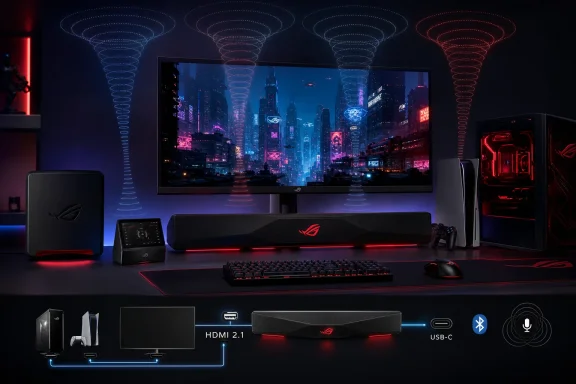
That is why the connection list matters as much as the driver list. The Gjallar provides HDMI 2.1 input, HDMI 2.1 output with eARC, USB-C, optical digital input, a 3.5 mm auxiliary input, Bluetooth 5.3, and two USB Type-A ports. The combination gives it the potential to operate as infrastructure rather than as a peripheral attached permanently to one machine.
ASUS calls the Gjallar a premium gaming soundbar, but its practical identity is closer to a compact entertainment hub designed around a gaming desk. That distinction is important because there are already plenty of competent PC speakers, gaming headsets, and living-room soundbars. The opening ASUS sees lies between them: users who want open-air sound, meaningful bass, console compatibility, and fewer reasons to crawl behind a monitor whenever they change devices.
This is not a full discrete surround system. There are no rear speakers, and ASUS is not claiming that a compact bar placed beneath a monitor can reproduce the physical separation of speakers positioned around a room. Instead, the Gjallar is intended to build a broader and taller sound field from the front of the listening position, using its driver arrangement and Dolby Atmos processing to create directional and height cues.
That approach makes sense for a desk, where a player generally occupies a predictable central position and sits much closer to the speakers than a viewer in a conventional living room. It also makes the installation far simpler than a 5.1 system, particularly in bedrooms, dorms, home offices, and shared spaces where rear speakers and their cables are impractical.
The tradeoff is that the room becomes part of the product. Up-firing audio depends on placement and reflective surfaces, so ceiling height, ceiling material, desk depth, monitor position, and the listener’s distance from the bar may all influence how convincing the Atmos effect feels. ASUS describes a realistic 3D soundstage and tactical positional clarity, but those claims require independent testing across more than one carefully arranged demonstration environment.
The soundbar’s stated frequency response is 50 Hz–20 kHz. That figure reinforces how important the separate subwoofer will be: the bar carries the mids, treble, dialogue, and directional information, while the 6.5-inch unit supplies the physical weight behind engines, impacts, music, and cinematic effects.
ASUS rates the subwoofer at 65 watts and connects it wirelessly over the 5 GHz band, with a specified operating range of 5.180–5.825 GHz. A wireless link removes the signal cable between the bar and subwoofer, although the subwoofer still requires power and must still be placed where it does not become a knee obstacle, footrest, or unwanted vibration source.
The Gjallar’s defining audio decision is not maximum channel count but a compromise between immersion and livability. It promises more spatial structure than ordinary stereo speakers without forcing the owner to turn a gaming desk into a small-scale home theater installation.
That means a compatible console or PC can feed video and audio into the Gjallar, with the video continuing to a display. Alternatively, eARC can return audio from a compatible television to the soundbar. In theory, this lets the Gjallar sit inside a high-refresh-rate gaming chain without forcing the user to sacrifice 4K resolution or a 120 Hz refresh rate merely to route sound.
For PlayStation 5, Xbox Series X and gaming-PC users, that is more than a convenience. Display connections are often the bottleneck in otherwise expensive setups, especially when a monitor or television has a limited number of full-bandwidth HDMI inputs. A soundbar that cannot pass the desired video mode may have to be connected through an alternative route, potentially adding complexity or giving up audio capabilities.
The Razer Leviathan V2 Pro illustrates the difference in strategy. As eCoustics noted in its launch coverage, Razer’s soundbar provides USB, Bluetooth 5.0, and a 3.5 mm headset jack. That arrangement makes sense for a PC-centered product, but it does not offer the same role in a console-and-display signal chain.
ASUS is consequently competing on topology as much as sound. The Gjallar is designed for users who want to move among a Windows machine, console, television, Mac, Switch, or mobile device while keeping one speaker system at the center. Its usefulness will rise with every device the owner expects it to accommodate.
There are still unanswered implementation questions. ASUS says the Gjallar supports up to 4K@120Hz passthrough and describes eARC as providing high-resolution audio with synchronized, low-latency visuals, but announcement specifications cannot show how reliably HDMI handshakes recover after sleep, how quickly inputs switch, or how the product behaves across the enormous range of displays, graphics hardware, cables, and consoles in the field.
Those details are not glamorous, but they determine whether an HDMI audio product feels invisible or temperamental. A great soundbar that occasionally leaves a Windows PC staring at a blank display after waking from sleep will rapidly become less impressive than a simpler device that works every time.
ASUS also describes profiles optimized for gaming, music, and movies. The hub can toggle among connected sources and change those profiles without requiring the user to open software on whichever device happens to be active.
That is a small but meaningful design choice. Software-only controls are tolerable when a speaker belongs to one PC, but they break down in a cross-platform system. A console cannot be expected to run a Windows configuration utility, and a work-managed laptop may not permit one to be installed. Physical controls give the Gjallar a degree of independence from its host devices.
The LCD should also make source selection less ambiguous than the traditional sequence of colored LEDs and memorized button presses. A multi-input product must communicate what it is doing, particularly when HDMI, USB-C, optical, auxiliary, and Bluetooth sources may all be attached at once.
The soundbar itself adds two USB Type-A ports for peripherals, external storage, wireless dongles, or other desk devices. They do not turn the Gjallar into a full docking station, but they support ASUS’s broader argument that audio hardware can help consolidate a setup rather than simply occupy another outlet.
There is a danger of overreach. Every additional role creates another opportunity for compatibility trouble, and the quality of a hub is measured by predictability rather than by the length of its feature list. Input switching, volume retention, sleep behavior, USB enumeration, HDMI detection, Bluetooth reconnection, and firmware stability will matter at least as much as the control hub’s animations.
Still, the architecture is coherent. The control hub, HDMI path, USB ports, microphones, and software are not random extras attached to a speaker. They all support the same idea: the Gjallar should remain useful even when the device producing the audio changes.
AEC is essential when a microphone and loudspeaker operate in the same room. Without effective echo cancellation, teammates can hear game audio, their own voices, or delayed feedback returning through the user’s microphone. ASUS says its implementation intelligently filters speaker output, including in-game sound and teammate voices.
The company also promotes an AI beamforming algorithm that focuses capture toward the speaker and suppresses ambient sounds such as PC fans and system hum. If successful, the system could let players use voice chat without wearing a headset or keeping a separate desktop microphone directly in front of them.
That is a substantial usability promise. Headsets remain popular partly because they place the microphone close to the mouth and isolate sound in a controlled acoustic environment. A far-field microphone sitting on a desk must contend with keyboard switches, mouse clicks, air conditioning, cooling fans, room reflections, other people, and the soundbar itself.
eCoustics put the issue bluntly in its coverage: “AI beamforming” may sound impressive in a press release, but mechanical keyboards, loud GPU fans, and family noise will have their own influence on the result. That skepticism is appropriate because microphone processing can fail in several ways even when speech remains technically intelligible.
Aggressive suppression may clip consonants or give a voice an artificial, underwater quality. Weak suppression may leave teammates hearing every keystroke. Echo cancellation may work at moderate volume but struggle when the subwoofer and soundbar are driving a loud action sequence.
The ideal test is not a voice recording made in a quiet studio. It is a multiplayer session on a Windows gaming PC with the speakers running at a realistic level, a mechanical keyboard in use, cooling fans ramping under load, and other people moving through the room. Until the Gjallar faces that environment, its microphones should be treated as a compelling feature awaiting proof rather than as a replacement for a good headset microphone.
A web-based configuration path is particularly relevant for a device marketed across Windows and Mac systems. It can reduce dependence on a large resident utility and may make basic configuration easier on machines where users do not want another vendor application starting with the operating system.
The mobile option is equally logical for console and television setups. If the Gjallar is connected to a PS5, Xbox Series X or S, Switch, or TV, a phone is the most practical place to expose settings that exceed what can comfortably fit on the physical hub.
This division of control—hardware hub for immediate operations, browser or phone for detailed configuration—is one of the better ideas in the announcement. Volume, source changes, and playback belong on the desk. Fine EQ work, microphone tuning, and lighting customization are better handled on a larger interface.
The remaining question is how much functionality depends on continuing software support. A premium audio product should remain fully usable long after the gaming PC beside it has been replaced. ASUS will need to ensure that essential functions remain available through the hub and that Gear Link does not become a single point of failure for settings owners reasonably expect to control.
Aura RGB lighting is also included, offering up to 16.8 million colors and four preset effects. RGB is predictable for an ROG product, but here it is secondary to the soundbar’s architecture. The lighting may help the unit visually match an existing setup; it should not be allowed to distract from the harder work of stable HDMI, clean audio, and intelligible communications.
The Gjallar attempts to combine selected advantages from several of those approaches. It has a relatively compact bar, a dedicated subwoofer, height channels, microphones, a physical controller, broad device support, and HDMI passthrough. It does not, however, provide Razer’s head-tracking system or SteelSeries’ physical rear channels.
The Razer Leviathan V2 Pro is the closest brand-level rival. Its adaptive beamforming and head-tracking AI are designed to direct spatial sound toward one listener, giving it an unusually personalized approach. Its connectivity, however, remains more explicitly PC-oriented than the Gjallar’s HDMI-equipped design.
OXS’s Thunder Pro is the closer architectural rival because it pairs Dolby Atmos with 4K/120Hz passthrough. Its 5.1.2 configuration is more elaborate than ASUS’s 2.1.2 layout, putting pressure on the Gjallar to compete through compactness, usability, microphone integration, and price rather than raw channel count.
The SteelSeries Arena 9 represents the alternative ASUS is deliberately avoiding. It is a 5.1 desktop system with a 6.5-inch subwoofer and wireless rear speakers, giving owners real speaker positions behind them. That can provide separation a front-facing soundbar cannot physically duplicate, but it also requires more room and introduces more hardware into the workspace.
Creative’s Sound Blaster Katana SE and Katana V2/V2X remain relevant because they helped establish the idea that a soundbar could be designed specifically for a monitor and gaming desk rather than adapted from television use. They address different price and subwoofer preferences, and their continued presence means ASUS is entering an established niche rather than creating one.
The Gjallar’s advantage on paper is that it does not force the buyer to identify as only a PC gamer or only a console player. It is trying to make that distinction obsolete at the audio layer. Its disadvantage is that a broad platform promise creates a correspondingly broad field of devices against which it must work reliably.
The competitive markers are already visible. The Razer Leviathan V2 Pro starts at $499.99, while the OXS Thunder Pro launched at $599. SteelSeries lists the larger Arena 9 system at $679.99, although that package uses a fundamentally different multi-speaker arrangement.
Those products create a rough premium-gaming-audio corridor, but the Gjallar does not map perfectly onto any one of them. ASUS could argue that HDMI 2.1 passthrough, eARC, the wireless subwoofer, microphones, control hub, USB ports, and wide platform support justify a price above simpler desktop bars. Buyers may counter that a 2.1.2 system without rear speakers should cost less than more elaborate alternatives.
A lower-than-Razer price would make the Gjallar immediately disruptive, especially for buyers who value console and television connections more than head tracking. Pricing near the OXS Thunder Pro would shift scrutiny toward the channel difference and real-world Atmos performance. Moving toward Arena 9 territory would invite comparisons with systems that provide actual rear speakers.
ASUS must also contend with conventional soundbars from home-theater brands, particularly when retail discounts enter the picture. The Gjallar is more desk-focused and offers gaming-specific controls, but buyers spending several hundred dollars will inevitably compare it with living-room systems that may provide larger enclosures or additional speakers.
The price therefore needs to express ASUS’s intended audience. A competitive figure would frame the Gjallar as a versatile upgrade for serious PC and console users. An aggressive premium would make it a lifestyle product for ROG loyalists and place far more pressure on the microphones, software, build quality, and HDMI implementation to distinguish it.
Until ASUS announces the price, the Gjallar is a persuasive configuration rather than a persuasive purchase.
Choice is useful, but it also creates configuration decisions. Windows may expose different channel layouts, spatial-audio options, sample formats, communications devices, and volume behavior depending on whether the active endpoint is USB, HDMI, or Bluetooth. Users switching paths should not assume that a setting applied to one endpoint will automatically follow another.
HDMI installations deserve particular attention because the graphics driver participates in the audio chain. A change to the display, cable, GPU output, refresh-rate mode, or sleep state can affect device enumeration. USB is often the simpler route for a PC-only installation, while HDMI becomes more valuable when passthrough, eARC, consoles, or a shared display are involved.
The built-in microphones create an additional endpoint that organizations may need to consider. In a personal gaming room this is mostly a convenience and privacy-setting issue. In a shared office, lab, classroom, streaming booth, or managed workstation environment, administrators should determine whether the microphone is appropriate and which applications are permitted to access it.
For IT departments, the relevant question is not whether the device can produce sound from each platform. It is whether users can move among those platforms without generating support tickets about missing endpoints, incorrect defaults, silent HDMI paths, or applications that selected the wrong microphone.
A large monitor positioned low over the bar could obstruct or alter dispersion. A shelf above the desk could interfere with reflections. An unusually high, angled, absorptive, or irregular ceiling may weaken the intended height effect. Even the choice to place the soundbar flat or on its included feet could influence how directly its drivers reach the listener.
The near-field listening position may also be both an advantage and a constraint. Sitting close to the bar gives ASUS a more predictable target area, but it leaves less distance for sound from multiple drivers to blend naturally. Tuning must prevent the output from feeling like several small sources competing beneath the monitor.
The 607 mm width should suit many desktop displays without approaching the span of a large living-room soundbar. Its 92 mm height, however, requires clearance beneath the screen. Owners using a monitor on a low fixed stand may need to measure before assuming the bar will fit without covering the lower bezel or part of the panel.
Bass placement presents its own compromises. The subwoofer measures 125 x 315 x 356 mm and weighs 5.7 kg, making it slim but substantial. Its narrow body should offer more placement options than a broad cube, although room boundaries and furniture can exaggerate or suppress low frequencies.
The wireless connection helps with positioning because the subwoofer does not need a signal cable running back to the soundbar. It does not eliminate acoustic considerations or the possibility of nearby 5 GHz activity becoming relevant in a crowded wireless environment. Real-world testing will need to establish range, resilience, and whether the connection remains stable in rooms full of networking and peripheral hardware.
The weight may help it remain stable as cables are attached, particularly because the rear connection set may include HDMI, USB-C, optical, auxiliary, and power wiring at the same time. Owners should nevertheless account for the cable bend radius and rear clearance rather than measuring only the bar’s 82 mm depth.
The control hub introduces a separate object on the desk, but its compact dimensions should make placement manageable. It will be most useful within easy reach, which means ASUS is asking for a small amount of prime desk space in exchange for avoiding repeated interaction with software or hard-to-reach controls.
The system includes two AC cables, a power adapter, a USB cable, a pair of soundbar feet, a quick-start guide, and a warranty booklet. The presence of two AC cables reflects the unavoidable truth behind the “wireless” subwoofer description: wireless refers to the audio link, not to power.
Packaging dimensions are 674 x 178 x 547 mm. That is not an everyday usability concern, but it underlines that the complete system is larger than the soundbar’s desktop silhouette suggests. Buyers receive a bar, a 5.7 kg subwoofer, a control hub, power hardware, and cabling—not a single compact speaker that disappears into a laptop bag.
What it cannot answer is whether the complete system behaves as coherently as the component list suggests. The hardest parts of a product like this are not necessarily the visible ones. Audio tuning, latency, echo cancellation, input transitions, firmware, HDMI interoperability, and recovery from device sleep require extended use.
ASUS’s claims about tactical clarity also need careful interpretation. Positional information in games depends on the game’s audio engine, its output format, Windows or console settings, Dolby processing, speaker placement, and the acoustic environment. No speaker can create “absolute precision” independently of the content and signal chain feeding it.
The microphone claim deserves similar restraint. A beamforming array can improve directional pickup, and AEC can reduce sound returning from the speakers, but neither technology abolishes a noisy room. ASUS is addressing a genuine problem; it is not exempt from the physics that make that problem difficult.
The company’s own availability disclaimer acknowledges the uncertainty surrounding a product at announcement. Specifications, content, and availability may change, may differ by country, and may perform differently according to applications, use, and environment. That boilerplate is particularly relevant here because environment is central to both up-firing audio and far-field microphones.
Independent reviews should therefore focus on system behavior rather than repeating demonstrations of RGB effects or playing an Atmos trailer once. The Gjallar needs tests with multiple GPUs, consoles, displays, USB hosts, HDMI cables, room layouts, voice-chat applications, and volume levels. It also needs ordinary music and dialogue tests, because a gaming soundbar spends much of its life doing things other than gaming.
 ASUS Is Selling Integration, Not Just More Speakers
Republic of Gamers has spent two decades extending the ROG identity from its original performance-hardware roots into almost every part of a gaming setup. Formed in 2006, the ASUS sub-brand now covers components, computers, displays, networking gear, mobile devices, peripherals, and audio products, making a premium desktop sound system a logical addition rather than a surprising detour.The Gjallar—pronounced “ga-lar,” according to ASUS—is nevertheless more ambitious than a typical branded accessory. It is not a pair of speakers wrapped in angular plastic and Aura lighting, nor is it merely a Bluetooth soundbar carrying a gaming preset. ASUS has designed it around the increasingly messy reality that one desk may contain a Windows PC, work laptop, console, handheld, phone, monitor, TV, external DAC, microphone, wireless dongles, and several competing paths for audio.
That is why the connection list matters as much as the driver list. The Gjallar provides HDMI 2.1 input, HDMI 2.1 output with eARC, USB-C, optical digital input, a 3.5 mm auxiliary input, Bluetooth 5.3, and two USB Type-A ports. The combination gives it the potential to operate as infrastructure rather than as a peripheral attached permanently to one machine.
ASUS calls the Gjallar a premium gaming soundbar, but its practical identity is closer to a compact entertainment hub designed around a gaming desk. That distinction is important because there are already plenty of competent PC speakers, gaming headsets, and living-room soundbars. The opening ASUS sees lies between them: users who want open-air sound, meaningful bass, console compatibility, and fewer reasons to crawl behind a monitor whenever they change devices.
A Modest Channel Count Hides a Serious Desktop Design
The Gjallar uses a 2.1.2-channel configuration consisting of four 50 mm full-range drivers, two 27 mm tweeters, dedicated up-firing channels, and a wireless subwoofer. The “2” at the end of 2.1.2 identifies the height component intended to support Dolby Atmos effects, while the subwoofer handles the low-frequency work that a bar only 82 mm deep cannot realistically perform alone.This is not a full discrete surround system. There are no rear speakers, and ASUS is not claiming that a compact bar placed beneath a monitor can reproduce the physical separation of speakers positioned around a room. Instead, the Gjallar is intended to build a broader and taller sound field from the front of the listening position, using its driver arrangement and Dolby Atmos processing to create directional and height cues.
That approach makes sense for a desk, where a player generally occupies a predictable central position and sits much closer to the speakers than a viewer in a conventional living room. It also makes the installation far simpler than a 5.1 system, particularly in bedrooms, dorms, home offices, and shared spaces where rear speakers and their cables are impractical.
The tradeoff is that the room becomes part of the product. Up-firing audio depends on placement and reflective surfaces, so ceiling height, ceiling material, desk depth, monitor position, and the listener’s distance from the bar may all influence how convincing the Atmos effect feels. ASUS describes a realistic 3D soundstage and tactical positional clarity, but those claims require independent testing across more than one carefully arranged demonstration environment.
The soundbar’s stated frequency response is 50 Hz–20 kHz. That figure reinforces how important the separate subwoofer will be: the bar carries the mids, treble, dialogue, and directional information, while the 6.5-inch unit supplies the physical weight behind engines, impacts, music, and cinematic effects.
ASUS rates the subwoofer at 65 watts and connects it wirelessly over the 5 GHz band, with a specified operating range of 5.180–5.825 GHz. A wireless link removes the signal cable between the bar and subwoofer, although the subwoofer still requires power and must still be placed where it does not become a knee obstacle, footrest, or unwanted vibration source.
The Gjallar’s defining audio decision is not maximum channel count but a compromise between immersion and livability. It promises more spatial structure than ordinary stereo speakers without forcing the owner to turn a gaming desk into a small-scale home theater installation.
HDMI 2.1 Is the Specification That Changes the Product
Dolby Atmos supplies the most recognizable logo, but HDMI 2.1 is the feature that separates the Gjallar from many desktop gaming soundbars. ASUS specifies an HDMI input and an HDMI output with eARC, including passthrough of video at up to 4K@120Hz.That means a compatible console or PC can feed video and audio into the Gjallar, with the video continuing to a display. Alternatively, eARC can return audio from a compatible television to the soundbar. In theory, this lets the Gjallar sit inside a high-refresh-rate gaming chain without forcing the user to sacrifice 4K resolution or a 120 Hz refresh rate merely to route sound.
For PlayStation 5, Xbox Series X and gaming-PC users, that is more than a convenience. Display connections are often the bottleneck in otherwise expensive setups, especially when a monitor or television has a limited number of full-bandwidth HDMI inputs. A soundbar that cannot pass the desired video mode may have to be connected through an alternative route, potentially adding complexity or giving up audio capabilities.
The Razer Leviathan V2 Pro illustrates the difference in strategy. As eCoustics noted in its launch coverage, Razer’s soundbar provides USB, Bluetooth 5.0, and a 3.5 mm headset jack. That arrangement makes sense for a PC-centered product, but it does not offer the same role in a console-and-display signal chain.
ASUS is consequently competing on topology as much as sound. The Gjallar is designed for users who want to move among a Windows machine, console, television, Mac, Switch, or mobile device while keeping one speaker system at the center. Its usefulness will rise with every device the owner expects it to accommodate.
There are still unanswered implementation questions. ASUS says the Gjallar supports up to 4K@120Hz passthrough and describes eARC as providing high-resolution audio with synchronized, low-latency visuals, but announcement specifications cannot show how reliably HDMI handshakes recover after sleep, how quickly inputs switch, or how the product behaves across the enormous range of displays, graphics hardware, cables, and consoles in the field.
Those details are not glamorous, but they determine whether an HDMI audio product feels invisible or temperamental. A great soundbar that occasionally leaves a Windows PC staring at a blank display after waking from sleep will rapidly become less impressive than a simpler device that works every time.
The Gjallar Wants to Become the Desk’s Switching Layer
The Gjallar’s separate control hub is ASUS’s answer to the usability problem created by all that connectivity. Measuring 90 x 82 x 37 mm and weighing 0.191 kg, the hub includes an LCD display and provides access to volume, playback, EQ, input selection, microphone controls, and RGB lighting.ASUS also describes profiles optimized for gaming, music, and movies. The hub can toggle among connected sources and change those profiles without requiring the user to open software on whichever device happens to be active.
That is a small but meaningful design choice. Software-only controls are tolerable when a speaker belongs to one PC, but they break down in a cross-platform system. A console cannot be expected to run a Windows configuration utility, and a work-managed laptop may not permit one to be installed. Physical controls give the Gjallar a degree of independence from its host devices.
The LCD should also make source selection less ambiguous than the traditional sequence of colored LEDs and memorized button presses. A multi-input product must communicate what it is doing, particularly when HDMI, USB-C, optical, auxiliary, and Bluetooth sources may all be attached at once.
The soundbar itself adds two USB Type-A ports for peripherals, external storage, wireless dongles, or other desk devices. They do not turn the Gjallar into a full docking station, but they support ASUS’s broader argument that audio hardware can help consolidate a setup rather than simply occupy another outlet.
There is a danger of overreach. Every additional role creates another opportunity for compatibility trouble, and the quality of a hub is measured by predictability rather than by the length of its feature list. Input switching, volume retention, sleep behavior, USB enumeration, HDMI detection, Bluetooth reconnection, and firmware stability will matter at least as much as the control hub’s animations.
Still, the architecture is coherent. The control hub, HDMI path, USB ports, microphones, and software are not random extras attached to a speaker. They all support the same idea: the Gjallar should remain useful even when the device producing the audio changes.
Built-In Microphones Make the Boldest Promise
ASUS has integrated a beamforming microphone system with Acoustic Echo Cancellation into the control hub. The microphones have a specified frequency response of 100 Hz–10 kHz and sensitivity of -37 ± 3 dB, with processing intended to distinguish the user’s voice from sound produced by the speakers.AEC is essential when a microphone and loudspeaker operate in the same room. Without effective echo cancellation, teammates can hear game audio, their own voices, or delayed feedback returning through the user’s microphone. ASUS says its implementation intelligently filters speaker output, including in-game sound and teammate voices.
The company also promotes an AI beamforming algorithm that focuses capture toward the speaker and suppresses ambient sounds such as PC fans and system hum. If successful, the system could let players use voice chat without wearing a headset or keeping a separate desktop microphone directly in front of them.
That is a substantial usability promise. Headsets remain popular partly because they place the microphone close to the mouth and isolate sound in a controlled acoustic environment. A far-field microphone sitting on a desk must contend with keyboard switches, mouse clicks, air conditioning, cooling fans, room reflections, other people, and the soundbar itself.
eCoustics put the issue bluntly in its coverage: “AI beamforming” may sound impressive in a press release, but mechanical keyboards, loud GPU fans, and family noise will have their own influence on the result. That skepticism is appropriate because microphone processing can fail in several ways even when speech remains technically intelligible.
Aggressive suppression may clip consonants or give a voice an artificial, underwater quality. Weak suppression may leave teammates hearing every keystroke. Echo cancellation may work at moderate volume but struggle when the subwoofer and soundbar are driving a loud action sequence.
The ideal test is not a voice recording made in a quiet studio. It is a multiplayer session on a Windows gaming PC with the speakers running at a realistic level, a mechanical keyboard in use, cooling fans ramping under load, and other people moving through the room. Until the Gjallar faces that environment, its microphones should be treated as a compelling feature awaiting proof rather than as a replacement for a good headset microphone.
Gear Link Moves Control Away From a Single PC
ASUS is supporting the Gjallar through Gear Link and Gear Link Mobile. The system is available through a web-based PC tool and a mobile app, providing controls for EQ, lighting, microphone settings, and other customization options.A web-based configuration path is particularly relevant for a device marketed across Windows and Mac systems. It can reduce dependence on a large resident utility and may make basic configuration easier on machines where users do not want another vendor application starting with the operating system.
The mobile option is equally logical for console and television setups. If the Gjallar is connected to a PS5, Xbox Series X or S, Switch, or TV, a phone is the most practical place to expose settings that exceed what can comfortably fit on the physical hub.
This division of control—hardware hub for immediate operations, browser or phone for detailed configuration—is one of the better ideas in the announcement. Volume, source changes, and playback belong on the desk. Fine EQ work, microphone tuning, and lighting customization are better handled on a larger interface.
The remaining question is how much functionality depends on continuing software support. A premium audio product should remain fully usable long after the gaming PC beside it has been replaced. ASUS will need to ensure that essential functions remain available through the hub and that Gear Link does not become a single point of failure for settings owners reasonably expect to control.
Aura RGB lighting is also included, offering up to 16.8 million colors and four preset effects. RGB is predictable for an ROG product, but here it is secondary to the soundbar’s architecture. The lighting may help the unit visually match an existing setup; it should not be allowed to distract from the harder work of stable HDMI, clean audio, and intelligible communications.
The Competition Splits Into Different Philosophies
The gaming-speaker market does not offer a single obvious template. Razer emphasizes personalized beamforming from a bar and subwoofer, OXS pursues a larger channel configuration, Creative maintains a family of compact desktop bars, and SteelSeries uses separate speakers to deliver physical 5.1 surround.The Gjallar attempts to combine selected advantages from several of those approaches. It has a relatively compact bar, a dedicated subwoofer, height channels, microphones, a physical controller, broad device support, and HDMI passthrough. It does not, however, provide Razer’s head-tracking system or SteelSeries’ physical rear channels.
| System | Configuration | Spatial-audio approach | Key connectivity or system feature | Stated price status |
|---|---|---|---|---|
| ASUS ROG Gjallar | 2.1.2 | Dolby Atmos with up-firing channels | HDMI 2.1 eARC and up to 4K@120Hz passthrough | TBA |
| Razer Leviathan V2 Pro | Soundbar and subwoofer | Head-tracking AI, adaptive beamforming, THX Spatial Audio | USB, Bluetooth 5.0, 3.5 mm headset jack | Starts at $499.99 |
| OXS Thunder Pro | 5.1.2 | Dolby Atmos | 4K/120Hz passthrough | Launched at $599 |
| SteelSeries Arena 9 | 5.1 | Separate speakers with wireless rears | Physical desktop surround system | $679.99 |
OXS’s Thunder Pro is the closer architectural rival because it pairs Dolby Atmos with 4K/120Hz passthrough. Its 5.1.2 configuration is more elaborate than ASUS’s 2.1.2 layout, putting pressure on the Gjallar to compete through compactness, usability, microphone integration, and price rather than raw channel count.
The SteelSeries Arena 9 represents the alternative ASUS is deliberately avoiding. It is a 5.1 desktop system with a 6.5-inch subwoofer and wireless rear speakers, giving owners real speaker positions behind them. That can provide separation a front-facing soundbar cannot physically duplicate, but it also requires more room and introduces more hardware into the workspace.
Creative’s Sound Blaster Katana SE and Katana V2/V2X remain relevant because they helped establish the idea that a soundbar could be designed specifically for a monitor and gaming desk rather than adapted from television use. They address different price and subwoofer preferences, and their continued presence means ASUS is entering an established niche rather than creating one.
The Gjallar’s advantage on paper is that it does not force the buyer to identify as only a PC gamer or only a console player. It is trying to make that distinction obsolete at the audio layer. Its disadvantage is that a broad platform promise creates a correspondingly broad field of devices against which it must work reliably.
Pricing Will Decide Whether “Premium” Means Competitive or Excessive
ASUS had not confirmed U.S. pricing at the time of writing, and that omission prevents any final judgment. The Gjallar can look compelling at one price and indulgent at another without changing a single driver or connector.The competitive markers are already visible. The Razer Leviathan V2 Pro starts at $499.99, while the OXS Thunder Pro launched at $599. SteelSeries lists the larger Arena 9 system at $679.99, although that package uses a fundamentally different multi-speaker arrangement.
Those products create a rough premium-gaming-audio corridor, but the Gjallar does not map perfectly onto any one of them. ASUS could argue that HDMI 2.1 passthrough, eARC, the wireless subwoofer, microphones, control hub, USB ports, and wide platform support justify a price above simpler desktop bars. Buyers may counter that a 2.1.2 system without rear speakers should cost less than more elaborate alternatives.
A lower-than-Razer price would make the Gjallar immediately disruptive, especially for buyers who value console and television connections more than head tracking. Pricing near the OXS Thunder Pro would shift scrutiny toward the channel difference and real-world Atmos performance. Moving toward Arena 9 territory would invite comparisons with systems that provide actual rear speakers.
ASUS must also contend with conventional soundbars from home-theater brands, particularly when retail discounts enter the picture. The Gjallar is more desk-focused and offers gaming-specific controls, but buyers spending several hundred dollars will inevitably compare it with living-room systems that may provide larger enclosures or additional speakers.
The price therefore needs to express ASUS’s intended audience. A competitive figure would frame the Gjallar as a versatile upgrade for serious PC and console users. An aggressive premium would make it a lifestyle product for ROG loyalists and place far more pressure on the microphones, software, build quality, and HDMI implementation to distinguish it.
Until ASUS announces the price, the Gjallar is a persuasive configuration rather than a persuasive purchase.
Windows Is the Center of the Setup, but Not Its Boundary
For Windows users, the Gjallar offers several possible audio routes. A PC can connect over USB-C, feed HDMI through the bar to a display, send audio through a compatible display using eARC, use optical output where available, or fall back to analog or Bluetooth.Choice is useful, but it also creates configuration decisions. Windows may expose different channel layouts, spatial-audio options, sample formats, communications devices, and volume behavior depending on whether the active endpoint is USB, HDMI, or Bluetooth. Users switching paths should not assume that a setting applied to one endpoint will automatically follow another.
HDMI installations deserve particular attention because the graphics driver participates in the audio chain. A change to the display, cable, GPU output, refresh-rate mode, or sleep state can affect device enumeration. USB is often the simpler route for a PC-only installation, while HDMI becomes more valuable when passthrough, eARC, consoles, or a shared display are involved.
The built-in microphones create an additional endpoint that organizations may need to consider. In a personal gaming room this is mostly a convenience and privacy-setting issue. In a shared office, lab, classroom, streaming booth, or managed workstation environment, administrators should determine whether the microphone is appropriate and which applications are permitted to access it.
Action checklist for admins
- Map the intended signal path before deployment: direct USB-C, HDMI passthrough, display eARC, optical, or Bluetooth.
- Verify that the display, graphics output, and cable support the required HDMI 2.1 and 4K@120Hz mode.
- Check Windows playback, spatial-audio, communications, and default-microphone settings for each connection method.
- Review microphone privacy permissions and disable the Gjallar’s input where far-field capture is not appropriate.
- Test sleep, wake, input switching, console handoff, and display reconnection before standardizing a shared-room setup.
- Document Gear Link access, EQ profiles, and firmware or configuration procedures for supported users.
For IT departments, the relevant question is not whether the device can produce sound from each platform. It is whether users can move among those platforms without generating support tickets about missing endpoints, incorrect defaults, silent HDMI paths, or applications that selected the wrong microphone.
Dolby Atmos at a Desk Remains a Room-Dependent Proposition
A 2.1.2 system can deliver a sense of height and space, but the Dolby Atmos label does not guarantee the same experience in every environment. The Gjallar’s performance will depend on the relationship among its up-firing channels, the ceiling, the monitor, the desk, and the listener.A large monitor positioned low over the bar could obstruct or alter dispersion. A shelf above the desk could interfere with reflections. An unusually high, angled, absorptive, or irregular ceiling may weaken the intended height effect. Even the choice to place the soundbar flat or on its included feet could influence how directly its drivers reach the listener.
The near-field listening position may also be both an advantage and a constraint. Sitting close to the bar gives ASUS a more predictable target area, but it leaves less distance for sound from multiple drivers to blend naturally. Tuning must prevent the output from feeling like several small sources competing beneath the monitor.
The 607 mm width should suit many desktop displays without approaching the span of a large living-room soundbar. Its 92 mm height, however, requires clearance beneath the screen. Owners using a monitor on a low fixed stand may need to measure before assuming the bar will fit without covering the lower bezel or part of the panel.
Bass placement presents its own compromises. The subwoofer measures 125 x 315 x 356 mm and weighs 5.7 kg, making it slim but substantial. Its narrow body should offer more placement options than a broad cube, although room boundaries and furniture can exaggerate or suppress low frequencies.
The wireless connection helps with positioning because the subwoofer does not need a signal cable running back to the soundbar. It does not eliminate acoustic considerations or the possibility of nearby 5 GHz activity becoming relevant in a crowded wireless environment. Real-world testing will need to establish range, resilience, and whether the connection remains stable in rooms full of networking and peripheral hardware.
The Physical Package Is Compact, Not Inconsequential
The soundbar measures 607 x 92 x 82 mm, or 23.9 x 3.6 x 3.2 inches, and weighs 2.4 kg, or 5.3 pounds. That makes it compact compared with many television soundbars but considerably more substantial than a pair of lightweight monitor speakers.The weight may help it remain stable as cables are attached, particularly because the rear connection set may include HDMI, USB-C, optical, auxiliary, and power wiring at the same time. Owners should nevertheless account for the cable bend radius and rear clearance rather than measuring only the bar’s 82 mm depth.
The control hub introduces a separate object on the desk, but its compact dimensions should make placement manageable. It will be most useful within easy reach, which means ASUS is asking for a small amount of prime desk space in exchange for avoiding repeated interaction with software or hard-to-reach controls.
The system includes two AC cables, a power adapter, a USB cable, a pair of soundbar feet, a quick-start guide, and a warranty booklet. The presence of two AC cables reflects the unavoidable truth behind the “wireless” subwoofer description: wireless refers to the audio link, not to power.
Packaging dimensions are 674 x 178 x 547 mm. That is not an everyday usability concern, but it underlines that the complete system is larger than the soundbar’s desktop silhouette suggests. Buyers receive a bar, a 5.7 kg subwoofer, a control hub, power hardware, and cabling—not a single compact speaker that disappears into a laptop bag.
ASUS Has Announced the Right Features but Not Yet Proved the System
The specification sheet answers many purchasing questions unusually well. We know the channel configuration, driver sizes, subwoofer dimensions and power, connection options, microphone characteristics, physical measurements, supported platforms, RGB capabilities, software path, and video-passthrough target.What it cannot answer is whether the complete system behaves as coherently as the component list suggests. The hardest parts of a product like this are not necessarily the visible ones. Audio tuning, latency, echo cancellation, input transitions, firmware, HDMI interoperability, and recovery from device sleep require extended use.
ASUS’s claims about tactical clarity also need careful interpretation. Positional information in games depends on the game’s audio engine, its output format, Windows or console settings, Dolby processing, speaker placement, and the acoustic environment. No speaker can create “absolute precision” independently of the content and signal chain feeding it.
The microphone claim deserves similar restraint. A beamforming array can improve directional pickup, and AEC can reduce sound returning from the speakers, but neither technology abolishes a noisy room. ASUS is addressing a genuine problem; it is not exempt from the physics that make that problem difficult.
The company’s own availability disclaimer acknowledges the uncertainty surrounding a product at announcement. Specifications, content, and availability may change, may differ by country, and may perform differently according to applications, use, and environment. That boilerplate is particularly relevant here because environment is central to both up-firing audio and far-field microphones.
Independent reviews should therefore focus on system behavior rather than repeating demonstrations of RGB effects or playing an Atmos trailer once. The Gjallar needs tests with multiple GPUs, consoles, displays, USB hosts, HDMI cables, room layouts, voice-chat applications, and volume levels. It also needs ordinary music and dialogue tests, because a gaming soundbar spends much of its life doing things other than gaming.
What Prospective Buyers Should Carry Forward
The Gjallar is one of the more complete gaming-soundbar designs announced to date, but it remains an announced product with no confirmed U.S. price and no body of independent performance testing. Its most important qualities are the way the features fit together—and the number of those features that still depend on implementation.- The core system is a 2.1.2 Dolby Atmos soundbar with up-firing channels and a 65-watt, 6.5-inch wireless subwoofer.
- HDMI 2.1 input, eARC output, and up to 4K@120Hz passthrough give it broader relevance than a USB-only PC speaker.
- The physical LCD control hub is central to the cross-platform design, not merely an accessory.
- Beamforming microphones with AEC could reduce headset dependence, but noisy-room performance remains unproven.
- Gear Link provides browser and mobile configuration for EQ, lighting, and microphone settings.
- Pricing will determine whether the Gjallar challenges the $499.99 Razer Leviathan V2 Pro and $599 OXS Thunder Pro or moves into a harder-to-defend tier.
References
- Primary source: eCoustics
Published: Sat, 11 Jul 2026 08:20:21 GMT
ASUS ROG Gjallar Gaming Soundbar Challenges Razer With Dolby Atmos and HDMI 2.1 - ecoustics.com
ASUS ROG Gjallar brings 2.1.2 Dolby Atmos, HDMI 2.1, 4K/120 passthrough and a wireless subwoofer to desktop and console gamers.www.ecoustics.com - Independent coverage: ASUS Pressroom
Published: Fri, 10 Jul 2026 05:57:01 GMT
ASUS Republic of Gamers Announces Gjallar Gaming Soundbar | ASUS Pressroom - Official Global News & Updates
ASUS ROG unveils Gjallar, a gaming soundbar with 2.1.2 Dolby Atmos sound, AEC microphones for clear comms, and USB-C, HDMI eARC, and Bluetooth 5.3 connectivity. press.asus.com
- Related coverage: techradar.com
Asus unveils the 'elite' ROG Raikiri II Pro PC Controller featuring 'competition-grade responsiveness and ultra-low latency' and the Gjallar Gaming Soundbar that boasts 'intuitive cross-platform controls' | TechRadar
Asus Republic of Gamers has announced the ROG Raikiri II Pro, a high-end, elite performance PC controller, and the premium, compact Gjallar Gaming Soundbar.www.techradar.com - Related coverage: rog.asus.com
- Related coverage: razer.com
Buy Razer Leviathan V2 Pro | Gaming Speakers | Razer.com
Purchase Razer Leviathan V2 Pro (gaming speakers), or browse through our extensive selection of gaming peripherals, and more at razer.com www.razer.com
- Related coverage: mysupport.razer.com

At a Glance: Razer Leviathan V2 Pro | RZ05-04160
mysupport.razer.com
- Related coverage: oxsaudio.com
OXS Thunder Pro - Dolby Atmos® 5.1.2ch Gaming Soundbar
OXS Thunder Pro gaming soundbar features 5.1.2 Channel Dolby Atmos® audio, is a high-performance, under-monitor soundbar for your computer and gaming consoles. With 8 fine-tuned drivers that closely adhere to a concept designed by Dolby, you can accurately pinpoint your enemies from up to 7... oxsaudio.com
- Related coverage: techolam.com
- Related coverage: asus.com
- Related coverage: mo-solu.com
Razer_仕様表_Leviathan V2 Pro, USB-C Hub, Kraken Kitty V2 BT_v2.xlsx
PDF documentwww.mo-solu.com
- Related coverage: windowscentral.com
The best Xbox gaming headset is 48% off at Amazon | Windows Central
The Xbox variant of Razer's Blackshark V2 Pro gaming headset is now less than $105, just in time for gamers to get their co-op buddies a gift for Christmas.www.windowscentral.com - Related coverage: tomsguide.com
Asus ROG Zephyrus G16 (2026) review: Improved (and much more expensive) | Tom's Guide
The Asus ROG Zephyrus G16 is often a favorite in the gaming laptop scene, though last year’s model was more disappointing than expected. The new 2026 model does improve the battery life, and packs a heftier punch in terms of raw performance, but it’s still too pricey.www.tomsguide.com - Related coverage: sg.creative.com
Sound Blaster Katana V2: This is the Cutting Edge
Creative's Flagship Gaming Soundbar Sharpened with Super X-Fi Headphone Holography and Moresg.creative.com - Related coverage: steelseries.com
- Related coverage: tomshardware.com
The ultimate 5.1 surround sound SteelSeries Arena 9 gaming speaker system gets a big $130 discount | Tom's Hardware
True surround sound is an experience to behold.www.tomshardware.com - Related coverage: pcgamer.com
Creative Stage Pro review | PC Gamer
The latest Review,,,reviews, breaking news, comment, reviews and features from the experts at PC Gamerwww.pcgamer.com