

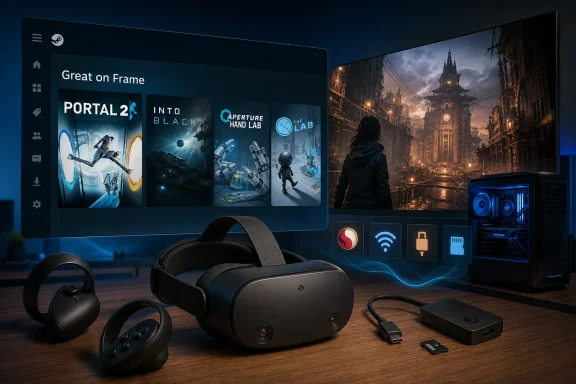
Valve has quietly added a new “Great on Frame” category to Steam for its upcoming standalone VR headset, with Portal 2, Into Black, Aperture Hand Lab, and The Lab currently listed, a page first spotted by Brad Lynch that makes the hardware’s launch look materially closer. The important development is not the meager size of that list, but the fact that Valve has begun exposing the storefront machinery needed to explain a complicated new class of Steam device to ordinary buyers. Steam Frame is being positioned as a standalone Arm-based gaming computer, a wireless PC-VR display, and a virtual theater for traditional games at the same time. “Great on Frame” is Valve’s first visible attempt to turn that architectural complexity into a label customers might understand.
The category does not prove that orders will open immediately, and it should not be mistaken for a four-game launch library. It does suggest that Valve is progressing from demonstrating hardware to organizing software around it—the point at which a platform must stop being an engineering project and start becoming a product.
As first reported by DLCompare, the current “Great on Frame” page contains only four titles: Portal 2, Into Black, Aperture Hand Lab, and The Lab. Two are Valve-owned VR technology demonstrations, while Portal 2 is a conventional flatscreen PC game rather than a native VR release.
That mixture is more revealing than a larger, cleaner list of obvious VR titles would have been. Valve is not presenting Steam Frame merely as a wireless successor to a traditional PC headset; it is showing the device as another place where users can open their existing Steam libraries, whether a title surrounds the player in VR or appears on a large virtual screen.
The list therefore looks less like a launch catalog than a set of carefully chosen test cases. Aperture Hand Lab and The Lab represent interaction-heavy VR software closely associated with Valve’s previous work in the medium. Portal 2 represents the enormous conventional Steam library that Valve needs to make useful inside the headset if Frame is to be more than a specialist VR purchase.
Into Black supplies the crucial outside example. It prevents the first public collection from looking entirely like an internal Valve demonstration and indicates, at minimum, that the category is not reserved for the company’s own software.
The small list also places an important limit on what can be inferred. Four games are not enough to judge the breadth, maturity, or consistency of compatibility testing, and the category’s existence does not establish that every title has received the same kind of validation.
“Great on Frame” may ultimately function as a storefront collection, a compatibility badge, a recommendation layer, or some combination of all three. Until Valve explains the label publicly, the safest reading is narrow: these are games Valve is currently comfortable highlighting, not the only games the headset can run and not necessarily a guarantee that every one of them provides a native VR experience.
That distinction matters because Steam Frame’s promise is built around several fundamentally different ways to play. A badge that hides those differences too aggressively could become convenient marketing at the cost of useful technical information.
This expands the headset’s potential value proposition considerably. A dedicated VR device lives or dies by the pace of VR releases, but a device capable of presenting conventional Steam games on a large virtual display can draw from libraries users have spent years building.
Valve employed a similar philosophical advantage with Steam Deck: instead of asking customers to begin again with a separate software ecosystem, it gave them another way to use games they already owned. Steam Frame appears designed around the same commercial idea, although the technical challenge is more difficult because Valve is moving across processor architectures as well as display formats.
Portal 2 is also an unusually sensible demonstration title. It is familiar, controller-friendly, visually readable, and closely identified with Valve. If the company wants to teach users that a flatscreen game can still feel at home inside a headset, Portal 2 offers a controlled and recognizable starting point.
But that does not make it a native VR conversion. PC Gamer’s coverage similarly cautioned that inclusion in the new collection does not necessarily mean a game has been adapted to place the player physically inside its world. A traditional title may simply run as it normally would while being viewed on a virtual screen.
Valve will need to communicate that difference with more precision than the category currently provides. “Runs locally,” “streams from a PC,” “plays on a virtual screen,” and “supports native VR” describe experiences with different performance requirements, input expectations, comfort implications, and failure modes.
A user selecting Portal 2 may be perfectly happy with a virtual cinema experience. That same user will be less happy if the storefront’s language encourages the assumption that Valve has transformed the game into room-scale VR.
The larger lesson is that “Great on Frame” is not necessarily synonymous with “VR game.” It appears to describe suitability for the device rather than a single software format, which makes the label broader—and potentially more valuable—than a conventional VR compatibility filter.
Valve’s Steamworks documentation describes an Arm-based SteamOS environment designed to accommodate software built for other operating systems and processor architectures through compatibility technology. Valve’s goal is not simply to persuade every PC developer to create and maintain a separate Steam Frame edition.
That is an ambitious extension of the strategy behind SteamOS. Rather than turning Steam Frame into a closed mobile-VR console with its own isolated catalog, Valve is trying to preserve the PC model in which users purchase games once and expect them to remain useful across changing hardware.
The technical cost is substantial. Traditional Windows PC games were not created for this processor, this operating system, or this thermal envelope. Even when compatibility layers allow software to launch, the result still has to deliver stable performance, readable interfaces, sensible controls, and acceptable behavior when suspended or resumed.
VR software adds another layer of difficulty. A short frame-rate drop that might be tolerable on a monitor can become physically uncomfortable in a headset, while tracking and input failures are far more disruptive when the user cannot simply glance down at a keyboard or taskbar.
This is where the “Great on Frame” category must eventually earn its name. Valve does not merely need to prove that software can execute; it must define what good enough means across experiences that may be native, translated, streamed, or displayed on a virtual screen.
A conventional compatibility database could expose every technical detail, but that would reproduce the complexity Valve is trying to hide. A single friendly badge is easier to sell, yet risks collapsing several distinct experiences into one vague promise.
The best version of Valve’s system would do both. The store could give casual buyers a simple recommendation while allowing enthusiasts, developers, and support teams to inspect how the game runs, which controls it expects, and whether a host PC is involved.
That information will become particularly important when users troubleshoot problems. A locally executed Arm-compatible title, a translated Windows game, and a wirelessly streamed PC-VR title may look identical in a Steam library but fail for completely different reasons.
Valve is offering a dedicated wireless adapter for that connection rather than relying entirely on whatever router, channel layout, and household traffic the buyer happens to have. That is more than a convenience accessory: it is an attempt to turn wireless PC VR from a network-configuration exercise into a product feature.
For demanding games, streaming provides an escape hatch from the limits of a mobile-class processor. The host computer can supply the graphics performance while the headset remains physically untethered, preserving one of standalone VR’s greatest advantages.
It is also an anchor tying Frame back to Windows gaming PCs. Even if Valve succeeds in running a meaningful selection of games locally through SteamOS and compatibility layers, the highest-end PC-VR experiences will still depend on the user’s existing machine.
This division of labor gives Valve a way to serve two audiences with one device. Buyers without a powerful PC can use locally supported software and conventional games, while enthusiasts can treat Frame as a wireless front end for a much more capable system.
The risk is that these audiences may encounter very different products under the same name. One person’s Steam Frame could be a self-contained headset filled with local games; another’s could spend most of its life receiving frames from a Windows desktop.
That makes network quality part of the user experience in a way that Steam’s traditional compatibility labels have not had to address. A streamed game may be functioning perfectly on the PC while still feeling poor in the headset because of congestion, interference, latency, or an unstable connection.
The dedicated adapter is Valve’s answer to that uncertainty. By supplying a more controlled path between the PC and headset, Valve can reduce the number of variables that would otherwise be blamed on Steam Frame.
For IT departments, labs, gaming venues, and households with crowded wireless environments, the adapter may prove more important than the onboard processor. It creates a clearer support boundary: test the host, test the dedicated link, and test the headset rather than attempting to diagnose every device sharing a general-purpose network.
It also reveals Valve’s priorities. Steam Frame is not abandoning PC VR in favor of standalone computing; it is trying to remove the cable while keeping the PC available whenever local hardware reaches its limit.
DLCompare highlights the contrast with Meta’s Quest headsets, which do not offer the same expandable-storage option. That difference could become significant as local Steam Frame libraries grow and as users move between conventional games, native VR software, and downloaded assets.
Expandable storage also fits Valve’s broader treatment of gaming hardware as a PC rather than an appliance. The company is giving users a degree of control over capacity instead of using storage scarcity solely as a mechanism for upselling a more expensive model.
There are practical limits, of course. A microSD card does not automatically provide the same performance characteristics as built-in storage, and some games will be more sensitive to storage speed than others. Valve will need to make installation behavior and performance expectations clear, particularly for large titles that stream assets aggressively.
Still, the slot changes the economics of ownership. A buyer does not have to predict the lifetime size of a library at checkout with the same finality required by a sealed device.
That matters because Steam Frame’s pitch encourages users to think beyond a compact mobile-VR catalog. Once traditional PC games are included, storage demand can grow quickly, and a headset sold as a portal to an existing Steam library needs a credible answer to the question of where that library will fit.
MicroSD expansion is that answer, even if it does not eliminate every capacity or performance tradeoff. It shifts some control from Valve back to the owner and makes the device more plausible as a general-purpose Steam system.
The design also helps unify Valve’s hardware story. Steam Deck normalized removable storage as an ordinary way to manage a portable PC library, and Steam Frame can build on habits users already understand rather than inventing a headset-specific purchasing model.
Steam Deck demonstrated why such labels matter. Most customers do not want to read compatibility-layer documentation before purchasing a game; they want a fast indication that the title will launch, remain readable, and accept the controls available on the device.
Steam Frame introduces more dimensions than a handheld. A game can be a native VR title, a traditional game on a virtual display, a locally installed title passing through compatibility layers, or a streamed experience rendered by a PC.
Those categories can also overlap. A conventional PC game might run locally or be streamed for better performance, while a VR game may have a headset-optimized local version as well as a more demanding PC edition.
A useful storefront needs to tell customers not only whether a game is recommended but how Valve expects them to play it. Otherwise, “Great on Frame” may conceal the prerequisite that makes the experience great.
The current four-title page cannot answer that yet. Its importance is organizational: Valve now has a visible destination where that language can be developed, tested, and presented to buyers.
The presence of both VR demonstrations and Portal 2 suggests Valve wants one umbrella covering the device’s full range rather than separate storefronts for every execution mode. That may simplify discovery, but it places a heavier burden on the details displayed beneath the umbrella.
For developers, the category introduces both opportunity and pressure. A favorable Steam Frame label could become valuable storefront visibility, particularly during the hardware’s launch period, but earning it may require work on performance, interface scaling, controls, or compatibility behavior.
Valve will also need a continuing review process. A badge assigned once can become misleading after a game update changes its renderer, launcher, anti-cheat system, account flow, or input handling.
The same is true on the platform side. SteamOS updates and improvements to Valve’s compatibility stack may turn previously unsuitable games into good experiences without any developer intervention.
A trustworthy program therefore has to be dynamic. The category should represent current behavior, not historical certification, and Valve will need to provide enough transparency that developers can understand failed checks and users can report regressions.
Internally controlled titles make good baseline tests because Valve can inspect and alter both sides of the problem. If tracking, input, rendering, or user-interface behavior fails, the company does not have to negotiate with an external publisher before investigating the software.
They also provide recognizable introductory experiences for users who may be new to Valve’s approach to VR. Technology demonstrations can teach controls and interaction more gently than a complex commercial game that assumes the player already understands the hardware.
The danger is perception. A page led by older Valve demonstrations can look less like a thriving platform and more like a museum of the company’s previous VR ambitions.
That is why Into Black matters disproportionately. Its presence signals that “Great on Frame” is at least capable of reaching beyond Valve’s own back catalog, even though one outside title is nowhere near enough to establish broad publisher support.
The next additions will be more informative than the first four. If the collection begins filling with varied third-party releases, conventional PC games, and substantial VR experiences, Valve will have evidence for its whole-library argument.
If it remains dominated by internal demonstrations and a few controlled examples, the page will instead expose the gap between technical compatibility and a platform buyers can confidently invest in. The category’s growth rate may become an early indicator of how much preparation Valve and developers completed before launch.
This is why the page looks launch-ready without proving that the ecosystem is ready. Storefront infrastructure can be switched on quickly; validating a large, unruly PC library is a continuing operational commitment.
That is a powerful advantage because VR hardware has often been treated as an ecosystem reset. Buyers acquire a device and then discover that the real expense is rebuilding a useful library inside the manufacturer’s store.
Valve can approach the market differently. It already operates the dominant PC game storefront, and Steam Frame is designed to make that catalog available through local execution, compatibility technology, virtual-screen play, and PC streaming.
The company does not need every existing Steam title to become a native VR experience. It needs enough of the library to become useful enough that putting on the headset feels like entering Steam rather than leaving it.
Portal 2 illustrates that strategy perfectly. The game does not need a new VR campaign to help sell Frame; it only needs to demonstrate that familiar software remains accessible and pleasant to use.
The commercial logic resembles Steam Deck more than a conventional headset launch. Valve is using hardware to increase the number of contexts in which a Steam purchase has value.
Steam Deck made PC libraries portable. Steam Frame attempts to make them spatial and wearable, even when the underlying games remain conventional.
That continuity may also lower the psychological barrier to purchase. A buyer evaluating a new headset does not have to believe that the future pipeline of VR-exclusive software will justify the full investment; the device can begin with games already owned.
Yet continuity raises expectations. PC users are accustomed to broad choice, modding, peripherals, configurable graphics settings, and years of backward compatibility. A device invoking the whole Steam library will be judged against those expectations rather than against the narrower standards of a mobile app store.
Valve’s compatibility labels must therefore perform a delicate task: encourage users to bring their libraries while setting honest boundaries around which parts of those libraries work well locally, which require streaming, and which remain unsuitable.
DLCompare points to the Steam Machine as an uncomfortable precedent. According to its report, the Steam Machine launched the previous month with a starting price of $1,050, or 1,039€ and £879, with Valve citing ongoing RAM and storage shortages as a major reason for the high price.
Steam Frame is a different product with a different component mix, so the Steam Machine price cannot simply be transferred to the headset. It does, however, demonstrate that Valve is willing to pass difficult hardware economics through to buyers rather than subsidize an aggressively low entry point.
That matters because Frame’s hybrid design adds value but also creates cost. The headset is not merely a display accessory: it contains its own Snapdragon 8 Gen 3 processor, local storage capability, tracking hardware, wireless systems, and the supporting components required to operate independently.
The dedicated wireless adapter further reflects Valve’s attempt to solve the entire connection problem rather than leave customers to assemble a network solution. Good product integration is valuable, but it is rarely free.
MicroSD expansion may soften the cost of storage over the device’s lifetime, especially for buyers who do not want to pay upfront for maximum internal capacity. It cannot compensate for an entry price that places the hardware beyond the audience needed to support a broad platform.
Price remains the veto point. A polished compatibility page, a large existing library, and clever local-versus-streamed flexibility can all be rendered secondary if Steam Frame costs enough that users compare it with an entire gaming PC rather than with other headsets.
Valve must also avoid a muddled value proposition. If the headset is expensive because it contains standalone computing hardware, PC-VR users may resent paying for a processor they intend to bypass through streaming. If Valve emphasizes standalone use, buyers may expect local performance that a mobile-class platform cannot deliver across demanding PC games.
The hybrid architecture works commercially only if enough customers value both halves. Valve’s task is to price Frame so that local computing feels like added freedom rather than an expensive feature tax attached to a wireless PC headset.
That means Windows configuration, graphics drivers, game launchers, account prompts, firewalls, and background software can all influence an experience marketed under the Steam Frame name. The headset may be wireless, but it is not operationally detached from the PC.
Support teams should resist treating “Great on Frame” as a complete diagnostic statement. If a game is being streamed, the label says little about whether a particular host PC has the performance, software state, or network conditions required to reproduce Valve’s expected experience.
The difference between local and streamed execution should be the first troubleshooting question. Without that distinction, users may reinstall headset software for a problem caused by the host—or alter Windows settings for a title that is actually running entirely on Frame.
Organizations considering the hardware for demonstrations, development, training, or public installations should likewise separate the headset’s operating model into clear paths. Local content reduces dependence on a host but increases the importance of device storage and standalone compatibility; streamed content centralizes rendering on the PC but adds network and Windows-management dependencies.
The dedicated wireless adapter should make streamed deployments more predictable, but it does not eliminate the need to maintain the host. A stable link cannot correct a game that performs poorly, opens an inaccessible launcher, or loses focus behind a desktop prompt.
For Windows users, this may be the central appeal and the central complication. Steam Frame offers a way to use the power and software library of a PC without being physically tethered to it, but the PC remains part of the system whenever streaming is involved.
Valve’s documentation and store interface should make that dependency visible before purchase. “Great on Frame through PC streaming” is a different promise from “Great on Frame as a standalone installation,” even if both produce the same image inside the headset.
The category does not prove that orders will open immediately, and it should not be mistaken for a four-game launch library. It does suggest that Valve is progressing from demonstrating hardware to organizing software around it—the point at which a platform must stop being an engineering project and start becoming a product.
 Four Games Reveal More Than a Full Specification Sheet
As first reported by DLCompare, the current “Great on Frame” page contains only four titles: Portal 2, Into Black, Aperture Hand Lab, and The Lab. Two are Valve-owned VR technology demonstrations, while Portal 2 is a conventional flatscreen PC game rather than a native VR release.That mixture is more revealing than a larger, cleaner list of obvious VR titles would have been. Valve is not presenting Steam Frame merely as a wireless successor to a traditional PC headset; it is showing the device as another place where users can open their existing Steam libraries, whether a title surrounds the player in VR or appears on a large virtual screen.
The list therefore looks less like a launch catalog than a set of carefully chosen test cases. Aperture Hand Lab and The Lab represent interaction-heavy VR software closely associated with Valve’s previous work in the medium. Portal 2 represents the enormous conventional Steam library that Valve needs to make useful inside the headset if Frame is to be more than a specialist VR purchase.
Into Black supplies the crucial outside example. It prevents the first public collection from looking entirely like an internal Valve demonstration and indicates, at minimum, that the category is not reserved for the company’s own software.
| Game | Format represented | Why its inclusion matters |
|---|---|---|
| Portal 2 | Traditional flatscreen game | Shows that “Great on Frame” can include non-VR software displayed inside the headset |
| Into Black | Third-party title | Demonstrates that the category can extend beyond Valve-published software |
| Aperture Hand Lab | Valve VR technology demo | Provides a known test of VR interaction and controller behavior |
| The Lab | Valve VR technology demo | Connects Steam Frame with Valve’s established VR software catalog |
“Great on Frame” may ultimately function as a storefront collection, a compatibility badge, a recommendation layer, or some combination of all three. Until Valve explains the label publicly, the safest reading is narrow: these are games Valve is currently comfortable highlighting, not the only games the headset can run and not necessarily a guarantee that every one of them provides a native VR experience.
That distinction matters because Steam Frame’s promise is built around several fundamentally different ways to play. A badge that hides those differences too aggressively could become convenient marketing at the cost of useful technical information.
Portal 2 Turns a VR Page Into a Platform Statement
Portal 2 is the most strategically important title on the page precisely because it is not a VR game. Its appearance tells prospective buyers that Valve expects ordinary PC games to be part of the default Steam Frame experience, not an unsupported side activity buried behind an experimental menu.This expands the headset’s potential value proposition considerably. A dedicated VR device lives or dies by the pace of VR releases, but a device capable of presenting conventional Steam games on a large virtual display can draw from libraries users have spent years building.
Valve employed a similar philosophical advantage with Steam Deck: instead of asking customers to begin again with a separate software ecosystem, it gave them another way to use games they already owned. Steam Frame appears designed around the same commercial idea, although the technical challenge is more difficult because Valve is moving across processor architectures as well as display formats.
Portal 2 is also an unusually sensible demonstration title. It is familiar, controller-friendly, visually readable, and closely identified with Valve. If the company wants to teach users that a flatscreen game can still feel at home inside a headset, Portal 2 offers a controlled and recognizable starting point.
But that does not make it a native VR conversion. PC Gamer’s coverage similarly cautioned that inclusion in the new collection does not necessarily mean a game has been adapted to place the player physically inside its world. A traditional title may simply run as it normally would while being viewed on a virtual screen.
Valve will need to communicate that difference with more precision than the category currently provides. “Runs locally,” “streams from a PC,” “plays on a virtual screen,” and “supports native VR” describe experiences with different performance requirements, input expectations, comfort implications, and failure modes.
A user selecting Portal 2 may be perfectly happy with a virtual cinema experience. That same user will be less happy if the storefront’s language encourages the assumption that Valve has transformed the game into room-scale VR.
The larger lesson is that “Great on Frame” is not necessarily synonymous with “VR game.” It appears to describe suitability for the device rather than a single software format, which makes the label broader—and potentially more valuable—than a conventional VR compatibility filter.
Steam Frame’s Real Product Is a Hybrid Architecture
The hardware underneath the category explains why Valve needs a new layer of storefront guidance. Steam Frame uses a Qualcomm Snapdragon 8 Gen 3 processor, giving it enough onboard computing capability to install and run supported games without requiring a nearby gaming PC.Valve’s Steamworks documentation describes an Arm-based SteamOS environment designed to accommodate software built for other operating systems and processor architectures through compatibility technology. Valve’s goal is not simply to persuade every PC developer to create and maintain a separate Steam Frame edition.
That is an ambitious extension of the strategy behind SteamOS. Rather than turning Steam Frame into a closed mobile-VR console with its own isolated catalog, Valve is trying to preserve the PC model in which users purchase games once and expect them to remain useful across changing hardware.
The technical cost is substantial. Traditional Windows PC games were not created for this processor, this operating system, or this thermal envelope. Even when compatibility layers allow software to launch, the result still has to deliver stable performance, readable interfaces, sensible controls, and acceptable behavior when suspended or resumed.
VR software adds another layer of difficulty. A short frame-rate drop that might be tolerable on a monitor can become physically uncomfortable in a headset, while tracking and input failures are far more disruptive when the user cannot simply glance down at a keyboard or taskbar.
This is where the “Great on Frame” category must eventually earn its name. Valve does not merely need to prove that software can execute; it must define what good enough means across experiences that may be native, translated, streamed, or displayed on a virtual screen.
A conventional compatibility database could expose every technical detail, but that would reproduce the complexity Valve is trying to hide. A single friendly badge is easier to sell, yet risks collapsing several distinct experiences into one vague promise.
The best version of Valve’s system would do both. The store could give casual buyers a simple recommendation while allowing enthusiasts, developers, and support teams to inspect how the game runs, which controls it expects, and whether a host PC is involved.
That information will become particularly important when users troubleshoot problems. A locally executed Arm-compatible title, a translated Windows game, and a wirelessly streamed PC-VR title may look identical in a Steam library but fail for completely different reasons.
Wireless PC VR Is the Escape Hatch and the Anchor
Steam Frame’s onboard processor is only half of Valve’s strategy. The headset also supports wireless PC-VR streaming, allowing a gaming PC to render demanding software while Frame handles the display, tracking, audio, and interaction.Valve is offering a dedicated wireless adapter for that connection rather than relying entirely on whatever router, channel layout, and household traffic the buyer happens to have. That is more than a convenience accessory: it is an attempt to turn wireless PC VR from a network-configuration exercise into a product feature.
For demanding games, streaming provides an escape hatch from the limits of a mobile-class processor. The host computer can supply the graphics performance while the headset remains physically untethered, preserving one of standalone VR’s greatest advantages.
It is also an anchor tying Frame back to Windows gaming PCs. Even if Valve succeeds in running a meaningful selection of games locally through SteamOS and compatibility layers, the highest-end PC-VR experiences will still depend on the user’s existing machine.
This division of labor gives Valve a way to serve two audiences with one device. Buyers without a powerful PC can use locally supported software and conventional games, while enthusiasts can treat Frame as a wireless front end for a much more capable system.
The risk is that these audiences may encounter very different products under the same name. One person’s Steam Frame could be a self-contained headset filled with local games; another’s could spend most of its life receiving frames from a Windows desktop.
That makes network quality part of the user experience in a way that Steam’s traditional compatibility labels have not had to address. A streamed game may be functioning perfectly on the PC while still feeling poor in the headset because of congestion, interference, latency, or an unstable connection.
The dedicated adapter is Valve’s answer to that uncertainty. By supplying a more controlled path between the PC and headset, Valve can reduce the number of variables that would otherwise be blamed on Steam Frame.
For IT departments, labs, gaming venues, and households with crowded wireless environments, the adapter may prove more important than the onboard processor. It creates a clearer support boundary: test the host, test the dedicated link, and test the headset rather than attempting to diagnose every device sharing a general-purpose network.
It also reveals Valve’s priorities. Steam Frame is not abandoning PC VR in favor of standalone computing; it is trying to remove the cable while keeping the PC available whenever local hardware reaches its limit.
MicroSD Expansion Challenges the Premium-Storage Model
The inclusion of microSD storage expansion is one of Steam Frame’s least glamorous but most consumer-friendly decisions. It gives users a path to increase capacity without replacing the headset or paying entirely through the manufacturer’s internal-storage tiers.DLCompare highlights the contrast with Meta’s Quest headsets, which do not offer the same expandable-storage option. That difference could become significant as local Steam Frame libraries grow and as users move between conventional games, native VR software, and downloaded assets.
Expandable storage also fits Valve’s broader treatment of gaming hardware as a PC rather than an appliance. The company is giving users a degree of control over capacity instead of using storage scarcity solely as a mechanism for upselling a more expensive model.
There are practical limits, of course. A microSD card does not automatically provide the same performance characteristics as built-in storage, and some games will be more sensitive to storage speed than others. Valve will need to make installation behavior and performance expectations clear, particularly for large titles that stream assets aggressively.
Still, the slot changes the economics of ownership. A buyer does not have to predict the lifetime size of a library at checkout with the same finality required by a sealed device.
That matters because Steam Frame’s pitch encourages users to think beyond a compact mobile-VR catalog. Once traditional PC games are included, storage demand can grow quickly, and a headset sold as a portal to an existing Steam library needs a credible answer to the question of where that library will fit.
MicroSD expansion is that answer, even if it does not eliminate every capacity or performance tradeoff. It shifts some control from Valve back to the owner and makes the device more plausible as a general-purpose Steam system.
The design also helps unify Valve’s hardware story. Steam Deck normalized removable storage as an ordinary way to manage a portable PC library, and Steam Frame can build on habits users already understand rather than inventing a headset-specific purchasing model.
The Badge Must Explain Compatibility Without Overselling It
Valve’s biggest software challenge is not getting a handful of games to run. It is establishing a compatibility language that remains trustworthy after thousands of titles, patches, drivers, and user configurations enter the system.Steam Deck demonstrated why such labels matter. Most customers do not want to read compatibility-layer documentation before purchasing a game; they want a fast indication that the title will launch, remain readable, and accept the controls available on the device.
Steam Frame introduces more dimensions than a handheld. A game can be a native VR title, a traditional game on a virtual display, a locally installed title passing through compatibility layers, or a streamed experience rendered by a PC.
Those categories can also overlap. A conventional PC game might run locally or be streamed for better performance, while a VR game may have a headset-optimized local version as well as a more demanding PC edition.
A useful storefront needs to tell customers not only whether a game is recommended but how Valve expects them to play it. Otherwise, “Great on Frame” may conceal the prerequisite that makes the experience great.
The current four-title page cannot answer that yet. Its importance is organizational: Valve now has a visible destination where that language can be developed, tested, and presented to buyers.
The presence of both VR demonstrations and Portal 2 suggests Valve wants one umbrella covering the device’s full range rather than separate storefronts for every execution mode. That may simplify discovery, but it places a heavier burden on the details displayed beneath the umbrella.
For developers, the category introduces both opportunity and pressure. A favorable Steam Frame label could become valuable storefront visibility, particularly during the hardware’s launch period, but earning it may require work on performance, interface scaling, controls, or compatibility behavior.
Valve will also need a continuing review process. A badge assigned once can become misleading after a game update changes its renderer, launcher, anti-cheat system, account flow, or input handling.
The same is true on the platform side. SteamOS updates and improvements to Valve’s compatibility stack may turn previously unsuitable games into good experiences without any developer intervention.
A trustworthy program therefore has to be dynamic. The category should represent current behavior, not historical certification, and Valve will need to provide enough transparency that developers can understand failed checks and users can report regressions.
Two Valve Demos Establish a Baseline, Not a Library
Aperture Hand Lab and The Lab are unsurprising entries, but their inclusion serves a practical purpose. Both give Valve known software against which it can evaluate fundamental aspects of the headset’s VR experience.Internally controlled titles make good baseline tests because Valve can inspect and alter both sides of the problem. If tracking, input, rendering, or user-interface behavior fails, the company does not have to negotiate with an external publisher before investigating the software.
They also provide recognizable introductory experiences for users who may be new to Valve’s approach to VR. Technology demonstrations can teach controls and interaction more gently than a complex commercial game that assumes the player already understands the hardware.
The danger is perception. A page led by older Valve demonstrations can look less like a thriving platform and more like a museum of the company’s previous VR ambitions.
That is why Into Black matters disproportionately. Its presence signals that “Great on Frame” is at least capable of reaching beyond Valve’s own back catalog, even though one outside title is nowhere near enough to establish broad publisher support.
The next additions will be more informative than the first four. If the collection begins filling with varied third-party releases, conventional PC games, and substantial VR experiences, Valve will have evidence for its whole-library argument.
If it remains dominated by internal demonstrations and a few controlled examples, the page will instead expose the gap between technical compatibility and a platform buyers can confidently invest in. The category’s growth rate may become an early indicator of how much preparation Valve and developers completed before launch.
This is why the page looks launch-ready without proving that the ecosystem is ready. Storefront infrastructure can be switched on quickly; validating a large, unruly PC library is a continuing operational commitment.
Valve Is Selling Continuity More Than Virtual Reality
Steam Frame’s strongest competitive argument may not be a specific display feature or processor benchmark. It is the promise that a customer’s Steam identity, purchases, friends, cloud saves, and familiar storefront can follow them into a headset without requiring a separate platform relationship.That is a powerful advantage because VR hardware has often been treated as an ecosystem reset. Buyers acquire a device and then discover that the real expense is rebuilding a useful library inside the manufacturer’s store.
Valve can approach the market differently. It already operates the dominant PC game storefront, and Steam Frame is designed to make that catalog available through local execution, compatibility technology, virtual-screen play, and PC streaming.
The company does not need every existing Steam title to become a native VR experience. It needs enough of the library to become useful enough that putting on the headset feels like entering Steam rather than leaving it.
Portal 2 illustrates that strategy perfectly. The game does not need a new VR campaign to help sell Frame; it only needs to demonstrate that familiar software remains accessible and pleasant to use.
The commercial logic resembles Steam Deck more than a conventional headset launch. Valve is using hardware to increase the number of contexts in which a Steam purchase has value.
Steam Deck made PC libraries portable. Steam Frame attempts to make them spatial and wearable, even when the underlying games remain conventional.
That continuity may also lower the psychological barrier to purchase. A buyer evaluating a new headset does not have to believe that the future pipeline of VR-exclusive software will justify the full investment; the device can begin with games already owned.
Yet continuity raises expectations. PC users are accustomed to broad choice, modding, peripherals, configurable graphics settings, and years of backward compatibility. A device invoking the whole Steam library will be judged against those expectations rather than against the narrower standards of a mobile app store.
Valve’s compatibility labels must therefore perform a delicate task: encourage users to bring their libraries while setting honest boundaries around which parts of those libraries work well locally, which require streaming, and which remain unsuitable.
Price Can Still Overrule the Entire Platform Argument
The largest unanswered question is price. Valve has not announced how much Steam Frame will cost, leaving buyers unable to determine whether the device is a mainstream extension of Steam or another premium purchase for committed enthusiasts.DLCompare points to the Steam Machine as an uncomfortable precedent. According to its report, the Steam Machine launched the previous month with a starting price of $1,050, or 1,039€ and £879, with Valve citing ongoing RAM and storage shortages as a major reason for the high price.
Steam Frame is a different product with a different component mix, so the Steam Machine price cannot simply be transferred to the headset. It does, however, demonstrate that Valve is willing to pass difficult hardware economics through to buyers rather than subsidize an aggressively low entry point.
That matters because Frame’s hybrid design adds value but also creates cost. The headset is not merely a display accessory: it contains its own Snapdragon 8 Gen 3 processor, local storage capability, tracking hardware, wireless systems, and the supporting components required to operate independently.
The dedicated wireless adapter further reflects Valve’s attempt to solve the entire connection problem rather than leave customers to assemble a network solution. Good product integration is valuable, but it is rarely free.
MicroSD expansion may soften the cost of storage over the device’s lifetime, especially for buyers who do not want to pay upfront for maximum internal capacity. It cannot compensate for an entry price that places the hardware beyond the audience needed to support a broad platform.
Price remains the veto point. A polished compatibility page, a large existing library, and clever local-versus-streamed flexibility can all be rendered secondary if Steam Frame costs enough that users compare it with an entire gaming PC rather than with other headsets.
Valve must also avoid a muddled value proposition. If the headset is expensive because it contains standalone computing hardware, PC-VR users may resent paying for a processor they intend to bypass through streaming. If Valve emphasizes standalone use, buyers may expect local performance that a mobile-class platform cannot deliver across demanding PC games.
The hybrid architecture works commercially only if enough customers value both halves. Valve’s task is to price Frame so that local computing feels like added freedom rather than an expensive feature tax attached to a wireless PC headset.
Windows Users Should Watch the Host PC as Closely as the Headset
Steam Frame runs SteamOS on its onboard hardware, but Windows remains central to the product’s practical reach. For many enthusiasts, the most demanding games will continue to execute on a Windows gaming PC and reach the headset through wireless streaming.That means Windows configuration, graphics drivers, game launchers, account prompts, firewalls, and background software can all influence an experience marketed under the Steam Frame name. The headset may be wireless, but it is not operationally detached from the PC.
Support teams should resist treating “Great on Frame” as a complete diagnostic statement. If a game is being streamed, the label says little about whether a particular host PC has the performance, software state, or network conditions required to reproduce Valve’s expected experience.
The difference between local and streamed execution should be the first troubleshooting question. Without that distinction, users may reinstall headset software for a problem caused by the host—or alter Windows settings for a title that is actually running entirely on Frame.
Organizations considering the hardware for demonstrations, development, training, or public installations should likewise separate the headset’s operating model into clear paths. Local content reduces dependence on a host but increases the importance of device storage and standalone compatibility; streamed content centralizes rendering on the PC but adds network and Windows-management dependencies.
The dedicated wireless adapter should make streamed deployments more predictable, but it does not eliminate the need to maintain the host. A stable link cannot correct a game that performs poorly, opens an inaccessible launcher, or loses focus behind a desktop prompt.
For Windows users, this may be the central appeal and the central complication. Steam Frame offers a way to use the power and software library of a PC without being physically tethered to it, but the PC remains part of the system whenever streaming is involved.
Valve’s documentation and store interface should make that dependency visible before purchase. “Great on Frame through PC streaming” is a different promise from “Great on Frame as a standalone installation,” even if both produce the same image inside the headset.
The Four Signals That Matter Before Valve Opens Orders
The new category is credible evidence of launch preparation, but the page should be read as a platform signal rather than a finished catalog. Its four games sketch Valve’s strategy while leaving the decisive questions—breadth, labeling clarity, third-party participation, and price—unanswered.- Steam now has a dedicated “Great on Frame” destination, first spotted by Brad Lynch.
- The collection currently contains Portal 2, Into Black, Aperture Hand Lab, and The Lab.
- Portal 2 confirms that Valve is promoting traditional flatscreen games alongside VR software.
- Steam Frame combines Snapdragon 8 Gen 3 standalone computing with wireless PC-VR streaming.
- A dedicated wireless adapter and microSD expansion address connectivity and storage friction.
- Valve has not announced the Steam Frame price, and the Steam Machine’s $1,050 starting point makes affordability a serious concern.
References
- Primary source: dlcompare.com
Published: Sat, 11 Jul 2026 14:30:00 GMT
Valve’s Steam Frame appears launch-ready with a new Steam games category
Although Valve hasn't announced a release date or price for the highly anticipated Steam Frame standalone headset, signs suggest a launch is near.www.dlcompare.com - Related coverage: pcgamer.com
Valve's Steam Frame launch looks imminent, with new 'Great on Frame' category spotted | PC Gamer
Though there are only four games as of right now.www.pcgamer.com - Related coverage: steamdb.info
Valve announces three new Steam Hardware devices: Steam Machine, Steam Frame, and Steam Controller · SteamDB
A decade after the original failure, Valve tries again. A very in-depth summary of all press coverage and official announcements.steamdb.info - Related coverage: gematsu.com
Valve announces Steam Machine, Steam Frame, and Steam Controller - Gematsu
Valve has announced three new additions to the Steam hardware family—Steam Machine, Steam Frame, and Steam Controller. All three will launch in early 2026.www.gematsu.com - Related coverage: engadget.com
Valve’s Steam Frame VR headset is finally official and it's coming in 2026
The wireless headset, which works as a standalone device, has been rumored for years.www.engadget.com - Related coverage: techtimes.com
Steam Frame Gets First Compatibility Ratings, Signaling Imminent Launch
Steam Frame VR headset earned its first compatibility ratings on June 30, 2026 — Portal 2 passed four of Valve’s five certification checks but failed the native 2,160-by-2,160 resolution test,www.techtimes.com
- Related coverage: dl.pcgamer.com
- Related coverage: tomsguide.com
Steam Machine Is Back: live updates on Valve's console comeback and Steam Frame VR launch | Tom's Guide
Valve has a trio of new Steam devices including a console, headset and controllerwww.tomsguide.com - Related coverage: tomshardware.com
Valve details new game verification system for upcoming Steam Frame and Steam Machine — 30 FPS at 1080p for Steam Frame Verified, same as Steam Deck | Tom's Hardware
But every game will be retested for the Steam Frame.www.tomshardware.com - Related coverage: windowscentral.com
Valve lays the foundations for an Arm-based gaming handheld future with first Snapdragon-powered SteamOS VR headset | Windows Central
The new Steam Frame is coming next year and is Valve's first all-in-one headset running SteamOS, powered by a Snapdragon chip.www.windowscentral.com - Related coverage: techradar.com
Steam Frame official – 7 things you need to know about Valve's Quest 3 rival | TechRadar
The Steam Frame has landed to take on the Quest 3www.techradar.com