

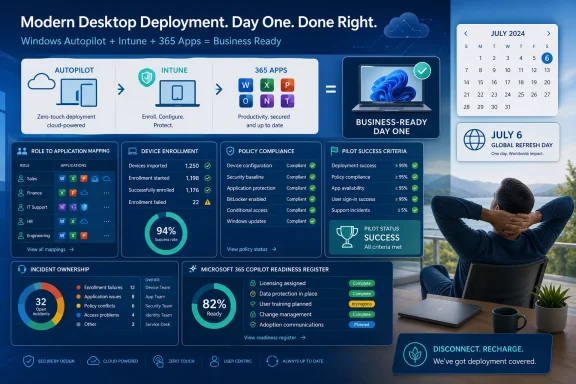
What changed: Nerdio promoted an on-demand #NerdioCon2026 session led by Aaron Parker, Senior PM Architect, on using Windows Autopilot, Intune, and Microsoft 365 Apps to build a fully configured day-one desktop with minimal IT intervention. Separately, Nerdio highlighted a Microsoft 365 Copilot project framework focused on readiness before deployment and announced its inaugural Global Refresh Day, a company-wide holiday on July 6 encouraging employees to disconnect.
Why it matters: The announcements give Microsoft-centric IT teams three prompts: examine endpoint deployment, formalize Copilot readiness work, and review coverage for a shared company holiday.
What admins should do this week: Produce a role-to-application matrix, inventory deployment profiles and assignments, write pilot success criteria, name incident owners, and create a Copilot readiness register. Treat the Nerdio material as a starting point for planning—not as proof of specific outcomes or a complete implementation guide.
 Action Checklist for Admins
Day-one desktop planning
- [ ] Create a role-to-application matrix. List each supported role, its required Microsoft 365 Apps and line-of-business software, licensing prerequisites, installation dependencies, and application owner.
- [ ] Produce a profile and assignment inventory. Record every relevant Autopilot profile, Intune configuration or compliance policy, application assignment, group, filter, inclusion, and exclusion.
- [ ] Write the business-ready state for each role. Specify the sign-in, application, security, connectivity, and role-specific tasks that must work before a device is considered ready.
- [ ] Set pilot success criteria. Include application availability, policy completion, user-visible prompts, required restarts, authentication results, support contacts, and time to business readiness.
- [ ] Name incident owners and backups. Assign ownership for identity, enrollment, policy, application, licensing, network, and user-support failures.
- [ ] Create an exception register. Record each approved deviation, its business reason, owner, affected users or devices, approval date, expiration date, and review status.
Microsoft 365 Copilot readiness
- [ ] Create a Copilot readiness register. Track each governance, endpoint-management, access, support, adoption, or project finding with an owner, required action, target date, closure evidence, and decision status.
- [ ] Define the pilot on paper before assigning licenses. List participating roles, intended use cases, prerequisites, support channels, feedback intervals, and expansion or pause criteria.
- [ ] Publish a responsibility matrix. Name the people accountable for technical incidents, access questions, endpoint findings, user communications, training, adoption, and project decisions.
What Nerdio Announced
Nerdio’s weekly update contains three distinct items.First, Nerdio promoted an on-demand #NerdioCon2026 session led by Aaron Parker, Senior PM Architect. The session addresses the use of Windows Autopilot, Intune, and Microsoft 365 Apps to build a fully configured day-one desktop with minimal IT intervention.
Second, Nerdio highlighted a framework for Microsoft 365 Copilot projects. Its stated emphasis is readiness: assessing the Microsoft 365 environment, addressing governance and endpoint-management gaps, and structuring deployment and adoption before attempting to scale.
Third, Nerdio announced its inaugural Global Refresh Day. The company-wide holiday is scheduled for July 6, and employees are being encouraged to disconnect.
The reporting stops there. The analysis below translates those announcements into questions, planning artifacts, and review points for Windows administrators without treating a promoted session or framework as evidence of measured outcomes.
| Workstream | Nerdio’s stated focus | WindowsForum action item | Artifact to produce |
|---|---|---|---|
| Day-one desktop | Use Windows Autopilot, Intune, and Microsoft 365 Apps for a fully configured desktop with minimal IT intervention | Define what business-ready means for each supported role | Role-to-app matrix and business-ready criteria |
| Endpoint deployment | Assemble Microsoft technologies into a day-one experience | Review profiles, policies, applications, groups, filters, and ownership | Profile and assignment inventory |
| Copilot projects | Assess readiness and address governance and endpoint-management gaps before scaling | Convert findings into owned decisions and remediation work | Copilot readiness register |
| Copilot adoption | Structure deployment and adoption | Establish a pilot with explicit use cases and decision gates | Pilot charter and success criteria |
| Global Refresh Day | Encourage employees to disconnect on July 6 | Confirm any required coverage and escalation arrangements | Coverage roster and escalation list |
Nerdio’s Session Focuses on a Day-One Desktop
Nerdio statement: The on-demand session covers Windows Autopilot, Intune, and Microsoft 365 Apps as components of a fully configured day-one desktop with minimal IT intervention.WindowsForum action item: Define and test a business-ready desktop rather than using enrollment completion as the only measure of success.
A user’s first-day experience includes more than reaching the Windows desktop. The relevant question is whether that user can perform the work associated with the assigned role.
For a finance employee, that may require Microsoft 365 Apps, approved browser configuration, access to financial systems, working multifactor authentication, appropriate security controls, and any required printing or data connections. Sales, engineering, operations, contractor, and shared-device roles may require different combinations.
Create a business-ready definition for every major role that answers four questions:
- Can the user sign in through the expected authentication flow?
- Are the required applications installed, licensed, and usable?
- Have the intended security and configuration policies applied?
- Can the user complete representative tasks for the role?
The Nerdio promotion does not provide exact Intune or Autopilot configuration paths, enrollment prerequisites, assignment settings, or troubleshooting procedures. Administrators should therefore treat this as a planning checklist for a day-one desktop, not a complete day-one deployment procedure. Exact implementation belongs in a separate, configuration-specific how-to based on the organization’s licensing, enrollment method, device state, identity design, and policy requirements.
Minimal Intervention Requires Explicit Design
Nerdio statement: The session’s intended outcome is a configured desktop delivered with minimal IT intervention.WindowsForum action item: Replace technician memory and informal exceptions with reviewed profiles, assignments, owners, and recovery plans.
Minimal intervention does not mean that administrators can omit design work. It means the deployment process must contain enough approved information to proceed without relying on a technician to make every decision manually.
Start with a role-to-application matrix. Each row should represent an application or required capability, while the columns identify supported roles. For every required application, record:
- Packaging or configuration owner.
- Business owner.
- Licensing prerequisite.
- Installation dependencies.
- Assignment group or filter.
- Expected deployment stage.
- Validation method.
- Support route.
- Approved exceptions.
A supportable planning model should also include:
- A common device baseline.
- Role-specific additions.
- A list of prohibited or exception-only software.
- Defined application dependencies.
- Compliance expectations.
- Exception approval and expiration rules.
- Monitoring responsibilities.
- Failure categories and escalation routes.
- A fallback for deployments that do not reach the required state.
A common baseline might cover security controls, update behavior, browser configuration, Microsoft 365 Apps, and support tooling. Role-based assignments can then add the software and settings needed by particular business functions. The exception register should make deviations visible rather than allowing them to become an undocumented second standard.
Pilot the User Experience
Nerdio statement: The promoted session concerns a day-one desktop assembled with Windows Autopilot, Intune, and Microsoft 365 Apps.WindowsForum action item: Select a representative pilot based on roles and scenarios, without relying on an unsupported fixed cohort size.
The appropriate pilot size depends on the organization, the number of roles in scope, device variation, application complexity, support capacity, and the risks attached to the deployment. The important requirement is not an arbitrary user count. It is sufficient representation of the conditions the production rollout is expected to encounter.
A useful pilot plan should identify:
- The business roles represented.
- Remote and on-site scenarios in scope.
- Required line-of-business applications.
- New, replacement, or reassigned device scenarios being tested.
- The support analysts who will receive incidents.
- The managers or business owners who will validate role readiness.
- The conditions that would stop or delay expansion.
- Whether enrollment completed.
- Whether required applications became available.
- Whether required policies reached the expected state.
- Whether the user encountered unexpected prompts or restarts.
- Whether the expected authentication flow worked.
- Whether representative business tasks could be completed.
- How many support contacts were required.
- How long it took to reach the documented business-ready state.
- Which failures were detected automatically.
- How long remediation took.
The pilot report should end with a decision: expand, revise, pause, or stop. It should also list unresolved findings, accepted exceptions, responsible owners, and required evidence for closure.
Multi-Tenant Teams Need Customer-Specific Inputs
Nerdio statement: The promoted session addresses Microsoft endpoint technologies and the day-one desktop outcome.WindowsForum action item: For multi-tenant work, separate reusable planning artifacts from customer-specific requirements.
Different Microsoft environments can have different identities, licenses, applications, policies, security requirements, device states, and historical exceptions. Administrators and service providers should not assume that a configuration validated in one environment can be copied unchanged into another.
A reusable engagement structure could include:
- Prerequisite and licensing review.
- Role and application discovery.
- Profile and assignment inventory.
- Baseline and role-specific planning.
- Customer review and approval.
- Representative pilot.
- Results review and remediation.
- Staged rollout decision.
- Monitoring and incident ownership.
- Periodic assignment and exception review.
The practical distinction is between reusable process and reusable configuration. Intake forms, role matrices, readiness criteria, incident categories, and approval records may be standardized. Application sets, assignments, exceptions, identity structures, and acceptance decisions still require environment-specific input.
Nerdio Emphasizes Copilot Readiness Before Scale
Nerdio statement: Its Microsoft 365 Copilot project framework emphasizes environmental assessment, governance and endpoint-management gaps, deployment structure, and adoption before broader scale.WindowsForum action item: Create a readiness register that turns every finding into an owned decision.
License assignment is one project event. Before a pilot begins, administrators should be able to answer:
- Which business use cases are in scope?
- Which roles are expected to participate?
- Who approves participation?
- Which Microsoft 365 information sources are relevant?
- Which environmental findings require action?
- Which findings block the pilot?
- Which findings block only broader expansion?
- Which risks can be accepted temporarily, and by whom?
- What support channel will participants use?
- Who owns technical incidents, access questions, communications, training, and adoption?
- What evidence will support an expansion, revision, pause, or stop decision?
| Register field | Required content |
|---|---|
| Finding | The observed governance, endpoint, access, support, or project condition |
| Scope | Affected users, devices, information, process, or use case |
| Relevance | Why the finding matters to the proposed pilot |
| Owner | Person accountable for the decision or remediation |
| Required action | Specific work or approval needed |
| Target date | Planned completion or review date |
| Closure evidence | Configuration result, approval, test, or other evidence |
| Decision status | Pilot blocker, expansion blocker, temporary acceptance, or closed |
The endpoint portion should also be scoped carefully. Nerdio’s framework includes endpoint-management readiness, but the announcement does not establish that endpoint work alone provides a complete governance or security assessment. The readiness register should distinguish endpoint findings from identity, access, information, adoption, and operating-model questions.
Give the Copilot Pilot Decision Gates
Nerdio statement: The framework includes structured deployment and adoption work.WindowsForum action item: Produce a written pilot charter before making the service broadly available.
As with endpoint deployment, there is no universally correct pilot size in the provided facts. Choose participants according to the use cases being evaluated, the roles affected, the organization’s ability to support them, and the evidence required for a decision.
The pilot charter should contain:
- Participating users and roles.
- Named business sponsors.
- Intended use cases.
- Environmental prerequisites.
- Open readiness findings.
- Approved temporary exceptions.
- User orientation and communications.
- Support and escalation channels.
- Feedback schedule.
- Technical and adoption measures.
- Conditions for expansion.
- Conditions for revision or pause.
- The person or group authorized to make the final decision.
A readiness process can improve project discipline, but it cannot supply missing use cases, business sponsorship, accurate organizational content, effective communications, or user participation. Those matters need named owners in the responsibility matrix.
Keep Readiness Findings Proportionate
Nerdio statement: The framework calls for assessing the environment and addressing gaps before scale.WindowsForum action item: Require every remediation request to include evidence, project relevance, priority, and a decision owner.
A staged project can separate assessment, remediation, pilot, adoption, and expansion decisions. That separation can make assumptions and approval points visible, but the Nerdio announcement does not confirm a particular commercial model.
For administrators reviewing a readiness assessment, the useful questions are:
- What evidence supports the finding?
- Which proposed use case does it affect?
- Does it block the pilot or only later expansion?
- Can the risk be accepted temporarily?
- Who is authorized to accept it?
- What is the smallest proportionate remediation?
- What proof is required to close the item?
- When will an accepted exception be reviewed again?
Define the Outcome and the Owner
Nerdio statement: Its endpoint session and Copilot framework address preparation for two different Microsoft technology initiatives.WindowsForum action item: Publish one end-to-end responsibility matrix covering detection, investigation, decisions, remediation, communication, and fallback.
Endpoint and Copilot projects can involve multiple technical and business teams. Instead of relying on assumptions about responsibility boundaries, record the agreed owner for each activity.
For the day-one desktop, the matrix may include:
- Identity and sign-in.
- Device registration and enrollment.
- Autopilot profile assignment.
- Intune policy assignment.
- Compliance results.
- Microsoft 365 Apps deployment.
- Line-of-business application packaging.
- Licensing.
- Network access.
- First-line user support.
- Escalation and incident coordination.
- Business-readiness approval.
- License approval and assignment.
- Readiness-register maintenance.
- Endpoint findings.
- Access and permission questions.
- Information ownership decisions.
- Technical support.
- User communications.
- Training and adoption.
- Use-case approval.
- Risk acceptance.
- Pilot expansion or pause decisions.
- Who detects the issue?
- Who investigates it?
- Who can approve an exception?
- Who performs the remediation?
- Who communicates with affected users?
- What fallback is available?
- Who verifies closure?
- When will the process be reviewed?
Nerdio Scheduled Global Refresh Day for July 6
Nerdio statement: Its inaugural Global Refresh Day is a company-wide holiday on July 6, and employees are encouraged to disconnect.WindowsForum action item: Where administrators support an organization-wide closure, produce a coverage roster and escalation list for services that still require attention.
The announcement does not establish operational, retention, wellbeing, or business results. Its immediate relevance to administrators is limited to coverage planning: identify any services requiring attention, name the people assigned to urgent escalation, communicate the boundary between urgent and routine work, and defer nonessential changes where appropriate.
That planning should be proportionate to actual obligations. A coverage roster should identify the responsible person, backup contact, supported service, escalation route, and handoff time. Routine requests should remain outside the emergency path.
Questions to Ask Before Broader Rollout
Nerdio’s announcements provide useful subjects for review, but administrators still need evidence from their own environments.For a day-one desktop plan, ask:
- Does every role have a current business-ready definition?
- Is the role-to-app matrix approved by application and business owners?
- Does the assignment inventory expose overlaps and exclusions?
- Are dependencies and licensing prerequisites visible?
- Do success criteria cover representative work rather than enrollment alone?
- Can support staff identify the failed stage?
- Is there a fallback for a device that is enrolled but not business-ready?
- Are exceptions owned and time-limited?
- Are the use cases specific enough to test?
- Does every readiness finding have an owner and project connection?
- Are pilot blockers separated from expansion blockers?
- Are temporary risk acceptances recorded?
- Are support, training, communication, and decision owners named?
- Does the pilot charter state what evidence will support expansion?
- Is there a clear process for pausing or changing the project?
A Practical Seven-Day Planning Sequence
| Day | Administrative task | Output |
|---|---|---|
| 1 | Identify supported roles and representative tasks | Draft business-ready definitions |
| 2 | Map applications, licenses, dependencies, and owners | Role-to-app matrix |
| 3 | Review profiles, policies, groups, filters, and exclusions | Profile and assignment inventory |
| 4 | Classify common failure categories and ownership | Incident responsibility matrix |
| 5 | Choose representative pilot scenarios and measures | Pilot charter and success criteria |
| 6 | Record Copilot findings, actions, owners, and gates | Copilot readiness register |
| 7 | Review exceptions, fallbacks, and expansion authority | Approved decision record |
The Next Step Is to Produce the Artifacts
The most useful response to Nerdio’s update is not immediate broad deployment. It is the production of concrete administrative records that can be reviewed and tested.For the day-one desktop, the essential outputs are the role-to-application matrix, profile and assignment inventory, business-ready definitions, pilot success criteria, incident responsibility matrix, and exception register.
For Microsoft 365 Copilot, the essential outputs are the readiness register, pilot charter, use-case list, support and communication plan, and expansion or pause criteria.
For the July 6 Global Refresh Day, the relevant operational output is a concise coverage roster and escalation list where service obligations require one.
Nerdio’s announcements place endpoint preparation, Copilot readiness, and a company-wide holiday in the same weekly update. Windows administrators do not need to force those items into one technology story. They can take the more practical lesson: translate each announced objective into an artifact, assign an owner, test the relevant conditions, and require evidence before moving to the next stage.