

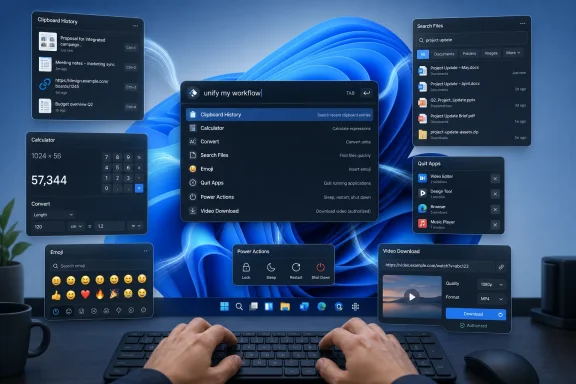
Raycast can replace or consolidate six everyday Windows utilities—clipboard history, Calculator, Everything-style file search, the emoji picker, common Task Manager app-killing duties, and a dedicated YouTube downloader—while also taking over app launching and system power actions from a single keyboard-driven command bar. After using the launcher for months, XDA’s João Carrasqueira argues that this kind of workflow compression can improve a PC more meaningfully than another round of Windows “optimization.” The provocative part is not that Raycast performs many tasks; Windows already performs most of them. It is that Raycast puts those tasks behind one consistent, searchable interface, reducing the friction Microsoft has allowed to accumulate across the desktop.
That distinction matters because Windows optimization advice often focuses on subtraction: uninstall applications, disable services, remove startup entries, and strip away features in the hope that the operating system will feel faster. Raycast offers the opposite proposition. Instead of making Windows smaller, it attempts to make the distance between intention and action shorter.
A modern PC can calculate a unit conversion in a fraction of a second, find an application almost instantly, and close a process without difficulty. Yet the user may still have to remember which Windows surface handles each operation, wait for the right panel to appear, navigate a cramped interface, or open a full application for a task that should have taken one line of text.
That is where launchers earn their place. They are not conventional optimization tools because they do not directly make the processor, storage, or operating system faster. They optimize the interaction path: invoke a command bar, type what you want, select the result, and return to work.
Raycast’s central advantage is therefore architectural rather than cosmetic. Clipboard entries, applications, files, calculations, emoji, commands, and extensions are presented as variations of the same basic operation: search for an object and act on it. Once a user internalizes that pattern, the launcher begins to function less like another installed application and more like a command layer over Windows.
Microsoft has pieces of this model scattered throughout the operating system. Start and Windows Search launch applications and find some files. Windows-V opens clipboard history. Windows-period opens the emoji panel. Calculator handles arithmetic and conversions. Task Manager terminates applications, while the Start menu’s power controls handle sleep, shutdown, and restart.
Individually, those tools are serviceable. Collectively, they expose a longstanding Windows problem: Microsoft has built many small conveniences without giving them a sufficiently coherent front door.
That narrower claim is also the more persuasive one. Most users do not launch Task Manager to inspect processor scheduling or analyze service dependencies; they launch it because an application has frozen. They do not always need Calculator’s complete interface; they need the answer to a quick expression or conversion. They do not open clipboard history to administer a database; they need to recover something copied earlier.
The table reveals the real trade: Raycast exchanges depth for consistency. That is often an excellent deal for repetitive, shallow tasks, but it is not an argument for uninstalling every specialist utility on the PC.
A power user may reasonably keep Everything for advanced filename queries, Task Manager for diagnostics, and Calculator for more involved work while still routing routine actions through Raycast. Consolidation does not have to mean exclusivity.
Windows-V is useful when the desired item was copied recently. Its limitations become apparent when the user is trying to recover text from yesterday, locate one item among many similar entries, or retrieve something after a reboot. The native panel is designed as a small recency list rather than a serious searchable archive.
Raycast turns clipboard history into an information-retrieval tool. According to XDA, the launcher can retain entries for up to three months without requiring Pro, while the paid version offers longer retention. Entries survive restarts and can be searched by typing a fragment of their contents.
That changes the mental model of copy and paste. The ordinary clipboard is temporary working memory: copying a new value effectively displaces the previous one unless history has captured it. A searchable clipboard becomes a personal cache of recently encountered information.
The distinction is especially significant for support staff, writers, developers, researchers, and administrators. These users repeatedly copy error messages, file paths, commands, ticket numbers, machine names, configuration fragments, and links. Losing an entry may mean reopening a remote session, finding an old browser tab, searching through a ticket, or reconstructing a command manually.
Raycast’s use of optical character recognition extends the archive to screenshots. XDA reports that text visible in copied images can be recognized and used in searches, while Raycast’s documentation describes on-device text recognition for extracting text from screenshots and photos. A screenshot containing an error message is no longer merely an image buried in chronological history; it can become discoverable through the words inside it.
This is the point at which clipboard history stops being a convenience and starts behaving like lightweight knowledge management. It is also where the security implications become more serious.
Extending retention increases utility, but it also increases the period during which sensitive material may remain available. Searchability makes legitimate recovery easier and could make unintended discovery easier as well. OCR broadens that collection surface further by turning text inside images into searchable data.
This does not make Raycast uniquely dangerous. Clipboard managers as a category create the same tension, and the native Windows clipboard can also contain sensitive material. The difference is that a long-retention, searchable archive is deliberately more durable and useful than a short native history.
For a personal machine, the sensible response is configuration rather than panic. Users should understand how long entries are retained, delete sensitive items promptly, and avoid treating clipboard history as a secure credential store. Password managers, protected notes, and approved secret-management systems remain the correct places for durable secrets.
For managed Windows environments, deployment should be a policy decision. Security teams need to determine whether a third-party clipboard database is acceptable on devices handling regulated, privileged, or customer data. The productivity value may be considerable, but convenience does not eliminate data-governance obligations.
XDA gives the example of typing “17lbs,” which produces the corresponding value in kilograms before the user specifies a target unit. Additional text can refine the requested conversion, and the same input-oriented approach can be used for currency conversions.
The raw time saved on any one calculation is small. The benefit comes from avoiding context switching: no new application window, no reaching for the mouse, no copying numbers into a separate interface, and no need to close or minimize anything afterward.
That pattern repeats across successful launcher features. A workflow tool does not have to save minutes on every command. Saving a few seconds hundreds of times—and eliminating the cognitive disruption associated with those transitions—can matter more than shaving a marginal amount from boot time.
This is why the comparison with Windows debloating is sharper than it first appears. Removing background components may produce no perceptible improvement on a reasonably modern computer. Removing five unnecessary interactions from a task produces an improvement the user can feel immediately.
VoidTools describes Everything as a dedicated filename search engine built around rapid indexing, low resource use, real-time updating, and advanced search controls. It can display files and folders almost immediately after building its index, and it supports filters, operators, exclusions, bookmarks, multiple index types, and detailed configuration.
Raycast is pursuing a different objective. Its file search is valuable because results appear alongside applications and commands in the same launcher interface. The user can open a result, invoke additional actions, or browse into a folder without first opening File Explorer.
That integration is more important than a synthetic race over which search box produces its first result fastest. If the user wants one interface for launching an application, opening a document, running a command, and finding a folder, Raycast has the conceptual advantage. If the user routinely performs complex filesystem searches, maintains unusual storage configurations, or depends on Everything’s specialized syntax, the dedicated utility remains the stronger instrument.
There is also an important difference between the experience reported by XDA and the underlying implementation story presented in Raycast’s own documentation. Raycast’s Windows file-search work has evolved, and search behavior depends on its index, configured locations, exclusions, and filesystem conditions. A claim that it is “just as fast” as Everything should therefore be understood as a hands-on observation for ordinary queries, not as proof that the products have identical indexing architectures or advanced capabilities.
The better conclusion is that Raycast may eliminate the need to open Everything for routine searches. It does not make Everything conceptually obsolete. Integrated search and specialist search solve overlapping but different problems.
Windows includes an emoji panel, but XDA criticizes it as small, slow to load, and awkward to navigate. Raycast reportedly displays more emoji at once, uses larger presentation, supports keyboard navigation and fuzzy searching, and ranks frequently used choices so they remain easy to reach.
None of these capabilities is technologically remarkable. That is precisely the point. Raycast’s appeal comes partly from treating minor interactions as worthy of refinement, whereas built-in Windows accessories can feel as if they were implemented to satisfy a feature checklist and then left at the edge of the product.
Search also solves the vocabulary problem inherent in emoji. Users often know the concept they want to express but not the official name of the corresponding symbol. Fuzzy matching allows descriptive intent to stand in for exact terminology.
The picker is a small example of a larger principle: productivity software succeeds when it accommodates imperfect human recall. Windows frequently expects the user to remember where a feature lives. Raycast encourages the user to describe what they want.
As XDA explains, searching for a running application and pressing Ctrl+K opens additional options, including Quit and Force Quit. The former corresponds to asking the application to close normally; the latter provides the more aggressive response associated with terminating an unresponsive program.
That will cover the main reason many ordinary users open Task Manager. Instead of invoking a separate system utility, locating the process in a long list, and confirming the target, they can search for the application by the same familiar name used to launch it.
Raycast does not replace Task Manager in any professional sense. Task Manager remains necessary for examining performance, processes, startup behavior, users, services, and resource consumption. It can distinguish among related processes and provide context that a launcher action does not.
The launcher is replacing a route, not an administrative console. That distinction should prevent an otherwise useful feature from being oversold.
There is also a practical risk in making force termination extremely easy. An application may have unsaved work, active writes, or unfinished synchronization. Force Quit should remain the fallback for a genuinely stuck application, not the default way to close software merely because it is faster.
The workflow described by XDA combines separate extensions: one can search YouTube, while another accepts the copied link and handles the download. Raycast’s extension listing confirms that its video downloader uses yt-dlp, requires the relevant supporting components, and supports Windows.
This is not the same type of substitution as replacing the emoji picker. The capability does not come entirely from Raycast itself; the launcher provides discovery, invocation, configuration, and interface around external tooling. The actual media handling depends on mature command-line components.
That model is powerful because it allows complicated utilities to inherit a common front end. A user who might never remember command syntax can still benefit from the underlying tool through searchable commands and forms. Extensions can therefore convert Raycast from a launcher into a lightweight automation environment.
They also expand the support and security surface. An extension may have its own maintainer, dependencies, update cadence, permissions, and failure modes. If yt-dlp, ffmpeg, a website, or the extension changes, the workflow can break even if Raycast itself remains healthy.
Downloading must also remain limited to material the user is authorized to obtain. A convenient interface does not override copyright, licensing terms, access controls, or platform rules. Business deployments should be particularly cautious about approving media-downloading extensions simply because they are available in a productivity launcher.
The larger lesson is that an extension ecosystem can reproduce the benefits and complications of a package manager. It makes the product dramatically more capable, but it means “install Raycast” is not a complete description of the resulting environment.
Replacing that invocation changes Raycast from an optional utility into the default beginning of a desktop action. Applications, files, calculations, emoji, clipboard retrieval, extensions, and system commands all start in the same place.
The launcher can also invoke power actions such as sleep, shutdown, and restart. Again, Windows already provides these controls, but Microsoft’s intended route usually involves opening Start, locating the power button, and choosing an action. In Raycast, the user can type the intended result directly.
There is a revealing contrast here. Microsoft organizes the Start menu around a visual hierarchy: pinned applications, recommendations, an application list, account controls, and power options. Raycast organizes the desktop around intent.
The visual model is easier for discovery on a new PC, but the command model becomes faster once habits form. Raycast is therefore most valuable to users willing to invest a little time in aliases, shortcuts, and command recall.
It is unlikely to suit everyone. Some users prefer a visible map of available options, rely primarily on pointer input, or do not want a third-party application mediating basic desktop actions. Others will find that after a week of keyboard-first operation, navigating Start feels unexpectedly slow.
A clipboard failure is no longer just a clipboard failure if the user has reorganized daily work around the launcher. Indexing trouble affects file discovery. A shortcut collision can disrupt the new Start-menu replacement. An extension update can break a previously reliable automation.
This is not a reason to reject consolidation. It is a reason to preserve basic operational literacy. Users should still know Windows-V, Windows-period, Task Manager, the Start menu’s power controls, and the location of important files. Native fallbacks matter when the convenience layer fails.
Administrators should make the same distinction between optional productivity enhancement and required operational dependency. If Raycast is deployed broadly, the organization needs a support position: which features are approved, whether paid capabilities are licensed, how settings are managed, what data is retained, and what happens when the application is unavailable.
The Windows edition should also be assessed as a Windows product rather than assumed to behave identically to its Mac counterpart. XDA calls Raycast a “marvel” on both platforms, but feature parity, extension compatibility, shortcut behavior, and integration details can vary. Testing the actual Windows workflow remains more reliable than extrapolating from the launcher’s established reputation on macOS.
Removing components can address some of those complaints, but aggressive debloating introduces its own problems. Scripts may remove dependencies, disable features expected by later updates, alter security assumptions, or leave the user responsible for maintaining an unofficial Windows configuration.
Raycast takes a less destructive route. It does not need to dismantle the Start menu to become the user’s preferred launcher. It does not need to remove Calculator to answer calculations. It does not need to disable Windows Search to offer another file-search surface.
That reversibility is important. A user can test the launcher, gradually assign shortcuts, and retreat to native tools whenever necessary. The operating system remains intact underneath.
Raycast will not repair a genuinely slow computer. It cannot compensate for failing storage, insufficient memory, thermal throttling, malware, excessive startup software, or a badly damaged Windows installation. Workflow optimization should not be confused with hardware or system remediation.
But on a healthy PC, perceived speed is often dominated by how quickly the machine responds to intent. That is the category in which Raycast can outperform many conventional “optimization hacks” without modifying Windows internals at all.
Clipboard history is the clearest victory because retention, search, and OCR substantially expand what the native Windows feature can do. Calculator and emoji selection demonstrate the benefit of inline, keyboard-first actions. File search is compelling for ordinary retrieval, although Everything retains a stronger specialist identity.
Quit and Force Quit remove a common detour through Task Manager without replacing its diagnostic role. The video-downloader extension demonstrates the platform’s reach while also exposing the maintenance, governance, and legal questions that accompany third-party automation.
The product’s success ultimately depends on repetition. A feature used once a month does not justify a new layer on the desktop. A launcher that intercepts dozens of actions every day can become one of the most valuable applications installed.
That distinction matters because Windows optimization advice often focuses on subtraction: uninstall applications, disable services, remove startup entries, and strip away features in the hope that the operating system will feel faster. Raycast offers the opposite proposition. Instead of making Windows smaller, it attempts to make the distance between intention and action shorter.
 The Real Windows Bottleneck Is Often the Interface
A modern PC can calculate a unit conversion in a fraction of a second, find an application almost instantly, and close a process without difficulty. Yet the user may still have to remember which Windows surface handles each operation, wait for the right panel to appear, navigate a cramped interface, or open a full application for a task that should have taken one line of text.That is where launchers earn their place. They are not conventional optimization tools because they do not directly make the processor, storage, or operating system faster. They optimize the interaction path: invoke a command bar, type what you want, select the result, and return to work.
Raycast’s central advantage is therefore architectural rather than cosmetic. Clipboard entries, applications, files, calculations, emoji, commands, and extensions are presented as variations of the same basic operation: search for an object and act on it. Once a user internalizes that pattern, the launcher begins to function less like another installed application and more like a command layer over Windows.
Microsoft has pieces of this model scattered throughout the operating system. Start and Windows Search launch applications and find some files. Windows-V opens clipboard history. Windows-period opens the emoji panel. Calculator handles arithmetic and conversions. Task Manager terminates applications, while the Start menu’s power controls handle sleep, shutdown, and restart.
Individually, those tools are serviceable. Collectively, they expose a longstanding Windows problem: Microsoft has built many small conveniences without giving them a sufficiently coherent front door.
Six Utilities Become One Workflow
XDA’s article describes Raycast as a replacement for six categories of tool, but “replacement” needs qualification. Raycast does not reproduce every advanced capability of Task Manager, every search feature available in Everything, or every interface mode in Calculator. It replaces the common reason many people open those utilities.That narrower claim is also the more persuasive one. Most users do not launch Task Manager to inspect processor scheduling or analyze service dependencies; they launch it because an application has frozen. They do not always need Calculator’s complete interface; they need the answer to a quick expression or conversion. They do not open clipboard history to administer a database; they need to recover something copied earlier.
| Windows task | Usual tool | Raycast approach | Where Raycast gains | What it does not fully replace |
|---|---|---|---|---|
| Recover copied content | Windows clipboard history | Searchable long-term history with image text recognition | Faster retrieval and persistence across restarts | Native clipboard integration and managed Windows policy |
| Calculate or convert | Calculator or Windows Search | Type expressions and units directly | No separate app or results page | Calculator’s complete specialized interfaces |
| Locate files | Windows Search, File Explorer, or Everything | File results in the main launcher, with folder browsing | One search surface for apps, commands, and files | Everything’s specialized search syntax and indexing controls |
| Insert emoji | Windows emoji picker | Large searchable picker with usage-based ranking | Faster keyboard navigation and discovery | Native panel integration across Windows features |
| Close a running app | Task Manager | Select the app, press Ctrl+K, then Quit or Force Quit | Removes the trip through Task Manager | Performance, process, service, and startup diagnostics |
| Download permitted video | A dedicated downloader such as Persepolis Download Manager | Extension-driven workflow using yt-dlp and ffmpeg | Search, URL handling, and downloading in one launcher | A dedicated manager’s broader queue and download controls |
A power user may reasonably keep Everything for advanced filename queries, Task Manager for diagnostics, and Calculator for more involved work while still routing routine actions through Raycast. Consolidation does not have to mean exclusivity.
Clipboard History Makes the Strongest Case
Clipboard history is the feature most likely to convert Raycast from an interesting launcher into something that feels indispensable. Microsoft includes clipboard history in Windows 11, but Microsoft’s own support material confirms that users must turn it on and that unpinned entries are cleared when the PC restarts.Windows-V is useful when the desired item was copied recently. Its limitations become apparent when the user is trying to recover text from yesterday, locate one item among many similar entries, or retrieve something after a reboot. The native panel is designed as a small recency list rather than a serious searchable archive.
Raycast turns clipboard history into an information-retrieval tool. According to XDA, the launcher can retain entries for up to three months without requiring Pro, while the paid version offers longer retention. Entries survive restarts and can be searched by typing a fragment of their contents.
That changes the mental model of copy and paste. The ordinary clipboard is temporary working memory: copying a new value effectively displaces the previous one unless history has captured it. A searchable clipboard becomes a personal cache of recently encountered information.
The distinction is especially significant for support staff, writers, developers, researchers, and administrators. These users repeatedly copy error messages, file paths, commands, ticket numbers, machine names, configuration fragments, and links. Losing an entry may mean reopening a remote session, finding an old browser tab, searching through a ticket, or reconstructing a command manually.
Raycast’s use of optical character recognition extends the archive to screenshots. XDA reports that text visible in copied images can be recognized and used in searches, while Raycast’s documentation describes on-device text recognition for extracting text from screenshots and photos. A screenshot containing an error message is no longer merely an image buried in chronological history; it can become discoverable through the words inside it.
This is the point at which clipboard history stops being a convenience and starts behaving like lightweight knowledge management. It is also where the security implications become more serious.
A Better Clipboard Is Also a Larger Security Boundary
Any application that records months of copied material deserves more scrutiny than a simple app launcher. Users copy passwords, authentication codes, private customer information, internal URLs, API tokens, personal messages, financial details, and fragments of confidential documents, often without thinking of the clipboard as storage.Extending retention increases utility, but it also increases the period during which sensitive material may remain available. Searchability makes legitimate recovery easier and could make unintended discovery easier as well. OCR broadens that collection surface further by turning text inside images into searchable data.
This does not make Raycast uniquely dangerous. Clipboard managers as a category create the same tension, and the native Windows clipboard can also contain sensitive material. The difference is that a long-retention, searchable archive is deliberately more durable and useful than a short native history.
For a personal machine, the sensible response is configuration rather than panic. Users should understand how long entries are retained, delete sensitive items promptly, and avoid treating clipboard history as a secure credential store. Password managers, protected notes, and approved secret-management systems remain the correct places for durable secrets.
For managed Windows environments, deployment should be a policy decision. Security teams need to determine whether a third-party clipboard database is acceptable on devices handling regulated, privileged, or customer data. The productivity value may be considerable, but convenience does not eliminate data-governance obligations.
Calculator Shows Why Tiny Delays Matter
Raycast’s calculator and unit conversion features sound modest beside searchable clipboard history, but they demonstrate the launcher’s broader philosophy particularly well. A user types an expression and receives the answer inline, without opening Calculator or waiting for Windows Search to decide how it wants to interpret the query.XDA gives the example of typing “17lbs,” which produces the corresponding value in kilograms before the user specifies a target unit. Additional text can refine the requested conversion, and the same input-oriented approach can be used for currency conversions.
The raw time saved on any one calculation is small. The benefit comes from avoiding context switching: no new application window, no reaching for the mouse, no copying numbers into a separate interface, and no need to close or minimize anything afterward.
That pattern repeats across successful launcher features. A workflow tool does not have to save minutes on every command. Saving a few seconds hundreds of times—and eliminating the cognitive disruption associated with those transitions—can matter more than shaving a marginal amount from boot time.
This is why the comparison with Windows debloating is sharper than it first appears. Removing background components may produce no perceptible improvement on a reasonably modern computer. Removing five unnecessary interactions from a task produces an improvement the user can feel immediately.
Raycast Challenges Windows Search, Not Just Everything
The file-search claim requires more nuance. XDA identifies Everything correctly as the filename-search utility developed by VoidTools and argues that Raycast’s newest versions can return file results directly in the primary search bar with comparable speed.VoidTools describes Everything as a dedicated filename search engine built around rapid indexing, low resource use, real-time updating, and advanced search controls. It can display files and folders almost immediately after building its index, and it supports filters, operators, exclusions, bookmarks, multiple index types, and detailed configuration.
Raycast is pursuing a different objective. Its file search is valuable because results appear alongside applications and commands in the same launcher interface. The user can open a result, invoke additional actions, or browse into a folder without first opening File Explorer.
That integration is more important than a synthetic race over which search box produces its first result fastest. If the user wants one interface for launching an application, opening a document, running a command, and finding a folder, Raycast has the conceptual advantage. If the user routinely performs complex filesystem searches, maintains unusual storage configurations, or depends on Everything’s specialized syntax, the dedicated utility remains the stronger instrument.
There is also an important difference between the experience reported by XDA and the underlying implementation story presented in Raycast’s own documentation. Raycast’s Windows file-search work has evolved, and search behavior depends on its index, configured locations, exclusions, and filesystem conditions. A claim that it is “just as fast” as Everything should therefore be understood as a hands-on observation for ordinary queries, not as proof that the products have identical indexing architectures or advanced capabilities.
The better conclusion is that Raycast may eliminate the need to open Everything for routine searches. It does not make Everything conceptually obsolete. Integrated search and specialist search solve overlapping but different problems.
The Emoji Picker Exposes Microsoft’s Neglect of Small Interfaces
An emoji picker may seem trivial in a discussion of Windows productivity, but it is a useful test of interface quality. Communication is a major desktop workload, and selecting a symbol is exactly the kind of small action that becomes irritating when the interface is slow, cramped, or difficult to search.Windows includes an emoji panel, but XDA criticizes it as small, slow to load, and awkward to navigate. Raycast reportedly displays more emoji at once, uses larger presentation, supports keyboard navigation and fuzzy searching, and ranks frequently used choices so they remain easy to reach.
None of these capabilities is technologically remarkable. That is precisely the point. Raycast’s appeal comes partly from treating minor interactions as worthy of refinement, whereas built-in Windows accessories can feel as if they were implemented to satisfy a feature checklist and then left at the edge of the product.
Search also solves the vocabulary problem inherent in emoji. Users often know the concept they want to express but not the official name of the corresponding symbol. Fuzzy matching allows descriptive intent to stand in for exact terminology.
The picker is a small example of a larger principle: productivity software succeeds when it accommodates imperfect human recall. Windows frequently expects the user to remember where a feature lives. Raycast encourages the user to describe what they want.
Quit and Force Quit Turn App Search Into App Control
Launching applications is the baseline function of a desktop launcher. Raycast’s more useful trick is recognizing that an application already running should expose a different set of possible actions.As XDA explains, searching for a running application and pressing Ctrl+K opens additional options, including Quit and Force Quit. The former corresponds to asking the application to close normally; the latter provides the more aggressive response associated with terminating an unresponsive program.
That will cover the main reason many ordinary users open Task Manager. Instead of invoking a separate system utility, locating the process in a long list, and confirming the target, they can search for the application by the same familiar name used to launch it.
Raycast does not replace Task Manager in any professional sense. Task Manager remains necessary for examining performance, processes, startup behavior, users, services, and resource consumption. It can distinguish among related processes and provide context that a launcher action does not.
The launcher is replacing a route, not an administrative console. That distinction should prevent an otherwise useful feature from being oversold.
There is also a practical risk in making force termination extremely easy. An application may have unsaved work, active writes, or unfinished synchronization. Force Quit should remain the fallback for a genuinely stuck application, not the default way to close software merely because it is faster.
Extensions Turn the Launcher Into a Platform
The YouTube downloader example shows Raycast moving beyond the replacement of Windows accessories. XDA says an extension can provide a downloading interface powered by yt-dlp and ffmpeg, removing the author’s need for a dedicated program such as Persepolis Download Manager.The workflow described by XDA combines separate extensions: one can search YouTube, while another accepts the copied link and handles the download. Raycast’s extension listing confirms that its video downloader uses yt-dlp, requires the relevant supporting components, and supports Windows.
This is not the same type of substitution as replacing the emoji picker. The capability does not come entirely from Raycast itself; the launcher provides discovery, invocation, configuration, and interface around external tooling. The actual media handling depends on mature command-line components.
That model is powerful because it allows complicated utilities to inherit a common front end. A user who might never remember command syntax can still benefit from the underlying tool through searchable commands and forms. Extensions can therefore convert Raycast from a launcher into a lightweight automation environment.
They also expand the support and security surface. An extension may have its own maintainer, dependencies, update cadence, permissions, and failure modes. If yt-dlp, ffmpeg, a website, or the extension changes, the workflow can break even if Raycast itself remains healthy.
Downloading must also remain limited to material the user is authorized to obtain. A convenient interface does not override copyright, licensing terms, access controls, or platform rules. Business deployments should be particularly cautious about approving media-downloading extensions simply because they are available in a productivity launcher.
The larger lesson is that an extension ecosystem can reproduce the benefits and complications of a package manager. It makes the product dramatically more capable, but it means “install Raycast” is not a complete description of the resulting environment.
The Windows Key Is the Most Important Integration Point
Raycast can be configured to open with the Windows key, according to XDA, allowing it to stand in for the Start menu during routine use. This is more consequential than assigning an arbitrary keyboard shortcut because the Windows key is already embedded in years of user muscle memory.Replacing that invocation changes Raycast from an optional utility into the default beginning of a desktop action. Applications, files, calculations, emoji, clipboard retrieval, extensions, and system commands all start in the same place.
The launcher can also invoke power actions such as sleep, shutdown, and restart. Again, Windows already provides these controls, but Microsoft’s intended route usually involves opening Start, locating the power button, and choosing an action. In Raycast, the user can type the intended result directly.
There is a revealing contrast here. Microsoft organizes the Start menu around a visual hierarchy: pinned applications, recommendations, an application list, account controls, and power options. Raycast organizes the desktop around intent.
The visual model is easier for discovery on a new PC, but the command model becomes faster once habits form. Raycast is therefore most valuable to users willing to invest a little time in aliases, shortcuts, and command recall.
It is unlikely to suit everyone. Some users prefer a visible map of available options, rely primarily on pointer input, or do not want a third-party application mediating basic desktop actions. Others will find that after a week of keyboard-first operation, navigating Start feels unexpectedly slow.
Consolidation Can Create Its Own Single Point of Failure
The strongest argument for Raycast is also the strongest argument for restraint. When six utilities, application launching, file retrieval, system commands, and extensions all flow through one interface, an outage or malfunction in that interface becomes disproportionately disruptive.A clipboard failure is no longer just a clipboard failure if the user has reorganized daily work around the launcher. Indexing trouble affects file discovery. A shortcut collision can disrupt the new Start-menu replacement. An extension update can break a previously reliable automation.
This is not a reason to reject consolidation. It is a reason to preserve basic operational literacy. Users should still know Windows-V, Windows-period, Task Manager, the Start menu’s power controls, and the location of important files. Native fallbacks matter when the convenience layer fails.
Administrators should make the same distinction between optional productivity enhancement and required operational dependency. If Raycast is deployed broadly, the organization needs a support position: which features are approved, whether paid capabilities are licensed, how settings are managed, what data is retained, and what happens when the application is unavailable.
The Windows edition should also be assessed as a Windows product rather than assumed to behave identically to its Mac counterpart. XDA calls Raycast a “marvel” on both platforms, but feature parity, extension compatibility, shortcut behavior, and integration details can vary. Testing the actual Windows workflow remains more reliable than extrapolating from the launcher’s established reputation on macOS.
Debloating and Workflow Optimization Solve Different Problems
XDA frames Raycast as a better productivity intervention than debloating Windows, and for many users that is likely correct. The majority of frustration blamed on “bloat” is not measured as sustained processor load or provable storage latency. It is experienced as clutter, inconsistent search, slow navigation, intrusive recommendations, and too many clicks.Removing components can address some of those complaints, but aggressive debloating introduces its own problems. Scripts may remove dependencies, disable features expected by later updates, alter security assumptions, or leave the user responsible for maintaining an unofficial Windows configuration.
Raycast takes a less destructive route. It does not need to dismantle the Start menu to become the user’s preferred launcher. It does not need to remove Calculator to answer calculations. It does not need to disable Windows Search to offer another file-search surface.
That reversibility is important. A user can test the launcher, gradually assign shortcuts, and retreat to native tools whenever necessary. The operating system remains intact underneath.
Raycast will not repair a genuinely slow computer. It cannot compensate for failing storage, insufficient memory, thermal throttling, malware, excessive startup software, or a badly damaged Windows installation. Workflow optimization should not be confused with hardware or system remediation.
But on a healthy PC, perceived speed is often dominated by how quickly the machine responds to intent. That is the category in which Raycast can outperform many conventional “optimization hacks” without modifying Windows internals at all.
Action checklist for admins
- Test Raycast on representative Windows hardware, user profiles, storage layouts, and security configurations before approving deployment.
- Review clipboard retention settings and determine whether long-term history is appropriate for devices handling secrets, customer data, or regulated information.
- Verify which folders are indexed and exclude locations that should not appear in launcher search results.
- Evaluate extensions individually, including their maintainers, dependencies, permissions, update behavior, and business purpose.
- Retain documented native fallbacks for clipboard access, process termination, file search, and system power actions.
- Train users to prefer normal Quit and reserve Force Quit for unresponsive applications with no safer recovery path.
- Restrict downloading workflows to authorized content and align extension use with organizational copyright and acceptable-use policies.
Raycast Wins by Making Windows Feel Smaller
The best way to understand Raycast is not as six applications bundled together, but as an interface that makes six applications less necessary. Its value is proportional to the number of small desktop interruptions it can absorb.Clipboard history is the clearest victory because retention, search, and OCR substantially expand what the native Windows feature can do. Calculator and emoji selection demonstrate the benefit of inline, keyboard-first actions. File search is compelling for ordinary retrieval, although Everything retains a stronger specialist identity.
Quit and Force Quit remove a common detour through Task Manager without replacing its diagnostic role. The video-downloader extension demonstrates the platform’s reach while also exposing the maintenance, governance, and legal questions that accompany third-party automation.
The product’s success ultimately depends on repetition. A feature used once a month does not justify a new layer on the desktop. A launcher that intercepts dozens of actions every day can become one of the most valuable applications installed.
What Matters Before You Hand It the Windows Key
Raycast’s case can be reduced to a handful of practical conclusions, but none of them requires treating the launcher as a universal replacement for Windows itself.- Its most consequential feature is searchable clipboard history that survives restarts and can retain entries for up to three months without Pro.
- OCR makes text inside copied screenshots discoverable, increasing both productivity value and the need for careful data handling.
- Inline calculation, conversion, emoji search, app control, and power commands save time primarily by eliminating context switches.
- File search can replace routine trips to Everything or File Explorer, but advanced Everything users may still need the dedicated utility.
- Ctrl+K exposes Quit and Force Quit for running applications, while Task Manager remains essential for diagnosis and system inspection.
- Extensions can replace dedicated workflows, including authorized video downloading through yt-dlp and ffmpeg, but must be reviewed like any other third-party software.
References
- Primary source: XDA
Published: Sat, 11 Jul 2026 20:00:23 GMT
Loading…
www.xda-developers.com - Related coverage: raycast.com
Loading…
www.raycast.com - Related coverage: windowscentral.com
Loading…
www.windowscentral.com - Official source: support.microsoft.com
Keyboard shortcuts in Windows - Microsoft Support
Learn how to navigate Windows using keyboard shortcuts. Explore a full list of taskbar, command prompt, and general Windows shortcuts.support.microsoft.com - Official source: learn.microsoft.com
Loading…
learn.microsoft.com - Related coverage: villagesatlynxcreek.com
Loading…
www.villagesatlynxcreek.com