

Google’s CVE-2026-14401 is a high-severity ANGLE input-validation flaw affecting Chrome on Android before version 150.0.7871.46. According to the Chrome-originated CVE description, a remote attacker who has already compromised the browser’s renderer can use a crafted HTML page to potentially escape the sandbox. The prerequisite matters: the published description does not present this as a complete, one-step compromise of an otherwise intact browser.
Google rates the vulnerability High. The CISA-ADP assessment assigns it a CVSS 3.1 score of 8.3, with potentially high confidentiality, integrity, and availability impact. For Android users and administrators, the practical answer is clear: Chrome installations below 150.0.7871.46 should be updated.
The wording of the vulnerability description is especially important. According to the Chrome-originated CVE record published through the National Vulnerability Database, an attacker must already have compromised Chrome’s renderer before CVE-2026-14401 can potentially be used to escape the sandbox.
CVE-2026-14401 therefore should not be described as though opening a page guarantees immediate compromise of an Android device. The record says a crafted HTML page can be used by a remote attacker who has already compromised the renderer to potentially perform the escape. That makes the issue a possible additional stage in an attack rather than a complete attack path by itself.
This distinction should guide both reporting and remediation. The prerequisite reduces the accuracy of claims that this is a simple one-click takeover, but it does not make the vulnerability unimportant. A flaw that may allow an attacker to cross a security boundary after establishing an initial foothold can still have serious consequences.
The CISA-ADP CVSS vector is:
That vector assigns high attack complexity and required user interaction. It also assigns a changed scope and high potential impact to confidentiality, integrity, and availability. The public material does not explicitly map the AC:H rating to one particular prerequisite, so the score should be reported without presenting an inferred explanation as a sourced fact.
Administrators should also retain the word “potentially” when summarizing the issue. The public description identifies the possible result and the conditions preceding it, but it does not provide exploit instructions, reliability data, or evidence that every attempt against a vulnerable build will succeed.
The public record does not identify the exact input, function, or operation involved. It also does not classify the underlying defect as a buffer overflow, type confusion, integer error, use-after-free, or another narrower weakness. Assigning one of those labels without additional vendor information would be speculation.
The linked Chromium issue is permission-restricted. That establishes only that access requires permission. It does not, by itself, establish why access is restricted, how long the restriction will remain, whether a rollout is still in progress, or whether related code remains exposed in another project.
The supported conclusions are narrower:
The NVD CPE configuration reinforces the platform limitation. It combines the Google Chrome application configuration with the Google Android operating-system configuration using an AND relationship. In practical terms, the analyzed vulnerable configuration is Chrome running on Android.
The NVD references include a Chrome stable-channel advisory whose title is associated with desktop. That reference should not be expanded into an assertion about the advisory’s detailed contents or applicability without separately verifying the advisory itself. Its presence in the NVD reference list does not override the Android-specific CPE configuration.
The verified material does not establish that CVE-2026-14401 affects Chrome on Windows, Chrome on macOS, Chrome on Linux, Microsoft Edge, or every Chromium-derived product. Those products should not be assigned this CVE merely because they share upstream technology.
Windows-led security teams should preserve that scope when triaging findings. They may own browser security across the organization, but the remediation owner for this record should be the team responsible for Android applications, enterprise mobility management, or managed Google Play.
The vector identifies several important characteristics:
The vector should not be turned into a claim that exploitation is easy, widespread, or inevitable. CVSS measures technical severity under a standardized model. It does not count active attacks, predict the number of affected users, or establish that a public exploit exists.
The high impact ratings likewise describe potential consequences under the scoring model. They do not mean every exploitation attempt will necessarily achieve the maximum possible effect.
For operational decisions, the score should be considered alongside the product scope, fixed version, prerequisite renderer compromise, and CISA-ADP SSVC fields. Together, those details support prompt patching without unsupported claims of an ongoing emergency.
“Automatable: no” is another categorization field, not a guarantee that attacks cannot be scaled under any circumstances. “Technical impact: total” indicates that the modeled technical consequences can be severe if the required conditions are met and exploitation succeeds.
This combination supports a measured response. Administrators have a defined vulnerable range and a defined remediation threshold. They should deploy the update and verify compliance, but the supplied material does not support claims that Android devices are currently being compromised through this CVE at scale.
Security teams should monitor the record and relevant vendor communications for changes. If the exploitation field changes, new product scope is published, or additional indicators become available, organizations can revisit prioritization and detection plans. Until then, the strongest immediate control is version compliance.
The restricted Chromium issue similarly limits technical conclusions. The public record does not provide proof-of-concept steps, the vulnerable function, patch mechanics, indicators of compromise, or exploit reliability. Defenders should avoid filling those gaps with assumptions.
That lack of detail does not prevent remediation. Administrators know the affected platform, vulnerable version range, and minimum corrected version. Those are the facts needed to update affected devices and verify that the exposure has been removed according to the published configuration.
A policy stating that automatic updates are enabled is not the same as observed compliance. The meaningful condition is whether the installed Chrome version reported for each managed Android device or work profile is 150.0.7871.46 or later.
Administrators should use their enterprise mobility management platform and managed Google Play controls to perform a concrete verification cycle. Exact console labels vary by EMM, but the operational sequence should remain consistent:
The published record does not establish active exploitation, so organizations should keep their response proportionate. The material does not support ordering a fleet-wide wipe, disabling all Android connectivity, or treating ordinary browser failures as evidence of compromise. It does support prioritizing an available security update and escalating devices that remain below the remediation threshold.
Internal communications should use a precise formulation:
The appropriate ownership model is straightforward:
Automated findings require particular care. If a scanner reports CVE-2026-14401 against a Windows workstation, the team should compare the finding with the NVD configuration before opening a desktop remediation ticket. The authoritative configuration described in the supplied material joins Chrome with Android; a broad software-family match does not replace that platform condition.
The public record also supplies no exploit-specific indicators of compromise, process names, command-line patterns, network destinations, or crash signatures. Security operations teams should not label a generic browser crash, graphics problem, or unusual process event as CVE-2026-14401 activity without additional evidence.
The absence of those details makes disciplined scoping more important, not less. Mobile administrators can act on the exact version threshold now, while other teams watch for verified updates that might expand or clarify applicability.
CVE-2026-14401 is mobile in its currently documented scope, but its remediation is still an enterprise responsibility. Windows-led security teams should not manufacture desktop exposure from an Android-only CPE match; they should route ownership to mobile management, verify Chrome 150.0.7871.46 or later across the Android fleet, and keep unresolved devices visible until every exception has an accountable disposition.
Google rates the vulnerability High. The CISA-ADP assessment assigns it a CVSS 3.1 score of 8.3, with potentially high confidentiality, integrity, and availability impact. For Android users and administrators, the practical answer is clear: Chrome installations below 150.0.7871.46 should be updated.
Reader action
Update Chrome on Android to 150.0.7871.46 or later. Verify the installed version in Chrome > ⋮ > Settings > About Chrome. If an update is offered, install it through Google Play, relaunch Chrome, and check the version again.
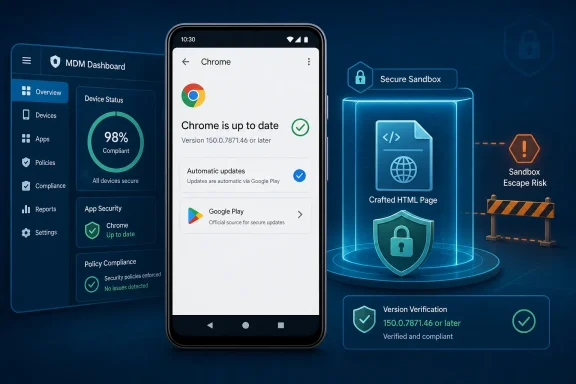 The Dangerous Part Begins After the First Exploit
The wording of the vulnerability description is especially important. According to the Chrome-originated CVE record published through the National Vulnerability Database, an attacker must already have compromised Chrome’s renderer before CVE-2026-14401 can potentially be used to escape the sandbox.CVE-2026-14401 therefore should not be described as though opening a page guarantees immediate compromise of an Android device. The record says a crafted HTML page can be used by a remote attacker who has already compromised the renderer to potentially perform the escape. That makes the issue a possible additional stage in an attack rather than a complete attack path by itself.
This distinction should guide both reporting and remediation. The prerequisite reduces the accuracy of claims that this is a simple one-click takeover, but it does not make the vulnerability unimportant. A flaw that may allow an attacker to cross a security boundary after establishing an initial foothold can still have serious consequences.
The CISA-ADP CVSS vector is:
CVSS:3.1/AV:N/AC:H/PR:N/UI:R/S:C/C:H/I:H/A:HThat vector assigns high attack complexity and required user interaction. It also assigns a changed scope and high potential impact to confidentiality, integrity, and availability. The public material does not explicitly map the AC:H rating to one particular prerequisite, so the score should be reported without presenting an inferred explanation as a sourced fact.
Administrators should also retain the word “potentially” when summarizing the issue. The public description identifies the possible result and the conditions preceding it, but it does not provide exploit instructions, reliability data, or evidence that every attempt against a vulnerable build will succeed.
ANGLE Is the Named Component, but the Public Detail Is Limited
Google identifies ANGLE as the affected component and classifies the weakness as CWE-20, Improper Input Validation. At a high level, that classification means the software did not adequately validate untrusted input before accepting or processing it.The public record does not identify the exact input, function, or operation involved. It also does not classify the underlying defect as a buffer overflow, type confusion, integer error, use-after-free, or another narrower weakness. Assigning one of those labels without additional vendor information would be speculation.
The linked Chromium issue is permission-restricted. That establishes only that access requires permission. It does not, by itself, establish why access is restricted, how long the restriction will remain, whether a rollout is still in progress, or whether related code remains exposed in another project.
The supported conclusions are narrower:
- The affected component is ANGLE.
- The weakness classification is CWE-20.
- The attack context includes a crafted HTML page.
- The attacker must already have compromised the renderer.
- Successful use may permit a sandbox escape.
- The affected product context identified by the NVD configuration is Chrome on Android before 150.0.7871.46.
The Version Boundary Is Clear Even When the Disclosure Is Sparse
The most actionable part of the record is the affected-version range. Chrome on Android before 150.0.7871.46 is affected. Version 150.0.7871.46 is outside the affected range identified in the NVD configuration and is the minimum published remediation threshold for this article.| Chrome state | Version range | Platform named by the CVE | CVE status | Operational meaning |
|---|---|---|---|---|
| Vulnerable | Earlier than 150.0.7871.46 | Android | Affected | Update should be prioritized |
| Remediation threshold | 150.0.7871.46 or later | Android | Outside the published affected range | Meets the stated version requirement |
The NVD references include a Chrome stable-channel advisory whose title is associated with desktop. That reference should not be expanded into an assertion about the advisory’s detailed contents or applicability without separately verifying the advisory itself. Its presence in the NVD reference list does not override the Android-specific CPE configuration.
The verified material does not establish that CVE-2026-14401 affects Chrome on Windows, Chrome on macOS, Chrome on Linux, Microsoft Edge, or every Chromium-derived product. Those products should not be assigned this CVE merely because they share upstream technology.
Windows-led security teams should preserve that scope when triaging findings. They may own browser security across the organization, but the remediation owner for this record should be the team responsible for Android applications, enterprise mobility management, or managed Google Play.
What Windows teams should not do
- Do not create Windows Chrome or Microsoft Edge remediation tickets solely from CVE-2026-14401.
- Do not treat a product-family or Chromium-family match as proof of applicability.
- Validate every scanner match against the NVD’s Android-only CPE scope before assigning desktop remediation work.
- Continue monitoring product-specific vendor information, but keep unsupported platforms out of the affected inventory unless new evidence changes the scope.
An 8.3 Score Captures Technical Severity, Not Exploit Prevalence
CISA-ADP assigns CVE-2026-14401 a CVSS 3.1 base score of 8.3, categorized as High. NVD displays that contributed assessment, so internal reports should preserve its provenance rather than presenting it as an independently generated NVD score.The vector identifies several important characteristics:
| Metric | Value | Meaning within the CVSS assessment |
|---|---|---|
| Attack vector | Network | The attack context is network-reachable |
| Attack complexity | High | The assessment assigns elevated complexity |
| Privileges required | None | Legitimate privileges are not required by the vector |
| User interaction | Required | User interaction is part of the assessed scenario |
| Scope | Changed | Successful exploitation may cross a security boundary |
| Confidentiality | High | Potential confidentiality impact is high |
| Integrity | High | Potential integrity impact is high |
| Availability | High | Potential availability impact is high |
The high impact ratings likewise describe potential consequences under the scoring model. They do not mean every exploitation attempt will necessarily achieve the maximum possible effect.
For operational decisions, the score should be considered alongside the product scope, fixed version, prerequisite renderer compromise, and CISA-ADP SSVC fields. Together, those details support prompt patching without unsupported claims of an ongoing emergency.
The CISA-ADP SSVC Record Lists Exploitation as None
The CISA-ADP Stakeholder-Specific Vulnerability Categorization record lists:- Exploitation: none
- Automatable: no
- Technical impact: total
“Automatable: no” is another categorization field, not a guarantee that attacks cannot be scaled under any circumstances. “Technical impact: total” indicates that the modeled technical consequences can be severe if the required conditions are met and exploitation succeeds.
This combination supports a measured response. Administrators have a defined vulnerable range and a defined remediation threshold. They should deploy the update and verify compliance, but the supplied material does not support claims that Android devices are currently being compromised through this CVE at scale.
Security teams should monitor the record and relevant vendor communications for changes. If the exploitation field changes, new product scope is published, or additional indicators become available, organizations can revisit prioritization and detection plans. Until then, the strongest immediate control is version compliance.
The Disclosure Record Was Enriched in Stages
The NVD change history shows that the record was assembled through contributions from multiple sources. Google supplied the CVE description, affected-product information, weakness classification, and references. CISA-ADP contributed the CVSS assessment and SSVC data. NIST added the platform-specific CPE configuration and reference classifications.Timeline
- Initial CVE publication — The record identified Chrome on Android before 150.0.7871.46, named ANGLE, classified the weakness as CWE-20, and described the renderer-compromise prerequisite and potential sandbox escape.
- CISA-ADP enrichment — The record received the 8.3 CVSS 3.1 assessment and SSVC categorization.
- NIST analysis — The configuration data represented the vulnerable environment as Google Chrome combined with Google Android.
- Subsequent record maintenance — The change history recorded later updates to the vulnerability entry and its contributed data.
The restricted Chromium issue similarly limits technical conclusions. The public record does not provide proof-of-concept steps, the vulnerable function, patch mechanics, indicators of compromise, or exploit reliability. Defenders should avoid filling those gaps with assumptions.
That lack of detail does not prevent remediation. Administrators know the affected platform, vulnerable version range, and minimum corrected version. Those are the facts needed to update affected devices and verify that the exposure has been removed according to the published configuration.
Android Patch Governance Is the Real Enterprise Test
For an individual user, remediation is an update, relaunch, and version check. For an enterprise, the more difficult task is proving that every managed Android device has reached the required version and identifying the devices that have not.A policy stating that automatic updates are enabled is not the same as observed compliance. The meaningful condition is whether the installed Chrome version reported for each managed Android device or work profile is 150.0.7871.46 or later.
Administrators should use their enterprise mobility management platform and managed Google Play controls to perform a concrete verification cycle. Exact console labels vary by EMM, but the operational sequence should remain consistent:
- Identify installed versions. Query the EMM application inventory, managed-device inventory, or managed Google Play application report for Google Chrome on Android.
- Create the vulnerable set. Filter or export devices reporting Chrome versions below 150.0.7871.46. Include managed work profiles where the EMM reports work-profile application versions separately.
- Approve the corrected release. Confirm that the current Chrome update is approved in managed Google Play and permitted by the organization’s application policy.
- Expedite deployment. Use the EMM’s available priority-update, forced-install, immediate-deployment, or equivalent control to expedite the Chrome update. The exact name of this setting varies by EMM.
- Require a relaunch. Notify users or apply an available management workflow requiring Chrome to close and relaunch after installation. An installed update should not be considered fully handled while an older running process remains open.
- Verify the resulting version. Requery the inventory after deployment. Confirm the observed application version rather than relying only on an “approved,” “assigned,” or “update enabled” status.
- Report exceptions. Produce an exception list for every managed Android device still below 150.0.7871.46. Assign those exceptions to the appropriate mobile-support or device-management owner.
- Investigate unresolved devices. Determine whether each exception is offline, unenrolled, no longer in service, outside the managed Google Play path, blocked by policy, or otherwise unable to install the update.
The published record does not establish active exploitation, so organizations should keep their response proportionate. The material does not support ordering a fleet-wide wipe, disabling all Android connectivity, or treating ordinary browser failures as evidence of compromise. It does support prioritizing an available security update and escalating devices that remain below the remediation threshold.
Internal communications should use a precise formulation:
That wording preserves the affected platform, version boundary, prerequisite, and potential outcome without broadening the vulnerability to unsupported products.CVE-2026-14401 affects Google Chrome on Android before 150.0.7871.46. According to the CVE description, a remote attacker who has already compromised the renderer may use a crafted HTML page to potentially escape the sandbox. Managed Android devices should be updated to Chrome 150.0.7871.46 or later and verified through application inventory.
Action checklist for admins
- Inventory Chrome versions on managed Android devices and work profiles.
- Flag every installation below 150.0.7871.46.
- Confirm the Chrome update is approved through managed Google Play.
- Expedite deployment using the EMM’s priority or forced-update mechanism.
- Require users to relaunch Chrome after installation.
- Requery application inventory and verify version 150.0.7871.46 or later.
- Report and assign every exception still below the required version.
- Record the reason for each unresolved exception and continue follow-up.
- Keep Windows Chrome and Edge outside the remediation scope unless product-specific evidence establishes applicability.
- Monitor the CISA-ADP SSVC record for any change to its current exploitation field.
Windows Teams Should Route Ownership Without Rewriting the Scope
A Chrome-on-Android vulnerability may enter an organization through a vulnerability-management team primarily responsible for Windows. That does not make it a Windows vulnerability. It means the Windows-led security function must route the finding to the correct operational owner.The appropriate ownership model is straightforward:
| Function | Responsibility |
|---|---|
| Vulnerability management | Preserve the Android-only scope and track remediation status |
| Mobile or EMM administration | Approve, deploy, and verify Chrome 150.0.7871.46 or later |
| Security operations | Monitor for changes in exploitation status or new vendor information |
| Windows endpoint administration | Avoid unsupported Chrome or Edge desktop tickets |
| Asset and compliance teams | Reconcile devices that remain below the required version |
The public record also supplies no exploit-specific indicators of compromise, process names, command-line patterns, network destinations, or crash signatures. Security operations teams should not label a generic browser crash, graphics problem, or unusual process event as CVE-2026-14401 activity without additional evidence.
The absence of those details makes disciplined scoping more important, not less. Mobile administrators can act on the exact version threshold now, while other teams watch for verified updates that might expand or clarify applicability.
CVE-2026-14401 is mobile in its currently documented scope, but its remediation is still an enterprise responsibility. Windows-led security teams should not manufacture desktop exposure from an Android-only CPE match; they should route ownership to mobile management, verify Chrome 150.0.7871.46 or later across the Android fleet, and keep unresolved devices visible until every exception has an accountable disposition.
References
- Primary source: NVD / Chromium
Published: 2026-07-11T15:39:23-07:00
Loading…
nvd.nist.gov - Security advisory: MSRC
Published: 2026-07-11T15:39:23-07:00
Original feed URL
Loading…
msrc.microsoft.com - Related coverage: security.snyk.io
Loading…
security.snyk.io - Related coverage: cvefeed.io
Loading…
cvefeed.io - Related coverage: vulnerability.circl.lu
Loading…
vulnerability.circl.lu