

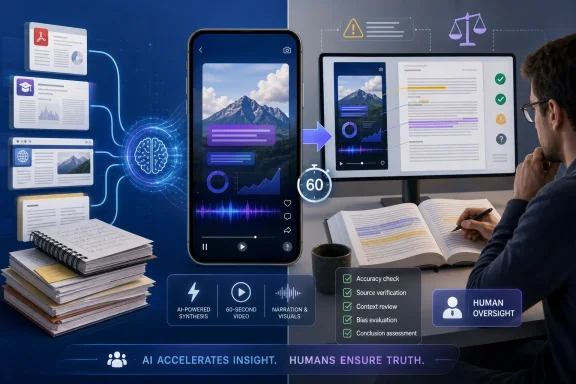
Google is adding a new output format to NotebookLM: a roughly 60-second vertical video generated from the documents, PDFs, websites, notes, and other sources assembled in a notebook. The feature extends NotebookLM beyond text responses and podcast-like Audio Overviews into a visual format designed for quick viewing on a phone.What changed: NotebookLM is rolling out 60-second vertical video clips generated from uploaded sources.
Who gets it: The current rollout is available to Google AI Pro and Google AI Ultra subscribers.
What to do now: Use the clips for orientation, review, or explaining one narrowly defined concept—not as a replacement for reading the source. Keep the original material available, verify the narration, captions, and visuals, and do not share a clip externally until the source owner approves it.
How to create one: The verified material does not provide exact, tested in-product UI steps. Eligible subscribers should look for the video-generation option inside NotebookLM, but menu names, placement, and availability may vary while the rollout is in progress.
That could make NotebookLM more useful for students, analysts, journalists, educators, and professionals who need a rapid introduction to unfamiliar material. It also creates an obvious risk: a polished minute of synthetic narration, captions, and visuals can feel more complete and authoritative than the underlying evidence warrants.
For WindowsForum readers, the practical verdict is straightforward: these clips may be useful for source orientation and visual revision, but they are not a reliable replacement for reading and should not be treated as an approved enterprise communications workflow without human review.
 Google Turns the Research Notebook Into a Media Generator
NotebookLM began with a relatively disciplined proposition: give Google a bounded collection of sources, then ask questions about those sources rather than relying entirely on the open web. Users can assemble a notebook from documents, PDFs, websites, and their own notes, creating a working research space that is narrower and potentially easier to audit than a general-purpose chatbot session.Its output has steadily moved beyond text. Audio Overviews, launched in 2024, allowed users to hear two synthetic hosts conduct a conversational, podcast-like discussion of uploaded material. That format made it possible to review source-based information while commuting, walking, exercising, or completing other tasks.
The new video capability applies a similar source-to-media approach to visual explanations. Instead of producing an extended audio conversation, NotebookLM can compress a selected idea into a vertical clip lasting about a minute. Google’s AP Biology example illustrates the intended use: take a concept involving unfamiliar vocabulary, processes, structures, or diagrams and reshape it as a compact visual explanation.
The change is more substantial than adding pictures to a summary. NotebookLM is developing into a system that can take the same body of source material and render it in several forms: text answers, study aids, synthetic discussions, and now short visual explainers.
Each conversion requires the model to decide what deserves emphasis, what can be omitted, how ideas should be ordered, and which visuals appear to represent the source. Those decisions can make difficult material easier to approach, but they can also change how the material is understood.
Use One Concept Per Clip and Review Before Sharing
A 60-second limit works best when the assignment is narrow. It can be useful for defining one term, illustrating one mechanism, comparing two concepts, explaining one chart, or summarizing a clearly bounded section.It is far less suitable for preserving the full argument of a complex report. A minute cannot reliably retain every qualification, conflicting data point, methodological limitation, appendix note, dependency, or distinction between evidence and interpretation.
Instead of prompting NotebookLM to “explain the report,” users should ask it to perform a specific task, such as:
- Explain how the report defines its primary risk.
- Visualize the process described in section three.
- Compare the two models discussed in the uploaded paper.
- Explain one diagram using the terminology found in the source.
- Summarize the conditions that must be true for the recommendation to apply.
- Introduce the report’s main subject without presenting the clip as a complete summary.
The source should remain accessible alongside the clip. Viewers should be able to move from the generated explanation to the original document, especially when the subject affects a decision, assignment, policy, technical implementation, or public statement.
Before any clip is distributed, review at least four elements:
- Narration: Are all spoken claims supported by the uploaded sources?
- Captions: Do captions preserve terminology, units, names, and qualifications?
- Visual claims: Do diagrams, animations, charts, labels, and implied relationships match the source?
- Scope: Does the clip make clear that it covers one concept rather than the entire source set?
Conservative internal-control template for admins
The following is a cautious starting point for organizations evaluating the feature. It is an internal-control template, not jurisdiction-specific legal advice.- Confirm that organizational policy permits the intended documents, websites, notes, and other information to be uploaded to NotebookLM.
- Check whether the user’s subscription and account type are appropriate for the material being processed.
- Separate private orientation clips from assets intended for internal distribution, training, customer communication, or public release.
- Limit each clip to one clearly stated concept, process, comparison, or question.
- Require the creator to retain access to the original sources used for generation.
- Require a source owner or subject-matter expert to compare the narration, captions, visual claims, labels, and sequence with the original material.
- Treat generated videos as drafts until a named reviewer approves them.
- Prohibit external sharing until the source owner and the organization’s designated communications or approval function authorizes release.
- Check whether the clip contains confidential information, personal information, licensed material, internal projections, or content subject to contractual restrictions.
- Add an appropriate disclosure when viewers could otherwise mistake synthetic narration or imagery for independently produced human media.
- Retain the source set, prompt, final clip, reviewer name, and approval record when the video is used in a controlled organizational process.
- Do not use a one-minute clip as the sole basis for technical, medical, legal, financial, security, compliance, or policy decisions.
Sixty Seconds Is a Useful Constraint and a Dangerous Promise
A short duration forces focus. That can be valuable when the objective is to introduce one mechanism, define a term, reinforce a lesson, or help a user decide whether a longer document deserves attention.The format becomes less dependable when the subject includes competing interpretations, methodological caveats, exceptions, uncertainty, or a long chain of reasoning. A minute may communicate that a biological process exists without showing where a simplified model stops matching reality. It may name a report’s recommendation while omitting the assumptions on which that recommendation depends.
Visual presentation can also make a compressed explanation feel complete. Narration, animation, captions, diagrams, and transitions create an impression of deliberate editorial construction. Even when individual statements are drawn from uploaded sources, their selection and arrangement can alter emphasis.
A clip based on a 40-page report may provide a useful orientation to its central subject. It cannot preserve the report’s entire evidentiary structure. It will not naturally convey every limitation, conflicting data point, appendix note, methodological choice, or distinction between what the authors demonstrate and what they merely suggest.
That limitation defines the proper role of the feature.
A generated video clip is an entry point, revision aid, or draft explanation—not a substitute for the source. Used before reading, it may provide a mental map. Used after reading, it may reinforce a concept or reveal whether the user recognizes the document’s central argument. Used instead of reading, it can replace evidence with an AI-produced impression of evidence.
Audio Overviews Established the Source-to-Media Model
Audio Overviews demonstrated that users do not always want another answer box. Sometimes they want source material restaged in a familiar media form.The two-host format provides rhythm. One synthetic speaker can introduce a point while the other reacts, clarifies, or reframes it. The exchange creates the sense that an idea is being discussed rather than merely recited. It also lets users review information without confronting another dense page of generated text.
The new video clips extend that model rather than simply duplicating it. A vertical video can keep terminology visible, display labels while narration continues, illustrate stages in a process, or show a relationship that would be awkward to describe through audio alone.
The phone-oriented format carries familiar short-video conventions: rapid pacing, large visual elements, captions, immediate playback, and limited commitment from the viewer. Those conventions can support learning when the scope is controlled. A brief animation may communicate a spatial, mechanical, or biological relationship more clearly than a paragraph, and immediate replay can help with sequences or unfamiliar terms.
The same conventions also create pressure to remove friction. Research frequently contains uncertainty, repetition, disagreement, and details whose importance becomes clear only after sustained attention. A coherent one-minute story may be easier to watch than an accurate explanation of why the source does not support a simple conclusion.
The challenge for NotebookLM is therefore not merely to make source material look engaging. It is to preserve source boundaries and appropriate uncertainty while operating inside a format optimized for speed.
The Visual Layer Can Explain—and Mislead
The AP Biology demonstration is a logical example because biology contains processes, structures, cycles, and interactions that can be difficult to reconstruct from prose alone. Video can align a spoken term with a labeled structure, reveal stages in order, or keep an unfamiliar acronym visible while the narration explains it.That is where video may surpass an audio discussion rather than merely shorten it. A podcast can describe a diagram, but a video can show one. Students may benefit from seeing the relationship between parts while hearing the relevant vocabulary.
Professionals could apply the same mechanism differently. An analyst might generate a clip explaining one metric from an industry report. A project lead could use a video to orient colleagues to one part of a dense briefing. A journalist might use a generated explanation to test whether a technical mechanism can be expressed clearly before independently verifying every element.
The visual output, however, is not automatically more accurate than text. An AI-generated diagram can introduce a relationship that the source does not establish, omit labels that preserve important distinctions, use inappropriate scale, or depict an abstract process too literally.
A narration may correctly state that two factors are associated while the animation visually implies that one causes the other. A simplified chart may hide the limited period covered by the data. An arrow may suggest a one-way relationship where the source describes feedback. A smooth transition may imply chronological continuity that does not exist.
This is why reviewing the script alone is insufficient. Captions, ordering, scale, labels, imagery, visual metaphors, and transitions all communicate claims. Viewers frequently infer relationships from what they see even when the narration never states those relationships directly.
The safest operational interpretation is that NotebookLM generates a draft explanation. It may save substantial time compared with building a script and storyboard manually, but the output still requires comparison with the original material.
Google Puts the Initial Rollout Behind Two Paid Plans
The rollout is currently limited to Google AI Pro and Google AI Ultra subscribers. The prices supplied for the plans are $19.99 per month for Pro and $249.99 per month for Ultra.| Plan | Listed monthly price | Current video-clip access | Editorial shorthand |
|---|---|---|---|
| Google AI Pro | $19.99 | Included in the rollout | Standard paid tier |
| Google AI Ultra | $249.99 | Included in the rollout | Highest paid tier |
The price difference means the video capability should be evaluated as part of each subscription’s broader package rather than in isolation. The feature alone is unlikely to explain the cost of the Ultra plan. For Pro subscribers who already use NotebookLM regularly, it may be a useful additional output for study, review, or briefing.
No broad-access date is established in the supplied material. Users should distinguish between a possible future expansion and confirmed availability. At present, the verified point is that the feature is rolling out to Pro and Ultra subscribers.
Because this is a rollout, eligible users may not all see the option at exactly the same time. The verified material does not document an exact sequence of buttons or menu selections, so instructions that claim a specific tested interface path would be premature.
The Larger Product Is the Conversion Pipeline
It is tempting to characterize the release as a new “make video” button. The more important development is NotebookLM’s ability to convert one controlled body of information into several artifacts suited to different tasks.A user might begin with a PDF and notes, query the material through text, listen to an Audio Overview while traveling, and generate a short video to revisit one concept. The underlying sources remain substantially the same, but the mode of presentation changes according to the user’s context and objective.
That makes NotebookLM increasingly resemble a source-to-media conversion pipeline. Its value is not limited to document summarization. It can turn a source collection into different representations without requiring the user to rebuild the context for each output.
For Windows and Microsoft 365 users, this is the strategically relevant distinction. Microsoft Copilot is closely connected with productivity applications, enterprise data, Windows, and the Microsoft 365 environment. NotebookLM is developing a separate identity around transforming bounded source collections into learning and communication artifacts.
It is reasonable to expect competitors to study whether users value this workflow, but any claim about a specific Microsoft or OpenAI response would be speculation. A portrait video frame is not the difficult part. The harder product problem is preserving traceability, useful customization, source fidelity, and administrative control while generating an output people can readily share.
NotebookLM’s feature therefore matters even to users who never generate a clip. It illustrates a broader direction for AI software: chat may become only one interface among several, while the same source set is rendered as a report, discussion, study guide, presentation, audio program, or video.
A Shareable Video Creates a Different Governance Problem
For individuals, the central risk is misunderstanding. For organizations, it is uncontrolled publication.A NotebookLM clip may begin as a private orientation artifact based on an internal report. Its vertical dimensions, captions, visual transitions, and completed narration can make it look ready for distribution even when it has not been reviewed by the document owner, a subject-matter expert, or communications staff.
That differs from a chat response, which often remains inside a session and is visibly provisional. A rendered video resembles a completed media asset. It can be forwarded, embedded in training, attached to a message, presented in a meeting, or uploaded to a public platform with little additional work.
Organizations should therefore classify clips according to intended use. A personal orientation video may operate under a relatively lightweight review process because the creator has access to the source and understands that the result is provisional. A clip intended for internal training needs more verification. A customer-facing or public explanation requires a formal owner and approval path appropriate to the organization.
The source material may also have restrictions independent of the AI tool. Having access to a document does not necessarily mean the user should republish its contents as a narrated visual summary. Confidentiality requirements, contractual terms, licensing conditions, privacy rules, and internal data-handling policies may still apply.
Disclosure can reduce ambiguity when synthetic narration or visuals might otherwise be mistaken for independently produced human media. It does not correct an inaccurate output, and it does not replace source review. The key question remains: who is responsible for confirming that the clip represents the underlying material fairly?
For organizational use, that responsibility should belong to a named person or team—not the model and not the eventual viewer.
The Accuracy Problem Gets Harder When the Error Looks Good
AI summarization failures are familiar: missing context, unjustified emphasis, confused relationships, unsupported transitions, and statements that sound plausible without being established by the source. Video introduces additional ways to fail.A clip can be verbally defensible while visually misleading. It can place items next to each other in a way that implies a connection. It can use size to suggest relative importance. It can turn a tentative possibility into a confident sequence. It can show a generic image that viewers mistake for direct evidence from the uploaded material.
Polish intensifies the problem. Clean narration, synchronized captions, smooth animation, and attractive graphics can encourage viewers to lower their skepticism. The artifact looks edited even when no human editor has reviewed it.
This is especially important for scientific, medical, legal, financial, security, and technical subjects. A short clip may introduce a topic, but it should not become the basis for treatment, investment, compliance, architecture, or policy decisions. The compression is aggressive, and visual confidence can conceal the missing detail.
Ordinary workplace reports present similar problems. A summary of a proposal may emphasize projected benefits while compressing its assumptions. A project-status clip may smooth over unresolved dependencies. A competitive analysis may convert tentative estimates into visually clean comparisons that appear more certain than the source.
The appropriate response is not to reject every generated video. It is to match the workflow to the risk. A personal revision clip about a familiar concept needs less control than a customer-facing explanation of a disputed technical issue. What should remain constant is access to the source and a human check before the output is relied upon or distributed.
Short Video Could Improve Studying Without Replacing Study
One of the strongest uses for these clips may be retrieval and revision after initial reading. A student who has already studied a chapter can generate a clip about one process, revisit key terminology, or identify a section that remains unclear.The feature may also help establish an initial framework before deeper reading. Technical documents are often difficult because the reader does not yet know which concepts organize the material. A short overview can supply a provisional map and lower the barrier to beginning.
Problems arise when the map becomes the destination. Learning requires more than recognizing a polished explanation. It involves recalling information without cues, applying ideas in a new context, distinguishing similar concepts, evaluating evidence, and understanding exceptions.
A generated clip may produce a feeling of familiarity without demonstrating that the viewer can use the knowledge. That risk is not unique to AI, but AI makes customized summaries much easier to generate. Whenever the source becomes difficult, the user can request another simplified representation rather than working through the difficulty.
Educators can turn that weakness into an exercise by asking students to critique the clip:
- What did the video omit?
- Which visual choices involved interpretation?
- Did it preserve the source’s level of certainty?
- Which passage supports each major claim?
- Did the animation imply causation, sequence, or scale that the source did not establish?
- What would have to be added before the clip could serve as a complete explanation?
The same principle applies to workplace training. A one-minute clip may be effective for reminding employees about one procedure, term, or distinction. It is poorly suited to replacing a policy whose conditions and exceptions determine the correct action.
WindowsForum Verdict: Useful Orientation, Not Final Authority
NotebookLM’s vertical video capability has a legitimate purpose. Some concepts benefit from movement, labels, sequencing, and combined visual and verbal explanation. A short clip can help a user enter an unfamiliar source set, revise one concept, test whether an explanation is understandable, or identify where deeper reading is required.The feature becomes less trustworthy when users ask it to compress an entire report, substitute for evidence, or produce a ready-to-publish organizational asset without review. Source grounding is valuable, but it does not eliminate model interpretation, omission, visual invention, or misplaced emphasis.
WindowsForum readers should treat the feature as a source-orientation and visual-revision tool. Generate one concept at a time. Keep the source open. Check every spoken and visual claim. Do not assume that a smooth presentation is an accurate presentation. In organizational settings, require a source owner to approve the output before it leaves the creator’s private workspace.
The optimistic case is that short video becomes a doorway into deeper understanding. A reader who feels intimidated by a technical paper may become willing to engage after receiving a clear one-minute introduction to its central concept.
The pessimistic case is that the doorway becomes an exit: users watch the clip, feel informed, and never examine the evidence, qualifications, or uncertainty behind it.
The difference will not be determined by the vertical format alone. It will be determined by the workflow surrounding it. Use the clip to decide what to read next, not to justify reading nothing at all.
References
- Primary source: explosion.com
Published: 2026-07-11T12:50:08.191238
NotebookLM Now Turns Your Research Into 60-Second AI Videos — Explosion
Google's NotebookLM now turns uploaded research into 60-second TikTok-style AI video clips. Available to Ultra and Pro subscribers starting now.www.explosion.com - Related coverage: androidauthority.com
Attention span too fried for NotebookLM's podcasts? Have it make you a TikTok instead
Google has announced that starting today, NotebookLM can generate 60-second vertical video clips based on the information you provide.www.androidauthority.com - Related coverage: blog.google
NotebookLM adds Cinematic Video Overviews
NotebookLM is introducing Cinematic Video Overviews, a major update to its AI-powered video creation capabilities. This new feature moves beyond narrated slides in Video…blog.google - Official source: support.google.com

Create a notebook in NotebookLM - NotebookLM Help
Important: At this time, the NotebookLM mobile app may have limitations to this feature. Learn more about the supported features in the NotebookLM mobile app. In NotebookLM, you can create individual
support.google.com
- Related coverage: zaidalhuda.github.io
- Related coverage: androidcentral.com
You can watch a 'Video Overview' of your NotebookLM research on Android now, and more | Android Central
Learn in all the ways that are comfortable for you.www.androidcentral.com
- Official source: knowledge.workspace.google.com
Turn NotebookLM on or off for users | Google Workspace Help
 knowledge.workspace.google.com
- Related coverage: gadgets360.com
- Related coverage: digitaltrends.com
NotebookLM's 60-second videos turned my doomscrolling curse into something useful - Digital Trends
What if the same 60 seconds you spend doomscrolling could help you ace a test instead? NotebookLM's newest feature makes a pretty convincing case.www.digitaltrends.com - Related coverage: alphasignal.ai

Google's NotebookLM Turns Any Document Into a 60-Second Vertical Video | AlphaSignal
New format: NotebookLM launches Short Video Overviews -- 60-second, vertical (portrait) AI-generated videos from any uploaded source.
alphasignal.ai
- Related coverage: pasqualepillitteri.it
- Official source: edu.google.com
Generative AI Tool for Teachers & Students - Google for Education - Google for Education
NotebookLM helps K12 & higher education create lesson plans, study guides, and quizzes grounded in your content. Empower teachers and accelerate student learning. edu.google.com
- Related coverage: tonyreviewsthings.com
NotebookLM Adds Short Video Overviews, AI-Powered Educational Doom Scrolling
NotebookLM is adding Short Video Overviews that turn complex sources into 60-second vertical videos. Rolling out now to Google AI Ultra and Pro subscribers.www.tonyreviewsthings.com - Official source: services.google.com
- Related coverage: senpak.nz
- Related coverage: techradar.com
I tested NotebookLM and found it very useful for academic, technical, and general research | TechRadar
AI notebook for academic, technical, and general researchwww.techradar.com - Related coverage: tomsguide.com
NotebookLM is getting a big upgrade — here’s what you can do with video overviews and smart sharing | Tom's Guide
Google’s upgraded NotebookLM is now the smarter tool for team projects, with mind maps, public sharing, expert content, and free access.www.tomsguide.com