

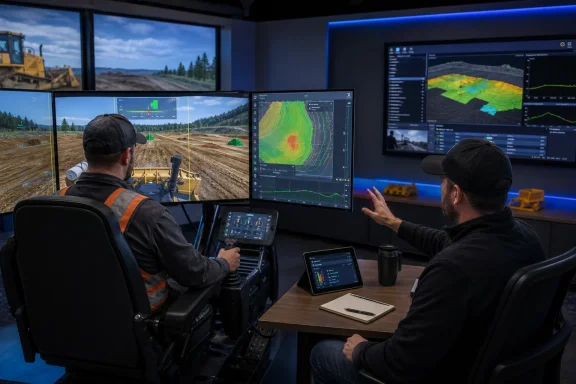
 CM Labs Adds Trimble Design File Import and Expands Earthworks Autos Support for Dozer Training
What changed / what contractors should do now: Intellia gained Trimble Design File Import, and the Intellia Dozer Simulation Curriculum gained expanded Trimble Earthworks Autos support. Before using project files, contractors should confirm CM Labs-supported file behavior and obtain a precise list of the Earthworks Autos functions represented in their simulator and curriculum configuration.CM Labs Simulations has added Trimble Design File Import to the Intellia Workforce Training System and expanded Trimble Earthworks Autos support in its dozer training curriculum, according to the company announcement published by For Construction Pros. The additions are intended to support operator readiness, mission planning, safety, and productivity by making relevant design information and machine-control technology available during training.
The practical opportunity is to introduce operators to selected design-driven and automated workflows before supervised field evaluation. Contractors can get more value from the update by verifying file compatibility and revision status, setting a specific lesson objective, using an instructor-led session, and then assessing the operator on actual equipment.
The Simulator Is No Longer Limited to a Generic Training Ground
Traditional heavy-equipment simulation addresses a familiar set of training needs. It gives inexperienced operators a place to learn controls, develop coordination, receive instruction, and make mistakes without immediately placing a production machine into the exercise.That model remains useful, but generalized exercises do not always reflect the digital information associated with an upcoming assignment. A trainee can develop foundational machine skills while still needing separate instruction on the design data and machine-control tools selected for a project.
The newly announced Trimble Design File Import capability adds a way to bring supported Trimble design files into Intellia. CM Labs describes the feature as supporting project-specific training and mission planning, with the aim of helping operators prepare before work begins onsite.
The important deployment question is what the supported import process makes available in the contractor’s specific Intellia configuration. Contractors should verify accepted formats, required preparation, revision behavior, and what trainees can see or use after import. That product-level confirmation is especially important before an instructor builds a lesson around a live project file.
Used deliberately, the feature can provide a more relevant training context than a generic exercise alone. An instructor can connect the session to an upcoming type of work, introduce the selected design information, and observe whether the trainee understands the represented workflow.
CM Labs presents the capability as a way to support readiness and mission planning while reducing risk. Those are the manufacturer’s stated intended benefits. Contractors remain responsible for deciding how the feature fits into their training, qualification, and field-evaluation programs.
A Design File Becomes a Training Input
Trimble Design File Import gives instructors and training managers another type of material around which to organize an Intellia session. Rather than treating the presence of a file as the lesson itself, the contractor can define what the trainee is expected to learn from the exercise.A useful lesson objective might focus on recognizing the selected design, becoming familiar with the represented information, following the workflow demonstrated by the instructor, or explaining how that information relates to the assigned training task. The objective should be specific enough that the instructor can observe and document the trainee’s performance.
Before rollout, the contractor needs clear answers from CM Labs about the supported import behavior. The announcement confirms the addition of Trimble Design File Import, but detailed deployment decisions require product documentation or direct technical confirmation.
Five-step rollout for contractors
The following is WindowsForum’s recommended rollout, not a CM Labs-mandated procedure:- Verify the approved design revision. Identify the exact file selected for the session and confirm that it is the revision authorized by the contractor for training use.
- Confirm CM Labs-supported import behavior. Verify file format, preparation requirements, displayed or available information, revision handling, and any configuration dependencies.
- Define the lesson objective. State what the operator is expected to recognize, explain, or perform during the session.
- Run an instructor-led session. Have a qualified instructor explain the context, observe the trainee, correct misunderstandings, and record the result.
- Conduct a supervised field evaluation. Evaluate the relevant skills and workflow on the contractor’s actual equipment under its established procedures.
It also separates three questions that are easy to combine accidentally: Is this the file the organization intends to use? Did the simulator accept and represent it as CM Labs documents? Did the trainee demonstrate the required skills during field evaluation?
WindowsForum Pre-deployment Questions for CM Labs
Before placing a project file into Intellia or scheduling Earthworks Autos dozer instruction, WindowsForum recommends sending CM Labs or the contractor’s authorized provider a short written verification request.Contractors can use the following script:
The answers give training, operations, and IT personnel a concrete basis for deciding whether the feature is ready for their intended use. They also reduce the risk of building a lesson around behavior that is not included in the purchased configuration.We are evaluating Trimble Design File Import and expanded Trimble Earthworks Autos support in the Intellia Dozer Simulation Curriculum. Please provide written confirmation for our installed or proposed Intellia configuration on the following points:
- Which Trimble design-file formats and versions are supported?
- Does a file require conversion, packaging, preprocessing, or validation before import?
- What information from the supported file is available to the trainee, and where is it presented?
- How does Intellia identify or distinguish file names, project identifiers, and design revisions?
- What happens when a revised file is imported? Does it replace, coexist with, or remain separate from the earlier revision?
- Where are imported files stored, and is storage local, hosted, cloud-based, or dependent on the customer’s configuration?
- Which users can import, view, select, change, or remove a file?
- Are access permissions, activity records, backup behavior, and export options available?
- How can an administrator permanently delete an imported file and any associated copies?
- Exactly which Trimble Earthworks Autos functions, controls, screens, prompts, and operating states are represented in the Intellia Dozer Simulation Curriculum?
- Which Earthworks software versions and simulator curriculum versions are supported?
- Are there differences among simulator hardware, curriculum packages, licenses, geographic markets, or customer configurations?
- What instructor training, setup documentation, updates, or technical support are required?
- Which behaviors can an instructor observe or review after a session?
- Can CM Labs demonstrate the complete workflow using a non-sensitive sample file before deployment?
Trimble Earthworks Autos Support Expands in Dozer Training
The second confirmed product change is expanded Trimble Earthworks Autos support in the Intellia Dozer Simulation Curriculum, according to the CM Labs announcement published by For Construction Pros.That is the verified scope of the update. Contractors should obtain the detailed function list from CM Labs before describing what the curriculum reproduces or using it to teach a particular Earthworks Autos procedure.
The phrase “Earthworks Autos support” can cover different expectations among equipment managers, instructors, operators, and technology specialists. A contractor evaluating the update will want to know which controls, displays, prompts, operating steps, and system responses are represented. It will also need to know whether support depends on particular software, curriculum, license, tablet, or simulator versions.
Once those details are confirmed, the contractor can define a corresponding lesson. The instructor can introduce the represented functions, demonstrate the required sequence, observe the trainee, and identify points that need additional explanation.
The objective is not simply to finish an exercise. A useful session asks the operator to understand the purpose of the activity, follow the instructed sequence, maintain awareness of the simulated work area, and explain the role of the represented Earthworks Autos functions.
| Capability | Confirmed product change or training input | Practical training objective | Contractor action |
|---|---|---|---|
| Standard dozer simulation | Existing Intellia dozer curriculum exercises | Develop or assess foundational behaviors selected by the contractor | Use instructor-defined criteria and follow with equipment evaluation |
| Trimble Earthworks Autos support | Support expanded in the Intellia Dozer Simulation Curriculum | Introduce and practice the specific functions that CM Labs confirms are represented | Verify functions, versions, configuration, and lesson scope |
| Trimble Design File Import | Design File Import added to the Intellia Workforce Training System | Use a supported design file within a clearly defined training exercise | Verify format, revision, import behavior, access, and deletion process |
The Potential Value Is Earlier, More Relevant Preparation
CM Labs says the additions are intended to bring operator training, mission planning, and project-specific practice together in support of safer and more productive heavy-equipment operations.For contractors, the clearest potential value is earlier exposure to selected design information and Earthworks Autos functions. An operator can encounter the represented workflow during a planned session rather than seeing every element for the first time during field operations.
That preparation can also give instructors a more focused basis for coaching. Instead of asking only whether the operator completed a generic task, the instructor can assess whether the trainee understood the lesson objective, followed the taught sequence, and recognized when to stop and ask for clarification.
Useful instructor questions include:
- Can the trainee identify the design selected for the exercise?
- Can the trainee explain the purpose of the session?
- Does the trainee follow the demonstrated workflow?
- Which represented Earthworks Autos functions does the trainee understand?
- Which steps require repeated instruction?
- What must be reviewed during supervised field evaluation?
- Can the trainee explain the difference between completing the simulator lesson and receiving authorization for field work?
If several trainees struggle with the same part of a lesson, WindowsForum recommends reviewing the instruction, terminology, and session design before drawing conclusions about individual performance. If one trainee needs additional help, the instructor can repeat the relevant portion and document the coaching provided.
This is an implementation recommendation from WindowsForum. CM Labs’ verified claim is that the additions are intended to support readiness, mission planning, safety, and productivity.
Avoiding a Poor Transition to Field Work
A strong simulator session has a documented purpose. The instructor identifies the expected outcome, explains the selected input and represented functions, observes the attempt, provides feedback, and records what must happen next.A weak session consists primarily of opening a file or showing the operator a new screen without checking comprehension. That approach can create familiarity with an interface while leaving the organization with little evidence about what the trainee learned.
Contractors can improve the transition by giving field supervisors a concise training record. It can identify:
- The file and revision used.
- The Intellia curriculum and configuration used.
- The represented Earthworks Autos functions included in the lesson.
- The lesson objective.
- The exercises completed.
- The instructor’s observations.
- The topics requiring field confirmation.
- The date and responsible instructor.
The field supervisor can then focus on the skills and procedures that the contractor requires on its equipment. Any authorization or qualification decision remains part of the contractor’s established program.
One Clear Limitations Box
Keeping these qualifications in one place avoids surrounding every potential use with repetitive warnings. It also provides a clear boundary between the two announced additions, CM Labs’ intended benefits, and WindowsForum’s rollout recommendations.Product and deployment limits
The confirmed facts are that Intellia gained Trimble Design File Import and that Trimble Earthworks Autos support was expanded in the Intellia Dozer Simulation Curriculum. Contractors need direct confirmation from CM Labs for supported formats, imported-file behavior, represented data, revision handling, storage, access, deletion, Earthworks Autos functions, version compatibility, and configuration requirements.
Simulator instruction is one stage of training. Engineering approval, survey work, equipment setup, project supervision, safety planning, operator authorization, and field evaluation remain governed by the contractor and other responsible parties.
Optional Enterprise Governance Considerations
Organizations that plan to use the feature across multiple projects, offices, instructors, or simulator locations may want a short internal standard. The following are optional WindowsForum recommendations, not capabilities or requirements announced by CM Labs:- Assign a role responsible for approving files used in training.
- Record the project, file name, revision, instructor, session date, and simulator configuration.
- Limit access according to the organization’s existing project-data rules.
- Define when imported files and related training records are retained or deleted.
- Establish a method for notifying instructors when an approved training file changes.
- Include training, operations, project technology, document-control, and IT personnel when their responsibilities are affected.
- Review supplier answers about storage and deletion before using confidential or contract-restricted files.
Training and Operations Need a Shared Process
The update creates a practical reason for training personnel and project teams to coordinate. The instructor needs to know which file and workflow the organization wants to introduce. Operations personnel need to know what was covered and what remains to be evaluated in the field.That coordination does not need to become burdensome. A simple handoff can identify the approved input, lesson objective, confirmed product functions, instructor observations, and next evaluation step.
Instructor capacity remains central. Importing a supported file does not by itself produce an effective lesson. Someone must explain the context, demonstrate the represented workflow, observe the trainee, correct misunderstandings, and decide whether more instruction is needed.
The contractor also needs evaluation criteria tied to the lesson. An exercise-completion indicator can be part of the record, but instructor observation and the trainee’s ability to explain the process provide additional context. Supervised performance on the actual equipment completes the rollout recommended by WindowsForum.
Where questions arise about the design, project requirements, equipment configuration, or field procedures, the instructor can route them to the person assigned by the contractor. This keeps training personnel focused on instruction while preserving the organization’s existing decision responsibilities.
Project-Specific Inputs Raise the Standard for Readiness Decisions
The most important implications of the CM Labs update concern how contractors introduce design information and Earthworks Autos functions into training:- CM Labs added Trimble Design File Import to the Intellia Workforce Training System, according to the company announcement published by For Construction Pros.
- CM Labs expanded Trimble Earthworks Autos support in the Intellia Dozer Simulation Curriculum, according to the same announcement.
- CM Labs identifies operator readiness, mission planning, safety, and productivity as intended benefits of the additions.
- Contractors need CM Labs to confirm supported formats, import behavior, represented information, revision handling, storage, access, deletion, and version requirements.
- Contractors also need a precise list of the Earthworks Autos functions represented in their dozer curriculum and simulator configuration.
- WindowsForum recommends a five-step rollout: verify the approved revision, confirm supported behavior, define the lesson, conduct instructor-led training, and complete supervised field evaluation.
- A short training record can connect the simulator session to the contractor’s field-evaluation process.
- Organizations using sensitive or controlled project information can add access, retention, and deletion rules through their existing internal procedures.
CM Labs’ additions can make Intellia training more relevant to design-driven earthmoving and dozer machine-control work, while a disciplined five-step rollout can turn those new capabilities into focused preparation for the field.
References
- Primary source: For Construction Pros
Published: 2026-07-11T19:50:08.185870
Loading…
www.forconstructionpros.com - Related coverage: cm-labs.com
Loading…
cm-labs.com - Related coverage: trimble.com
Loading…
www.trimble.com - Related coverage: civilconstruction.trimble.com
Loading…
civilconstruction.trimble.com