

Unbox Therapy’s format footprint is straightforward: it is a long-running English-language consumer-tech brand centered on YouTube unboxings and hands-on product showcases, with an additional presence on Twitch, TikTok, Instagram, Spotify, and X. It still matters heading into the next hardware cycle because a clear hands-on video can answer immediate physical questions that specifications and promotional images often leave unresolved. Windows buyers should use those videos as evidence of physical design—not as evidence of long-term ownership.
That distinction is the key to using the channel well. An Unbox Therapy video can help verify what comes in the box, where the ports are, how large a laptop appears beside familiar objects, which keyboard layout is shown, what charging hardware is included, and how a hinge or accessory works. A sustained independent review is still needed for battery life, heat, fan noise, performance, display behavior, and reliability. Before purchasing, buyers should also confirm driver availability, firmware support, warranty terms, repair options, and Windows compatibility on the manufacturer’s official support pages.
AD HOC NEWS describes Unbox Therapy as one of YouTube’s established technology-unboxing channels, with accessible product coverage spanning several consumer-electronics categories. The channel’s core method is easy to recognize: open the package, identify what is included, handle the product, point out visible features, and give viewers an initial sense of the hardware.
A conventional review asks whether a product performs well enough to recommend after meaningful testing. An unboxing begins with more immediate questions:
That is the durable role Unbox Therapy occupies. It gives viewers a visual encounter with hardware they may not yet be able to inspect in a store. The channel’s value is greatest when it makes an unfamiliar device easier to understand without pretending that an initial encounter settles every question about ownership.
The format also aligns naturally with the technology launch calendar. New phones, laptops, tablets, headphones, chargers, keyboards, and unusual peripherals continually enter the market. Each new object gives the channel another opportunity to apply the same recognizable sequence without changing its central identity.
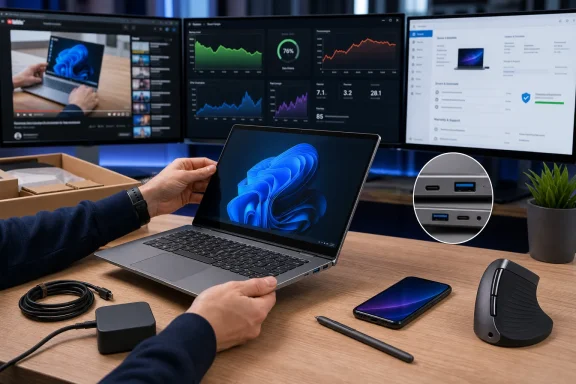
If the camera shows two USB-C ports and no USB-A port on the demonstrated laptop, that observation is useful. If the keyboard has a short left Shift key, a compact arrow cluster, or no number pad, the footage can help a buyer notice it. If the power adapter is unusually large, the device requires a proprietary connector, or the box contains no charger at all, the video may reveal a practical consequence before purchase.
For Windows PCs in particular, a hands-on can help buyers inspect:
These observations do not require the viewer to accept every spoken conclusion. The footage itself can be evidence. A buyer can pause, zoom, compare frames, and check whether the visible configuration matches the manufacturer’s regional product listing.
That last step matters because a video may show a review unit, a different regional package, or a configuration that is not identical to the one offered by a particular retailer. What appears in one box should not automatically be assumed to appear in every box carrying the same product family name.
An unboxing can show the location of a laptop’s cooling vents. It cannot establish whether that cooling system will maintain performance during a long rendering job, game, software build, or data-processing workload. It can show the battery capacity printed on a specification sheet, but it cannot prove how many hours the machine will last under an individual buyer’s applications and settings.
A short initial demonstration ordinarily cannot establish:
The practical boundary is simple: a hands-on demonstrates the product’s initial physical presentation; a review tests claims about use over time.
Unbox Therapy is most useful when viewers keep that boundary intact. Its videos can place a product on a shortlist or remove one from consideration because of an obvious physical mismatch. They should not be the sole basis for expensive decisions involving performance, durability, serviceability, or business deployment.
Smartphones are natural anchors because major releases create immediate interest and because viewers already understand the basic form. The video can concentrate on what has changed: dimensions, finish, camera arrangement, controls, packaging, or included accessories.
Laptops and tablets require different attention. Port placement can determine whether a cable crosses a desk. Keyboard layout can affect daily productivity. Hinge range matters for shared screens, touch use, and confined workspaces. The size of the charger can change whether a supposedly portable system is convenient to carry.
Audio equipment demonstrates the limits of visual coverage more clearly. A video can show fit, controls, included tips, cables, charging hardware, and adjustment range, but the audience cannot directly experience the sound heard by the presenter. Independent listening tests and comparisons therefore carry additional weight.
Accessories and unusual peripherals provide variety between major launches. They also give the format room to demonstrate physical mechanisms that are difficult to explain in a product listing. A strange dock, folding keyboard, charging device, compact computer, or specialized controller may become understandable as soon as it is handled on camera.
A hands-on video is particularly well suited to the beginning of a launch cycle because it does not need to resolve every long-term question. Its legitimate subject is the first encounter. The product can be opened, inspected, and compared physically before there has been enough time to assess battery aging, update reliability, recurring defects, or durability.
Flagships supply familiarity and broad attention. Unusual peripherals supply differentiation.
A heavily promoted phone may arrive with few genuine surprises after announcements and previews. A less familiar accessory can restore the discovery element at the center of the unboxing format. Viewers may not know what the product does, how it moves, or why it exists until the demonstration begins.
The combination gives Unbox Therapy a practical editorial range:
YouTube gives a product demonstration enough time to move from packaging to physical inspection. It also preserves a searchable video catalog that buyers can revisit after the immediate launch conversation has passed.
The other platforms can support different pieces of that operation. Short clips can circulate a reveal or notable product feature. Image-led posts can highlight physical design. Social feeds can announce or redistribute coverage. Audio can carry discussion that does not depend on a continuous view of the device.
The Windows buyer implication is straightforward: a short clip may be useful for discovery, but it is less likely to contain the complete physical inspection needed for a purchase decision. Buyers should locate the full hands-on presentation, confirm the exact model shown, and then move to independent reviews and official documentation.
The profile also reports no publicly announced live event or near-term stream date. That is simply a current scheduling note; it does not, by itself, establish a broader conclusion about Unbox Therapy’s business model or future plans.
Use the following workflow before purchasing a Windows laptop, tablet, handheld PC, dock, charger, or peripheral.
Confirm:
Check the exact:
Look for statements addressing:
The most reliable parts of a hands-on remain the things viewers can verify on screen. Subjective reactions, comparative claims, and buying recommendations deserve additional scrutiny, especially when the exact test method is not explained.
These signals are measurable through the channel’s public output. They do not require speculation about internal strategy: viewers can compare product categories, upload patterns, video depth, and the relationship between full videos and shorter posts across the next series of launches.
That fragmentation makes visual evidence useful—but it also makes configuration discipline essential.
Unbox Therapy can help a buyer notice that a laptop lacks a needed port, includes an inconvenient charger, uses an unsuitable keyboard layout, occupies too much space, or requires accessories that are not in the box. Catching one of those issues early can save time and prevent a poor purchase.
The channel cannot establish that a Windows PC will remain fast, cool, quiet, repairable, and well supported. Those judgments require sustained tests and official support information. Nor can a video of one unit guarantee that a retailer is selling the same configuration or regional package.
The practical takeaway is not to choose between unboxings and reviews. It is to assign each source the right job.
Use Unbox Therapy to inspect the object. Use an independent review to test the machine. Use the manufacturer’s documentation to verify the support commitment. Then compare all three against the exact retailer listing before purchasing.
That workflow explains why the channel’s format can remain relevant in the next hardware cycle even as individual platforms, products, and presentation trends change. Buyers will continue to need a clear first look at unfamiliar hardware. They will also continue to need evidence that extends beyond the first look.
Unbox Therapy is most valuable at the boundary between announcement and ownership: the moment when a product stops being a render and becomes a physical object that can be examined. For WindowsForum readers, the correct response is neither automatic trust nor automatic dismissal. It is to treat the hands-on as the first evidence layer in a deliberate purchasing process—and never as the last.
That distinction is the key to using the channel well. An Unbox Therapy video can help verify what comes in the box, where the ports are, how large a laptop appears beside familiar objects, which keyboard layout is shown, what charging hardware is included, and how a hinge or accessory works. A sustained independent review is still needed for battery life, heat, fan noise, performance, display behavior, and reliability. Before purchasing, buyers should also confirm driver availability, firmware support, warranty terms, repair options, and Windows compatibility on the manufacturer’s official support pages.
At a glance
- What Unbox Therapy is: A YouTube-centered consumer-tech channel focused on unboxings, hands-on presentations, showcases, and product overviews.
- Its wider footprint: Twitch, TikTok, Instagram, Spotify, and X supplement the main YouTube operation.
- What its format can verify: Packaging, included accessories, ports, controls, dimensions, keyboard layout, hinge movement, physical setup, and visible design.
- What it cannot verify by itself: Sustained performance, battery endurance, thermal behavior, update quality, long-term durability, repairability, or support over the product’s useful life.
- How Windows buyers should use it: Watch the hands-on first, add independent testing, and then verify support details directly with the manufacturer.
 What Unbox Therapy Is
AD HOC NEWS describes Unbox Therapy as one of YouTube’s established technology-unboxing channels, with accessible product coverage spanning several consumer-electronics categories. The channel’s core method is easy to recognize: open the package, identify what is included, handle the product, point out visible features, and give viewers an initial sense of the hardware.A conventional review asks whether a product performs well enough to recommend after meaningful testing. An unboxing begins with more immediate questions:
- What is in the package?
- Is a charger, cable, adapter, case, stylus, or other accessory included?
- How large and heavy does the device appear?
- Where are its ports, buttons, vents, cameras, speakers, and controls?
- How does a hinge, stand, keyboard, case, or removable component operate?
- Does the physical product match the impression created by promotional images?
That is the durable role Unbox Therapy occupies. It gives viewers a visual encounter with hardware they may not yet be able to inspect in a store. The channel’s value is greatest when it makes an unfamiliar device easier to understand without pretending that an initial encounter settles every question about ownership.
The format also aligns naturally with the technology launch calendar. New phones, laptops, tablets, headphones, chargers, keyboards, and unusual peripherals continually enter the market. Each new object gives the channel another opportunity to apply the same recognizable sequence without changing its central identity.
What Its YouTube Format Can Verify
The strongest evidence in an unboxing or hands-on video is evidence the viewer can see directly.If the camera shows two USB-C ports and no USB-A port on the demonstrated laptop, that observation is useful. If the keyboard has a short left Shift key, a compact arrow cluster, or no number pad, the footage can help a buyer notice it. If the power adapter is unusually large, the device requires a proprietary connector, or the box contains no charger at all, the video may reveal a practical consequence before purchase.
For Windows PCs in particular, a hands-on can help buyers inspect:
- Port type, number, and placement
- Charging connector and included power adapter
- Keyboard layout, key spacing, and number-pad availability
- Touchpad size and position
- Webcam location and visible privacy controls
- Hinge range and apparent screen stability
- Vent placement and possible desk-clearance concerns
- Display reflectivity under the conditions shown
- Chassis thickness and approximate physical scale
- Included adapters, styluses, docks, sleeves, cables, and documentation
- Accessibility of removable or adjustable components
- The amount of desk or bag space required by the device
These observations do not require the viewer to accept every spoken conclusion. The footage itself can be evidence. A buyer can pause, zoom, compare frames, and check whether the visible configuration matches the manufacturer’s regional product listing.
That last step matters because a video may show a review unit, a different regional package, or a configuration that is not identical to the one offered by a particular retailer. What appears in one box should not automatically be assumed to appear in every box carrying the same product family name.
What Its YouTube Format Cannot Verify
A polished hands-on should not be mistaken for a long-term review. The two formats answer different questions.An unboxing can show the location of a laptop’s cooling vents. It cannot establish whether that cooling system will maintain performance during a long rendering job, game, software build, or data-processing workload. It can show the battery capacity printed on a specification sheet, but it cannot prove how many hours the machine will last under an individual buyer’s applications and settings.
A short initial demonstration ordinarily cannot establish:
- Sustained CPU or GPU performance
- Thermal throttling during extended workloads
- Fan behavior across different power modes
- Battery life under repeatable test conditions
- Battery aging after months or years
- Sleep, standby, and wake reliability
- Driver stability across Windows updates
- Firmware quality and update frequency
- Display calibration, response times, or long-term image behavior
- Wireless reliability in varied environments
- Hinge, keyboard, cable, and connector durability
- Ease of repair or availability of replacement parts
- Warranty handling and support quality
- Compatibility with an organization’s deployment and management tools
The practical boundary is simple: a hands-on demonstrates the product’s initial physical presentation; a review tests claims about use over time.
Unbox Therapy is most useful when viewers keep that boundary intact. Its videos can place a product on a shortlist or remove one from consideration because of an obvious physical mismatch. They should not be the sole basis for expensive decisions involving performance, durability, serviceability, or business deployment.
Unbox Therapy’s Main Product Categories
Unbox Therapy covers related formats across several consumer-electronics categories. The product changes, but the underlying sequence remains consistent: reveal the package, identify the contents, handle the hardware, demonstrate visible features, and offer an initial interpretation.| Format | Primary object | What viewers can inspect | Evidence still needed |
|---|---|---|---|
| Smartphone unboxings | Flagship and other handsets | Packaging, dimensions, materials, cameras, controls, accessories, and handling | Battery endurance, camera consistency, software support, reception, thermals, and durability |
| Laptop and tablet hands-on videos | Portable PCs, tablets, and hybrid devices | Display movement, keyboard, ports, hinge, profile, charger, stylus, and included components | Sustained performance, battery tests, fan noise, firmware, repairability, and driver support |
| Audio gear showcases | Headphones, speakers, earbuds, and related equipment | Controls, construction, fit, included cables, charging case, and setup method | Comparative sound testing, microphone quality, wireless reliability, comfort over time, and battery life |
| Accessory and peripheral spotlights | Chargers, cases, keyboards, docks, and unusual gadgets | Function, connector type, compatibility claims, physical operation, and package contents | Long-term reliability, full compatibility testing, support policy, power behavior, and value against alternatives |
Laptops and tablets require different attention. Port placement can determine whether a cable crosses a desk. Keyboard layout can affect daily productivity. Hinge range matters for shared screens, touch use, and confined workspaces. The size of the charger can change whether a supposedly portable system is convenient to carry.
Audio equipment demonstrates the limits of visual coverage more clearly. A video can show fit, controls, included tips, cables, charging hardware, and adjustment range, but the audience cannot directly experience the sound heard by the presenter. Independent listening tests and comparisons therefore carry additional weight.
Accessories and unusual peripherals provide variety between major launches. They also give the format room to demonstrate physical mechanisms that are difficult to explain in a product listing. A strange dock, folding keyboard, charging device, compact computer, or specialized controller may become understandable as soon as it is handled on camera.
Flagship Launches and Unusual Peripherals Serve Different Roles
The supplied profile identifies flagship-device unboxing as a leading format for the channel, with major hardware launches creating periods of elevated interest. That fit is logical: when a widely anticipated phone, laptop, or tablet appears, viewers want to see the retail package and physical device quickly.A hands-on video is particularly well suited to the beginning of a launch cycle because it does not need to resolve every long-term question. Its legitimate subject is the first encounter. The product can be opened, inspected, and compared physically before there has been enough time to assess battery aging, update reliability, recurring defects, or durability.
Flagships supply familiarity and broad attention. Unusual peripherals supply differentiation.
A heavily promoted phone may arrive with few genuine surprises after announcements and previews. A less familiar accessory can restore the discovery element at the center of the unboxing format. Viewers may not know what the product does, how it moves, or why it exists until the demonstration begins.
The combination gives Unbox Therapy a practical editorial range:
- Major releases connect the channel to active buying interest.
- Laptops and tablets broaden its relevance beyond phones.
- Audio equipment applies the hands-on method to fit, controls, and setup.
- Accessories and unconventional gadgets create discovery between large launches.
YouTube Is the Center of the Format Footprint
Unbox Therapy has a presence on YouTube, Twitch, TikTok, Instagram, Spotify, and X, but the footprint should not be interpreted as six equivalent publishing operations. Based on the supplied description, YouTube remains the main platform and the clearest home of the channel’s established unboxing and hands-on format.YouTube gives a product demonstration enough time to move from packaging to physical inspection. It also preserves a searchable video catalog that buyers can revisit after the immediate launch conversation has passed.
The other platforms can support different pieces of that operation. Short clips can circulate a reveal or notable product feature. Image-led posts can highlight physical design. Social feeds can announce or redistribute coverage. Audio can carry discussion that does not depend on a continuous view of the device.
The Windows buyer implication is straightforward: a short clip may be useful for discovery, but it is less likely to contain the complete physical inspection needed for a purchase decision. Buyers should locate the full hands-on presentation, confirm the exact model shown, and then move to independent reviews and official documentation.
The profile also reports no publicly announced live event or near-term stream date. That is simply a current scheduling note; it does not, by itself, establish a broader conclusion about Unbox Therapy’s business model or future plans.
Windows PC Buying Checklist
Windows hardware requires extra care because products that share a family name can differ by processor, graphics configuration, display, wireless adapter, port capabilities, keyboard layout, memory arrangement, storage, and region.Use the following workflow before purchasing a Windows laptop, tablet, handheld PC, dock, charger, or peripheral.
1. Use the Unbox Therapy hands-on for physical inspection
Confirm the exact model or configuration shown whenever possible. Then inspect:- Ports: Count them and note their placement. Do not assume every USB-C port supports charging, video output, Thunderbolt, or the same transfer speed.
- Charger inclusion: Verify whether the demonstrated package contains a charger and whether your retailer’s listing promises the same contents.
- Charging method: Note proprietary connectors, USB-C charging, adapter size, cable length, and whether a higher-wattage adapter may be required for full performance.
- Keyboard layout: Check key size, arrow-key arrangement, function row, number pad, regional layout, and the location of frequently used keys.
- Physical size: Compare the system with the presenter’s hands, its power adapter, familiar accessories, or another device—but treat visual scale as approximate.
- Included accessories: Identify cables, adapters, styluses, cases, docks, replacement parts, or proprietary components.
- Hinge and stand: Observe range of movement and whether the design appears suitable for touch, presentation, tablet, or desk use.
- Vent and connector placement: Consider whether cables, walls, stands, or external displays could obstruct the intended setup.
2. Check an independent sustained review
Find testing that addresses the workload you expect to run. Look for:- Battery tests under documented conditions
- Sustained CPU and GPU performance
- Surface temperatures and thermal throttling
- Fan noise at idle and under load
- Display brightness, color behavior, and response characteristics
- Sleep, standby, and wake behavior
- Webcam, microphone, speaker, and wireless performance
- Performance while connected to the included charger
- Comparisons with similarly priced Windows devices
3. Visit the manufacturer’s official support pages
Before paying, check the support entry for the exact model number—not merely the marketing name.Confirm:
- Windows version compatibility
- Downloadable drivers and utilities
- BIOS or UEFI update availability
- Firmware update procedures
- Security advisory and update information
- Warranty duration and regional restrictions
- Mail-in, depot, carry-in, or on-site service options
- Repair manuals or service documentation, if available
- Replacement-part or authorized-service availability
- Compatibility notes for docks, chargers, styluses, and other accessories
- Support for business management or deployment tools, if required
4. Reconcile the exact configuration
Compare the video, independent review, manufacturer specification page, support page, and retailer listing.Check the exact:
- Model and regional suffix
- Processor and graphics hardware
- Display resolution and refresh rate
- Memory capacity and whether it is replaceable
- Storage capacity and upgrade options
- Wireless adapter
- Port capabilities
- Keyboard layout
- Operating system edition
- Warranty terms
- Box contents
5. Decide only after all three evidence layers agree
The safest procedure combines:- Hands-on evidence for physical design and included hardware.
- Independent sustained testing for performance, battery life, heat, noise, and behavior over longer workloads.
- Official manufacturer documentation for drivers, firmware, warranty, repair, and Windows support.
Viewer Checklist for Sponsorships, Loaners, Affiliates, and Embargoes
Launch coverage can involve manufacturers, retailers, review units, early access, affiliate commerce, or sponsorship. No channel-specific conclusion should be drawn without evidence, but viewers can apply the same disclosure checklist to Unbox Therapy and any other technology outlet.Look for statements addressing:
- Whether the product was purchased, borrowed, or supplied
- Whether the manufacturer sponsored the video
- Whether the manufacturer saw or approved the content before publication
- Whether affiliate links are used
- Whether the unit must be returned
- Whether travel, accommodation, or event access was provided
- Whether publication timing was subject to an embargo
- Whether the hardware or software was final
The most reliable parts of a hands-on remain the things viewers can verify on screen. Subjective reactions, comparative claims, and buying recommendations deserve additional scrutiny, especially when the exact test method is not explained.
Analysis: Signals to Watch in the Next Hardware Cycle
The following are analysis and predictions, not verified announcements or facts about future Unbox Therapy plans. They are observable signals readers can use to judge how the channel’s role is evolving.1. Do flagship launches remain the main traffic engine?
Watch whether coverage of major phones, laptops, tablets, and other widely promoted devices continues to produce the channel’s most visible periods of audience attention. If flagship videos dominate, the launch calendar will remain central to the format. If other categories regularly match that attention, the channel may be developing a less launch-dependent mix.2. Do unusual peripherals provide differentiation between launches?
Track whether chargers, keyboards, docks, compact computers, experimental accessories, and unconventional gadgets appear consistently between major releases. These products can preserve the discovery element of unboxing when annual flagship designs offer only incremental physical changes.3. Are short-form platforms used mainly for distribution?
Compare short-form posts with full YouTube uploads. If clips mainly excerpt reveals, reactions, or single features and direct attention toward longer coverage, that would indicate distribution around a YouTube-centered operation. If complete product coverage increasingly occurs in short-form feeds, the balance of the footprint may be changing.4. Does Windows hardware receive more support-focused context?
Observe whether laptop, handheld, dock, and peripheral coverage increasingly identifies exact configurations, port capabilities, charger requirements, regional differences, upgrade limits, and Windows compatibility considerations. More attention to those details would make the format more useful in a fragmented PC market without requiring every hands-on to become a full technical review.These signals are measurable through the channel’s public output. They do not require speculation about internal strategy: viewers can compare product categories, upload patterns, video depth, and the relationship between full videos and shorter posts across the next series of launches.
Why the Format Still Matters for Windows Buyers
Windows buyers face a market in which similar-looking systems can differ substantially. Two laptops sold under almost the same name may have different displays, port capabilities, wireless components, memory arrangements, chargers, warranties, or support terms. An accessory that works with one USB-C system may not provide the same features on another.That fragmentation makes visual evidence useful—but it also makes configuration discipline essential.
Unbox Therapy can help a buyer notice that a laptop lacks a needed port, includes an inconvenient charger, uses an unsuitable keyboard layout, occupies too much space, or requires accessories that are not in the box. Catching one of those issues early can save time and prevent a poor purchase.
The channel cannot establish that a Windows PC will remain fast, cool, quiet, repairable, and well supported. Those judgments require sustained tests and official support information. Nor can a video of one unit guarantee that a retailer is selling the same configuration or regional package.
The practical takeaway is not to choose between unboxings and reviews. It is to assign each source the right job.
Use Unbox Therapy to inspect the object. Use an independent review to test the machine. Use the manufacturer’s documentation to verify the support commitment. Then compare all three against the exact retailer listing before purchasing.
That workflow explains why the channel’s format can remain relevant in the next hardware cycle even as individual platforms, products, and presentation trends change. Buyers will continue to need a clear first look at unfamiliar hardware. They will also continue to need evidence that extends beyond the first look.
Unbox Therapy is most valuable at the boundary between announcement and ownership: the moment when a product stops being a render and becomes a physical object that can be examined. For WindowsForum readers, the correct response is neither automatic trust nor automatic dismissal. It is to treat the hands-on as the first evidence layer in a deliberate purchasing process—and never as the last.
References
- Primary source: ad-hoc-news.de
Published: 2026-07-11T22:50:10.225825
Unbox Therapy and the format footprint on YouTube
Unbox Therapy has turned tech unboxings into a long-running YouTube format brand. This evergreen profile looks at the channel’s niche, core series and platform footprint for fans and industry watchers.www.ad-hoc-news.de - Related coverage: vidiq.com
Unbox Therapy's YouTube Stats: Subscribers, Views & Earnings | vidIQ
Unbox Therapy's YouTube subscriber count, estimated net worth, and channel earnings. Track real-time stats, views, and growth trends with vidIQ.vidiq.com - Related coverage: socialblade.com
- Related coverage: techtimes.com
[Youtuber] Unbox Therapy: How A Simple Video Premise Turned Into A YouTube Powerhouse
The YouTube channel Unbox Therapy is one of the most curious tech channels out there, mainly because of its simple and extremely effective premise.www.techtimes.com - Related coverage: onsightapp.com
The best tech YouTube channels | B2B Sales Blog - Onsight
Here are some of the best YouTube tech channels for getting your daily tech fix or for helping you to research your next tech purchasewww.onsightapp.com - Related coverage: research.cbs.dk
- Related coverage: awards.social
Unbox Therapy – World Social Media Awards
 awards.social
- Related coverage: thestudentpocketguide.com