

CVE-2026-13822 affects Google Chrome on Android before version 150.0.7871.47. According to the published description, a remote attacker who persuades a user to install a crafted malicious extension could bypass the browser’s same-origin policy.Answer first
- Affected product: Google Chrome on Android before version 150.0.7871.47.
- Attack prerequisite: The public description requires an attacker to persuade the user to install a crafted malicious extension. It does not describe a webpage-only trigger.
- Published result: The malicious extension could bypass Chrome’s same-origin policy.
- Required response: Update Chrome on Android to 150.0.7871.47 or later, then verify the complete installed version.
- Unmanaged-device update path: Open Google Play Store → profile icon → Manage apps & device → Updates available → Google Chrome → Update. If Chrome is not listed, open its Play Store page and check whether an Update button is available.
- Managed-device response: Use the organization’s enterprise mobility management or managed Google Play console to approve or assign the current Chrome release, enforce or schedule installation, synchronize affected devices, and verify the resulting full version in device inventory.
- Complementary control: Review extension-installation restrictions and remind users not to install unapproved extensions. These precautions do not replace the documented fix.
- Disclosure limit: The public record does not provide the precise vulnerable code path, a detailed exploit sequence, a public proof of concept, or CVE-specific detection artifacts.
The documented remediation is version-based: move affected Chrome-on-Android installations to 150.0.7871.47 or later and collect fresh version evidence. The extension-installation prerequisite provides an additional control point, but extension hygiene is complementary rather than a substitute for updating.
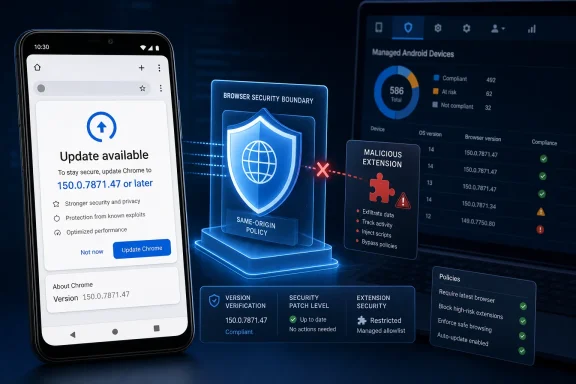 Action Checklist for Administrators
- Inventory Google Chrome installations on managed Android devices.
- Collect the complete Chrome version, including all four version components.
- Flag every Chrome-on-Android installation earlier than 150.0.7871.47 as affected.
- Treat missing, shortened, stale, or conflicting version data as unresolved.
- Approve or assign an eligible Chrome release in the organization’s managed application console.
- Enforce or schedule the application update according to organizational policy.
- Trigger a device or application-policy synchronization where the management platform supports it.
- Recheck inventory after the deployment window and confirm that each affected installation reports 150.0.7871.47 or later.
- Keep devices below the remediation threshold in the active remediation queue.
- Escalate devices whose complete Chrome version cannot be collected after a fresh check-in.
- Review existing browser-extension installation restrictions as a complementary control.
- Remind users not to install unexpected or unapproved extensions.
- Track desktop Chrome and other Chromium-based browsers separately; this record establishes an Android Chrome scope.
- Monitor authoritative vulnerability information for changes to the affected range, exploitation assessment, or available technical detail.
Documented Behavior and Its Operational Meaning
The public description establishes a short attack sequence:- An attacker persuades the user to install a crafted malicious extension.
- The extension runs in an affected version of Chrome on Android.
- The extension bypasses the browser’s same-origin policy.
That prerequisite should be stated precisely. The record does not describe exploitation triggered solely by visiting a hostile webpage. It requires installation of a crafted malicious extension with user involvement. At the same time, the installation requirement does not make vulnerable versions safe: after the extension is installed, the affected browser fails to enforce the documented origin boundary.
The vulnerability is associated with CWE-346, Origin Validation Error. That classification is consistent with the same-origin policy consequence, but it does not reveal which Chrome component, extension API, function, request, message, or validation decision is defective.
The linked Chromium issue is permission-restricted, and the available public material does not provide:
- The vulnerable source file or function.
- The exact origin-validation failure.
- The extension API or operation involved.
- Required extension or host permissions.
- The origins or resources that could be targeted.
- A public proof of concept.
- A malicious extension identifier.
- CVE-specific indicators of compromise.
- A reliable behavioral detection method.
- A workaround equivalent to updating.
The disclosure also does not establish applicability to desktop Chrome or to other Chromium-derived browsers. Shared upstream technology alone is insufficient to transfer Google Chrome for Android’s affected range to another product. Administrators should use each vendor’s own platform and version information when evaluating other browsers.
“High” and 6.5 “Medium” Describe Different Assessments
Chromium classifies CVE-2026-13822 as High severity. The CISA-ADP CVSS 3.1 assessment displayed by NVD assigns a base score of 6.5, categorized as Medium.Those labels reflect different assessment systems rather than an error that must be resolved by choosing one and discarding the other. Chromium’s label represents the vendor’s security classification of the browser vulnerability. CVSS uses standardized metrics designed to support comparison across vulnerability types and products.
The contributed vector is:
CVSS:3.1/AV:N/AC:L/PR:N/UI:R/S:U/C:N/I:H/A:NIn plain English, that vector models:
- A network attack vector.
- Low attack complexity.
- No pre-existing privileges.
- Required user interaction.
- Unchanged scope.
- No modeled confidentiality impact.
- High modeled integrity impact.
- No modeled availability impact.
Reporting should not expand those metrics into consequences that the record does not identify. The available information does not establish credential theft, document theft, access to a particular account, manipulation of a specific business transaction, browser crashes, or service disruption. It supports the narrower statement that successful exploitation produces a same-origin policy bypass and has a high modeled integrity effect.
The 6.5 score should retain its attribution. It is a CISA-ADP CVSS 3.1 contribution displayed by NVD, not an independently authored NVD or NIST score. NVD had not supplied its own CVSS assessment in the provided record.
| Assessment or condition | Recorded result | Practical interpretation |
|---|---|---|
| Affected product | Google Chrome on Android | Scope remediation to the specified product and platform |
| Affected range | Versions before 150.0.7871.47 | Installations below this boundary remain affected |
| Chromium security severity | High | Google considers the browser implementation issue serious |
| CISA-ADP CVSS 3.1 | 6.5 Medium | Required user interaction and the modeled impact categories reduce the standardized score |
| User interaction | Required | The attacker must persuade the user to install a crafted malicious extension |
| Published consequence | Same-origin policy bypass | A browser isolation boundary can be crossed after the prerequisite is met |
| Modeled impact | High integrity; no confidentiality or availability impact | Preserve the published impact distinctions |
| NVD-authored CVSS assessment | Not provided | Do not describe the contributed 6.5 value as an “NVD score” |
The supplied CISA-ADP SSVC information lists exploitation as none, automatable as no, and technical impact as partial. These are point-in-time assessment values. “Exploitation: none” means that the assessment did not identify known exploitation; it is not proof that exploitation has never happened or cannot occur. “Automatable: no” is a decision-model classification and should not be converted into unsupported claims about exact attacker effort or tooling.
Android Scope and Update Procedures
The affected-product information identifies Google Chrome on Android and versions before 150.0.7871.47. It does not establish that Chrome on Windows, macOS, Linux, or ChromeOS is affected by this CVE, nor does it establish equivalent version boundaries for other Chromium-based browsers.For remediation tickets and vulnerability-management records, use the complete scope:
- Application: Google Chrome
- Platform: Android
- Affected condition: Version earlier than 150.0.7871.47
- Attack prerequisite: Installation of a crafted malicious extension
- Published result: Same-origin policy bypass
- Remediation threshold: Version 150.0.7871.47 or later
Unmanaged Android devices
For a device updated directly through Google Play:- Open the Google Play Store.
- Tap the profile icon in the upper-right corner.
- Select Manage apps & device.
- Under Updates available, select See details if necessary.
- Find Google Chrome.
- Tap Update.
- After installation completes, open Chrome and verify the full version.
Google Play Store → profile icon → Manage apps & device → Updates available → Google Chrome → Update
If Chrome does not appear under available updates, open the Chrome application page in Google Play. If the page offers Update, install it. If it offers only Open, verify the full installed version rather than assuming the device has crossed the remediation threshold.
Google Play availability can vary by device eligibility, release distribution, account configuration, and administrative controls. A device that is not yet offered 150.0.7871.47 or later cannot be closed as remediated merely because the Play Store says no update is currently available. Keep it unresolved until the required version is installed and verified.
Managed Android devices
For organization-managed devices, use the enterprise mobility management platform and managed Google Play workflow available in the environment:- Locate Google Chrome in the managed Google Play or enterprise application catalog.
- Confirm that Chrome is approved for the relevant users, device groups, or organizational units.
- Assign the current eligible Chrome release as a required or managed application.
- Select the organization’s enforced, automatic, or scheduled update mode as appropriate.
- Confirm that no application version pin, maintenance window, staged deployment rule, or device policy is holding affected devices below 150.0.7871.47.
- Initiate a device synchronization or policy check-in where supported.
- Allow the defined deployment window to complete.
- Refresh application inventory and collect the complete installed Chrome version from each device.
- Retain devices below 150.0.7871.47 in remediation.
- Escalate devices that fail to check in, fail installation, report insufficient storage, or do not return a complete version.
A status such as “assigned,” “approved,” “deployment initiated,” or “installation requested” is not final remediation evidence. Close the finding only after the device reports a qualifying installed version.
| Reported Chrome-on-Android version | Status under the affected range | Administrative response |
|---|---|---|
| Earlier than 150.0.7871.47 | Affected | Update and collect fresh version evidence |
| Exactly 150.0.7871.47 | Outside the stated affected range | Retain the complete version as closure evidence |
| Later than 150.0.7871.47 | Outside the stated affected range | Maintain normal browser update management |
| Only “Chrome 150” is reported | Unknown | Collect all four version components |
| Version is missing, stale, or conflicting | Unknown | Force a fresh check-in and escalate if collection still fails |
| Chrome on another operating system | Not established as affected by this record | Evaluate using platform-specific vendor information |
Extension Controls Are Complementary, Not the Fix
Because the public description requires installation of a malicious extension, organizations should review the controls governing extension installation and user approval. These controls may reduce the chance that the prerequisite is satisfied, but they are not the documented remediation for CVE-2026-13822.The documented fix is to move Chrome on Android to 150.0.7871.47 or later.
Complementary precautions include:
- Instruct users not to install unexpected or unapproved browser extensions.
- Direct users to approved application and extension distribution channels.
- Treat unsolicited instructions to install an extension as suspicious.
- Require users to escalate questionable installation requests through established support or security channels.
- Apply available enterprise restrictions to extension installation where the organization’s supported Chrome and Android management environment provides them.
- Review exception processes that allow users or administrators to install unapproved browser components.
Verified Disclosure Timeline
The vulnerability record developed through contributions from Chrome, CISA-ADP, and NVD/NIST. The dates below are verified record events and should be retained with their attribution.| Date | Record event | Attribution |
|---|---|---|
| June 30, 2026 | CVE-2026-13822 was published in NVD | NVD |
| July 1, 2026 | The record was modified with CISA-ADP enrichment | CISA-ADP |
| July 6, 2026 | Initial analysis was recorded | NIST |
CISA-ADP supplies the displayed CVSS 3.1 assessment, CWE mapping, and SSVC context. NVD presents the record and its contributed information, while the July 6 initial analysis is attributed to NIST. These distinctions matter when copying data into internal advisories, scanners, or ticketing systems. In particular, the 6.5 Medium score should remain labeled as a CISA-ADP contribution rather than being shortened to an NVD-authored score.
The restricted Chromium issue continues to limit public technical precision. That does not prevent remediation because the affected platform and version boundary are explicit.
Verification and Closure Criteria
Remediation should be measured against concrete evidence rather than deployment intent.Inventory source: Use the organization’s authoritative Android device or application inventory. Acceptable sources may include enterprise mobility management inventory, managed application reporting, or direct device verification for unmanaged systems. Record which source produced the version evidence.
Full-version requirement: The evidence must contain all four components of the Chrome version. “Chrome 150,” “current,” “updated,” or “compliant” is not sufficient to compare the installation with 150.0.7871.47.
Remediation threshold: A Chrome-on-Android installation can leave the affected queue only when the authoritative inventory reports 150.0.7871.47 or later. Versions earlier than that threshold remain affected.
Recheck timing: Recheck after the organization’s defined deployment window or, for an individual unmanaged device, immediately after the Play Store update completes. Managed devices should perform a fresh policy or inventory check-in before the result is accepted. If inventory data has an age field, require data captured after the update attempt.
Escalation condition: Escalate any managed device whose full Chrome version cannot be collected after a fresh check-in and the normal inventory refresh interval. Also escalate devices that remain below the threshold, repeatedly fail installation, do not check in, or return conflicting application versions. Unknown version status is unresolved exposure, not proof of compliance.
The closing decision is therefore direct: if authoritative inventory shows Google Chrome on Android below 150.0.7871.47, update it. If inventory shows 150.0.7871.47 or later, retain that full version as evidence. If the complete version cannot be collected, keep the device open and escalate it for investigation.
CVE-2026-13822 does not require a speculative exploit narrative to justify action. Its public description identifies the prerequisite, the browser boundary that can be bypassed, the affected Android version range, and the remediation threshold. Update affected installations, verify the resulting full version, and use extension-installation controls as an additional layer rather than a replacement for the fixed Chrome release.
References
- Primary source: NVD / Chromium
Published: 2026-07-11T15:40:52-07:00
NVD - CVE-2026-13822
 nvd.nist.gov
- Security advisory: MSRC
Published: 2026-07-11T15:40:52-07:00
Original feed URL
Security Update Guide - Microsoft Security Response Center
 msrc.microsoft.com
- Related coverage: developer.chrome.com
Cross-origin network requests | Chrome for Developers
Implement cross-origin network requests in your Chrome Extension. developer.chrome.com
- Related coverage: chromium.org
- Official source: bughunters.google.com
Chrome Extensions Vulnerability Reward Program Rules | Google Bug Hunters
Get an overview of the rules governing the Google VRP and related programs, including what’s in scope and potential reward amounts.bughunters.google.com