

These are India-only mainstream Windows 11 laptops with a 17-TOPS NPU, but buyers should verify the exact SKU—especially the unexplained INR 32,000 starting-price gap and USB-C capabilities.
ASUS has launched the Vivobook 14 and Vivobook 15 in India with Intel Core 7 Series 3 processors, Intel graphics, and dedicated NPUs rated at up to 17 TOPS. The Vivobook 14 starts at INR 107,990, while the larger Vivobook 15 starts at INR 75,990.
The family-level specifications also include up to 16GB of DDR5 memory, a 512GB PCIe 4.0 NVMe M.2 SSD, Full HD IPS displays, 42Wh batteries, and Windows 11 Home. Those details establish the broad outline of the new laptops, but they do not confirm that the two entry-priced models have identical processors, memory, displays, touchscreens, storage, or other configuration details.
That distinction is essential. The published starting prices differ by INR 32,000, yet the available launch information does not clearly identify what accounts for the gap. Buyers should compare the complete model numbers and configuration sheets rather than assuming that the smaller Vivobook 14 is simply a more expensive version of the Vivobook 15.
The NPU is another reason to read the specifications carefully. Its up-to-17-TOPS rating describes the capability of specialized processing hardware, not the laptop’s overall speed. Whether it matters to a particular buyer depends on the software and features that buyer intends to use. The practical test is simple: identify the applications involved and confirm whether their relevant functions support the NPU in the exact laptop configuration being considered.
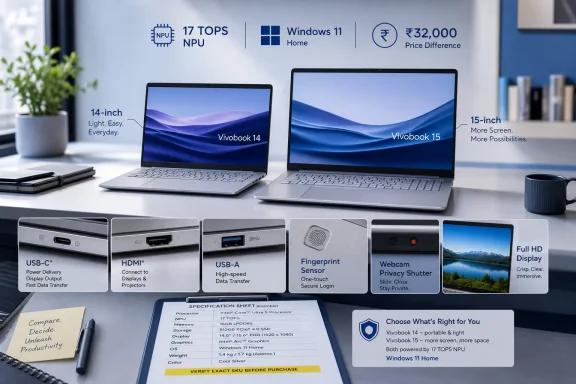
The Vivobook 14 and Vivobook 15 follow a conventional notebook format. Their specifications combine current Intel processing hardware with familiar consumer-laptop features, including Full HD displays, physical webcam shutters, fingerprint sensors, HDMI, USB Type-A, USB Type-C, and dedicated charging inputs.
Both models are listed with Intel Core 7 Series 3 processors, Intel graphics, and an NPU rated at up to 17 TOPS. The available launch information does not provide enough detail to establish how every processor option compares with other Intel product families, nor does it explain what processor is installed in each starting-price SKU.
The memory specification is listed as up to 16GB of DDR5 RAM. Storage is listed as a 512GB PCIe 4.0 NVMe M.2 SSD. Because “up to” describes the maximum available configuration rather than every unit sold, shoppers should confirm the installed memory and storage of the precise model offered by a retailer.
That is particularly important when comparing advertisements. A family-level product summary may combine features available across several configurations, while the starting price may apply to only one of them. The presence of a maximum specification in launch coverage does not prove that the entry-priced unit includes that maximum.
The same caution applies to the processor, touchscreen, and color. The two laptops belong to the same launch family, but the disclosed facts do not establish complete configuration equivalence between them.
TOPS refers to trillions of operations per second under the applicable workload and measurement conditions. It is a specialized hardware rating, not a substitute for complete application benchmarks. It should not be used by itself to predict general responsiveness, graphics performance, battery runtime, or the speed of a specific program.
The available facts confirm the presence and maximum rating of the NPU. They do not establish how often particular applications will use it, what performance those applications will achieve, or how much difference users will notice.
That leaves buyers with a more useful question than whether the laptop carries an “AI” label: Does the software they use have a feature that can take advantage of this hardware?
For a consumer, the pre-purchase test can be kept concise:
Both Vivobook families are listed with up to 16GB of DDR5 RAM and a 512GB PCIe 4.0 NVMe M.2 SSD. The wording again matters: the launch facts state a maximum memory capacity, not that every unit includes 16GB.
A buyer should therefore verify whether a particular SKU ships with the maximum amount or a lower amount. The same check should establish whether the memory is upgradeable, how it is installed, and what upgrade options are supported. Those details are not established by the supplied launch information and should not be inferred from the family-level specification.
The listed SSD capacity is 512GB. Buyers should confirm the installed drive and determine whether the retailer’s model number corresponds to the launch description. Anyone who expects to store large media collections, games, project files, or offline data should evaluate capacity according to that workload.
Upgradeability is another unresolved point. The provided facts do not confirm the number of memory slots, whether any memory is soldered, whether a second storage slot is available, or what components can be replaced without affecting warranty coverage. Those questions belong on the buyer’s checklist rather than being answered through assumptions based on other Vivobook models.
The central point is straightforward: the NPU is only one component. The exact processor, installed RAM, SSD capacity, and expansion options may have a more immediate effect on whether a particular configuration suits the buyer.
The Vivobook 14 measures 32.49 × 21.39 × 1.79 centimeters and weighs 1.4 kilograms. The Vivobook 15 measures 35.97 × 23.25 × 1.79 centimeters and weighs 1.7 kilograms.
The smaller model is therefore 300 grams lighter. Both are listed at the same thickness, while the Vivobook 15 has the larger width and depth expected from its display size.
The Vivobook 14 starts INR 32,000 above the Vivobook 15. That is an unresolved launch-listing discrepancy, not proof that one model is incorrectly priced or that the two starting-price configurations are otherwise identical.
The supplied specifications give family-level features and maxima. They do not confirm that the starting-price Vivobook 14 and Vivobook 15 use the same processor SKU, installed RAM, display panel, touchscreen option, SSD configuration, color, bundled software, or sales channel.
As a result, the price gap cannot be evaluated responsibly from the summary specifications alone. It may reflect differences between the actual launch SKUs, but those differences have not been established in the provided facts.
Buyers comparing the two should ask retailers for the complete ASUS model number and a line-by-line specification sheet. A meaningful comparison requires matching the exact processor, RAM, storage, touchscreen status, display details, warranty, and included accessories.
The smaller dimensions and lower listed weight of the Vivobook 14 are confirmed advantages for buyers who prioritize portability. Whether those differences justify the higher starting price depends on what else is included in the retail configuration.
These facts describe the basic display class, but they do not establish every characteristic of every panel offered. The launch information does not provide a complete account of color coverage, color accuracy, contrast, response time, refresh rate, surface treatment, or differences among individual configurations.
“Optional touchscreen” is especially important. It means touch should not be assumed simply because a retailer lists the Vivobook family name. Buyers who want touch input need to confirm that feature against the precise model number.
The same approach should be used for the panel itself. A family may contain more than one display configuration, and a retailer’s shortened title may omit meaningful distinctions.
The launch facts support the following statements: the laptops are listed with Full HD resolution, IPS panels, a 16:9 aspect ratio, 250-nit brightness, optional touch capability, and TÜV Rheinland certification. Any broader judgment about viewing quality requires examination or independent testing of the actual panel.
For shoppers ordering online, the safest approach is to request written confirmation of the display resolution, touch status, brightness specification, and exact model number before purchase.
Actual runtime can only be established through testing of a complete configuration under defined conditions. Differences in the processor SKU, panel, software, wireless activity, settings, and workload may affect results, but the launch information does not quantify those effects.
The listed port selection includes a DC-in connection as well as USB 3.2 Gen 1 Type-C. The supplied facts do not confirm whether the USB-C port supports charging, display output, docking, or other optional functions associated with the connector.
This uncertainty should be resolved before purchase, especially by anyone who plans to use a USB-C monitor, charger, hub, or dock. The presence of the connector and its USB data designation should not be treated as confirmation of every USB-C capability.
A retailer or ASUS representative should be able to match the exact model number to a detailed port specification. If docking or USB-C charging is important, buyers should request explicit confirmation rather than relying on product photographs or a generic family listing.
The specifications do not establish every supported data mode, display combination, charging function, or docking feature. They also do not provide enough information to promise compatibility with a particular monitor, dock, charger, capture device, or multi-display arrangement.
Consumers should check their intended accessories individually. The most important questions are:
The camera resolution is a confirmed specification. The supplied facts do not include image-quality comparisons, microphone test results, speaker measurements, or biometric performance results, so those aspects should be evaluated independently.
The physical shutter gives users a direct way to cover the camera. The fingerprint sensor provides a biometric input option, though the launch facts do not specify its placement, enrollment performance, or behavior under different conditions.
AI noise cancellation is among the included ASUS features. Buyers interested in it should evaluate call and recording tests from the exact model where possible, because the feature’s presence alone does not quantify its effect in a particular room or application.
SonicMaster branding is also listed, but no verified speaker-output measurements are provided. Anyone who prioritizes built-in audio should listen to the laptop in person or consult testing tied to the same configuration.
These features may be more relevant to daily use than the broader AI language surrounding the launch. A buyer who spends significant time in classes or meetings should compare the camera, microphones, speakers, fingerprint sensor, and privacy shutter alongside the processor and NPU.
It should therefore be reported as a listed compliance claim without expanding it into promises about specific accidents or environments. Buyers who require detailed durability information should request the relevant testing documentation for the exact model.
Both laptops are also listed with 180-degree hinges. That states the specified opening angle, but the launch facts do not establish additional use cases or mechanical outcomes. It should not be confused with a 360-degree convertible design.
The listed color choices are Cool Silver, Terra Cotta, and Quiet Blue. Color availability may be tied to specific configurations or sales channels, so buyers should not assume that every color can be combined with every processor, memory, display, or touchscreen option.
As with the other family-level specifications, the correct approach is to identify the exact model number first and then verify the color and internal configuration attached to it.
That operating-system edition should be included in any price comparison. Buyers who require a different Windows edition for personal, educational, or organizational reasons should verify upgrade options, licensing, compatibility, and total cost separately.
No broader claims about device-management limitations or business suitability are necessary to understand the consumer launch. The important confirmed fact is that Windows 11 Home is the included edition.
Consumers should also confirm whether a retailer has changed the operating-system configuration, included additional software, or added a service bundle. Those differences can affect the price even when two listings use the same Vivobook family name.
That means the Indian specifications and prices should not be treated as a promise of what ASUS will sell in the Philippines, the United States, or any other market. A similarly named Vivobook offered elsewhere may have a different processor, memory capacity, storage configuration, display, touchscreen status, operating system, color, warranty, or port functionality.
The approximate Philippine peso figures supplied with the launch coverage are currency conversions of the Indian prices, not Philippine retail prices.
The INR 75,990 starting price of the Vivobook 15 was converted in the supplied source to approximately PHP 48,984.77. The INR 107,990 starting price of the Vivobook 14 was converted to approximately PHP 69,612.65. Those amounts do not confirm a Philippine launch, local taxes, distribution costs, warranty terms, retailer margins, promotional bundles, or actual Philippine pricing.
Consumers outside India should wait for a local ASUS announcement or a confirmed retailer listing tied to a complete model number. Importing an Indian-market unit may also raise separate questions about keyboard layout, charger packaging, warranty service, returns, and regional support, all of which should be checked before purchase rather than assumed.
The Vivobook 14 is the smaller and lighter option at 1.4 kilograms, while the Vivobook 15 weighs 1.7 kilograms. Yet the smaller model starts at INR 107,990—INR 32,000 more than the Vivobook 15’s INR 75,990 starting price—and the supplied family-level facts do not explain why.
That makes exact SKU verification more important than the headline AI specification. Buyers should compare the full processor model, installed RAM, storage, touchscreen status, USB-C functions, warranty, and local availability before deciding which machine offers better value.
For now, these are India-market launches. Availability outside India remains unconfirmed, and the supplied Philippine peso conversions are reference conversions rather than Philippine retail prices. If ASUS introduces similarly named models in other regions, buyers will need to compare those local configurations independently instead of assuming that they match the Indian laptops.
The 17-TOPS NPU may be relevant where a buyer’s chosen software explicitly supports it, but it should not overshadow the unresolved configuration questions. The most reliable buying decision will come from matching an exact model number to an exact workload—not from treating the Vivobook family name, a maximum specification, or an AI label as a complete description of the laptop.
ASUS has launched the Vivobook 14 and Vivobook 15 in India with Intel Core 7 Series 3 processors, Intel graphics, and dedicated NPUs rated at up to 17 TOPS. The Vivobook 14 starts at INR 107,990, while the larger Vivobook 15 starts at INR 75,990.
The family-level specifications also include up to 16GB of DDR5 memory, a 512GB PCIe 4.0 NVMe M.2 SSD, Full HD IPS displays, 42Wh batteries, and Windows 11 Home. Those details establish the broad outline of the new laptops, but they do not confirm that the two entry-priced models have identical processors, memory, displays, touchscreens, storage, or other configuration details.
That distinction is essential. The published starting prices differ by INR 32,000, yet the available launch information does not clearly identify what accounts for the gap. Buyers should compare the complete model numbers and configuration sheets rather than assuming that the smaller Vivobook 14 is simply a more expensive version of the Vivobook 15.
The NPU is another reason to read the specifications carefully. Its up-to-17-TOPS rating describes the capability of specialized processing hardware, not the laptop’s overall speed. Whether it matters to a particular buyer depends on the software and features that buyer intends to use. The practical test is simple: identify the applications involved and confirm whether their relevant functions support the NPU in the exact laptop configuration being considered.
 ASUS Puts New Silicon Inside a Familiar Laptop
The Vivobook 14 and Vivobook 15 follow a conventional notebook format. Their specifications combine current Intel processing hardware with familiar consumer-laptop features, including Full HD displays, physical webcam shutters, fingerprint sensors, HDMI, USB Type-A, USB Type-C, and dedicated charging inputs.Both models are listed with Intel Core 7 Series 3 processors, Intel graphics, and an NPU rated at up to 17 TOPS. The available launch information does not provide enough detail to establish how every processor option compares with other Intel product families, nor does it explain what processor is installed in each starting-price SKU.
The memory specification is listed as up to 16GB of DDR5 RAM. Storage is listed as a 512GB PCIe 4.0 NVMe M.2 SSD. Because “up to” describes the maximum available configuration rather than every unit sold, shoppers should confirm the installed memory and storage of the precise model offered by a retailer.
That is particularly important when comparing advertisements. A family-level product summary may combine features available across several configurations, while the starting price may apply to only one of them. The presence of a maximum specification in launch coverage does not prove that the entry-priced unit includes that maximum.
The same caution applies to the processor, touchscreen, and color. The two laptops belong to the same launch family, but the disclosed facts do not establish complete configuration equivalence between them.
What the 17-TOPS NPU Does—and Does Not Tell Buyers
The dedicated NPU is one of the launch’s most prominent specifications. ASUS lists up to 17 TOPS of NPU performance in both Vivobook families.TOPS refers to trillions of operations per second under the applicable workload and measurement conditions. It is a specialized hardware rating, not a substitute for complete application benchmarks. It should not be used by itself to predict general responsiveness, graphics performance, battery runtime, or the speed of a specific program.
The available facts confirm the presence and maximum rating of the NPU. They do not establish how often particular applications will use it, what performance those applications will achieve, or how much difference users will notice.
That leaves buyers with a more useful question than whether the laptop carries an “AI” label: Does the software they use have a feature that can take advantage of this hardware?
For a consumer, the pre-purchase test can be kept concise:
- List the applications and AI-assisted features you expect to use.
- Check the application developer’s current hardware requirements.
- Confirm that the feature supports the NPU in the exact processor and laptop configuration.
- Look for testing of that application rather than relying only on the 17-TOPS figure.
Memory and Storage Still Deserve Equal Attention
The NPU may dominate the product description, but memory and storage remain central purchasing specifications.Both Vivobook families are listed with up to 16GB of DDR5 RAM and a 512GB PCIe 4.0 NVMe M.2 SSD. The wording again matters: the launch facts state a maximum memory capacity, not that every unit includes 16GB.
A buyer should therefore verify whether a particular SKU ships with the maximum amount or a lower amount. The same check should establish whether the memory is upgradeable, how it is installed, and what upgrade options are supported. Those details are not established by the supplied launch information and should not be inferred from the family-level specification.
The listed SSD capacity is 512GB. Buyers should confirm the installed drive and determine whether the retailer’s model number corresponds to the launch description. Anyone who expects to store large media collections, games, project files, or offline data should evaluate capacity according to that workload.
Upgradeability is another unresolved point. The provided facts do not confirm the number of memory slots, whether any memory is soldered, whether a second storage slot is available, or what components can be replaced without affecting warranty coverage. Those questions belong on the buyer’s checklist rather than being answered through assumptions based on other Vivobook models.
The central point is straightforward: the NPU is only one component. The exact processor, installed RAM, SSD capacity, and expansion options may have a more immediate effect on whether a particular configuration suits the buyer.
Two Sizes Share a Family, but the Price Gap Remains Unexplained
The Vivobook 14 and Vivobook 15 are presented as related laptops, but their most visible differences are size, weight, and starting price.The Vivobook 14 measures 32.49 × 21.39 × 1.79 centimeters and weighs 1.4 kilograms. The Vivobook 15 measures 35.97 × 23.25 × 1.79 centimeters and weighs 1.7 kilograms.
The smaller model is therefore 300 grams lighter. Both are listed at the same thickness, while the Vivobook 15 has the larger width and depth expected from its display size.
| Specification | ASUS Vivobook 14 | ASUS Vivobook 15 | What remains to be verified |
|---|---|---|---|
| Dimensions | 32.49 × 21.39 × 1.79 cm | 35.97 × 23.25 × 1.79 cm | Whether dimensions vary by configuration |
| Weight | 1.4kg | 1.7kg | Whether touch or other options affect listed weight |
| Starting price | INR 107,990 | INR 75,990 | What components and features are included at each price |
| Battery | 42Wh | 42Wh | Real-world runtime for each exact SKU |
| Adapter | 45W | 45W | Charging options beyond the included adapter |
| Processor family | Intel Core 7 Series 3 | Intel Core 7 Series 3 | Exact processor SKU in each retail unit |
| NPU | Up to 17 TOPS | Up to 17 TOPS | Application support and measured performance |
| Memory | Up to 16GB DDR5 | Up to 16GB DDR5 | Installed capacity and upgrade arrangement |
| Storage | 512GB PCIe 4.0 NVMe M.2 SSD | 512GB PCIe 4.0 NVMe M.2 SSD | Expansion and replacement options |
| Display class | Full HD IPS | Full HD IPS | Exact panel, touch status, and SKU-specific details |
The supplied specifications give family-level features and maxima. They do not confirm that the starting-price Vivobook 14 and Vivobook 15 use the same processor SKU, installed RAM, display panel, touchscreen option, SSD configuration, color, bundled software, or sales channel.
As a result, the price gap cannot be evaluated responsibly from the summary specifications alone. It may reflect differences between the actual launch SKUs, but those differences have not been established in the provided facts.
Buyers comparing the two should ask retailers for the complete ASUS model number and a line-by-line specification sheet. A meaningful comparison requires matching the exact processor, RAM, storage, touchscreen status, display details, warranty, and included accessories.
The smaller dimensions and lower listed weight of the Vivobook 14 are confirmed advantages for buyers who prioritize portability. Whether those differences justify the higher starting price depends on what else is included in the retail configuration.
The Displays Follow a Mainstream Full HD Specification
Both laptops are listed with Full HD IPS displays using a 16:9 aspect ratio. The stated brightness is 250 nits, touchscreen support is optional, and TÜV Rheinland certification is included in the launch specifications.These facts describe the basic display class, but they do not establish every characteristic of every panel offered. The launch information does not provide a complete account of color coverage, color accuracy, contrast, response time, refresh rate, surface treatment, or differences among individual configurations.
“Optional touchscreen” is especially important. It means touch should not be assumed simply because a retailer lists the Vivobook family name. Buyers who want touch input need to confirm that feature against the precise model number.
The same approach should be used for the panel itself. A family may contain more than one display configuration, and a retailer’s shortened title may omit meaningful distinctions.
The launch facts support the following statements: the laptops are listed with Full HD resolution, IPS panels, a 16:9 aspect ratio, 250-nit brightness, optional touch capability, and TÜV Rheinland certification. Any broader judgment about viewing quality requires examination or independent testing of the actual panel.
For shoppers ordering online, the safest approach is to request written confirmation of the display resolution, touch status, brightness specification, and exact model number before purchase.
Battery Capacity and Charging Details Require Verification
Both models are listed with 42Wh batteries and 45W adapters. No verified runtime result is included in the supplied facts, so the battery capacity should not be converted into a specific endurance expectation.Actual runtime can only be established through testing of a complete configuration under defined conditions. Differences in the processor SKU, panel, software, wireless activity, settings, and workload may affect results, but the launch information does not quantify those effects.
The listed port selection includes a DC-in connection as well as USB 3.2 Gen 1 Type-C. The supplied facts do not confirm whether the USB-C port supports charging, display output, docking, or other optional functions associated with the connector.
This uncertainty should be resolved before purchase, especially by anyone who plans to use a USB-C monitor, charger, hub, or dock. The presence of the connector and its USB data designation should not be treated as confirmation of every USB-C capability.
A retailer or ASUS representative should be able to match the exact model number to a detailed port specification. If docking or USB-C charging is important, buyers should request explicit confirmation rather than relying on product photographs or a generic family listing.
The Port List Mixes USB Type-A, USB Type-C, and HDMI
The published port list includes:- USB 2.0 Type-A
- USB 3.2 Gen 1 Type-A
- USB 3.2 Gen 1 Type-C
- HDMI 1.4
- 3.5mm audio jack
- DC-in
The specifications do not establish every supported data mode, display combination, charging function, or docking feature. They also do not provide enough information to promise compatibility with a particular monitor, dock, charger, capture device, or multi-display arrangement.
Consumers should check their intended accessories individually. The most important questions are:
- Does the USB-C port accept power input?
- Does it provide video output?
- Can it connect to the intended dock or monitor?
- What external resolutions and refresh rates are supported through HDMI?
- Are all functions supported simultaneously?
- Does the accessory manufacturer list the laptop or required USB modes as compatible?
Privacy and Call Features Round Out the Package
Both Vivobooks are listed with a 720p HD camera, a physical webcam privacy shutter, an integrated fingerprint sensor, ASUS AI noise cancellation, and SonicMaster speakers.The camera resolution is a confirmed specification. The supplied facts do not include image-quality comparisons, microphone test results, speaker measurements, or biometric performance results, so those aspects should be evaluated independently.
The physical shutter gives users a direct way to cover the camera. The fingerprint sensor provides a biometric input option, though the launch facts do not specify its placement, enrollment performance, or behavior under different conditions.
AI noise cancellation is among the included ASUS features. Buyers interested in it should evaluate call and recording tests from the exact model where possible, because the feature’s presence alone does not quantify its effect in a particular room or application.
SonicMaster branding is also listed, but no verified speaker-output measurements are provided. Anyone who prioritizes built-in audio should listen to the laptop in person or consult testing tied to the same configuration.
These features may be more relevant to daily use than the broader AI language surrounding the launch. A buyer who spends significant time in classes or meetings should compare the camera, microphones, speakers, fingerprint sensor, and privacy shutter alongside the processor and NPU.
Durability, Hinge, and Color Options
ASUS lists MIL-STD-810H compliance for the Vivobook 14 and Vivobook 15. The provided launch facts do not identify the individual test methods, test conditions, sample sizes, or pass criteria associated with that claim.It should therefore be reported as a listed compliance claim without expanding it into promises about specific accidents or environments. Buyers who require detailed durability information should request the relevant testing documentation for the exact model.
Both laptops are also listed with 180-degree hinges. That states the specified opening angle, but the launch facts do not establish additional use cases or mechanical outcomes. It should not be confused with a 360-degree convertible design.
The listed color choices are Cool Silver, Terra Cotta, and Quiet Blue. Color availability may be tied to specific configurations or sales channels, so buyers should not assume that every color can be combined with every processor, memory, display, or touchscreen option.
As with the other family-level specifications, the correct approach is to identify the exact model number first and then verify the color and internal configuration attached to it.
Windows 11 Home Keeps the Launch Consumer-Focused
The Vivobook 14 and Vivobook 15 ship with Windows 11 Home according to the supplied launch facts.That operating-system edition should be included in any price comparison. Buyers who require a different Windows edition for personal, educational, or organizational reasons should verify upgrade options, licensing, compatibility, and total cost separately.
No broader claims about device-management limitations or business suitability are necessary to understand the consumer launch. The important confirmed fact is that Windows 11 Home is the included edition.
Consumers should also confirm whether a retailer has changed the operating-system configuration, included additional software, or added a service bundle. Those differences can affect the price even when two listings use the same Vivobook family name.
Brief sidebar for workplace buyers
Organizations considering these consumer models should keep qualification narrow and factual:- Record the complete ASUS model number.
- Confirm the exact processor, installed RAM, storage, display, and Windows edition.
- Test required docks, monitors, chargers, and peripherals.
- Verify warranty coverage and the available repair channel.
- Confirm local stock and replacement-unit availability.
The Launch Is Limited to India for Now
The Vivobook 14 and Vivobook 15 configurations described here have been announced for India. Availability outside India is unconfirmed.That means the Indian specifications and prices should not be treated as a promise of what ASUS will sell in the Philippines, the United States, or any other market. A similarly named Vivobook offered elsewhere may have a different processor, memory capacity, storage configuration, display, touchscreen status, operating system, color, warranty, or port functionality.
The approximate Philippine peso figures supplied with the launch coverage are currency conversions of the Indian prices, not Philippine retail prices.
The INR 75,990 starting price of the Vivobook 15 was converted in the supplied source to approximately PHP 48,984.77. The INR 107,990 starting price of the Vivobook 14 was converted to approximately PHP 69,612.65. Those amounts do not confirm a Philippine launch, local taxes, distribution costs, warranty terms, retailer margins, promotional bundles, or actual Philippine pricing.
Consumers outside India should wait for a local ASUS announcement or a confirmed retailer listing tied to a complete model number. Importing an Indian-market unit may also raise separate questions about keyboard layout, charger packaging, warranty service, returns, and regional support, all of which should be checked before purchase rather than assumed.
What Buyers Should Verify Before Paying
The launch facts are sufficient to identify the two laptop families, but not to resolve every SKU-level question. Before choosing either model, consumers should obtain written confirmation of the following:- Exact processor SKU: “Intel Core 7 Series 3” identifies the family description but not necessarily the complete processor model in every retail unit.
- Installed RAM: The published maximum is up to 16GB of DDR5 memory. Confirm how much the advertised unit actually includes.
- Memory upgrade options: Check whether memory can be upgraded and what configuration is supported.
- Storage configuration: Confirm that the unit includes the listed 512GB PCIe 4.0 NVMe M.2 SSD and ask about replacement or expansion options.
- Touchscreen status: Touch is optional and should not be inferred from the family name.
- Display specification: Confirm Full HD resolution, panel type, brightness listing, and any SKU-specific differences.
- USB-C charging support: Do not assume that the USB-C port can charge the laptop.
- USB-C display support: Confirm video output if a USB-C monitor or dock is part of the intended setup.
- Dock compatibility: Test or obtain explicit compatibility confirmation for the exact dock and laptop model.
- Windows edition: Verify that the retail unit includes Windows 11 Home as expected.
- Battery and adapter: Confirm the listed 42Wh battery and 45W adapter for the exact SKU.
- Warranty: Check duration, coverage, repair procedure, and whether service is valid in the country where the laptop will be used.
- Color: Verify that the desired Cool Silver, Terra Cotta, or Quiet Blue finish is available with the required internal configuration.
- Local availability: Confirm that the model is officially sold and supported in the buyer’s market.
Final Verdict
The ASUS Vivobook 14 and Vivobook 15 bring Intel Core 7 Series 3 processors and dedicated NPUs rated at up to 17 TOPS to familiar Windows 11 Home laptop designs. They also include up to 16GB of DDR5 memory, a 512GB PCIe 4.0 NVMe M.2 SSD, Full HD IPS displays, fingerprint sensors, physical webcam shutters, and a broad selection of familiar connectors.The Vivobook 14 is the smaller and lighter option at 1.4 kilograms, while the Vivobook 15 weighs 1.7 kilograms. Yet the smaller model starts at INR 107,990—INR 32,000 more than the Vivobook 15’s INR 75,990 starting price—and the supplied family-level facts do not explain why.
That makes exact SKU verification more important than the headline AI specification. Buyers should compare the full processor model, installed RAM, storage, touchscreen status, USB-C functions, warranty, and local availability before deciding which machine offers better value.
For now, these are India-market launches. Availability outside India remains unconfirmed, and the supplied Philippine peso conversions are reference conversions rather than Philippine retail prices. If ASUS introduces similarly named models in other regions, buyers will need to compare those local configurations independently instead of assuming that they match the Indian laptops.
The 17-TOPS NPU may be relevant where a buyer’s chosen software explicitly supports it, but it should not overshadow the unresolved configuration questions. The most reliable buying decision will come from matching an exact model number to an exact workload—not from treating the Vivobook family name, a maximum specification, or an AI label as a complete description of the laptop.
References
- Primary source: ManilaShaker Philippines
Published: 2026-07-12T04:00:08.910594
ASUS Vivobook 14, Vivobook 15 Launched – ManilaShaker Philippines | Tech Reviews, Comparisons, and News
ASUS has launched its latest Vivobook laptops in India, packed with Intel Core 7 Series 3 processors and built-in AI features. The laptops, which are the ASUS Vivobook 14 and Vivobook 15, are powered by the latest Intel Core 7 Series 3 processor with Intel graphics and a dedicated Neural...manilashaker.com - Related coverage: fonearena.com
- Related coverage: asus.com
Latest Vivobook S14 (S3407CA) Slim Laptop | ASUS India
Find the latest ASUS Vivobook S14 (S3407CA) – a sleek AI PC powered by Intel core ultra 7 processor designed for performance and portability. Available now!www.asus.com - Related coverage: telecomtalk.info
ASUS Vivobook 14, Vivobook 15 with Intel Core 7 Series 3 Chips Launched in India
ASUS, a Taiwanese technology maker has launched the ASUS Vivobook 14 and ASUS Vivobook 15 in India.telecomtalk.info - Related coverage: livehindustan.com
ASUS ने लॉन्च किए Military-Grade मजबूती, फ्री 100GB स्टोरेज वाले 2 नए AI Laptops, 26 जुलाई से शुरू होगी Sale
ASUS ने भारत में अपने दो दमदार AI लैपटॉप Vivobook 14 और Vivobook 15 को पेश कर दिया है। इनमें Intel Core 7 Series 3 प्रोसेसर, Full HD डिस्प्ले, मिलिट्री ग्रेड मजबूती मिलती है। लैपटॉप की कीमत सबके बजट में फिट होती है।, Gadgets Hindi News - Hindustanwww.livehindustan.com - Related coverage: tdsynnex.com
- Related coverage: tomsguide.com
Asus Vivobook 14 (2026) review: A no-frills laptop where AMD Ryzen AI 400 series can focus on the fundamentals | Tom's Guide
The Asus Vivobook 14 won’t win hearts, but it will quietly help you meet deadlines with a focus on ergonomics, decent mid-range performance, solid battery life and an affordable price.www.tomsguide.com - Related coverage: itpro.com
Asus Vivobook S16 (S5606) Review | IT Pro
The sublime 3.2K 120Hz OLED display is the cherry on top of this excellent ultrabook, boasting the latest Intel silicon, good connectivity and solid battery life.www.itpro.com - Related coverage: laptopmag.com
Asus Vivobook 16 Flip (TP3607) review: A gorgeous OLED and great battery life make for a compelling convertible | Laptop Mag
The Asus Vivobook 16 Flip presents a solid balance between performance and power efficiency in a versatile 2-in-1 form factor.www.laptopmag.com - Related coverage: windowscentral.com
This ASUS Vivobook 16 OLED deal packs 32GB of RAM, a 3K display, and Intel’s latest AI chip for less than you’d expect | Windows Central
A rare midrange laptop deal that feels like a flagship — and it’s happening while everyone else is raising prices.www.windowscentral.com - Related coverage: techradar.com
This $199.99 Asus Core i3 laptop megadeal won't last long | TechRadar
This is a stunning bargain for anyone looking for a real Core i3 laptop with 8GB of RAM.www.techradar.com - Related coverage: press.asus.com
ASUS Announces Vivobook 14 OLED, 15 OLED and 16 OLED | ASUS Pressroom - Official Global News & Updates
Discover the latest ASUS news, press releases, and global updates at the official ASUS Pressroom. Explore now! Visit press.asus.com press.asus.com
- Related coverage: hindustantimes.com
ASUS launches Vivobook 14 and Vivobook 15 AI laptops in India, starting at ₹75,990 | Technology News (HT Tech)
ASUS has launched the Vivobook 14 and Vivobook 15 AI laptops in India with Intel Core Series 3 processors, starting at Rs. 75,990. | Technology Newswww.hindustantimes.com - Related coverage: 91mobiles.com
ASUS launches Vivobook 14 and Vivobook 15 in India with Intel Core 7 Series 3 processors | 91mobiles.com
ASUS has launched the Vivobook 14 and Vivobook 15 in India with up to Intel Core 7 Series 3 processors, 17 TOPS NPU support and prices starting at Rs 75,990.www.91mobiles.com - Related coverage: dlcdnwebimgs.asus.com
- Related coverage: asus.in
- Related coverage: 5.imimg.com
