

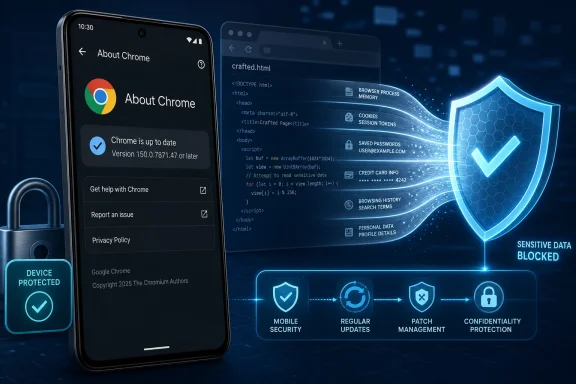
CVE-2026-13949 is a Medium-severity policy-enforcement vulnerability in Chrome for Android before version 150.0.7871.47. Google’s description says a remote attacker can use a crafted HTML page to obtain potentially sensitive information from the browser process. The attacker requires no prior privileges, but user interaction is required.Answer first
- Affected: Google Chrome for Android versions earlier than 150.0.7871.47
- Action: Update Chrome for Android and verify that the installed version is 150.0.7871.47 or later
- Not established as affected by this record: Desktop Chrome, Microsoft Edge, or other Chromium-based browsers
- Documented impact: A crafted HTML page may obtain potentially sensitive information from Chrome’s process memory
- Current posture: Patch promptly, but do not declare an incident solely because a device was running an affected version
The public record documents an information-disclosure risk, not remote code execution, transaction manipulation, persistence, or complete device compromise. It also does not establish active exploitation. The practical response is to update Chrome for Android, verify the installed version, and investigate only when additional evidence justifies treating a device as compromised.
One attribution detail deserves emphasis near the outset: the displayed 6.5 CVSS 3.1 score comes from CISA-ADP data shown by NVD. It is not an NVD-assessed score. Administrators and vulnerability reports should describe it accordingly.
 A Payments Bug With a Wider Confidentiality Problem
The affected component is identified as Payments, but the documented consequence is not limited to a payment-screen error. Google’s description says crafted HTML can obtain potentially sensitive information from Chrome’s process memory.The record does not identify the information that may be exposed. It does not establish that an attacker can retrieve card numbers, passwords, cookies, authentication tokens, or any other specific data class. Claims about particular secrets would go beyond the available description.
The defensible conclusion is narrower: a policy in Chrome’s Android Payments component was not enforced sufficiently, allowing attacker-controlled web content to access process information that should not have been available to it.
The vulnerability is categorized as CWE-284, Improper Access Control. Its published metrics assign high confidentiality impact but no integrity or availability impact. That supports a clear boundary for risk communication:
Information disclosure is the documented impact; broader browser or device compromise is not established.
That distinction does not make the issue trivial. Browser process memory can contain sensitive information, and the attack is remotely deliverable through web content. But the public record does not support describing CVE-2026-13949 as an arbitrary-code-execution flaw, a payment-fraud mechanism, or proof that affected users’ financial information has been stolen.
The Attack Starts With a Page, Not an Installed App
Google describes exploitation through a crafted HTML page. The CISA-ADP CVSS 3.1 vector displayed by NVD characterizes the vulnerability as network-accessible, low complexity, requiring no privileges, and requiring user interaction. Scope is unchanged, confidentiality impact is high, and integrity and availability impacts are absent.Those conditions explain the 6.5 Medium score:
- The attacker can deliver the malicious content remotely.
- The attacker does not need an account or prior access to the device.
- The attack is not scored as requiring unusually complex conditions.
- The user must load or interact with attacker-controlled web content.
- The documented result is information disclosure rather than code execution or system modification.
The record also does not provide public indicators of compromise, malicious domains, or a confirmed exploitation campaign. Running a vulnerable version establishes exposure, not compromise. An unfamiliar page visit or unexpected browser behavior, by itself, does not prove that process information was disclosed through this CVE.
Version state remains the clearest operational test:
| Deployment state | Chrome for Android version | Record status | Documented consequence | Response |
|---|---|---|---|---|
| Affected | Earlier than 150.0.7871.47 | Within the affected range | Crafted HTML may obtain potentially sensitive information from process memory | Update promptly |
| Fixed threshold or later | 150.0.7871.47 or newer | Outside the stated affected range | CVE addressed at the published threshold | Verify and record compliance |
What Android Users Should Do
End users should update Chrome through the app-update route supported for their device and organization. The exact menus and distribution method may vary by Android version, device manufacturer, Google Play configuration, or management platform.Verify the installed Chrome version
In Chrome on Android:- Open Chrome.
- Tap the three-dot menu.
- Select Settings.
- Select About Chrome.
- Confirm that the displayed version is 150.0.7871.47 or later.
Install the update
Use the update route approved and supported for the device:- Personally managed device: Install the available Chrome update through the device’s supported application store or update service.
- Organization-managed device: Use the application-distribution system designated by the organization. This may be a managed application catalog, enterprise mobility management platform, device-management portal, or another approved deployment channel.
- Restricted device: If application updates are disabled or controlled by policy, contact the organization’s IT or security team rather than attempting to bypass management controls.
After updating, reopen Chrome and repeat the three-dot menu > Settings > About Chrome check. Do not treat an update notification, store status, or management-console deployment message as a substitute for confirming the installed version.
Until the update is complete, users should be cautious with unexpected links and untrusted pages. That is a temporary exposure-reduction measure, not a replacement for installing the fixed release.
Medium Severity Does Not Mean Optional Patching
The Medium label reflects both the impact and the attack prerequisites. CVE-2026-13949 has high confidentiality impact, but it requires user interaction and has no documented integrity or availability impact. The record does not describe arbitrary code execution, service disruption, or alteration of browser data.At the same time, the attack is network-accessible, low complexity, and requires no prior privileges. That combination supports prompt browser patching even without evidence of active exploitation.
The correct operational posture sits between complacency and emergency response:
- Do not defer the update merely because the score is Medium.
- Do not tell users that their payment data was stolen when the record does not establish that.
- Do not treat every affected device as compromised.
- Do not declare an incident solely because an older Chrome version was found.
- Do investigate if separate evidence indicates suspicious activity or possible exploitation.
For patch prioritization, the underlying vector is more useful than the label alone. It describes a remotely delivered confidentiality attack that needs user interaction but no authentication. That is sufficient reason to move affected Android installations onto the fixed release through an accelerated browser-update process.
The Desktop Advisory Trap
The CVE record’s affected configuration identifies Google Chrome running on Android, with versions earlier than 150.0.7871.47 in scope. That configuration—not assumptions based on Chromium lineage or a reference page’s title—should drive applicability decisions.A reference associated with a desktop-oriented Chrome release page could create ambiguity in automated or manual review. It may indicate a relationship to the corresponding Chrome release, but the supplied material does not establish that the page itself lists this CVE or that desktop Chrome is affected.
The cautious conclusion is therefore limited:
- Chrome for Android before 150.0.7871.47 is established as affected.
- Desktop Chrome is not established as affected by the supplied configuration.
- Microsoft Edge is not named as an affected product.
- Other Chromium-based browsers are not named as affected products.
This does not prove that related code could not exist elsewhere. It means only that broader product impact has not been established by the available CVE configuration. Any expansion to desktop Chrome, Edge, or another Chromium-derived browser would require supporting vendor or vulnerability-record information.
Version Verification Is the Auditable Control
“Update Chrome” is advice. A confirmed installed version is evidence.Administrators should use their organization’s supported Android application-distribution and inventory systems to deploy the fixed release and verify its installation. The name and workflow of those systems vary by management platform, enrollment model, device manufacturer, and organizational policy.
A successful deployment command does not necessarily demonstrate that the application on a specific device reached the required version. Compliance should be based on the installed Chrome version whenever that information is available.
The decisive question is:
The public description does not establish a complete configuration-based workaround. It also does not say that users without saved payment methods are unaffected. Because the stated consequence is access to potentially sensitive process information, administrators should not substitute assumptions about payment usage for version verification.Does Chrome on this Android device report version 150.0.7871.47 or later?
Action checklist for administrators
- Inventory Chrome versions on managed Android devices.
- Flag installations earlier than 150.0.7871.47 as affected.
- Deploy the supported Chrome update through the organization’s approved app-distribution system.
- Clearly communicate the applicable update route to users of managed, personally managed, and restricted devices.
- Verify the installed version after deployment rather than relying only on push or assignment status.
- Ask users, where appropriate, to check Chrome > three-dot menu > Settings > About Chrome.
- Document that menu names may vary by Android version, OEM, Chrome release, or management platform.
- Identify devices that remain below the fixed threshold and route them through the organization’s exception or remediation process.
- Avoid labeling affected devices as compromised without additional evidence.
- Recheck vendor and vulnerability records for changes in affected products, exploitation status, or remediation guidance.
How the Public Record Was Enriched
The disclosure record developed in stages. The supplied facts support the sequence of contributions, but not the specific calendar dates previously associated with them. Those unsupported dates have therefore been omitted.Timeline
Initial vendor record — Google provided the core vulnerability description, affected Chrome for Android version boundary, impact language, and references.CISA-ADP enrichment — CISA-ADP added the displayed CVSS 3.1 vector and 6.5 Medium score, the CWE-284 classification, and decision data covering exploitation, automation, and technical impact.
NIST analysis — NIST added the affected configuration connecting the Chrome application to the Android operating environment and expressing the vulnerable range as versions earlier than 150.0.7871.47.
This sequence explains why attribution matters. NVD displays information contributed by multiple sources. A score appearing on an NVD page is not necessarily a score produced by NIST.
For CVE-2026-13949, the accurate formulation is:
The affected-version data may also appear awkward when machine-readable fields are viewed without context. The plain-language description and NIST configuration establish the intended boundary: versions before 150.0.7871.47 are affected, while 150.0.7871.47 is the fixed threshold.NVD displays a CISA-ADP CVSS 3.1 base score of 6.5.
If a vulnerability scanner flags the threshold version itself, administrators should compare the finding with the affected range before escalating it. Likewise, a result that applies the CVE to a desktop operating system or another Chromium browser should be validated against the Android-specific configuration.
What the Public Record Does Not Establish
The available information leaves several technical questions unanswered. It does not explain:- Which specific Payments policy was insufficiently enforced
- What exact user interaction is required
- Which process-memory contents may become accessible
- How much information can be disclosed
- Whether particular browser settings alter exploitability
- Whether any reliable configuration-based mitigation exists
- Whether the vulnerable code is present in products outside the named Android scope
These gaps should constrain both detection claims and user messaging. Defenders cannot build a high-confidence CVE-specific detector from technical details that have not been published. They also should not convert a broad confidentiality description into claims about stolen cards, passwords, sessions, or other particular data.
General link caution can reduce exposure while an update is pending, but it does not remove the vulnerable code. Updating to 150.0.7871.47 or later remains the remediation established by the public record.
The Facts That Should Drive the Patch Queue
CVE-2026-13949 is a bounded but credible Chrome for Android confidentiality risk. Crafted HTML may obtain potentially sensitive information from browser process memory, with user interaction required and no prior privileges needed. The documented impact is disclosure, not code execution or transaction manipulation.Scope: Chrome for Android earlier than 150.0.7871.47.
Action: Deploy the supported update and verify 150.0.7871.47 or later through Chrome > three-dot menu > Settings > About Chrome or the organization’s approved inventory method.
Not established as affected: Desktop Chrome, Microsoft Edge, and other Chromium-based browsers.
Response posture: Patch promptly and confirm compliance, but do not declare a security incident or assume data theft without additional evidence.
References
- Primary source: NVD / Chromium
Published: 2026-07-11T15:41:22-07:00
NVD - CVE-2026-13949
 nvd.nist.gov
- Security advisory: MSRC
Published: 2026-07-11T15:41:22-07:00
Original feed URL
Security Update Guide - Microsoft Security Response Center
 msrc.microsoft.com
- Related coverage: cvefeed.io
CVE-2026-13949 - Google Chrome Android Payments Information Disclosure
Insufficient policy enforcement in Payments in Google Chrome on Android prior to 150.0.7871.47 allowed a remote attacker to obtain potentially sensitive information from process memory via a crafted HTML page. (Chromium security severity: Medium)cvefeed.io - Related coverage: issues.chromium.org
Chromium
issues.chromium.org