

Google addressed CVE-2026-13955 in Chrome for Android, with version 150.0.7871.47 identified as the published fix threshold for a CustomTabs input-validation flaw that could allow a local attacker to use a malicious file for UI spoofing. The affected-product data lists Chrome on Android versions prior to 150.0.7871.47. It does not establish that Chrome on Windows is affected.
The practical instruction is straightforward: update Chrome on Android and verify that the installed version is 150.0.7871.47 or later. That version is the published correction threshold, although administrators should continue monitoring authoritative records in case the affected range or vendor guidance changes.
Chrome classified CVE-2026-13955 as Medium severity, while the CISA-ADP CVSS 3.1 assessment displayed by NVD gives it a base score of 3.3, categorized as Low. The visible vector describes a local attack with low attack complexity, no privileges required, and required user interaction. Scope is unchanged, confidentiality and availability impacts are scored as none, and integrity impact is scored as low.
Those characteristics constrain the documented vulnerability:
The record also should not be stretched beyond its stated impact. It describes UI spoofing, but it does not provide enough public detail to determine every possible consequence or categorically rule out outcomes not discussed in the entry. Reports should therefore avoid adding unsupported claims about credential access, code execution, permission bypass, device control, or other effects. The defensible description is the one in the record: insufficient validation of untrusted input in CustomTabs could allow a local attacker, using a malicious file, to perform UI spoofing.
A low numerical score does not make the update optional. It does, however, support a proportionate response. This is not presented by the supplied evidence as a network-based, zero-click Chrome emergency. It is a limited, interaction-dependent Android browser vulnerability with a direct update path.
That context is enough to explain why UI spoofing matters. Users make decisions partly from visible interface cues, so a defect that permits deceptive presentation can affect their interpretation of what is on the screen. The public record does not reveal the exact UI element, malformed file structure, rendering sequence, or application workflow involved in CVE-2026-13955.
The weakness is classified as CWE-20, Improper Input Validation. In this case, Chrome’s description connects insufficient validation of untrusted input with the ability to perform UI spoofing through a malicious file. More specific technical conclusions should wait for additional authoritative disclosure.
Administrators do not need a complete proof of concept to act. The affected platform, prerequisite, version boundary, and remediation are already sufficiently clear:
The record does not identify that action. It should not be described as a specific tap, download, open-file command, app handoff, or browser gesture unless later technical documentation confirms the sequence. Similarly, “local attacker” should not be casually translated into “an attacker must physically possess the device.” Physical access is not stated as a requirement.
CISA-ADP’s SSVC entry recorded exploitation as none at that time. That is a point-in-time assessment, not a guarantee that exploitation is impossible or that the status will never change. It is also not sufficient to call the vulnerability actively exploited.
The same SSVC data records the vulnerability as not automatable and gives it partial technical impact. Those values reinforce the measured response suggested by the CVSS vector: update affected installations promptly, but do not characterize the issue as an established mass-exploitation campaign without new evidence.
Users should remain cautious when interacting with unexpected or untrusted files, but general security awareness is not a replacement for updating the browser. The browser update is the direct correction for the behavior described in the CVE record.
That wording requires some precision. It is reasonable to say that an Android installation earlier than 150.0.7871.47 falls within the documented affected range. It is also reasonable to use 150.0.7871.47 as the minimum remediation target supplied by the record. Administrators should not turn that into an unconditional promise that every later build is free of every related or subsequently discovered issue.
This is the most important WindowsForum distinction: CVE-2026-13955 is not a Windows Chrome CVE based on the supplied affected-product data. The record identifies Chrome on Android and ties the affected version range to that platform.
Shared Chromium ancestry does not automatically extend an Android Chrome finding to Chrome on Windows, Microsoft Edge, or another Chromium-based browser. Those products require their own affected-product evidence or vendor guidance.
For Windows-centered administrators, the issue may still appear in a vulnerability console operated from Windows or be assigned to a team responsible for a mixed device fleet. The management workstation does not determine the vulnerable platform. The endpoint record does.
If no Chrome update is shown but the installed version is earlier than 150.0.7871.47, refresh the Play Store’s update view and confirm that the device is online and using its supported application source. If the device is controlled by an organization, contact the mobile-management owner rather than installing Chrome from an unapproved source.
An update notification is not proof of remediation. Neither is the fact that Chrome appears in the device’s application list. The useful evidence is the complete installed version displayed after the update.
The closure standard should remain evidence-based: the administrator has confirmed the Android platform and obtained a current, complete Chrome version meeting or exceeding the published fix threshold.
The practical risk picture is narrow:
At the same time, security teams should communicate the issue accurately. Avoid calling it a confirmed remote attack, a zero-click compromise, an Android operating-system vulnerability, or a Windows Chrome flaw. Avoid attaching speculative outcomes to the UI-spoofing description. Avoid describing every later version as categorically safe from all related defects.
A concise internal ticket can state:
The 3.3 score should therefore be identified as the CISA-ADP assessment displayed by NVD, not as an independent NVD-authored score unless the record later shows one.
That distinction prevents both exaggeration and false reassurance. Security reporting does not need to invent an attack chain to justify an application update. It also should not convert the record’s silence about additional effects into affirmative proof that those effects are technically impossible.
The appropriate editorial boundaries are simple:
For CVE-2026-13955, the useful data points are:
Unknown data should remain unknown. A report showing only “Chrome 150,” an old application inventory, or no current check-in does not prove that the endpoint has reached the published threshold. Administrators should request a fresh complete version rather than assuming compliance.
Likewise, an update command or help-desk instruction records activity, not outcome. The task is complete when the organization has reasonable evidence that the Android installation now reports version 150.0.7871.47 or later.
For WindowsForum readers, the platform distinction is essential. This record does not establish that Chrome on Windows is affected. Do not create Windows desktop remediation work merely because “Google Chrome” appears in the CVE title or a scanner result. Route confirmed Android exposure to the person or team responsible for the mobile fleet.
The forward-looking task is continued verification. Monitor authoritative records for a revised affected range, additional technical detail, or a changed exploitation assessment. Until such information appears, the defensible response remains focused: update Chrome on Android, verify version 150.0.7871.47 or later as the published correction threshold, keep unknown versions unresolved, and do not extend the CVE to Windows Chrome without supporting evidence.
The practical instruction is straightforward: update Chrome on Android and verify that the installed version is 150.0.7871.47 or later. That version is the published correction threshold, although administrators should continue monitoring authoritative records in case the affected range or vendor guidance changes.
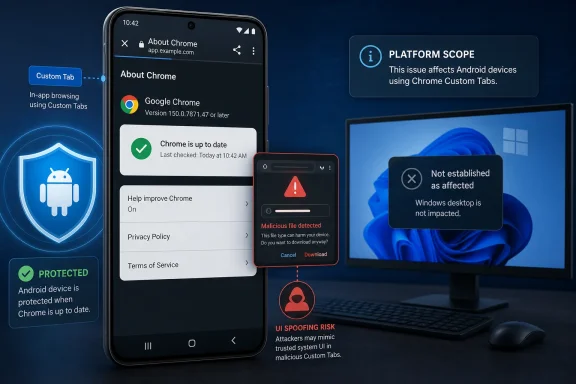 A Low Score Meets a Sensitive Interface
Chrome classified CVE-2026-13955 as Medium severity, while the CISA-ADP CVSS 3.1 assessment displayed by NVD gives it a base score of 3.3, categorized as Low. The visible vector describes a local attack with low attack complexity, no privileges required, and required user interaction. Scope is unchanged, confidentiality and availability impacts are scored as none, and integrity impact is scored as low.Those characteristics constrain the documented vulnerability:
- The attack vector is local rather than network-based.
- A malicious file is part of the described prerequisite.
- User interaction is required.
- No prior privileges are required.
- The documented technical effect is UI spoofing.
- The assessed integrity impact is low.
The record also should not be stretched beyond its stated impact. It describes UI spoofing, but it does not provide enough public detail to determine every possible consequence or categorically rule out outcomes not discussed in the entry. Reports should therefore avoid adding unsupported claims about credential access, code execution, permission bypass, device control, or other effects. The defensible description is the one in the record: insufficient validation of untrusted input in CustomTabs could allow a local attacker, using a malicious file, to perform UI spoofing.
A low numerical score does not make the update optional. It does, however, support a proportionate response. This is not presented by the supplied evidence as a network-based, zero-click Chrome emergency. It is a limited, interaction-dependent Android browser vulnerability with a direct update path.
Custom Tabs Provide the Relevant Context
Custom Tabs are the affected Chrome component named in the record. They are used when an Android application opens browser-rendered web content in an experience connected to the originating app.That context is enough to explain why UI spoofing matters. Users make decisions partly from visible interface cues, so a defect that permits deceptive presentation can affect their interpretation of what is on the screen. The public record does not reveal the exact UI element, malformed file structure, rendering sequence, or application workflow involved in CVE-2026-13955.
The weakness is classified as CWE-20, Improper Input Validation. In this case, Chrome’s description connects insufficient validation of untrusted input with the ability to perform UI spoofing through a malicious file. More specific technical conclusions should wait for additional authoritative disclosure.
Administrators do not need a complete proof of concept to act. The affected platform, prerequisite, version boundary, and remediation are already sufficiently clear:
- The listed product is Google Chrome on Android.
- Versions prior to 150.0.7871.47 are affected.
- The described attack requires a malicious file and user interaction.
- Version 150.0.7871.47 is the published fix threshold.
- The installed version must be checked after the update.
The Malicious-File Requirement Narrows the Threat
The local attack vector and malicious-file requirement distinguish CVE-2026-13955 from vulnerabilities scored as directly reachable through arbitrary network traffic. The user-interaction requirement further indicates that exploitation depends on a person performing some action.The record does not identify that action. It should not be described as a specific tap, download, open-file command, app handoff, or browser gesture unless later technical documentation confirms the sequence. Similarly, “local attacker” should not be casually translated into “an attacker must physically possess the device.” Physical access is not stated as a requirement.
CISA-ADP’s SSVC entry recorded exploitation as none at that time. That is a point-in-time assessment, not a guarantee that exploitation is impossible or that the status will never change. It is also not sufficient to call the vulnerability actively exploited.
The same SSVC data records the vulnerability as not automatable and gives it partial technical impact. Those values reinforce the measured response suggested by the CVSS vector: update affected installations promptly, but do not characterize the issue as an established mass-exploitation campaign without new evidence.
Users should remain cautious when interacting with unexpected or untrusted files, but general security awareness is not a replacement for updating the browser. The browser update is the direct correction for the behavior described in the CVE record.
The Version Boundary Is the Decision Point
The NVD affected-product configuration identifies Google Chrome on Android versions prior to 150.0.7871.47 as affected. Version 150.0.7871.47 is the published fix threshold.That wording requires some precision. It is reasonable to say that an Android installation earlier than 150.0.7871.47 falls within the documented affected range. It is also reasonable to use 150.0.7871.47 as the minimum remediation target supplied by the record. Administrators should not turn that into an unconditional promise that every later build is free of every related or subsequently discovered issue.
| Deployment state | Installed version and platform | What the supplied record supports | Operational response |
|---|---|---|---|
| Confirmed affected | Chrome on Android earlier than 150.0.7871.47 | Within the documented affected range | Update Chrome and verify the resulting version |
| Published correction threshold | Chrome on Android 150.0.7871.47 | Identified as the published fix threshold | Record the installed version and continue normal update monitoring |
| Later Android build | Chrome on Android later than 150.0.7871.47 | Meets or exceeds the published fix threshold | Maintain current updates and watch for revised guidance |
| Unknown or incomplete version | Chrome on Android with missing, stale, or truncated inventory data | Exposure cannot be resolved from the available evidence | Obtain a fresh complete version result |
| Windows installation | Chrome on Windows | Not listed as affected in the supplied affected-product data | Do not create a Windows remediation claim for this CVE without additional evidence |
| Other Chromium-based browser | Any platform | Not established as affected merely because it uses Chromium | Evaluate under product-specific evidence |
Shared Chromium ancestry does not automatically extend an Android Chrome finding to Chrome on Windows, Microsoft Edge, or another Chromium-based browser. Those products require their own affected-product evidence or vendor guidance.
For Windows-centered administrators, the issue may still appear in a vulnerability console operated from Windows or be assigned to a team responsible for a mixed device fleet. The management workstation does not determine the vulnerable platform. The endpoint record does.
Update Chrome on Android and Verify the Result
On the Android device, use the following procedure:- Open Google Play Store.
- Select the profile icon.
- Open Manage apps & device.
- Open Updates available.
- Select Google Chrome.
- Select Update.
- After installation, open Chrome.
- Select ⋮.
- Open Settings.
- Open About Chrome.
- Verify that the displayed version is 150.0.7871.47 or later.
If no Chrome update is shown but the installed version is earlier than 150.0.7871.47, refresh the Play Store’s update view and confirm that the device is online and using its supported application source. If the device is controlled by an organization, contact the mobile-management owner rather than installing Chrome from an unapproved source.
An update notification is not proof of remediation. Neither is the fact that Chrome appears in the device’s application list. The useful evidence is the complete installed version displayed after the update.
A Windows-Admin Mobile-Fleet Checklist
The following checklist is a general operational application of the product and version boundary. It does not assume that every management platform exposes the same controls, commands, or reporting fields.- Confirm that the endpoint is Android, not Windows.
- Inventory the complete installed Google Chrome version on managed Android devices.
- Flag Chrome versions earlier than 150.0.7871.47 for remediation.
- Treat missing, shortened, conflicting, or stale version results as unresolved.
- Direct users or support personnel to update Chrome through Google Play Store.
- Obtain a fresh version result after the update.
- Use 150.0.7871.47 as the published minimum correction threshold for this CVE.
- Keep devices below that threshold in the remediation queue.
- Record the device identifier, Android platform, observed Chrome version, observation time, and remediation status where those fields are available.
- Exclude Windows Chrome findings produced solely by generic “Google Chrome” product matching.
- Do not assume Microsoft Edge or another Chromium-derived browser is affected.
- Continue monitoring authoritative vulnerability and vendor information for changes to scope, exploitation status, or the affected range.
The closure standard should remain evidence-based: the administrator has confirmed the Android platform and obtained a current, complete Chrome version meeting or exceeding the published fix threshold.
Keep the Response Proportionate to the Evidence
CVE-2026-13955 should not be inflated into a Windows-wide Chrome emergency, but it should not be dismissed because its visible CVSS score is 3.3.The practical risk picture is narrow:
- The affected product data is Android-specific.
- The attack vector is local.
- A malicious file is required.
- User interaction is required.
- The documented effect is UI spoofing.
- The published fix threshold is Chrome for Android 150.0.7871.47.
- CISA-ADP recorded exploitation as none at the time of its SSVC entry.
- The public record does not provide a detailed exploit walkthrough.
At the same time, security teams should communicate the issue accurately. Avoid calling it a confirmed remote attack, a zero-click compromise, an Android operating-system vulnerability, or a Windows Chrome flaw. Avoid attaching speculative outcomes to the UI-spoofing description. Avoid describing every later version as categorically safe from all related defects.
A concise internal ticket can state:
That wording gives technical teams enough information to route and close the finding without extending the claim beyond the available evidence.CVE-2026-13955 affects Google Chrome on Android versions prior to 150.0.7871.47. The vulnerability involves insufficient validation of untrusted input in CustomTabs and could allow a local attacker, using a malicious file and required user interaction, to perform UI spoofing. Update Chrome through Google Play Store and verify in Chrome’s About screen that the installed version is 150.0.7871.47 or later. The supplied affected-product data does not establish exposure for Chrome on Windows.
Timeline
The supplied evidence supports a sequence of contributions, but not the previously stated exact calendar dates with sufficient confidence for publication:- Chrome supplied the core CVE information, including the Android product scope, CustomTabs component, UI-spoofing description, malicious-file prerequisite, Medium severity classification, CWE-20 classification, and version threshold.
- CISA-ADP supplied the visible CVSS 3.1 assessment and SSVC data, including the point-in-time exploitation value of none, an automatable value of no, and partial technical impact.
- NVD presented the vulnerability record and affected-product configuration, linking the vulnerable Chrome range to Android.
The 3.3 score should therefore be identified as the CISA-ADP assessment displayed by NVD, not as an independent NVD-authored score unless the record later shows one.
Sparse Disclosure Requires Disciplined Reporting
The public information is sufficient to support remediation, but it is not sufficient to reconstruct the exploit.That distinction prevents both exaggeration and false reassurance. Security reporting does not need to invent an attack chain to justify an application update. It also should not convert the record’s silence about additional effects into affirmative proof that those effects are technically impossible.
The appropriate editorial boundaries are simple:
- State the affected platform exactly.
- State the affected version range exactly.
- Identify 150.0.7871.47 as the published fix threshold.
- Describe the local vector, malicious-file prerequisite, and required user interaction.
- Use “UI spoofing” for the documented effect.
- Attribute the 3.3 score and SSVC values to CISA-ADP.
- Describe exploitation as none at the time of the SSVC entry.
- Avoid unsupported delivery scenarios and outcomes.
- Avoid extending the finding to Windows or other Chromium products.
- Revisit the assessment if authoritative sources add technical details or change the exploitation status.
Asset Data Beats Product-Name Matching
A Windows vulnerability-management console may contain records for Chrome across several operating systems. Searching only for the product name can therefore create a misleading list that mixes Android and desktop installations.For CVE-2026-13955, the useful data points are:
- Endpoint operating system
- Product name
- Complete installed Chrome version
- Time of the last inventory result
- Whether the result is current enough to support closure
- Whether a post-update version was collected
Unknown data should remain unknown. A report showing only “Chrome 150,” an old application inventory, or no current check-in does not prove that the endpoint has reached the published threshold. Administrators should request a fresh complete version rather than assuming compliance.
Likewise, an update command or help-desk instruction records activity, not outcome. The task is complete when the organization has reasonable evidence that the Android installation now reports version 150.0.7871.47 or later.
Verify the Version and Keep the Scope Clean
CVE-2026-13955 has a narrow and measurable response. Google Chrome on Android versions prior to 150.0.7871.47 is affected according to the supplied product data. Update those installations through Google Play Store, open Chrome’s About screen, and verify the complete installed version afterward.For WindowsForum readers, the platform distinction is essential. This record does not establish that Chrome on Windows is affected. Do not create Windows desktop remediation work merely because “Google Chrome” appears in the CVE title or a scanner result. Route confirmed Android exposure to the person or team responsible for the mobile fleet.
The forward-looking task is continued verification. Monitor authoritative records for a revised affected range, additional technical detail, or a changed exploitation assessment. Until such information appears, the defensible response remains focused: update Chrome on Android, verify version 150.0.7871.47 or later as the published correction threshold, keep unknown versions unresolved, and do not extend the CVE to Windows Chrome without supporting evidence.
References
- Primary source: NVD / Chromium
Published: 2026-07-11T15:41:23-07:00
Loading…
nvd.nist.gov - Security advisory: MSRC
Published: 2026-07-11T15:41:23-07:00
Original feed URL
Loading…
msrc.microsoft.com - Related coverage: chromium.googlesource.com
Loading…
chromium.googlesource.com - Related coverage: issues.chromium.org
Chromium
issues.chromium.org