

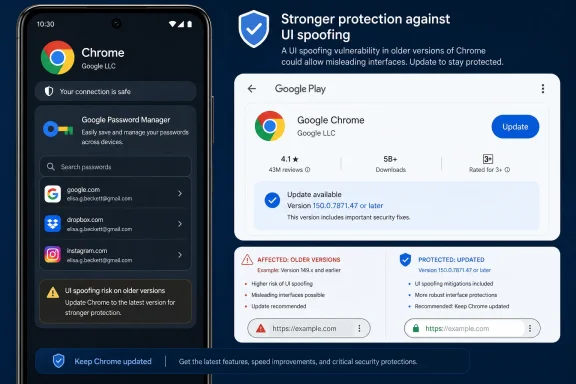
 Chrome for Android before 150.0.7871.47 is affected; update through Google Play
Desktop Chrome is not listed as affected in the NVD configuration.CVE-2026-13994 is a Medium-severity Google Chrome vulnerability affecting Chrome on Android before version 150.0.7871.47. According to the National Vulnerability Database record, crafted HTML could perform credential-management UI spoofing. The attack requires user interaction and has a low integrity impact. The verified record does not describe browser takeover, password-store compromise, sandbox escape, code execution, or an automatic authentication bypass.
Android update procedure: Open Google Play Store > profile icon > Manage apps & device > Updates available > Chrome > Update. Menu labels can vary by Play Store version. After installation, open Chrome > ⋮ > Settings > About Chrome and confirm that the version is 150.0.7871.47 or later.
The immediate response is therefore simple: update Chrome on affected Android devices and verify the installed version. Administrators should keep the finding scoped to the platform and version range identified in the NVD configuration.
What the public record establishes
The Chrome-sourced description identifies an inappropriate implementation in Credential Management in Google Chrome on Android before 150.0.7871.47. It says a remote attacker could use a crafted HTML page to perform UI spoofing.CISA-ADP contributed a CVSS 3.1 base score of 4.3, which falls in the Medium range. The vector describes:
- Network attack access
- Low attack complexity
- No required privileges
- Required user interaction
- Unchanged scope
- No direct confidentiality impact
- Low integrity impact
- No availability impact
Together, those facts describe a limited but security-relevant presentation flaw. Malicious web content could misrepresent information in a credential-management interface, but a user would have to interact with the experience before the stated integrity impact could occur.
The public record does not identify the exact interface element involved. It does not establish that an attacker could expose stored passwords, retrieve credentials, defeat passkey protections, approve authentication without the user, or gain control of the device. It also does not establish a specific spoofing mechanism involving origins, account labels, account selection, recovery actions, or credential-provider boundaries.
Those possibilities should not be added to the vulnerability narrative unless Google or another authoritative source publishes supporting technical details.
Medium severity, narrowly interpreted
The 4.3 CVSS score is consistent with the limited technical effect described in the record. The vulnerability is remotely reachable through web content, but it requires user interaction and is assigned only a low integrity impact. There is no scored confidentiality or availability impact.That does not make the issue purely cosmetic. Security-sensitive interfaces must accurately represent information to users. A spoofing flaw can weaken that representation even when it does not expose data or execute attacker-controlled code.
At the same time, the term authentication bypass would overstate the available evidence. An authentication bypass normally means an attacker can obtain access without satisfying the expected authentication requirement. The verified description for CVE-2026-13994 says only that crafted HTML could perform credential-management UI spoofing.
A deceptive interface might support a broader social-engineering attempt, but that potential downstream use is not the same as a demonstrated authentication bypass. Internal tickets, reports, and user communications should preserve that distinction.
A concise description is sufficient:
CVE-2026-13994 affects Google Chrome on Android before version 150.0.7871.47. Crafted HTML could perform credential-management UI spoofing with user interaction and low integrity impact. Update Chrome through Google Play and confirm version 150.0.7871.47 or later.
Affected-product boundary
NIST’s configuration information associates the vulnerable Chrome version range with Android. It does not identify Chrome on Windows, macOS, or Linux as affected by this CVE.| Scenario | Product and platform | Version state | Operational treatment |
|---|---|---|---|
| Affected | Google Chrome on Android | Earlier than 150.0.7871.47 | Update and verify |
| Corrected boundary | Google Chrome on Android | 150.0.7871.47 or later | Record verification evidence |
| Desktop Chrome | Chrome on Windows, macOS, or Linux | Not listed as affected in the NVD configuration | Do not create a CVE-specific finding without additional authoritative evidence |
| Other Android browsers | Products not named in the record | Not established | Follow the relevant vendor’s advisory |
| Android WebView | Not identified in the supplied affected configuration | Not established | Do not infer exposure from shared technology alone |
The same restraint applies to other Chromium-derived products. Shared code does not by itself prove that another browser or Android component is affected. Each product needs its own authoritative applicability information.
The NVD record also does not say that Android requires an operating-system update for this vulnerability. Android defines the affected operating environment, while the stated remediation boundary is a Chrome application version.
Windows admin takeaway
Android-only applicability does not make this irrelevant to a Windows-centric organization. Android devices may access the same organizational identities and services used from Windows PCs. Route the finding to the mobile or device-management owner, but keep identity and access stakeholders informed. This is an organizational scoping consideration, not evidence that CVE-2026-13994 affects Windows or directly compromises an account.
Public details remain limited
The linked Chromium issue is access-restricted, so the public cannot use it to confirm the triggering HTML, vulnerable code path, precise interface state, reproduction procedure, or implementation of the fix.That limitation calls for a narrow reading of the available record. The defensible facts are:
- Chrome on Android before 150.0.7871.47 is affected.
- Crafted HTML could perform credential-management UI spoofing.
- A remote attacker does not need prior privileges.
- User interaction is required.
- The scored technical impact is low integrity impact.
- Updating Chrome to 150.0.7871.47 or later moves the device outside the listed affected range.
The NVD record identifies Chrome on Android before 150.0.7871.47. That structured platform and version information should control remediation scope. Administrators do not need to interpret the title or broader contents of a linked release page to determine which devices belong in the affected population.
Remediation for individual Android users
Users should install the update through Google Play rather than relying on a prompt displayed by a website.- Open the Google Play Store.
- Select the profile icon.
- Open Manage apps & device.
- Open Updates available.
- Find Chrome and select Update.
- Reopen Chrome after installation.
- Open Chrome > ⋮ > Settings > About Chrome.
- Confirm that the displayed version is 150.0.7871.47 or later.
An update should not be considered complete merely because the Play Store no longer shows an update button. The installed version is the relevant evidence. If the device remains below 150.0.7871.47, the user should retry the update, restart the application or device if appropriate, and contact the device administrator if the corrected version remains unavailable.
Enterprise verification
For organizations, approving an application update and proving that it was installed are separate tasks. The following are general mobile-security practices rather than CVE-specific facts about Google Play rollout behavior.Administrators should use device-level application inventory where available. They should also account for stale check-ins, offline devices, incomplete application reporting, and devices that cannot install the current Chrome release.
Inventory data should be interpreted conservatively:
- A reported version below 150.0.7871.47 is an open remediation item.
- A reported version at or above 150.0.7871.47 can be closed if the inventory is current and tied to the correct device.
- A missing version is unverified, not compliant.
- A stale version requires a fresh device check or manual confirmation.
- A desktop Chrome match should be excluded unless new authoritative information expands the affected configuration.
- A device that cannot install the corrected version should enter the organization’s exception, replacement, or access-review process.
A valid finding for this CVE needs both of the following conditions:
- The device runs Android.
- The installed Google Chrome version is earlier than 150.0.7871.47.
Action checklist for administrators
Scope
- Identify managed and organization-accessing Android devices.
- Retrieve the installed Google Chrome version for each device.
- Flag versions earlier than 150.0.7871.47.
- Exclude Windows, macOS, and Linux Chrome installations from this CVE-specific remediation group unless authoritative guidance changes.
- Do not automatically include Android WebView or other Chromium-based browsers.
Remediate
- Make the corrected Chrome release available through the normal mobile-management process.
- Direct users to update through Google Play.
- Ask users to reopen Chrome after installation.
- Escalate devices that cannot obtain the corrected release.
Verify
- Confirm Chrome version 150.0.7871.47 or later at the device level.
- Refresh stale inventory before closing a finding.
- Preserve the device identity, platform, observed application version, observation time, and remediation disposition.
- Keep missing or unverifiable application versions open as unknown rather than marking them compliant.
- Record the reason when a desktop scanner result is rejected as outside the NVD platform configuration.
Communicate
- Describe the vulnerability as credential-management UI spoofing.
- State that user interaction is required.
- State that the scored effect is low integrity impact.
- Avoid calling it browser takeover, password theft, passkey compromise, or authentication bypass.
- Avoid claiming a particular spoofed field, prompt, account, origin, or workflow without additional authoritative evidence.
Monitor
- Watch for a public Chromium issue, revised vendor guidance, changes to the NVD affected configuration, or additional product advisories.
- Reassess other browsers only if their vendors identify them as affected.
- Update internal severity or detection guidance if authoritative exploitation information becomes available.
Detection and incident handling
The supplied record does not provide a verified exploit payload, signature, or public reproduction sequence. It also does not provide enough information to define a CVE-specific network or endpoint detection rule.As general security practice, teams can review reports of unexpected or misleading credential-related browser interfaces, especially on Android devices that were below the corrected version. Such a report should be investigated as a possible social-engineering event, but it should not automatically be attributed to CVE-2026-13994.
A report involving an unpatched device does not prove exploitation. Conversely, a lack of reports does not prove that every device is safe. Version remediation is the measurable control available from the public record.
If a user reports a suspicious interaction, incident responders should preserve the ordinary evidence available to them, such as:
- Device and Android version
- Installed Chrome version
- Approximate time of the event
- Website or application being used
- Screenshots supplied by the user
- Actions the user recalls taking
- Relevant identity and sign-in records
- Whether the device was updated before or after the event
Disclosure and enrichment timeline
Exact calendar dates should not be repeated without a permitted source that validates them. The supplied information supports the event order and attribution, which are enough for operational use.| Stage | Source | Contribution |
|---|---|---|
| Initial CVE record | Chrome | Supplied the core description, affected Chrome-on-Android version boundary, and references |
| Security enrichment | CISA-ADP | Added the CVSS 3.1 vector and 4.3 score, CWE-451 classification, and decision-support information |
| Initial analysis | NIST | Added machine-readable platform and version configuration information and classified references |
This distinction is useful in internal reporting. A vulnerability ticket can say “CISA-ADP CVSS 3.1: 4.3 Medium” while separately recording Chrome as the source of the vulnerability description and NIST as the source of the affected configuration analysis.
The affected-version wording should also be translated into a clear operational rule: Chrome on Android earlier than 150.0.7871.47 is affected, and administrators should verify 150.0.7871.47 or later.
Practical reporting language
A short internal advisory can use the following wording:A remediation ticket can use an even shorter form:CVE-2026-13994 affects Google Chrome on Android before version 150.0.7871.47. According to the NVD record, crafted HTML could perform credential-management UI spoofing. The attack requires user interaction and is scored as having low integrity impact. Update Chrome through Google Play and confirm the installed version is 150.0.7871.47 or later. Desktop Chrome is not listed as affected in the NVD configuration.
Desktop scanner findings can be documented as follows:Update Google Chrome on the listed Android device and provide evidence that Chrome is version 150.0.7871.47 or later. Do not close the ticket based only on update approval or Play Store availability.
These statements remain within the verified record and give each operational team a measurable next step.Excluded from CVE-2026-13994 scope because the asset is not an Android device. The current NVD configuration identifies Google Chrome on Android before 150.0.7871.47.
Keep the response narrow and measurable
CVE-2026-13994 does not need an elaborate attack narrative to justify remediation. The affected population is specific, the version boundary is clear, and the update path is available through Google Play.For users, the task is to update Chrome and confirm version 150.0.7871.47 or later. For administrators, the task is to find affected Android installations, verify remediation at the device level, reject unsupported desktop matches, and track devices whose application version remains unknown.
The restricted technical details may become public later. Google, NIST, or CISA-ADP may also revise or enrich the record. Security teams should watch for those changes without speculating about mechanisms that have not been documented.
The durable lesson is straightforward: application, platform, and version must all match before a vulnerability finding is treated as valid. Android-only applicability does not remove the issue from a Windows-centric organization’s risk picture, but it does determine who owns the remediation and which devices must be updated.
Until authoritative information expands the scope, the correct response remains narrow: update Chrome for Android, confirm 150.0.7871.47 or later, and do not classify desktop Chrome as affected by CVE-2026-13994.
References
- Primary source: NVD / Chromium
Published: 2026-07-11T15:41:28-07:00
Loading…
nvd.nist.gov - Security advisory: MSRC
Published: 2026-07-11T15:41:28-07:00
Original feed URL
Loading…
msrc.microsoft.com - Related coverage: chromium.googlesource.com
Loading…
chromium.googlesource.com - Related coverage: cvefeed.io
Loading…
cvefeed.io - Related coverage: cvepremium.circl.lu
Loading…
cvepremium.circl.lu - Related coverage: radar.offseq.com
Loading…
radar.offseq.com