

CVE-2026-14066 is an input-validation vulnerability in Chrome on iOS that can allow a remote attacker to bypass navigation restrictions through a crafted HTML page. The NVD description records Chromium security severity as Low, while the CISA-ADP CVSS 3.1 contribution produces a 4.3 Medium score.Answer
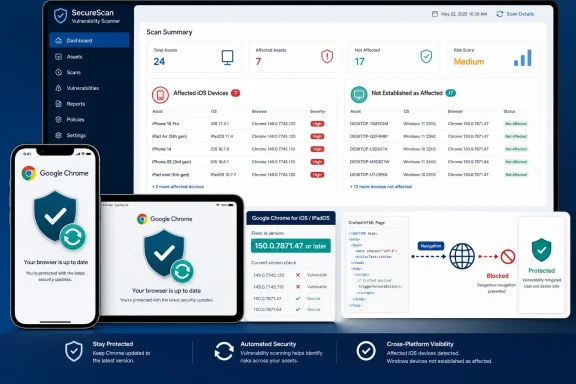
- Affected: Google Chrome on iOS before 150.0.7871.47, including applicable iOS/iPadOS assets running the affected application.
- Not established as affected: Chrome on Windows desktop. Do not open or retain a Windows remediation ticket solely because a scanner reports a generic Chrome match, CPE signal, or desktop-titled reference.
- Action: Update affected Chrome on iOS installations to 150.0.7871.47 or later, then verify the device platform and complete installed application version.
The central administrative issue is scope, not patch complexity. A useful finding must establish both that the asset runs the applicable Apple mobile operating environment and that its complete installed Chrome version is earlier than 150.0.7871.47.
 Validate Scanner Findings Before Assigning Remediation
Vulnerability-management tools may ingest the product name, affected-version range, references, and CPE data differently. A generic Chrome match should therefore trigger validation, not an automatic conclusion that every Chrome installation is affected.Use this procedure for each finding:
- Confirm the asset operating system. Determine whether the device is an applicable iOS/iPadOS asset rather than a Windows, macOS, Linux, Android, or ChromeOS system.
- Inspect the product evidence. Confirm that the detected application is Google Chrome on iOS, not merely a product record containing the word “Chrome.”
- Collect the complete installed version. A major-version value such as “Chrome 150” is not sufficient.
- Compare the version with 150.0.7871.47. Earlier versions fall within the stated affected range; that version and later releases meet the documented threshold.
- Review the scanner’s applicability logic. Determine whether it evaluated the platform and application together or produced a product-only match.
- Reject or retag unsupported desktop findings. If the asset is a Windows desktop and the tool provides no evidence that the iOS condition applies, the supplied record does not establish that asset as affected.
- Avoid global suppression. An exception created for an unsupported Windows finding should not hide legitimate Chrome on iOS findings.
| Asset and installed version | Treatment |
|---|---|
| Chrome on iOS earlier than 150.0.7871.47 | Affected; update required |
| Chrome on iOS 150.0.7871.47 | Meets the documented threshold |
| Chrome on iOS later than 150.0.7871.47 | Outside the stated affected range |
| Applicable platform but version unknown or incomplete | Unresolved; collect the complete version |
| Chrome on Windows desktop | Not established as affected by the supplied record |
| Platform unknown and product reported only as “Chrome” | Validate before assigning or closing remediation |
Read the CPE Data Cautiously
The supplied facts describe an NVD configuration containing a Chrome CPE range and an Apple iPhone OS CPE, with an “OR” relationship reported in the available material. Without the complete NVD configuration tree—including node nesting, negation, vulnerability flags, and the relationship between match groups—it is not safe to claim that the operating-system CPE definitively constrains every Chrome match through an AND-style expression.That uncertainty does not justify assigning the CVE to Windows. It means the CPE display alone may be insufficient to determine applicability.
Administrators should anchor triage in the explicit affected-product description, which identifies Chrome on iOS, and then verify the platform and full application version on the asset. If a scanner reaches a broader conclusion from the Chrome CPE alone, request or inspect the underlying match logic before treating that conclusion as authoritative.
The same caution applies to an NVD-linked Google reference whose title or path mentions the desktop Stable Channel. A desktop-related title does not, by itself, establish that Windows Chrome shares the vulnerable condition. Reference metadata should not override the explicit Chrome on iOS scope in the vulnerability description.
Organizations may continue updating desktop Chrome under their ordinary browser-maintenance policy. That routine maintenance should not be recorded as remediation for CVE-2026-14066 unless later authoritative information expands the affected-product scope.
What the Vulnerability Allows
Chrome’s description states that insufficient validation of untrusted input in Chrome on iOS allowed a remote attacker to bypass navigation restrictions through a crafted HTML page in versions before 150.0.7871.47.The CISA-ADP CVSS vector records a network attack vector, low attack complexity, no privileges required, and required user interaction. It assesses confidentiality and availability as unaffected, integrity impact as Low, and scope as unchanged.
The required-user-interaction value confirms that some user participation is part of the modeled attack, but the supplied record does not define the exact interaction sequence. It does not specify how the crafted page reaches the user, what action the user must take, or which browsing context or navigation control is involved.
Possible routes to hostile web content should not be presented as a confirmed CVE-specific exploit chain. The supported conclusion is narrower: exploitation involves a crafted HTML page, requires user interaction under the CVSS assessment, and can result in a navigation-restriction bypass.
The linked Chromium issue is restricted, so the available material does not support claims about a particular frame, URL handler, browser interface, internal page, validation function, or code path. Those implementation details are unnecessary for remediation. Administrators need to identify applicable Chrome on iOS installations below the fixed-version threshold and update them.
Severity at a Glance
The NVD description records Chromium security severity as Low. Separately, CISA-ADP contributed a CVSS 3.1 score of 4.3 Medium and SSVC values recording exploitation as none, automatable as no, and technical impact as partial.| Assessment source | Published result | Key conditions or impact |
|---|---|---|
| Chromium severity recorded in the NVD description | Low | Navigation-restriction bypass through crafted HTML |
| CISA-ADP CVSS 3.1 | 4.3 Medium | Network reachable, low complexity, no privileges, user interaction required; Low integrity impact |
| CISA-ADP SSVC | Exploitation: none; automatable: no; partial technical impact | Assessment status in the supplied record |
| Independent NVD CVSS assessment | Not supplied | Do not describe 4.3 as an NVD-produced score |
“Exploitation: none” should remain attributed to the supplied CISA-ADP assessment. It means exploitation was not identified in that assessment, not that future exploitation is impossible. The available information supports prompt routine remediation without unsupported emergency language.
Preserve the Platform Scope
The affected-product description repeatedly identifies Chrome on iOS. The supplied record does not establish that the same vulnerable condition exists in Chrome on Windows, macOS, Linux, Android, or ChromeOS, or in Microsoft Edge and other Chromium-based browsers.That conclusion is limited to this CVE. It is not a claim that desktop browsers are free of other vulnerabilities or that applications sharing Chromium components can never share defects. It means administrators should not broaden the affected population beyond the product and platform identified in the available record.
The practical test is:
- Is the asset an applicable iOS/iPadOS device?
- Is Google Chrome installed?
- Is the complete installed version earlier than 150.0.7871.47?
This distinction matters when vulnerability feeds normalize application names across operating systems. A dashboard may display “Google Chrome” without making the platform qualifier prominent, but product identity alone is not enough for sound remediation decisions.
Update and Verification Workflow
The required end state is straightforward: applicable Chrome on iOS installations must report version 150.0.7871.47 or later.For an individually maintained device, a general operational example is to obtain the current Google Chrome release through Apple’s normal application-update channel and then verify the installed application version through a trustworthy device or application-information source. Exact screens, labels, availability, and store behavior can vary and are not established by the supplied vulnerability record.
For managed devices, a general workflow may include:
- Identify applicable iOS/iPadOS assets with Google Chrome installed.
- Collect the full installed application version for each device.
- Separate versions earlier than 150.0.7871.47 from versions at or above the threshold.
- Use the organization’s approved application-management process to make the current Chrome release available or required.
- Refresh inventory after the deployment window.
- Verify the post-update installed version before closing each finding.
- Retain devices with missing, incomplete, or stale inventory data for follow-up.
An “assigned,” “approved,” “available,” or “command sent” state should not automatically be treated as proof of remediation. The strongest closure evidence ties together:
- Device identity
- Device operating system
- Google Chrome application identity
- Complete installed version
- Recent inventory or verification time
Keep Response Proportionate
The documented effect is a navigation-restriction bypass with Low integrity impact in the CISA-ADP vector. The supplied assessment requires user interaction and records no confidentiality or availability impact. It also records no identified exploitation at the time of the CISA-ADP assessment.That profile supports routine but timely browser updating. It does not support leaving affected installations below a clear fixed-version boundary, but it also does not justify presenting the issue as demonstrated code execution, credential theft, sandbox escape, persistence, operating-system compromise, or denial of service.
Finding a vulnerable version is not evidence that exploitation occurred. Incident-response escalation should depend on separate indicators, such as a relevant security alert, a credible user report, or suspicious activity assessed under the organization’s normal investigation procedures.
The supplied record does not establish a CVE-specific workaround, detection signature, domain block, browser policy, conditional-access control, or forensic artifact. Organizations may apply broader defensive controls according to local risk, but those measures should not replace updating and verifying Chrome on applicable iOS/iPadOS assets.
Local prioritization may account for device ownership, user role, exposure, or access to sensitive services. Those are organizational risk factors, not additional properties established for CVE-2026-14066.
Administrator Checklist
- Identify iPhones and other applicable iOS/iPadOS assets with Google Chrome installed.
- Collect the complete installed Chrome version, not only the major release.
- Flag versions earlier than 150.0.7871.47 for remediation.
- Update affected installations through the organization’s approved application-update process.
- Verify version 150.0.7871.47 or later before closing the finding.
- Keep assets with unknown, incomplete, or stale version data unresolved.
- Validate scanner results against both the device operating system and application evidence.
- Inspect the scanner’s CPE and applicability logic rather than assuming the reported “OR” structure creates a definitive platform constraint.
- Do not assign CVE-2026-14066 to Windows Chrome solely from a generic Chrome match, CPE signal, or desktop-titled reference.
- Do not globally suppress the CVE because one desktop match is unsupported.
- Attribute the 4.3 Medium score and SSVC fields to CISA-ADP.
- Use the wording: “The NVD description records Chromium security severity as Low.”
- Treat required user interaction as a CVSS condition without claiming an unsupported interaction sequence.
- Treat “exploitation: none” as the status of the supplied assessment, not a permanent guarantee.
- Escalate beyond routine remediation only when separate evidence supports investigation.
- Monitor authoritative vulnerability and vendor records for changes to scope, exploitation status, scoring, or the fixed-version threshold.
References
- Primary source: NVD / Chromium
Published: 2026-07-11T15:40:38-07:00
NVD - CVE-2026-14066
 nvd.nist.gov
- Security advisory: MSRC
Published: 2026-07-11T15:40:38-07:00
Original feed URL
Security Update Guide - Microsoft Security Response Center
 msrc.microsoft.com
- Related coverage: chrome.updatestar.com
Google Chrome - Download
Download Google Chrome 7.0.517.41, free, virus-checked. Google Chrome is a speedy and adaptable web browser with extensive features. chrome.updatestar.com
- Related coverage: google-chrome.en.uptodown.com
Google Chrome for Windows - Download it from Uptodown for free
Download Google Chrome for Windows for free. Fast, clean and easy web browsing courtesy of Google. Google Chrome is Google's web browser that has...google-chrome.en.uptodown.com - Related coverage: cvefeed.io
CVE-2026-14066 - Google Chrome for iOS Navigation Restriction Bypass
Insufficient validation of untrusted input in Chrome for iOS in Google Chrome on iOS prior to 150.0.7871.47 allowed a remote attacker to bypass navigation restrictions via a crafted HTML page. (Chromium security severity: Low)cvefeed.io - Related coverage: pcwelt.de
Update auf Chrome 150 beseitigt über 430 Lücken im Browser – Vivaldi ist abgesichert - PC-WELT
Mit dem Update auf die neuen Hauptversion Chrome 150 schließt Google beinahe so viele Sicherheitslücken wie bei der Vorversion. Mehr ein Dutzend Lücken sind als kritisch ausgewiesen.www.pcwelt.de
- Related coverage: tomsguide.com
Apple issues security updates to fix zero-day flaw used in Chrome attacks — update your iPhone and Mac right now | Tom's Guide
The latest iOS, macOS and other updates from Apple include a security patch which fixes a zero-day flaw in Google Chrome.www.tomsguide.com - Official source: support.google.com

Overview: Managing ChromeOS device policies - Chrome Enterprise and Education Help
For administrators who manage ChromeOS devices for a business or school. As a Chrome Enterprise admin, you can manage policies and settings for Chromebooks and other devices that run ChromeOS from th
support.google.com
- Related coverage: chromium.org