

After years of relying on Google Keep, a How-To Geek writer moved to Joplin because it combines Markdown, attachments, Windows, Linux, and Android support, extensions, encrypted sync, and the option to run the synchronization server on the writer’s own Raspberry Pi 4 behind a WireGuard VPN. The move is less a verdict on Keep’s basic competence than a rejection of the bargain that makes it so convenient: Google supplies the infrastructure, defines the feature set, and remains the unavoidable custodian of the service. Joplin replaces that bargain with a choice among managed storage, a paid synchronization service, and genuinely self-controlled infrastructure. The price of that freedom is that the user must decide how much of the cloud operator’s job they are prepared to take back.
Google Keep is built around immediacy. A user opens it, writes something, and expects the note to appear on another device without thinking about databases, synchronization targets, containers, ports, or network tunnels. That absence of visible infrastructure is not a minor feature; it is the product’s central achievement.
But the same design becomes restrictive once a user wants Keep to operate as more than a quick capture tool. The How-To Geek author had used it as a writing and note-taking application for years, only to find that its limited features and the desire for greater control over personal data eventually outweighed its convenience.
The replacement requirements were unusually revealing. The author wanted proper Markdown, support for embedding pictures, videos, and files, clients for Windows, Linux, and Android, self-hosted cloud synchronization, a lightweight footprint, and extensions. That list describes more than a note-taking application. It describes a portable writing environment whose interface, storage, and behavior can be changed without waiting for a platform owner.
Keep falls short primarily because it is designed to remain Keep. Its formatting exists within the interface Google provides, and How-To Geek notes that activating or deactivating those formatting options depends on shortcuts. There is no meaningful extension ecosystem through which users can substantially redesign the workflow.
Joplin takes the opposite approach. Its Markdown support makes the text itself carry much of the formatting intent, while its plugin system allows functionality to be layered on top of the base application. Joplin’s official documentation says its desktop and mobile applications can display both Markdown text and rendered rich text, following a familiar model in which the source remains readable even before rendering.
That distinction matters for writers and technical users because Markdown is not merely a collection of formatting shortcuts. It is a way of keeping documents structurally legible outside the application that created them. A heading remains visibly a heading, a list remains recognizable, and a link does not depend entirely on a proprietary editing surface to make sense.
The practical appeal is longevity. A polished visual editor can be pleasant today, but plain-text conventions are easier to inspect, convert, automate, and move. Joplin’s attraction is therefore not that it makes bold text dramatically easier; it is that it reduces the degree to which the note’s meaning is trapped inside one interface.
Google Keep arrives as a vertically integrated service. Google supplies the client experience, account system, storage, synchronization, and operational infrastructure. That makes setup almost frictionless, but it also means the user cannot replace one layer while keeping the others.
Joplin treats synchronization as a selectable component. Its official documentation lists multiple possible targets, and the How-To Geek author focuses on three practical paths: third-party storage such as OneDrive or Dropbox, the paid Joplin Cloud service, or a self-hosted Joplin server.
This separation allows a gradual departure from the conventional cloud rather than demanding an all-or-nothing migration. A user can begin with OneDrive or Dropbox, validate the Joplin clients and note structure, and only later move synchronization to self-hosted infrastructure.
That is approximately what the How-To Geek author did. Third-party cloud storage was the first experiment and reportedly worked without major problems. It solved the immediate synchronization requirement but not the broader goal of reducing dependence on large technology companies.
Joplin Cloud occupies the middle ground. According to the article, annual billing placed its tiers at roughly $2.80 to $7.80 per month at the time covered by the source material. More expensive tiers offered better collaboration, additional storage, and larger maximum attachment sizes.
For many users, that managed option is the rational stopping point. It preserves Joplin’s Markdown-oriented, extensible client while transferring the server operation back to a provider. Someone who wants to escape Keep’s limitations does not necessarily need to become responsible for a database and remotely accessible home server.
Self-hosting is the most consequential option because it changes who is accountable when synchronization fails. Once the server runs on personal hardware, there is no provider to absorb storage failures, patch the host, restore a damaged database, or diagnose why a phone can no longer reach the service. Control and responsibility arrive as the same package.
The How-To Geek account reduces the deployment to three major components: a server, a database containing the notes, and a method of reaching that server over the internet. That is a useful summary because it exposes the operational boundary immediately. Installing Joplin’s desktop application is ordinary end-user computing; running Joplin Server is systems administration.
Docker and Docker Compose provide the most direct packaged route. How-To Geek points readers to the required material on Docker Hub, while the official image documentation describes a containerized Joplin Server and a database-backed production arrangement. The containers make deployment repeatable, but they do not eliminate administration.
A container is still software that must be updated and monitored. Its persistent data still needs protection. Environment variables and credentials still need to be handled carefully, and the database must survive the replacement or recreation of the container that connects to it.
This is where self-hosting tutorials sometimes oversell simplicity. A successful first login proves that the service is running; it does not prove that the installation can survive a disk failure, a mistaken update, a corrupted database, an expired credential, or a configuration change made six months later by someone who has forgotten how the stack was assembled.
The How-To Geek author was not enthusiastic about Docker and planned to place the permanent installation in an LXC container on a Proxmox server instead. That decision makes sense for an established homelab operator because it fits the service into infrastructure already being managed. It is less obviously attractive for a Keep user whose previous administrative responsibility consisted of remembering a Google password.
Proxmox and an LXC container are not prerequisites for Joplin. They are evidence that the author already thinks in terms of hosts, guests, service isolation, and persistent infrastructure. Readers should not mistake the author’s preferred deployment for the minimum technical commitment.
The more useful lesson is to deploy Joplin in the environment an administrator already understands. A technically elegant stack becomes fragile if its owner cannot confidently update, restore, and troubleshoot it. Familiarity is a security and availability advantage, particularly for a service intended to hold years of personal writing.
The conventional answer is to expose the service through a reverse proxy. That can provide a stable public endpoint and web encryption, but it also places an internet-facing service in front of the home network. The reverse proxy, certificates, forwarded ports, application authentication, and server updates all become part of the external security boundary.
The How-To Geek author recommends a different model for this personal deployment: do not expose Joplin Server directly. Instead, run a lightweight VPN, connect remote devices to the home network, and then reach Joplin as though those devices were local.
That recommendation depends on Joplin Server being available to devices on the local network by default. The VPN extends that trusted network boundary to an authenticated remote device without requiring the Joplin service itself to accept arbitrary traffic from the public internet.
WireGuard was the author’s preferred choice because of its low demand on system resources, with OpenVPN identified as an alternative. Both were described as secure and widely supported. The WireGuard server and Joplin Server were hosted on the same Raspberry Pi 4, producing a compact deployment in which one small device handled both synchronization and remote network access.
The architectural argument is stronger than the choice of VPN technology. If only the owner’s devices need the service, exposing a general public endpoint may be unnecessary. A VPN can reduce the number of services presented directly to the internet and reuse one remote-access channel for Joplin, network-attached storage, and other private resources.
That does not make the system invulnerable. The VPN endpoint remains internet-facing, client keys must be protected, the Raspberry Pi must be maintained, and remote synchronization depends on the home connection and local power. Consolidating the VPN and note server on one device also creates a single point of failure: if the Pi is unavailable, both the tunnel and Joplin disappear together.
There is also a usability cost. The writer must connect to the VPN before synchronizing notes from outside the home network. How-To Geek characterizes this as a quick step, but any extra step can become noticeable on mobile devices, particularly when background synchronization is expected to happen without intervention.
For an individual homelab, that trade can be entirely reasonable. For a team, however, requiring every user to maintain VPN access may create more support work than placing a carefully secured service behind a reverse proxy or choosing Joplin Cloud. The correct topology depends not only on threat models but on the number and technical confidence of the people expected to use it.
Joplin’s official documentation adds an important operational qualification: end-to-end encryption is supported across its applications, but it must be enabled and propagated correctly. Users should not interpret the mere selection of Joplin, OneDrive, Dropbox, or a self-hosted server as proof that encryption is already protecting every synchronized item.
The documented setup begins on one device, which creates the encryption key protected by the user’s password. The encrypted data must then complete its first synchronization before additional clients retrieve the key and are configured with the password. Joplin specifically cautions against enabling encryption independently on several devices at the same time because that can produce multiple keys.
This is one of the places where convenience and security pull in opposite directions. The first encrypted synchronization may take longer because existing notes and resources must be processed and uploaded again. A user with large attachments should treat that initial operation as a migration task rather than assume it will finish instantly.
End-to-end encryption also does not remove the need for host security. It helps prevent the synchronization provider or an interceptor from reading encrypted content, but it does not rescue a compromised endpoint after notes have been decrypted for use. Malware running under the user’s account may be able to read what the user can read.
Nor is encryption a substitute for backup. Encrypted synchronization can faithfully distribute an accidental deletion, damaged data, or unwanted change. A self-hoster therefore needs both confidentiality controls and a recovery plan.
The distinction is particularly important because “my data is on my hardware” often feels safer than it actually is. Ownership reduces exposure to a third-party platform’s business decisions, but it concentrates operational risk in the user’s storage, update practices, credentials, and backup discipline. Data sovereignty is not the same thing as data durability.
How-To Geek argues that self-hosting removes the managed service’s practical attachment limits, allowing the author to attach files as large as the available infrastructure can support. In practice, the real boundaries become server storage, database behavior, network upload speeds, client capacity, and backup windows.
That difference matters most for users who treat notes as containers for source material rather than brief reminders. A few text notes barely register on modern storage. A collection filled with screenshots, PDFs, video clips, and other files can become a substantial repository whose performance and recovery requirements resemble those of a document service.
Joplin Cloud handles those constraints through plans. The source material says higher tiers provide more cloud storage and larger maximum attachment sizes, alongside better collaboration. Self-hosting removes the provider-defined ceiling but transfers capacity planning to the operator.
Plugins create a similar exchange. Keep’s closed feature set offers predictability: the application does what Google built and little beyond that. Joplin’s plugin repository and extension API let users alter the experience, and How-To Geek notes that a missing extension can be written in JavaScript.
Official Joplin documentation confirms that plugins can extend the desktop and mobile applications, although availability and behavior may differ across platforms. That means “Joplin supports plugins” should not be read as “every plugin behaves identically on Windows, Linux, and Android.”
For power users, the extensibility is transformative. A note-taking application can become a specialized editor, publishing workflow, task system, or personal knowledge base. For administrators, however, every plugin adds code, compatibility assumptions, and another component that may react badly to an application update.
The How-To Geek author deliberately kept plugins to a minimum in pursuit of a lightweight system. That is the more disciplined approach. Extensibility is valuable because it permits specific improvements, not because every available modification should be installed.
A sensible deployment begins with the base application and adds plugins only when a demonstrated workflow need justifies them. Administrators should know which plugins are essential, where they came from, and whether they remain maintained. Otherwise, a migration intended to escape platform dependence merely replaces one large dependency with a pile of smaller, less visible ones.
The more profound difference is governance. Keep users accept Google’s decisions about the service’s interface, storage model, feature roadmap, and continued availability. Joplin users can choose their synchronization target, operate their own server, install plugins, and retain more influence over how the environment evolves.
That does not mean every Joplin deployment is independent. Synchronizing through OneDrive or Dropbox still relies on a third party. Paying for Joplin Cloud replaces Google with another operator. Running Joplin Server inside infrastructure controlled by someone else still creates external dependencies even if the software stack itself is under the user’s administration.
Self-hosting is therefore better understood as a spectrum of control. The client may be under the user’s control while storage is outsourced. The server may be self-managed while the physical host is rented. A home server may be locally owned but dependent on an internet provider, remote-access service, or off-site backup destination.
What Joplin changes is the user’s ability to move among those arrangements. The official synchronization design is intended to avoid a hard dependency on one company or service, allowing the user to change targets without abandoning the note-taking application itself.
That portability has strategic value even for people who never run a server. A credible ability to leave constrains lock-in. Users can select the easiest arrangement today without accepting that it must remain the only arrangement tomorrow.
The author’s choice of Joplin over Trillium and Obsidian was ultimately based on the complete set of requirements rather than one spectacular feature. How-To Geek still describes Trillium and Obsidian as excellent alternatives worth considering, which is an important acknowledgment that there is no universal post-Keep destination.
A user who values a particular knowledge-management model may prefer one of those alternatives. Someone whose top priority is effortless shared editing may decide that a managed service remains superior. The crucial exercise is to define the workflow before selecting the application, just as the author did with Markdown, attachments, platform support, self-hosting, weight, and extensions.
That cross-platform support matters because self-hosted tools often fail at the client layer. A server may be technically impressive yet depend on a browser interface, have a weak mobile application, or make Windows users feel like an afterthought. Joplin instead places native clients at the center of the workflow and treats the server primarily as a synchronization target.
The result is a useful separation between user experience and infrastructure. A Windows user can write and search locally while the sync layer moves changes among devices. The server does not need to become the primary editing environment.
That local-first character can also make the system feel less dependent on constant connectivity than a purely web-based tool, although synchronization still requires the selected target to be reachable. In the Raspberry Pi and WireGuard arrangement, remote connectivity becomes an explicit action: establish the VPN, reach the home network, and allow Joplin to synchronize.
For administrators supporting mixed Windows and Linux estates, the common application can reduce workflow fragmentation. Notes do not need to be recreated in one tool for Windows and another for Linux merely because the operating systems differ.
The burden moves into deployment policy. IT teams must decide whether synchronization will use an approved third-party provider, Joplin Cloud, or an internally hosted server. They must also decide whether plugins are allowed, how encryption keys and passwords are handled, and what recovery process applies when a user loses a device or corrupts a notebook.
Those questions may sound excessive for “just notes,” but notes frequently contain operational procedures, drafts, credentials copied where they should not be, screenshots, customer details, and internal research. Once Joplin supports large attachments and collaboration, it should be governed according to the sensitivity of the information placed inside it, not according to the modest appearance of the editor.
But the hardware is not the decisive factor. The installation succeeds only if it remains understandable and maintainable after the excitement of setup has passed.
A sustainable system needs predictable updates, recoverable data, known credentials, and documentation sufficient to rebuild it. If synchronization silently stops and the owner discovers the problem only after several devices have diverged, theoretical control offers little comfort.
The same test applies to lightweight design. Running Joplin and WireGuard on modest hardware is attractive, but light resource use should not be confused with zero operational cost. Storage grows, logs accumulate, software changes, and the device itself eventually requires attention.
This is why the managed options remain essential to Joplin’s proposition. They let users choose how much administration they want rather than making self-hosting an ideological purity test. OneDrive or Dropbox can be the practical entry point; Joplin Cloud can serve users who value collaboration and managed operation; a personal server can satisfy those willing to own the entire stack.
The best choice is not necessarily the one with the fewest external dependencies. It is the one whose dependencies are understood and whose failure modes the user can handle. A home server that never receives updates may be less defensible than a reputable managed service using properly configured end-to-end encryption.
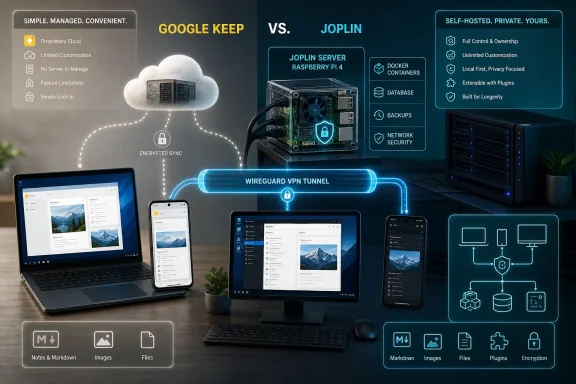 Google Keep’s Simplicity Eventually Becomes Its Ceiling
Google Keep is built around immediacy. A user opens it, writes something, and expects the note to appear on another device without thinking about databases, synchronization targets, containers, ports, or network tunnels. That absence of visible infrastructure is not a minor feature; it is the product’s central achievement.But the same design becomes restrictive once a user wants Keep to operate as more than a quick capture tool. The How-To Geek author had used it as a writing and note-taking application for years, only to find that its limited features and the desire for greater control over personal data eventually outweighed its convenience.
The replacement requirements were unusually revealing. The author wanted proper Markdown, support for embedding pictures, videos, and files, clients for Windows, Linux, and Android, self-hosted cloud synchronization, a lightweight footprint, and extensions. That list describes more than a note-taking application. It describes a portable writing environment whose interface, storage, and behavior can be changed without waiting for a platform owner.
Keep falls short primarily because it is designed to remain Keep. Its formatting exists within the interface Google provides, and How-To Geek notes that activating or deactivating those formatting options depends on shortcuts. There is no meaningful extension ecosystem through which users can substantially redesign the workflow.
Joplin takes the opposite approach. Its Markdown support makes the text itself carry much of the formatting intent, while its plugin system allows functionality to be layered on top of the base application. Joplin’s official documentation says its desktop and mobile applications can display both Markdown text and rendered rich text, following a familiar model in which the source remains readable even before rendering.
That distinction matters for writers and technical users because Markdown is not merely a collection of formatting shortcuts. It is a way of keeping documents structurally legible outside the application that created them. A heading remains visibly a heading, a list remains recognizable, and a link does not depend entirely on a proprietary editing surface to make sense.
The practical appeal is longevity. A polished visual editor can be pleasant today, but plain-text conventions are easier to inspect, convert, automate, and move. Joplin’s attraction is therefore not that it makes bold text dramatically easier; it is that it reduces the degree to which the note’s meaning is trapped inside one interface.
Joplin Wins by Separating the App From the Cloud
The most important architectural difference between Keep and Joplin is not Markdown or plugins. It is that Joplin does not force the application and the synchronization provider to be the same product.Google Keep arrives as a vertically integrated service. Google supplies the client experience, account system, storage, synchronization, and operational infrastructure. That makes setup almost frictionless, but it also means the user cannot replace one layer while keeping the others.
Joplin treats synchronization as a selectable component. Its official documentation lists multiple possible targets, and the How-To Geek author focuses on three practical paths: third-party storage such as OneDrive or Dropbox, the paid Joplin Cloud service, or a self-hosted Joplin server.
| Synchronization route | Who runs the infrastructure | Main advantage | Main compromise | Best fit |
|---|---|---|---|---|
| OneDrive or Dropbox | Third-party cloud provider | Easiest path to multi-device synchronization | The user still depends on a large cloud company | Users who want Joplin’s editor without becoming server admins |
| Joplin Cloud | Joplin’s managed service | Integrated synchronization and stronger collaboration options | Recurring cost and continued reliance on hosted infrastructure | Users who want convenience without returning to Google Keep |
| Self-hosted Joplin server | The user | Maximum control over server location, storage, and access | The user owns maintenance, availability, security, and recovery | Technically confident users and small organizations |
That is approximately what the How-To Geek author did. Third-party cloud storage was the first experiment and reportedly worked without major problems. It solved the immediate synchronization requirement but not the broader goal of reducing dependence on large technology companies.
Joplin Cloud occupies the middle ground. According to the article, annual billing placed its tiers at roughly $2.80 to $7.80 per month at the time covered by the source material. More expensive tiers offered better collaboration, additional storage, and larger maximum attachment sizes.
For many users, that managed option is the rational stopping point. It preserves Joplin’s Markdown-oriented, extensible client while transferring the server operation back to a provider. Someone who wants to escape Keep’s limitations does not necessarily need to become responsible for a database and remotely accessible home server.
Self-hosting is the most consequential option because it changes who is accountable when synchronization fails. Once the server runs on personal hardware, there is no provider to absorb storage failures, patch the host, restore a damaged database, or diagnose why a phone can no longer reach the service. Control and responsibility arrive as the same package.
Self-Hosting Turns Note-Taking Into Infrastructure
The phrase “self-hosted notes” can sound deceptively simple. It suggests that files merely sit on a computer the user owns, when the real system must keep several clients synchronized, authenticate users, accept attachments, maintain a database, and remain reachable whenever those clients need it.The How-To Geek account reduces the deployment to three major components: a server, a database containing the notes, and a method of reaching that server over the internet. That is a useful summary because it exposes the operational boundary immediately. Installing Joplin’s desktop application is ordinary end-user computing; running Joplin Server is systems administration.
Docker and Docker Compose provide the most direct packaged route. How-To Geek points readers to the required material on Docker Hub, while the official image documentation describes a containerized Joplin Server and a database-backed production arrangement. The containers make deployment repeatable, but they do not eliminate administration.
A container is still software that must be updated and monitored. Its persistent data still needs protection. Environment variables and credentials still need to be handled carefully, and the database must survive the replacement or recreation of the container that connects to it.
This is where self-hosting tutorials sometimes oversell simplicity. A successful first login proves that the service is running; it does not prove that the installation can survive a disk failure, a mistaken update, a corrupted database, an expired credential, or a configuration change made six months later by someone who has forgotten how the stack was assembled.
The How-To Geek author was not enthusiastic about Docker and planned to place the permanent installation in an LXC container on a Proxmox server instead. That decision makes sense for an established homelab operator because it fits the service into infrastructure already being managed. It is less obviously attractive for a Keep user whose previous administrative responsibility consisted of remembering a Google password.
Proxmox and an LXC container are not prerequisites for Joplin. They are evidence that the author already thinks in terms of hosts, guests, service isolation, and persistent infrastructure. Readers should not mistake the author’s preferred deployment for the minimum technical commitment.
The more useful lesson is to deploy Joplin in the environment an administrator already understands. A technically elegant stack becomes fragile if its owner cannot confidently update, restore, and troubleshoot it. Familiarity is a security and availability advantage, particularly for a service intended to hold years of personal writing.
The VPN Choice Shrinks the Public Attack Surface
After the server and database come the hardest practical question: how should devices reach the service away from home? A synchronization server limited to the local network may be private, but it is not especially useful when a phone, laptop, or remote workstation needs current notes.The conventional answer is to expose the service through a reverse proxy. That can provide a stable public endpoint and web encryption, but it also places an internet-facing service in front of the home network. The reverse proxy, certificates, forwarded ports, application authentication, and server updates all become part of the external security boundary.
The How-To Geek author recommends a different model for this personal deployment: do not expose Joplin Server directly. Instead, run a lightweight VPN, connect remote devices to the home network, and then reach Joplin as though those devices were local.
That recommendation depends on Joplin Server being available to devices on the local network by default. The VPN extends that trusted network boundary to an authenticated remote device without requiring the Joplin service itself to accept arbitrary traffic from the public internet.
WireGuard was the author’s preferred choice because of its low demand on system resources, with OpenVPN identified as an alternative. Both were described as secure and widely supported. The WireGuard server and Joplin Server were hosted on the same Raspberry Pi 4, producing a compact deployment in which one small device handled both synchronization and remote network access.
The architectural argument is stronger than the choice of VPN technology. If only the owner’s devices need the service, exposing a general public endpoint may be unnecessary. A VPN can reduce the number of services presented directly to the internet and reuse one remote-access channel for Joplin, network-attached storage, and other private resources.
That does not make the system invulnerable. The VPN endpoint remains internet-facing, client keys must be protected, the Raspberry Pi must be maintained, and remote synchronization depends on the home connection and local power. Consolidating the VPN and note server on one device also creates a single point of failure: if the Pi is unavailable, both the tunnel and Joplin disappear together.
There is also a usability cost. The writer must connect to the VPN before synchronizing notes from outside the home network. How-To Geek characterizes this as a quick step, but any extra step can become noticeable on mobile devices, particularly when background synchronization is expected to happen without intervention.
For an individual homelab, that trade can be entirely reasonable. For a team, however, requiring every user to maintain VPN access may create more support work than placing a carefully secured service behind a reverse proxy or choosing Joplin Cloud. The correct topology depends not only on threat models but on the number and technical confidence of the people expected to use it.
Encryption Protects the Sync Target, Not the Entire Operation
Encryption is central to Joplin’s ability to work with multiple synchronization providers. The How-To Geek article says Joplin uses end-to-end encryption to secure its files, making third-party storage a relatively low-risk option because the synchronized material is not intended to be readable until decrypted by the user’s application.Joplin’s official documentation adds an important operational qualification: end-to-end encryption is supported across its applications, but it must be enabled and propagated correctly. Users should not interpret the mere selection of Joplin, OneDrive, Dropbox, or a self-hosted server as proof that encryption is already protecting every synchronized item.
The documented setup begins on one device, which creates the encryption key protected by the user’s password. The encrypted data must then complete its first synchronization before additional clients retrieve the key and are configured with the password. Joplin specifically cautions against enabling encryption independently on several devices at the same time because that can produce multiple keys.
This is one of the places where convenience and security pull in opposite directions. The first encrypted synchronization may take longer because existing notes and resources must be processed and uploaded again. A user with large attachments should treat that initial operation as a migration task rather than assume it will finish instantly.
End-to-end encryption also does not remove the need for host security. It helps prevent the synchronization provider or an interceptor from reading encrypted content, but it does not rescue a compromised endpoint after notes have been decrypted for use. Malware running under the user’s account may be able to read what the user can read.
Nor is encryption a substitute for backup. Encrypted synchronization can faithfully distribute an accidental deletion, damaged data, or unwanted change. A self-hoster therefore needs both confidentiality controls and a recovery plan.
The distinction is particularly important because “my data is on my hardware” often feels safer than it actually is. Ownership reduces exposure to a third-party platform’s business decisions, but it concentrates operational risk in the user’s storage, update practices, credentials, and backup discipline. Data sovereignty is not the same thing as data durability.
Attachments and Plugins Turn a Notebook Into a Platform
The author’s requirement for embedded pictures, videos, and files shifts Joplin beyond the narrow role of a text notebook. Attachments make notes useful as project records, research collections, documentation, and personal archives, but they also change the storage and synchronization profile of the service.How-To Geek argues that self-hosting removes the managed service’s practical attachment limits, allowing the author to attach files as large as the available infrastructure can support. In practice, the real boundaries become server storage, database behavior, network upload speeds, client capacity, and backup windows.
That difference matters most for users who treat notes as containers for source material rather than brief reminders. A few text notes barely register on modern storage. A collection filled with screenshots, PDFs, video clips, and other files can become a substantial repository whose performance and recovery requirements resemble those of a document service.
Joplin Cloud handles those constraints through plans. The source material says higher tiers provide more cloud storage and larger maximum attachment sizes, alongside better collaboration. Self-hosting removes the provider-defined ceiling but transfers capacity planning to the operator.
Plugins create a similar exchange. Keep’s closed feature set offers predictability: the application does what Google built and little beyond that. Joplin’s plugin repository and extension API let users alter the experience, and How-To Geek notes that a missing extension can be written in JavaScript.
Official Joplin documentation confirms that plugins can extend the desktop and mobile applications, although availability and behavior may differ across platforms. That means “Joplin supports plugins” should not be read as “every plugin behaves identically on Windows, Linux, and Android.”
For power users, the extensibility is transformative. A note-taking application can become a specialized editor, publishing workflow, task system, or personal knowledge base. For administrators, however, every plugin adds code, compatibility assumptions, and another component that may react badly to an application update.
The How-To Geek author deliberately kept plugins to a minimum in pursuit of a lightweight system. That is the more disciplined approach. Extensibility is valuable because it permits specific improvements, not because every available modification should be installed.
A sensible deployment begins with the base application and adds plugins only when a demonstrated workflow need justifies them. Administrators should know which plugins are essential, where they came from, and whether they remain maintained. Otherwise, a migration intended to escape platform dependence merely replaces one large dependency with a pile of smaller, less visible ones.
The Migration Is About Governance, Not Just Privacy
It is tempting to frame this story as a straightforward privacy contest: Google Keep is cloud-hosted, while Joplin can be self-hosted, so Joplin is the private choice. That interpretation is directionally useful but incomplete.The more profound difference is governance. Keep users accept Google’s decisions about the service’s interface, storage model, feature roadmap, and continued availability. Joplin users can choose their synchronization target, operate their own server, install plugins, and retain more influence over how the environment evolves.
That does not mean every Joplin deployment is independent. Synchronizing through OneDrive or Dropbox still relies on a third party. Paying for Joplin Cloud replaces Google with another operator. Running Joplin Server inside infrastructure controlled by someone else still creates external dependencies even if the software stack itself is under the user’s administration.
Self-hosting is therefore better understood as a spectrum of control. The client may be under the user’s control while storage is outsourced. The server may be self-managed while the physical host is rented. A home server may be locally owned but dependent on an internet provider, remote-access service, or off-site backup destination.
What Joplin changes is the user’s ability to move among those arrangements. The official synchronization design is intended to avoid a hard dependency on one company or service, allowing the user to change targets without abandoning the note-taking application itself.
That portability has strategic value even for people who never run a server. A credible ability to leave constrains lock-in. Users can select the easiest arrangement today without accepting that it must remain the only arrangement tomorrow.
The author’s choice of Joplin over Trillium and Obsidian was ultimately based on the complete set of requirements rather than one spectacular feature. How-To Geek still describes Trillium and Obsidian as excellent alternatives worth considering, which is an important acknowledgment that there is no universal post-Keep destination.
A user who values a particular knowledge-management model may prefer one of those alternatives. Someone whose top priority is effortless shared editing may decide that a managed service remains superior. The crucial exercise is to define the workflow before selecting the application, just as the author did with Markdown, attachments, platform support, self-hosting, weight, and extensions.
Windows Users Gain Flexibility Without Leaving the Desktop Behind
For Windows users, Joplin’s strongest argument is that greater infrastructure control does not require abandoning a conventional desktop application. The official installation documentation provides clients across Windows, Linux, and mobile platforms, matching the How-To Geek author’s need to work across Windows, Linux, and Android.That cross-platform support matters because self-hosted tools often fail at the client layer. A server may be technically impressive yet depend on a browser interface, have a weak mobile application, or make Windows users feel like an afterthought. Joplin instead places native clients at the center of the workflow and treats the server primarily as a synchronization target.
The result is a useful separation between user experience and infrastructure. A Windows user can write and search locally while the sync layer moves changes among devices. The server does not need to become the primary editing environment.
That local-first character can also make the system feel less dependent on constant connectivity than a purely web-based tool, although synchronization still requires the selected target to be reachable. In the Raspberry Pi and WireGuard arrangement, remote connectivity becomes an explicit action: establish the VPN, reach the home network, and allow Joplin to synchronize.
For administrators supporting mixed Windows and Linux estates, the common application can reduce workflow fragmentation. Notes do not need to be recreated in one tool for Windows and another for Linux merely because the operating systems differ.
The burden moves into deployment policy. IT teams must decide whether synchronization will use an approved third-party provider, Joplin Cloud, or an internally hosted server. They must also decide whether plugins are allowed, how encryption keys and passwords are handled, and what recovery process applies when a user loses a device or corrupts a notebook.
Those questions may sound excessive for “just notes,” but notes frequently contain operational procedures, drafts, credentials copied where they should not be, screenshots, customer details, and internal research. Once Joplin supports large attachments and collaboration, it should be governed according to the sensitivity of the information placed inside it, not according to the modest appearance of the editor.
Action checklist for admins
- Define whether the deployment is personal, team-based, or organization-wide before choosing a synchronization route.
- Test Joplin on every required Windows, Linux, and Android device before migrating important notes.
- Choose deliberately among OneDrive or Dropbox, Joplin Cloud, and a self-hosted Joplin server.
- If using end-to-end encryption, enable it on one device first and allow synchronization to complete before adding the remaining clients.
- If self-hosting, document the server, database, persistent storage, update process, remote-access method, and recovery procedure.
- Keep the Joplin service private behind a VPN when public access is unnecessary, and protect the VPN credentials as carefully as the notes.
- Limit plugins to reviewed, necessary extensions and retest them after application updates.
- Verify backups through an actual restoration exercise rather than assuming synchronized data is recoverable.
Self-Hosting Is Successful Only When It Becomes Boring
The Raspberry Pi 4 deployment is appealing because it demonstrates that personal cloud infrastructure does not necessarily require a rack of enterprise hardware. One small device can host Joplin Server and WireGuard, allowing authenticated remote clients to enter the local network and synchronize without publishing Joplin itself to the open internet.But the hardware is not the decisive factor. The installation succeeds only if it remains understandable and maintainable after the excitement of setup has passed.
A sustainable system needs predictable updates, recoverable data, known credentials, and documentation sufficient to rebuild it. If synchronization silently stops and the owner discovers the problem only after several devices have diverged, theoretical control offers little comfort.
The same test applies to lightweight design. Running Joplin and WireGuard on modest hardware is attractive, but light resource use should not be confused with zero operational cost. Storage grows, logs accumulate, software changes, and the device itself eventually requires attention.
This is why the managed options remain essential to Joplin’s proposition. They let users choose how much administration they want rather than making self-hosting an ideological purity test. OneDrive or Dropbox can be the practical entry point; Joplin Cloud can serve users who value collaboration and managed operation; a personal server can satisfy those willing to own the entire stack.
The best choice is not necessarily the one with the fewest external dependencies. It is the one whose dependencies are understood and whose failure modes the user can handle. A home server that never receives updates may be less defensible than a reputable managed service using properly configured end-to-end encryption.
What the Keep-to-Joplin Move Actually Proves
The useful lesson is not that every Google Keep user should buy a Raspberry Pi and deploy containers. It is that a note-taking workflow can be separated into an editor, a storage target, an encryption model, and a remote-access path—and each layer can be chosen according to the user’s tolerance for cost, lock-in, and administration.- Joplin met the author’s requirements for Markdown, attachments, Windows, Linux, Android, extensions, and self-hosted synchronization.
- OneDrive or Dropbox provides the easiest transition, while end-to-end encryption can protect synchronized content when correctly enabled.
- Joplin Cloud trades a recurring fee for managed operation, collaboration features, more storage, and larger attachments on higher tiers.
- Self-hosting provides the greatest control but makes the user responsible for the server, database, connectivity, maintenance, and recovery.
- A WireGuard or OpenVPN connection can keep Joplin off the public internet while still allowing remote devices to reach the local service.
- Trillium and Obsidian remain credible alternatives, but the right replacement depends on requirements rather than the broad desire to “de-Google.”