

ChatGPT users reported access problems early Sunday after tracking account @status_is_down flagged a possible disruption at 5:45 a.m., but StatusGator and UptimeRobot continued to show OpenAI largely operational. OpenAI separately acknowledged that some ChatGPT users on iOS were encountering HTTP 403 errors while loading conversations. The evidence supports a narrower conclusion than the social-media alarm: some users were clearly having trouble, but there was no confirmation of a platform-wide ChatGPT outage at the time of reporting.
If ChatGPT is not working, first check OpenAI’s official status page at https://status.openai.com, then test https://chatgpt.com in a second browser, on another device, or through another network. If the problem is specifically an HTTP 403 error while loading conversations on iOS, compare the app with the web version and monitor OpenAI’s acknowledged incident rather than treating the symptom as proof of a global outage.
The most defensible answer to whether ChatGPT was down Sunday is that it depended on where and how a user was accessing it. @status_is_down reported a possible problem at 5:45 a.m., while StatusGator recorded 23 user-submitted reports during the preceding 24 hours. Those complaints establish that users were experiencing failures, but they do not establish how many people were affected or that OpenAI’s entire service was unavailable.
StatusGator continued to classify OpenAI as operational during its Sunday-morning check. Roughly seven hours earlier, it had also shown the service as operational while recording 16 user reports. The available information does not establish how StatusGator interpreted those totals beyond continuing to display an operational status.
UptimeRobot supplied another external view. Its automated monitoring, based on checks every five minutes and confirmation from three different global locations, found no unusual response times or error codes in its most recently reported check as of Saturday afternoon. That did not prove that every ChatGPT feature, region, account, or client was healthy. It showed only that the monitored service remained reachable under the conditions tested.
OpenAI’s own status page added an important qualification. The company acknowledged that some iOS users were encountering HTTP 403 errors while loading ChatGPT conversations and said it was investigating. That was a genuine service incident, but OpenAI described it as affecting some users on a named platform—not as a general failure of ChatGPT for everyone.
This was not a confirmed platform-wide outage. It was a collection of user-visible failures, including an acknowledged iOS conversation issue, while broader external checks continued to show the service as operational.
Crowdsourced reports show that people are experiencing trouble, but they do not automatically reveal whether those people share the same failure. A total such as 23 reports over 24 hours is useful evidence of user frustration, yet it cannot establish a global outage without additional information about timing, symptoms, platforms, or geographic distribution.
Automated monitoring answers a narrower question. UptimeRobot’s successful checks indicate that the monitored target responded without the unusual latency or error codes its system was designed to detect. They do not establish that an authenticated conversation loaded successfully in the iOS application or that every ChatGPT feature completed its intended task.
OpenAI’s status notice addressed a more specific symptom: HTTP 403 errors affecting some iOS users as they attempted to load conversations. That acknowledgment provides stronger evidence for a client- or workflow-specific incident than for a universal loss of service.
The concise operational distinction is this:
That distinction matters during outage diagnosis. If https://chatgpt.com loads in a browser but the iOS application returns a 403 while opening conversations, a simple homepage test does not reproduce the reported failure. Conversely, a working iOS application for one user does not disprove the experience of another user covered by OpenAI’s incident notice.
The available information does not establish why the iOS requests were receiving 403 responses. It would therefore be premature to assign the issue to authentication, permissions, an application release, or a particular OpenAI system. OpenAI said it was investigating and would provide further information as it became available.
For WindowsForum readers, the practical value lies in comparison testing. If a conversation fails in the iOS application, try the same account through https://chatgpt.com on a Windows PC or another device. If the web version works while the iOS workflow continues to return a 403, record that difference and monitor OpenAI’s status update.
That result does not identify the root cause, but it does help define the visible scope. It may also provide a temporary route back to the conversation while the acknowledged incident remains under investigation.
If the homepage and login fail across several devices and unrelated networks, the evidence points in a different direction. That pattern is more consistent with a broader service problem and should prompt an immediate status-page check before time is spent changing settings on every affected computer.
Report totals also should not be compared casually across tracking services. Each service may have a different audience, collection method, reporting window, and definition of an incident. A small count on one tracker does not necessarily mean that only that number of people were affected, just as a large social-media reaction does not by itself prove that all participants experienced the same failure.
The reliable conclusions are narrower:
Early Sunday, roughly seven hours before the later StatusGator observation — StatusGator displayed OpenAI as operational while recording 16 user-submitted reports in the relevant window.
Sunday, 5:45 a.m. — @status_is_down flagged a possible ChatGPT or OpenAI disruption and asked other users whether they were experiencing problems.
Sunday morning — StatusGator continued to show OpenAI as operational and recorded 23 reports over the preceding 24 hours.
During the same reporting period — OpenAI’s status page acknowledged that some iOS users were receiving HTTP 403 errors while loading ChatGPT conversations and said the issue was under investigation.
The next step is controlled comparison. WindowsForum recommends testing the same workflow in a second browser, on another device, and through another network where organizational policy permits. The objective is not to keep trying random fixes. It is to change one condition at a time and determine which changes affect the result.
Start with the direct web address, https://chatgpt.com, rather than relying on an old bookmark or a third-party link. If the site works in one browser but not another, test a private browsing window or a clean browser profile. Review extensions that alter scripts, cookies, privacy controls, or network traffic.
If the failure affects only one device, compare it with another device using the same network. If both devices fail, switch one of them to a different connection, such as a mobile hotspot, if permitted. If the service works on the alternate connection, examine the original network, VPN, filtering service, or organizational gateway.
VPN testing requires care. Disabling a VPN may help isolate a routing or policy difference, but enterprise users should not bypass required security controls. If policy requires the VPN, record whether the failure occurs only while connected and escalate that observation to the appropriate network or security team.
Session state is another useful comparison point. A private window or a second browser can help determine whether a failure is confined to the existing browser session. Avoid destructive troubleshooting until basic comparison tests are complete, particularly if clearing data would remove useful evidence or require users to reauthenticate.
None of these steps should be used to dismiss an acknowledged provider incident. If the symptom matches OpenAI’s notice about iOS conversation-loading errors, the efficient response is to document the failure, compare it with https://chatgpt.com, use the working route if available, and wait for the official incident update.
First, identify the symptom. Determine whether the user cannot reach the homepage, cannot sign in, cannot load conversations, receives an HTTP error, or cannot complete one specific action.
Second, check the provider notice. Open https://status.openai.com and compare the wording of any incident with the reported platform, error, and workflow.
Third, reproduce the actual failure. If a conversation will not load, test that conversation or the closest safe equivalent. Merely loading the ChatGPT homepage is not the same test.
Fourth, change one variable at a time. Try https://chatgpt.com in another browser, then on another device, then through another permitted network. Record which change restores access.
Fifth, classify the visible scope.
This process avoids the two common extremes: declaring a global outage from one failed application and assuming that a green monitoring badge proves every user workflow is healthy.
A support team might return temporarily to a conventional knowledge base and manual response templates. A writing team might queue drafts for later processing. A developer might preserve prompts, error messages, and unfinished work locally until access returns. The appropriate fallback depends on the business process and the organization’s security rules.
The incident owner should also communicate what is known without overstating it. A useful internal update would say that OpenAI has acknowledged an iOS conversation issue, external monitors still show broader availability, and administrators are testing whether local reports match the named symptom.
That is more helpful than telling employees either that “ChatGPT is down everywhere” or that “nothing is wrong because the status is green.” It identifies the confirmed problem, acknowledges uncertainty, and gives users an immediate route for testing access through the web.
For critical dependencies, support teams should maintain a short record containing:
In this case, the useful details were the platform, the HTTP 403 response, and the conversation-loading workflow. Those specifics allowed readers to determine whether their experience resembled the acknowledged problem. The notice did not establish that every social-media complaint belonged to the same incident, and the available evidence cannot responsibly fill that gap.
If OpenAI updates the incident from “investigating” to a mitigation or monitoring phase, users should retest the exact workflow that failed rather than assuming that all affected sessions recovered simultaneously. If OpenAI marks the event resolved but a user still receives the same error across multiple environments, preserve the evidence and move to support escalation.
The status page is not the only diagnostic tool, but it is the appropriate anchor for deciding whether OpenAI has acknowledged a provider-side event. StatusGator, UptimeRobot, and social reports add context; they do not override the scope stated by the provider without stronger evidence.
Users encountering the named iOS symptom should check https://status.openai.com, compare the same account at https://chatgpt.com, and wait for the acknowledged incident update if the web version provides a workable alternative. Users unable to reach ChatGPT across several devices and unrelated networks should document the errors, recheck the status page, and prepare a provider-support escalation.
If the failure occurs only in one browser, device, or network, investigate the session, extensions, VPN, and local connection before declaring a general outage. If the same failure persists across independent environments, escalate with timestamps, screenshots, HTTP codes, and the exact workflow affected.
The practical lesson is not that green status indicators are meaningless or that every user complaint signals a major incident. It is that outage diagnosis must start with the precise symptom. Check the official status, reproduce the actual workflow, compare environments, and escalate according to the scope the evidence supports.
If ChatGPT is not working, first check OpenAI’s official status page at https://status.openai.com, then test https://chatgpt.com in a second browser, on another device, or through another network. If the problem is specifically an HTTP 403 error while loading conversations on iOS, compare the app with the web version and monitor OpenAI’s acknowledged incident rather than treating the symptom as proof of a global outage.
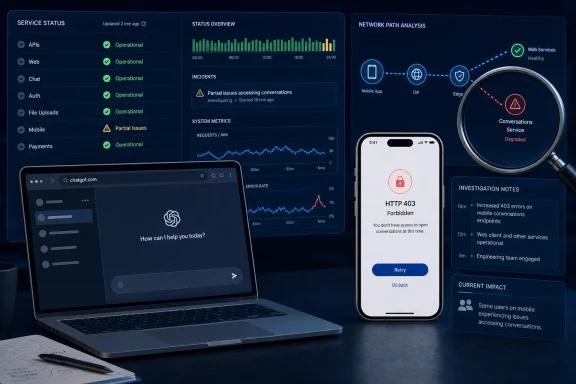 ChatGPT Was Having an Incident, but “Down” Overstates the Evidence
The most defensible answer to whether ChatGPT was down Sunday is that it depended on where and how a user was accessing it. @status_is_down reported a possible problem at 5:45 a.m., while StatusGator recorded 23 user-submitted reports during the preceding 24 hours. Those complaints establish that users were experiencing failures, but they do not establish how many people were affected or that OpenAI’s entire service was unavailable.StatusGator continued to classify OpenAI as operational during its Sunday-morning check. Roughly seven hours earlier, it had also shown the service as operational while recording 16 user reports. The available information does not establish how StatusGator interpreted those totals beyond continuing to display an operational status.
UptimeRobot supplied another external view. Its automated monitoring, based on checks every five minutes and confirmation from three different global locations, found no unusual response times or error codes in its most recently reported check as of Saturday afternoon. That did not prove that every ChatGPT feature, region, account, or client was healthy. It showed only that the monitored service remained reachable under the conditions tested.
OpenAI’s own status page added an important qualification. The company acknowledged that some iOS users were encountering HTTP 403 errors while loading ChatGPT conversations and said it was investigating. That was a genuine service incident, but OpenAI described it as affecting some users on a named platform—not as a general failure of ChatGPT for everyone.
This was not a confirmed platform-wide outage. It was a collection of user-visible failures, including an acknowledged iOS conversation issue, while broader external checks continued to show the service as operational.
| Signal source | How it measures trouble | Observation | What it establishes | Main limitation |
|---|---|---|---|---|
| @status_is_down | Social reports and follower responses | Flagged a possible issue at 5:45 a.m. Sunday | Users were reporting access problems | Cannot independently establish overall scope |
| StatusGator | User submissions and service monitoring | Displayed OpenAI as operational; recorded 23 reports over 24 hours | A limited number of reports had been submitted | Report totals alone do not identify cause or affected workflow |
| UptimeRobot | Automated checks every five minutes, with confirmation from three global locations | No unusual response times or error codes in its latest reported check | The monitored service remained externally reachable | Does not reproduce every account, client, or feature workflow |
| OpenAI status page | Provider incident information | Investigating HTTP 403 errors affecting some iOS conversation users | OpenAI recognized a specific product problem | The initial notice did not define the full cause or scope |
The Trackers Were Measuring Different Symptoms
It is tempting to look at the four signals and decide that one of them must be wrong. A social account said there might be a problem; users submitted reports; automated monitors said the service was operational; and OpenAI acknowledged an iOS issue. The apparent contradiction becomes easier to understand once each signal is treated as a partial observation.Crowdsourced reports show that people are experiencing trouble, but they do not automatically reveal whether those people share the same failure. A total such as 23 reports over 24 hours is useful evidence of user frustration, yet it cannot establish a global outage without additional information about timing, symptoms, platforms, or geographic distribution.
Automated monitoring answers a narrower question. UptimeRobot’s successful checks indicate that the monitored target responded without the unusual latency or error codes its system was designed to detect. They do not establish that an authenticated conversation loaded successfully in the iOS application or that every ChatGPT feature completed its intended task.
OpenAI’s status notice addressed a more specific symptom: HTTP 403 errors affecting some iOS users as they attempted to load conversations. That acknowledgment provides stronger evidence for a client- or workflow-specific incident than for a universal loss of service.
The concise operational distinction is this:
That distinction explains the available evidence without turning it into a broader technical theory unsupported by the facts. The external checks and the user complaints could both be accurate because they were not necessarily testing the same action.A service can remain reachable to an automated monitor while a particular client, account path, or user workflow fails.
A 403 Error Does Not Mean the Entire Service Is Offline
The HTTP 403 reports are important because they identify a concrete failure rather than a general claim that ChatGPT “doesn’t work.” A 403 response means the request received a refusal from the responding service. It is different from a browser or application being completely unable to contact the service.That distinction matters during outage diagnosis. If https://chatgpt.com loads in a browser but the iOS application returns a 403 while opening conversations, a simple homepage test does not reproduce the reported failure. Conversely, a working iOS application for one user does not disprove the experience of another user covered by OpenAI’s incident notice.
The available information does not establish why the iOS requests were receiving 403 responses. It would therefore be premature to assign the issue to authentication, permissions, an application release, or a particular OpenAI system. OpenAI said it was investigating and would provide further information as it became available.
For WindowsForum readers, the practical value lies in comparison testing. If a conversation fails in the iOS application, try the same account through https://chatgpt.com on a Windows PC or another device. If the web version works while the iOS workflow continues to return a 403, record that difference and monitor OpenAI’s status update.
That result does not identify the root cause, but it does help define the visible scope. It may also provide a temporary route back to the conversation while the acknowledged incident remains under investigation.
If the homepage and login fail across several devices and unrelated networks, the evidence points in a different direction. That pattern is more consistent with a broader service problem and should prompt an immediate status-page check before time is spent changing settings on every affected computer.
Symptom-to-action guide
| Symptom | Immediate action | Likely interpretation |
|---|---|---|
| iOS shows HTTP 403 while loading conversations | Compare the same account or conversation at https://chatgpt.com and monitor https://status.openai.com for the acknowledged incident | Consistent with the named iOS conversation issue; not proof of a global outage |
| ChatGPT homepage is unavailable across different devices and networks | Check https://status.openai.com, record the error and time, and ask another user to test independently | Stronger evidence of a broader provider or connectivity issue |
| Failure occurs in only one browser or on one device | Inspect the VPN, extensions, session state, browser profile, and local network; then compare with a clean browser or another device | More likely confined to the local environment, though a provider issue is still possible |
| Homepage loads, but one conversation or feature fails | Preserve the exact error and test the same workflow elsewhere | A narrower workflow failure that a basic availability check may not reproduce |
| Multiple users see the same error on different networks | Check OpenAI’s status page and begin escalation with timestamps and screenshots | Stronger evidence that the issue is not isolated to one machine or connection |
The Evidence Was Limited but Still Actionable
The 23 StatusGator reports over 24 hours should neither be ignored nor inflated. They indicate that users had submitted complaints, but they do not support a claim that reports had surfaced for hundreds of users. The 16 reports recorded in the earlier window likewise do not establish the scale of the underlying problem.Report totals also should not be compared casually across tracking services. Each service may have a different audience, collection method, reporting window, and definition of an incident. A small count on one tracker does not necessarily mean that only that number of people were affected, just as a large social-media reaction does not by itself prove that all participants experienced the same failure.
The reliable conclusions are narrower:
- @status_is_down flagged a possible disruption at 5:45 a.m. Sunday.
- StatusGator continued to display OpenAI as operational while recording user reports.
- UptimeRobot did not identify unusual response times or error codes in its latest reported automated check.
- OpenAI acknowledged and investigated HTTP 403 errors affecting some iOS users loading conversations.
- No cited signal established that ChatGPT was unavailable to everyone.
Timeline
Saturday afternoon — UptimeRobot’s latest reported automated check found no unusual ChatGPT response times or error codes.Early Sunday, roughly seven hours before the later StatusGator observation — StatusGator displayed OpenAI as operational while recording 16 user-submitted reports in the relevant window.
Sunday, 5:45 a.m. — @status_is_down flagged a possible ChatGPT or OpenAI disruption and asked other users whether they were experiencing problems.
Sunday morning — StatusGator continued to show OpenAI as operational and recorded 23 reports over the preceding 24 hours.
During the same reporting period — OpenAI’s status page acknowledged that some iOS users were receiving HTTP 403 errors while loading ChatGPT conversations and said the issue was under investigation.
Administrators Should Reproduce the Failing Workflow
When a user reports that ChatGPT is unavailable, the first task is to preserve the exact symptom. “ChatGPT is down” can mean the site does not open, login fails, the iOS app returns a 403, a stored conversation will not load, or a particular action stops working. Those are different observations and should not be merged into a single generic outage ticket.The next step is controlled comparison. WindowsForum recommends testing the same workflow in a second browser, on another device, and through another network where organizational policy permits. The objective is not to keep trying random fixes. It is to change one condition at a time and determine which changes affect the result.
Start with the direct web address, https://chatgpt.com, rather than relying on an old bookmark or a third-party link. If the site works in one browser but not another, test a private browsing window or a clean browser profile. Review extensions that alter scripts, cookies, privacy controls, or network traffic.
If the failure affects only one device, compare it with another device using the same network. If both devices fail, switch one of them to a different connection, such as a mobile hotspot, if permitted. If the service works on the alternate connection, examine the original network, VPN, filtering service, or organizational gateway.
VPN testing requires care. Disabling a VPN may help isolate a routing or policy difference, but enterprise users should not bypass required security controls. If policy requires the VPN, record whether the failure occurs only while connected and escalate that observation to the appropriate network or security team.
Session state is another useful comparison point. A private window or a second browser can help determine whether a failure is confined to the existing browser session. Avoid destructive troubleshooting until basic comparison tests are complete, particularly if clearing data would remove useful evidence or require users to reauthenticate.
None of these steps should be used to dismiss an acknowledged provider incident. If the symptom matches OpenAI’s notice about iOS conversation-loading errors, the efficient response is to document the failure, compare it with https://chatgpt.com, use the working route if available, and wait for the official incident update.
Action checklist for admins
- Record the exact error message, affected action, client platform, account type, and approximate start time.
- Open https://status.openai.com and check for an incident matching the user’s platform and symptom.
- Test https://chatgpt.com directly rather than testing only whether an app launches.
- Repeat the failing workflow in a second browser or clean browser profile.
- Compare the same account on another device, if available.
- Test from another network where security policy permits, such as an approved mobile hotspot.
- Check whether a VPN, browser extension, filtering product, or existing session changes the result.
- Ask other affected users whether they see the same error and whether they are on different devices or networks.
- Preserve screenshots, HTTP status codes, timestamps, and the exact conversation or feature affected.
- Use an approved fallback process for business-critical work instead of repeatedly retrying a known failing workflow.
- Escalate internally when the problem is limited to a managed device or network.
- Escalate to OpenAI support when the problem persists across browsers, devices, and networks but is not represented accurately on the status page.
A Short Decision Tree Beats a Generic “Is It Down?” Test
Administrators can reduce unnecessary troubleshooting by following a simple sequence.First, identify the symptom. Determine whether the user cannot reach the homepage, cannot sign in, cannot load conversations, receives an HTTP error, or cannot complete one specific action.
Second, check the provider notice. Open https://status.openai.com and compare the wording of any incident with the reported platform, error, and workflow.
Third, reproduce the actual failure. If a conversation will not load, test that conversation or the closest safe equivalent. Merely loading the ChatGPT homepage is not the same test.
Fourth, change one variable at a time. Try https://chatgpt.com in another browser, then on another device, then through another permitted network. Record which change restores access.
Fifth, classify the visible scope.
- One browser only suggests a browser profile, extension, or session issue worth investigating.
- One device only suggests a device-specific condition or client-specific problem.
- One network only points toward the network path, VPN, gateway, or local policy.
- One client platform with a matching provider notice should be tracked as an acknowledged incident.
- The same failure across unrelated devices and networks is stronger evidence of a broader provider-side problem.
This process avoids the two common extremes: declaring a global outage from one failed application and assuming that a green monitoring badge proves every user workflow is healthy.
Businesses Need a Defined Fallback, Not a Perfect Diagnosis
Organizations using ChatGPT for regular work should decide in advance what happens when access becomes unreliable. The fallback does not need to reproduce every AI capability. It needs to keep essential work moving while the incident is investigated.A support team might return temporarily to a conventional knowledge base and manual response templates. A writing team might queue drafts for later processing. A developer might preserve prompts, error messages, and unfinished work locally until access returns. The appropriate fallback depends on the business process and the organization’s security rules.
The incident owner should also communicate what is known without overstating it. A useful internal update would say that OpenAI has acknowledged an iOS conversation issue, external monitors still show broader availability, and administrators are testing whether local reports match the named symptom.
That is more helpful than telling employees either that “ChatGPT is down everywhere” or that “nothing is wrong because the status is green.” It identifies the confirmed problem, acknowledges uncertainty, and gives users an immediate route for testing access through the web.
For critical dependencies, support teams should maintain a short record containing:
- The affected workflow and business impact
- The first known failure time
- Devices, browsers, applications, and networks tested
- Exact errors and screenshots
- Relevant provider-status wording
- Temporary workarounds
- The internal owner and external escalation status
OpenAI’s Status Update Should Remain the Primary Incident Reference
Crowdsourced trackers and social accounts are valuable early-warning signals, but OpenAI’s status page should remain the primary source for the company’s public incident classification. Administrators should compare its incident wording closely with the symptom they are investigating.In this case, the useful details were the platform, the HTTP 403 response, and the conversation-loading workflow. Those specifics allowed readers to determine whether their experience resembled the acknowledged problem. The notice did not establish that every social-media complaint belonged to the same incident, and the available evidence cannot responsibly fill that gap.
If OpenAI updates the incident from “investigating” to a mitigation or monitoring phase, users should retest the exact workflow that failed rather than assuming that all affected sessions recovered simultaneously. If OpenAI marks the event resolved but a user still receives the same error across multiple environments, preserve the evidence and move to support escalation.
The status page is not the only diagnostic tool, but it is the appropriate anchor for deciding whether OpenAI has acknowledged a provider-side event. StatusGator, UptimeRobot, and social reports add context; they do not override the scope stated by the provider without stronger evidence.
The Verdict: A Narrow Incident, Not a Confirmed Global Outage
The Sunday evidence supports a concise verdict: some ChatGPT users were experiencing genuine access problems, and OpenAI had acknowledged HTTP 403 errors affecting some iOS conversation users, but the available monitoring did not confirm a platform-wide ChatGPT outage.Users encountering the named iOS symptom should check https://status.openai.com, compare the same account at https://chatgpt.com, and wait for the acknowledged incident update if the web version provides a workable alternative. Users unable to reach ChatGPT across several devices and unrelated networks should document the errors, recheck the status page, and prepare a provider-support escalation.
If the failure occurs only in one browser, device, or network, investigate the session, extensions, VPN, and local connection before declaring a general outage. If the same failure persists across independent environments, escalate with timestamps, screenshots, HTTP codes, and the exact workflow affected.
The practical lesson is not that green status indicators are meaningless or that every user complaint signals a major incident. It is that outage diagnosis must start with the precise symptom. Check the official status, reproduce the actual workflow, compare environments, and escalate according to the scope the evidence supports.
References
- Primary source: International Business Times Australia
Published: 2026-07-12T11:11:07.966788
Is ChatGPT Down Today? OpenAI Outage Reports Surface for Hundreds of Users as Trackers Show Mixed Signals
Some ChatGPT users reported access issues, but independent trackers showed the platform largely operational, highlighting discrepancies between user complaints and confirmed outages.www.ibtimes.com.au - Official source: status.openai.com

ChatGPT Availability Impacted - OpenAI Status
All impacted services have now fully recovered.
status.openai.com
- Related coverage: uptimerobot.com
ChatGPT Status - UptimeRobot
Check if ChatGPT is down or experiencing issues right now. Real-time status, outage history, and response times.uptimerobot.com