

Buyer/settings verdict: Start with the High preset. At 1440p and Ultra High without ray tracing, both the Radeon RX 9070 XT and GeForce RTX 5080 can dip below 60 FPS. At native 4K, Ultra High, and no ray tracing, only the tested GeForce RTX 5090 held above 60 FPS throughout the benchmark.
Test-context caveat: These findings come from DSOGaming’s testing on Windows 10 with a Ryzen 9 7950X3D, 32GB of DDR5 memory, and eight AMD and NVIDIA graphics cards. They are a useful launch snapshot, not a guarantee for every processor, driver, operating-system configuration, or gameplay sequence. The results also apply to the tested settings and should not be extended to untested combinations.
Ubisoft’s Assassin’s Creed Black Flag Resynced makes a generally encouraging first technical impression on PC. Its native maximum settings are demanding, its preset scaling is uneven, and DSOGaming identified a cutscene frame-rate bug. Against those problems, the game offers a representative built-in benchmark, broad reconstruction support, competitive Radeon rasterization results, and several hours of ordinary gameplay in which DSOGaming encountered no gameplay stutters.
The practical conclusion is straightforward. Ultra High is an enthusiast target rather than the sensible default, especially above 1080p. High is the better place to begin, ray tracing should remain off while establishing a baseline, and the available DLSS, FSR, or XeSS option should be evaluated before sacrificing resolution or making broad reductions to image quality.
Average frame rate does not tell the whole story of a PC release. A game can post a respectable benchmark average while still feeling inconsistent if traversal, shader compilation, or asset streaming repeatedly interrupts frame delivery.
DSOGaming reports playing Black Flag Resynced for more than four to five hours without encountering a gameplay stutter. That observation is significant because it covers ordinary play rather than only the game’s built-in performance test. The built-in benchmark reportedly produced a couple of stutters with ray tracing enabled, so the benchmark and gameplay observations should remain distinct.
The appropriate conclusion is not that the game is flawless or that every PC will have the same experience. It is that the tested system avoided the repeated gameplay stutters that have affected some other major PC releases. That gives buyers a more useful starting point than an average frame-rate number alone.
There are still qualifications. The benchmark’s ray-tracing run was not completely free of stutters, and DSOGaming identified a 30 FPS cutscene bug. Neither issue should be converted into a broader claim that the rendering pipeline is unstable, but both warrant attention when players validate their own settings.
The built-in benchmark also matters because DSOGaming considers it representative of in-game performance. No benchmark can reproduce every port, ship battle, weather condition, scripted sequence, or long streaming session, but a representative test is useful for comparing presets and features on the same PC. Players should use it as a repeatable baseline and then verify the chosen configuration during normal gameplay.
The game supports the major reconstruction families from NVIDIA, AMD, and Intel: DLSS, FSR, and XeSS. That support is especially relevant at 1440p and 4K, where DSOGaming’s native-resolution results show that Ultra High can challenge even expensive graphics hardware.
Reconstruction should not be treated merely as an emergency option for entry-level GPUs. At higher resolutions, it is one of the primary tools available for balancing image quality against rendering cost. Which option is appropriate depends on the installed GPU, the modes exposed by the game, the desired output resolution, and the result visible in motion.
The presence of multiple reconstruction paths also allows a more disciplined tuning process. Players can first measure native performance, then activate the appropriate technology and compare the benchmark’s frame rate and visual presentation. That is more informative than enabling several performance features simultaneously and trying to infer which one changed the result.
For NVIDIA users, DSOGaming reports that the game appears to use DLSS Preset E by default and that Preset M can be forced through the NVIDIA App. That override is best understood as an optional comparison for advanced users, not as a required correction. The game’s default should be tested first, and any override should be judged in representative scenes rather than assumed to be universally preferable.
That is a powerful platform, and readers with different processors or memory configurations should avoid treating its results as guaranteed minimums. The test tells us how the selected GPUs behaved in that system. It does not establish how every card will perform when paired with an older CPU, less memory, different background software, or another Windows configuration.
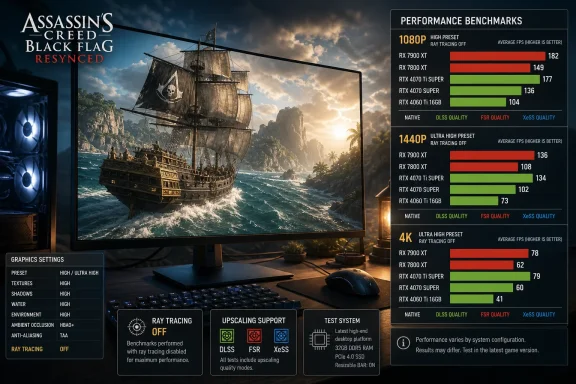
The primary comparison at 1080p used Ultra High settings with ray tracing disabled. This isolates rasterized performance before ray tracing or reconstruction changes the workload. It also creates a clear baseline for comparing the tested GPUs.
At 1080p, DSOGaming found that the Radeon RX 7900 XTX and RX 9070 XT outperformed the GeForce RTX 4090. The RX 6900 XT also finished ahead of the RTX 3080. Those results show that the game’s rasterized workload performed particularly well on the tested Radeon cards.
They should not be stretched into a universal ranking for every scene, setting, resolution, or future software configuration. They are specific benchmark findings. Nevertheless, they are relevant to owners who might otherwise assume that a general multi-game GPU hierarchy will predict this game perfectly.
The built-in benchmark is therefore most valuable as a local comparison tool. Run it repeatedly on the same PC while changing one major variable at a time. The difference between High and Ultra High, between ray tracing off and on, or between native rendering and reconstruction is more actionable than comparing one PC’s result with an unrelated system that may use different hardware and software.
Those comparisons do not mean that every Radeon GPU will beat every nominally comparable GeForce GPU. They do establish that Black Flag Resynced does not follow a simple brand hierarchy in this test. Buyers and existing owners should judge the game using its own results rather than relying exclusively on broad rankings collected across unrelated titles.
Resolution also changes the practical picture. At 1440p, the RX 9070 XT and RTX 5080 could fall below 60 FPS at Ultra High without ray tracing. The RX 7900 XTX, RTX 4090, and RTX 5090 remained above 60 FPS throughout the test.
At native 4K, the demands became much clearer. Only the RTX 5090 maintained more than 60 FPS throughout the Ultra High, no-ray-tracing test. The RTX 4090 did not provide a 60 FPS experience under those conditions.
The resulting guidance is not that every player needs an RTX 5090. It is that native 4K at Ultra High represents the extreme end of the tested workload. High settings, reconstruction, or both are the more practical starting points for other GPUs.
The final column is explicitly editorial guidance based on the reported performance tiers. It should not be read as a measured result for combinations that DSOGaming did not specify.
GPU utilization can vary for several reasons, and a percentage alone does not identify the cause. Proper diagnosis would require more telemetry and repeatable scene analysis than the reported figure provides.
The narrow and defensible conclusion is that the RTX 5090 was not at full utilization in every observed area at 1080p. Despite that behavior, it remained the only tested card to hold above 60 FPS at native 4K, Ultra High, and no ray tracing.
That combination of findings is useful without speculation. The 1080p result warns reviewers not to assume every frame is purely GPU-limited, while the 4K result establishes the card’s position at the highest tested native-resolution target.
Windows enthusiasts reproducing the test should record more than one number. Frame rate, frame time, GPU utilization, clocks, power, and per-core CPU activity can all help describe what is happening. Even then, correlation should not be mistaken for a confirmed cause.
This is where Radeon’s reported advantage is most visible. It is also where the RTX 5090 showed the utilization drop in some areas. Both observations should remain attached to the specific test rather than expanded into claims about the entire game.
Players using 1080p should still begin with High unless they have a reason to prefer Ultra High. The source analysis identifies High as the best balance between image quality and performance, and the highest preset does not automatically provide the most efficient experience.
High-refresh players should also avoid confusing “above 60 FPS” with a guarantee that a card will sustain a much higher monitor refresh rate. The available facts establish a 60 FPS floor for the top five cards in this benchmark, not a universal 120 FPS, 144 FPS, or 240 FPS result.
The recommended procedure is simple: run the benchmark at High with ray tracing disabled, record the result, and then repeat it at Ultra High. If the visual difference is not worth the measured performance change on that PC, return to High.
This is an important boundary because the RX 9070 XT and RTX 5080 are powerful GPUs. Their results show that Ultra High is not merely consuming otherwise unused performance at 1440p. It can push capable hardware below a 60 FPS target.
No adaptive-sync claim is required to make the practical point. If maintaining more than 60 FPS matters, High should be tested before Ultra High. If native High already meets the target, the player can then decide whether ray tracing or a higher preset is the more valuable use of the remaining performance headroom.
Reconstruction provides another route. After establishing native High performance, use the DLSS, FSR, or XeSS option available for the installed GPU and compare the same benchmark. Record both the performance change and any visible differences rather than evaluating the frame-rate number in isolation.
The RX 7900 XTX’s ability to remain above 60 FPS at 1440p reinforces its strong showing in the rasterized tests. Again, that statement applies to the reported benchmark and settings; it does not establish performance under ray tracing or at every point in the game.
That makes the native 4K result the clearest hardware boundary in the report. Within this set of cards, an RTX 5090 was required to keep the benchmark above 60 FPS while using the highest raster preset without reconstruction.
This does not make the RTX 5090 a general requirement for 4K output. The result concerns native rendering at Ultra High. The game includes a High preset as well as DLSS, FSR, and XeSS paths, giving players several alternatives to the exact test configuration.
For an RTX 4090 or another high-end card, the sensible order is to test High first, then test the appropriate reconstruction option. Only after those comparisons should the player decide whether native Ultra High is worth accepting a result below the desired threshold.
The distinction between output resolution and internal rendering resolution also matters. A reconstructed 4K output is not the same test as native 4K, but it may be the preferable operating configuration for a particular display and GPU. The correct choice depends on the benchmark result and the player’s image-quality judgment.
The preset ladder reportedly scales unevenly. Medium and Low perform almost identically even though Medium provides better image quality. Very Low and Ultra Low produce a more meaningful performance improvement, but they also bring substantial visual compromises.
Those findings lead to several concrete conclusions:
Individual settings can still be tested, but they should be changed one at a time. Run the same benchmark after each change and retain only adjustments that produce a worthwhile result.
The final configuration should be based on both repeatable benchmark performance and actual play, not on the benchmark average alone.
They should instead be treated as optional enhancements to test after establishing a stable rasterized baseline. This order matters because it allows the player to identify the specific performance and frame-delivery changes associated with the ray-tracing path.
Start at High with ray tracing disabled. Run the benchmark. Then enable the available ray-tracing features and repeat the same test. If the result remains within the intended performance target and the visual change is worthwhile to the player, retain them. Otherwise, disable them or test a reconstruction option.
The couple of benchmark stutters reported with ray tracing enabled are another reason to compare the two paths directly. DSOGaming’s ordinary gameplay observation was more positive, with no gameplay stutters encountered over more than four to five hours, so the benchmark behavior should not automatically be generalized to the full game.
This is also why ray tracing should not be bundled into the initial setup. Establishing a no-RT baseline makes later troubleshooting more precise.
Accordingly, players should not be told to change Raytracing, Terrain Quality, an Overall Preset, or any other setting as a confirmed solution. Those instructions would imply knowledge that has not been established by the available source material.
The defensible guidance is limited:
The result is still useful. The reported benchmark and gameplay behavior occurred on Windows 10 with the stated high-end hardware platform. Readers attempting to reproduce the findings should document their own Windows version alongside the GPU, driver, resolution, preset, ray-tracing state, and reconstruction mode.
Comparisons across operating systems require care. A Windows 11 result from another machine may also differ because of the processor, memory, driver, overlays, background applications, or game configuration. The operating system is one variable among many.
The same caution applies to driver versions. A benchmark is a snapshot of the software environment in which it was performed. Later results may change, but no prediction about the direction or size of that change is justified without new testing.
For administrators, reproducibility matters more than guessing what a future update might do. Maintain a short record of each test configuration, change one variable at a time, and rerun the same built-in benchmark after updates.
High is the recommended balance. Medium and Low reportedly perform almost identically despite Medium looking better. Very Low and Ultra Low offer more substantial performance relief but at a larger visual cost.
That arrangement can mislead users who expect each downward step to recover a predictable amount of performance. A player may move from Medium to Low, lose image quality, and gain little. Another player may remain on Ultra High because the name suggests it is the intended setting for a powerful GPU, even though High provides the more efficient balance.
The built-in benchmark gives players a way around that problem. Rather than moving through every preset in order, test the combinations that the available findings make most relevant:
First, can the installed GPU meet the desired target at High without ray tracing? This is the recommended baseline and the most relevant starting point.
Second, how much does Ultra High change the image and performance on that specific system? At 1440p, the RX 9070 XT and RTX 5080 can dip below 60 FPS under the tested Ultra High configuration. At native 4K, only the RTX 5090 remained above 60 FPS throughout.
Third, is ray tracing or native rendering more important than maintaining the performance target? The game offers ray-traced Global Illumination and Reflections as well as DLSS, FSR, and XeSS, so the answer does not have to be determined by the preset alone.
Owners of the tested Radeon cards should note their strong rasterized benchmark results. Owners of high-end GeForce hardware should note that even the RTX 4090 did not provide a 60 FPS native-4K Ultra High experience in the reported test. Neither observation should be turned into a universal brand verdict.
The best purchasing conclusion is narrower: Black Flag Resynced can rearrange familiar GPU expectations in rasterized testing, and native 4K Ultra High is demanding enough to separate the RTX 5090 from the rest of the tested group.
Its weaknesses are also clear. Ultra High can push the RX 9070 XT and RTX 5080 below 60 FPS at 1440p. Native 4K Ultra High without ray tracing remained above 60 FPS only on the RTX 5090. Preset scaling is uneven, with Medium and Low reportedly delivering similar performance despite a visible quality difference. The ray-tracing benchmark produced a couple of stutters, and the identified 30 FPS cutscene bug remains an issue without a verified official workaround in the supplied material.
None of those points requires speculation about engine design, future drivers, or Ubisoft’s intentions. The current evidence already supports a practical verdict.
Start at High. Keep ray tracing off for the first benchmark. Compare High directly with Ultra High. Then test ray-traced Global Illumination and Reflections as a separate change. Finally, evaluate the available DLSS, FSR, or XeSS path and confirm the selected configuration during gameplay.
That process will not make every GPU a native-4K Ultra High card, but it will identify the best supported balance for the hardware actually installed. For most PC players, that is more useful than treating the maximum preset as the only valid destination.
Test-context caveat: These findings come from DSOGaming’s testing on Windows 10 with a Ryzen 9 7950X3D, 32GB of DDR5 memory, and eight AMD and NVIDIA graphics cards. They are a useful launch snapshot, not a guarantee for every processor, driver, operating-system configuration, or gameplay sequence. The results also apply to the tested settings and should not be extended to untested combinations.
Ubisoft’s Assassin’s Creed Black Flag Resynced makes a generally encouraging first technical impression on PC. Its native maximum settings are demanding, its preset scaling is uneven, and DSOGaming identified a cutscene frame-rate bug. Against those problems, the game offers a representative built-in benchmark, broad reconstruction support, competitive Radeon rasterization results, and several hours of ordinary gameplay in which DSOGaming encountered no gameplay stutters.
The practical conclusion is straightforward. Ultra High is an enthusiast target rather than the sensible default, especially above 1080p. High is the better place to begin, ray tracing should remain off while establishing a baseline, and the available DLSS, FSR, or XeSS option should be evaluated before sacrificing resolution or making broad reductions to image quality.
 Stability Is the Strongest Part of the First PC Report
Average frame rate does not tell the whole story of a PC release. A game can post a respectable benchmark average while still feeling inconsistent if traversal, shader compilation, or asset streaming repeatedly interrupts frame delivery.DSOGaming reports playing Black Flag Resynced for more than four to five hours without encountering a gameplay stutter. That observation is significant because it covers ordinary play rather than only the game’s built-in performance test. The built-in benchmark reportedly produced a couple of stutters with ray tracing enabled, so the benchmark and gameplay observations should remain distinct.
The appropriate conclusion is not that the game is flawless or that every PC will have the same experience. It is that the tested system avoided the repeated gameplay stutters that have affected some other major PC releases. That gives buyers a more useful starting point than an average frame-rate number alone.
There are still qualifications. The benchmark’s ray-tracing run was not completely free of stutters, and DSOGaming identified a 30 FPS cutscene bug. Neither issue should be converted into a broader claim that the rendering pipeline is unstable, but both warrant attention when players validate their own settings.
The built-in benchmark also matters because DSOGaming considers it representative of in-game performance. No benchmark can reproduce every port, ship battle, weather condition, scripted sequence, or long streaming session, but a representative test is useful for comparing presets and features on the same PC. Players should use it as a repeatable baseline and then verify the chosen configuration during normal gameplay.
A Modern Rendering and Reconstruction Feature Set
Ubisoft’s material describes Black Flag Resynced as rebuilt using the latest Anvil Engine, with ray tracing included among its visual upgrades. The PC version provides adjustable settings covering areas such as textures, shadows, view distance, terrain, and reflections. Ray-traced Global Illumination and ray-traced Reflections are also available.The game supports the major reconstruction families from NVIDIA, AMD, and Intel: DLSS, FSR, and XeSS. That support is especially relevant at 1440p and 4K, where DSOGaming’s native-resolution results show that Ultra High can challenge even expensive graphics hardware.
Reconstruction should not be treated merely as an emergency option for entry-level GPUs. At higher resolutions, it is one of the primary tools available for balancing image quality against rendering cost. Which option is appropriate depends on the installed GPU, the modes exposed by the game, the desired output resolution, and the result visible in motion.
The presence of multiple reconstruction paths also allows a more disciplined tuning process. Players can first measure native performance, then activate the appropriate technology and compare the benchmark’s frame rate and visual presentation. That is more informative than enabling several performance features simultaneously and trying to infer which one changed the result.
For NVIDIA users, DSOGaming reports that the game appears to use DLSS Preset E by default and that Preset M can be forced through the NVIDIA App. That override is best understood as an optional comparison for advanced users, not as a required correction. The game’s default should be tested first, and any override should be judged in representative scenes rather than assumed to be universally preferable.
The Benchmark Is Useful, but the Test Platform Matters
DSOGaming tested the game using an AMD Ryzen 9 7950X3D, 32GB of DDR5-6000 memory, and eight high-end or formerly high-end graphics cards. The Radeon group consisted of the RX 6900 XT, RX 7900 XTX, and RX 9070 XT. The GeForce group included the RTX 2080 Ti, RTX 3080, RTX 4090, RTX 5080, and RTX 5090.That is a powerful platform, and readers with different processors or memory configurations should avoid treating its results as guaranteed minimums. The test tells us how the selected GPUs behaved in that system. It does not establish how every card will perform when paired with an older CPU, less memory, different background software, or another Windows configuration.
The primary comparison at 1080p used Ultra High settings with ray tracing disabled. This isolates rasterized performance before ray tracing or reconstruction changes the workload. It also creates a clear baseline for comparing the tested GPUs.
At 1080p, DSOGaming found that the Radeon RX 7900 XTX and RX 9070 XT outperformed the GeForce RTX 4090. The RX 6900 XT also finished ahead of the RTX 3080. Those results show that the game’s rasterized workload performed particularly well on the tested Radeon cards.
They should not be stretched into a universal ranking for every scene, setting, resolution, or future software configuration. They are specific benchmark findings. Nevertheless, they are relevant to owners who might otherwise assume that a general multi-game GPU hierarchy will predict this game perfectly.
The built-in benchmark is therefore most valuable as a local comparison tool. Run it repeatedly on the same PC while changing one major variable at a time. The difference between High and Ultra High, between ray tracing off and on, or between native rendering and reconstruction is more actionable than comparing one PC’s result with an unrelated system that may use different hardware and software.
Radeon Leads Several Raster Comparisons
The most notable GPU result is the tested strength of Radeon hardware when ray tracing is disabled. At 1080p and Ultra High, the RX 7900 XTX and RX 9070 XT both finished ahead of the RTX 4090 in DSOGaming’s benchmark. The RX 6900 XT likewise beat the RTX 3080.Those comparisons do not mean that every Radeon GPU will beat every nominally comparable GeForce GPU. They do establish that Black Flag Resynced does not follow a simple brand hierarchy in this test. Buyers and existing owners should judge the game using its own results rather than relying exclusively on broad rankings collected across unrelated titles.
Resolution also changes the practical picture. At 1440p, the RX 9070 XT and RTX 5080 could fall below 60 FPS at Ultra High without ray tracing. The RX 7900 XTX, RTX 4090, and RTX 5090 remained above 60 FPS throughout the test.
At native 4K, the demands became much clearer. Only the RTX 5090 maintained more than 60 FPS throughout the Ultra High, no-ray-tracing test. The RTX 4090 did not provide a 60 FPS experience under those conditions.
The resulting guidance is not that every player needs an RTX 5090. It is that native 4K at Ultra High represents the extreme end of the tested workload. High settings, reconstruction, or both are the more practical starting points for other GPUs.
| GPU | 1080p Ultra High, no RT | 1440p Ultra High, no RT | Native 4K Ultra High, no RT | Editorial guidance |
|---|---|---|---|---|
| Radeon RX 6900 XT | Beat the RTX 3080 | Not specified | Not specified | Compare High against Ultra High before reducing resolution |
| Radeon RX 7900 XTX | Beat the RTX 4090 | Remained above 60 FPS | Not specified | A strong tested raster result; benchmark the target resolution locally |
| Radeon RX 9070 XT | Beat the RTX 4090 | Could dip below 60 FPS | Not specified | Begin at High if maintaining 60 FPS is the priority |
| GeForce RTX 3080 | Finished behind the RX 6900 XT | Not specified | Not specified | Use the built-in benchmark to compare High with Ultra High |
| GeForce RTX 4090 | Finished behind the RX 7900 XTX and RX 9070 XT | Remained above 60 FPS | Did not provide a 60 FPS experience | Consider High or a supported reconstruction mode for native 4K output |
| GeForce RTX 5080 | One of the top five cards that remained above 60 FPS | Could dip below 60 FPS | Not specified | High is the safer baseline for a consistent 60 FPS target at 1440p |
| GeForce RTX 5090 | Remained above 60 FPS; utilization fell to 85% in some areas | Remained above 60 FPS | Remained above 60 FPS | The only tested card that held above 60 FPS at native 4K Ultra High |
The RTX 5090 Utilization Result Needs a Narrow Interpretation
At 1080p, Ultra High, and no ray tracing, DSOGaming observed RTX 5090 GPU utilization falling to 85% in some areas. That is the verified observation. It does not establish why utilization fell, and it should not be presented as proof of a processor bottleneck, a driver defect, or an engine limitation.GPU utilization can vary for several reasons, and a percentage alone does not identify the cause. Proper diagnosis would require more telemetry and repeatable scene analysis than the reported figure provides.
The narrow and defensible conclusion is that the RTX 5090 was not at full utilization in every observed area at 1080p. Despite that behavior, it remained the only tested card to hold above 60 FPS at native 4K, Ultra High, and no ray tracing.
That combination of findings is useful without speculation. The 1080p result warns reviewers not to assume every frame is purely GPU-limited, while the 4K result establishes the card’s position at the highest tested native-resolution target.
Windows enthusiasts reproducing the test should record more than one number. Frame rate, frame time, GPU utilization, clocks, power, and per-core CPU activity can all help describe what is happening. Even then, correlation should not be mistaken for a confirmed cause.
1080p Establishes the Rasterized Baseline
At 1080p and Ultra High without ray tracing, DSOGaming’s top five tested GPUs maintained more than 60 FPS throughout the benchmark. The value of that result lies less in proving that expensive hardware can handle 1080p and more in exposing the game’s card ordering under a relatively controlled rasterized workload.This is where Radeon’s reported advantage is most visible. It is also where the RTX 5090 showed the utilization drop in some areas. Both observations should remain attached to the specific test rather than expanded into claims about the entire game.
Players using 1080p should still begin with High unless they have a reason to prefer Ultra High. The source analysis identifies High as the best balance between image quality and performance, and the highest preset does not automatically provide the most efficient experience.
High-refresh players should also avoid confusing “above 60 FPS” with a guarantee that a card will sustain a much higher monitor refresh rate. The available facts establish a 60 FPS floor for the top five cards in this benchmark, not a universal 120 FPS, 144 FPS, or 240 FPS result.
The recommended procedure is simple: run the benchmark at High with ray tracing disabled, record the result, and then repeat it at Ultra High. If the visual difference is not worth the measured performance change on that PC, return to High.
1440p Exposes the Cost of Ultra High
At 1440p and Ultra High without ray tracing, the RX 9070 XT and RTX 5080 could dip below 60 FPS. The RX 7900 XTX, RTX 4090, and RTX 5090 remained above 60 FPS throughout DSOGaming’s test.This is an important boundary because the RX 9070 XT and RTX 5080 are powerful GPUs. Their results show that Ultra High is not merely consuming otherwise unused performance at 1440p. It can push capable hardware below a 60 FPS target.
No adaptive-sync claim is required to make the practical point. If maintaining more than 60 FPS matters, High should be tested before Ultra High. If native High already meets the target, the player can then decide whether ray tracing or a higher preset is the more valuable use of the remaining performance headroom.
Reconstruction provides another route. After establishing native High performance, use the DLSS, FSR, or XeSS option available for the installed GPU and compare the same benchmark. Record both the performance change and any visible differences rather than evaluating the frame-rate number in isolation.
The RX 7900 XTX’s ability to remain above 60 FPS at 1440p reinforces its strong showing in the rasterized tests. Again, that statement applies to the reported benchmark and settings; it does not establish performance under ray tracing or at every point in the game.
Native 4K Ultra High Is an RTX 5090-Class Test
At native 4K, Ultra High, and no ray tracing, only the RTX 5090 maintained more than 60 FPS throughout DSOGaming’s benchmark. The RTX 4090 did not provide a 60 FPS experience under the same conditions.That makes the native 4K result the clearest hardware boundary in the report. Within this set of cards, an RTX 5090 was required to keep the benchmark above 60 FPS while using the highest raster preset without reconstruction.
This does not make the RTX 5090 a general requirement for 4K output. The result concerns native rendering at Ultra High. The game includes a High preset as well as DLSS, FSR, and XeSS paths, giving players several alternatives to the exact test configuration.
For an RTX 4090 or another high-end card, the sensible order is to test High first, then test the appropriate reconstruction option. Only after those comparisons should the player decide whether native Ultra High is worth accepting a result below the desired threshold.
The distinction between output resolution and internal rendering resolution also matters. A reconstructed 4K output is not the same test as native 4K, but it may be the preferable operating configuration for a particular display and GPU. The correct choice depends on the benchmark result and the player’s image-quality judgment.
High Is the Recommended Default
DSOGaming identifies High as the best balance between image quality and performance. That makes it the recommended starting preset, including for many systems that can technically select Ultra High.The preset ladder reportedly scales unevenly. Medium and Low perform almost identically even though Medium provides better image quality. Very Low and Ultra Low produce a more meaningful performance improvement, but they also bring substantial visual compromises.
Those findings lead to several concrete conclusions:
- Do not assume that lowering the preset by one step will produce a useful performance gain.
- Prefer Medium over Low if both perform similarly on the local system.
- Use Very Low or Ultra Low only when the additional performance is necessary and the visual reduction is acceptable.
- Compare High directly with Ultra High before treating the maximum preset as the default.
Individual settings can still be tested, but they should be changed one at a time. Run the same benchmark after each change and retain only adjustments that produce a worthwhile result.
What to Set
The following process uses only the verified presets, ray-tracing controls, benchmark, and reconstruction options:1. Establish the baseline
- Select the High in-game preset.
- Set ray tracing off, including ray-traced Global Illumination and ray-traced Reflections.
- Use the display’s native resolution.
- Leave DLSS, FSR, or XeSS disabled for the first run.
- Run the game’s built-in benchmark.
- Record the average performance, minimum behavior shown by the benchmark, and any visible stutters.
2. Measure Ultra High
- Select the Ultra High preset.
- Keep ray tracing off.
- Keep the same native resolution.
- Run the built-in benchmark again.
- Compare the performance result and visible image difference with the High baseline.
3. Test ray tracing separately
- Return to the preferred preset, normally High.
- Enable the available ray-traced Global Illumination and Reflections options.
- Run the built-in benchmark.
- Compare this run with the no-ray-tracing baseline.
4. Test the appropriate reconstruction path
- Keep the preferred preset and chosen ray-tracing state.
- Enable the available DLSS, FSR, or XeSS option appropriate to the GPU.
- Run the built-in benchmark again.
- Compare performance and image quality with the native-resolution result.
5. Verify the result in gameplay
After selecting the best benchmark configuration, play through ordinary traversal and at least one demanding sequence. The benchmark is reported to be representative, but it cannot cover every gameplay condition.The final configuration should be based on both repeatable benchmark performance and actual play, not on the benchmark average alone.
Ray Tracing Should Be Tested After the Raster Baseline
Black Flag Resynced provides ray-traced Global Illumination and Reflections. The available evidence does not support a broad claim that their performance cost is small, that their visual effect is transformative, or that they should always be enabled on a particular GPU.They should instead be treated as optional enhancements to test after establishing a stable rasterized baseline. This order matters because it allows the player to identify the specific performance and frame-delivery changes associated with the ray-tracing path.
Start at High with ray tracing disabled. Run the benchmark. Then enable the available ray-tracing features and repeat the same test. If the result remains within the intended performance target and the visual change is worthwhile to the player, retain them. Otherwise, disable them or test a reconstruction option.
The couple of benchmark stutters reported with ray tracing enabled are another reason to compare the two paths directly. DSOGaming’s ordinary gameplay observation was more positive, with no gameplay stutters encountered over more than four to five hours, so the benchmark behavior should not automatically be generalized to the full game.
This is also why ray tracing should not be bundled into the initial setup. Establishing a no-RT baseline makes later troubleshooting more precise.
The 30 FPS Cutscene Bug Remains a Launch Defect
DSOGaming identified a 30 FPS cutscene bug. The supplied facts do not establish its exact triggers, an official workaround, or a timetable for correction.Accordingly, players should not be told to change Raytracing, Terrain Quality, an Overall Preset, or any other setting as a confirmed solution. Those instructions would imply knowledge that has not been established by the available source material.
The defensible guidance is limited:
- Be aware that DSOGaming identified a cutscene bug involving a 30 FPS limit.
- Do not assume that a setting change circulating elsewhere is an official or verified fix.
- Keep a record of the selected preset, ray-tracing state, and reconstruction mode if the issue occurs.
- Reproduce the behavior before making broad configuration changes.
- Prefer an official game update or documented support instruction over an unofficial executable modification.
Action checklist for admins
- Record the PC’s Windows version, GPU model, graphics driver version, display resolution, and current game build before testing.
- Select the High preset and turn ray tracing off for the first baseline.
- Leave reconstruction disabled and run the game’s built-in benchmark at native resolution.
- Save the result, then repeat the benchmark at Ultra High with ray tracing still off.
- Compare High and Ultra High using the same resolution and reconstruction state.
- Return to the preferred preset, enable ray-traced Global Illumination and Reflections, and rerun the benchmark.
- Test the available DLSS, FSR, or XeSS path separately rather than changing several features at once.
- Verify the selected configuration during ordinary gameplay after completing the benchmark comparisons.
- If the 30 FPS cutscene bug appears, document the exact active settings and avoid presenting an unverified setting change as a confirmed workaround.
- Test any NVIDIA App DLSS preset override on one machine before applying it more broadly.
- Avoid unofficial executable patchers on managed PCs unless they have passed the organization’s security and software-integrity review.
Windows 10 Is the Test Context, Not a Universal Guarantee
DSOGaming conducted its testing on Windows 10 64-bit. That establishes the operating system used for the reported results. It does not establish a universal support policy, guarantee identical performance on all Windows 10 systems, or prove that Windows 10 and Windows 11 will behave the same way.The result is still useful. The reported benchmark and gameplay behavior occurred on Windows 10 with the stated high-end hardware platform. Readers attempting to reproduce the findings should document their own Windows version alongside the GPU, driver, resolution, preset, ray-tracing state, and reconstruction mode.
Comparisons across operating systems require care. A Windows 11 result from another machine may also differ because of the processor, memory, driver, overlays, background applications, or game configuration. The operating system is one variable among many.
The same caution applies to driver versions. A benchmark is a snapshot of the software environment in which it was performed. Later results may change, but no prediction about the direction or size of that change is justified without new testing.
For administrators, reproducibility matters more than guessing what a future update might do. Maintain a short record of each test configuration, change one variable at a time, and rerun the same built-in benchmark after updates.
The Preset Structure Needs Better Practical Scaling
The most actionable criticism is not simply that Ultra High is demanding. Maximum presets are expected to be expensive. The larger issue is that the reported preset ladder does not provide evenly spaced performance choices.High is the recommended balance. Medium and Low reportedly perform almost identically despite Medium looking better. Very Low and Ultra Low offer more substantial performance relief but at a larger visual cost.
That arrangement can mislead users who expect each downward step to recover a predictable amount of performance. A player may move from Medium to Low, lose image quality, and gain little. Another player may remain on Ultra High because the name suggests it is the intended setting for a powerful GPU, even though High provides the more efficient balance.
The built-in benchmark gives players a way around that problem. Rather than moving through every preset in order, test the combinations that the available findings make most relevant:
- High versus Ultra High for capable systems.
- Medium versus Low for systems that cannot maintain the target at High.
- Medium versus Very Low if a substantial performance increase is necessary.
- Native rendering versus the appropriate DLSS, FSR, or XeSS option.
What Buyers Should Take From the GPU Results
Prospective buyers should separate three questions.First, can the installed GPU meet the desired target at High without ray tracing? This is the recommended baseline and the most relevant starting point.
Second, how much does Ultra High change the image and performance on that specific system? At 1440p, the RX 9070 XT and RTX 5080 can dip below 60 FPS under the tested Ultra High configuration. At native 4K, only the RTX 5090 remained above 60 FPS throughout.
Third, is ray tracing or native rendering more important than maintaining the performance target? The game offers ray-traced Global Illumination and Reflections as well as DLSS, FSR, and XeSS, so the answer does not have to be determined by the preset alone.
Owners of the tested Radeon cards should note their strong rasterized benchmark results. Owners of high-end GeForce hardware should note that even the RTX 4090 did not provide a 60 FPS native-4K Ultra High experience in the reported test. Neither observation should be turned into a universal brand verdict.
The best purchasing conclusion is narrower: Black Flag Resynced can rearrange familiar GPU expectations in rasterized testing, and native 4K Ultra High is demanding enough to separate the RTX 5090 from the rest of the tested group.
A Promising Baseline With Clear Limits
Assassin’s Creed Black Flag Resynced begins its PC life with a stronger technical foundation than its maximum-setting requirements might initially suggest. DSOGaming’s extended play session encountered no gameplay stutters, the built-in benchmark was considered representative, and the game offers the three major reconstruction paths alongside optional ray-traced Global Illumination and Reflections.Its weaknesses are also clear. Ultra High can push the RX 9070 XT and RTX 5080 below 60 FPS at 1440p. Native 4K Ultra High without ray tracing remained above 60 FPS only on the RTX 5090. Preset scaling is uneven, with Medium and Low reportedly delivering similar performance despite a visible quality difference. The ray-tracing benchmark produced a couple of stutters, and the identified 30 FPS cutscene bug remains an issue without a verified official workaround in the supplied material.
None of those points requires speculation about engine design, future drivers, or Ubisoft’s intentions. The current evidence already supports a practical verdict.
Start at High. Keep ray tracing off for the first benchmark. Compare High directly with Ultra High. Then test ray-traced Global Illumination and Reflections as a separate change. Finally, evaluate the available DLSS, FSR, or XeSS path and confirm the selected configuration during gameplay.
That process will not make every GPU a native-4K Ultra High card, but it will identify the best supported balance for the hardware actually installed. For most PC players, that is more useful than treating the maximum preset as the only valid destination.
References
- Primary source: DSOGaming
Published: 2026-07-13T00:58:00+00:00
Assassin’s Creed Black Flag Resynced PC Performance Analysis
Powered by the latest version of Anvil Engine, it's time to benchmark Assassin’s Creed Black Flag Resynced and examine its performance on PC.www.dsogaming.com - Related coverage: tomsguide.com
Assassin’s Creed Black Flag Resynced review: The best pirate game gets even better | Tom's Guide
Black Flag Resynced gives the fan-favorite 2013 Assassin’s Creed game a complete overhaul. From the incredible visuals to some essential gameplay upgrades, stepping into the shoes of Edward Kenway has never looked or played this good.www.tomsguide.com - Related coverage: pcgamer.com
How to get all 28 Black Flag Resynced outfits | PC Gamer
Want some fresh fits? Here's how to get all the Assassin's Creed Black Flag Resynced outfits, as some of the locations have changed in the remake.www.pcgamer.com - Related coverage: creativebloq.com
Assassin's Creed Black Flag Resynced review: prettier, smoother, but still feels like it's 2013 at heart | Creative Bloq
A remake that brings back the swashbuckling charm, but is it the reset the series needs?www.creativebloq.com - Related coverage: tomshardware.com
Cracked version of Assassin’s Creed Black Flag Resynced leaked days prior to official release despite Denuvo DRM protection — Denuvo unable to stop crackers, with some finding ways to completely remove it from other titles | Tom's Hardwar
Crackers are now beating game studios and releasing pre-release copies of games before their official launch date.www.tomshardware.com - Related coverage: gamesradar.com
Edward Kenway is the biggest bastard in Assassin's Creed history | GamesRadar+
Opinion | Five hours into Black Flag Resynced, I'm bored of the bad boy era.www.gamesradar.com
- Related coverage: ubisoft.com
Assassin's Creed Black Flag Resynced | Ubisoft (US)
Official site. Sail the Caribbean as Edward Kenway during the Golden Age of Piracy in this faithfully enhanced remake! Available now on PlayStation®5 and Xbox Series X|S, as well as on PC on Ubisoft Store, Steam, Steam Deck and Epic Games Store.www.ubisoft.com
- Related coverage: news.ubisoft.com
Assassin's Creed Black Flag Resynced Launches With 2 Million Copies Sold
Assassin's Creed Black Flag Resynced makes a strong start, supported by positive reviewsnews.ubisoft.com - Related coverage: store.steampowered.com
Assassin's Creed Black Flag Resynced on Steam
The iconic solo pirate adventure returns. Sail the Caribbean as Edward Kenway during the Golden Age of Piracy in this faithfully enhanced remake featuring stunning visuals, upgraded gameplay, and new content.store.steampowered.com
- Related coverage: gamespot.com
Assassin's Creed: Black Flag Resynced PC Requirements Revealed - Check If Your Rig Is Seaworthy - GameSpot
Is your PC ready to sail on the Assassin's Creed: Black Flag Resynced tides?www.gamespot.com - Related coverage: playstation.com
Assassin’s Creed Black Flag Resynced – PS5 Games | PlayStation (US)
Discover Assassin’s Creed Black Flag Resynced for PS5 on the official PlayStation website. The iconic solo pirate adventure returns in this faithfully enhanced remake featuring stunning visuals, upgraded gameplay, and new content.www.playstation.com
- Related coverage: ubistatic-a.ubisoft.com
- Related coverage: windowscentral.com
Ubisoft's Assassin's Creed Black Flag Resynced remake finally has its release date after its full reveal, and preorders are live — oh, and there's a Collector's Edition, too | Windows Central
The Assassin's Creed Black Flag remake has been revealed in full, and you can preorder it now.www.windowscentral.com - Related coverage: techradar.com
'It's kind of humbling to come back to a project after all these years, to know that the fans love the game and they love the character so much' — Edward Kenway's actor speaks about revisiting the character for Assassin's Creed Black Flag Resyn
Matt Ryan, the actor behind Assassin's Creed Black Flag's Edward Kenway, has discussed revisiting the character 13 years later in the upcoming remake.www.techradar.com - Related coverage: as.com
Ubisoft Barcelona sufre despidos tras Assassin’s Creed Black Flag: “No imaginé que terminaría así” - Meristation
Ubisoft despide a 51 empleados en Barcelona tras el éxito de Assassin’s Creed Black Flag Resynced, uno de los mejor valorados de la saga.as.com - Related coverage: techspot.com
Assassin's Creed Black Flag Resynced: 50 GPU Benchmark | TechSpot
How demanding is Assassin's Creed Black Flag Resynced? We benchmarked 50 graphics cards across multiple settings, resolutions, ray tracing modes, and upscaling presets.www.techspot.com - Related coverage: pcgamingwiki.com
- Related coverage: kalendarhrace.cz
Assassin's Creed Black Flag Resynced — Známý problém: Cutscény na PC omezené na 30 FPS (dočasné řešení) | KalendářHráče.cz
{"summary":"Vývojáři Assassin's Creed Black Flag Resynced řeší problém, kdy se cutscény na PC uzamykají na 30 FPS při použití Raytracing, BVH nebo Ultra High nawww.kalendarhrace.cz - Related coverage: tech.sportskeeda.com
Assassin's Creed Black Flag Resynced 30 FPS cap: How to remove 30 FPS cap from Assassin's Creed Black Flag Resynced
With the arrival of Assassin's Creed Black Flag Resynced, fans can revisit the revitalized classic in all its modern glory, from ray-tracing to high FPS.tech.sportskeeda.com - Related coverage: game-atlas.de
Assassin's Creed Black Flag Resynced Review: 58/100 · Game Atlas
The pirate game underneath is still worth sailing, and the visual pass genuinely flatters Havana and the open water. But this remake keeps tripping over decisions Ubisoft made around it rather than in it: a pause menu that sells you things, an options screen buried behind loading screens...game-atlas.de - Related coverage: resetera.com

