

StartupHub.ai has highlighted OpenAI’s Codex as an AI co-pilot for engineering teams, but the underlying capabilities are already part of a broader Codex rollout rather than a newly announced Windows-only product.
According to OpenAI, Codex can take a software task from an issue or bug report through planning, code changes, test execution and a review-ready pull request. Its intended jobs include routine fixes, test coverage, complex refactors and large migrations. The key distinction from autocomplete-style coding assistants is that Codex is designed to work across a repository and carry out multi-step tasks, while an engineer reviews and decides what ships.
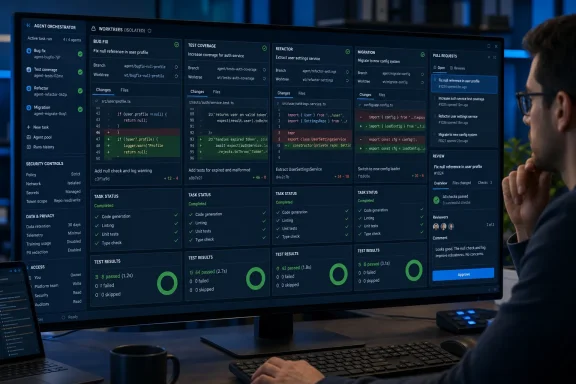
For Windows developers, the relevant milestone arrived on March 4, 2026. OpenAI’s release notes say the Codex desktop app is available on Windows for ChatGPT plans that include Codex. It can run multiple agents in parallel using isolated worktrees, then present reviewable diffs that can be edited, discarded or converted into pull requests. Work can move among the desktop app, command-line interface and IDE integrations under the same ChatGPT account.
The sales pitch is familiar: less time spent on repetitive development work and more time for engineers to handle design, architecture and review. In practice, Codex can investigate a reported defect, reproduce it, propose the smallest fix, modify the repository and run tests. That is useful for a backlog full of well-scoped bugs, dependency migrations and coverage gaps.
It is not a replacement for code review or change control. A generated patch can still misunderstand business requirements, fail in an environment the agent cannot reproduce, introduce security flaws, or produce a test that merely validates its own incorrect assumption. OpenAI’s own engineering material frames the human role as setting intent, providing the right tooling and feedback loops, and supervising the result.
The Windows app’s use of separate worktrees is especially relevant to teams evaluating parallel agents. It reduces the chance that concurrent tasks collide in a single checkout, but it does not remove the operational problem of reviewing several AI-generated changes at once.
For managed environments, Business, Enterprise and Edu workspaces can control plugins and connected applications through workspace settings, with role-based access controls available for Enterprise and Edu. Those controls span ChatGPT and Codex rather than applying solely to the Codex app.
Data handling needs attention before developers connect proprietary repositories or services. OpenAI states that Business, Enterprise and Edu inputs and outputs are not used to improve its models by default. For Plus and Pro accounts, conversations may be used for training unless the user disables that setting in ChatGPT data controls.
Windows shops should treat Codex as a supervised agent in an existing pull-request, testing and access-control process—not as an unattended route from bug report to production.
According to OpenAI, Codex can take a software task from an issue or bug report through planning, code changes, test execution and a review-ready pull request. Its intended jobs include routine fixes, test coverage, complex refactors and large migrations. The key distinction from autocomplete-style coding assistants is that Codex is designed to work across a repository and carry out multi-step tasks, while an engineer reviews and decides what ships.
For Windows developers, the relevant milestone arrived on March 4, 2026. OpenAI’s release notes say the Codex desktop app is available on Windows for ChatGPT plans that include Codex. It can run multiple agents in parallel using isolated worktrees, then present reviewable diffs that can be edited, discarded or converted into pull requests. Work can move among the desktop app, command-line interface and IDE integrations under the same ChatGPT account.
 What Codex actually changes
The sales pitch is familiar: less time spent on repetitive development work and more time for engineers to handle design, architecture and review. In practice, Codex can investigate a reported defect, reproduce it, propose the smallest fix, modify the repository and run tests. That is useful for a backlog full of well-scoped bugs, dependency migrations and coverage gaps.It is not a replacement for code review or change control. A generated patch can still misunderstand business requirements, fail in an environment the agent cannot reproduce, introduce security flaws, or produce a test that merely validates its own incorrect assumption. OpenAI’s own engineering material frames the human role as setting intent, providing the right tooling and feedback loops, and supervising the result.
The Windows app’s use of separate worktrees is especially relevant to teams evaluating parallel agents. It reduces the chance that concurrent tasks collide in a single checkout, but it does not remove the operational problem of reviewing several AI-generated changes at once.
Admin and data considerations
OpenAI says Codex is included with ChatGPT Free, Go, Plus, Pro, Business, Edu and Enterprise plans, although usage limits differ by plan. Its Windows client is therefore a subscription and policy question as much as a developer-tool deployment.For managed environments, Business, Enterprise and Edu workspaces can control plugins and connected applications through workspace settings, with role-based access controls available for Enterprise and Edu. Those controls span ChatGPT and Codex rather than applying solely to the Codex app.
Data handling needs attention before developers connect proprietary repositories or services. OpenAI states that Business, Enterprise and Edu inputs and outputs are not used to improve its models by default. For Plus and Pro accounts, conversations may be used for training unless the user disables that setting in ChatGPT data controls.
Windows shops should treat Codex as a supervised agent in an existing pull-request, testing and access-control process—not as an unattended route from bug report to production.
References
- Primary source: startuphub.ai
Published: 2026-07-11T18:08:35.143000+00:00
Loading…
www.startuphub.ai - Official source: openai.com
Loading…
openai.com - Official source: cdn.openai.com
Loading…
cdn.openai.com - Official source: help.openai.com
Loading…
help.openai.com - Official source: deploymentsafety.openai.com