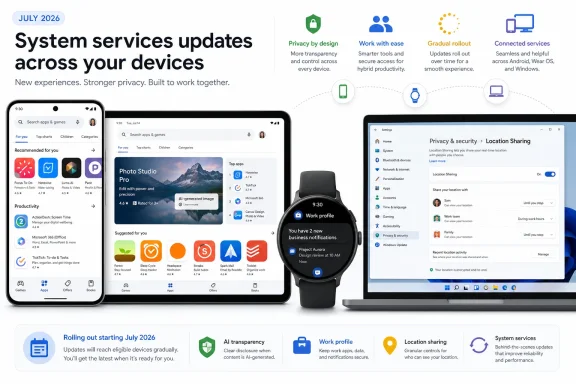
Google’s July 2026 system-update notes now include a Google Play Store v52.3 entry, adding a denser large-screen layout and an EU-facing label for AI-generated images. The changes arrive alongside Google Play services v26.26, which adds work-profile and PC-related controls but does not list a new Android security fix.
As reported by 9to5Google, Play Store v52.3 improves content density on large-screen phones and tablets. The change should mean more listings and less empty space in the Store interface, though Google has not specified which screen sizes qualify or whether foldables receive a separate layout.
The same Play Store release introduces an AI label for identifying AI-generated images in the European Union. Google notes that the label will not appear on every image: certain formats and older content may not support it yet. That limitation matters, as the marker is an identification aid rather than a guarantee that unlabelled images are conventional photographs.
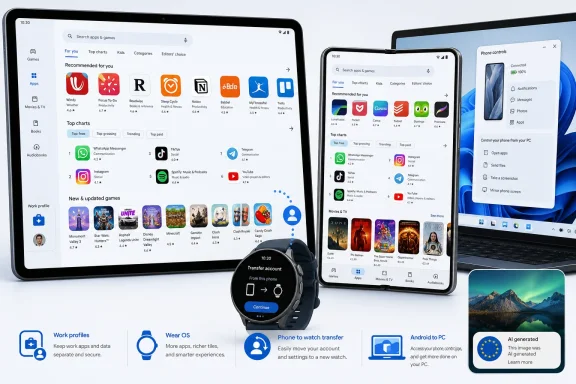
Google Play services v26.26, dated July 6, brings a few more practical changes for managed Android deployments. Google’s official system-services release notes say the update adds an API intended to make work-profile setup more reliable. It also allows a work-profile account to be transferred from a phone to a Wear OS watch.
For users working across Android and desktop devices, the release notes list new management controls for Google Location Sharing settings and device-type compatibility under the “PC” category. Google has not detailed the supported operating systems, browsers, or rollout scope, so Windows users should not assume a new native Windows client or a specific Chrome feature is included.
Google One subscribers may also see a faster in-app purchasing flow through an upgraded native storefront. The remainder of the Play services entry is primarily developer-facing, covering Maps-related processes on phones and utility-related processes across Android Auto, PCs, phones, TVs, and Wear OS.
The Wear OS portion of Play Store v52.3 is architectural rather than user-facing, moving the Wear details page to Google’s newer “Univision” architecture from the older fragment-based implementation.
For administrators, the work-profile API and phone-to-watch account transfer are the notable items, but both depend on management tooling adopting the relevant Play services changes. End users do not need to download a separate July package; keeping Google Play services and the Google Play Store current is sufficient while the rollout proceeds.
As reported by 9to5Google, Play Store v52.3 improves content density on large-screen phones and tablets. The change should mean more listings and less empty space in the Store interface, though Google has not specified which screen sizes qualify or whether foldables receive a separate layout.
The same Play Store release introduces an AI label for identifying AI-generated images in the European Union. Google notes that the label will not appear on every image: certain formats and older content may not support it yet. That limitation matters, as the marker is an identification aid rather than a guarantee that unlabelled images are conventional photographs.
 Work profiles and PC controls
Google Play services v26.26, dated July 6, brings a few more practical changes for managed Android deployments. Google’s official system-services release notes say the update adds an API intended to make work-profile setup more reliable. It also allows a work-profile account to be transferred from a phone to a Wear OS watch.For users working across Android and desktop devices, the release notes list new management controls for Google Location Sharing settings and device-type compatibility under the “PC” category. Google has not detailed the supported operating systems, browsers, or rollout scope, so Windows users should not assume a new native Windows client or a specific Chrome feature is included.
Google One subscribers may also see a faster in-app purchasing flow through an upgraded native storefront. The remainder of the Play services entry is primarily developer-facing, covering Maps-related processes on phones and utility-related processes across Android Auto, PCs, phones, TVs, and Wear OS.
Rollout remains gradual
Google system-service releases are distributed independently of full Android operating-system updates, through Play services and the Play Store. A feature appearing in the changelog does not mean it is enabled on every device immediately; Google commonly stages availability over weeks or longer.The Wear OS portion of Play Store v52.3 is architectural rather than user-facing, moving the Wear details page to Google’s newer “Univision” architecture from the older fragment-based implementation.
For administrators, the work-profile API and phone-to-watch account transfer are the notable items, but both depend on management tooling adopting the relevant Play services changes. End users do not need to download a separate July package; keeping Google Play services and the Google Play Store current is sufficient while the rollout proceeds.
References
- Primary source: 9to5Google
Published: 2026-07-13T21:25:00+00:00
What’s new in Android's July 2026 Google System Updates [U]
The monthly “Google System Release Notes” primarily detail what’s new in Play services, Play Store, and Play system update across...9to5google.com