

CVE-2026-55037 is an Important-severity Microsoft Excel vulnerability that can let attacker-controlled code run on a victim’s computer after local processing of malicious content. Microsoft’s CVSS vector nevertheless assigns it a Local attack vector,
That distinction explains why “Remote Code Execution” and
The flaw carries a CVSS 3.1 base score of 7.8 and the vector
The apparent contradiction comes from using “remote” in two different security vocabularies. In a vulnerability title, Remote Code Execution generally identifies the impact: an attacker who is not legitimately operating the computer may cause arbitrary code to execute there.
CVSS Attack Vector answers a narrower question. It measures how the vulnerable component must be accessed to trigger the flaw.
Excel is ordinarily not waiting for unsolicited network requests like a web server. Instead, it opens and parses workbook content on the user’s computer. A malicious spreadsheet may arrive remotely through email, Microsoft Teams, OneDrive, a browser download, a file-sharing service, or another delivery channel, but Excel processes that file locally.
The delivery path therefore does not automatically make the vulnerability
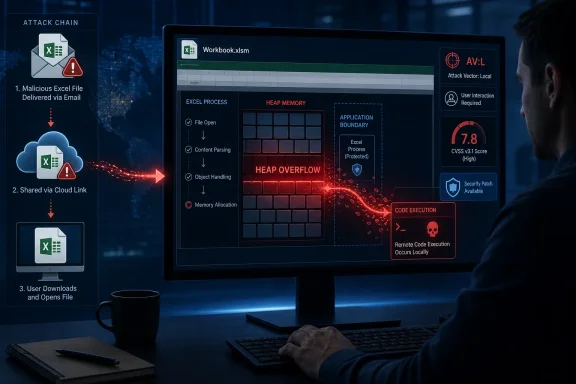
In practical terms, a likely attack chain has two distinct stages:
Privileges Required is None because the attacker does not first need an authenticated account on the target computer. User Interaction is Required because another person must perform an action—most plausibly opening attacker-controlled content—before exploitation can succeed.
The high ratings for confidentiality, integrity, and availability indicate that successful exploitation could seriously compromise all three. Code running in the context of Excel could potentially access data available to the signed-in user, modify files or settings within that user’s permissions, and disrupt applications or the operating environment.
That last limitation matters. Remote code execution does not automatically mean SYSTEM-level control. The code normally inherits the security context of the exploited application, so a user operating without administrative rights can reduce the immediate reach of a successful attack. Attackers may still combine an Office vulnerability with privilege escalation, credential theft, or lateral-movement techniques.
Microsoft also describes the issue as allowing an unauthorized attacker to “execute code locally.” That language aligns with the CVSS score rather than contradicting the RCE title: attacker-controlled code ultimately executes on the local target after the victim participates in the attack chain.
Some security teams use arbitrary code execution, or ACE, as a less ambiguous description for vulnerabilities of this type. Microsoft’s product vulnerability titles, however, commonly retain RCE for document-based flaws where the attacker can be remote even though a local application must parse the payload.
A crash is one possible result, but carefully controlled memory corruption may allow an attacker to influence program execution. That is why this issue is classified as code execution rather than merely a denial of service, even though Microsoft has not publicly documented the exact malformed workbook structure or exploitation technique.
The distinction is also important for vulnerability scanners. A scanner may classify its Office detection plugin as local because it checks installed versions and patches on the endpoint. That does not imply an attacker already needs an interactive Windows account to send the malicious document; it describes either the exploitation context or the way the scanner verifies exposure.
Microsoft’s advisory and the National Vulnerability Database identify the following affected product families:
Microsoft 365 Apps administrators can use their normal inventory and update-management tooling to compare deployed builds against Microsoft’s Office security release data. Excel 2016 MSI installations should receive KB5002886 and report version 16.0.5561.1001 or later, while Mac deployments should reach 16.111.26071215 or later.
Email filtering, attachment controls, Protected View, application allowlisting, and least-privilege user accounts remain useful layers, but they do not replace the update. Files can enter an organization through collaboration platforms, cloud storage, removable media, or trusted accounts that have already been compromised.
The actionable reading of CVE-2026-55037 is therefore not “local attackers only.” It is a remotely initiated, user-assisted document attack whose vulnerable processing step occurs locally. For defenders, the relevant boundary is the Excel build installed on every system capable of opening the attacker’s file.
AV:L, because exploitation occurs through Excel on the target device and requires user interaction—not through a network-facing Excel service.That distinction explains why “Remote Code Execution” and
AV:L can correctly appear together. As detailed in Microsoft’s Security Update Guide on July 14, 2026, remote describes the attacker and the resulting control of the victim’s machine, while the CVSS Attack Vector describes how the vulnerable component is reached during exploitation.The flaw carries a CVSS 3.1 base score of 7.8 and the vector
CVSS:3.1/AV:L/AC:L/PR:N/UI:R/S:U/C:H/I:H/A:H. It is a heap-based buffer overflow, tracked as CWE-122, affecting supported Windows and Mac editions of Excel and several server-side Office products.
 Remote Code Execution Does Not Require AV:N
The apparent contradiction comes from using “remote” in two different security vocabularies. In a vulnerability title, Remote Code Execution generally identifies the impact: an attacker who is not legitimately operating the computer may cause arbitrary code to execute there.CVSS Attack Vector answers a narrower question. It measures how the vulnerable component must be accessed to trigger the flaw.
AV:N is reserved for cases where an attacker can exploit a vulnerable service or component through the network stack, typically by sending traffic directly to it.Excel is ordinarily not waiting for unsolicited network requests like a web server. Instead, it opens and parses workbook content on the user’s computer. A malicious spreadsheet may arrive remotely through email, Microsoft Teams, OneDrive, a browser download, a file-sharing service, or another delivery channel, but Excel processes that file locally.
The delivery path therefore does not automatically make the vulnerability
AV:N. The FIRST CVSS 3.1 guidance specifically treats vulnerabilities involving malicious content that must be downloaded or received and then opened by a user as Local when the vulnerable application processes the content on the endpoint.In practical terms, a likely attack chain has two distinct stages:
- An attacker sends or publishes a specially crafted Excel file.
- A user or user-initiated process opens that file on a vulnerable system, causing Excel to trigger the memory-corruption flaw.
The Rest of the Vector Describes the Real Risk
The remaining CVSS metrics make the exploitation model clearer. Attack Complexity is Low, suggesting that Microsoft does not consider exploitation dependent on unusual conditions beyond reaching a vulnerable configuration.Privileges Required is None because the attacker does not first need an authenticated account on the target computer. User Interaction is Required because another person must perform an action—most plausibly opening attacker-controlled content—before exploitation can succeed.
The high ratings for confidentiality, integrity, and availability indicate that successful exploitation could seriously compromise all three. Code running in the context of Excel could potentially access data available to the signed-in user, modify files or settings within that user’s permissions, and disrupt applications or the operating environment.
That last limitation matters. Remote code execution does not automatically mean SYSTEM-level control. The code normally inherits the security context of the exploited application, so a user operating without administrative rights can reduce the immediate reach of a successful attack. Attackers may still combine an Office vulnerability with privilege escalation, credential theft, or lateral-movement techniques.
Microsoft also describes the issue as allowing an unauthorized attacker to “execute code locally.” That language aligns with the CVSS score rather than contradicting the RCE title: attacker-controlled code ultimately executes on the local target after the victim participates in the attack chain.
Some security teams use arbitrary code execution, or ACE, as a less ambiguous description for vulnerabilities of this type. Microsoft’s product vulnerability titles, however, commonly retain RCE for document-based flaws where the attacker can be remote even though a local application must parse the payload.
Excel’s Parser Is the Security Boundary That Fails
CVE-2026-55037 is categorized as a heap-based buffer overflow. This class of vulnerability occurs when software writes more data into a heap allocation than the allocated region can safely contain, potentially corrupting nearby memory.A crash is one possible result, but carefully controlled memory corruption may allow an attacker to influence program execution. That is why this issue is classified as code execution rather than merely a denial of service, even though Microsoft has not publicly documented the exact malformed workbook structure or exploitation technique.
The distinction is also important for vulnerability scanners. A scanner may classify its Office detection plugin as local because it checks installed versions and patches on the endpoint. That does not imply an attacker already needs an interactive Windows account to send the malicious document; it describes either the exploitation context or the way the scanner verifies exposure.
Microsoft’s advisory and the National Vulnerability Database identify the following affected product families:
- Microsoft 365 Apps for enterprise on 32-bit and x64 Windows systems is affected until updated through the applicable Office servicing channel.
- Microsoft Excel 2016 is affected below version 16.0.5561.1001 on both 32-bit and x64 systems.
- Microsoft Office 2019, Office LTSC 2021, and Office LTSC 2024 are affected on Windows until their applicable security releases are installed.
- Microsoft 365 and Office LTSC editions for Mac are affected below version 16.111.26071215.
- Office Online Server is affected below version 16.0.10417.20175.
Patch the Application, Then Recheck Office Builds
Organizations should deploy the July 14, 2026 Office security updates and confirm that managed devices actually advance to fixed builds. This is particularly important where update deferrals, disconnected endpoints, frozen virtual desktop images, or separate servicing policies leave Office behind Windows Update.Microsoft 365 Apps administrators can use their normal inventory and update-management tooling to compare deployed builds against Microsoft’s Office security release data. Excel 2016 MSI installations should receive KB5002886 and report version 16.0.5561.1001 or later, while Mac deployments should reach 16.111.26071215 or later.
Email filtering, attachment controls, Protected View, application allowlisting, and least-privilege user accounts remain useful layers, but they do not replace the update. Files can enter an organization through collaboration platforms, cloud storage, removable media, or trusted accounts that have already been compromised.
The actionable reading of CVE-2026-55037 is therefore not “local attackers only.” It is a remotely initiated, user-assisted document attack whose vulnerable processing step occurs locally. For defenders, the relevant boundary is the Excel build installed on every system capable of opening the attacker’s file.
References
- Primary source: MSRC
Published: 2026-07-14T07:00:00-07:00
Security Update Guide - Microsoft Security Response Center
 msrc.microsoft.com
- Official source: support.microsoft.com
Description of the security update for Excel 2016: July 8, 2025 (KB5002749) | Microsoft Support
Description of the security update for Excel 2016: July 8, 2025 (KB5002749)support.microsoft.com
