

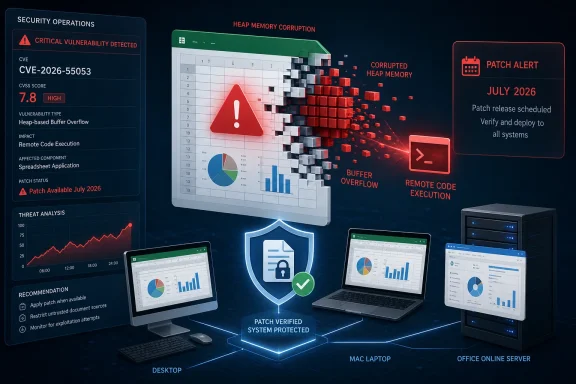
CVE-2026-55053 exposes Microsoft Excel to remote code execution through a heap-based buffer overflow, allowing malicious workbook content to run code with the victim’s permissions. Microsoft released the fix on July 14, 2026, as part of its monthly security updates and rates the vulnerability Important, with a CVSS 3.1 score of 7.8.
Detailed in the Microsoft Security Response Center advisory, the flaw affects Excel across Microsoft 365 Apps for enterprise, perpetual Office releases, Mac editions, and Office Online Server. The National Vulnerability Database has also published Microsoft’s CVE record, confirming the vulnerability class as CWE-122, a heap-based buffer overflow.
Microsoft reported no known public disclosure or active exploitation when the update shipped. Zero Day Initiative’s July 2026 Patch Tuesday review likewise lists CVE-2026-55053 as neither publicly known nor exploited, but the lack of observed attacks does not make unsafe spreadsheets harmless.
Microsoft’s CVSS vector is AV:L/AC:L/PR:N/UI:R/S:U/C:H/I:H/A:H. In practical terms, exploitation has low complexity and requires no existing privileges, but it does require user interaction.
An attacker would typically need to persuade a target to open a specially crafted Excel file. That file could arrive through email, a collaboration platform, a shared network location, cloud storage, or a download presented as an invoice, report, pricing sheet, or other routine business document.
The “remote code execution” label can appear inconsistent with the CVSS designation of local attack vector. Here, remote describes the potential delivery and code-execution outcome, while local reflects the point at which Excel processes the malicious content on the victim’s device. The attacker is not directly sending unauthenticated commands to an Excel network service.
Successful exploitation could compromise confidentiality, integrity, and availability. Code would generally execute in the context of the user running Excel, meaning a standard account limits the immediate reach while a user with local administrator rights offers an attacker a more powerful starting point.
That distinction should shape risk management without becoming an excuse to delay. Many corporate users can access valuable SharePoint sites, OneDrive folders, mapped drives, browser sessions, email data, and internal applications even when they do not hold administrator privileges.
Microsoft’s assignment of CVE-2026-55053, its publication of affected-product information, and the release of corrected versions establish a high level of confidence that the flaw exists. This is not merely an uncorroborated report in which the impact is suspected but the root cause remains unknown.
The public record still stops short of providing exploit-development details. Microsoft has not published a proof of concept, a malicious sample, or a technical walk-through describing the exact workbook structure that triggers the overflow. That restraint reduces immediate guidance for attackers, although experienced vulnerability researchers may be able to compare patched and unpatched binaries to identify the corrected code.
The CVSS metrics also indicate that exploitation is considered technically feasible rather than dependent on unusual environmental conditions. Low attack complexity, no privilege requirement, and high potential impact explain the 7.8 score, despite the need for a victim to open the file.
CISA’s initial Stakeholder-Specific Vulnerability Categorization data records no exploitation and classifies the attack as non-automatable, while assigning a total technical impact. That assessment reinforces the central operational point: this is not a wormable Excel flaw, but a successful document-based attack could still produce a full compromise within the affected user’s security context.
Mac deployments also need explicit verification. A Windows-focused Patch Tuesday workflow does not establish that managed or personally assigned Macs have reached Office version 16.111.26071215, particularly where updates are deferred to protect add-ins or business-critical workbook automation.
Office 2016 presents another inventory challenge. Its fixed-version threshold gives administrators a concrete target—16.0.5561.1001—but estates frequently contain a mixture of MSI-based installations, Click-to-Run Microsoft 365 Apps, Office LTSC, and unsupported copies that no longer fit the organization’s standard deployment model.
Microsoft 365 Apps installations should be checked against the security release for their assigned update channel. Organizations using Current Channel, Monthly Enterprise Channel, or Semi-Annual Enterprise Channel may receive different build numbers, so a single universal Microsoft 365 version should not be assumed.
For perpetual Office and Office Online Server, teams should confirm both the installed update state and the application or server build. Mac administrators should verify that Office has reached at least 16.111.26071215 across every supported deployment ring.
Security controls can reduce exposure while patching proceeds. Email filtering and sandboxing should receive heightened scrutiny for Excel attachments, especially files arriving from new senders or external domains. Microsoft Defender for Office 365 Safe Attachments, endpoint detection rules, Protected View, Mark of the Web enforcement, and restrictions on untrusted content can provide layers of resistance, but none should be treated as a replacement for the corrected Excel binaries.
Users should also be reminded that a workbook does not need visible macros to be dangerous. CVE-2026-55053 is a memory-corruption vulnerability in Excel’s handling of content, not a conventional VBA attack that can be neutralized simply by disabling macros.
For enterprise IT, the efficient response is to validate the complete July Office update set against critical add-ins and workbook workflows, then move it through deployment rings without unnecessary delay. Testing remains important for finance systems, reporting plugins, COM add-ins, and 32-bit Office dependencies, but the breadth of the Excel fixes increases the risk of holding an entire fleet back for one legacy integration.
There is no evidence as of July 15, 2026, that CVE-2026-55053 is being exploited in the wild. The next meaningful milestone is therefore not an exploit headline but measurable patch coverage: Excel 2016 at 16.0.5561.1001 or later, Mac installations at 16.111.26071215 or later, Office Online Server at 16.0.10417.20175 or later, and every supported Microsoft 365 or LTSC deployment on its applicable July security build.
Detailed in the Microsoft Security Response Center advisory, the flaw affects Excel across Microsoft 365 Apps for enterprise, perpetual Office releases, Mac editions, and Office Online Server. The National Vulnerability Database has also published Microsoft’s CVE record, confirming the vulnerability class as CWE-122, a heap-based buffer overflow.
Microsoft reported no known public disclosure or active exploitation when the update shipped. Zero Day Initiative’s July 2026 Patch Tuesday review likewise lists CVE-2026-55053 as neither publicly known nor exploited, but the lack of observed attacks does not make unsafe spreadsheets harmless.
 The Attack Still Needs Someone to Open the File
Microsoft’s CVSS vector is AV:L/AC:L/PR:N/UI:R/S:U/C:H/I:H/A:H. In practical terms, exploitation has low complexity and requires no existing privileges, but it does require user interaction.An attacker would typically need to persuade a target to open a specially crafted Excel file. That file could arrive through email, a collaboration platform, a shared network location, cloud storage, or a download presented as an invoice, report, pricing sheet, or other routine business document.
The “remote code execution” label can appear inconsistent with the CVSS designation of local attack vector. Here, remote describes the potential delivery and code-execution outcome, while local reflects the point at which Excel processes the malicious content on the victim’s device. The attacker is not directly sending unauthenticated commands to an Excel network service.
Successful exploitation could compromise confidentiality, integrity, and availability. Code would generally execute in the context of the user running Excel, meaning a standard account limits the immediate reach while a user with local administrator rights offers an attacker a more powerful starting point.
That distinction should shape risk management without becoming an excuse to delay. Many corporate users can access valuable SharePoint sites, OneDrive folders, mapped drives, browser sessions, email data, and internal applications even when they do not hold administrator privileges.
A Confirmed Memory-Safety Defect, Not a Speculative Report
The vulnerability’s underlying weakness is a heap-based buffer overflow. This class of defect occurs when software writes more data into a heap-allocated memory region than that region can safely hold, potentially corrupting adjacent objects or control data.Microsoft’s assignment of CVE-2026-55053, its publication of affected-product information, and the release of corrected versions establish a high level of confidence that the flaw exists. This is not merely an uncorroborated report in which the impact is suspected but the root cause remains unknown.
The public record still stops short of providing exploit-development details. Microsoft has not published a proof of concept, a malicious sample, or a technical walk-through describing the exact workbook structure that triggers the overflow. That restraint reduces immediate guidance for attackers, although experienced vulnerability researchers may be able to compare patched and unpatched binaries to identify the corrected code.
The CVSS metrics also indicate that exploitation is considered technically feasible rather than dependent on unusual environmental conditions. Low attack complexity, no privilege requirement, and high potential impact explain the 7.8 score, despite the need for a victim to open the file.
CISA’s initial Stakeholder-Specific Vulnerability Categorization data records no exploitation and classifies the attack as non-automatable, while assigning a total technical impact. That assessment reinforces the central operational point: this is not a wormable Excel flaw, but a successful document-based attack could still produce a full compromise within the affected user’s security context.
The Affected List Reaches Beyond Windows Desktops
CVE-2026-55053 is not confined to one aging Excel release. Microsoft’s CVE data identifies the following affected product families:- Microsoft 365 Apps for enterprise is affected on 32-bit and x64 Windows systems until the applicable Office security release is installed.
- Microsoft Excel 2016 is affected before version 16.0.5561.1001 on 32-bit and x64 systems.
- Microsoft Office 2019 is affected until its corresponding security update is installed.
- Microsoft Office LTSC 2021 and Office LTSC 2024 are affected on 32-bit and x64 Windows systems.
- Microsoft 365 and Office 365 for Mac are affected before version 16.111.26071215.
- Office LTSC for Mac 2021 and Office LTSC for Mac 2024 are affected before version 16.111.26071215.
- Office Online Server is affected before version 16.0.10417.20175.
Mac deployments also need explicit verification. A Windows-focused Patch Tuesday workflow does not establish that managed or personally assigned Macs have reached Office version 16.111.26071215, particularly where updates are deferred to protect add-ins or business-critical workbook automation.
Office 2016 presents another inventory challenge. Its fixed-version threshold gives administrators a concrete target—16.0.5561.1001—but estates frequently contain a mixture of MSI-based installations, Click-to-Run Microsoft 365 Apps, Office LTSC, and unsupported copies that no longer fit the organization’s standard deployment model.
Patch Verification Matters More Than Update Approval
Administrators should deploy the July 14 Office security updates through the servicing mechanism appropriate to each product, then verify the resulting version rather than treating update approval as proof of installation. Devices that were offline, outside the corporate network, low on disk space, or blocked by a failed Office update can remain vulnerable after the broader rollout is marked complete.Microsoft 365 Apps installations should be checked against the security release for their assigned update channel. Organizations using Current Channel, Monthly Enterprise Channel, or Semi-Annual Enterprise Channel may receive different build numbers, so a single universal Microsoft 365 version should not be assumed.
For perpetual Office and Office Online Server, teams should confirm both the installed update state and the application or server build. Mac administrators should verify that Office has reached at least 16.111.26071215 across every supported deployment ring.
Security controls can reduce exposure while patching proceeds. Email filtering and sandboxing should receive heightened scrutiny for Excel attachments, especially files arriving from new senders or external domains. Microsoft Defender for Office 365 Safe Attachments, endpoint detection rules, Protected View, Mark of the Web enforcement, and restrictions on untrusted content can provide layers of resistance, but none should be treated as a replacement for the corrected Excel binaries.
Users should also be reminded that a workbook does not need visible macros to be dangerous. CVE-2026-55053 is a memory-corruption vulnerability in Excel’s handling of content, not a conventional VBA attack that can be neutralized simply by disabling macros.
July’s Excel Volume Raises the Cost of Selective Patching
CVE-2026-55053 arrived alongside more than 20 other Excel remote-code-execution fixes listed in Zero Day Initiative’s July review. Most carry the same 7.8 score and Important rating, making this month a poor candidate for selectively deploying only the vulnerabilities that attract the most attention.For enterprise IT, the efficient response is to validate the complete July Office update set against critical add-ins and workbook workflows, then move it through deployment rings without unnecessary delay. Testing remains important for finance systems, reporting plugins, COM add-ins, and 32-bit Office dependencies, but the breadth of the Excel fixes increases the risk of holding an entire fleet back for one legacy integration.
There is no evidence as of July 15, 2026, that CVE-2026-55053 is being exploited in the wild. The next meaningful milestone is therefore not an exploit headline but measurable patch coverage: Excel 2016 at 16.0.5561.1001 or later, Mac installations at 16.111.26071215 or later, Office Online Server at 16.0.10417.20175 or later, and every supported Microsoft 365 or LTSC deployment on its applicable July security build.
References
- Primary source: MSRC
Published: 2026-07-14T07:00:00-07:00
Security Update Guide - Microsoft Security Response Center
 msrc.microsoft.com
- Official source: support.microsoft.com
Description of the security update for Excel 2016: June 9, 2026 (KB5002877) | Microsoft Support
Description of the security update for Excel 2016: June 9, 2026 (KB5002877)support.microsoft.com - Related coverage: caloes.ca.gov
</rdf:Alt> </dc:title> <dc:description> <rdf:Alt> <rdf:li xml:lang="x-default"/> </rdf:Alt> </dc:description> <dc:creator> <rdf:Seq> <rdf:li>(Contra
</rdf:Alt> </dc:description> <dc:creator> <rdf:Seq> <rdf:li>(Contractor) Melanie, Barlow@CalOESwww.caloes.ca.gov
- Related coverage: techradar.com
An ancient Microsoft Excel security flaw could let hackers hijack your entire system, so patch now | TechRadar
CISA is warning about ongoing exploitation of a 2008 bugwww.techradar.com
